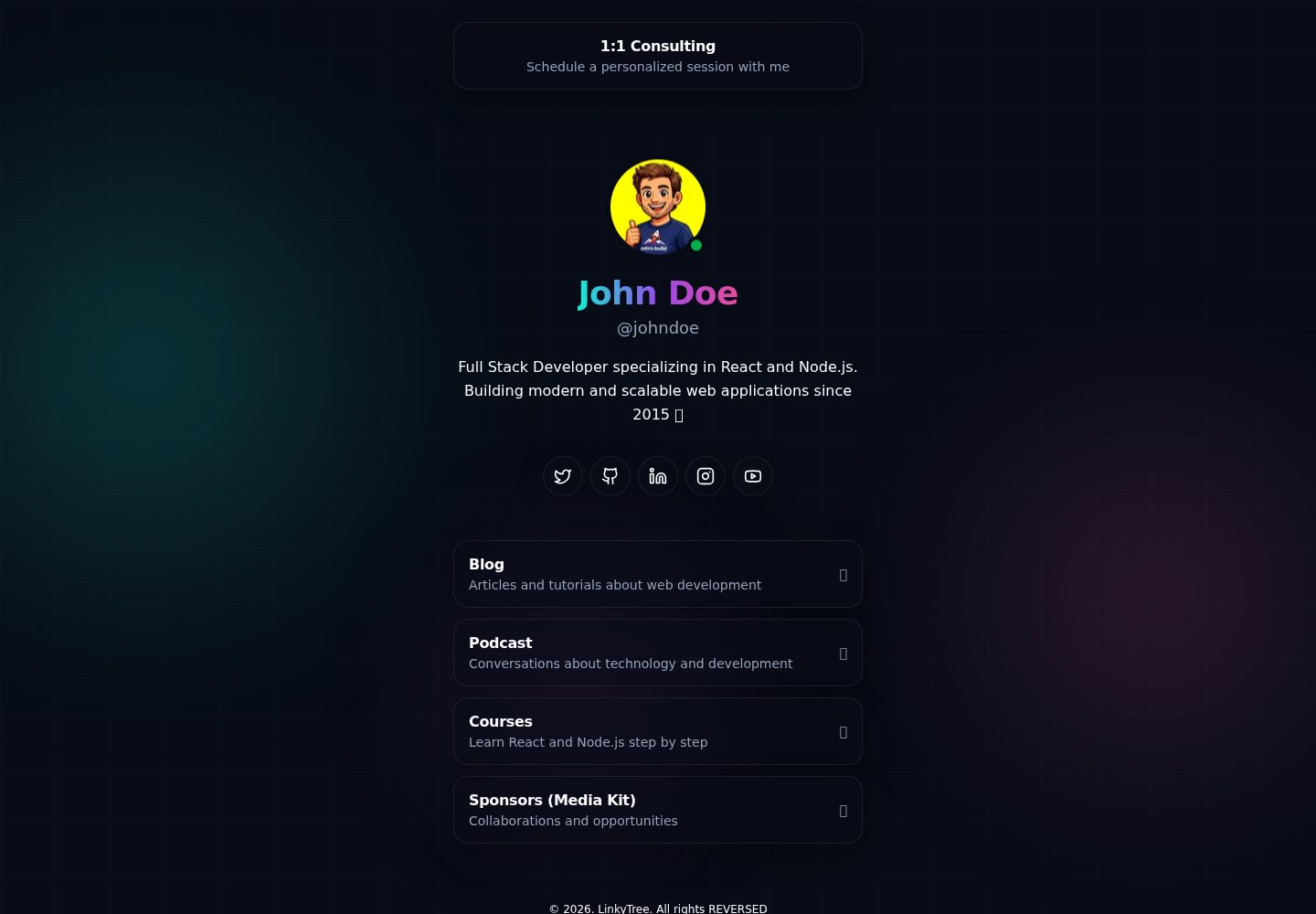
Built with Astro and TailwindCSS, with content centralized in the single data file src/data/site.ts
AstroStarter
linkytree — Astro Starter Template
By gndx
LinkyTree is a link-in-bio page template built with Astro and TailwindCSS, with all content configured in a single data file.
Explore the design
Compare the page layouts and mobile experience. Open any screenshot for a closer look.
Desktop homepage1 / 2
Desktop captureTop of page
Actual screenshot captured by the server browser.
All pages & views 2
Screenshots show visual appearance; interactive behavior may differ.
Recorded 2026-10-05View source
What stands out
A quick read of the recorded project description.
Provides an interactive npm run setup command that fills in name, account, bio, and social links in a fixed order
Automatically generates three prerendered routes: robots.txt, sitemap.xml, and humans.txt
Build output is a static dist/ directory, with wrangler.jsonc included for deployment to Cloudflare Workers
Global styles use CSS variables to define colors and provide classes such as .link-card and .social-icon
Template Details
LinkyTree is a link-in-bio page template built with Astro and TailwindCSS, used to display a profile, social links, and link cards. Page content comes from a single data file, src/data/site.ts, which contains SEO information, the profile, pinned recommended links, a social links list, and the main link cards. The project provides an interactive npm run setup command that asks for name, account, bio, and social links in a fixed order; skipped platforms are not written to the configuration file.
In addition to the homepage, the template generates robots.txt, sitemap.xml, and humans.txt through Astro endpoints, and these routes are marked as prerendered. Styles are centralized in src/styles/global.css, use CSS variables to define colors, and provide utility/component classes such as .link-card and .social-icon. The build output is a static dist/ directory that can be deployed to Cloudflare Workers or other static hosting services; the repository includes wrangler.jsonc for Workers deployment.
Note that robots.txt, sitemap.xml, and humans.txt rely on site.seo.url to generate the origin, so this field must be updated when changing domains. The free scope of the template is limited to the code under the MIT license; third-party assets such as demo images, fonts, and icons must be checked against their respective licenses, and external services such as domains and hosting may incur separate charges.
AstroSetup CLI
Is it right for your project?
Use Cases
- Build a personal link-in-bio page to centrally display social links and recommended links
- Use as a base template for an Astro static site project, modifying the data file and styles as needed
- Deploy to Cloudflare Workers or other static hosting services
- Quickly generate initial site configuration through npm run setup
Suitable For
- Individual users who need a simple link aggregation page
- Developers familiar with Astro or willing to edit a TypeScript data file
- Projects that want to use static hosting without a runtime server
- Users who accept the MIT license and will verify third-party asset licenses themselves
Getting started & customization
Use these recorded setup notes alongside the repository instructions for your chosen version.
- 1
Requires Node.js (LTS recommended) and npm; first run npm install to install dependencies
- 2
Run npm run setup to interactively fill in the basic information in src/data/site.ts
- 3
npm run dev starts the development server at http://localhost:4321, and npm run build generates the static site to dist/
- 4
When changing domains, update site.seo.url accordingly; otherwise the origin for robots.txt, sitemap.xml, and humans.txt will be incorrect
- 5
Deploying to Cloudflare Workers requires installing the Wrangler CLI, running wrangler auth login, and optionally changing the deployment name in wrangler.jsonc
License & source material
Usage conditions & limitations
Free to use · keep license noticeThis entry covers the free version in the public repository under the MIT license; the free scope applies to that version's code and does not mean external services or third-party assets are free.
Must comply with when using
- The code of this version may be used, modified, used commercially, and distributed for free.
- When distributing copies or substantial portions of the code, retain the original author's copyright notice and the complete MIT license notice.
- The code is provided as is; warranties and limitations of liability are governed by the original license and applicable law.
Additional costs & items to verify
- Demo images, fonts, icons, and other third-party assets must be checked against their respective licenses and cannot be judged solely by the code's MIT license.
- External services such as domains, hosting, databases, payments, or AI may incur separate charges.
- The demo site in the README is hosted on the author's own domain linkytree.error427.com and is for example display only; users must prepare their own domain and hosting services, and these external services may incur costs.
- Deploying to Cloudflare Workers requires additionally installing the Wrangler CLI and logging in to a Cloudflare account, which is an external service dependency outside the project.
- When using the Cloudflare Workers deployment path, Cloudflare account authentication must be completed through wrangler auth login, which requires an external account.
- The origin for robots.txt, sitemap.xml, and humans.txt depends on site.seo.url; when changing domains, this field must be updated accordingly, otherwise links in the generated files will point to the old domain.
- The README provides a GitHub Sponsors sponsorship entry, which is a voluntary donation and does not affect free use under the MIT license.
View Original Text Basis
Permission is hereby granted, free of charge
Original License Text
**Live at:** [linkytree.error427.com](https://linkytree.error427.com)
Original README
1. **Install Wrangler CLI** (if you don't have it):
Original README
2. **Authenticate with Cloudflare**:
Original README
**Note:** `robots.txt`, `sitemap.xml`, and `humans.txt` use `site.seo.url` to build the `origin`. If you change the domain, update that field.
Original README
https://github.com/gndx/linkytree/blob/main/LICENSEhttps://github.com/gndx/linkytree/blob/main/README.mdIf this project helped you learn something new, or if you're feeling particularly generous, you can buy me a coffee.
Original README
Compiled by DeepSeek based on repository license and README ·2026-10-05. Results only cover the materials read; dependencies, images, fonts, and subsequent term changes are subject to their respective original texts.
Project checks & description sources
Template Information
- Source platforms
- Astro Themes
- Documentation and maintenance reference score
- More documented · 75 / 100
- Technologies
- Astro
- Website type
- Starter
How this score is calculated
Our heuristic uses license records (up to 30), a demo link (12), a preview (10), stars (15), recorded maintenance (15), description completeness (8), feature records (5) and classification data (5). It is not a code, security or performance test, or a Google score. A link does not establish tested functionality.
What to verify for this project
- Repository update recorded
- 2026-01-22
- Screenshot last checked
- 2026-10-05
A demo link is listed. Check it with your own content and viewport sizes; its presence does not confirm that forms, authentication or payments work.
The catalog identifies Astro as the primary stack. Check the actual dependency manifest and lockfile for versions and hosting requirements. These notes use recorded metadata, not a code audit or a deployment test.
Use a selection guide →How this description was prepared
AI-assisted description based on catalog records and repository material. Repository authors are not automatically the reviewers of this description.
Review declaration: [email protected] · 2026-10-05
Inspect the recorded source material
SHA-256: 11507eb9887bacb27e562b34d287b930bad82c23e4ff06d3dd9d66403e86addf
2026-10-05T00:14:23.710Z
Source file / repository# LinkyTree
A link-in-bio page built with **Astro** and **TailwindCSS**. It renders your profile, social links, and link cards from a single data file.
[](https://deploy.workers.cloudflare.com/?url=https://github.com/gndx/linkytree)
**Live at:** [linkytree.error427.com](https://linkytree.error427.com)
## Stack
- **Astro 5**
- **TailwindCSS 4** (via Vite plugin)
- **TypeScript** (strict config)
## Requirements
- Node.js (recommended: LTS)
- npm
## Installation
```bash
npm install
```
## Commands
```bash
npm run setup
npm run dev
npm run build
npm run preview
```
- `npm run setup`: interactive CLI to fill basic `src/data/site.ts` fields (name, handle, bio, social links)
- `npm run dev`: starts the dev server at `http://localhost:4321`
- `npm run build`: generates the static site in `dist/`
- `npm run preview`: previews the production build
## Configuration / Content
The single source of truth for your site content is:
`src/data/site.ts`
If you want a quick start, run:
```bash
npm run setup
```
The setup assistant will ask for your name, handle, bio, and then prompt for social links in a fixed order. You can press Enter to skip any social platform and it will not be written into `site.ts`.
Here you can edit:
- `site.seo`: title, description, canonical URL, OG image, Twitter cards
- `site.profile`: avatar, name, handle, and bio
- `site.featuredLink`: top featured link
- `site.socialLinks`: list of social networks (with embedded `iconSvg`)
- `site.linkCards`: main link cards (title, subtitle, emojis, and `href`)
**Note:** `robots.txt`, `sitemap.xml`, and `humans.txt` use `site.seo.url` to build the `origin`. If you change the domain, update that field.
## Routes
- `/`: main page (rendered in `src/pages/index.astro`)
- `/robots.txt`: generated by `src/pages/robots.txt.ts`
- `/sitemap.xml`: generated by `src/pages/sitemap.xml.ts`
- `/humans.txt`: generated by `src/pages/humans.txt.ts`
All these routes are marked with `export const prerender = true;`.
## Project Structure
```text
.
├── public/
├── src/
│ ├── assets/ # images and favicon
│ ├── components/ # Astro components
│ ├── data/ # site data (site.ts)
│ ├── layouts/ # base layout with meta tags
│ ├── pages/ # routes (index + endpoints)
│ └── styles/ # global styles (Tailwind)
├── astro.config.mjs
└── package.json
```
## Styles
Global styles are located in `src/styles/global.css`:
- CSS variables for colors (`--background`, `--foreground`, etc.)
- Utility/component classes (`.link-card`, `.social-icon`, blobs/background)
## Deploy
### Cloudflare Workers
This project is configured to deploy to Cloudflare Workers using the `wrangler.jsonc` file. The deployment is static, which means the site is completely generated at build time and doesn't require a runtime server.
#### Why is it static?
- **Performance**: The site is served as static files from Cloudflare's CDN
- **Cost**: No server or runtime costs
- **Scalability**: The CDN automatically handles traffic without needing to scale servers
- **Security**: Smaller attack surface with no server-side processes
#### Name Configuration
To change the deployment name, edit the `name` field in `wrangler.jsonc`:
```jsonc
{
"name": "your-name-here",
// ... other configurations
}
```
#### Static Files and .assetsignore
The `public/.assetsignore` file controls which files are excluded from static assets:
```
# dist/.assetsignore
_worker.js
_routes.json
```
These files are excluded because they are internal Workers configuration files that don't need to be served as static assets.
#### Deployment Instructions
1. **Install Wrangler CLI** (if you don't have it):
```bash
npm install -g wrangler
```
2. **Authenticate with Cloudflare**:
```bash
wrangler auth login
```
3. **Build the project**:
```bash
npm run build
```
4. **Deploy to Workers**:
```bash
wrangler deploy
```
The site will be available at `https://your-name.workers.dev` or your custom domain if you configured one.
### Other Static Providers
The build output is static (`dist/` folder), so you can also deploy to any static hosting provider (Netlify, Vercel, Cloudflare Pages, GitHub Pages, etc.).
## 💻 Contributing
Contributions to this project are welcome. If you find a bug or have a suggestion for improvement, please open an issue or submit a pull request.
<!-- ALL-CONTRIBUTORS-LIST:START - Do not remove or modify this section -->
<!-- prettier-ignore-start -->
<!-- markdownlint-disable -->
<!-- markdownlint-restore -->
<!-- prettier-ignore-end -->
<!-- ALL-CONTRIBUTORS-LIST:END -->
## 📃 License
This project is licensed under the MIT License. See the `LICENSE` file for details.
## ☕ Support
If this project helped you learn something new, or if you're feeling particularly generous, you can buy me a coffee. It's greatly appreciated! 😊 [GitHub Sponsors](https://github.com/sponsors/gndx)
Explore similar templates
Compare previews and descriptions within the same stack and category.

astrowind
AstroWind is a free, open-source Astro starter theme using Astro and Tailwind CSS, released under the MIT license.
Astro · Blog
accessible-astro-starter
An accessibility-focused Astro 6 starter template with WCAG 2.2 AA practices, Tailwind CSS 4, TypeScript, Prettier, ESLint, form validation, blog and portfolio examples, and preference toggles for dark mode, high contrast, and reduced motion.
Astro · Blog

astro-erudite
astro-erudite is an opinionated, unstyled static blog template built with Astro and native CSS, with no UI or CSS framework and minimal dependencies.
Astro · Portfolio

astro-shopify
A lightweight Shopify headless ecommerce starter template built with Astro and Svelte, integrating the Shopify Storefront API for product and inventory data, with built-in cart state management and basic add-to-cart and checkout flow.
Astro · E-commerce

brutal
Brutal is a neobrutalism Astro starter theme from ElianCodes, derived from the author's personal site and generalized. It includes a Markdown blog collection, build-time RSS and sitemap, image optimization, Tailwind CSS styling, and Biome checks, with no JavaScript by default.
Astro · Starter

qwind
Qwind is a free and open-source website template built on Qwik and Tailwind CSS, featuring directory-based routing via QwikCity, a Markdown blog, dark mode, and static deployment configuration.
Astro · Tool Site