使用 Astro 与 TailwindCSS 构建,内容集中在 src/data/site.ts 单一数据文件
Astro启动器
linkytree — Astro 启动器模板
作者 gndx
LinkyTree 是一个基于 Astro 与 TailwindCSS 的 link-in-bio 链接页模板,所有内容集中在单个数据文件中配置。
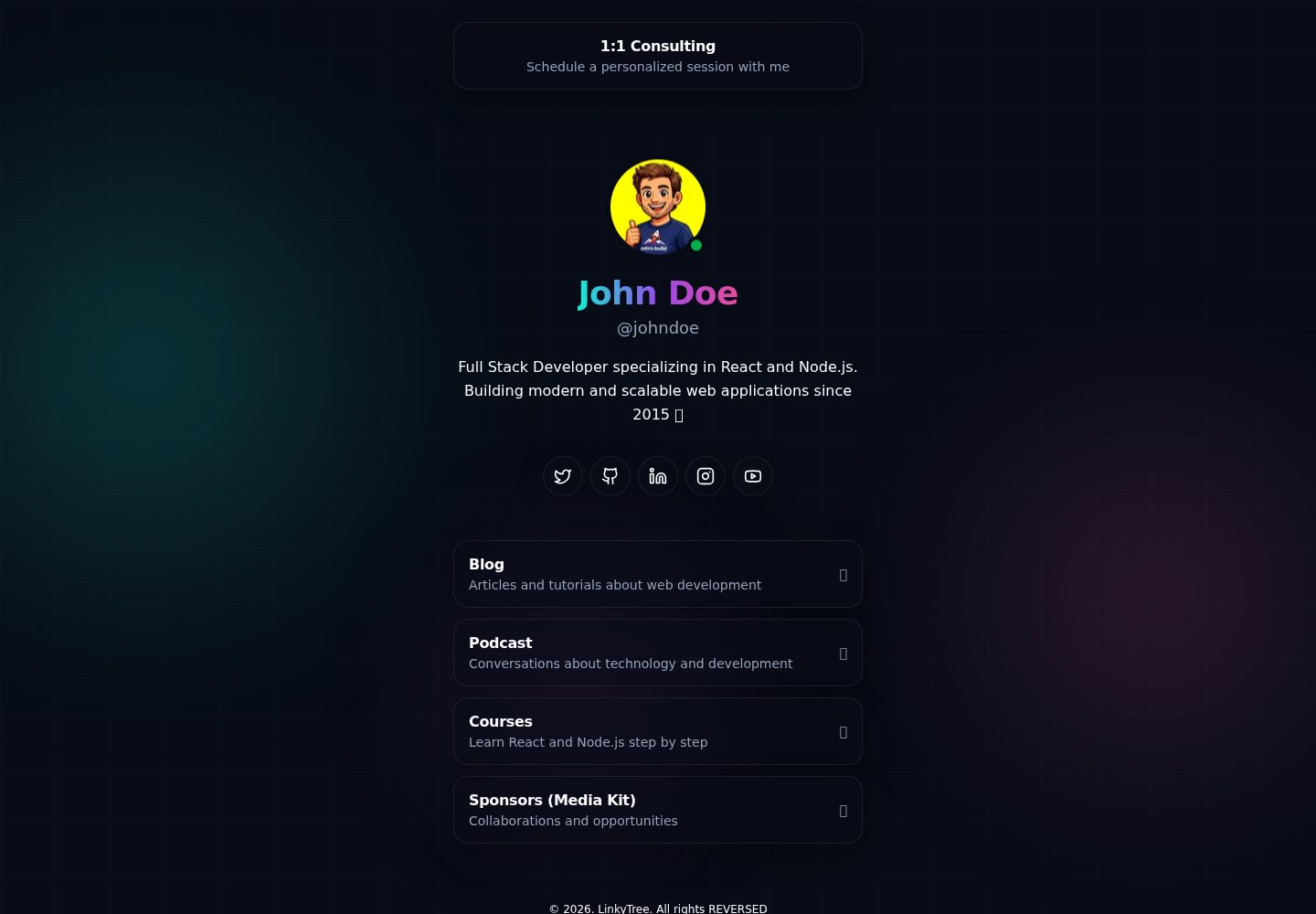
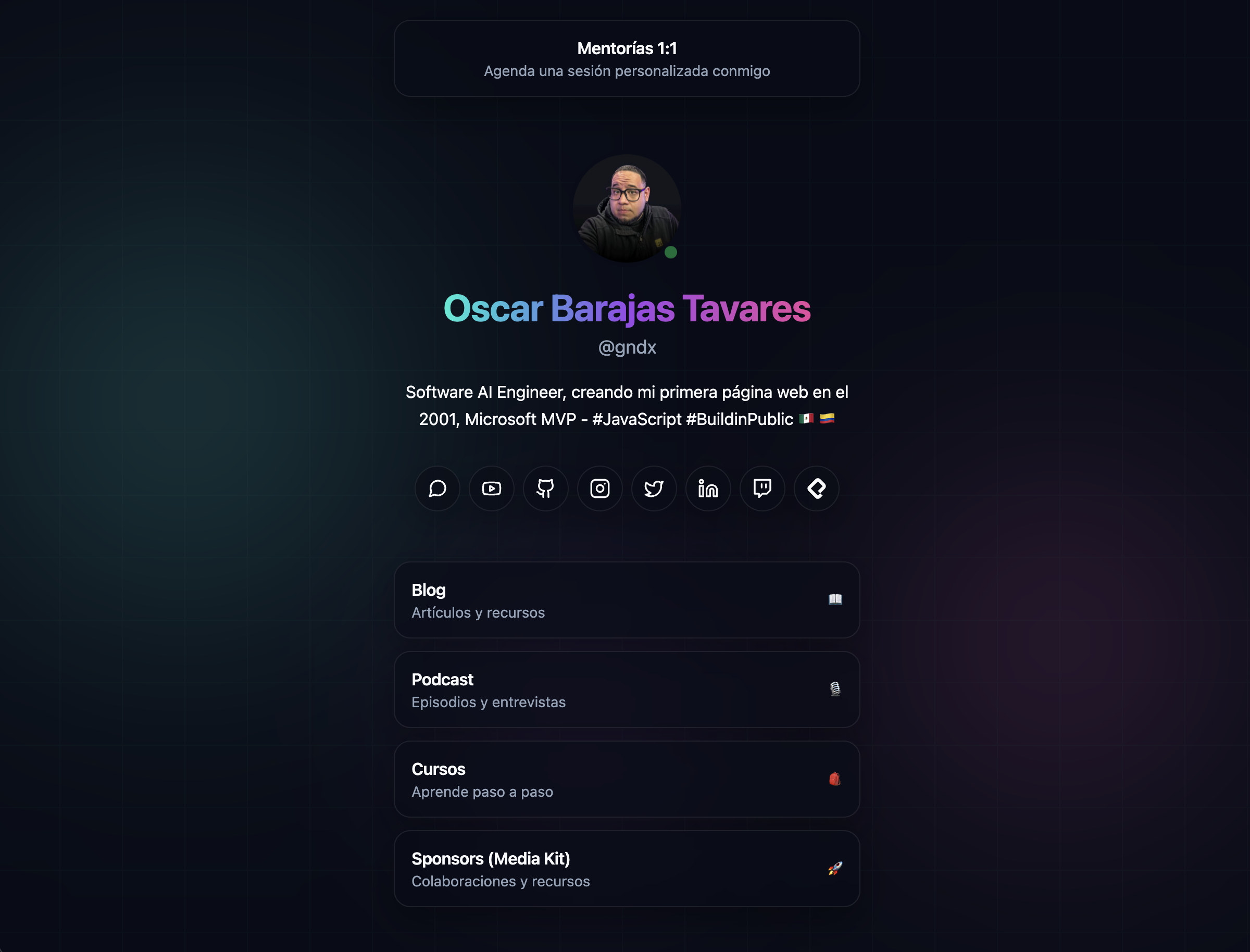
看看你的网站会是什么样
浏览真实页面截图,比较内容排版与手机效果。点击下方缩略图切换,放大查看整页细节。
全部页面与视图 2
截图用于了解视觉与布局,交互效果请以实际项目为准。
采集于 2026-10-05查看来源
值得关注的模板亮点
从已有项目资料中,快速了解它的特点。
提供 npm run setup 交互式命令行,按固定顺序填写姓名、账号、简介和社交链接
自动生成 robots.txt、sitemap.xml 和 humans.txt 三个预渲染路由
构建输出为静态 dist/ 目录,附带 wrangler.jsonc 可部署到 Cloudflare Workers
全局样式使用 CSS 变量定义颜色,并提供 .link-card、.social-icon 等类
模板详细介绍
LinkyTree 是一个用 Astro 和 TailwindCSS 构建的 link-in-bio 页面模板,用于展示个人资料、社交链接和链接卡片。页面内容来自单一数据文件 src/data/site.ts,其中包含 SEO 信息、个人资料、置顶推荐链接、社交链接列表和主链接卡片。项目提供 npm run setup 交互式命令行,按固定顺序询问姓名、账号、简介和社交链接,跳过的平台不会写入配置文件。
除首页外,模板还通过 Astro 端点生成 robots.txt、sitemap.xml 和 humans.txt,这些路由均标记为预渲染。样式集中在 src/styles/global.css,使用 CSS 变量定义颜色,并提供 .link-card、.social-icon 等工具/组件类。构建输出为静态 dist/ 目录,可部署到 Cloudflare Workers 或其他静态托管服务;仓库内提供 wrangler.jsonc 用于 Workers 部署。
需要注意的是,robots.txt、sitemap.xml 和 humans.txt 依赖 site.seo.url 生成 origin,更换域名时必须同步修改该字段。模板的免费范围仅限 MIT 许可下的代码,演示图片、字体、图标等第三方素材需按各自许可核对,域名、托管等外部服务可能另外收费。
Astro启动器
适合你的项目吗?
适用场景
- 搭建个人 link-in-bio 页面,集中展示社交链接和推荐链接
- 作为 Astro 静态站点项目的基础模板,按需修改数据文件与样式
- 部署到 Cloudflare Workers 或其他静态托管服务
- 通过 npm run setup 快速生成初始站点配置
适合人群
- 需要简单链接聚合页的个人用户
- 熟悉 Astro 或愿意编辑 TypeScript 数据文件的开发者
- 希望使用静态托管、无需运行时服务器的项目
- 接受 MIT 许可并会自行核对第三方素材许可的使用者
上手与定制指南
结合仓库当前版本的说明,按下面的资料检查内容、配置与运行要求。
- 1
需要 Node.js(建议 LTS)和 npm,先执行 npm install 安装依赖
- 2
运行 npm run setup 可交互式填写 src/data/site.ts 中的基本信息
- 3
npm run dev 在 http://localhost:4321 启动开发服务器,npm run build 生成静态站点到 dist/
- 4
更换域名时需同步更新 site.seo.url,否则 robots.txt、sitemap.xml 和 humans.txt 的 origin 会出错
- 5
部署到 Cloudflare Workers 需安装 Wrangler CLI、执行 wrangler auth login,并可在 wrangler.jsonc 中修改部署名称
授权与来源资料
使用条件与限制
免费使用 · 保留许可声明本次收录的是公开仓库中采用 MIT 许可的免费版本;免费范围为该版本代码,不代表外部服务或第三方素材免费。
使用时需要遵守
- 允许免费使用、修改、商用和分发该版本代码。
- 分发代码副本或实质性部分时,保留原作者版权声明和完整 MIT 许可声明。
- 代码按现状提供;担保与责任限制以原许可证及适用法律为准。
额外费用与待核对事项
- 演示图片、字体、图标及其他第三方素材需按各自许可核对,不能仅凭代码的 MIT 许可判断。
- 域名、托管、数据库、支付或 AI 等外部服务可能另外收费。
- README 中的演示站点托管在作者自有域名 linkytree.error427.com,仅作示例展示;使用者需自行准备域名与托管服务,这些外部服务可能产生费用。
- 部署到 Cloudflare Workers 需额外安装 Wrangler CLI 并登录 Cloudflare 账号,属于项目外的外部服务依赖。
- 使用 Cloudflare Workers 部署路径时,必须通过 wrangler auth login 完成 Cloudflare 账号认证,即需要外部账号。
- robots.txt、sitemap.xml 与 humans.txt 的 origin 依赖 site.seo.url;更换域名时必须同步修改该字段,否则生成文件中的链接会指向旧域名。
- README 提供 GitHub Sponsors 赞助入口,属自愿捐赠,不影响 MIT 许可下的免费使用。
查看原文依据
Permission is hereby granted, free of charge
许可证原文
**Live at:** [linkytree.error427.com](https://linkytree.error427.com)
README 原文
1. **Install Wrangler CLI** (if you don't have it):
README 原文
2. **Authenticate with Cloudflare**:
README 原文
**Note:** `robots.txt`, `sitemap.xml`, and `humans.txt` use `site.seo.url` to build the `origin`. If you change the domain, update that field.
README 原文
https://github.com/gndx/linkytree/blob/main/LICENSEhttps://github.com/gndx/linkytree/blob/main/README.mdIf this project helped you learn something new, or if you're feeling particularly generous, you can buy me a coffee.
README 原文
DeepSeek 根据仓库许可证和 README 整理 ·2026-10-05。结果仅覆盖已读取资料,依赖、图片、字体及后续条款变更以各自原文为准。
项目核对记录与介绍依据
模板资料
- 来源平台
- Astro Themes
- 资料与维护参考分
- 资料较完整 · 75 / 100
- 技术栈
- Astro
- 网站类型
- 启动器
这个分数如何计算
本站按许可资料(最高30分)、演示链接(12分)、预览图(10分)、Star数(15分)、记录的维护时间(15分)、描述完整度(8分)、功能记录(5分)和分类资料(5分)计算。它不是代码、安全或性能测试,也不是 Google 评分;有链接不代表已实测可用。
这个项目需要核对什么
- 记录的仓库更新时间
- 2026-01-22
- 截图检查日期
- 2026-10-05
已收录演示链接。请用你的内容与屏幕尺寸检查;有演示不代表表单、认证或支付已经可用。
目录记录的主要技术栈是 Astro。请通过依赖清单和锁文件核对实际版本与托管要求。这些说明基于收录资料,不代表代码审计或部署实测。
查看具体选型方法 →介绍的制作与核对状态
介绍由 AI 辅助整理目录与仓库资料。仓库作者不等于这篇介绍的审核者。
审核声明: [email protected] · 2026-10-05
查看当时使用的来源资料
SHA-256: 11507eb9887bacb27e562b34d287b930bad82c23e4ff06d3dd9d66403e86addf
2026-10-05T00:14:23.710Z
来源文件 / 仓库# LinkyTree
A link-in-bio page built with **Astro** and **TailwindCSS**. It renders your profile, social links, and link cards from a single data file.
[](https://deploy.workers.cloudflare.com/?url=https://github.com/gndx/linkytree)
**Live at:** [linkytree.error427.com](https://linkytree.error427.com)
## Stack
- **Astro 5**
- **TailwindCSS 4** (via Vite plugin)
- **TypeScript** (strict config)
## Requirements
- Node.js (recommended: LTS)
- npm
## Installation
```bash
npm install
```
## Commands
```bash
npm run setup
npm run dev
npm run build
npm run preview
```
- `npm run setup`: interactive CLI to fill basic `src/data/site.ts` fields (name, handle, bio, social links)
- `npm run dev`: starts the dev server at `http://localhost:4321`
- `npm run build`: generates the static site in `dist/`
- `npm run preview`: previews the production build
## Configuration / Content
The single source of truth for your site content is:
`src/data/site.ts`
If you want a quick start, run:
```bash
npm run setup
```
The setup assistant will ask for your name, handle, bio, and then prompt for social links in a fixed order. You can press Enter to skip any social platform and it will not be written into `site.ts`.
Here you can edit:
- `site.seo`: title, description, canonical URL, OG image, Twitter cards
- `site.profile`: avatar, name, handle, and bio
- `site.featuredLink`: top featured link
- `site.socialLinks`: list of social networks (with embedded `iconSvg`)
- `site.linkCards`: main link cards (title, subtitle, emojis, and `href`)
**Note:** `robots.txt`, `sitemap.xml`, and `humans.txt` use `site.seo.url` to build the `origin`. If you change the domain, update that field.
## Routes
- `/`: main page (rendered in `src/pages/index.astro`)
- `/robots.txt`: generated by `src/pages/robots.txt.ts`
- `/sitemap.xml`: generated by `src/pages/sitemap.xml.ts`
- `/humans.txt`: generated by `src/pages/humans.txt.ts`
All these routes are marked with `export const prerender = true;`.
## Project Structure
```text
.
├── public/
├── src/
│ ├── assets/ # images and favicon
│ ├── components/ # Astro components
│ ├── data/ # site data (site.ts)
│ ├── layouts/ # base layout with meta tags
│ ├── pages/ # routes (index + endpoints)
│ └── styles/ # global styles (Tailwind)
├── astro.config.mjs
└── package.json
```
## Styles
Global styles are located in `src/styles/global.css`:
- CSS variables for colors (`--background`, `--foreground`, etc.)
- Utility/component classes (`.link-card`, `.social-icon`, blobs/background)
## Deploy
### Cloudflare Workers
This project is configured to deploy to Cloudflare Workers using the `wrangler.jsonc` file. The deployment is static, which means the site is completely generated at build time and doesn't require a runtime server.
#### Why is it static?
- **Performance**: The site is served as static files from Cloudflare's CDN
- **Cost**: No server or runtime costs
- **Scalability**: The CDN automatically handles traffic without needing to scale servers
- **Security**: Smaller attack surface with no server-side processes
#### Name Configuration
To change the deployment name, edit the `name` field in `wrangler.jsonc`:
```jsonc
{
"name": "your-name-here",
// ... other configurations
}
```
#### Static Files and .assetsignore
The `public/.assetsignore` file controls which files are excluded from static assets:
```
# dist/.assetsignore
_worker.js
_routes.json
```
These files are excluded because they are internal Workers configuration files that don't need to be served as static assets.
#### Deployment Instructions
1. **Install Wrangler CLI** (if you don't have it):
```bash
npm install -g wrangler
```
2. **Authenticate with Cloudflare**:
```bash
wrangler auth login
```
3. **Build the project**:
```bash
npm run build
```
4. **Deploy to Workers**:
```bash
wrangler deploy
```
The site will be available at `https://your-name.workers.dev` or your custom domain if you configured one.
### Other Static Providers
The build output is static (`dist/` folder), so you can also deploy to any static hosting provider (Netlify, Vercel, Cloudflare Pages, GitHub Pages, etc.).
## 💻 Contributing
Contributions to this project are welcome. If you find a bug or have a suggestion for improvement, please open an issue or submit a pull request.
<!-- ALL-CONTRIBUTORS-LIST:START - Do not remove or modify this section -->
<!-- prettier-ignore-start -->
<!-- markdownlint-disable -->
<!-- markdownlint-restore -->
<!-- prettier-ignore-end -->
<!-- ALL-CONTRIBUTORS-LIST:END -->
## 📃 License
This project is licensed under the MIT License. See the `LICENSE` file for details.
## ☕ Support
If this project helped you learn something new, or if you're feeling particularly generous, you can buy me a coffee. It's greatly appreciated! 😊 [GitHub Sponsors](https://github.com/sponsors/gndx)
看看同类模板
对比同技术栈与用途的模板,找到更适合的视觉与内容结构。

astrowind
⭕️ AstroWind: A free template using Astro v7 and Tailwind CSS v4. Astro starter theme.
Astro · 博客
accessible-astro-starter
Accessible Astro Starter 是一个以无障碍为核心理念的 Astro 6 启动模板,由 incluud 团队维护。
Astro · 博客

astro-erudite
An opinionated, unstyled static blogging template built with Astro and native CSS.
Astro · 作品集

astro-shopify
astro-shopify 是一个面向开发者的轻量级电商启动模板,用于构建基于 Shopify 的无头店面。
Astro · 电商

brutal
A neobrutalism Astro starter theme
Astro · 启动器

qwind
⭕️ Qwind: A template to make your website using Qwik + Tailwind CSS.
Astro · 工具站