Eleventy static blog starter with pre-rendered content and zero JavaScript output at build time
EleventyBlogStarter
starter-extended-blog — Eleventy Blog Template
By GoogleChrome
An Eleventy blog starter maintained by GoogleChrome, with a built-in browser-based Markdown editor and optional AI writing assistance. Posts can be exported as a zip or submitted directly as a Pull Request to a GitHub repository.
Explore the design
Compare the page layouts and mobile experience. Open any screenshot for a closer look.
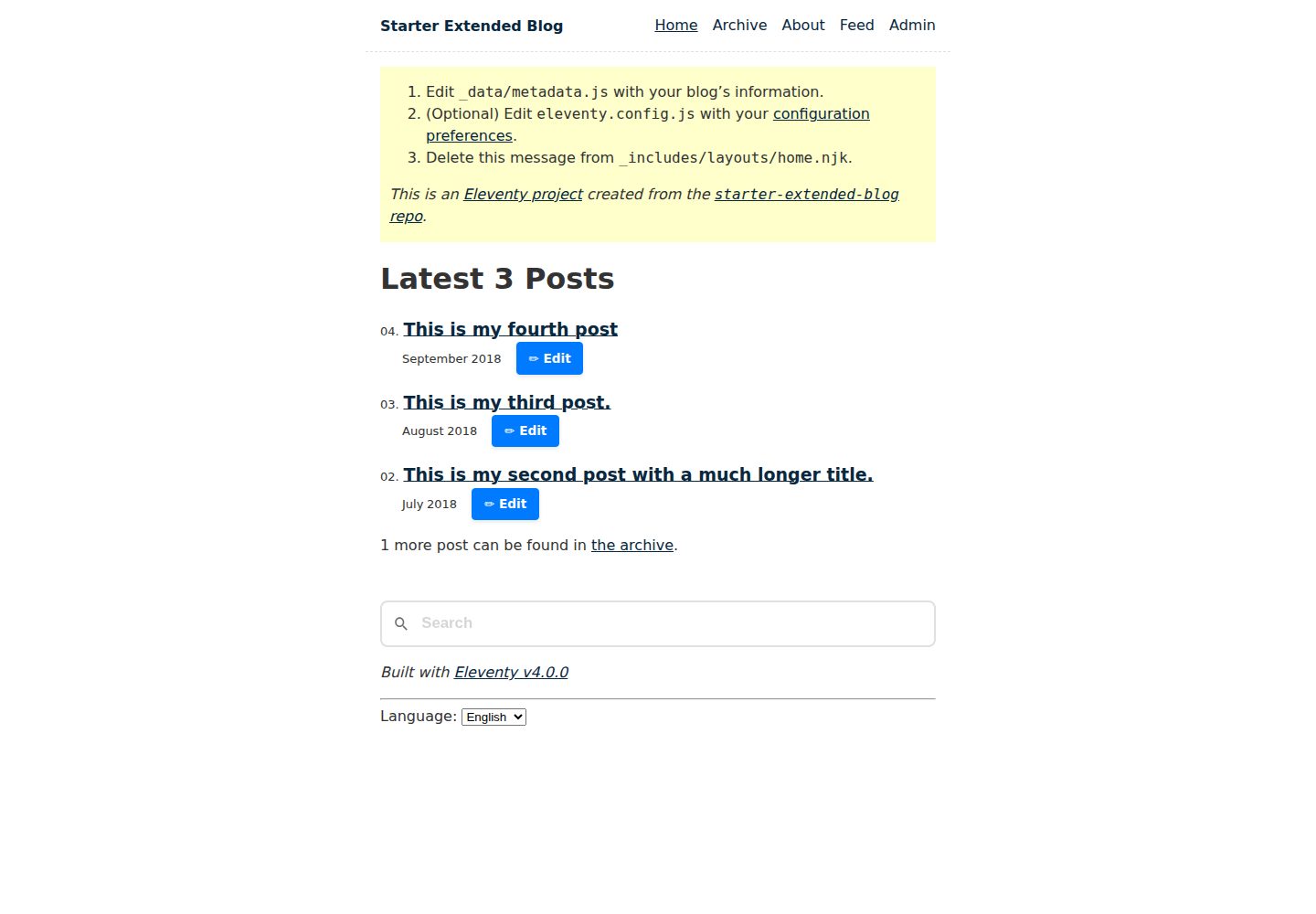
Desktop homepage1 / 2
Desktop captureTop of page
Actual screenshot captured by the server browser.
All pages & views 2
Screenshots show visual appearance; interactive behavior may differ.
Recorded 2026-09-30View source
What stands out
A quick read of the recorded project description.
Built-in browser-based admin page with a Markdown editor and live preview
Drafts autosave to local storage, images are stored in IndexedDB, and unused images are cleaned up automatically
Supports exporting a zip, or linking a GitHub repository to directly create a branch, upload images, and submit a Pull Request
Optional AI assistance: expansion, rewriting, title and description generation, image alt text, tag recommendations, and post translation
AI backend options include local Transformers.js or cloud services such as Firebase AI Logic, OpenAI, and the Gemini API
Template Details
starter-extended-blog is an Eleventy-based blog starter for building static blog sites. Content is pre-rendered at build time with zero JavaScript output, templates can be configured through the Eleventy Data Cascade, and it includes generated pages such as home, archive, about, 404, tags, sitemap.xml, and an Atom feed.
The project additionally provides an admin page at /{locale}/blog/admin/?admin=true for writing and editing blog posts in the browser. The editor supports live Markdown preview, drag-and-drop or paste image upload, multiple concurrent drafts with autosave to browser local storage, image storage in IndexedDB, automatic cleanup of unused images, and conversion of rich-text pasted from other websites into Markdown. Finished posts can be exported as a structured zip file, or, after linking a GitHub repository in settings, the page can directly create a branch, upload images, and submit a Pull Request; the Edit buttons on the archive page and home page can load and update existing posts.
The admin page can be installed as a PWA, and after installation it requests persistent storage. AI features can be fully disabled by default; when enabled, they can expand bullet points, rewrite tone, generate title and meta description suggestions, generate alt text and captions for images, recommend tags and ad categories, and translate posts into the languages listed in _data/locales.js. AI backends include local Transformers.js as well as cloud services such as Firebase AI Logic, OpenAI, and the Gemini API; using a cloud backend requires entering an API key in the admin page settings, while the local backend does not require a key.
Limitations: the README mentions Firebase integration, and enabling related dynamic features requires configuring it yourself and checking quotas and billing; third-party assets such as demo images, fonts, and icons must be checked against their respective licenses; external services such as domains, hosting, databases, payments, or AI may incur additional charges. The project states that it is not an officially supported Google product.
EleventyBlogStarter
Is it right for your project?
Use Cases
- Building a Markdown-first static blog with Eleventy that needs a home page, archive, tag pages, and an Atom feed
- Writing and editing posts directly in the browser without relying on a local Markdown editor
- Publishing posts through a GitHub Pull Request workflow, with the admin page handling branches, image uploads, and Markdown submission
- Needing to edit drafts offline and keep drafts and images in browser local storage and IndexedDB
- Wanting to use local or cloud AI to assist writing, generate image alt text, or translate posts
Suitable For
- Developers building static blogs with Eleventy
- Sites that prefer Markdown writing and want pre-rendered content with zero JavaScript output
- Personal or team blogs that need an in-browser editor and a GitHub publishing workflow
- Sites that want to configure multilingual content and translate posts via _data/locales.js
Getting started & customization
Use these recorded setup notes alongside the repository instructions for your chosen version.
- 1
After creating a directory and cloning the repository, run npm install to install dependencies
- 2
Use npx @11ty/eleventy to generate a production build in _site, or npx @11ty/eleventy --serve to start a local development server
- 3
You can first review eleventy.config.js and _data/metadata.js to configure site options and data
- 4
The admin page is at /{locale}/blog/admin/?admin=true, and publishing requires linking a GitHub repository in settings
- 5
Using a cloud AI backend requires entering an API key in the admin page settings; the local backend does not require a key
License & source material
Usage conditions & limitations
Free to use · keep license noticeThis listing covers the free version in the public repository under the MIT license; the free scope is the code in that version and does not mean external services or third-party assets are free.
Must comply with when using
- The code in this version may be used, modified, used commercially, and distributed free of charge.
- When distributing copies or substantial portions of the code, retain the original author's copyright notice and the full MIT license notice.
- The code is provided as is; warranties and limitations of liability are governed by the original license and applicable law.
Additional costs & items to verify
- When using a cloud AI backend (Firebase AI Logic, OpenAI, Gemini API, etc.), you must enter your own AI API key in the admin page settings; the local backend does not require a key.
- To publish posts directly through the admin page, you must link your own GitHub repository in settings; otherwise you can only export a zip and deploy manually.
- The project states that it is not an officially supported Google product, provides no official support, and is not part of the Google Open Source Vulnerability Reward Program.
- The README mentions Firebase integration; before enabling related dynamic features, you must configure it yourself and check Firebase quotas and billing.
- Demo images, fonts, icons, and other third-party assets must be checked against their respective licenses and cannot be judged solely by the code's MIT license.
- External services such as domains, hosting, databases, payments, or AI may incur additional charges.
View Original Text Basis
Permission is hereby granted, free of charge
Original License Text
For cloud backends, enter your AI API keys in the **Settings** section of the admin Page.
Original README
Open the Settings pane and link the editor with your blog's GitHub repository to enable publishing to GitHub.
Original README
https://github.com/GoogleChrome/starter-extended-blog/blob/main/LICENSEhttps://github.com/GoogleChrome/starter-extended-blog/blob/main/README.mdThis is not an officially supported Google product.
Original README
Compiled by DeepSeek based on repository license and README ·2026-10-01. Results only cover the materials read; dependencies, images, fonts, and subsequent term changes are subject to their respective original texts.
Project checks & description sources
Template Information
- Source platforms
- GitHub
- Documentation and maintenance reference score
- More documented · 92 / 100
- Technologies
- Eleventy
- Website type
- Blog · Starter
How this score is calculated
Our heuristic uses license records (up to 30), a demo link (12), a preview (10), stars (15), recorded maintenance (15), description completeness (8), feature records (5) and classification data (5). It is not a code, security or performance test, or a Google score. A link does not establish tested functionality.
What to verify for this project
- Repository update recorded
- 2026-09-29
- Screenshot last checked
- 2026-10-01
A demo link is listed. Check it with your own content and viewport sizes; its presence does not confirm that forms, authentication or payments work.
The catalog identifies Eleventy as the primary stack. Check the actual dependency manifest and lockfile for versions and hosting requirements. These notes use recorded metadata, not a code audit or a deployment test.
Use a selection guide →How this description was prepared
AI-assisted description based on catalog records and repository material. Repository authors are not automatically the reviewers of this description.
Automatically checked against source and license rules; no manual editorial review.
Inspect the recorded source material
SHA-256: 876d0e1cfa97212b5a35a29390322926defb6ac63f17966489fa7b30f271563d
2026-10-01T13:50:49.895Z
Source file / repository# starter-extended-blog v10
A starter repository showing how to build a blog with the [Eleventy](https://www.11ty.dev/) site generator.
## Getting Started
- [Want a more generic/detailed getting started guide?](https://www.11ty.dev/docs/getting-started/)
1. Make a directory and navigate to it:
```
mkdir my-blog-name
cd my-blog-name
```
2. Clone this Repository
```
git clone https://github.com/GoogleChrome/starter-extended-blog.git .
```
_Optional:_ Review `eleventy.config.js` and `_data/metadata.js` to configure the site’s options and data.
3. Install dependencies
```
npm install
```
4. Run Eleventy
Generate a production-ready build to the `_site` folder:
```
npx @11ty/eleventy
```
Or build and host on a local development server:
```
npx @11ty/eleventy --serve
```
Or you can run [debug mode](https://www.11ty.dev/docs/debugging/) to see all the internals.
## Admin Page: Create Blog Posts
This project includes a dedicated Admin Page at `/{locale}/blog/admin/?admin=true` (for example, `/en/blog/admin/?admin=true`) for composing new blog posts directly in the browser. It features a Markdown editor with a live preview and advanced asset handling.
### Usage
- Load your blog's admin page at `/{locale}/blog/admin/?admin=true` (for example, `/en/blog/admin/?admin=true`).
- Open the Settings pane and link the editor with your blog's GitHub repository to enable publishing to GitHub.
- Optionally enable AI features and choose your AI backend. If available, the editor will use built-in AI APIs that work with a local model directly in the browser. Otherwise, you can use cloud or local AI backends.
- For cloud backends, enter your AI API keys in the **Settings** section of the admin Page.
- For local backends, no API keys are required.
- Create new blog posts, or edit existing ones by clicking the "Edit" button in the Archive or on the Home page.
### Features
- **Draft Management**: Work on multiple drafts simultaneously. Drafts are saved automatically to your browser's local storage.
- **Rich Asset Support**:
- Drag and drop or paste images directly into the editor.
- Images are stored locally in **IndexedDB** for persistent offline editing.
- **Intelligent Housekeeping**: Automatically identifies and removes unused images from local storage when drafts are updated or deleted.
- **PWA Support**: The Admin Page is installable as a Progressive Web App (PWA). Once installed, it requests **persistent storage**, making it significantly less likely that your drafts and images will be evicted by the browser under disk pressure.
- **Smart Pasting**: Paste rich text from other websites; the Admin Page automatically converts HTML to Markdown and attempts to download and locally host external images. If this isn't possible due to CORS, it falls back to the original remote URL.
- **Export & Sync**:
- **Save as `.zip`**: Export your finished post and its images as a structured `.zip` file ready for manual deployment.
- **GitHub Integration**: Create a Pull Request directly from the UI. The Admin Page handles branch creation, image uploads, and Markdown submission to your repository.
- **Edit Existing Blog Posts**: Directly load and update existing posts from your GitHub repository by clicking the "Edit" button in the Archive or the Home page.
### Optional Built-in AI Features
The Admin Page offers several assistive features powered by the Built-in AI APIs. These APIs are also polyfilled to work in browsers that do not support them natively.
To use the polyfilled AI features with cloud AI providers, you need to provide your AI API keys in the **Settings** section of the Admin Page. The following backends are supported:
- **Local**: Transformers.js.
- **Cloud**: Firebase AI Logic (Developer/Vertex), OpenAI, Gemini API.
For more information on supported backends and configuration, see the [Prompt API Polyfill README](https://github.com/GoogleChromeLabs/web-ai-demos/tree/main/prompt-api-polyfill#configuring-dot_envjson--envjson).
Available AI features:
- **AI Writing Assistant**: Expand bullet points into full paragraphs or rewrite existing content to adjust the tone.
- **Smart Summarization**: Generate suggestions for blog post titles and meta descriptions from your content that you can then refine.
- **Multimodal Alt-Text**: Automatically generate suggestions for accessible alt-text and creative captions for uploaded or pasted images.
- **Tag Suggestions**: Receive relevant tag recommendations based on the topics discussed in your post.
- **Advertising Categories**: Generate suggestions for advertising categories based on the topics discussed in your post.
- **Post Translation**: Translate your blog post to other languages, based on the locales you list in `_data/locales.js`.
_Note: These features are privacy-focused and run entirely locally on your device when using the built-in AI APIs. They can be **completely** turned off in the Admin Page settings._
## Features
- Using [Eleventy v4](https://github.com/11ty/eleventy) with zero-JavaScript output.
- Content is exclusively pre-rendered (this is a static site).
- Can easily [deploy to a subfolder without changing any content](https://www.11ty.dev/docs/plugins/html-base/)
- All URLs are decoupled from the content’s location on the file system.
- Configure templates via the [Eleventy Data Cascade](https://www.11ty.dev/docs/data-cascade/)
- **Performance focused**: four-hundos Lighthouse score out of the box!
- _0 Cumulative Layout Shift_
- _0ms Total Blocking Time_
- Local development live reload provided by [Eleventy Dev Server](https://www.11ty.dev/docs/dev-server/).
- Content-driven [navigation menu](https://www.11ty.dev/docs/plugins/navigation/)
- Fully automated [Image optimization](https://www.11ty.dev/docs/plugins/image/)
- Zero-JavaScript output.
- Support for modern image formats automatically (e.g. AVIF and WebP)
- Processes images on-request during `--serve` for speedy local builds.
- Prefers `<img>` markup if possible (single image format) but switches automatically to `<picture>` for multiple image formats.
- Automated `<picture>` syntax markup with `srcset` and optional `sizes`
- Includes `width`/`height` attributes to avoid [content layout shift](https://web.dev/cls/).
- Includes `loading="lazy"` for native lazy loading without JavaScript.
- Includes [`decoding="async"`](https://developer.mozilla.org/en-US/docs/Web/API/HTMLImageElement/decoding)
- Images can be co-located with blog post files.
- Per page CSS bundles [via `eleventy-plugin-bundle`](https://github.com/11ty/eleventy-plugin-bundle).
- Built-in [syntax highlighter](https://www.11ty.dev/docs/plugins/syntaxhighlight/) (zero-JavaScript output).
- Draft content: use `draft: true` to mark any template as a draft. Drafts are **only** included during `--serve`/`--watch` and are excluded from full builds. This is driven by the `addPreprocessor` configuration API in `eleventy.config.js`. Schema validator will show an error if non-boolean value is set in data cascade.
- Blog Posts
- Automated next/previous links
- Accessible deep links to headings
- Generated Pages
- Home, Archive, and About pages
- [Atom feed included (with easy one-line swap to use RSS or JSON)](https://www.11ty.dev/docs/plugins/rss/)
- `sitemap.xml`
- Zero-maintenance tag pages/
- Content not found (404) page
## Demos
- [Netlify](https://starter-extended-blog.netlify.app/)
- [Vercel](https://demo-base-blog.11ty.dev/)
- [Cloudflare Pages](https://starter-extended-blog-d2a.pages.dev/)
- [GitHub Pages](https://11ty.github.io/starter-extended-blog/)
## Deploy this to your own site
Deploy this Eleventy site in just a few clicks on these services:
- Read more about [Deploying an Eleventy project](https://www.11ty.dev/docs/deployment/) to the web.
- [Deploy this to **Netlify**](https://app.netlify.com/start/deploy?repository=https://github.com/GoogleChrome/starter-extended-blog)
- [Deploy this to **Vercel**](https://vercel.com/import/project?template=11ty%2Fstarter-extended-blog)
- Look in `.github/workflows/gh-pages.yml.sample` for information on [Deploying to **GitHub Pages**](https://www.11ty.dev/docs/deployment/#deploy-an-eleventy-project-to-git-hub-pages).
- [Try it out on **Stackblitz**](https://stackblitz.com/github/GoogleChrome/starter-extended-blog)
### Implementation Notes
- `content/{locale}/about/index.njk` is an example of a content page.
- `content/blog/{locale}/` has the blog posts but really they can live in any directory. They need only the `posts` tag to be included in the blog posts [collection](https://www.11ty.dev/docs/collections/).
- Use the `eleventyNavigation` key (via the [Eleventy Navigation plugin](https://www.11ty.dev/docs/plugins/navigation/)) in your front matter to add a template to the top level site navigation. This is in use on `content/{locale}/index.njk` and `content/{locale}/about/index.njk`.
- Content can be in _any template format_ (blog posts needn’t exclusively be markdown, for example). Configure your project’s supported templates in `eleventy.config.js` -> `templateFormats`.
- The `public` folder in your input directory will be copied to the output folder (via `addPassthroughCopy` in the `eleventy.config.js` file). This means `./public/css/*` will live at `./_site/css/*` after your build completes.
- This project uses three [Eleventy Layouts](https://www.11ty.dev/docs/layouts/):
- `_includes/layouts/base.njk`: the top level HTML structure
- `_includes/layouts/home.njk`: the home page template (wrapped into `base.njk`)
- `_includes/layouts/post.njk`: the blog post template (wrapped into `base.njk`)
- `_includes/postslist.njk` is a Nunjucks include and is a reusable component used to display a list of all the posts. `content/index.njk` has an example of how to use it.
#### Content Security Policy
If your site enforces a [Content Security Policy](https://developer.mozilla.org/en-US/docs/Web/HTTP/CSP) (as public-facing sites should), you have a few choices (pick one):
1. In `base.njk`, remove `<style>{% getBundle "css" %}</style>` and uncomment `<link rel="stylesheet" href="{% getBundleFileUrl "css" %}">`
2. Configure the server with the CSP directive `style-src: 'unsafe-inline'` (less secure).
## Disclaimer
This is not an officially supported Google product. This project is not
eligible for the [Google Open Source Software Vulnerability Rewards
Program](https://bughunters.google.com/open-source-security).
Explore similar templates
Compare previews and descriptions within the same stack and category.

eleventy-base-blog
The officially maintained Eleventy blog starter template, MIT licensed, includes posts, tag pages, archives, an about page, a 404 page, an Atom feed, and sitemap.xml, with per-page CSS bundling, syntax highlighting, and image optimization.
Eleventy · Blog

eleventy-garden
An Eleventy-based digital garden starter template for building a personal knowledge site organized through hyperlinks. It supports Roam-style double-bracket links, backlink display, and hover cards for backlinks.
Eleventy · Starter

eleventastic
Eleventastic is an Eleventy starter kit by Max Böck, used as the base for new 11ty projects. It integrates Sass, Webpack, SVG icon sprites, critical CSS, and HTML minification into the 11ty build without external steps.
Eleventy · Starter

neat-starter
An Eleventy-based static site starter template integrating Netlify CMS, Alpine.js, and Tailwind CSS. It provides a ready-to-run example site, a one-click Netlify deploy button, and an MIT-licensed codebase.
Eleventy · Starter

Eleventy-Starter-Boilerplate
An Eleventy-based blog starter template with Tailwind CSS, Webpack, PostCSS, ESLint, and Prettier, optional Netlify CMS, and built-in SEO metadata, sitemap, and 404 page.
Eleventy · Blog

eleventy-plus-vite
A static site starter combining Eleventy and Vite, with a live-reloading development server, Vite-based production post-processing, a PostCSS pipeline with Autoprefixer and cssnano, critical CSS inlining and asynchronous CSS loading, a web font loading strategy example, fluid typography, basic dark mode, an…
Eleventy · Starter