Eleventy 静态博客启动器,构建输出零 JavaScript,内容预渲染
Eleventy博客启动器
starter-extended-blog — Eleventy 博客模板
作者 GoogleChrome
GoogleChrome 维护的 Eleventy 博客启动器,内置浏览器端 Markdown 编辑器与可选 AI 写作辅助,可导出 zip 或直接向 GitHub 仓库提交 Pull Request。
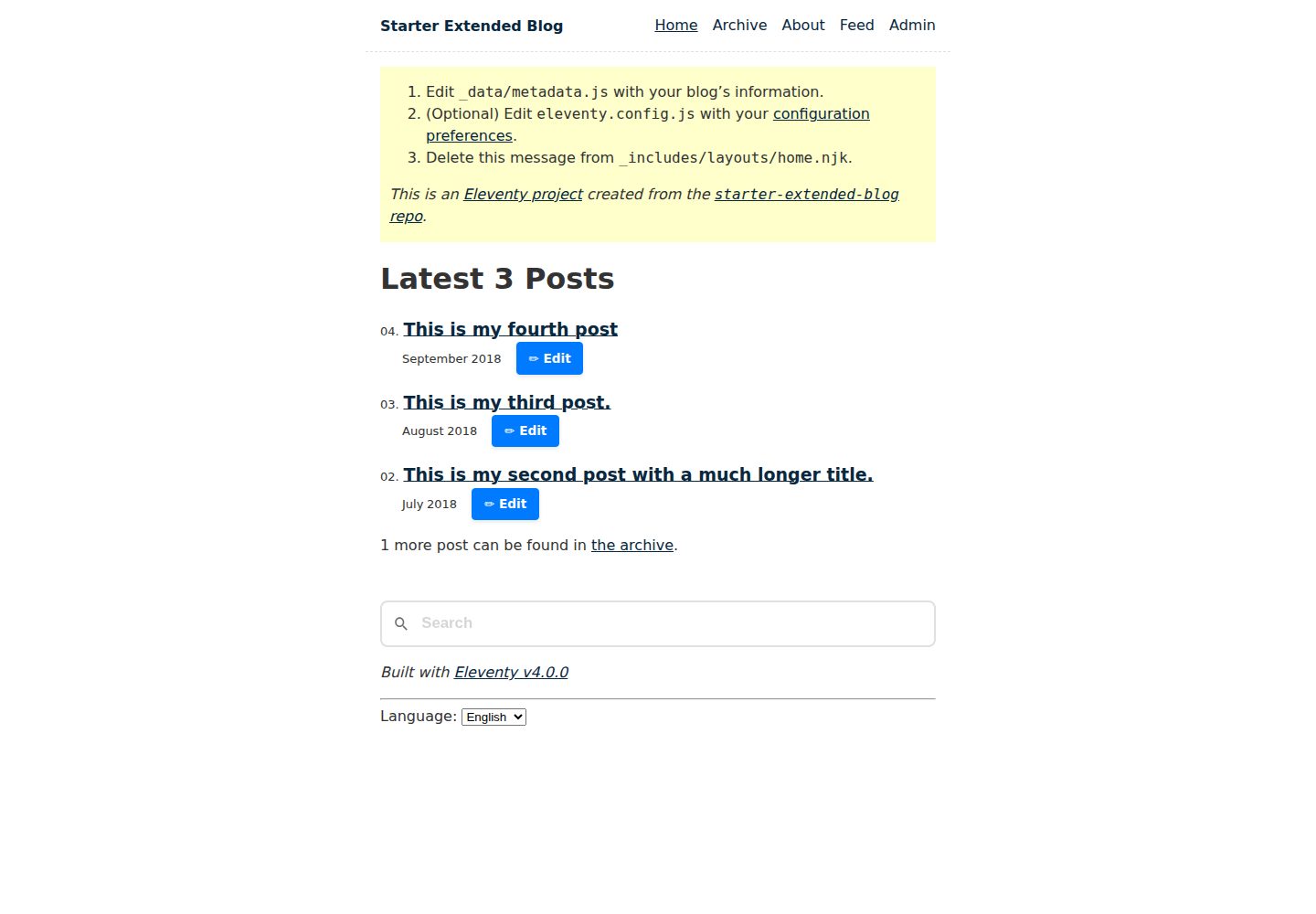
看看你的网站会是什么样
浏览真实页面截图,比较内容排版与手机效果。点击下方缩略图切换,放大查看整页细节。
全部页面与视图 2
截图用于了解视觉与布局,交互效果请以实际项目为准。
采集于 2026-09-30查看来源
值得关注的模板亮点
从已有项目资料中,快速了解它的特点。
内置浏览器端管理页,提供 Markdown 编辑器与实时预览
草稿自动保存到本地存储,图片存入 IndexedDB,并自动清理未使用图片
支持导出 zip,或关联 GitHub 仓库后直接创建分支、上传图片并提交 Pull Request
可选 AI 辅助:扩写、改写、生成标题与描述、图片替代文本、标签推荐与文章翻译
AI 后端可选本地 Transformers.js 或 Firebase AI Logic、OpenAI、Gemini API 等云端服务
模板详细介绍
starter-extended-blog 是一个基于 Eleventy 的博客启动器,用于搭建静态博客站点。内容在构建时预渲染,输出零 JavaScript,支持通过 Eleventy Data Cascade 配置模板,并包含首页、归档、关于、404、标签页、sitemap.xml 与 Atom feed 等生成页面。
项目额外提供一个管理页面,路径为 /{locale}/blog/admin/?admin=true,用于在浏览器中撰写和编辑博客文章。编辑器支持 Markdown 实时预览、拖放或粘贴图片、多草稿并存并自动保存到浏览器本地存储、将图片存入 IndexedDB、自动清理未使用图片,以及把其他网站的富文本粘贴内容转换为 Markdown。完成后的文章可以导出为结构化 zip 文件,也可以在设置中关联 GitHub 仓库后,由页面直接创建分支、上传图片并提交 Pull Request;归档页和首页的“Edit”按钮可加载并更新已有文章。
管理页面可安装为 PWA,安装后会申请持久化存储。AI 功能默认可以完全关闭,开启后可用于扩写要点、改写语气、生成标题与 meta 描述建议、为图片生成替代文本与说明、推荐标签与广告分类,以及按 _data/locales.js 中列出的语言翻译文章。AI 后端支持本地 Transformers.js,以及 Firebase AI Logic、OpenAI、Gemini API 等云端服务;使用云端后端需要在管理页设置中填写 API 密钥,本地后端不需要密钥。
限制方面:README 提及 Firebase 集成,启用相关动态功能前需自行配置并核对额度与收费;演示图片、字体、图标等第三方素材需按各自许可核对;域名、托管、数据库、支付或 AI 等外部服务可能另外收费。项目声明并非 Google 官方支持的产品。
Eleventy博客启动器
适合你的项目吗?
适用场景
- 用 Eleventy 搭建以 Markdown 为主的静态博客,并需要首页、归档、标签页与 Atom feed
- 希望在浏览器中直接撰写和编辑文章,而不依赖本地 Markdown 编辑器
- 希望通过 GitHub Pull Request 流程发布文章,由管理页处理分支、图片上传与 Markdown 提交
- 需要离线编辑草稿,并把草稿与图片保存在浏览器本地存储与 IndexedDB 中
- 希望使用本地或云端 AI 辅助写作、生成图片替代文本或翻译文章
适合人群
- 使用 Eleventy 构建静态博客的开发者
- 偏好 Markdown 写作并希望内容预渲染、输出零 JavaScript 的站点
- 需要浏览器内编辑器与 GitHub 发布流程的个人或团队博客
- 希望按 _data/locales.js 配置多语言内容并翻译文章的站点
上手与定制指南
结合仓库当前版本的说明,按下面的资料检查内容、配置与运行要求。
- 1
创建目录并克隆仓库后,运行 npm install 安装依赖
- 2
使用 npx @11ty/eleventy 生成 _site 生产构建,或用 npx @11ty/eleventy --serve 启动本地开发服务器
- 3
可先查看 eleventy.config.js 与 _data/metadata.js 配置站点选项与数据
- 4
管理页位于 /{locale}/blog/admin/?admin=true,需在设置中关联 GitHub 仓库才能发布
- 5
使用云端 AI 后端需在管理页设置中填写 API 密钥,本地后端不需要密钥
授权与来源资料
使用条件与限制
免费使用 · 保留许可声明本次收录的是公开仓库中采用 MIT 许可的免费版本;免费范围为该版本代码,不代表外部服务或第三方素材免费。
使用时需要遵守
- 允许免费使用、修改、商用和分发该版本代码。
- 分发代码副本或实质性部分时,保留原作者版权声明和完整 MIT 许可声明。
- 代码按现状提供;担保与责任限制以原许可证及适用法律为准。
额外费用与待核对事项
- 使用云端 AI 后端(Firebase AI Logic、OpenAI、Gemini API 等)时,需在管理页设置中自行填写 AI API 密钥;本地后端无需密钥。
- 要通过管理页直接发布文章,必须在设置中关联自己的 GitHub 仓库;否则只能导出 zip 手动部署。
- 项目声明并非 Google 官方支持的产品,不提供官方支持,也不属于 Google 开源漏洞奖励计划范围。
- README 提及 Firebase 集成;启用相关动态功能前需自行配置,并核对 Firebase 的额度与收费。
- 演示图片、字体、图标及其他第三方素材需按各自许可核对,不能仅凭代码的 MIT 许可判断。
- 域名、托管、数据库、支付或 AI 等外部服务可能另外收费。
查看原文依据
Permission is hereby granted, free of charge
许可证原文
For cloud backends, enter your AI API keys in the **Settings** section of the admin Page.
README 原文
Open the Settings pane and link the editor with your blog's GitHub repository to enable publishing to GitHub.
README 原文
https://github.com/GoogleChrome/starter-extended-blog/blob/main/LICENSEhttps://github.com/GoogleChrome/starter-extended-blog/blob/main/README.mdThis is not an officially supported Google product.
README 原文
DeepSeek 根据仓库许可证和 README 整理 ·2026-10-01。结果仅覆盖已读取资料,依赖、图片、字体及后续条款变更以各自原文为准。
项目核对记录与介绍依据
模板资料
- 来源平台
- GitHub
- 资料与维护参考分
- 资料较完整 · 92 / 100
- 技术栈
- Eleventy
- 网站类型
- 博客 · 启动器
这个分数如何计算
本站按许可资料(最高30分)、演示链接(12分)、预览图(10分)、Star数(15分)、记录的维护时间(15分)、描述完整度(8分)、功能记录(5分)和分类资料(5分)计算。它不是代码、安全或性能测试,也不是 Google 评分;有链接不代表已实测可用。
这个项目需要核对什么
- 记录的仓库更新时间
- 2026-09-29
- 截图检查日期
- 2026-10-01
已收录演示链接。请用你的内容与屏幕尺寸检查;有演示不代表表单、认证或支付已经可用。
目录记录的主要技术栈是 Eleventy。请通过依赖清单和锁文件核对实际版本与托管要求。这些说明基于收录资料,不代表代码审计或部署实测。
查看具体选型方法 →介绍的制作与核对状态
介绍由 AI 辅助整理目录与仓库资料。仓库作者不等于这篇介绍的审核者。
已完成服务器许可规则与 AI 来源核对;未经过人工编辑审核。
查看当时使用的来源资料
SHA-256: 876d0e1cfa97212b5a35a29390322926defb6ac63f17966489fa7b30f271563d
2026-10-01T13:50:49.895Z
来源文件 / 仓库# starter-extended-blog v10
A starter repository showing how to build a blog with the [Eleventy](https://www.11ty.dev/) site generator.
## Getting Started
- [Want a more generic/detailed getting started guide?](https://www.11ty.dev/docs/getting-started/)
1. Make a directory and navigate to it:
```
mkdir my-blog-name
cd my-blog-name
```
2. Clone this Repository
```
git clone https://github.com/GoogleChrome/starter-extended-blog.git .
```
_Optional:_ Review `eleventy.config.js` and `_data/metadata.js` to configure the site’s options and data.
3. Install dependencies
```
npm install
```
4. Run Eleventy
Generate a production-ready build to the `_site` folder:
```
npx @11ty/eleventy
```
Or build and host on a local development server:
```
npx @11ty/eleventy --serve
```
Or you can run [debug mode](https://www.11ty.dev/docs/debugging/) to see all the internals.
## Admin Page: Create Blog Posts
This project includes a dedicated Admin Page at `/{locale}/blog/admin/?admin=true` (for example, `/en/blog/admin/?admin=true`) for composing new blog posts directly in the browser. It features a Markdown editor with a live preview and advanced asset handling.
### Usage
- Load your blog's admin page at `/{locale}/blog/admin/?admin=true` (for example, `/en/blog/admin/?admin=true`).
- Open the Settings pane and link the editor with your blog's GitHub repository to enable publishing to GitHub.
- Optionally enable AI features and choose your AI backend. If available, the editor will use built-in AI APIs that work with a local model directly in the browser. Otherwise, you can use cloud or local AI backends.
- For cloud backends, enter your AI API keys in the **Settings** section of the admin Page.
- For local backends, no API keys are required.
- Create new blog posts, or edit existing ones by clicking the "Edit" button in the Archive or on the Home page.
### Features
- **Draft Management**: Work on multiple drafts simultaneously. Drafts are saved automatically to your browser's local storage.
- **Rich Asset Support**:
- Drag and drop or paste images directly into the editor.
- Images are stored locally in **IndexedDB** for persistent offline editing.
- **Intelligent Housekeeping**: Automatically identifies and removes unused images from local storage when drafts are updated or deleted.
- **PWA Support**: The Admin Page is installable as a Progressive Web App (PWA). Once installed, it requests **persistent storage**, making it significantly less likely that your drafts and images will be evicted by the browser under disk pressure.
- **Smart Pasting**: Paste rich text from other websites; the Admin Page automatically converts HTML to Markdown and attempts to download and locally host external images. If this isn't possible due to CORS, it falls back to the original remote URL.
- **Export & Sync**:
- **Save as `.zip`**: Export your finished post and its images as a structured `.zip` file ready for manual deployment.
- **GitHub Integration**: Create a Pull Request directly from the UI. The Admin Page handles branch creation, image uploads, and Markdown submission to your repository.
- **Edit Existing Blog Posts**: Directly load and update existing posts from your GitHub repository by clicking the "Edit" button in the Archive or the Home page.
### Optional Built-in AI Features
The Admin Page offers several assistive features powered by the Built-in AI APIs. These APIs are also polyfilled to work in browsers that do not support them natively.
To use the polyfilled AI features with cloud AI providers, you need to provide your AI API keys in the **Settings** section of the Admin Page. The following backends are supported:
- **Local**: Transformers.js.
- **Cloud**: Firebase AI Logic (Developer/Vertex), OpenAI, Gemini API.
For more information on supported backends and configuration, see the [Prompt API Polyfill README](https://github.com/GoogleChromeLabs/web-ai-demos/tree/main/prompt-api-polyfill#configuring-dot_envjson--envjson).
Available AI features:
- **AI Writing Assistant**: Expand bullet points into full paragraphs or rewrite existing content to adjust the tone.
- **Smart Summarization**: Generate suggestions for blog post titles and meta descriptions from your content that you can then refine.
- **Multimodal Alt-Text**: Automatically generate suggestions for accessible alt-text and creative captions for uploaded or pasted images.
- **Tag Suggestions**: Receive relevant tag recommendations based on the topics discussed in your post.
- **Advertising Categories**: Generate suggestions for advertising categories based on the topics discussed in your post.
- **Post Translation**: Translate your blog post to other languages, based on the locales you list in `_data/locales.js`.
_Note: These features are privacy-focused and run entirely locally on your device when using the built-in AI APIs. They can be **completely** turned off in the Admin Page settings._
## Features
- Using [Eleventy v4](https://github.com/11ty/eleventy) with zero-JavaScript output.
- Content is exclusively pre-rendered (this is a static site).
- Can easily [deploy to a subfolder without changing any content](https://www.11ty.dev/docs/plugins/html-base/)
- All URLs are decoupled from the content’s location on the file system.
- Configure templates via the [Eleventy Data Cascade](https://www.11ty.dev/docs/data-cascade/)
- **Performance focused**: four-hundos Lighthouse score out of the box!
- _0 Cumulative Layout Shift_
- _0ms Total Blocking Time_
- Local development live reload provided by [Eleventy Dev Server](https://www.11ty.dev/docs/dev-server/).
- Content-driven [navigation menu](https://www.11ty.dev/docs/plugins/navigation/)
- Fully automated [Image optimization](https://www.11ty.dev/docs/plugins/image/)
- Zero-JavaScript output.
- Support for modern image formats automatically (e.g. AVIF and WebP)
- Processes images on-request during `--serve` for speedy local builds.
- Prefers `<img>` markup if possible (single image format) but switches automatically to `<picture>` for multiple image formats.
- Automated `<picture>` syntax markup with `srcset` and optional `sizes`
- Includes `width`/`height` attributes to avoid [content layout shift](https://web.dev/cls/).
- Includes `loading="lazy"` for native lazy loading without JavaScript.
- Includes [`decoding="async"`](https://developer.mozilla.org/en-US/docs/Web/API/HTMLImageElement/decoding)
- Images can be co-located with blog post files.
- Per page CSS bundles [via `eleventy-plugin-bundle`](https://github.com/11ty/eleventy-plugin-bundle).
- Built-in [syntax highlighter](https://www.11ty.dev/docs/plugins/syntaxhighlight/) (zero-JavaScript output).
- Draft content: use `draft: true` to mark any template as a draft. Drafts are **only** included during `--serve`/`--watch` and are excluded from full builds. This is driven by the `addPreprocessor` configuration API in `eleventy.config.js`. Schema validator will show an error if non-boolean value is set in data cascade.
- Blog Posts
- Automated next/previous links
- Accessible deep links to headings
- Generated Pages
- Home, Archive, and About pages
- [Atom feed included (with easy one-line swap to use RSS or JSON)](https://www.11ty.dev/docs/plugins/rss/)
- `sitemap.xml`
- Zero-maintenance tag pages/
- Content not found (404) page
## Demos
- [Netlify](https://starter-extended-blog.netlify.app/)
- [Vercel](https://demo-base-blog.11ty.dev/)
- [Cloudflare Pages](https://starter-extended-blog-d2a.pages.dev/)
- [GitHub Pages](https://11ty.github.io/starter-extended-blog/)
## Deploy this to your own site
Deploy this Eleventy site in just a few clicks on these services:
- Read more about [Deploying an Eleventy project](https://www.11ty.dev/docs/deployment/) to the web.
- [Deploy this to **Netlify**](https://app.netlify.com/start/deploy?repository=https://github.com/GoogleChrome/starter-extended-blog)
- [Deploy this to **Vercel**](https://vercel.com/import/project?template=11ty%2Fstarter-extended-blog)
- Look in `.github/workflows/gh-pages.yml.sample` for information on [Deploying to **GitHub Pages**](https://www.11ty.dev/docs/deployment/#deploy-an-eleventy-project-to-git-hub-pages).
- [Try it out on **Stackblitz**](https://stackblitz.com/github/GoogleChrome/starter-extended-blog)
### Implementation Notes
- `content/{locale}/about/index.njk` is an example of a content page.
- `content/blog/{locale}/` has the blog posts but really they can live in any directory. They need only the `posts` tag to be included in the blog posts [collection](https://www.11ty.dev/docs/collections/).
- Use the `eleventyNavigation` key (via the [Eleventy Navigation plugin](https://www.11ty.dev/docs/plugins/navigation/)) in your front matter to add a template to the top level site navigation. This is in use on `content/{locale}/index.njk` and `content/{locale}/about/index.njk`.
- Content can be in _any template format_ (blog posts needn’t exclusively be markdown, for example). Configure your project’s supported templates in `eleventy.config.js` -> `templateFormats`.
- The `public` folder in your input directory will be copied to the output folder (via `addPassthroughCopy` in the `eleventy.config.js` file). This means `./public/css/*` will live at `./_site/css/*` after your build completes.
- This project uses three [Eleventy Layouts](https://www.11ty.dev/docs/layouts/):
- `_includes/layouts/base.njk`: the top level HTML structure
- `_includes/layouts/home.njk`: the home page template (wrapped into `base.njk`)
- `_includes/layouts/post.njk`: the blog post template (wrapped into `base.njk`)
- `_includes/postslist.njk` is a Nunjucks include and is a reusable component used to display a list of all the posts. `content/index.njk` has an example of how to use it.
#### Content Security Policy
If your site enforces a [Content Security Policy](https://developer.mozilla.org/en-US/docs/Web/HTTP/CSP) (as public-facing sites should), you have a few choices (pick one):
1. In `base.njk`, remove `<style>{% getBundle "css" %}</style>` and uncomment `<link rel="stylesheet" href="{% getBundleFileUrl "css" %}">`
2. Configure the server with the CSP directive `style-src: 'unsafe-inline'` (less secure).
## Disclaimer
This is not an officially supported Google product. This project is not
eligible for the [Google Open Source Software Vulnerability Rewards
Program](https://bughunters.google.com/open-source-security).
看看同类模板
对比同技术栈与用途的模板,找到更适合的视觉与内容结构。

eleventy-base-blog
A starter repository for a blog web site using the Eleventy static site generator.
Eleventy · 博客

eleventy-garden
:seedling: A starter site for building a mind garden with eleventy
Eleventy · 启动器

eleventastic
An Eleventy Starter Kit
Eleventy · 启动器

neat-starter
Starter Template for Netlify CMS, Eleventy, Alpine JS & Tailwind CSS
Eleventy · 启动器

Eleventy-Starter-Boilerplate
🚀 Eleventy Starter is production-ready with SEO-friendly for quickly starting a blog. ⚡ Built with Eleventy, …
Eleventy · 博客

eleventy-plus-vite
A clean and fast Eleventy Starter Project with Vite
Eleventy · 启动器