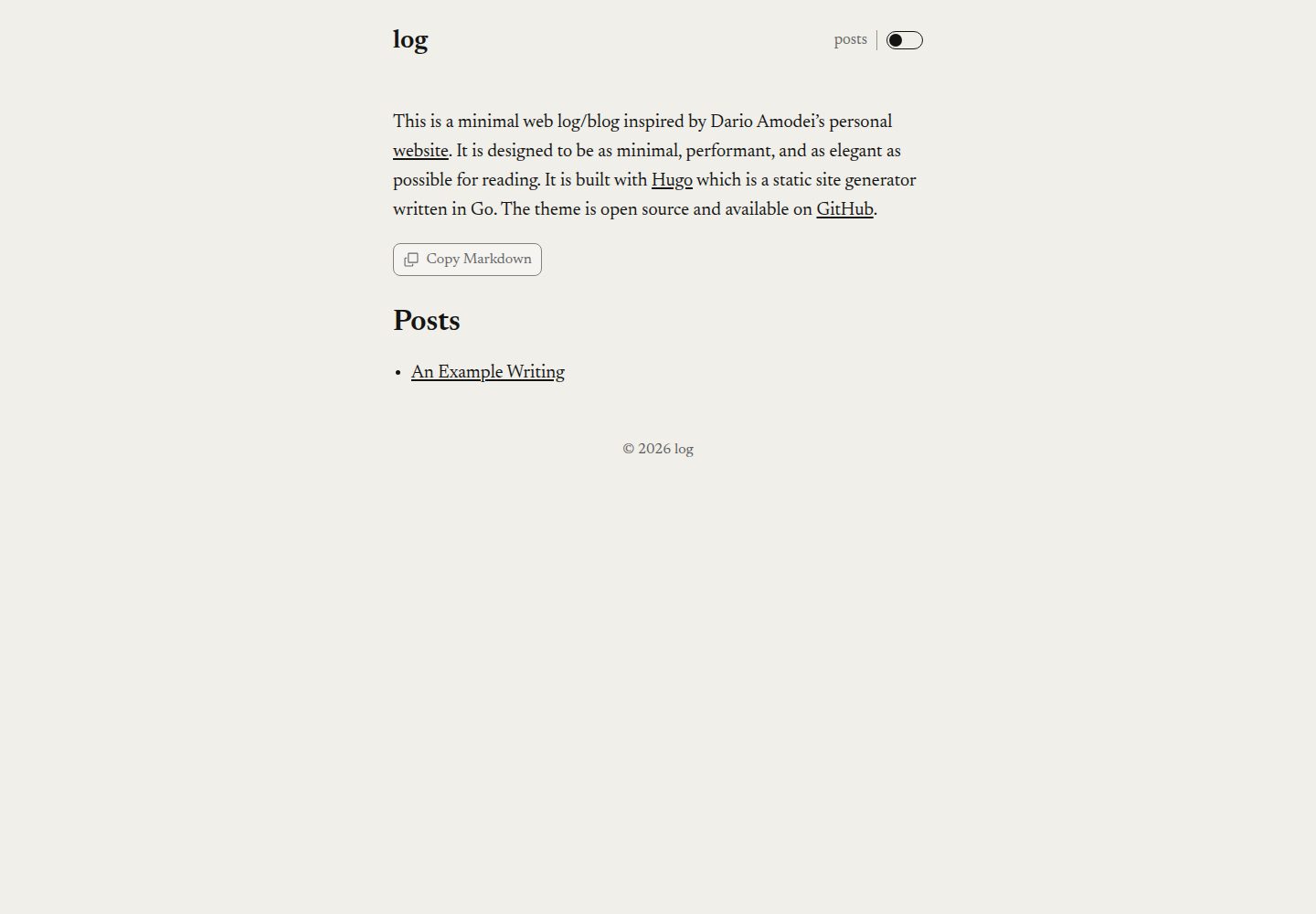
A minimal Hugo theme inspired by Dario Amodei's personal website, focused on reading experience
HugoPortfolioBlog
dario — Hugo Portfolio Template
By GrantBirki
dario is a minimal Hugo theme inspired by Dario Amodei's personal website, aimed at personal portfolios and blogs, with an emphasis on reading experience, under the MIT license.
Explore the design
Compare the page layouts and mobile experience. Open any screenshot for a closer look.
Desktop homepage1 / 2
Desktop captureTop of page
Actual screenshot captured by the server browser.
All pages & views 2
Screenshots show visual appearance; interactive behavior may differ.
Recorded 2026-10-02View source
What stands out
A quick read of the recorded project description.
Covers both personal portfolio and blog use cases
Home page supports a subtitle and Markdown body via content/_index.md, with an optional experimental homePageIsPost mode
Color mode options include toggle, system, light, and dark, with the default first load following system preference
Optional Copy Markdown control that copies the Markdown title and the page's original body, and can be controlled separately for the home page and post pages
Supports mainSections, custom CSS, custom 404, non-standard meta tags, and disabling social meta, among other configurations
Template Details
dario is a Hugo theme by GrantBirki, inspired by Dario Amodei's personal website, positioned to be as minimal and elegant as possible and easy to read. It suits both personal portfolio and blog sites, with the demo site at log.birki.io.
The theme provides two content forms: a home page and article pages. The home page can add a subtitle, description, and Markdown body via content/_index.md; alternatively, homePageIsPost: true can be set to render the home page as a blog post, which the README notes is somewhat experimental. Blog posts use Hugo's front matter and support title, author (string or array), description, summary, date, draft, as well as Open Graph fields such as ogTitle, ogDescription, and ogImage.
Configuration is centralized in config.toml. You can set the site title, copyright, description, and author information (name, email, twitter). Color mode is controlled by params.colorScheme, defaulting to toggle (first load follows system preference), and can also be set to system, light, or dark. The posts link in the header is off by default and requires showPostsLink = true to enable. The optional Copy Markdown control is off by default, enabled via params.copyMarkdown, and can be controlled separately for the home page (home) and post pages (posts); the copied content is the Markdown title plus the page's original Markdown body, and copying from the home page also includes generated section and post links. The home page by default shows the top-level section with the most pages, which can be specified with mainSections. Custom CSS goes in assets/css/custom.css; if you replace the default base font, you can set disableFontPreload = true to disable font preloading. The 404 page can be overridden via content/_404.md, and languageCode must be adjusted accordingly. disableSocialMeta = true disables Open Graph and X Cards related tags, and non-standard meta tags can be written into layouts/partials/nonstdmeta.html.
There are three installation methods: download the repository source and extract it to themes/dario, add it as a Git submodule, or import it as a Hugo module. Using it as a Hugo module requires Go and configuring module.imports in config.toml, and no longer keeping theme = "dario"; the README recommends pulling by the full 40-character commit SHA and reviewing before updating, with go.mod recording an immutable pseudo-version and go.sum verifying module contents. The repository follows the scripts-to-rule-them-all pattern, providing script/bootstrap, script/lint, script/test, and script/build, and CI runs these scripts directly.
Limitations: the README does not list dependencies or specify required Hugo or Go versions; homePageIsPost is marked experimental; the theme itself does not involve external services such as hosting or domains. The license is MIT, allowing free use, modification, commercial use, and distribution, provided the copyright notice and license notice are retained when distributing; third-party assets such as demo images, fonts, and icons need separate license verification.
HugoPortfolioBlog
Is it right for your project?
Use Cases
- Building a text-focused personal blog and managing posts with Hugo's front matter
- Creating a personal portfolio or writing home page, adding introductory text to the home page via content/_index.md
- Personal sites that need light/dark mode switching or following system preference
- Scenarios where you want to copy page content as Markdown into LLM prompts or other Markdown tools
Suitable For
- Developers building personal blogs or portfolios with Hugo
- Authors of personal sites who prefer minimal typography and reading as the core
- Theme users who need an MIT-licensed theme that can be freely modified and distributed
- Users accustomed to adjusting site appearance via config.toml and custom CSS
Getting started & customization
Use these recorded setup notes alongside the repository instructions for your chosen version.
- 1
Three installation methods: download the source and extract it to themes/dario, add it as a Git submodule, or import it as a Hugo module
- 2
Installing as a Hugo module requires Go and configuring module.imports in config.toml, while removing theme = "dario"
- 3
The README recommends pulling the module by the full 40-character commit SHA and reviewing before updating; go.mod records a pseudo-version and go.sum verifies contents
- 4
The repository provides script/bootstrap, script/lint, script/test, and script/build, and CI runs these scripts directly
- 5
The README does not list specific dependency versions; you need to confirm compatible Hugo and Go versions yourself before use
License & source material
Usage conditions & limitations
Free to use · keep license noticeThis entry covers the free version in the public repository under the MIT license; the free scope is that version's code and does not mean external services or third-party assets are free.
Must comply with when using
- Free use, modification, commercial use, and distribution of this version's code are permitted.
- When distributing copies or substantial portions of the code, retain the original author's copyright notice and the full MIT license notice.
- The code is provided as is; warranties and limitations of liability are governed by the original license and applicable law.
Additional costs & items to verify
- When installing as a Hugo module, theme = "dario" must not remain in config.toml and must be removed, otherwise it conflicts with the module import method.
- The Hugo module installation method requires a locally installed latest Go toolchain; users without Go can only use source download or Git submodule methods.
- homePageIsPost: true, which renders the home page as a blog post, is marked experimental by the author, with no stability guarantee, and is not recommended for production sites.
- When using a custom 404 page, you must also change languageCode in config.toml to match the content's primary language, otherwise language-related behavior may be incorrect.
- Demo images, fonts, icons, and other third-party assets need to be checked under their respective licenses and cannot be judged solely by the code's MIT license.
- External services such as domains, hosting, databases, payments, or AI may incur separate charges.
View Original Text Basis
Permission is hereby granted, free of charge
Original License Text
Note that there's no `theme = "dario"` in this case. If you already have this in your `config.toml`, please remove it.
Original README
if you have the [latest version of Go](https://go.dev/doc/install), the best way to install this theme and keep up with improvements from time to time is to install it as a [Hugo module](https://gohugo.io/hugo-modules/).
Original README
This is an alternate way to view the home page and is somewhat experimental.
Original README
https://github.com/GrantBirki/dario/blob/main/LICENSEhttps://github.com/GrantBirki/dario/blob/main/README.mdBe sure to update the value of [`languageCode`](https://gohugo.io/configuration/all/#languagecode) in `config.toml` to match the primary language of your content.
Original README
Compiled by DeepSeek based on repository license and README ·2026-10-02. Results only cover the materials read; dependencies, images, fonts, and subsequent term changes are subject to their respective original texts.
Project checks & description sources
Template Information
- Source platforms
- GitHub
- Documentation and maintenance reference score
- More documented · 92 / 100
- Technologies
- Hugo
- Website type
- Portfolio · Blog
How this score is calculated
Our heuristic uses license records (up to 30), a demo link (12), a preview (10), stars (15), recorded maintenance (15), description completeness (8), feature records (5) and classification data (5). It is not a code, security or performance test, or a Google score. A link does not establish tested functionality.
What to verify for this project
- Repository update recorded
- 2026-10-01
- Screenshot last checked
- 2026-10-02
A demo link is listed. Check it with your own content and viewport sizes; its presence does not confirm that forms, authentication or payments work.
The catalog identifies Hugo as the primary stack. Check the actual dependency manifest and lockfile for versions and hosting requirements. These notes use recorded metadata, not a code audit or a deployment test.
Use a selection guide →How this description was prepared
AI-assisted description based on catalog records and repository material. Repository authors are not automatically the reviewers of this description.
Automatically checked against source and license rules; no manual editorial review.
Inspect the recorded source material
SHA-256: 44b37e6dd8027c3c66bfa810dfe1de60a40ae4b8afecfd1e773c1ccedff8b71b
2026-10-02T08:09:49.243Z
Source file / repository# dario 🖊️
[](https://github.com/GrantBirki/dario/actions/workflows/lint.yml)
[](https://github.com/GrantBirki/dario/actions/workflows/test.yml)
[](https://github.com/GrantBirki/dario/actions/workflows/build.yml)
A minimal hugo theme inspired by Dario Amodei's personal [website](https://darioamodei.com/). It is designed to be as minimal, performant, and as elegant as possible for reading.
View the [live demo](https://log.birki.io) to see what it looks like ([source code](https://github.com/GrantBirki/dario)).
## Performance
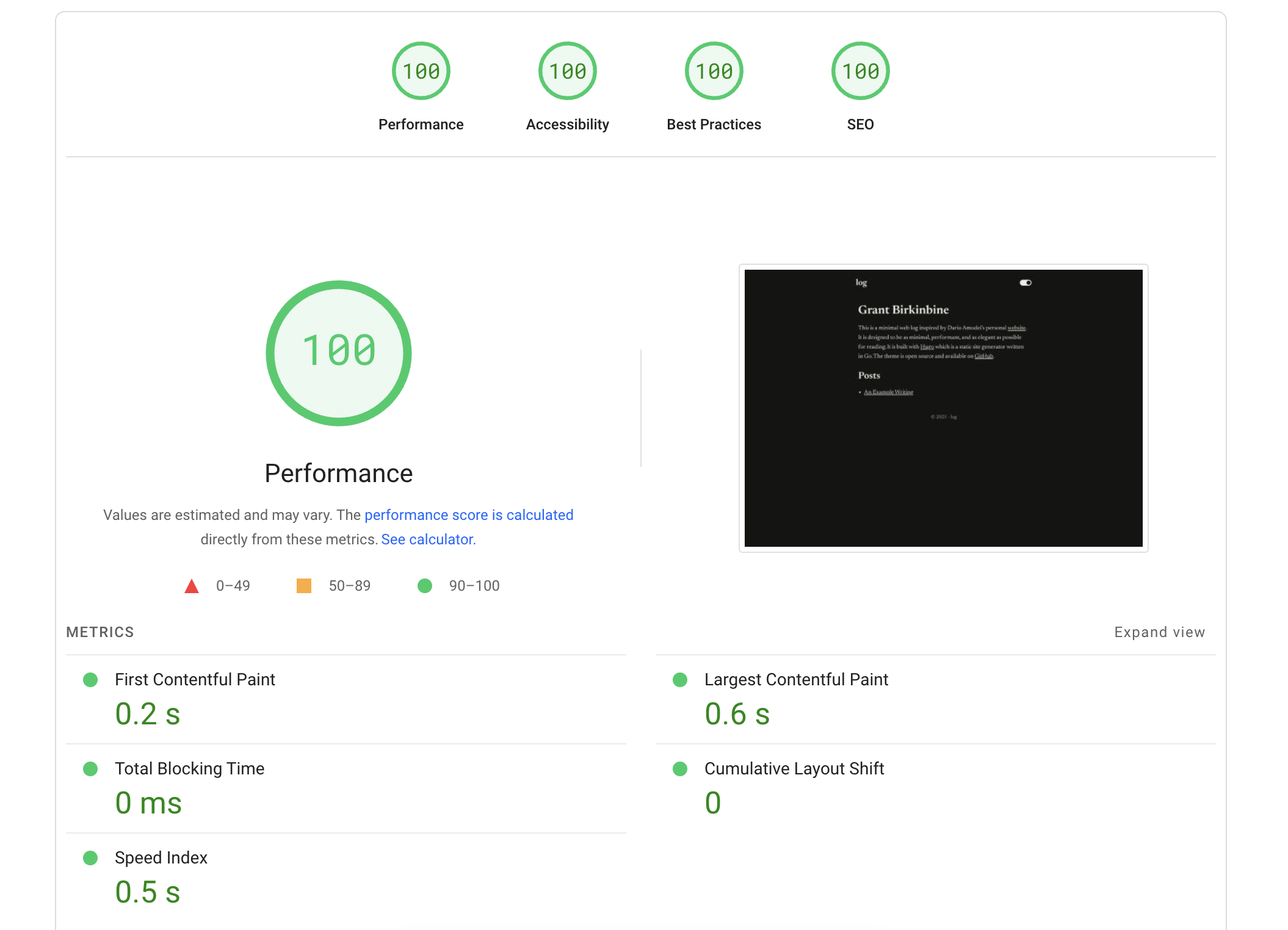
This theme is designed to be minimal and the page speed insights are as follows:
## Development
This repository follows the ["scripts to rule them all"](https://github.blog/engineering/scripts-to-rule-them-all/) pattern:
```bash
script/bootstrap
script/lint
script/test
script/build
```
CI executes these same scripts directly.
## Installation
> To view a real example of a project using this theme, check out [grantbirki/log](https://github.com/GrantBirki/log) which is where I have the demo deployed.
You can install this theme in one of the following ways:
### The Source
Download the source of this repo (dario) [as a zip from GitHub](https://github.com/GrantBirki/dario/archive/refs/heads/main.zip) and extract in your themes directory at `<my_site>/themes/dario`.
Then, once you have the theme extracted, you can add it to your site's `config.toml`:
```toml
theme = "dario"
```
### As a Git Submodule
Alternatively, if your site is a Git repo, you can add this theme as a [submodule](https://git-scm.com/book/en/v2/Git-Tools-Submodules) instead of downloading it as a zip:
```bash
cd <my_site>
git submodule add https://github.com/GrantBirki/dario.git themes/dario
git commit -m "Add dario theme as submodule"
```
Add it to your site's `config.toml`:
```toml
theme = "dario"
```
To upgrade to the latest version of the theme:
```bash
cd <my_site>
cd themes/dario
git checkout main
git pull
cd ../..
git commit themes/dario -m "Upgrade to latest dario theme"
```
### As a Hugo Module
And lastly, if you have the [latest version of Go](https://go.dev/doc/install), the best way to install this theme and keep up with improvements from time to time is to install it as a [Hugo module](https://gohugo.io/hugo-modules/).
Initialize your site:
```bash
hugo mod init yoursite.com
go mod edit -go=1.24
```
Add the following to your `config.toml`:
```toml
[module]
[[module.imports]]
path = "github.com/GrantBirki/dario"
```
Note that there's no `theme = "dario"` in this case. If you already have this in your `config.toml`, please remove it.
Review the Dario commit you intend to consume, then fetch it by its full 40-character revision. This example points to a known commit; replace it only after reviewing a newer revision:
```bash
DARIO_SHA="b0fa756c824bc7b9e4d64b75711b8742e44c7dc0"
hugo mod get "github.com/GrantBirki/dario@${DARIO_SHA}"
hugo mod tidy
```
Hugo records the commit as an immutable pseudo-version in `go.mod`, while `go.sum` authenticates the downloaded module content. The import in `config.toml` intentionally has no mutable version selector because `go.mod` is the dependency authority.
To upgrade the theme, review a newer Dario commit and run the same targeted update with its full revision:
```bash
DARIO_SHA="REPLACE_WITH_A_REVIEWED_40_CHARACTER_COMMIT_SHA"
hugo mod get "github.com/GrantBirki/dario@${DARIO_SHA}"
hugo mod tidy
```
## Configuration
You can further configure how this site looks by editing your `config.toml` file. Here is an example of a configuration that works with this theme:
```toml
baseURL = "https://yoursite.com/"
languageCode = "en-us"
title = "log" # the title of your site
copyright = "Copyright © 2025 Your Name. All rights reserved."
theme = "dario"
[params]
description = "A description of your site" # a description of your site that will be used in the meta tags
[params.author]
name = "Your Name" # the author of the site
email = "[email protected]" # the site author's email address
twitter = "@YourXHandle" # the site author's X/Twitter handle
```
To add intro text to your home page, create a file at `content/_index.md` with contents similar to the following:
```yaml
---
subtitle: "Home Page Subtitle" # the subtitle to display on the "/" homepage
description: "A minimal web log." # The description of the home page that will be used in the open graph meta tags
---
This is a minimal web log inspired by Dario Amodei's personal [website](https://darioamodei.com/). Add some more text here that will be displayed on your homepage (you can use markdown).
```
> Note: In the front matter yaml above, you can also set `homePageIsPost: true` to hydrate the landing page like a blog post. This is an alternate way to view the home page and is somewhat experimental.
### Optional Settings
By default, the theme shows a toggle for switching between light and dark modes. To follow the user's system preference instead, set the `colorScheme` parameter to `'system'`:
```toml
[params]
colorScheme = 'system'
```
You can also set it to `'light'` or `'dark'` to keep it fixed. The default behavior is to have it set as `'toggle'` which displays a toggle and on first page load it defaults to the user's system preference.
The lowercase `posts` link in the header is disabled by default. Enable it on every page with:
```toml
[params]
showPostsLink = true
```
The optional Copy Markdown control is disabled by default. Enable it on both the landing page and post pages with:
```toml
[params.copyMarkdown]
enabled = true
```
To show it on only one page type, set `home` or `posts` explicitly. An omitted page switch defaults to enabled while the feature is enabled globally:
```toml
[params.copyMarkdown]
enabled = true
home = true
posts = false
```
The control copies a Markdown heading and the page's raw Markdown body. Landing-page copies also include the generated section and post links, making the result ready to paste into an LLM prompt or another Markdown-aware tool.
The home page shows the top-level section with the most pages by default. To override this, set `mainSections` to select specific sections:
```toml
mainSections = ['posts', 'essays', 'notes']
```
You can add your own custom CSS in `assets/css/custom.css`:
```css
/* Use the black star as the bullet in unordered lists. */
.content-container ul {
list-style: none;
padding-left: 0;
}
.content-container ul > li::before {
content: '★';
margin-right: 0.5em;
}
```
If you override the default base font, you might also want to turn off font preloading:
```toml
[params]
disableFontPreload = true
```
To override the generated `404.html`, create `content/_404.md` with your customized text. For example, the following file contains a Hindi version of the default message:
```yaml
---
subtitle: "४०४"
build:
render: never
list: never
---
पृष्ठ नहीं मिला।
```
Be sure to update the value of [`languageCode`](https://gohugo.io/configuration/all/#languagecode) in `config.toml` to match the primary language of your content.
Set the `disableSocialMeta` parameter to turn off HTML tags related to [Open Graph](https://ogp.me) and [X Cards](https://developer.x.com/en/docs/x-for-websites/cards/overview/abouts-cards):
```toml
[params]
disableSocialMeta = true
```
If you wish to add your own non-standard meta tags for things like Bitcoin,
PGP, and so on, you can add them in `layouts/partials/nonstdmeta.html`:
```html
<meta name="email" content="[email protected]">
<meta name="bitcoin" content="bc1...">
<link rel="pgpkey" href="/pgp/key.asc">
```
## Blog Posts
Creating a blog post follows the same general process as most Hugo blogging themes.
Posts have markdown "front matter" that looks like this:
```yaml
---
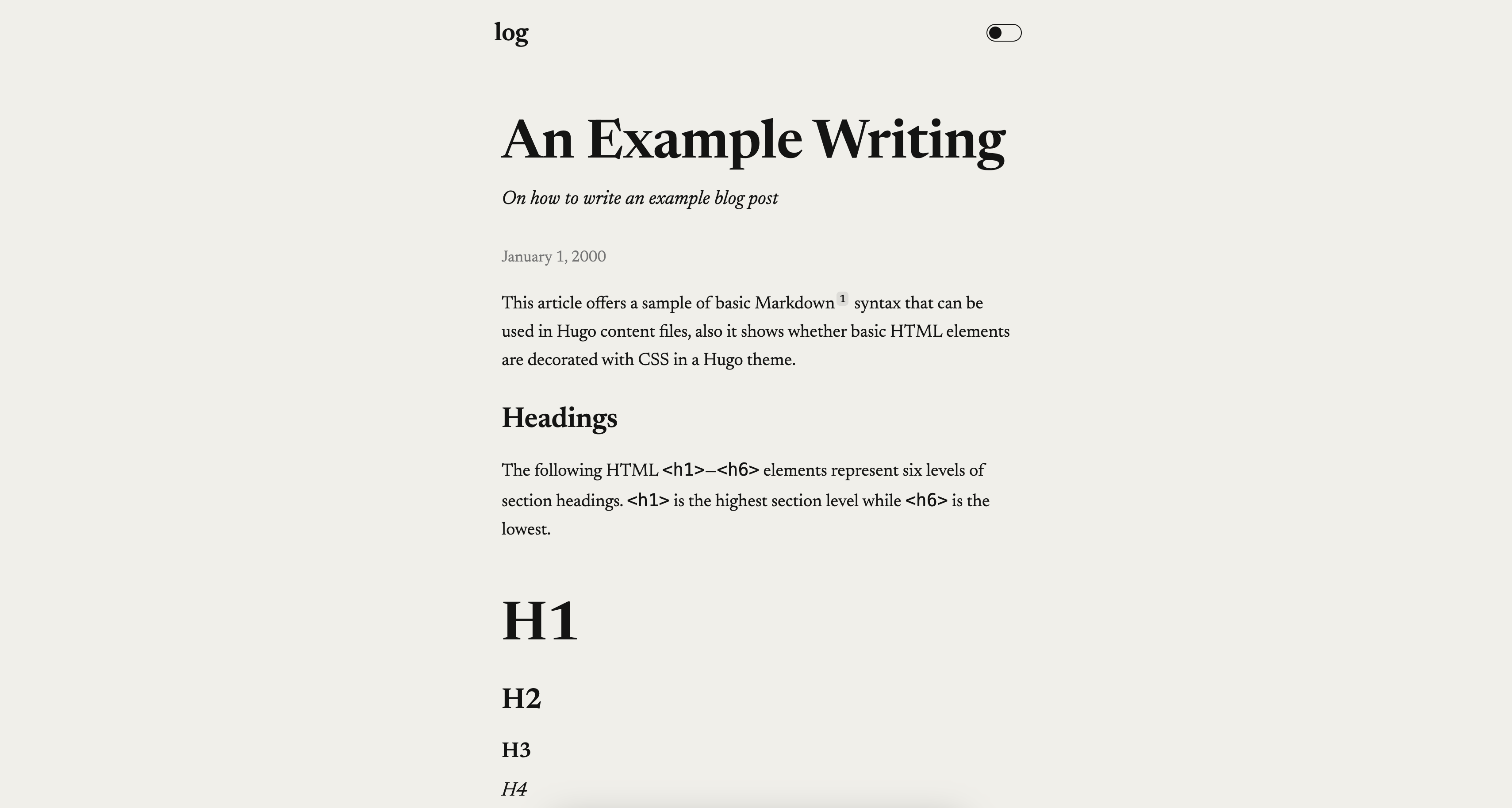
title: "An Example Writing"
author: ["hugo", "monalisa"] # can be an array or just a string
description: "On how to write an example blog post"
# The summary is for search engines
summary: Lorem ipsum dolor sit amet, consectetur adipiscing elit. Sed neque elit, tristique placerat feugiat ac, facilisis vitae arcu. Proin eget egestas augue. Praesent ut sem nec arcu pellentesque aliquet. Duis dapibus diam vel metus tempus vulputate.
date: 2000-01-01T00:00:00-00:00 # date of creation
draft: false
ogTitle: Cool New Example Post # the title of the post that will be used in the open graph meta tags
ogDescription: "An example of using the Dario hugo theme" # the description of the post that will be used in the open graph meta tags
ogImage: /posts/example/og.png # the path to a png/jpg image in the ./posts/example directory to use as the open graph image
---
Here is where you write the content of your blog post in markdown!
```
> Here is a [live example](https://github.com/GrantBirki/log/blob/0893a8488426d0f910feefe0c69c49f3c10fc8c8/content/posts/example/index.md) to view the source of a blog post that uses this theme.
Explore similar templates
Compare previews and descriptions within the same stack and category.

hugo-PaperMod
A fast, clean, responsive Hugo theme for blogs and lightweight portfolios, with three layout modes (Regular, Home-Info, Profile), automatic and manual light/dark themes, Fuse.js client-side search, multilingual support, and built-in Open Graph, Twitter Cards, and Schema.org data.
Hugo · Portfolio

LoveIt
LoveIt is a clean, elegant, and feature-rich Hugo blog theme derived from LeaveIt and KeepIt, MIT-licensed. It offers light/dark modes, responsive layout, multilingual support, and search via Lunr.js or Algolia.
Hugo · Blog

hugo-coder
hugo-coder is a minimalist Hugo blog theme maintained by luizdepra under the MIT license. It provides a clean, text-focused blog appearance, configuration documentation in the docs directory, and a complete exampleSite with hugo.toml.
Hugo · Blog

blowfish
Blowfish is a Hugo personal website and blog theme built with Tailwind CSS 4, focused on lightness, simplicity, and content-first presentation.
Hugo · Blog

hugo-paper
hugo-paper is a simple, clean, and customizable Hugo blog theme configured through config.toml or hugo.toml.
Hugo · Blog

hextra
Hextra is a Hugo theme for documentation and blog sites, built on Hugo and Tailwind CSS with design referencing Nextra.
Hugo · Documentation