受 Dario Amodei 个人网站启发的极简 Hugo 主题,面向阅读体验
Hugo作品集博客
dario — Hugo 作品集模板
作者 GrantBirki
dario 是一个受 Dario Amodei 个人网站启发的极简 Hugo 主题,面向个人作品集与博客,强调阅读体验,采用 MIT 许可。
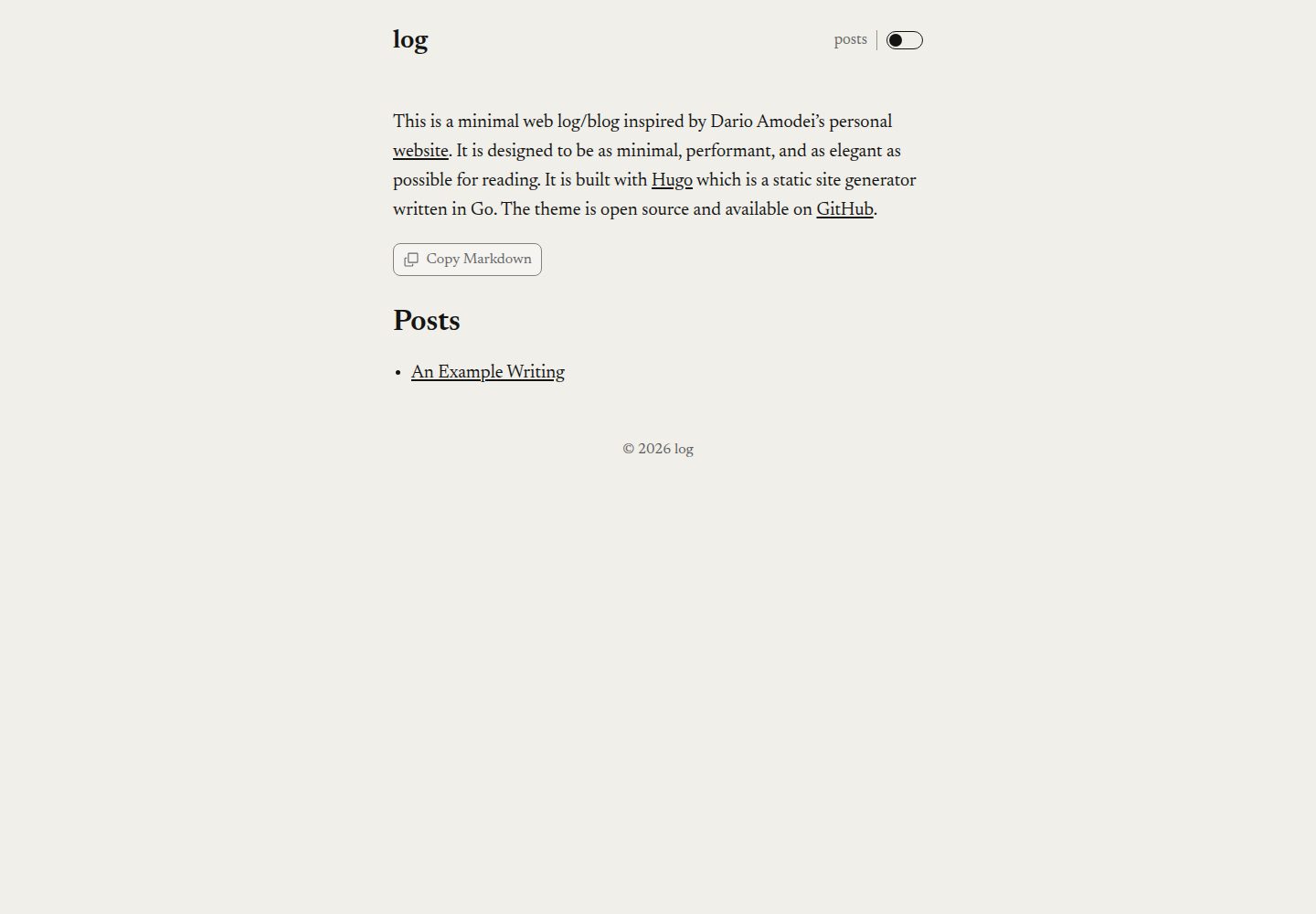
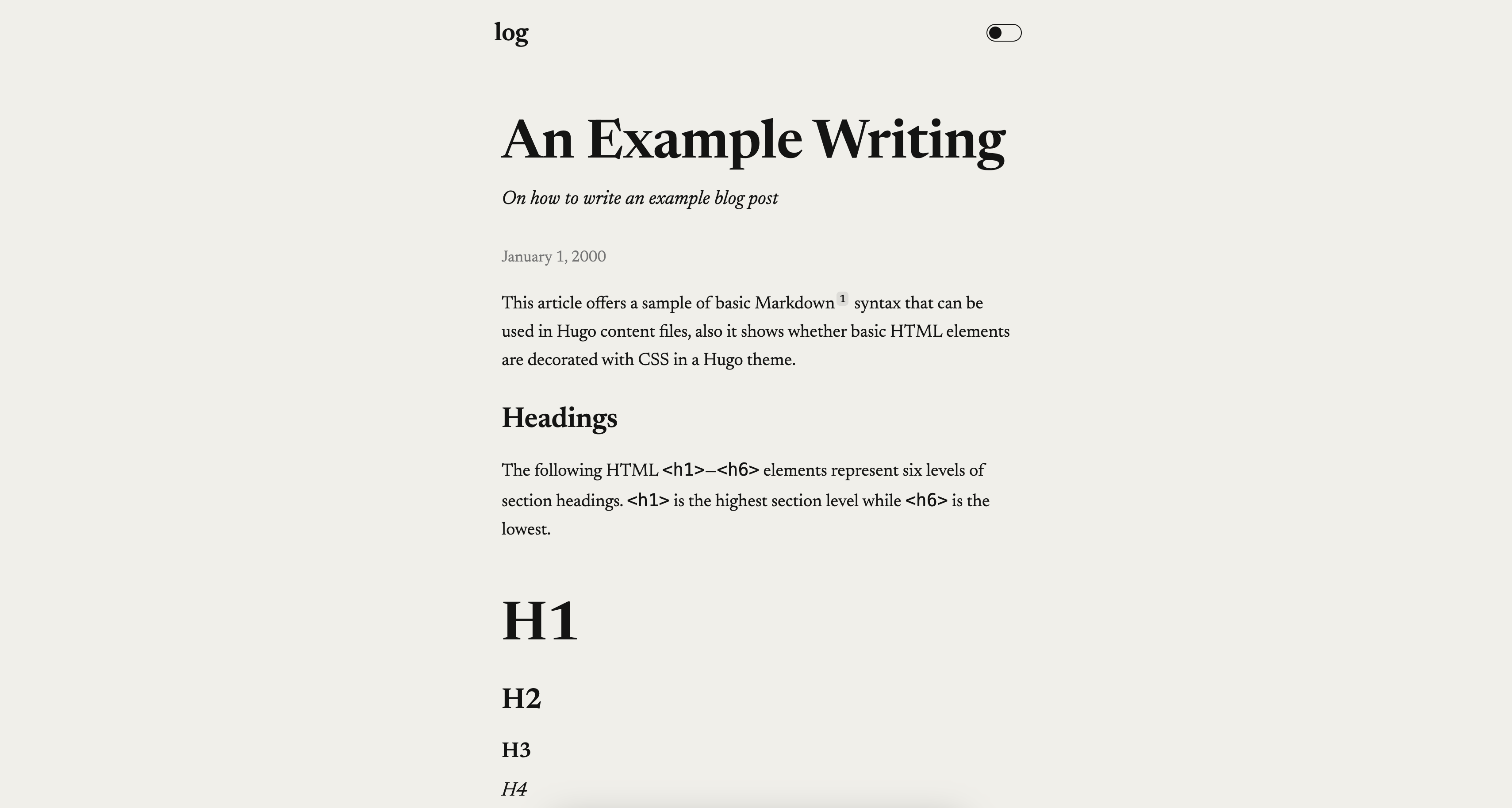
看看你的网站会是什么样
浏览真实页面截图,比较内容排版与手机效果。点击下方缩略图切换,放大查看整页细节。
全部页面与视图 2
截图用于了解视觉与布局,交互效果请以实际项目为准。
采集于 2026-10-02查看来源
值得关注的模板亮点
从已有项目资料中,快速了解它的特点。
同时覆盖个人作品集与博客两类用途
首页支持 content/_index.md 副标题与 Markdown 正文,可选实验性的 homePageIsPost 模式
颜色模式可选 toggle、system、light、dark,默认首次加载跟随系统偏好
可选的 Copy Markdown 控件,能复制 Markdown 标题与页面原始正文,并可分别控制首页与文章页
支持 mainSections、自定义 CSS、自定义 404、非标准 meta 标签与关闭社交 meta 等配置
模板详细介绍
dario 是一个 Hugo 主题,作者为 GrantBirki,灵感来自 Dario Amodei 的个人网站,定位是尽量极简、优雅,便于阅读。它同时适用于个人作品集和博客两类站点,演示站为 log.birki.io。
主题提供首页与文章页两种内容形态。首页可通过 content/_index.md 添加副标题、描述和 Markdown 正文;也可以设置 homePageIsPost: true,把首页当作一篇博客文章来渲染,README 注明该方式偏实验性。博客文章使用 Hugo 的 front matter,支持 title、author(字符串或数组)、description、summary、date、draft,以及 ogTitle、ogDescription、ogImage 等 Open Graph 字段。
配置集中在 config.toml。可设置站点标题、版权、description 与作者信息(name、email、twitter)。颜色模式通过 params.colorScheme 控制,默认 toggle(首次加载跟随系统偏好),也可设为 system、light 或 dark。页头的 posts 链接默认关闭,需 showPostsLink = true 开启。可选的 Copy Markdown 控件默认关闭,通过 params.copyMarkdown 启用,并可分别控制首页(home)与文章页(posts);复制内容为 Markdown 标题加页面原始 Markdown 正文,首页复制还会包含生成的栏目与文章链接。首页默认展示页面数最多的顶层栏目,可用 mainSections 指定。自定义 CSS 放在 assets/css/custom.css;若替换默认基础字体,可设置 disableFontPreload = true 关闭字体预加载。404 页面可通过 content/_404.md 覆盖,并需同步调整 languageCode。disableSocialMeta = true 可关闭 Open Graph 与 X Cards 相关标签,非标准 meta 标签可写入 layouts/partials/nonstdmeta.html。
安装方式有三种:下载仓库源码解压到 themes/dario,或作为 Git 子模块添加,或作为 Hugo 模块引入。使用 Hugo 模块时需要 Go,并在 config.toml 中配置 module.imports,且不再保留 theme = "dario";README 建议按完整 40 位提交 SHA 拉取并审查后再更新,go.mod 记录不可变的伪版本,go.sum 校验模块内容。仓库遵循 scripts-to-rule-them-all 模式,提供 script/bootstrap、script/lint、script/test、script/build,CI 直接执行这些脚本。
限制方面:README 未列出依赖清单,未给出具体 Hugo 或 Go 版本要求;homePageIsPost 被标注为实验性;主题本身不涉及托管、域名等外部服务。许可为 MIT,允许免费使用、修改、商用和分发,分发时需保留版权声明与许可声明;演示图片、字体、图标等第三方素材需单独核对许可。
Hugo作品集博客
适合你的项目吗?
适用场景
- 搭建以文字阅读为主的个人博客,使用 Hugo 的 front matter 管理文章
- 制作个人作品集或写作主页,通过 content/_index.md 添加首页介绍文字
- 需要浅色/深色模式切换或跟随系统偏好的个人站点
- 希望把页面内容以 Markdown 形式复制到 LLM 提示或其他 Markdown 工具的场景
适合人群
- 使用 Hugo 构建个人博客或作品集的开发者
- 偏好极简排版、以阅读为核心的个人站点作者
- 需要 MIT 许可、可自由修改与分发的主题使用者
- 习惯通过 config.toml 与自定义 CSS 调整站点外观的用户
上手与定制指南
结合仓库当前版本的说明,按下面的资料检查内容、配置与运行要求。
- 1
三种安装方式:下载源码解压到 themes/dario、作为 Git 子模块添加,或作为 Hugo 模块引入
- 2
作为 Hugo 模块安装需要 Go,并在 config.toml 中配置 module.imports,同时移除 theme = "dario"
- 3
README 建议按完整 40 位提交 SHA 拉取模块,审查后再更新;go.mod 记录伪版本,go.sum 校验内容
- 4
仓库提供 script/bootstrap、script/lint、script/test、script/build,CI 直接执行这些脚本
- 5
README 未列出具体依赖版本,使用前需自行确认 Hugo 与 Go 的兼容版本
授权与来源资料
使用条件与限制
免费使用 · 保留许可声明本次收录的是公开仓库中采用 MIT 许可的免费版本;免费范围为该版本代码,不代表外部服务或第三方素材免费。
使用时需要遵守
- 允许免费使用、修改、商用和分发该版本代码。
- 分发代码副本或实质性部分时,保留原作者版权声明和完整 MIT 许可声明。
- 代码按现状提供;担保与责任限制以原许可证及适用法律为准。
额外费用与待核对事项
- 以 Hugo 模块方式安装时,config.toml 中不能保留 theme = "dario",需移除该配置,否则与模块导入方式冲突。
- Hugo 模块安装方式需要本地安装最新版 Go 工具链,未安装 Go 的用户只能改用源码下载或 Git 子模块方式。
- homePageIsPost: true 将首页渲染为博客文章的方式被作者标注为实验性,稳定性无保证,不建议用于正式生产站点。
- 使用自定义 404 页面时,必须同步修改 config.toml 中的 languageCode 以匹配内容主语言,否则语言相关行为可能不正确。
- 演示图片、字体、图标及其他第三方素材需按各自许可核对,不能仅凭代码的 MIT 许可判断。
- 域名、托管、数据库、支付或 AI 等外部服务可能另外收费。
查看原文依据
Permission is hereby granted, free of charge
许可证原文
Note that there's no `theme = "dario"` in this case. If you already have this in your `config.toml`, please remove it.
README 原文
if you have the [latest version of Go](https://go.dev/doc/install), the best way to install this theme and keep up with improvements from time to time is to install it as a [Hugo module](https://gohugo.io/hugo-modules/).
README 原文
This is an alternate way to view the home page and is somewhat experimental.
README 原文
https://github.com/GrantBirki/dario/blob/main/LICENSEhttps://github.com/GrantBirki/dario/blob/main/README.mdBe sure to update the value of [`languageCode`](https://gohugo.io/configuration/all/#languagecode) in `config.toml` to match the primary language of your content.
README 原文
DeepSeek 根据仓库许可证和 README 整理 ·2026-10-02。结果仅覆盖已读取资料,依赖、图片、字体及后续条款变更以各自原文为准。
项目核对记录与介绍依据
模板资料
- 来源平台
- GitHub
- 资料与维护参考分
- 资料较完整 · 92 / 100
- 技术栈
- Hugo
- 网站类型
- 作品集 · 博客
这个分数如何计算
本站按许可资料(最高30分)、演示链接(12分)、预览图(10分)、Star数(15分)、记录的维护时间(15分)、描述完整度(8分)、功能记录(5分)和分类资料(5分)计算。它不是代码、安全或性能测试,也不是 Google 评分;有链接不代表已实测可用。
这个项目需要核对什么
- 记录的仓库更新时间
- 2026-10-01
- 截图检查日期
- 2026-10-02
已收录演示链接。请用你的内容与屏幕尺寸检查;有演示不代表表单、认证或支付已经可用。
目录记录的主要技术栈是 Hugo。请通过依赖清单和锁文件核对实际版本与托管要求。这些说明基于收录资料,不代表代码审计或部署实测。
查看具体选型方法 →介绍的制作与核对状态
介绍由 AI 辅助整理目录与仓库资料。仓库作者不等于这篇介绍的审核者。
已完成服务器许可规则与 AI 来源核对;未经过人工编辑审核。
查看当时使用的来源资料
SHA-256: 44b37e6dd8027c3c66bfa810dfe1de60a40ae4b8afecfd1e773c1ccedff8b71b
2026-10-02T08:09:49.243Z
来源文件 / 仓库# dario 🖊️
[](https://github.com/GrantBirki/dario/actions/workflows/lint.yml)
[](https://github.com/GrantBirki/dario/actions/workflows/test.yml)
[](https://github.com/GrantBirki/dario/actions/workflows/build.yml)
A minimal hugo theme inspired by Dario Amodei's personal [website](https://darioamodei.com/). It is designed to be as minimal, performant, and as elegant as possible for reading.
View the [live demo](https://log.birki.io) to see what it looks like ([source code](https://github.com/GrantBirki/dario)).
## Performance
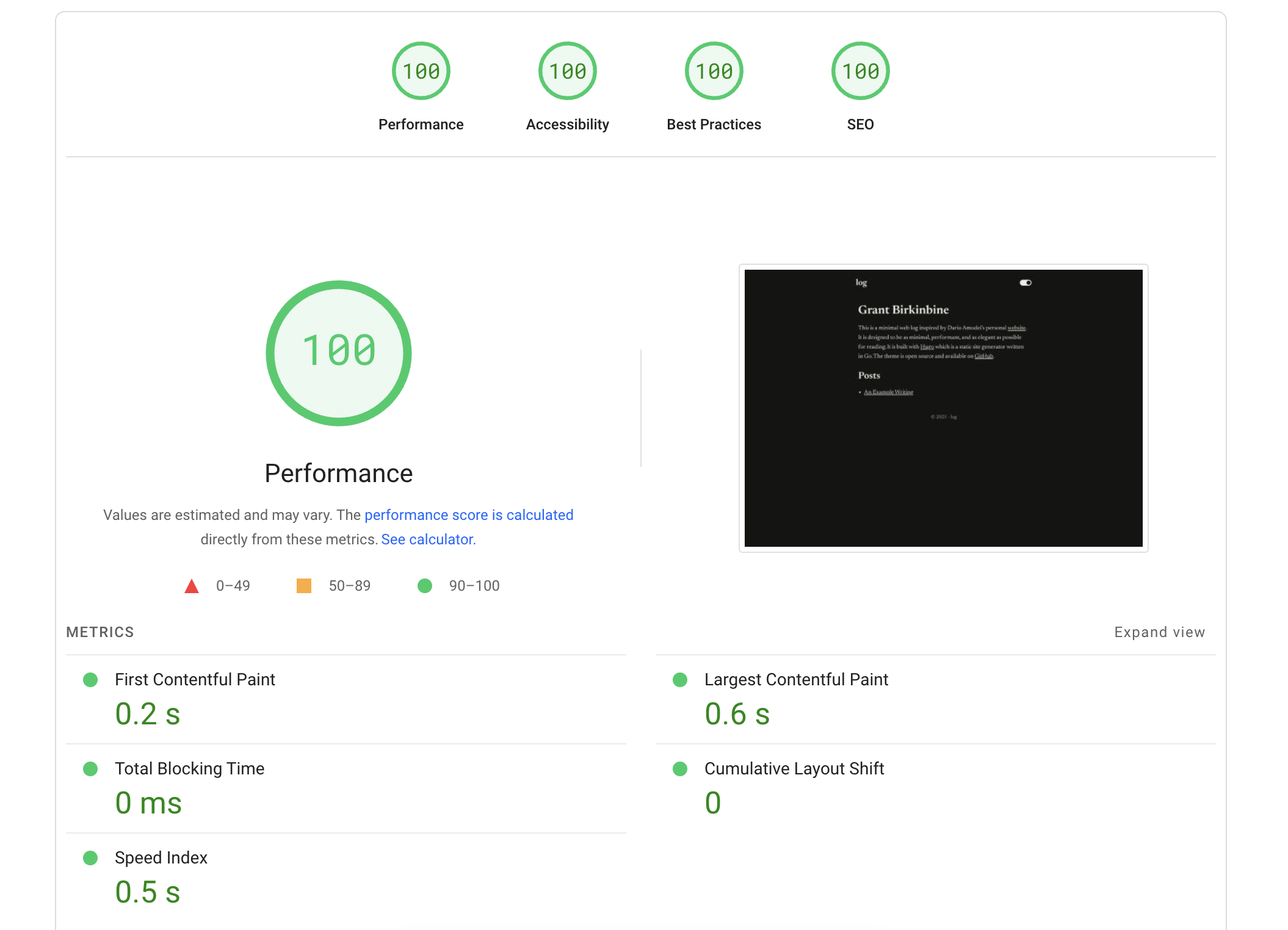
This theme is designed to be minimal and the page speed insights are as follows:
## Development
This repository follows the ["scripts to rule them all"](https://github.blog/engineering/scripts-to-rule-them-all/) pattern:
```bash
script/bootstrap
script/lint
script/test
script/build
```
CI executes these same scripts directly.
## Installation
> To view a real example of a project using this theme, check out [grantbirki/log](https://github.com/GrantBirki/log) which is where I have the demo deployed.
You can install this theme in one of the following ways:
### The Source
Download the source of this repo (dario) [as a zip from GitHub](https://github.com/GrantBirki/dario/archive/refs/heads/main.zip) and extract in your themes directory at `<my_site>/themes/dario`.
Then, once you have the theme extracted, you can add it to your site's `config.toml`:
```toml
theme = "dario"
```
### As a Git Submodule
Alternatively, if your site is a Git repo, you can add this theme as a [submodule](https://git-scm.com/book/en/v2/Git-Tools-Submodules) instead of downloading it as a zip:
```bash
cd <my_site>
git submodule add https://github.com/GrantBirki/dario.git themes/dario
git commit -m "Add dario theme as submodule"
```
Add it to your site's `config.toml`:
```toml
theme = "dario"
```
To upgrade to the latest version of the theme:
```bash
cd <my_site>
cd themes/dario
git checkout main
git pull
cd ../..
git commit themes/dario -m "Upgrade to latest dario theme"
```
### As a Hugo Module
And lastly, if you have the [latest version of Go](https://go.dev/doc/install), the best way to install this theme and keep up with improvements from time to time is to install it as a [Hugo module](https://gohugo.io/hugo-modules/).
Initialize your site:
```bash
hugo mod init yoursite.com
go mod edit -go=1.24
```
Add the following to your `config.toml`:
```toml
[module]
[[module.imports]]
path = "github.com/GrantBirki/dario"
```
Note that there's no `theme = "dario"` in this case. If you already have this in your `config.toml`, please remove it.
Review the Dario commit you intend to consume, then fetch it by its full 40-character revision. This example points to a known commit; replace it only after reviewing a newer revision:
```bash
DARIO_SHA="b0fa756c824bc7b9e4d64b75711b8742e44c7dc0"
hugo mod get "github.com/GrantBirki/dario@${DARIO_SHA}"
hugo mod tidy
```
Hugo records the commit as an immutable pseudo-version in `go.mod`, while `go.sum` authenticates the downloaded module content. The import in `config.toml` intentionally has no mutable version selector because `go.mod` is the dependency authority.
To upgrade the theme, review a newer Dario commit and run the same targeted update with its full revision:
```bash
DARIO_SHA="REPLACE_WITH_A_REVIEWED_40_CHARACTER_COMMIT_SHA"
hugo mod get "github.com/GrantBirki/dario@${DARIO_SHA}"
hugo mod tidy
```
## Configuration
You can further configure how this site looks by editing your `config.toml` file. Here is an example of a configuration that works with this theme:
```toml
baseURL = "https://yoursite.com/"
languageCode = "en-us"
title = "log" # the title of your site
copyright = "Copyright © 2025 Your Name. All rights reserved."
theme = "dario"
[params]
description = "A description of your site" # a description of your site that will be used in the meta tags
[params.author]
name = "Your Name" # the author of the site
email = "[email protected]" # the site author's email address
twitter = "@YourXHandle" # the site author's X/Twitter handle
```
To add intro text to your home page, create a file at `content/_index.md` with contents similar to the following:
```yaml
---
subtitle: "Home Page Subtitle" # the subtitle to display on the "/" homepage
description: "A minimal web log." # The description of the home page that will be used in the open graph meta tags
---
This is a minimal web log inspired by Dario Amodei's personal [website](https://darioamodei.com/). Add some more text here that will be displayed on your homepage (you can use markdown).
```
> Note: In the front matter yaml above, you can also set `homePageIsPost: true` to hydrate the landing page like a blog post. This is an alternate way to view the home page and is somewhat experimental.
### Optional Settings
By default, the theme shows a toggle for switching between light and dark modes. To follow the user's system preference instead, set the `colorScheme` parameter to `'system'`:
```toml
[params]
colorScheme = 'system'
```
You can also set it to `'light'` or `'dark'` to keep it fixed. The default behavior is to have it set as `'toggle'` which displays a toggle and on first page load it defaults to the user's system preference.
The lowercase `posts` link in the header is disabled by default. Enable it on every page with:
```toml
[params]
showPostsLink = true
```
The optional Copy Markdown control is disabled by default. Enable it on both the landing page and post pages with:
```toml
[params.copyMarkdown]
enabled = true
```
To show it on only one page type, set `home` or `posts` explicitly. An omitted page switch defaults to enabled while the feature is enabled globally:
```toml
[params.copyMarkdown]
enabled = true
home = true
posts = false
```
The control copies a Markdown heading and the page's raw Markdown body. Landing-page copies also include the generated section and post links, making the result ready to paste into an LLM prompt or another Markdown-aware tool.
The home page shows the top-level section with the most pages by default. To override this, set `mainSections` to select specific sections:
```toml
mainSections = ['posts', 'essays', 'notes']
```
You can add your own custom CSS in `assets/css/custom.css`:
```css
/* Use the black star as the bullet in unordered lists. */
.content-container ul {
list-style: none;
padding-left: 0;
}
.content-container ul > li::before {
content: '★';
margin-right: 0.5em;
}
```
If you override the default base font, you might also want to turn off font preloading:
```toml
[params]
disableFontPreload = true
```
To override the generated `404.html`, create `content/_404.md` with your customized text. For example, the following file contains a Hindi version of the default message:
```yaml
---
subtitle: "४०४"
build:
render: never
list: never
---
पृष्ठ नहीं मिला।
```
Be sure to update the value of [`languageCode`](https://gohugo.io/configuration/all/#languagecode) in `config.toml` to match the primary language of your content.
Set the `disableSocialMeta` parameter to turn off HTML tags related to [Open Graph](https://ogp.me) and [X Cards](https://developer.x.com/en/docs/x-for-websites/cards/overview/abouts-cards):
```toml
[params]
disableSocialMeta = true
```
If you wish to add your own non-standard meta tags for things like Bitcoin,
PGP, and so on, you can add them in `layouts/partials/nonstdmeta.html`:
```html
<meta name="email" content="[email protected]">
<meta name="bitcoin" content="bc1...">
<link rel="pgpkey" href="/pgp/key.asc">
```
## Blog Posts
Creating a blog post follows the same general process as most Hugo blogging themes.
Posts have markdown "front matter" that looks like this:
```yaml
---
title: "An Example Writing"
author: ["hugo", "monalisa"] # can be an array or just a string
description: "On how to write an example blog post"
# The summary is for search engines
summary: Lorem ipsum dolor sit amet, consectetur adipiscing elit. Sed neque elit, tristique placerat feugiat ac, facilisis vitae arcu. Proin eget egestas augue. Praesent ut sem nec arcu pellentesque aliquet. Duis dapibus diam vel metus tempus vulputate.
date: 2000-01-01T00:00:00-00:00 # date of creation
draft: false
ogTitle: Cool New Example Post # the title of the post that will be used in the open graph meta tags
ogDescription: "An example of using the Dario hugo theme" # the description of the post that will be used in the open graph meta tags
ogImage: /posts/example/og.png # the path to a png/jpg image in the ./posts/example directory to use as the open graph image
---
Here is where you write the content of your blog post in markdown!
```
> Here is a [live example](https://github.com/GrantBirki/log/blob/0893a8488426d0f910feefe0c69c49f3c10fc8c8/content/posts/example/index.md) to view the source of a blog post that uses this theme.
看看同类模板
对比同技术栈与用途的模板,找到更适合的视觉与内容结构。

hugo-PaperMod
PaperMod 是 Hugo 生态里知名度较高的主题之一,定位很明确:给博客和轻量作品集站点提供一套干净、响应式的阅读界面。
Hugo · 作品集

LoveIt
❤️A clean, elegant but advanced blog theme for Hugo 一个简洁、优雅且高效的 Hugo 主题
Hugo · 博客

hugo-coder
A minimalist blog theme for hugo.
Hugo · 博客

blowfish
Personal Website & Blog Theme for Hugo
Hugo · 博客

hugo-paper
🪺 A simple, clean, customizable Hugo theme
Hugo · 博客

hextra
Hextra 是一个 Hugo 主题,定位在文档站与博客之间:既提供侧边栏导航、目录、面包屑、分页这类文档站结构,也能承载博客内容。
Hugo · 文档