Exports pure static HTML to the /out directory at build time via output: 'export'
Next.jsReactBlog
nova-nextjs-blog-template — Next.js Blog Template
By haider484991
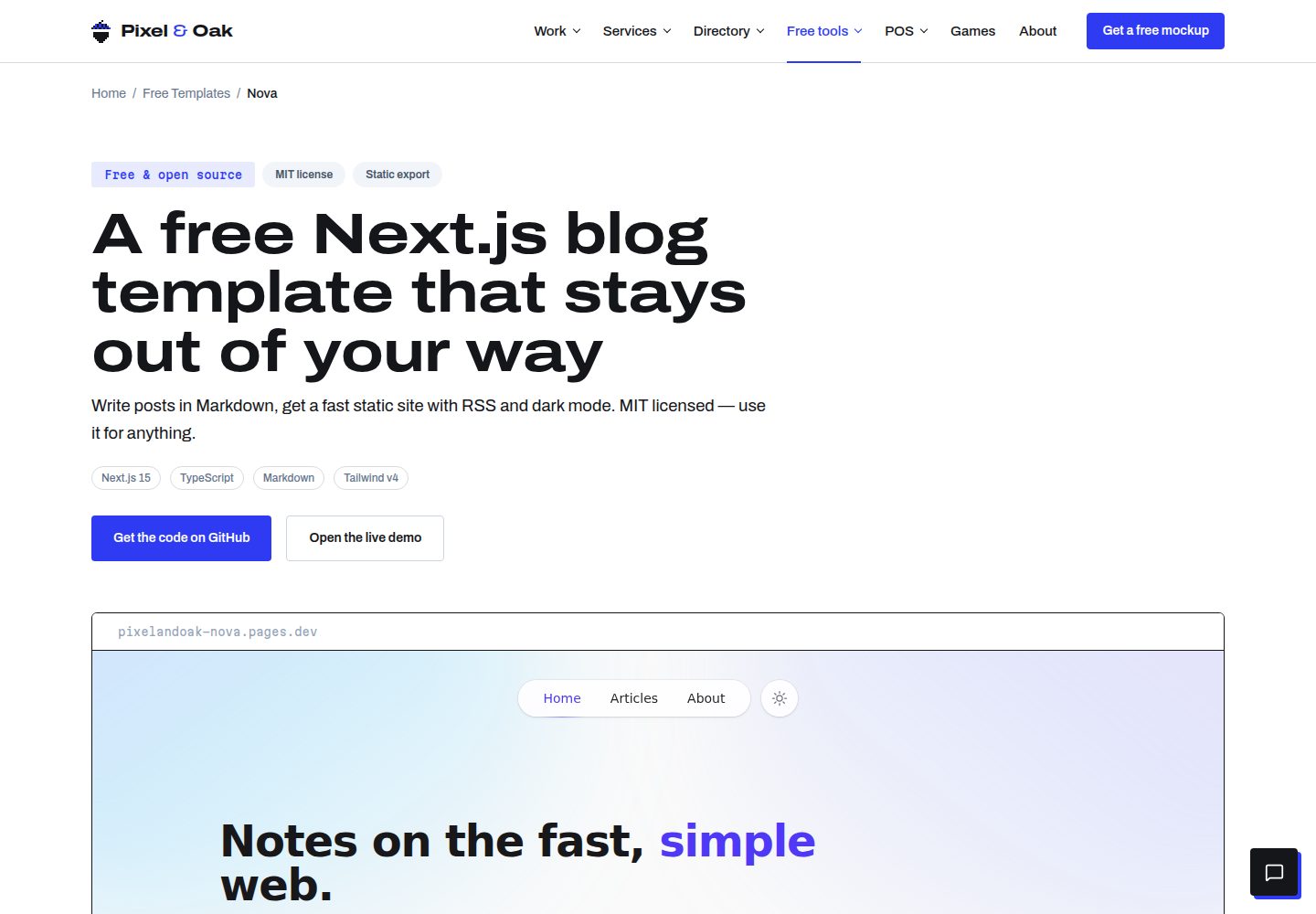
Nova is a free, open-source blog template built on Next.js. Write in Markdown, export pure static HTML at build time, with built-in dark mode, tag filtering, RSS, sitemap, and automatically generated cover gradients.
Explore the design
Compare the page layouts and mobile experience. Open any screenshot for a closer look.
Desktop homepage1 / 3
Desktop captureTop of page
Actual screenshot captured by the server browser.
All pages & views 3
Screenshots show visual appearance; interactive behavior may differ.
Recorded 2026-10-14View source
What stands out
A quick read of the recorded project description.
Markdown writing, with frontmatter supporting title, date, excerpt, and tags fields
Dark mode uses a class strategy, respects system preference, persists the toggle, and has no flash on load
Deterministically generates gradient covers based on tags, requiring no image assets
Generates RSS, sitemap, and robots.txt at build time
Provides per-page metadata, Open Graph, and Twitter cards via the Next.js Metadata API
Template Details
Nova is a Next.js template for blogs, described in its README as a static blog solution that is "done on day one." Posts are stored as Markdown files in the content/posts/ directory, one .md file per post, with the filename serving as the URL slug and frontmatter providing title, date, excerpt, and tags. At build time it automatically calculates reading time, generates deterministic gradient covers based on tags, and outputs RSS, sitemap, and robots.txt. The template uses the App Router, TypeScript, Tailwind CSS, react-markdown, remark-gfm, rehype-highlight, and gray-matter. The README explicitly states it does not rely on a CMS, database, or server; the build output is pure static files under /out, deployable to Cloudflare Pages, Vercel, Netlify, GitHub Pages, or any static host.
The template includes a floating pill navigation, an aurora gradient hero, system-preference-aware dark mode, client-side tag filtering, post cards, code block syntax highlighting, per-page metadata, and Open Graph/Twitter cards. The README does not provide information about comments, search, multilingual support, pagination, or image optimization, nor does it state the template's production performance or accessibility certification status.
Next.jsBlog
Is it right for your project?
Use Cases
- Personal technical blogs or writing sites that maintain content in Markdown
- Static blogs that need to be deployed to Cloudflare Pages, Vercel, Netlify, or GitHub Pages
- Content sites that want to organize posts with tag filtering and automatically generate RSS and a sitemap
- Developer blogs that need dark mode, post cards, and code highlighting
Suitable For
- Writers who accept managing content with Markdown files rather than a CMS
- Developers who want to host their blog as a pure static site for free on any static host
- Front-end developers using the Next.js App Router, TypeScript, and Tailwind CSS
- Blog projects that need basic SEO output such as RSS, a sitemap, and social cards
Getting started & customization
Use these recorded setup notes alongside the repository instructions for your chosen version.
- 1
After cloning the repository, run npm install; npm run dev starts local development, npm run build generates the static site to /out, and npm run preview previews /out locally
- 2
The site name, URL, author, and social links are centralized in lib/site.ts; when changing the domain, you must also update the URL and title at the top of scripts/rss.mjs, as well as the sitemap address in public/robots.txt
- 3
Posts go in the content/posts/ directory, one Markdown file per post; frontmatter requires title, date, and excerpt, while tags is optional
- 4
The newsletter subscription form in components/NewsletterCard.tsx is not connected to a service by default; you need to point the form action to an email service provider yourself
- 5
When deploying to Cloudflare Pages or Netlify, the build command is npm run build and the output directory is out; on Vercel, because next.config.ts already sets output: 'export', the default build produces the static export
License & source material
Usage conditions & limitations
Free to use · keep license noticeThis entry covers the free version under the MIT license in the public repository; the free scope is the code of this version and does not mean external services or third-party assets are free.
Must comply with when using
- You may use, modify, commercialize, and distribute the code of this version for free.
- When distributing copies or substantial portions of the code, retain the original author's copyright notice and the full MIT license notice.
- The code is provided as is; warranties and limitations of liability are governed by the original license and applicable law.
Additional costs & items to verify
- Demo images, fonts, icons, and other third-party assets must be checked against their respective licenses; they cannot be judged solely by the code's MIT license.
- External services such as domains, hosting, databases, payments, or AI may incur separate charges.
- The subscription form in NewsletterCard is not connected to any service by default; you need to point the form action to a third-party email service provider (such as Buttondown, Kit, Mailchimp, Loops) yourself, and using this feature depends on an external service.
- When changing the site domain, you must also update the URL and title at the top of lib/site.ts and scripts/rss.mjs, as well as the sitemap address in public/robots.txt; otherwise the RSS and sitemap links will be inconsistent.
View Original Text Basis
Permission is hereby granted, free of charge
Original License Text
The "Stay up to date" card in `components/NewsletterCard.tsx` is intentionally unwired. Point the `<form action>` at your provider — Buttondown, Kit, Mailchimp and Loops all accept simple HTML form posts.
Original README
https://github.com/haider484991/nova-nextjs-blog-template/blob/main/LICENSEhttps://github.com/haider484991/nova-nextjs-blog-template/blob/main/README.mdEverything site-wide lives in **`lib/site.ts`** — name, title, description, canonical URL, author info and social links. The RSS/sitemap script keeps its own copy of the URL and title at the top of **`scripts/rss.mjs`**; update both, plus the sitemap URL in `public/robots.txt`, when you change domains.
Original README
Compiled by DeepSeek based on repository license and README ·2026-10-14. Results only cover the materials read; dependencies, images, fonts, and subsequent term changes are subject to their respective original texts.
Project checks & description sources
Template Information
- Source platforms
- GitHub
- Documentation and maintenance reference score
- More documented · 80 / 100
- Technologies
- Next.js · React
- Website type
- Blog
How this score is calculated
Our heuristic uses license records (up to 30), a demo link (12), a preview (10), stars (15), recorded maintenance (15), description completeness (8), feature records (5) and classification data (5). It is not a code, security or performance test, or a Google score. A link does not establish tested functionality.
What to verify for this project
- Repository update recorded
- 2026-10-14
- Screenshot last checked
- 2026-10-14
A demo link is listed. Check it with your own content and viewport sizes; its presence does not confirm that forms, authentication or payments work.
The catalog identifies Next.js as the primary stack. Check the actual dependency manifest and lockfile for versions and hosting requirements. These notes use recorded metadata, not a code audit or a deployment test.
Use a selection guide →How this description was prepared
AI-assisted description based on catalog records and repository material. Repository authors are not automatically the reviewers of this description.
Review declaration: codex-user-requested-batch-review-20261015 · 2026-10-15
Inspect the recorded source material
SHA-256: 863d15de648661dab590bb68c78cfbbb9959a8bf471fde606be5d7854dbcdd73
2026-10-14T18:15:28.304Z
Source file / repository# Nova — a Next.js blog template that's finished on day one
Nova is a free, open-source **Next.js blog template** with the polish of a premium theme: refined editorial typography, a floating pill navigation, first-class dark mode, and signature aurora-gradient art — all exported to plain static HTML that deploys anywhere for free.
Write posts in markdown. Get article pages, tag filters, reading times, RSS, a sitemap and generated cover art out of one `next build`. No CMS, no database, no stock photos, no server.
**Live demo → [pixelandoak-nova.pages.dev](https://pixelandoak-nova.pages.dev)**
**Template page → [pixelandoak.com/templates/nextjs-blog-template](https://pixelandoak.com/templates/nextjs-blog-template/)**
[](https://vercel.com/new/clone?repository-url=https%3A%2F%2Fgithub.com%2Fhaider484991%2Fnova-nextjs-blog-template&project-name=nova-blog&repository-name=nova-blog)

## Features
- ⚡ **Fully static** — `output: 'export'` emits plain HTML to `/out`; host it free on Cloudflare Pages, Vercel, Netlify or GitHub Pages
- 🌗 **First-class dark mode** — class strategy, system-preference aware, persisted toggle, zero flash on load
- ✍️ **Markdown content** — one `.md` file per post with simple frontmatter; GitHub-flavored markdown supported
- 🎨 **Generated cover art** — deterministic tag-based gradients mean the template looks finished with zero images
- 🧭 **Floating pill navigation** — backdrop-blurred, detached from the top edge, collapses to a menu on mobile
- 🌌 **Aurora hero** — Nova's signature soft gradient wash, tuned separately for light and dark
- 📚 **Beautiful typography** — tuned `@tailwindcss/typography` prose with custom dark-glass code blocks and syntax highlighting
- 🏷️ **Tag system** — client-side tag filtering on the articles index, tag pills on every post
- ⏱️ **Reading time** — computed from word count at build time
- 📡 **RSS + sitemap + robots.txt** — generated on every build by a tiny Node script
- 🔍 **SEO-ready** — per-page metadata, Open Graph and Twitter cards via the Next.js Metadata API
- 🧩 **No icon or font dependencies** — inline SVGs and a fast system font stack
- ♿ **Accessible details** — labeled icon buttons, keyboard-friendly nav, stretched-link cards, semantic markup
## Tech stack
[Next.js 15](https://nextjs.org) (App Router) · [TypeScript](https://www.typescriptlang.org) · [Tailwind CSS v4](https://tailwindcss.com) · [react-markdown](https://github.com/remarkjs/react-markdown) + [remark-gfm](https://github.com/remarkjs/remark-gfm) · [rehype-highlight](https://github.com/rehypejs/rehype-highlight) · [gray-matter](https://github.com/jonschlinkert/gray-matter)
## Quick start
```bash
# 1. Grab the template
git clone https://github.com/haider484991/nova-nextjs-blog-template.git my-blog
cd my-blog
# 2. Install
npm install
# 3. Develop
npm run dev # http://localhost:3000
# 4. Build the static site
npm run build # generates rss.xml + sitemap.xml, then exports to /out
npm run preview # serve /out locally
```
## Writing content
Posts live in `content/posts/`. One markdown file per post — the filename becomes the URL slug (`hello-world.md` → `/articles/hello-world/`).
```md
---
title: "Hello, world"
date: "2026-07-01"
excerpt: "A one-or-two sentence summary shown on cards, in search results and in the RSS feed."
tags: ["engineering", "notes"]
---
Your markdown starts here. GitHub-flavored markdown is supported —
tables, task lists, strikethrough, autolinks — plus fenced code blocks
with syntax highlighting.
```
### Frontmatter reference
| Field | Type | Required | Notes |
| --------- | ---------- | -------- | ------------------------------------------------------------ |
| `title` | `string` | yes | Shown on cards, the post page, `<title>` and social cards |
| `date` | `"YYYY-MM-DD"` | yes | Controls ordering, display date, RSS `pubDate`, sitemap |
| `excerpt` | `string` | yes | Card/OG description and RSS item description |
| `tags` | `string[]` | no | Powers the tag filter, tag pills and the generated cover art |
Reading time is computed automatically. Cover art is generated from the tags — same tags, same gradient, every build.
## Customization
### Site name, URL and socials
Everything site-wide lives in **`lib/site.ts`** — name, title, description, canonical URL, author info and social links. The RSS/sitemap script keeps its own copy of the URL and title at the top of **`scripts/rss.mjs`**; update both, plus the sitemap URL in `public/robots.txt`, when you change domains.
### Accent color
Nova's accent is indigo. Because the accent is expressed as standard Tailwind utilities, a project-wide find-and-replace of `indigo-` → `sky-` (or `emerald-`, `rose`, `violet`…) restyles the whole template, aurora and gradients included. For a custom brand color, define it in `app/globals.css` under `@theme` and swap the utilities once.
### Fonts
Nova ships with a system font stack (zero network cost, zero layout shift). Prefer a web font? Add one with [`next/font`](https://nextjs.org/docs/app/building-your-application/optimizing/fonts) in `app/layout.tsx` and update `--font-sans` in `app/globals.css`.
### Navigation
Nav links are defined once in `components/Header.tsx` (and mirrored in `components/Footer.tsx`). Add a page in `app/your-page/page.tsx`, then add `{ href: "/your-page", label: "Your page" }` to both lists.
### Newsletter form
The "Stay up to date" card in `components/NewsletterCard.tsx` is intentionally unwired. Point the `<form action>` at your provider — Buttondown, Kit, Mailchimp and Loops all accept simple HTML form posts.
### Gradient covers
The six cover gradients live in `lib/gradients.ts`. Edit the list to retheme every card at once — covers are deterministic, so posts keep their art between builds.
## Deploying
Nova builds to a plain static site in `/out`, so any static host works.
### Cloudflare Pages
1. Push your repo to GitHub, then in the Cloudflare dashboard: **Workers & Pages → Create → Pages → Connect to Git**
2. Build command: `npm run build` — Output directory: `out`
3. Deploy. Every push to your production branch redeploys automatically.
### Vercel
1. **Add New Project**, import the repo — Vercel detects Next.js automatically
2. Because `output: 'export'` is set in `next.config.ts`, the default `npm run build` produces the static export; no extra configuration needed
### Netlify
1. **Add new site → Import an existing project**
2. Build command: `npm run build` — Publish directory: `out`
### Anywhere else
`npm run build`, then upload the contents of `/out` — GitHub Pages, S3 + CloudFront, or any web server that can serve files.
## Attribution
The footer includes a small "Built by Pixel & Oak" link. It's the only thing we ask for in exchange for a free template — but it's a request, not a requirement. The MIT license means **you're free to remove it** (see `components/Footer.tsx`). If you keep it, thank you — it genuinely helps.
## License
[MIT](./LICENSE) © Pixel & Oak. Use it for anything, personal or commercial.
---
Built by [Pixel & Oak](https://pixelandoak.com/templates/nextjs-blog-template/) — we build fast, SEO-ready websites. If you'd like one without building it yourself, [say hello](https://pixelandoak.com/templates/nextjs-blog-template/?utm_source=nova-template).
Explore similar templates
Compare previews and descriptions within the same stack and category.

tailwind-nextjs-starter-blog
A Next.js and Tailwind CSS blog starter template using Contentlayer for Markdown/MDX, with built-in SEO, code highlighting, and tags. It targets personal technical blogs and migration from Jekyll/Hugo to React, and supports one-click Vercel deployment.
Next.js · Blog

Nextjs-tailwindcss-blog-template
A Next.js blog styled with Tailwind CSS. The current branch processes Markdown with Velite; the earlier Contentlayer setup is retained in a separate historical branch.
Next.js · Blog

Next-js-Blog-Boilerplate
A blog starter built on Next.js 12 and Tailwind CSS 3, integrating TypeScript, ESLint, Prettier, and PostCSS.
Next.js · Blog

nextjs-blog-theme
A Next.js 15 and Tailwind CSS 4.x blog starter by Netlify, designed by Bejamas, with MDX support, dark/light theme switching, and environment-variable configuration. It includes a visual setup wizard for deploying to Netlify and manages content via local .mdx files.
Next.js · Blog

blog
A personal blog forked from Timlrx's tailwind-nextjs-starter-blog, built with Next.js, React, and Tailwind CSS. Content is stored as Markdown/MDX under data/, with site, author, navigation, and project data in separate files.
Next.js · Blog

tailnext
Tailnext is a free, open-source template built on the Next.js 14 App Router and Tailwind CSS, created by the onWidget team.
Next.js · Blog