构建时通过 output: 'export' 导出纯静态 HTML 到 /out 目录
Next.jsReact博客
nova-nextjs-blog-template — Next.js 博客模板
作者 haider484991
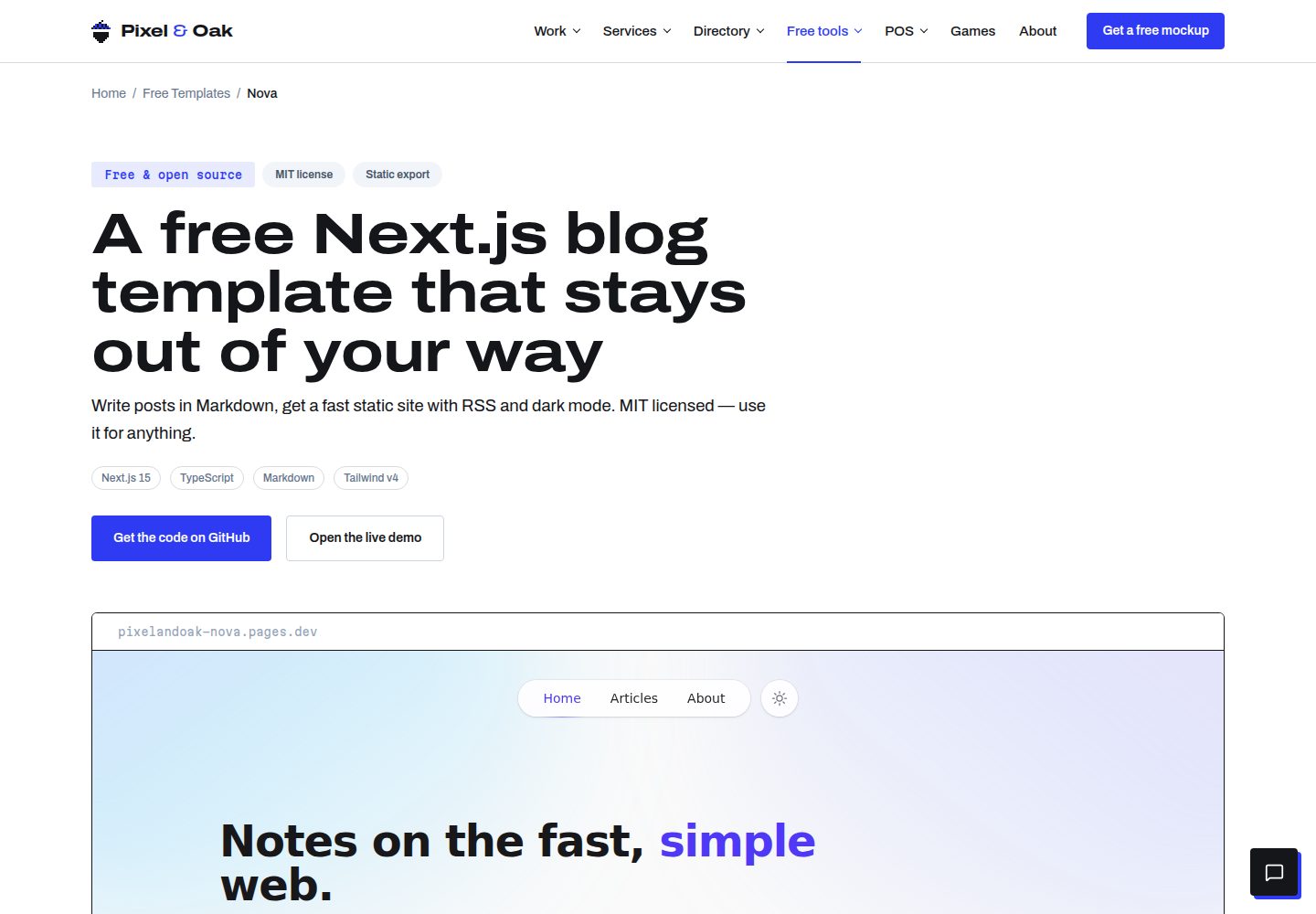
Nova 是一个基于 Next.js 的免费开源博客模板,使用 Markdown 写作,构建时导出纯静态 HTML,内置深色模式、标签筛选、RSS、站点地图和自动生成的封面渐变。
看看你的网站会是什么样
浏览真实页面截图,比较内容排版与手机效果。点击下方缩略图切换,放大查看整页细节。
全部页面与视图 3
截图用于了解视觉与布局,交互效果请以实际项目为准。
采集于 2026-10-14查看来源
值得关注的模板亮点
从已有项目资料中,快速了解它的特点。
Markdown 写作,frontmatter 支持 title、date、excerpt、tags 字段
深色模式采用 class 策略,感知系统偏好并持久化切换,加载时无闪烁
根据标签确定性生成渐变封面,无需图片素材
构建时生成 RSS、站点地图和 robots.txt
通过 Next.js Metadata API 提供每页元数据、Open Graph 和 Twitter 卡片
模板详细介绍
Nova 是一个面向博客的 Next.js 模板,README 说明其定位为“第一天就完成”的静态博客方案。文章以 Markdown 文件存放在 content/posts/ 目录,每篇文章一个 .md 文件,文件名即 URL slug,通过 frontmatter 提供标题、日期、摘要和标签。构建时自动计算阅读时间、生成基于标签的确定性渐变封面,并输出 RSS、站点地图和 robots.txt。模板使用 App Router、TypeScript、Tailwind CSS、react-markdown、remark-gfm、rehype-highlight 和 gray-matter。README 明确说明不依赖 CMS、数据库或服务器,构建产物为 /out 下的纯静态文件,可部署到 Cloudflare Pages、Vercel、Netlify、GitHub Pages 或任意静态托管。
模板包含浮动胶囊导航、极光渐变首屏、系统偏好感知的深色模式、客户端标签筛选、文章卡片、代码块语法高亮、每页元数据与 Open Graph/Twitter 卡片。README 未提供关于评论系统、搜索、多语言、分页或图片优化的说明,也未说明模板在生产环境下的性能表现或可访问性认证情况。
Next.js博客
适合你的项目吗?
适用场景
- 用 Markdown 维护内容的个人技术博客或写作站点
- 需要部署到 Cloudflare Pages、Vercel、Netlify 或 GitHub Pages 的静态博客
- 希望以标签筛选组织文章、并自动生成 RSS 与站点地图的内容站点
- 需要深色模式、文章卡片和代码高亮的开发者博客
适合人群
- 接受用 Markdown 文件而非 CMS 管理内容的写作者
- 希望将博客作为纯静态站点免费托管在任意静态主机的开发者
- 使用 Next.js App Router、TypeScript 和 Tailwind CSS 的前端开发者
- 需要 RSS、站点地图和社交卡片等基础 SEO 输出的博客项目
上手与定制指南
结合仓库当前版本的说明,按下面的资料检查内容、配置与运行要求。
- 1
克隆仓库后执行 npm install,npm run dev 启动本地开发,npm run build 生成静态站点到 /out,npm run preview 本地预览 /out
- 2
站点名称、URL、作者和社交链接集中在 lib/site.ts;修改域名时还需同步更新 scripts/rss.mjs 顶部的 URL 与标题,以及 public/robots.txt 中的站点地图地址
- 3
文章放在 content/posts/ 目录,每篇一个 Markdown 文件,frontmatter 必填 title、date、excerpt,tags 可选
- 4
新闻订阅表单在 components/NewsletterCard.tsx 中默认未接入服务,需要自行将 form action 指向邮件服务商
- 5
部署到 Cloudflare Pages 或 Netlify 时构建命令为 npm run build,输出目录为 out;Vercel 因 next.config.ts 已设置 output: 'export',默认构建即可产出静态导出
授权与来源资料
使用条件与限制
免费使用 · 保留许可声明本次收录的是公开仓库中采用 MIT 许可的免费版本;免费范围为该版本代码,不代表外部服务或第三方素材免费。
使用时需要遵守
- 允许免费使用、修改、商用和分发该版本代码。
- 分发代码副本或实质性部分时,保留原作者版权声明和完整 MIT 许可声明。
- 代码按现状提供;担保与责任限制以原许可证及适用法律为准。
额外费用与待核对事项
- 演示图片、字体、图标及其他第三方素材需按各自许可核对,不能仅凭代码的 MIT 许可判断。
- 域名、托管、数据库、支付或 AI 等外部服务可能另外收费。
- NewsletterCard 中的订阅表单默认未接入任何服务,需要自行将 form action 指向第三方邮件服务商(如 Buttondown、Kit、Mailchimp、Loops),使用该功能需依赖外部服务。
- 修改站点域名时需同时更新 lib/site.ts、scripts/rss.mjs 顶部的 URL 与标题,以及 public/robots.txt 中的站点地图地址,否则 RSS 与站点地图链接会不一致。
查看原文依据
Permission is hereby granted, free of charge
许可证原文
The "Stay up to date" card in `components/NewsletterCard.tsx` is intentionally unwired. Point the `<form action>` at your provider — Buttondown, Kit, Mailchimp and Loops all accept simple HTML form posts.
README 原文
https://github.com/haider484991/nova-nextjs-blog-template/blob/main/LICENSEhttps://github.com/haider484991/nova-nextjs-blog-template/blob/main/README.mdEverything site-wide lives in **`lib/site.ts`** — name, title, description, canonical URL, author info and social links. The RSS/sitemap script keeps its own copy of the URL and title at the top of **`scripts/rss.mjs`**; update both, plus the sitemap URL in `public/robots.txt`, when you change domains.
README 原文
DeepSeek 根据仓库许可证和 README 整理 ·2026-10-14。结果仅覆盖已读取资料,依赖、图片、字体及后续条款变更以各自原文为准。
项目核对记录与介绍依据
模板资料
- 来源平台
- GitHub
- 资料与维护参考分
- 资料较完整 · 80 / 100
- 技术栈
- Next.js · React
- 网站类型
- 博客
这个分数如何计算
本站按许可资料(最高30分)、演示链接(12分)、预览图(10分)、Star数(15分)、记录的维护时间(15分)、描述完整度(8分)、功能记录(5分)和分类资料(5分)计算。它不是代码、安全或性能测试,也不是 Google 评分;有链接不代表已实测可用。
这个项目需要核对什么
- 记录的仓库更新时间
- 2026-10-14
- 截图检查日期
- 2026-10-14
已收录演示链接。请用你的内容与屏幕尺寸检查;有演示不代表表单、认证或支付已经可用。
目录记录的主要技术栈是 Next.js。请通过依赖清单和锁文件核对实际版本与托管要求。这些说明基于收录资料,不代表代码审计或部署实测。
查看具体选型方法 →介绍的制作与核对状态
介绍由 AI 辅助整理目录与仓库资料。仓库作者不等于这篇介绍的审核者。
审核声明: codex-user-requested-batch-review-20261015 · 2026-10-15
查看当时使用的来源资料
SHA-256: 863d15de648661dab590bb68c78cfbbb9959a8bf471fde606be5d7854dbcdd73
2026-10-14T18:15:28.304Z
来源文件 / 仓库# Nova — a Next.js blog template that's finished on day one
Nova is a free, open-source **Next.js blog template** with the polish of a premium theme: refined editorial typography, a floating pill navigation, first-class dark mode, and signature aurora-gradient art — all exported to plain static HTML that deploys anywhere for free.
Write posts in markdown. Get article pages, tag filters, reading times, RSS, a sitemap and generated cover art out of one `next build`. No CMS, no database, no stock photos, no server.
**Live demo → [pixelandoak-nova.pages.dev](https://pixelandoak-nova.pages.dev)**
**Template page → [pixelandoak.com/templates/nextjs-blog-template](https://pixelandoak.com/templates/nextjs-blog-template/)**
[](https://vercel.com/new/clone?repository-url=https%3A%2F%2Fgithub.com%2Fhaider484991%2Fnova-nextjs-blog-template&project-name=nova-blog&repository-name=nova-blog)

## Features
- ⚡ **Fully static** — `output: 'export'` emits plain HTML to `/out`; host it free on Cloudflare Pages, Vercel, Netlify or GitHub Pages
- 🌗 **First-class dark mode** — class strategy, system-preference aware, persisted toggle, zero flash on load
- ✍️ **Markdown content** — one `.md` file per post with simple frontmatter; GitHub-flavored markdown supported
- 🎨 **Generated cover art** — deterministic tag-based gradients mean the template looks finished with zero images
- 🧭 **Floating pill navigation** — backdrop-blurred, detached from the top edge, collapses to a menu on mobile
- 🌌 **Aurora hero** — Nova's signature soft gradient wash, tuned separately for light and dark
- 📚 **Beautiful typography** — tuned `@tailwindcss/typography` prose with custom dark-glass code blocks and syntax highlighting
- 🏷️ **Tag system** — client-side tag filtering on the articles index, tag pills on every post
- ⏱️ **Reading time** — computed from word count at build time
- 📡 **RSS + sitemap + robots.txt** — generated on every build by a tiny Node script
- 🔍 **SEO-ready** — per-page metadata, Open Graph and Twitter cards via the Next.js Metadata API
- 🧩 **No icon or font dependencies** — inline SVGs and a fast system font stack
- ♿ **Accessible details** — labeled icon buttons, keyboard-friendly nav, stretched-link cards, semantic markup
## Tech stack
[Next.js 15](https://nextjs.org) (App Router) · [TypeScript](https://www.typescriptlang.org) · [Tailwind CSS v4](https://tailwindcss.com) · [react-markdown](https://github.com/remarkjs/react-markdown) + [remark-gfm](https://github.com/remarkjs/remark-gfm) · [rehype-highlight](https://github.com/rehypejs/rehype-highlight) · [gray-matter](https://github.com/jonschlinkert/gray-matter)
## Quick start
```bash
# 1. Grab the template
git clone https://github.com/haider484991/nova-nextjs-blog-template.git my-blog
cd my-blog
# 2. Install
npm install
# 3. Develop
npm run dev # http://localhost:3000
# 4. Build the static site
npm run build # generates rss.xml + sitemap.xml, then exports to /out
npm run preview # serve /out locally
```
## Writing content
Posts live in `content/posts/`. One markdown file per post — the filename becomes the URL slug (`hello-world.md` → `/articles/hello-world/`).
```md
---
title: "Hello, world"
date: "2026-07-01"
excerpt: "A one-or-two sentence summary shown on cards, in search results and in the RSS feed."
tags: ["engineering", "notes"]
---
Your markdown starts here. GitHub-flavored markdown is supported —
tables, task lists, strikethrough, autolinks — plus fenced code blocks
with syntax highlighting.
```
### Frontmatter reference
| Field | Type | Required | Notes |
| --------- | ---------- | -------- | ------------------------------------------------------------ |
| `title` | `string` | yes | Shown on cards, the post page, `<title>` and social cards |
| `date` | `"YYYY-MM-DD"` | yes | Controls ordering, display date, RSS `pubDate`, sitemap |
| `excerpt` | `string` | yes | Card/OG description and RSS item description |
| `tags` | `string[]` | no | Powers the tag filter, tag pills and the generated cover art |
Reading time is computed automatically. Cover art is generated from the tags — same tags, same gradient, every build.
## Customization
### Site name, URL and socials
Everything site-wide lives in **`lib/site.ts`** — name, title, description, canonical URL, author info and social links. The RSS/sitemap script keeps its own copy of the URL and title at the top of **`scripts/rss.mjs`**; update both, plus the sitemap URL in `public/robots.txt`, when you change domains.
### Accent color
Nova's accent is indigo. Because the accent is expressed as standard Tailwind utilities, a project-wide find-and-replace of `indigo-` → `sky-` (or `emerald-`, `rose`, `violet`…) restyles the whole template, aurora and gradients included. For a custom brand color, define it in `app/globals.css` under `@theme` and swap the utilities once.
### Fonts
Nova ships with a system font stack (zero network cost, zero layout shift). Prefer a web font? Add one with [`next/font`](https://nextjs.org/docs/app/building-your-application/optimizing/fonts) in `app/layout.tsx` and update `--font-sans` in `app/globals.css`.
### Navigation
Nav links are defined once in `components/Header.tsx` (and mirrored in `components/Footer.tsx`). Add a page in `app/your-page/page.tsx`, then add `{ href: "/your-page", label: "Your page" }` to both lists.
### Newsletter form
The "Stay up to date" card in `components/NewsletterCard.tsx` is intentionally unwired. Point the `<form action>` at your provider — Buttondown, Kit, Mailchimp and Loops all accept simple HTML form posts.
### Gradient covers
The six cover gradients live in `lib/gradients.ts`. Edit the list to retheme every card at once — covers are deterministic, so posts keep their art between builds.
## Deploying
Nova builds to a plain static site in `/out`, so any static host works.
### Cloudflare Pages
1. Push your repo to GitHub, then in the Cloudflare dashboard: **Workers & Pages → Create → Pages → Connect to Git**
2. Build command: `npm run build` — Output directory: `out`
3. Deploy. Every push to your production branch redeploys automatically.
### Vercel
1. **Add New Project**, import the repo — Vercel detects Next.js automatically
2. Because `output: 'export'` is set in `next.config.ts`, the default `npm run build` produces the static export; no extra configuration needed
### Netlify
1. **Add new site → Import an existing project**
2. Build command: `npm run build` — Publish directory: `out`
### Anywhere else
`npm run build`, then upload the contents of `/out` — GitHub Pages, S3 + CloudFront, or any web server that can serve files.
## Attribution
The footer includes a small "Built by Pixel & Oak" link. It's the only thing we ask for in exchange for a free template — but it's a request, not a requirement. The MIT license means **you're free to remove it** (see `components/Footer.tsx`). If you keep it, thank you — it genuinely helps.
## License
[MIT](./LICENSE) © Pixel & Oak. Use it for anything, personal or commercial.
---
Built by [Pixel & Oak](https://pixelandoak.com/templates/nextjs-blog-template/) — we build fast, SEO-ready websites. If you'd like one without building it yourself, [say hello](https://pixelandoak.com/templates/nextjs-blog-template/?utm_source=nova-template).
看看同类模板
对比同技术栈与用途的模板,找到更适合的视觉与内容结构。

tailwind-nextjs-starter-blog
tailwind-nextjs-starter-blog 是一个面向个人技术博客的 Next.js 与 Tailwind CSS 启动模板,其 v2 版本基于 App Router 与 React Server Comp…
Next.js · 博客

Nextjs-tailwindcss-blog-template
使用 Tailwind CSS 的 Next.js 博客。当前分支通过 Velite 处理 Markdown,早期 Contentlayer 实现保留在单独的历史分支中。
Next.js · 博客

Next-js-Blog-Boilerplate
Next-js-Blog-Boilerplate 是一套面向个人与技术博客的启动代码,基于 Next.js 12 与 Tailwind CSS 3 构建,同时集成了 TypeScript、ESLint、Prettier …
Next.js · 博客

nextjs-blog-theme
nextjs-blog-theme 是 Netlify 团队维护的一个博客启动模板,基于 Next.js 15(Pages Router)和 Tailwind CSS 4.x 构建,设计由 Bejamas 机构完成。
Next.js · 博客

blog
🚀 My personal blog made with Tailwind CSS and NextJS. Template from Timlrx. Feel free to fork, follow and use…
Next.js · 博客

tailnext
Tailnext 是一个基于 Next.js 14 App Router 和 Tailwind CSS 的免费开源模板,由 onWidget 团队创建并维护。
Next.js · 博客