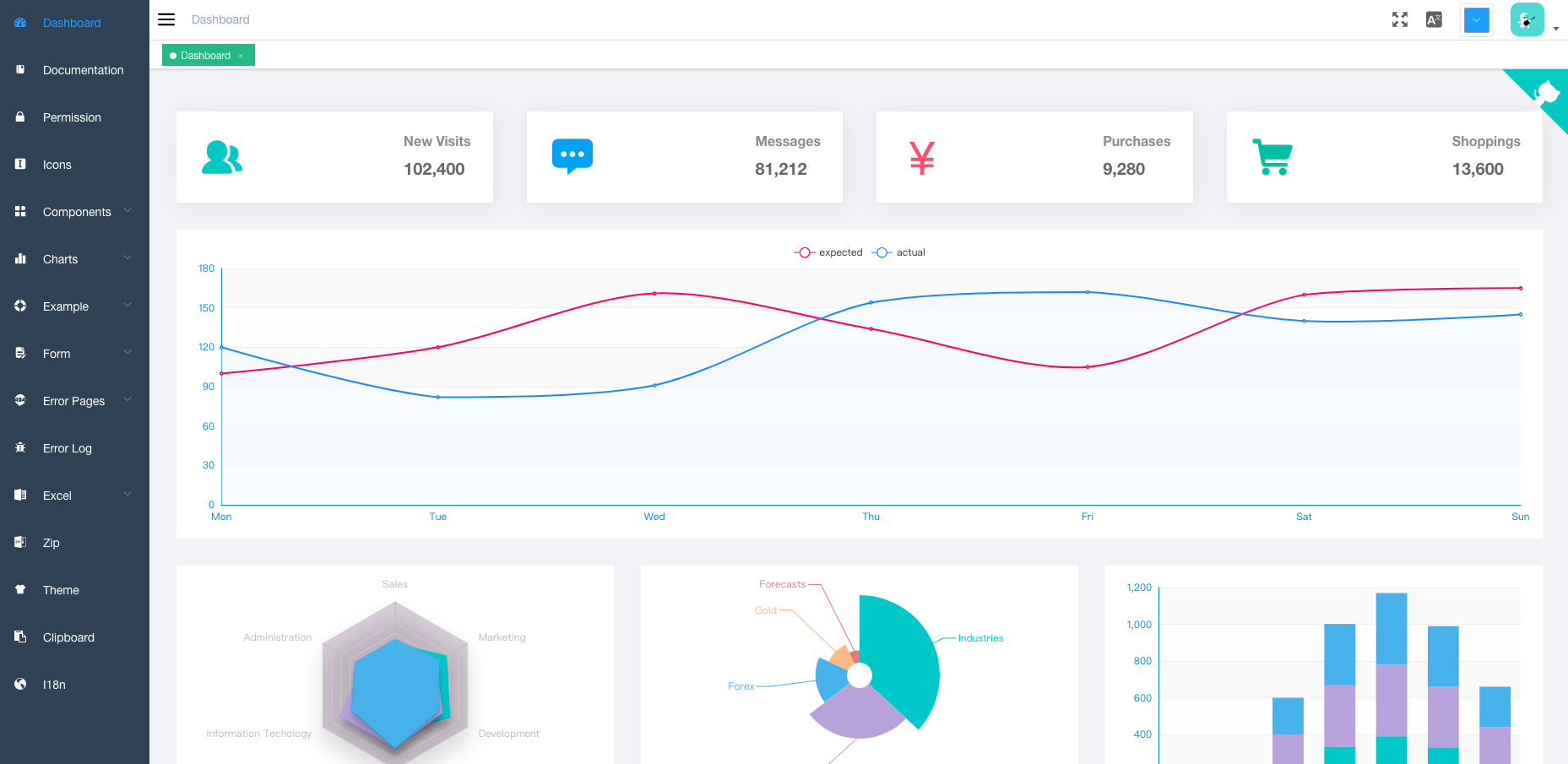
Built on Vue, element-ui, vuex, vue-router, and axios, with request data mocked by Mock.js
VueAngularReactAdmin dashboard
Vue-admin — Vue Admin dashboard Template
By harrialeksi
A Vue and element-ui admin front-end template with permission control, multi-environment builds, and example pages for tables and editors.
Explore the design
Compare the page layouts and mobile experience. Open any screenshot for a closer look.
Author preview
Author-provided preview
Preview provided in the project README.
One original preview is available. Open the full image to inspect the design.
Screenshots show visual appearance; interactive behavior may differ.
Recorded 2026-10-03View source
What stands out
A quick read of the recorded project description.
Includes login/logout and permission authentication, covering page permissions, directive permissions, a permission configuration page, and two-step login
Supports multi-environment builds: dev, sit, stage, prod, with preview and static asset analysis scripts
Provides internationalization, multiple themes, a dynamic sidebar, breadcrumbs, and a right-click-enabled tab view
Includes examples for editors, Excel import/export, dynamic/draggable/inline-editable tables, and drag-and-drop components
Comes with example pages such as 401 and 404 error pages, error logging, ECharts, and a guide page
Template Details
This project is a front-end template for an admin dashboard, built on Vue and element-ui, using vuex, vue-router, and axios, with request data mocked by Mock.js. The README describes its positioning as a starting point for enterprise single-page applications, providing global capabilities such as login/logout, permission authentication (page permissions, directive permissions, a permission configuration page, two-step login), multi-environment builds (dev, sit, stage, prod), internationalization, multiple themes, a dynamic sidebar and breadcrumbs, and a tab view.
The template also includes a rich set of example modules: rich text, Markdown, and JSON editors; Excel export, upload, visualization, and zip export; dynamic tables, draggable tables, and inline-editable tables; 401 and 404 error pages; components such as avatar upload, back-to-top, draggable dialog/select/kanban/list, SplitPane, Dropzone, Sticky, and CountTo; as well as examples for ECharts, clipboard, Markdown-to-HTML, error logging, and a guide page.
Before use, note the following: the README explicitly states that the project does not support older browsers (such as IE) and requires adding polyfills yourself; the default master branch from v4.1.0+ no longer supports internationalization, so switch to the i18n branch if needed; the current version is based on vue-cli, and for an older version you can switch to tag/3.11.0. The repository also mentions Flatlogic's admin templates, which is external promotional content.
VueAngularReactAdmin
Is it right for your project?
Use Cases
- Building the front-end skeleton for an internal enterprise admin dashboard
- Single-page applications requiring page-level and directive-level permission control
- Projects needing multi-environment builds and mock-data-first development
- Reference implementations for common admin modules such as tables, editors, and Excel processing
Suitable For
- Front-end teams using the Vue and element-ui stack
- Admin projects requiring permission authentication and multi-environment build configuration
- Developers looking for reference implementations of common admin components and example pages
Getting started & customization
Use these recorded setup notes alongside the repository instructions for your chosen version.
- 1
Node and git must be installed locally; the project is based on ES2015+ and vue, vuex, vue-router, vue-cli, axios, and element-ui
- 2
After cloning the repository, run npm install to install dependencies, then npm run dev to start development, which opens http://localhost:9527 by default
- 3
Build commands are npm run build:stage (staging) and npm run build:prod (production)
- 4
The README states that older browsers (such as IE) are not supported and polyfills must be added manually
- 5
The default master branch from v4.1.0+ does not support internationalization; use the i18n branch if i18n is needed
License & source material
Usage conditions & limitations
Free to use · keep license noticeThis entry covers the free version in the public repository under the MIT license; the free scope is the code of this version and does not imply that external services or third-party assets are free.
Must comply with when using
- Free use, modification, commercial use, and distribution of this version's code are permitted.
- When distributing copies or substantial portions of the code, retain the original author's copyright notice and the full MIT license notice.
- The code is provided as is; warranties and limitations of liability are governed by the original license and applicable law.
Additional costs & items to verify
- The project does not support older browsers (such as IE); to run in these browsers, users must add polyfills themselves.
- From v4.1.0 onward, the default master branch no longer supports internationalization; if i18n functionality is needed, the i18n branch must be used.
- The current v4.0+ version is built on vue-cli; for an older version that does not depend on vue-cli, switch to tag/3.11.0.
- Demo images, fonts, icons, and other third-party assets must be checked against their respective licenses and cannot be judged solely by the code's MIT license.
- External services such as domains, hosting, databases, payments, or AI may incur additional charges.
View Original Text Basis
Permission is hereby granted, free of charge
Original License Text
This project does not support low version browsers (e.g. IE). Please add polyfill by yourself.
Original README
After the `v4.1.0+` version, the default master branch will not support i18n. Please use i18n Branch, it will keep up with the master update
Original README
https://github.com/harrialeksi/Vue-admin/blob/master/LICENSEhttps://github.com/harrialeksi/Vue-admin/blob/master/README.mdThe current version is `v4.0+` build on `vue-cli`. If you find a problem, please put issue. If you want to use the old version , you can switch branch to tag/3.11.0, it does not rely on `vue-cli`
Original README
Compiled by DeepSeek based on repository license and README ·2026-10-03. Results only cover the materials read; dependencies, images, fonts, and subsequent term changes are subject to their respective original texts.
Project checks & description sources
Template Information
- Source platforms
- GitHub
- Documentation and maintenance reference score
- Partly documented · 58 / 100
- Technologies
- Vue · Angular · React
- Website type
- Admin dashboard
How this score is calculated
Our heuristic uses license records (up to 30), a demo link (12), a preview (10), stars (15), recorded maintenance (15), description completeness (8), feature records (5) and classification data (5). It is not a code, security or performance test, or a Google score. A link does not establish tested functionality.
What to verify for this project
- Repository update recorded
- 2023-09-13
- Screenshot last checked
- 2026-10-03
No demo link is recorded. Use the repository instructions to evaluate the project locally; the screenshot alone cannot establish interactive behavior.
The catalog identifies Vue as the primary stack. Check the actual dependency manifest and lockfile for versions and hosting requirements. These notes use recorded metadata, not a code audit or a deployment test.
Use a selection guide →How this description was prepared
AI-assisted description based on catalog records and repository material. Repository authors are not automatically the reviewers of this description.
Review declaration: [email protected] · 2026-10-04
Inspect the recorded source material
SHA-256: 53a5340f3901b699227733f638f062f1c1b57defee739e7f1ba143ccdc63494d
2026-10-03T18:14:52.788Z
Source file / repository<p align="center"> <img width="320" src="https://wpimg.wallstcn.com/ecc53a42-d79b-42e2-8852-5126b810a4c8.svg"> </p> ## Introduction vue-element-admin is a production-ready front-end solution for admin interfaces. It is based on [vue](https://github.com/vuejs/vue) and uses the UI Toolkit [element-ui](https://github.com/ElemeFE/element). vue-element-admin is based on the newest development stack of vue and it has a built-in i18n solution, typical templates for enterprise applications, and lots of awesome features. It helps you build large and complex Single-Page Applications. I believe whatever your needs are, this project will help you. - Base template recommends using: vue-admin-template - Desktop: electron-vue-admin - Typescript: vue-typescript-admin-template - awesome-project **After the `v4.1.0+` version, the default master branch will not support i18n. Please use i18n Branch, it will keep up with the master update** **The current version is `v4.0+` build on `vue-cli`. If you find a problem, please put issue. If you want to use the old version , you can switch branch to tag/3.11.0, it does not rely on `vue-cli`** **This project does not support low version browsers (e.g. IE). Please add polyfill by yourself.** ## Preparation You need to install [node](https://nodejs.org/) and [git](https://git-scm.com/) locally. The project is based on [ES2015+](https://es6.ruanyifeng.com/), [vue](https://cn.vuejs.org/index.html), [vuex](https://vuex.vuejs.org/zh-cn/), [vue-router](https://router.vuejs.org/zh-cn/), [vue-cli](https://github.com/vuejs/vue-cli) , [axios](https://github.com/axios/axios) and [element-ui](https://github.com/ElemeFE/element), all request data is simulated using [Mock.js](https://github.com/nuysoft/Mock). Understanding and learning this knowledge in advance will greatly help the use of this project. <p align="center"> <img width="900" src="https://wpimg.wallstcn.com/a5894c1b-f6af-456e-82df-1151da0839bf.png"> </p> ### Flatlogic <a href="https://flatlogic.com/admin-dashboards?from=vue-element-admin"><img width="150px" src="https://wpimg.wallstcn.com/9c0b719b-5551-4c1e-b776-63994632d94a.png" /></a><p>Admin Dashboard Templates made with Vue, React and Angular.</p> ## Features ``` - Login / Logout - Permission Authentication - Page permission - Directive permission - Permission configuration page - Two-step login - Multi-environment build - Develop (dev) - sit - Stage Test (stage) - Production (prod) - Global Features - I18n - Multiple dynamic themes - Dynamic sidebar (supports multi-level routing) - Dynamic breadcrumb - Tags-view (Tab page Support right-click operation) - Svg Sprite - Mock data - Screenfull - Responsive Sidebar - Editor - Rich Text Editor - Markdown Editor - JSON Editor - Excel - Export Excel - Upload Excel - Visualization Excel - Export zip - Table - Dynamic Table - Drag And Drop Table - Inline Edit Table - Error Page - 401 - 404 - Components - Avatar Upload - Back To Top - Drag Dialog - Drag Select - Drag Kanban - Drag List - SplitPane - Dropzone - Sticky - CountTo - Advanced Example - Error Log - Dashboard - Guide Page - ECharts - Clipboard - Markdown to html ``` ## Getting started ```bash # clone the project git clone https://github.com/harrialeksi/Vue-admin.git # enter the project directory cd Vue-admin # install dependency npm install # develop npm run dev ``` This will automatically open http://localhost:9527 ## Build ```bash # build for test environment npm run build:stage # build for production environment npm run build:prod ``` ## Advanced ```bash # preview the release environment effect npm run preview # preview the release environment effect + static resource analysis npm run preview -- --report # code format check npm run lint # code format check and auto fix npm run lint -- --fix ``` Copyright (c) 2017-present Antero
Explore similar templates
Compare previews and descriptions within the same stack and category.

vuestic-admin
Vuestic Admin is an open-source Vue 3 admin template maintained by Epicmax, built on Vuestic UI with Vite, Pinia, and Tailwind CSS. It provides a ready-to-run dashboard with a dark theme, global configuration, i18n internationalization, and responsive layout.
Vue · Admin dashboard

v3-admin-vite
v3-admin-vite is an AI-friendly Vue3 admin template built on Vue3, Vite, TypeScript, and Element Plus. It keeps a lean structure with detailed comments, supports backend-controlled dynamic route permissions, page-level and button-level permissions, multiple themes and layouts, and mobile compatibility.
Vue · Admin dashboard

vue-typescript-admin-template
A Vue 2.6 + TypeScript + Element UI admin template ported from vue-element-admin, offering type safety and enterprise features like permission authentication, internationalization, dynamic themes, editors, charts, Excel/PDF handling, and PWA support.
Vue · Admin dashboard

vue-antd-admin
Vue Antd Admin is the Vue implementation of Ant Design Pro, providing an out-of-the-box front-end and design solution for admin dashboards.
Vue · Admin dashboard

coreui-free-vue-admin-template
CoreUI's official free Vue admin template, MIT licensed, built on Vue 3 and the CoreUI component library with Vue Router, Pinia, and Vite.
Vue · Admin dashboard
nova-admin
Nova Admin is an admin template built on Vue3, Vite, TypeScript, and Naive UI, with Unocss for styling.
Vue · Admin dashboard