基于 Vue、element-ui、vuex、vue-router、axios,请求数据用 Mock.js 模拟
VueAngularReact后台
Vue-admin — Vue 后台模板
作者 harrialeksi
基于 Vue 与 element-ui 的后台管理前端模板,包含权限、多环境构建、表格与编辑器等示例页面。
看看你的网站会是什么样
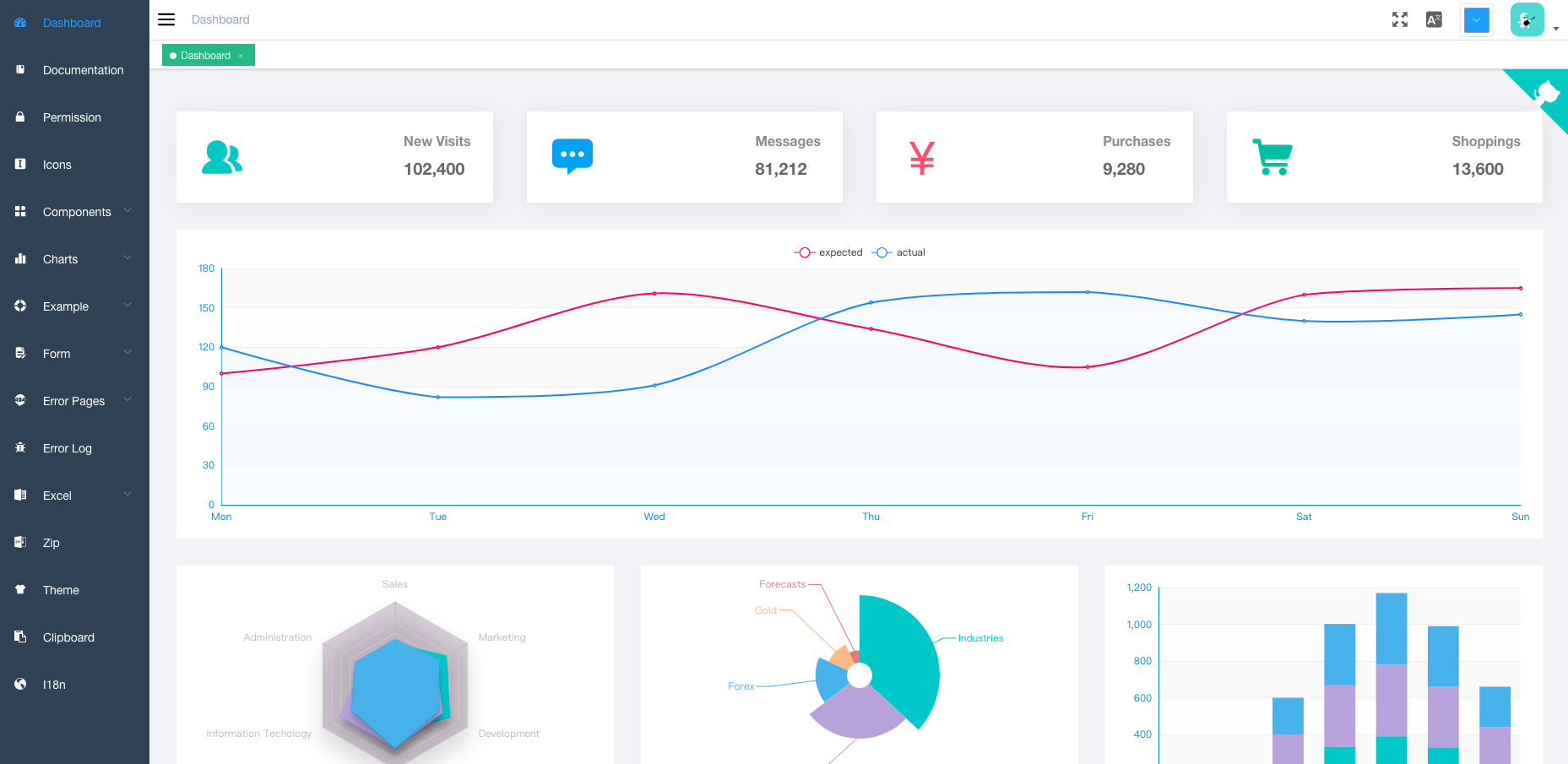
浏览真实页面截图,比较内容排版与手机效果。点击下方缩略图切换,放大查看整页细节。
目前有 1 张原始预览,可打开完整图片查看设计细节。
截图用于了解视觉与布局,交互效果请以实际项目为准。
采集于 2026-10-03查看来源
值得关注的模板亮点
从已有项目资料中,快速了解它的特点。
内置登录/登出与权限认证,含页面权限、指令权限、权限配置页和两步登录
支持多环境构建:dev、sit、stage、prod,并提供预览与静态资源分析脚本
提供国际化、多主题、动态侧边栏、面包屑与可右键操作的标签页视图
包含编辑器、Excel 导入导出、动态/拖拽/行内编辑表格及拖拽类组件示例
附带 401、404 错误页、错误日志、ECharts 与引导页等示例页面
模板详细介绍
该项目是一个后台管理界面的前端模板,基于 Vue 与 element-ui 构建,使用 vuex、vue-router、axios,请求数据由 Mock.js 模拟。README 说明其定位为面向企业应用的单页应用起点,提供登录/登出、权限认证(页面权限、指令权限、权限配置页、两步登录)、多环境构建(dev、sit、stage、prod)、国际化、多主题、动态侧边栏与面包屑、标签页视图等全局能力。
模板还内置了较丰富的示例模块:富文本、Markdown、JSON 编辑器;Excel 的导出、上传、可视化与 zip 导出;动态表格、拖拽表格、行内编辑表格;401 与 404 错误页;头像上传、回到顶部、拖拽对话框/选择/看板/列表、SplitPane、Dropzone、Sticky、CountTo 等组件;以及 ECharts、剪贴板、Markdown 转 HTML、错误日志、引导页等示例。
使用前需注意:README 明确说明该项目不支持低版本浏览器(如 IE),需要自行添加 polyfill;v4.1.0+ 的默认 master 分支不再支持国际化,需改用 i18n 分支;当前版本基于 vue-cli,如需旧版可切换到 tag/3.11.0。仓库同时提到 Flatlogic 的后台模板,属于外部推广内容。
VueAngularReact后台
适合你的项目吗?
适用场景
- 搭建企业内部管理后台的前端骨架
- 需要页面级与指令级权限控制的单页应用
- 需要多环境构建与 Mock 数据先行开发的项目
- 需要表格、编辑器、Excel 处理等后台常见模块的参考实现
适合人群
- 使用 Vue 与 element-ui 技术栈的前端团队
- 需要权限认证与多环境构建配置的后台项目
- 希望参考后台常见组件与示例页面实现的开发者
上手与定制指南
结合仓库当前版本的说明,按下面的资料检查内容、配置与运行要求。
- 1
本地需先安装 Node 与 git,项目基于 ES2015+ 及 vue、vuex、vue-router、vue-cli、axios、element-ui
- 2
克隆仓库后执行 npm install 安装依赖,npm run dev 启动开发,默认打开 http://localhost:9527
- 3
构建命令为 npm run build:stage(测试环境)与 npm run build:prod(生产环境)
- 4
README 说明不支持低版本浏览器(如 IE),需自行添加 polyfill
- 5
v4.1.0+ 默认 master 分支不支持国际化,需要 i18n 时请使用 i18n 分支
授权与来源资料
使用条件与限制
免费使用 · 保留许可声明本次收录的是公开仓库中采用 MIT 许可的免费版本;免费范围为该版本代码,不代表外部服务或第三方素材免费。
使用时需要遵守
- 允许免费使用、修改、商用和分发该版本代码。
- 分发代码副本或实质性部分时,保留原作者版权声明和完整 MIT 许可声明。
- 代码按现状提供;担保与责任限制以原许可证及适用法律为准。
额外费用与待核对事项
- 该项目不支持低版本浏览器(如 IE),如需在这些浏览器中运行,使用者必须自行添加 polyfill。
- v4.1.0+ 起默认 master 分支不再支持国际化;若需要 i18n 功能,必须改用 i18n 分支。
- 当前 v4.0+ 版本基于 vue-cli 构建;如需不依赖 vue-cli 的旧版本,需切换到 tag/3.11.0 分支。
- 演示图片、字体、图标及其他第三方素材需按各自许可核对,不能仅凭代码的 MIT 许可判断。
- 域名、托管、数据库、支付或 AI 等外部服务可能另外收费。
查看原文依据
Permission is hereby granted, free of charge
许可证原文
This project does not support low version browsers (e.g. IE). Please add polyfill by yourself.
README 原文
After the `v4.1.0+` version, the default master branch will not support i18n. Please use i18n Branch, it will keep up with the master update
README 原文
https://github.com/harrialeksi/Vue-admin/blob/master/LICENSEhttps://github.com/harrialeksi/Vue-admin/blob/master/README.mdThe current version is `v4.0+` build on `vue-cli`. If you find a problem, please put issue. If you want to use the old version , you can switch branch to tag/3.11.0, it does not rely on `vue-cli`
README 原文
DeepSeek 根据仓库许可证和 README 整理 ·2026-10-03。结果仅覆盖已读取资料,依赖、图片、字体及后续条款变更以各自原文为准。
项目核对记录与介绍依据
模板资料
- 来源平台
- GitHub
- 资料与维护参考分
- 资料一般 · 58 / 100
- 技术栈
- Vue · Angular · React
- 网站类型
- 后台
这个分数如何计算
本站按许可资料(最高30分)、演示链接(12分)、预览图(10分)、Star数(15分)、记录的维护时间(15分)、描述完整度(8分)、功能记录(5分)和分类资料(5分)计算。它不是代码、安全或性能测试,也不是 Google 评分;有链接不代表已实测可用。
这个项目需要核对什么
- 记录的仓库更新时间
- 2023-09-13
- 截图检查日期
- 2026-10-03
目前没有记录演示链接。请依据仓库说明在本地评估;仅凭截图无法确认交互行为。
目录记录的主要技术栈是 Vue。请通过依赖清单和锁文件核对实际版本与托管要求。这些说明基于收录资料,不代表代码审计或部署实测。
查看具体选型方法 →介绍的制作与核对状态
介绍由 AI 辅助整理目录与仓库资料。仓库作者不等于这篇介绍的审核者。
审核声明: [email protected] · 2026-10-04
查看当时使用的来源资料
SHA-256: 53a5340f3901b699227733f638f062f1c1b57defee739e7f1ba143ccdc63494d
2026-10-03T18:14:52.788Z
来源文件 / 仓库<p align="center"> <img width="320" src="https://wpimg.wallstcn.com/ecc53a42-d79b-42e2-8852-5126b810a4c8.svg"> </p> ## Introduction vue-element-admin is a production-ready front-end solution for admin interfaces. It is based on [vue](https://github.com/vuejs/vue) and uses the UI Toolkit [element-ui](https://github.com/ElemeFE/element). vue-element-admin is based on the newest development stack of vue and it has a built-in i18n solution, typical templates for enterprise applications, and lots of awesome features. It helps you build large and complex Single-Page Applications. I believe whatever your needs are, this project will help you. - Base template recommends using: vue-admin-template - Desktop: electron-vue-admin - Typescript: vue-typescript-admin-template - awesome-project **After the `v4.1.0+` version, the default master branch will not support i18n. Please use i18n Branch, it will keep up with the master update** **The current version is `v4.0+` build on `vue-cli`. If you find a problem, please put issue. If you want to use the old version , you can switch branch to tag/3.11.0, it does not rely on `vue-cli`** **This project does not support low version browsers (e.g. IE). Please add polyfill by yourself.** ## Preparation You need to install [node](https://nodejs.org/) and [git](https://git-scm.com/) locally. The project is based on [ES2015+](https://es6.ruanyifeng.com/), [vue](https://cn.vuejs.org/index.html), [vuex](https://vuex.vuejs.org/zh-cn/), [vue-router](https://router.vuejs.org/zh-cn/), [vue-cli](https://github.com/vuejs/vue-cli) , [axios](https://github.com/axios/axios) and [element-ui](https://github.com/ElemeFE/element), all request data is simulated using [Mock.js](https://github.com/nuysoft/Mock). Understanding and learning this knowledge in advance will greatly help the use of this project. <p align="center"> <img width="900" src="https://wpimg.wallstcn.com/a5894c1b-f6af-456e-82df-1151da0839bf.png"> </p> ### Flatlogic <a href="https://flatlogic.com/admin-dashboards?from=vue-element-admin"><img width="150px" src="https://wpimg.wallstcn.com/9c0b719b-5551-4c1e-b776-63994632d94a.png" /></a><p>Admin Dashboard Templates made with Vue, React and Angular.</p> ## Features ``` - Login / Logout - Permission Authentication - Page permission - Directive permission - Permission configuration page - Two-step login - Multi-environment build - Develop (dev) - sit - Stage Test (stage) - Production (prod) - Global Features - I18n - Multiple dynamic themes - Dynamic sidebar (supports multi-level routing) - Dynamic breadcrumb - Tags-view (Tab page Support right-click operation) - Svg Sprite - Mock data - Screenfull - Responsive Sidebar - Editor - Rich Text Editor - Markdown Editor - JSON Editor - Excel - Export Excel - Upload Excel - Visualization Excel - Export zip - Table - Dynamic Table - Drag And Drop Table - Inline Edit Table - Error Page - 401 - 404 - Components - Avatar Upload - Back To Top - Drag Dialog - Drag Select - Drag Kanban - Drag List - SplitPane - Dropzone - Sticky - CountTo - Advanced Example - Error Log - Dashboard - Guide Page - ECharts - Clipboard - Markdown to html ``` ## Getting started ```bash # clone the project git clone https://github.com/harrialeksi/Vue-admin.git # enter the project directory cd Vue-admin # install dependency npm install # develop npm run dev ``` This will automatically open http://localhost:9527 ## Build ```bash # build for test environment npm run build:stage # build for production environment npm run build:prod ``` ## Advanced ```bash # preview the release environment effect npm run preview # preview the release environment effect + static resource analysis npm run preview -- --report # code format check npm run lint # code format check and auto fix npm run lint -- --fix ``` Copyright (c) 2017-present Antero
看看同类模板
对比同技术栈与用途的模板,找到更适合的视觉与内容结构。

vuestic-admin
Vuestic Admin is an open-source, ready-to-use admin template suite designed for rapid development, easy mainte…
Vue · 后台

v3-admin-vite
v3-admin-vite 是一个主打 AI 编程友好体验的 Vue3 后台管理模板,基于 Vue3、Vite、TypeScript、Element Plus 构建。
Vue · 后台

vue-typescript-admin-template
vue-typescript-admin-template 是一套面向后台管理界面的前端解决方案,基于 Vue 2.6、TypeScript 和 Element UI 构建。
Vue · 后台

vue-antd-admin
Vue Antd Admin 是 Ant Design Pro 的 Vue 实现版本,目标是为中后台项目提供一套开箱即用的前端与设计解决方案。
Vue · 后台

coreui-free-vue-admin-template
Free Vue Admin & Dashboard Template Built for AI-Assisted Development
Vue · 后台
nova-admin
A simple and flexible admin template based on Vue3, Vite, TypeScript, NaiveUI
Vue · 后台