Black-and-white monochrome typographic design, content-first, with dark/light mode toggle that remembers preference
AstroBlog
storyteller-astro — Astro Blog Template
By hasinhayder
A minimalist black-and-white blog theme built on Astro, supporting multiple authors, categories and tags, pagination, and rich media embeds.
Explore the design
Compare the page layouts and mobile experience. Open any screenshot for a closer look.
Desktop homepage1 / 2
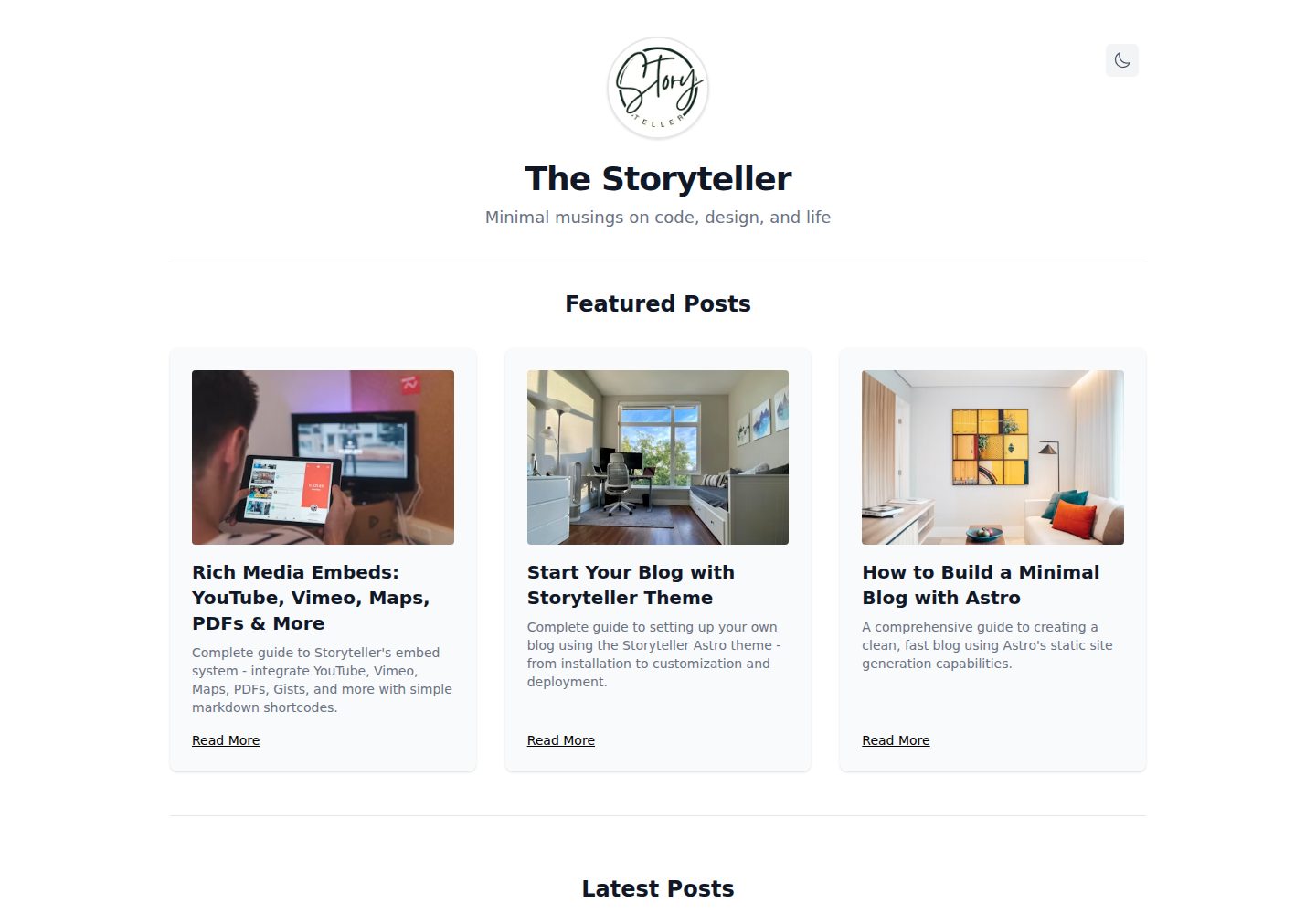
Desktop captureTop of page
Actual screenshot captured by the server browser.
All pages & views 2
Screenshots show visual appearance; interactive behavior may differ.
Recorded 2026-10-02View source
What stands out
A quick read of the recorded project description.
Markdown article management based on Astro Content Collections, with schema validation for frontmatter fields
Multi-author support, including author list pages, author article pages, and clickable author links
Categories, tags, featured articles, paginated blog list, and related article recommendations
Embed external content such as YouTube, Vimeo, Google Maps, PDFs, and Gists via Markdown shortcodes
Centralized site configuration to adjust homepage display, pagination text, footer links, and default author
Template Details
Storyteller is a blog theme built with Astro, featuring a black-and-white monochrome design that centers on typography and readability. It uses Astro Content Collections to manage Markdown articles, with frontmatter defining fields such as title, description, publication date, author, categories, tags, whether an article is featured, and thumbnail and large image fields. The theme includes a built-in dark/light mode toggle that reads system preferences and saves the choice in localStorage. For content organization, it provides category pages, tag pages, author pages, and a paginated blog list; the homepage can be configured to display featured articles, latest articles, and the number of articles per page. Article pages support related article recommendations and can embed external content such as YouTube, Vimeo, Wistia, Google Maps, PDFs, Gists, Asciinema, and SoundCloud via simple Markdown shortcodes. Site title, subtitle, copyright, interface text, pagination behavior, default author, and footer links are configured centrally in src/site.config.mjs. Styling uses Tailwind CSS, with main layout and color definitions in BlogLayout.astro. The project requires Node.js 18+ or Bun and provides dev, build, and preview commands. The theme is released under the MIT license, but third-party assets such as demo images, fonts, and icons require separate license verification; external services like Google Analytics may incur additional costs.
AstroBlog
Is it right for your project?
Use Cases
- Building a text-focused personal tech blog or writing site
- Blogs that require multi-author collaboration and separate author article lists
- Scenarios where you want to write in Markdown and embed external content such as videos, maps, and code snippets
- Sites that prefer a minimalist black-and-white visual style while needing dark/light mode switching
Suitable For
- Developers or writers familiar with Markdown and basic frontend configuration
- Teams or individuals building static blogs with Astro
- Blog projects that need categories, tags, author archives, and pagination
Getting started & customization
Use these recorded setup notes alongside the repository instructions for your chosen version.
- 1
Requires Node.js 18+ or Bun, and Git
- 2
After cloning the repository, install dependencies using bun install, npm install, or pnpm install
- 3
Run bun dev, npm run dev, or pnpm dev to start the local development server, default address http://localhost:4321
- 4
Modify site title, subtitle, copyright, interface text, pagination, and default author in src/site.config.mjs
- 5
Place articles in the src/content/article/ directory and fill in frontmatter fields such as title, description, publication date, categories, and tags
License & source material
Usage conditions & limitations
Free to use · keep license noticeThis entry covers the free version under the MIT license in the public repository; the free scope applies to that version's code and does not imply that external services or third-party assets are free.
Must comply with when using
- Free use, modification, commercial use, and distribution of this version's code are permitted.
- When distributing copies or substantial portions of the code, retain the original author's copyright notice and the full MIT license notice.
- The code is provided as is; warranties and limitations of liability are governed by the original license and applicable law.
Additional costs & items to verify
- The site configuration includes a Google Analytics tracking ID by default; enabling analytics requires using the external Google Analytics service and applying for a Measurement ID yourself; this service may involve account, privacy compliance, and costs, and can be disabled by leaving it empty.
- Demo and sample images come from third-party sources such as Unsplash, whose licenses are independent of this project's MIT code license; verify asset authorization before commercial use or redistribution.
- Third-party resources such as icons are subject to their own license terms and are not granted under this project's MIT license; confirm separately before use.
- Demo images, fonts, icons, and other third-party assets must be checked against their respective licenses and cannot be judged solely by the code's MIT license.
- External services such as domains, hosting, databases, payments, or AI may incur additional charges.
View Original Text Basis
Permission is hereby granted, free of charge
Original License Text
gTag: "G-V5QHDKBFP", // Google Analytics tracking ID
Original README
Images from [Unsplash](https://unsplash.com)
Original README
https://github.com/hasinhayder/storyteller-astro/blob/main/LICENSEhttps://github.com/hasinhayder/storyteller-astro/blob/main/README.mdIcons from [Lucide](https://lucide.dev)
Original README
Compiled by DeepSeek based on repository license and README ·2026-10-02. Results only cover the materials read; dependencies, images, fonts, and subsequent term changes are subject to their respective original texts.
Project checks & description sources
Template Information
- Source platforms
- GitHub
- Documentation and maintenance reference score
- More documented · 87 / 100
- Technologies
- Astro
- Website type
- Blog
How this score is calculated
Our heuristic uses license records (up to 30), a demo link (12), a preview (10), stars (15), recorded maintenance (15), description completeness (8), feature records (5) and classification data (5). It is not a code, security or performance test, or a Google score. A link does not establish tested functionality.
What to verify for this project
- Repository update recorded
- 2025-11-06
- Screenshot last checked
- 2026-10-02
A demo link is listed. Check it with your own content and viewport sizes; its presence does not confirm that forms, authentication or payments work.
The catalog identifies Astro as the primary stack. Check the actual dependency manifest and lockfile for versions and hosting requirements. These notes use recorded metadata, not a code audit or a deployment test.
Use a selection guide →How this description was prepared
AI-assisted description based on catalog records and repository material. Repository authors are not automatically the reviewers of this description.
Automatically checked against source and license rules; no manual editorial review.
Inspect the recorded source material
SHA-256: ee6c385998b4dc87866374b5570dbb4000dbf9aaa6f85199b3799efa758dfaaa
2026-10-02T10:33:59.094Z
Source file / repository# Storyteller - Minimal Astro Blog Theme
<div align="center">
<img src="https://res.cloudinary.com/roxlox/image/upload/v1749266794/storyteller/storyteller_zcihgf.png" alt="Storyteller Monochrome Blog Theme Preview" />
<p align="center">
<strong>A beautiful, minimal, and highly functional blog theme built with Astro</strong>
</p>
<p align="center">
<img src="https://img.shields.io/badge/Astro-5.9.0-FF5D01?style=flat-square&logo=astro" alt="Astro" />
<img src="https://img.shields.io/badge/TailwindCSS-4.1.8-38B2AC?style=flat-square&logo=tailwind-css" alt="TailwindCSS" />
<img src="https://img.shields.io/badge/TypeScript-Ready-3178C6?style=flat-square&logo=typescript" alt="TypeScript" />
<img src="https://img.shields.io/badge/License-MIT-green?style=flat-square" alt="License" />
</p>
</div>
---
## ✨ Features
### 🎨 **Design Philosophy**
- **Monochrome Elegance**: Clean black and white design that puts content first
- **Minimal Aesthetic**: Less is more - every element serves a purpose
- **Typography-Focused**: Beautiful typography hierarchy for excellent readability
### 🌓 **Theme System**
- **Dark/Light Mode**: Seamless theme switching with system preference detection
- **Persistent Settings**: Theme choice saved in localStorage
- **Smooth Transitions**: Elegant animations between theme changes
### 📱 **Responsive Design**
- **Mobile-First**: Optimized for all screen sizes
- **Max-Width Design**: 1000px container for optimal reading experience
- **Touch-Friendly**: Perfect interaction on mobile devices
### 📝 **Content Management**
- **Astro Content Collections**: Type-safe content management with schema validation
- **Markdown Support**: Write your posts in Markdown with frontmatter
- **Rich Metadata**: Support for categories, tags, publication dates, and featured posts
### 🗂️ **Organization Features**
- **Categories System**: Organize posts by categories with dedicated pages
- **Tags System**: Flexible tagging with tag-specific pages
- **Featured Posts**: Highlight your best content on the homepage
- **Multi-Author Support**: Full multi-author blog support with author pages and filtering
### 📄 **Advanced Pagination**
- **Smart Pagination**: Navigate through posts with numbered pagination
- **SEO-Friendly URLs**: Clean URLs for all paginated pages
- **Page Info**: Clear indication of current page and total posts
- **Responsive Controls**: Touch-friendly pagination on mobile
### 🖼️ **Image Support**
- **Thumbnail Images**: Featured post thumbnails for visual appeal
- **Large Images**: Full-size images for detailed article views
- **Lazy Loading**: Optimized image loading for better performance
- **Responsive Images**: Adaptive image sizing for different screens
### 🚀 **Performance**
- **Static Generation**: Lightning-fast loading with pre-built pages
- **Minimal Dependencies**: Clean codebase with essential dependencies only
- **Optimized Assets**: Compressed and optimized for web delivery
- **SEO Ready**: Meta tags and OpenGraph support
### 👥 **Multi-Author Support**
- **Author Pages**: Dedicated pages for each author with their post listings
- **Author Navigation**: Browse all authors with post counts on `/authors`
- **Clickable Author Links**: Author names link to their individual pages
- **Flexible Attribution**: Easy author assignment via frontmatter
- **Multiple Authors**: Support for any number of blog contributors
### 🔗 **Rich Embeds**
- **Rich Embeds** — Easily embed YouTube, Vimeo, Wistia, Google Maps, PDFs, Gists, Asciinema, SoundCloud, and more using simple markdown shortcodes
---
## 🎯 Demo
<div align="center">
<img src="https://res.cloudinary.com/roxlox/image/upload/v1749266607/storyteller/storyteller-light_a5xcvw.jpg" alt="Homepage - Light" />
<img src="https://res.cloudinary.com/roxlox/image/upload/v1749266607/storyteller/storyteller-dark_cqkugu.jpg" alt="Homepage - Dark" />
</div>
---
## 🚀 Quick Start
### Prerequisites
- Node.js 18+ or Bun
- Git
### Installation
```bash
# Clone the repository
git clone https://github.com/hasinhayder/storyteller-astro.git
cd storyteller-astro
# Install dependencies
bun install
# or
npm install
# or
pnpm install
# Start development server
bun dev
# or
npm run dev
# or
pnpm dev
```
Your blog will be available at `http://localhost:4321`
---
## 📁 Project Structure
```
📦 Storyteller/
├── 📁 public/
│ ├── 🖼️ images/ # Static images
│ ├── 📄 favicon.svg # Site favicon
│ └── 📜 scripts/ # Client-side scripts
├── 📁 src/
│ ├── 📁 components/ # Reusable Astro components
│ │ ├── 🧩 Header.astro # Navigation & theme toggle
│ │ ├── 🧩 PostCard.astro # Blog post preview
│ │ ├── 🧩 FeaturedCard.astro # Featured post card
│ │ └── 🧩 Pagination.astro # Pagination component
│ ├── 📁 content/ # Content collections
│ │ ├── 📄 config.ts # Content schema
│ │ └── 📁 article/ # Blog posts (Markdown)
│ ├── 📁 layouts/ # Page layouts
│ │ └── 🎨 BlogLayout.astro # Main blog layout
│ ├── 📁 pages/ # Astro pages
│ │ ├── 🏠 index.astro # Homepage
│ │ ├── 📁 blog/ # Paginated blog pages
│ │ ├── 📁 article/ # Individual articles
│ │ ├── 📁 author/ # Author pages
│ │ ├── 📁 category/ # Category pages
│ │ └── 📁 tag/ # Tag pages
│ └── 📁 styles/ # Global styles
└── 📄 package.json # Dependencies & scripts
```
---
## 📝 Content Creation
### Creating a New Blog Post
Create a new `.md` file in `src/content/article/`:
```markdown
---
title: "Your Amazing Post Title"
description: "A compelling description of your post"
pubDate: 2025-01-15
author: "Your Name" # Author name (defaults to "Hasin Hayder")
category: "Technology"
tags: ["astro", "web development", "javascript"]
featured: true # Optional: mark as featured
thumb: "https://images.unsplash.com/photo-example?w=400" # Thumbnail
large: "https://images.unsplash.com/photo-example?w=1200" # Large image
---
Your amazing content goes here! Write in Markdown format.
## Subheading
You can use all standard Markdown features...
```
### Content Schema
| Field | Type | Required | Description |
| ------------- | ------- | -------- | ---------------------------------------- |
| `title` | String | ✅ | Post title |
| `description` | String | ✅ | SEO description |
| `pubDate` | Date | ✅ | Publication date |
| `author` | String | ❌ | Author name (defaults to "Hasin Hayder") |
| `category` | String | ✅ | Post category |
| `tags` | Array | ✅ | Post tags |
| `featured` | Boolean | ❌ | Mark as featured |
| `thumb` | String | ❌ | Thumbnail image URL |
| `large` | String | ❌ | Large image URL |
---
## 🎨 Customization
### Styling
The theme uses Tailwind CSS for styling. Key customization areas:
- **Colors**: Modify the monochrome palette in `src/layouts/BlogLayout.astro`
- **Typography**: Adjust font sizes and weights in Tailwind classes
- **Spacing**: Customize margins and padding throughout components
### Theme Toggle
The dark/light mode system is powered by:
- `public/scripts/theme-toggle.js` - Client-side theme logic
- CSS variables for color switching
- localStorage for persistence
### Navigation
Customize the navigation in `src/components/Header.astro`:
- Add/remove menu items
- Modify the profile section
- Adjust the theme toggle button
---
## 🛠️ Available Commands
### Bun
| Command | Action |
| ----------------- | -------------------------------------------- |
| `bun install` | Install dependencies |
| `bun run dev` | Start development server at `localhost:4321` |
| `bun run build` | Build production site to `./dist/` |
| `bun run preview` | Preview build locally |
### npm
| Command | Action |
| ----------------- | -------------------------------------------- |
| `npm install` | Install dependencies |
| `npm run dev` | Start development server at `localhost:4321` |
| `npm run build` | Build production site to `./dist/` |
| `npm run preview` | Preview build locally |
### pnpm
| Command | Action |
| -------------- | -------------------------------------------- |
| `pnpm install` | Install dependencies |
| `pnpm dev` | Start development server at `localhost:4321` |
| `pnpm build` | Build production site to `./dist/` |
| `pnpm preview` | Preview build locally |
---
## 🔧 Configuration
### Site Configuration
Edit `src/site.config.mjs` for global settings:
```javascript
export default {
// Basic Site Information
siteTitle: "The Storyteller", // Main site title
siteSubTitle: "Minimal musings on code, design, and life", // Subtitle/tagline
copyright: "© 2025 The Storyteller. All Rights Reserved.", // Footer copyright text
// Homepage Display Options
showAuthorsOnHomePage: false, // Show author info on homepage
showFeaturrdPostsOnHomePage: true, // Display featured posts section
showCategoryOnPosts: true, // Display categories on posts in homepage
numberOfLatestPostsPerPage: 6, // Number of latest posts on homepage
numberOfBlogPostsPerPage: 8, // Number of posts per paginated blog page
// UI Labels (Customizable Text)
labels: {
featuredPosts: "Featured Posts", // Featured section title
latestPosts: "Latest Posts", // Latest posts section title
viewAllPosts: "View All Posts", // Link text to paginated blog
backToHome: "Back to Home", // Back navigation text
youMightAlsoLike: "You Might Also Like", // Similar posts section title
postedIn: "Posted in", // Category prefix text
noArticlesFound: "No articles found.", // Empty state message
allCategories: "All Categories", // Categories page title
allTags: "All Tags", // Tags page title
allAuthors: "All Authors", // Authors page title
exploreArticlesByTags: "Explore articles organized by topics", // Tags page description
exploreArticlesByCategories: "Explore articles organized by topics", // Categories page description
exploreArticlesByAuthors: "Explore articles organized by authors", // Authors page description
},
// Pagination Configuration
pagination: {
showPrevNext: true, // Show Previous/Next navigation buttons
prevText: "Previous", // Text for previous page button
nextText: "Next", // Text for next page button
postLabel: "posts", // Label used in pagination info (e.g., "8 posts")
},
// Default Author Settings
defaultAuthorName: "Hasin Hayder", // Default author name for posts without explicit author
// Footer Navigation
showCategoriesLinkOnFooter: true, // Show Categories link in footer
showTagsLinkOnFooter: true, // Show Tags link in footer
showAuthorsLinkOnFooter: true, // Show Authors link in footer
// Post Display Options
showSimilarPosts: true, // Show similar posts on article pages
showReadMoreLinkOnFeaturedPosts: true, // Show "Read More" on featured cards
showThumbnailOnFeaturedPosts: true, // Display thumbnails on featured posts
// Analytics
gTag: "G-V5QHDKBFP", // Google Analytics tracking ID
}
```
#### Configuration Options
| Option | Type | Default | Description |
| ------------------------------------ | ------- | --------------------- | -------------------------------------------- |
| **Basic Site Information** |
| `siteTitle` | String | "The Storyteller" | Main site title displayed in header |
| `siteSubTitle` | String | "Minimal musings..." | Subtitle/tagline shown under title |
| `copyright` | String | "© 2025..." | Copyright text in footer |
| **Homepage Display** |
| `showAuthorsOnHomePage` | Boolean | `false` | Display author information on homepage |
| `showFeaturrdPostsOnHomePage` | Boolean | `true` | Show featured posts section on homepage |
| `showCategoryOnPosts` | Boolean | `true` | Display category labels on posts in homepage |
| `numberOfLatestPostsPerPage` | Number | `6` | Number of latest posts displayed on homepage |
| `numberOfBlogPostsPerPage` | Number | `8` | Number of posts per paginated blog page |
| **UI Labels & Text** |
| `labels.featuredPosts` | String | "Featured Posts" | Title for featured posts section |
| `labels.latestPosts` | String | "Latest Posts" | Title for latest posts section |
| `labels.viewAllPosts` | String | "View All Posts" | Text for pagination link |
| `labels.backToHome` | String | "Back to Home" | Back navigation text |
| `labels.youMightAlsoLike` | String | "You Might Also Like" | Similar posts section title |
| `labels.postedIn` | String | "Posted in" | Category prefix text in articles |
| `labels.noArticlesFound` | String | "No articles found." | Empty state message |
| `labels.allCategories` | String | "All Categories" | Categories page main title |
| `labels.allTags` | String | "All Tags" | Tags page main title |
| `labels.allAuthors` | String | "All Authors" | Authors page main title |
| `labels.exploreArticlesByTags` | String | "Explore articles..." | Tags page description |
| `labels.exploreArticlesByCategories` | String | "Explore articles..." | Categories page description |
| `labels.exploreArticlesByAuthors` | String | "Explore articles..." | Authors page description |
| **Pagination Settings** |
| `pagination.showPrevNext` | Boolean | `true` | Show Previous/Next navigation buttons |
| `pagination.prevText` | String | "Previous" | Text for previous page button |
| `pagination.nextText` | String | "Next" | Text for next page button |
| `pagination.postLabel` | String | "posts" | Label used in pagination info display |
| **Navigation & Footer** |
| `showCategoriesLinkOnFooter` | Boolean | `true` | Show Categories link in footer |
| `showTagsLinkOnFooter` | Boolean | `true` | Show Tags link in footer |
| `showAuthorsLinkOnFooter` | Boolean | `true` | Show Authors link in footer |
| **Post Display Options** |
| `showSimilarPosts` | Boolean | `true` | Display similar posts on article pages |
| `showReadMoreLinkOnFeaturedPosts` | Boolean | `true` | Show "Read More" link on featured cards |
| `showThumbnailOnFeaturedPosts` | Boolean | `true` | Display thumbnail images on featured posts |
| **Analytics** |
| `gTag` | String | "G-V5QHDKBFP" | Google Analytics tracking ID (optional) |
### Pagination Settings
Adjust pagination in `src/pages/blog/[...page].astro`:
```javascript
return paginate(sortedPosts, {
pageSize: 8, // Posts per page
})
```
---
## 📊 Google Analytics Setup
### Adding Google Analytics
To enable Google Analytics tracking on your blog:
1. **Get your Google Analytics Tracking ID:**
- Go to [Google Analytics](https://analytics.google.com)
- Create a new property for your website
- Copy your Measurement ID (format: `G-XXXXXXXXXX`)
2. **Update Site Configuration:**
Edit `src/site.config.mjs` and add your tracking ID:
```javascript
export default {
// ... other config options
// Analytics
gTag: "G-YOUR-TRACKING-ID", // Replace with your actual tracking ID
}
```
3. **Verify Installation:**
- Build and deploy your site
- Visit your website and check the browser's Network tab
- Look for requests to `gtag` or `googletagmanager.com`
- Check your Google Analytics dashboard for real-time data
### Privacy Considerations
The theme implements Google Analytics with privacy in mind:
- **No Personal Data Collection**: Only anonymous usage statistics are tracked
- **Respects DNT**: Honors Do Not Track browser settings
- **GDPR Compliant**: No cookies are set without user consent
- **Minimal Tracking**: Only essential page views and navigation are tracked
### Disabling Analytics
To disable Google Analytics completely:
```javascript
export default {
// ... other config options
// Analytics
gTag: "", // Set to empty string or remove the line
}
```
Or comment out the line:
```javascript
export default {
// ... other config options
// Analytics
// gTag: "G-YOUR-TRACKING-ID" // Commented out
}
```
---
## Embedding Content
You can embed rich content in your markdown using simple shortcodes:
- `#youtube <id>` — Embed a YouTube video
- `#vimeo <id>` — Embed a Vimeo video
- `#wistia <id>` — Embed a Wistia video
- `#googlemaps <query or url>` — Embed a Google Map
- `#iframe <url>` — Embed any URL in an iframe
- `#pdf <url>` — Embed a PDF
- `#embed <url>` — Embed Notion, Figma, CodePen, etc.
- `#gist <gist-id or gist-url>` — Embed a GitHub Gist
- `#asciinema <id>` — Embed an Asciinema cast
- `#soundcloud <url>` — Embed a SoundCloud track
## 📈 SEO Features
- **Meta Tags**: Automatic generation for all pages
- **OpenGraph**: Social media preview support
- **Sitemap**: Auto-generated XML sitemap
- **RSS Feed**: Built-in RSS feed generation
---
## 🚀 Deployment
### Netlify
1. Connect your GitHub repository
2. Build command: `bun build` or `npm run build` or `pnpm build`
3. Publish directory: `dist`
### Vercel
1. Import your GitHub repository
2. Framework preset: Astro
3. Deploy!
### Static Hosting
After running `bun run build`, upload the `dist/` folder to any static hosting service.
---
## 🤝 Contributing
Contributions are welcome! Please feel free to submit a Pull Request.
1. Fork the project
2. Create your feature branch (`git checkout -b feature/AmazingFeature`)
3. Commit your changes (`git commit -m 'Add some AmazingFeature'`)
4. Push to the branch (`git push origin feature/AmazingFeature`)
5. Open a Pull Request
---
## 📄 License
This project is licensed under the MIT License - see the [LICENSE](LICENSE) file for details.
---
## 🙏 Acknowledgments
- Built with [Astro](https://astro.build) 🚀
- Styled with [Tailwind CSS](https://tailwindcss.com) 💨
- Icons from [Lucide](https://lucide.dev) ✨
- Images from [Unsplash](https://unsplash.com) 📸
---
<div align="center">
<p>Made with ❤️ by <strong>Hasin Hayder</strong></p>
<p>
<a href="https://github.com/hasinhayder/storyteller-astro">⭐ Star this project</a> |
<a href="https://github.com/hasinhayder/storyteller-astro/issues">🐛 Report Bug</a> |
<a href="https://github.com/hasinhayder/storyteller-astro/issues">💡 Request Feature</a>
</p>
</div>
Explore similar templates
Compare previews and descriptions within the same stack and category.

astrowind
AstroWind is a free, open-source Astro starter theme using Astro and Tailwind CSS, released under the MIT license.
Astro · Blog

astro-paper
AstroPaper is a minimal, responsive, accessible, and SEO-friendly Astro blog theme. Articles are stored as Markdown/MDX in src/content/posts/, with subdirectories affecting URLs.
Astro · Blog

fuwari
Fuwari is a static blog template built with Astro and Tailwind CSS for personal blogs. It manages posts as Markdown files in src/content/posts/, with frontmatter for title, date, description, cover, tags, categories, draft status, and language.
Astro · Blog

Firefly
Firefly is a clean personal blog theme forked from Astro and Fuwari, offering four background modes, single/double sidebar and list/grid layouts, Pagefind client-side full-text search, and a six-language UI.
Astro · Blog

astro-theme-cactus
Astro Cactus is an Astro-based blog and portfolio theme that uses Markdown/MDX content collections to manage posts, notes, and tags, with frontmatter type-checked by a schema.
Astro · Portfolio

astrofy
Astrofy is a free and open-source personal portfolio website template built with Astro and TailwindCSS, with built-in blog, CV timeline, project showcase, store, and RSS feed modules.
Astro · Portfolio