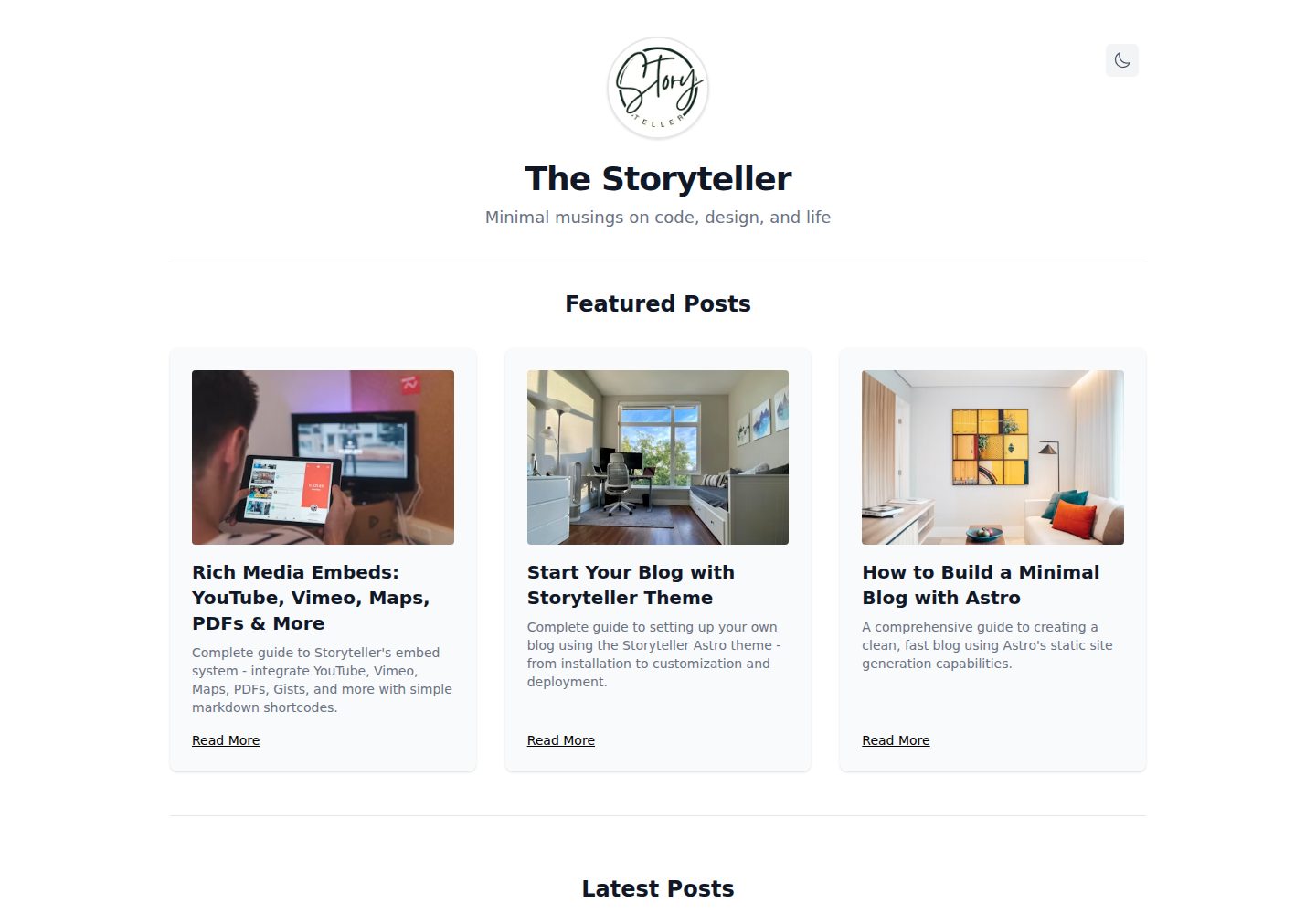
黑白单色排版设计,内容优先,支持暗色/亮色模式切换并记忆偏好
Astro博客
storyteller-astro — Astro 博客模板
作者 hasinhayder
基于 Astro 的极简黑白博客主题,支持多作者、分类标签、分页与富媒体嵌入。
看看你的网站会是什么样
浏览真实页面截图,比较内容排版与手机效果。点击下方缩略图切换,放大查看整页细节。
全部页面与视图 2
截图用于了解视觉与布局,交互效果请以实际项目为准。
采集于 2026-10-02查看来源
值得关注的模板亮点
从已有项目资料中,快速了解它的特点。
基于 Astro Content Collections 的 Markdown 文章管理,frontmatter 字段带 schema 校验
多作者支持,包含作者列表页、作者文章页和可点击的作者链接
分类、标签、精选文章、分页博客列表和相似文章推荐
通过 Markdown 短代码嵌入 YouTube、Vimeo、Google Maps、PDF、Gist 等外部内容
集中式站点配置,可调整首页展示、分页文案、页脚链接和默认作者
模板详细介绍
Storyteller 是一个用 Astro 构建的博客主题,采用黑白单色设计,内容以排版和可读性为中心。它使用 Astro Content Collections 管理 Markdown 文章,通过 frontmatter 定义标题、描述、发布日期、作者、分类、标签、是否精选以及缩略图和大图字段。主题内置暗色/亮色模式切换,会读取系统偏好并将选择保存在 localStorage。内容组织方面提供分类页、标签页、作者页和分页博客列表,首页可配置展示精选文章、最新文章以及每页文章数量。文章页支持相似文章推荐,并可通过简单的 Markdown 短代码嵌入 YouTube、Vimeo、Wistia、Google Maps、PDF、Gist、Asciinema、SoundCloud 等外部内容。站点标题、副标题、版权、界面文案、分页行为、默认作者和页脚链接等集中在 src/site.config.mjs 中配置。样式使用 Tailwind CSS,主要布局和颜色定义在 BlogLayout.astro 中。项目要求 Node.js 18+ 或 Bun,提供 dev、build、preview 命令。该主题以 MIT 许可发布,但演示图片、字体、图标等第三方素材需单独核对许可;Google Analytics 等外部服务可能另计费用。
Astro博客
适合你的项目吗?
适用场景
- 搭建以文字为主的个人技术博客或写作站点
- 需要多作者协作并分别展示作者文章列表的博客
- 希望用 Markdown 写作并嵌入视频、地图、代码片段等外部内容的场景
- 偏好黑白极简视觉风格、同时需要暗色/亮色模式切换的站点
适合人群
- 熟悉 Markdown 和基础前端配置的开发者或写作者
- 使用 Astro 构建静态博客的团队或个人
- 需要分类、标签、作者归档和分页功能的博客项目
上手与定制指南
结合仓库当前版本的说明,按下面的资料检查内容、配置与运行要求。
- 1
需要 Node.js 18+ 或 Bun,以及 Git
- 2
克隆仓库后使用 bun install、npm install 或 pnpm install 安装依赖
- 3
运行 bun dev、npm run dev 或 pnpm dev 启动本地开发服务器,默认地址为 http://localhost:4321
- 4
站点标题、副标题、版权、界面文案、分页和默认作者等配置在 src/site.config.mjs 中修改
- 5
文章放在 src/content/article/ 目录,按 frontmatter 字段填写标题、描述、发布日期、分类和标签等
授权与来源资料
使用条件与限制
免费使用 · 保留许可声明本次收录的是公开仓库中采用 MIT 许可的免费版本;免费范围为该版本代码,不代表外部服务或第三方素材免费。
使用时需要遵守
- 允许免费使用、修改、商用和分发该版本代码。
- 分发代码副本或实质性部分时,保留原作者版权声明和完整 MIT 许可声明。
- 代码按现状提供;担保与责任限制以原许可证及适用法律为准。
额外费用与待核对事项
- 站点配置默认内置 Google Analytics 跟踪 ID,启用分析需使用 Google Analytics 外部服务并自行申请 Measurement ID;该服务可能涉及账号、隐私合规与费用,可将其置空以禁用。
- 演示与示例图片来自 Unsplash 等第三方素材,其许可独立于本项目 MIT 代码许可,商用或再分发前需自行核对素材授权。
- 图标等第三方资源适用其自身许可条款,不随本项目 MIT 许可一并授予,使用前应单独确认。
- 演示图片、字体、图标及其他第三方素材需按各自许可核对,不能仅凭代码的 MIT 许可判断。
- 域名、托管、数据库、支付或 AI 等外部服务可能另外收费。
查看原文依据
Permission is hereby granted, free of charge
许可证原文
gTag: "G-V5QHDKBFP", // Google Analytics tracking ID
README 原文
Images from [Unsplash](https://unsplash.com)
README 原文
https://github.com/hasinhayder/storyteller-astro/blob/main/LICENSEhttps://github.com/hasinhayder/storyteller-astro/blob/main/README.mdIcons from [Lucide](https://lucide.dev)
README 原文
DeepSeek 根据仓库许可证和 README 整理 ·2026-10-02。结果仅覆盖已读取资料,依赖、图片、字体及后续条款变更以各自原文为准。
项目核对记录与介绍依据
模板资料
- 来源平台
- GitHub
- 资料与维护参考分
- 资料较完整 · 87 / 100
- 技术栈
- Astro
- 网站类型
- 博客
这个分数如何计算
本站按许可资料(最高30分)、演示链接(12分)、预览图(10分)、Star数(15分)、记录的维护时间(15分)、描述完整度(8分)、功能记录(5分)和分类资料(5分)计算。它不是代码、安全或性能测试,也不是 Google 评分;有链接不代表已实测可用。
这个项目需要核对什么
- 记录的仓库更新时间
- 2025-11-06
- 截图检查日期
- 2026-10-02
已收录演示链接。请用你的内容与屏幕尺寸检查;有演示不代表表单、认证或支付已经可用。
目录记录的主要技术栈是 Astro。请通过依赖清单和锁文件核对实际版本与托管要求。这些说明基于收录资料,不代表代码审计或部署实测。
查看具体选型方法 →介绍的制作与核对状态
介绍由 AI 辅助整理目录与仓库资料。仓库作者不等于这篇介绍的审核者。
已完成服务器许可规则与 AI 来源核对;未经过人工编辑审核。
查看当时使用的来源资料
SHA-256: ee6c385998b4dc87866374b5570dbb4000dbf9aaa6f85199b3799efa758dfaaa
2026-10-02T10:33:59.094Z
来源文件 / 仓库# Storyteller - Minimal Astro Blog Theme
<div align="center">
<img src="https://res.cloudinary.com/roxlox/image/upload/v1749266794/storyteller/storyteller_zcihgf.png" alt="Storyteller Monochrome Blog Theme Preview" />
<p align="center">
<strong>A beautiful, minimal, and highly functional blog theme built with Astro</strong>
</p>
<p align="center">
<img src="https://img.shields.io/badge/Astro-5.9.0-FF5D01?style=flat-square&logo=astro" alt="Astro" />
<img src="https://img.shields.io/badge/TailwindCSS-4.1.8-38B2AC?style=flat-square&logo=tailwind-css" alt="TailwindCSS" />
<img src="https://img.shields.io/badge/TypeScript-Ready-3178C6?style=flat-square&logo=typescript" alt="TypeScript" />
<img src="https://img.shields.io/badge/License-MIT-green?style=flat-square" alt="License" />
</p>
</div>
---
## ✨ Features
### 🎨 **Design Philosophy**
- **Monochrome Elegance**: Clean black and white design that puts content first
- **Minimal Aesthetic**: Less is more - every element serves a purpose
- **Typography-Focused**: Beautiful typography hierarchy for excellent readability
### 🌓 **Theme System**
- **Dark/Light Mode**: Seamless theme switching with system preference detection
- **Persistent Settings**: Theme choice saved in localStorage
- **Smooth Transitions**: Elegant animations between theme changes
### 📱 **Responsive Design**
- **Mobile-First**: Optimized for all screen sizes
- **Max-Width Design**: 1000px container for optimal reading experience
- **Touch-Friendly**: Perfect interaction on mobile devices
### 📝 **Content Management**
- **Astro Content Collections**: Type-safe content management with schema validation
- **Markdown Support**: Write your posts in Markdown with frontmatter
- **Rich Metadata**: Support for categories, tags, publication dates, and featured posts
### 🗂️ **Organization Features**
- **Categories System**: Organize posts by categories with dedicated pages
- **Tags System**: Flexible tagging with tag-specific pages
- **Featured Posts**: Highlight your best content on the homepage
- **Multi-Author Support**: Full multi-author blog support with author pages and filtering
### 📄 **Advanced Pagination**
- **Smart Pagination**: Navigate through posts with numbered pagination
- **SEO-Friendly URLs**: Clean URLs for all paginated pages
- **Page Info**: Clear indication of current page and total posts
- **Responsive Controls**: Touch-friendly pagination on mobile
### 🖼️ **Image Support**
- **Thumbnail Images**: Featured post thumbnails for visual appeal
- **Large Images**: Full-size images for detailed article views
- **Lazy Loading**: Optimized image loading for better performance
- **Responsive Images**: Adaptive image sizing for different screens
### 🚀 **Performance**
- **Static Generation**: Lightning-fast loading with pre-built pages
- **Minimal Dependencies**: Clean codebase with essential dependencies only
- **Optimized Assets**: Compressed and optimized for web delivery
- **SEO Ready**: Meta tags and OpenGraph support
### 👥 **Multi-Author Support**
- **Author Pages**: Dedicated pages for each author with their post listings
- **Author Navigation**: Browse all authors with post counts on `/authors`
- **Clickable Author Links**: Author names link to their individual pages
- **Flexible Attribution**: Easy author assignment via frontmatter
- **Multiple Authors**: Support for any number of blog contributors
### 🔗 **Rich Embeds**
- **Rich Embeds** — Easily embed YouTube, Vimeo, Wistia, Google Maps, PDFs, Gists, Asciinema, SoundCloud, and more using simple markdown shortcodes
---
## 🎯 Demo
<div align="center">
<img src="https://res.cloudinary.com/roxlox/image/upload/v1749266607/storyteller/storyteller-light_a5xcvw.jpg" alt="Homepage - Light" />
<img src="https://res.cloudinary.com/roxlox/image/upload/v1749266607/storyteller/storyteller-dark_cqkugu.jpg" alt="Homepage - Dark" />
</div>
---
## 🚀 Quick Start
### Prerequisites
- Node.js 18+ or Bun
- Git
### Installation
```bash
# Clone the repository
git clone https://github.com/hasinhayder/storyteller-astro.git
cd storyteller-astro
# Install dependencies
bun install
# or
npm install
# or
pnpm install
# Start development server
bun dev
# or
npm run dev
# or
pnpm dev
```
Your blog will be available at `http://localhost:4321`
---
## 📁 Project Structure
```
📦 Storyteller/
├── 📁 public/
│ ├── 🖼️ images/ # Static images
│ ├── 📄 favicon.svg # Site favicon
│ └── 📜 scripts/ # Client-side scripts
├── 📁 src/
│ ├── 📁 components/ # Reusable Astro components
│ │ ├── 🧩 Header.astro # Navigation & theme toggle
│ │ ├── 🧩 PostCard.astro # Blog post preview
│ │ ├── 🧩 FeaturedCard.astro # Featured post card
│ │ └── 🧩 Pagination.astro # Pagination component
│ ├── 📁 content/ # Content collections
│ │ ├── 📄 config.ts # Content schema
│ │ └── 📁 article/ # Blog posts (Markdown)
│ ├── 📁 layouts/ # Page layouts
│ │ └── 🎨 BlogLayout.astro # Main blog layout
│ ├── 📁 pages/ # Astro pages
│ │ ├── 🏠 index.astro # Homepage
│ │ ├── 📁 blog/ # Paginated blog pages
│ │ ├── 📁 article/ # Individual articles
│ │ ├── 📁 author/ # Author pages
│ │ ├── 📁 category/ # Category pages
│ │ └── 📁 tag/ # Tag pages
│ └── 📁 styles/ # Global styles
└── 📄 package.json # Dependencies & scripts
```
---
## 📝 Content Creation
### Creating a New Blog Post
Create a new `.md` file in `src/content/article/`:
```markdown
---
title: "Your Amazing Post Title"
description: "A compelling description of your post"
pubDate: 2025-01-15
author: "Your Name" # Author name (defaults to "Hasin Hayder")
category: "Technology"
tags: ["astro", "web development", "javascript"]
featured: true # Optional: mark as featured
thumb: "https://images.unsplash.com/photo-example?w=400" # Thumbnail
large: "https://images.unsplash.com/photo-example?w=1200" # Large image
---
Your amazing content goes here! Write in Markdown format.
## Subheading
You can use all standard Markdown features...
```
### Content Schema
| Field | Type | Required | Description |
| ------------- | ------- | -------- | ---------------------------------------- |
| `title` | String | ✅ | Post title |
| `description` | String | ✅ | SEO description |
| `pubDate` | Date | ✅ | Publication date |
| `author` | String | ❌ | Author name (defaults to "Hasin Hayder") |
| `category` | String | ✅ | Post category |
| `tags` | Array | ✅ | Post tags |
| `featured` | Boolean | ❌ | Mark as featured |
| `thumb` | String | ❌ | Thumbnail image URL |
| `large` | String | ❌ | Large image URL |
---
## 🎨 Customization
### Styling
The theme uses Tailwind CSS for styling. Key customization areas:
- **Colors**: Modify the monochrome palette in `src/layouts/BlogLayout.astro`
- **Typography**: Adjust font sizes and weights in Tailwind classes
- **Spacing**: Customize margins and padding throughout components
### Theme Toggle
The dark/light mode system is powered by:
- `public/scripts/theme-toggle.js` - Client-side theme logic
- CSS variables for color switching
- localStorage for persistence
### Navigation
Customize the navigation in `src/components/Header.astro`:
- Add/remove menu items
- Modify the profile section
- Adjust the theme toggle button
---
## 🛠️ Available Commands
### Bun
| Command | Action |
| ----------------- | -------------------------------------------- |
| `bun install` | Install dependencies |
| `bun run dev` | Start development server at `localhost:4321` |
| `bun run build` | Build production site to `./dist/` |
| `bun run preview` | Preview build locally |
### npm
| Command | Action |
| ----------------- | -------------------------------------------- |
| `npm install` | Install dependencies |
| `npm run dev` | Start development server at `localhost:4321` |
| `npm run build` | Build production site to `./dist/` |
| `npm run preview` | Preview build locally |
### pnpm
| Command | Action |
| -------------- | -------------------------------------------- |
| `pnpm install` | Install dependencies |
| `pnpm dev` | Start development server at `localhost:4321` |
| `pnpm build` | Build production site to `./dist/` |
| `pnpm preview` | Preview build locally |
---
## 🔧 Configuration
### Site Configuration
Edit `src/site.config.mjs` for global settings:
```javascript
export default {
// Basic Site Information
siteTitle: "The Storyteller", // Main site title
siteSubTitle: "Minimal musings on code, design, and life", // Subtitle/tagline
copyright: "© 2025 The Storyteller. All Rights Reserved.", // Footer copyright text
// Homepage Display Options
showAuthorsOnHomePage: false, // Show author info on homepage
showFeaturrdPostsOnHomePage: true, // Display featured posts section
showCategoryOnPosts: true, // Display categories on posts in homepage
numberOfLatestPostsPerPage: 6, // Number of latest posts on homepage
numberOfBlogPostsPerPage: 8, // Number of posts per paginated blog page
// UI Labels (Customizable Text)
labels: {
featuredPosts: "Featured Posts", // Featured section title
latestPosts: "Latest Posts", // Latest posts section title
viewAllPosts: "View All Posts", // Link text to paginated blog
backToHome: "Back to Home", // Back navigation text
youMightAlsoLike: "You Might Also Like", // Similar posts section title
postedIn: "Posted in", // Category prefix text
noArticlesFound: "No articles found.", // Empty state message
allCategories: "All Categories", // Categories page title
allTags: "All Tags", // Tags page title
allAuthors: "All Authors", // Authors page title
exploreArticlesByTags: "Explore articles organized by topics", // Tags page description
exploreArticlesByCategories: "Explore articles organized by topics", // Categories page description
exploreArticlesByAuthors: "Explore articles organized by authors", // Authors page description
},
// Pagination Configuration
pagination: {
showPrevNext: true, // Show Previous/Next navigation buttons
prevText: "Previous", // Text for previous page button
nextText: "Next", // Text for next page button
postLabel: "posts", // Label used in pagination info (e.g., "8 posts")
},
// Default Author Settings
defaultAuthorName: "Hasin Hayder", // Default author name for posts without explicit author
// Footer Navigation
showCategoriesLinkOnFooter: true, // Show Categories link in footer
showTagsLinkOnFooter: true, // Show Tags link in footer
showAuthorsLinkOnFooter: true, // Show Authors link in footer
// Post Display Options
showSimilarPosts: true, // Show similar posts on article pages
showReadMoreLinkOnFeaturedPosts: true, // Show "Read More" on featured cards
showThumbnailOnFeaturedPosts: true, // Display thumbnails on featured posts
// Analytics
gTag: "G-V5QHDKBFP", // Google Analytics tracking ID
}
```
#### Configuration Options
| Option | Type | Default | Description |
| ------------------------------------ | ------- | --------------------- | -------------------------------------------- |
| **Basic Site Information** |
| `siteTitle` | String | "The Storyteller" | Main site title displayed in header |
| `siteSubTitle` | String | "Minimal musings..." | Subtitle/tagline shown under title |
| `copyright` | String | "© 2025..." | Copyright text in footer |
| **Homepage Display** |
| `showAuthorsOnHomePage` | Boolean | `false` | Display author information on homepage |
| `showFeaturrdPostsOnHomePage` | Boolean | `true` | Show featured posts section on homepage |
| `showCategoryOnPosts` | Boolean | `true` | Display category labels on posts in homepage |
| `numberOfLatestPostsPerPage` | Number | `6` | Number of latest posts displayed on homepage |
| `numberOfBlogPostsPerPage` | Number | `8` | Number of posts per paginated blog page |
| **UI Labels & Text** |
| `labels.featuredPosts` | String | "Featured Posts" | Title for featured posts section |
| `labels.latestPosts` | String | "Latest Posts" | Title for latest posts section |
| `labels.viewAllPosts` | String | "View All Posts" | Text for pagination link |
| `labels.backToHome` | String | "Back to Home" | Back navigation text |
| `labels.youMightAlsoLike` | String | "You Might Also Like" | Similar posts section title |
| `labels.postedIn` | String | "Posted in" | Category prefix text in articles |
| `labels.noArticlesFound` | String | "No articles found." | Empty state message |
| `labels.allCategories` | String | "All Categories" | Categories page main title |
| `labels.allTags` | String | "All Tags" | Tags page main title |
| `labels.allAuthors` | String | "All Authors" | Authors page main title |
| `labels.exploreArticlesByTags` | String | "Explore articles..." | Tags page description |
| `labels.exploreArticlesByCategories` | String | "Explore articles..." | Categories page description |
| `labels.exploreArticlesByAuthors` | String | "Explore articles..." | Authors page description |
| **Pagination Settings** |
| `pagination.showPrevNext` | Boolean | `true` | Show Previous/Next navigation buttons |
| `pagination.prevText` | String | "Previous" | Text for previous page button |
| `pagination.nextText` | String | "Next" | Text for next page button |
| `pagination.postLabel` | String | "posts" | Label used in pagination info display |
| **Navigation & Footer** |
| `showCategoriesLinkOnFooter` | Boolean | `true` | Show Categories link in footer |
| `showTagsLinkOnFooter` | Boolean | `true` | Show Tags link in footer |
| `showAuthorsLinkOnFooter` | Boolean | `true` | Show Authors link in footer |
| **Post Display Options** |
| `showSimilarPosts` | Boolean | `true` | Display similar posts on article pages |
| `showReadMoreLinkOnFeaturedPosts` | Boolean | `true` | Show "Read More" link on featured cards |
| `showThumbnailOnFeaturedPosts` | Boolean | `true` | Display thumbnail images on featured posts |
| **Analytics** |
| `gTag` | String | "G-V5QHDKBFP" | Google Analytics tracking ID (optional) |
### Pagination Settings
Adjust pagination in `src/pages/blog/[...page].astro`:
```javascript
return paginate(sortedPosts, {
pageSize: 8, // Posts per page
})
```
---
## 📊 Google Analytics Setup
### Adding Google Analytics
To enable Google Analytics tracking on your blog:
1. **Get your Google Analytics Tracking ID:**
- Go to [Google Analytics](https://analytics.google.com)
- Create a new property for your website
- Copy your Measurement ID (format: `G-XXXXXXXXXX`)
2. **Update Site Configuration:**
Edit `src/site.config.mjs` and add your tracking ID:
```javascript
export default {
// ... other config options
// Analytics
gTag: "G-YOUR-TRACKING-ID", // Replace with your actual tracking ID
}
```
3. **Verify Installation:**
- Build and deploy your site
- Visit your website and check the browser's Network tab
- Look for requests to `gtag` or `googletagmanager.com`
- Check your Google Analytics dashboard for real-time data
### Privacy Considerations
The theme implements Google Analytics with privacy in mind:
- **No Personal Data Collection**: Only anonymous usage statistics are tracked
- **Respects DNT**: Honors Do Not Track browser settings
- **GDPR Compliant**: No cookies are set without user consent
- **Minimal Tracking**: Only essential page views and navigation are tracked
### Disabling Analytics
To disable Google Analytics completely:
```javascript
export default {
// ... other config options
// Analytics
gTag: "", // Set to empty string or remove the line
}
```
Or comment out the line:
```javascript
export default {
// ... other config options
// Analytics
// gTag: "G-YOUR-TRACKING-ID" // Commented out
}
```
---
## Embedding Content
You can embed rich content in your markdown using simple shortcodes:
- `#youtube <id>` — Embed a YouTube video
- `#vimeo <id>` — Embed a Vimeo video
- `#wistia <id>` — Embed a Wistia video
- `#googlemaps <query or url>` — Embed a Google Map
- `#iframe <url>` — Embed any URL in an iframe
- `#pdf <url>` — Embed a PDF
- `#embed <url>` — Embed Notion, Figma, CodePen, etc.
- `#gist <gist-id or gist-url>` — Embed a GitHub Gist
- `#asciinema <id>` — Embed an Asciinema cast
- `#soundcloud <url>` — Embed a SoundCloud track
## 📈 SEO Features
- **Meta Tags**: Automatic generation for all pages
- **OpenGraph**: Social media preview support
- **Sitemap**: Auto-generated XML sitemap
- **RSS Feed**: Built-in RSS feed generation
---
## 🚀 Deployment
### Netlify
1. Connect your GitHub repository
2. Build command: `bun build` or `npm run build` or `pnpm build`
3. Publish directory: `dist`
### Vercel
1. Import your GitHub repository
2. Framework preset: Astro
3. Deploy!
### Static Hosting
After running `bun run build`, upload the `dist/` folder to any static hosting service.
---
## 🤝 Contributing
Contributions are welcome! Please feel free to submit a Pull Request.
1. Fork the project
2. Create your feature branch (`git checkout -b feature/AmazingFeature`)
3. Commit your changes (`git commit -m 'Add some AmazingFeature'`)
4. Push to the branch (`git push origin feature/AmazingFeature`)
5. Open a Pull Request
---
## 📄 License
This project is licensed under the MIT License - see the [LICENSE](LICENSE) file for details.
---
## 🙏 Acknowledgments
- Built with [Astro](https://astro.build) 🚀
- Styled with [Tailwind CSS](https://tailwindcss.com) 💨
- Icons from [Lucide](https://lucide.dev) ✨
- Images from [Unsplash](https://unsplash.com) 📸
---
<div align="center">
<p>Made with ❤️ by <strong>Hasin Hayder</strong></p>
<p>
<a href="https://github.com/hasinhayder/storyteller-astro">⭐ Star this project</a> |
<a href="https://github.com/hasinhayder/storyteller-astro/issues">🐛 Report Bug</a> |
<a href="https://github.com/hasinhayder/storyteller-astro/issues">💡 Request Feature</a>
</p>
</div>
看看同类模板
对比同技术栈与用途的模板,找到更适合的视觉与内容结构。

astrowind
⭕️ AstroWind: A free template using Astro v7 and Tailwind CSS v4. Astro starter theme.
Astro · 博客

astro-paper
A minimal, accessible and SEO-friendly Astro blog theme.
Astro · 博客

fuwari
✨A static blog template built with Astro.
Astro · 博客

Firefly
Firefly 是一款基于 Astro 的静态博客主题,由 CuteLeaf 在 saicaca 的 Fuwari 模板基础上二次开发,主打清新美观的视觉风格。
Astro · 博客

astro-theme-cactus
A simple Astro theme. Use it to create your blog or website.
Astro · 作品集

astrofy
Astrofy is a free and open-source template for your Personal Portfolio Website built with Astro and TailwindCS…
Astro · 作品集