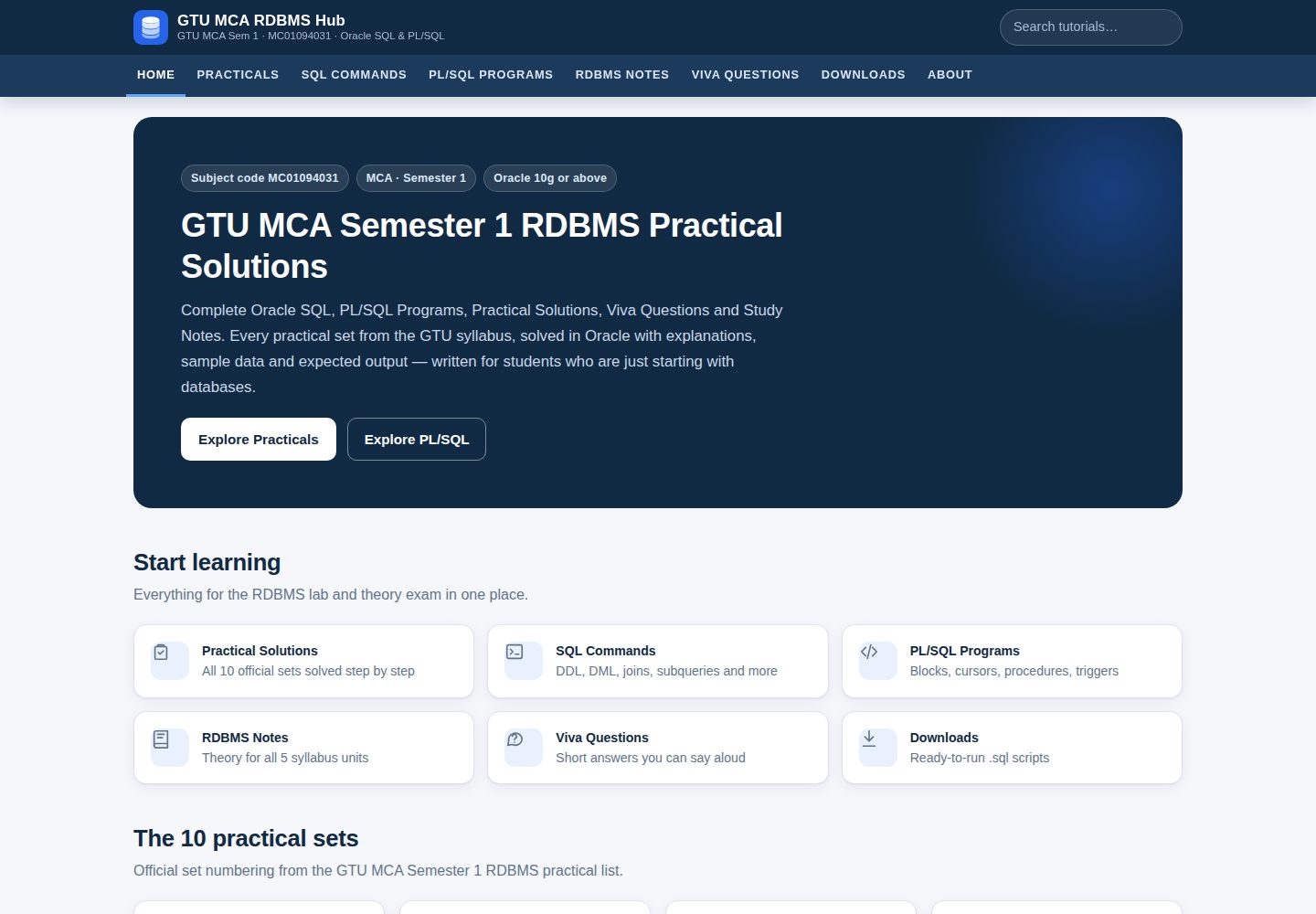
Contains Oracle SQL and PL/SQL solutions, explanations and expected output for 10 practical sets
HTMLBlogTool SiteCorporate Website
gtu-mca-rdbms-hub — HTML Blog Template
By hetmochi05
A Blogger teaching site for GTU MCA Semester 1 RDBMS (MC01094031), containing Oracle SQL/PLSQL solutions for 10 practical sets, explanations, output, notes, viva questions and downloadable scripts, along with a custom theme and Python generator.
Explore the design
Compare the page layouts and mobile experience. Open any screenshot for a closer look.
Desktop homepage1 / 3
Desktop captureTop of page
Actual screenshot captured by the server browser.
All pages & views 3
Screenshots show visual appearance; interactive behavior may differ.
Recorded 2026-10-12View source
What stands out
A quick read of the recorded project description.
Provides downloadable .sql scripts, viva question text and an SQL command reference
Includes a custom Blogger theme XML and an offline preview site
Offers a Python generator that rebuilds posts, pages, downloads and the theme from structured content
Uses labels (Set-01 to Set-10) to automatically associate practical posts with navigation
Template Details
This is a Blogger website template prepared for the GTU MCA Semester 1 RDBMS course (MC01094031). The content is organized around 10 practical sets, each providing Oracle SQL and PL/SQL solutions, explanations, expected output, notes and viva questions, with downloadable .sql scripts. The site also includes an SQL command reference, PL/SQL lessons, theory notes for five units and a viva question bank.
The repository provides a custom Blogger theme XML, CSS/JS for reference, logo and favicon, plus HTML source files for 10 practical posts and 10 static pages. It also includes an offline preview directory, download scripts, setup documentation and a Python generator.
To use it, a Google account is required; follow the steps to create a blog, configure basic settings, upload the theme, and create pages and posts. Post and page content must be pasted into Blogger's HTML view. The site relies on labels (such as Set-01 to Set-10) to associate practical posts, and the theme script replaces label links with the actual post URLs via the blog feed.
As for limitations, this site is an independent educational resource and is not affiliated with Gujarat Technological University. The theme does not display comments by default. Page URLs are determined by the title at first publication; if titles conflict, suffixed addresses may be generated. The generator requires sqlglot and duckdb to be installed to compute expected output for SELECT statements.
HTMLBlogTool SiteCorporate Website
Is it right for your project?
Use Cases
- GTU MCA students looking for reference solutions and explanations for RDBMS practicals
- Teachers or teaching assistants organizing course practical materials and viva questions
- Blogger users referencing the custom theme structure to build a teaching blog
- Developers using the Python generator to batch-maintain and update practical content
Suitable For
- Learners in the GTU MCA Semester 1 RDBMS course
- Blogger users who need to publish Oracle SQL/PLSQL teaching content
- Educational resource maintainers who want to build on the existing theme and generator
Getting started & customization
Use these recorded setup notes alongside the repository instructions for your chosen version.
- 1
A Google account is required; follow the README steps to create a blog on Blogger and configure basic settings
- 2
Upload theme/gtu-rdbms-hub-theme.xml to install the theme, and change the mobile setting to desktop version
- 3
Paste the HTML content from pages/ and posts/ into Blogger's HTML view, and set the corresponding labels and permalinks
- 4
To use the generator, install sqlglot and duckdb, then run python3 tools/build.py
- 5
Replace the placeholder email address on the Contact page before publishing
License & source material
Usage conditions & limitations
Free to use · keep license noticeThis entry covers the free version in the public repository under the MIT license; the free scope is the code of this version and does not imply that external services or third-party assets are free.
Must comply with when using
- You may use, modify, commercialize and distribute the code of this version for free.
- When distributing copies or substantial portions of the code, retain the original author's copyright notice and the full MIT license notice.
- The code is provided as is; warranties and limitations of liability are governed by the original license and applicable law.
Additional costs & items to verify
- Demo images, fonts, icons and other third-party assets must be checked against their respective licenses; the MIT license of the code alone is not sufficient to judge.
- External services such as domains, hosting, databases, payments or AI may incur additional charges.
- Publishing a site with this template requires a Google account and about 45–60 minutes to complete the Blogger configuration steps.
- Rebuilding content with the generator requires installing two third-party Python packages, sqlglot and duckdb, to compute expected output for SELECT statements.
- The placeholder email address must be replaced with a real one before publishing the Contact page, otherwise the page information will be incomplete.
- The theme does not display the comment area by default; to enable comments, you must modify the theme and add Blogger's default comment component.
- Page URLs are determined by the title at first publication; if titles conflict, suffixed addresses may be generated and must be handled according to the documentation.
- The author has not actually executed the code on an Oracle server; expected output is computed from sample data and must be verified by running it in your own lab environment.
View Original Text Basis
Permission is hereby granted, free of charge
Original License Text
You need a Google account and about 45–60 minutes.
Original README
pip install sqlglot duckdb # needed to compute expected outputs
Original README
**Contact page:** before publishing, replace `[your-email-address-here]` with your real address
Original README
The theme deliberately shows no comment section
Original README
Blogger makes the page URL from the title used the first time you publish.
Original README
https://github.com/hetmochi05/gtu-mca-rdbms-hub/blob/main/LICENSEhttps://github.com/hetmochi05/gtu-mca-rdbms-hub/blob/main/README.mdit has **not** been executed on an Oracle server by the author.
Original README
Compiled by DeepSeek based on repository license and README ·2026-10-12. Results only cover the materials read; dependencies, images, fonts, and subsequent term changes are subject to their respective original texts.
Project checks & description sources
Template Information
- Source platforms
- GitHub
- Documentation and maintenance reference score
- More documented · 85 / 100
- Technologies
- HTML
- Website type
- Blog · Tool Site · Corporate Website
How this score is calculated
Our heuristic uses license records (up to 30), a demo link (12), a preview (10), stars (15), recorded maintenance (15), description completeness (8), feature records (5) and classification data (5). It is not a code, security or performance test, or a Google score. A link does not establish tested functionality.
What to verify for this project
- Repository update recorded
- 2026-10-12
- Screenshot last checked
- 2026-10-12
A demo link is listed. Check it with your own content and viewport sizes; its presence does not confirm that forms, authentication or payments work.
The catalog identifies HTML as the primary stack. Check the actual dependency manifest and lockfile for versions and hosting requirements. These notes use recorded metadata, not a code audit or a deployment test.
Use a selection guide →How this description was prepared
AI-assisted description based on catalog records and repository material. Repository authors are not automatically the reviewers of this description.
Review declaration: [email protected] · 2026-10-13
Inspect the recorded source material
SHA-256: 1d2f1a0fe8b42f26da9d5e47d89d3e1533bff733f3d9a264e36393ec0c5e271b
2026-10-12T17:09:48.492Z
Source file / repository# GTU MCA RDBMS Hub — Blogger website A complete, ready-to-publish Google Blogger website for **GTU MCA Semester 1 — Relational Database Management Systems (MC01094031)**: all 10 practical sets solved in Oracle SQL / PL/SQL, an SQL command reference, PL/SQL lessons, five-unit theory notes, viva questions and downloadable scripts. > Independent educational resource — not affiliated with Gujarat Technological University. ## 🌐 Live links | | Link | |---|---| | **Blogger website (main site)** | **[gtu-mca-rdbms-guide.blogspot.com](https://gtu-mca-rdbms-guide.blogspot.com/)** | | **Live preview (GitHub Pages)** | [hetmochi05.github.io/gtu-mca-rdbms-hub/](https://hetmochi05.github.io/gtu-mca-rdbms-hub/preview/) | | **Author** | Het Mochi · [LinkedIn](https://www.linkedin.com/in/het-mochi-57a518321) · [GitHub](https://github.com/hetmochi05) | The Blogger website is the full site with search and post pages. The GitHub Pages link is a static preview of the same design and content. --- ## 1. What is in this folder ``` gtu-rdbms-hub/ ├── theme/ │ ├── gtu-rdbms-hub-theme.xml ← the Blogger theme (upload this) │ ├── site.css, site.js ← same CSS/JS that is embedded in the theme (for reference) │ ├── logo.svg, logo-512.png ← site logo │ └── favicon-64.png ← favicon for Blogger settings ├── posts/ ← 10 practical articles (paste each into a Blogger POST) │ └── set-01.html … set-10.html ├── pages/ ← 10 static pages (paste each into a Blogger PAGE) │ ├── practicals.html sql-commands.html plsql-programs.html rdbms-notes.html │ ├── viva-questions.html downloads.html │ └── about.html disclaimer.html privacy-policy.html contact.html ├── downloads/ ← the same scripts offered on the Downloads page │ ├── set-01-….sql … set-10-….sql │ ├── gtu-mca-rdbms-all-practicals.sql │ ├── gtu-mca-rdbms-viva-questions.txt │ └── oracle-sql-command-reference.txt ├── preview/ ← offline preview of the whole site (open index.html) ├── docs/ │ ├── blogger-setup-sheet.md ← exact titles, labels, permalinks, descriptions to type │ ├── content-checklist.md ← question-by-question status │ ├── FINAL-CHECKLIST.md ← completed / partial / pending items │ └── post-settings.json └── tools/ ← the generator (only needed if you want to change content) ``` **Important:** the files in `posts/` and `pages/` contain HTML. Always paste them in Blogger's **HTML view**, never in the normal (compose) view. --- ## 2. Preview the site on your computer Open `preview/index.html` in any browser (double-click it). Every page, link, filter, copy button and download button works. The yellow bar at the top reminds you it is a preview: search and Blogger features only work after publishing. The preview is **not** the Blogger theme — Blogger only uses `theme/gtu-rdbms-hub-theme.xml`. Both use the same CSS, JavaScript and markup, so they look the same. --- ## 3. Publish on Blogger — step by step You need a Google account and about 45–60 minutes. Do the steps in this order. ### Step 1 — Create the blog 1. Go to **blogger.com** and sign in. 2. Click **New blog** (or **Create your blog**). 3. Title: `GTU MCA RDBMS Hub`. 4. Address: choose something like `gtu-mca-rdbms-hub.blogspot.com` (pick any free name). 5. Display name: your name or "GTU MCA RDBMS Hub". Click **Finish**. ### Step 2 — Basic settings (left menu → **Settings**) | Setting | Value | |---|---| | Basic → Description | `GTU MCA Semester 1 RDBMS (MC01094031) practical solutions in Oracle SQL and PL/SQL, notes and viva questions.` | | Basic → Favicon | upload `theme/favicon-64.png` | | HTTPS → HTTPS redirect | **On** | | Comments → Comment location | **Hide** (this theme does not show comments; see §8) | | Site feed → Allow blog feed | **Full** or **Until Jump Break** (needed so the practical links can find each post — do **not** choose *None*) | | Crawlers and indexing → Enable search description | **On**, then write the same description as above | | Formatting → Time zone | (GMT+05:30) India Standard Time | ### Step 3 — Install the theme 1. Left menu → **Theme**. 2. Click the small **▼ arrow** next to **Customize** → **Backup** → **Download** (keeps a copy of the old theme, just in case). 3. Click the **▼ arrow** again → **Restore** → **Upload** → choose `theme/gtu-rdbms-hub-theme.xml`. 4. If Blogger asks to remove widgets that are not in the new theme, click **Remove widgets**. 5. Click the **▼ arrow** → **Mobile settings** → choose **Desktop** → **Save**. (The theme is fully responsive; this makes phones get it too.) ### Step 4 — Create the 10 pages For **each** row of the table, do: 1. Left menu → **Pages** → **+ New page**. 2. Type the **title exactly as shown** (it decides the page URL). 3. Click the toolbar's first drop-down (**Compose view**) and switch to **HTML view**. 4. Open the file from `pages/` in Notepad (or any text editor), **Select all → Copy**, then paste into Blogger. 5. Click **Publish** → **Confirm**. | Title to type (first publish) | File | URL Blogger creates | |---|---|---| | Practicals | `pages/practicals.html` | `/p/practicals.html` | | SQL Commands | `pages/sql-commands.html` | `/p/sql-commands.html` | | PLSQL Programs | `pages/plsql-programs.html` | `/p/plsql-programs.html` | | RDBMS Notes | `pages/rdbms-notes.html` | `/p/rdbms-notes.html` | | Viva Questions | `pages/viva-questions.html` | `/p/viva-questions.html` | | Downloads | `pages/downloads.html` | `/p/downloads.html` | | About | `pages/about.html` | `/p/about.html` | | Disclaimer | `pages/disclaimer.html` | `/p/disclaimer.html` | | Privacy Policy | `pages/privacy-policy.html` | `/p/privacy-policy.html` | | Contact | `pages/contact.html` | `/p/contact.html` | - After publishing **PLSQL Programs** you can edit it and change the title to **PL/SQL Programs** — the URL does not change. - **Contact page:** before publishing, replace `[your-email-address-here]` with your real address (or delete that line and add Blogger's Contact Form gadget, §6). - After each page is live, open it (Pages → *View*) and check that the address bar matches the third column. If Blogger created a different URL, see §7. ### Step 5 — Create the 10 practical posts Open `docs/blogger-setup-sheet.md` — it lists the exact title, labels, permalink and search description for each post. For **Set 1, then Set 2, … up to Set 10**: 1. Left menu → **Posts** → **+ New post**. 2. Paste the **Post title** from the setup sheet. 3. Switch to **HTML view** and paste the whole content of `posts/set-0N.html`. 4. In the right-hand **Post settings** panel: - **Labels:** type the labels exactly, separated by commas, e.g. `Set-01, Practicals, Basic SQL`. The `Set-01` … `Set-10` labels are essential — all practical links, the sidebar and previous/next navigation use them. - **Permalink → Custom permalink:** e.g. `gtu-mca-rdbms-set-1-solution`. - **Search description:** paste from the sheet. 5. Click **Publish**. Publishing Set 1 first and Set 10 last makes the homepage *Latest tutorials* list show the newest sets first. ### Step 6 — Check the live site Open your blog address and check: - [ ] The homepage shows the hero, the six quick cards, the 10 set cards and *Latest tutorials*. - [ ] Every top-menu item opens the right page. - [ ] Clicking a set card opens that practical (the link is upgraded automatically to the post's real address; before that it shows the post through its label). - [ ] On a practical: **Copy** buttons copy only their own block; **Download .sql** saves a file; *Previous/Next practical* work. - [ ] On the Practicals page the topic filters and the search box narrow the cards. - [ ] On a phone: the ☰ menu opens and closes, code scrolls sideways, nothing is cut off. ### Step 7 — Search engines (optional but recommended) 1. Blogger already creates `https://YOUR-BLOG.blogspot.com/sitemap.xml` and a correct `robots.txt` automatically. Leave **Custom robots.txt** and **Custom robots header tags** **off** unless you know you need them. 2. Go to **search.google.com/search-console**, add your blog address as a property (Blogger blogs verify automatically when you use the same Google account), then **Sitemaps → Add** `sitemap.xml`. 3. The theme already outputs canonical URLs and Open Graph tags (through Blogger's `all-head-content`), a meta description from each post's *Search description*, and `noindex` for search-result pages. --- ## 4. How labels are used | Label | Purpose | |---|---| | `Set-01` … `Set-10` | Identifies each practical. Links use `/search/label/Set-0N`, and the theme's script replaces that with the post's real URL by reading the blog feed. Use **exactly one** post per Set label. | | `Practicals` | Shows the *Home › Practicals › post* breadcrumb and highlights PRACTICALS in the menu. | | `Basic SQL`, `Constraints`, `Joins`, `Subqueries`, `Aggregate Functions`, `Views and Sequences`, `PLSQL`, `Procedures`, `Functions`, `Cursors`, `Triggers` | Topic labels. Clicking one on a post shows every post on that topic. | --- ## 5. Updating navigation links The top menu, footer, sidebar and homepage cards are part of the theme. To change a link: 1. **Theme → ▼ → Edit HTML**. 2. Press **Ctrl+F** (inside the code editor) and search for the old URL, e.g. `/p/practicals.html`. 3. Change it (there may be several occurrences — header, footer, homepage, sidebar) and click **Save** (💾 icon). Links **inside** posts and pages are in those posts/pages; edit them in HTML view. --- ## 6. Adding gadgets (optional) **Layout** shows a *Sidebar gadgets* area under the built-in sidebar. Click **Add a Gadget** there to add, for example, **Contact Form**, **Popular Posts** or **Labels**. Blogger renders them with its default markup. --- ## 7. If Blogger created a different page URL Blogger makes the page URL from the title used the first time you publish. If, for example, *PLSQL Programs* became `/p/plsql-programs_10.html` (this happens when a page with that URL existed before and was deleted): - Easiest: delete the page, **empty it from the trash too**, and create it again with the exact title; or - Replace the URL in the theme (§5) and in any post/page that links to it. --- ## 8. Comments The theme deliberately shows no comment section, which keeps the pages fast and avoids spam moderation. If you want comments, keep Settings → Comments → *Comment location: Embedded* and add Blogger's default comment includable to the Blog widget (Theme → Edit HTML). This is optional and not needed for the site to work. --- ## 9. Adding a future practical (e.g. Set 11) or changing content **Without the generator (simple):** 1. Copy any `posts/set-XX.html`, edit the text and code in a text editor, and publish it as a new post with labels `Set-11, Practicals, …`. 2. Add a card for it: Theme → Edit HTML → search for `Set-10` → duplicate the `<article class="set-card">…</article>` block of Set 10 in the homepage section and change `Set-10`/`10` to `Set-11`/`11`. Do the same for the sidebar `<li>` and in `pages/practicals.html`. **With the generator (recommended for bigger changes):** everything is produced from `tools/content/*.py`. ```bash pip install sqlglot duckdb # needed to compute expected outputs python3 tools/build.py # rebuilds posts/, pages/, downloads/, theme/, preview/, docs/ ``` - Edit a practical in `tools/content/setNN.py` (each question is a `Q(...)` with text, code, explanation). - Change theme layout in `tools/theme.py`, styles in `tools/assets/site.css`, behaviour in `tools/assets/site.js`. - A new set: create `tools/content/set11.py` following the same structure and change `range(1, 11)` in `tools/build.py` to `range(1, 12)`. - Re-publish only what changed: re-upload the theme and re-paste the edited posts/pages. Expected outputs of SELECT statements are **computed** by running the Oracle SQL (translated with `sqlglot`) on DuckDB against the same sample data, so they always match the data shown in the article. --- ## 10. Fixing common Blogger XML errors | Error message when uploading/saving the theme | Cause and fix | |---|---| | *The entity name must immediately follow the '&' in the entity reference* | A raw `&` in the HTML part of the theme. Write `&` (or put scripts inside `//<![CDATA[ … //]]>`). | | *The element type "br" must be terminated by the matching end-tag* | XML needs self-closed tags: `<br/>`, `<img …/>`, `<input …/>`, `<meta …/>`. | | *Open quote is expected for attribute* | Every attribute value needs quotes: `class='x'`. | | *The content of elements must consist of well-formed character data or markup* | A `<` inside text or a script outside CDATA. Use `<` or wrap the script in CDATA. | | *More than one widget was found with id: …* | Two widgets share an id. Give each a unique id (`HTML1`, `HTML2`, …). | | *Invalid variable declaration in page skin* | A `$` or `<Variable>` inside `<b:skin>`. Keep plain CSS only. | | *We were unable to save your template … widget … not found* | You removed a widget that Layout still lists. Re-upload the full theme file. | | Theme uploads but the page is blank | Check Settings → *Mobile settings → Desktop*, then clear the browser cache. | The theme file was validated with an XML parser before delivery. If you edit it, keep a backup first (Theme → Backup). --- ## 11. Troubleshooting - **A set card opens a "Posts labelled Set-0N" list instead of the article** — either the post is not published yet, its label is misspelt (`Set-1` instead of `Set-01`), or the blog feed is set to *None*. The list still shows the article, so nothing is broken. - **Download button missing** — the browser has JavaScript disabled, or the post was pasted in compose view (re-paste in HTML view). - **Copy button says "Press Ctrl+C"** — the browser blocked the clipboard; the code is selected for you. - **Code shows as one long line** — the content was pasted in compose view. Delete it and paste again in HTML view. --- ## 12. About the content - All question wording and numbering is copied from the official GTU syllabus PDF (MC01094031, w.e.f. 2024-25), including its spelling. Where the PDF splits one instruction across two numbers (Set 2 items 2–3 and 4–5, Set 5 items 12–13) or repeats a question (Set 5 items 2 and 10), the numbering is kept and the article explains it. - Set 1 uses the PDF's own department records. The other sets' rows are sample data built around the PDF's examples (Surat, Sejal, Chirag, Piyush, Ajaykumar, ORACLE FUNDAMENTALS, …), because the PDF gives no data for them. - All solutions target **Oracle 10g or above** and avoid newer-only features (no `FETCH FIRST`, identity columns or `LISTAGG`); places where newer versions differ are noted in the articles. - Code has been syntax-reviewed and the SQL statements were parse-checked; it has **not** been executed on an Oracle server by the author. Expected outputs are computed from the sample data — please run the scripts in your lab.
Explore similar templates
Compare previews and descriptions within the same stack and category.

mazer
Mazer is a free and open-source Bootstrap 5 admin dashboard and landing page template that does not depend on jQuery. It provides prebuilt releases, source builds, and CDN inclusion, and includes dark mode, perfect-scrollbar, and ApexCharts examples.
HTML · Admin dashboard

Freelancer
A bright, single-page Bootstrap portfolio template for freelancers, designers, and small studios. It includes a responsive portfolio grid with modal detail windows and an SB Forms contact form that requires an API token.
HTML · Portfolio

Casper
Casper is Ghost's official classic blog theme, long used as the default and still maintained.
HTML · Magazine

Creative
A single-page marketing template by Start Bootstrap for creative agencies and product services, built on Bootstrap with SCSS, featuring a portfolio grid and call-to-action sections. It includes pre-set SB Forms markers for form integration and npm build scripts for source customization.
HTML · Corporate Website

startbootstrap-agency
Agency is a one-page Bootstrap portfolio theme from Start Bootstrap, MIT licensed. It includes a responsive portfolio grid with modal details and a preconfigured SB Forms contact form that requires an API token.
HTML · Corporate Website
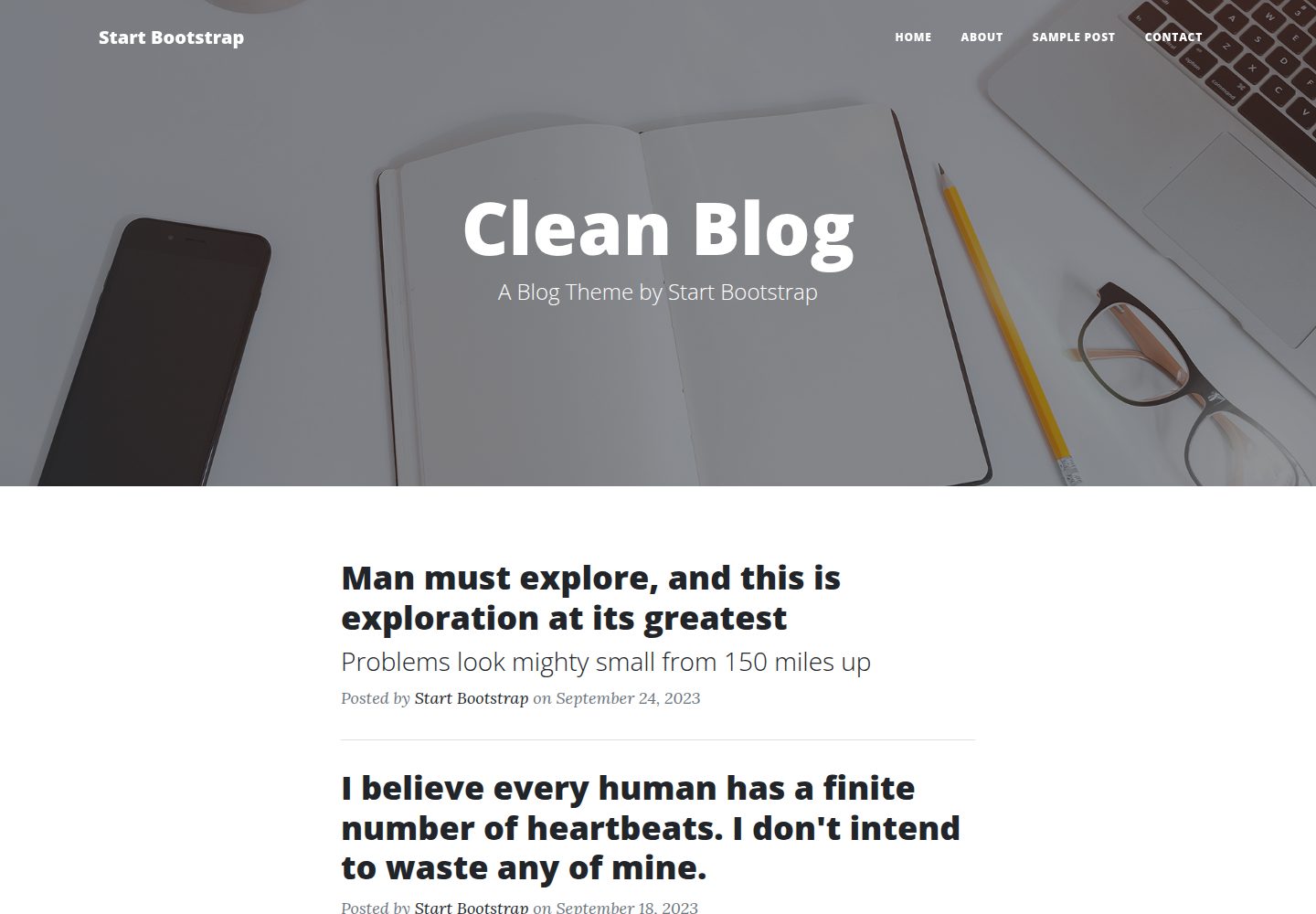
startbootstrap-clean-blog
Clean Blog by Start Bootstrap is a responsive Bootstrap blog theme with a home page, about page, contact page, and sample post page, plus a working PHP contact form preconfigured for SB Forms.
HTML · Blog