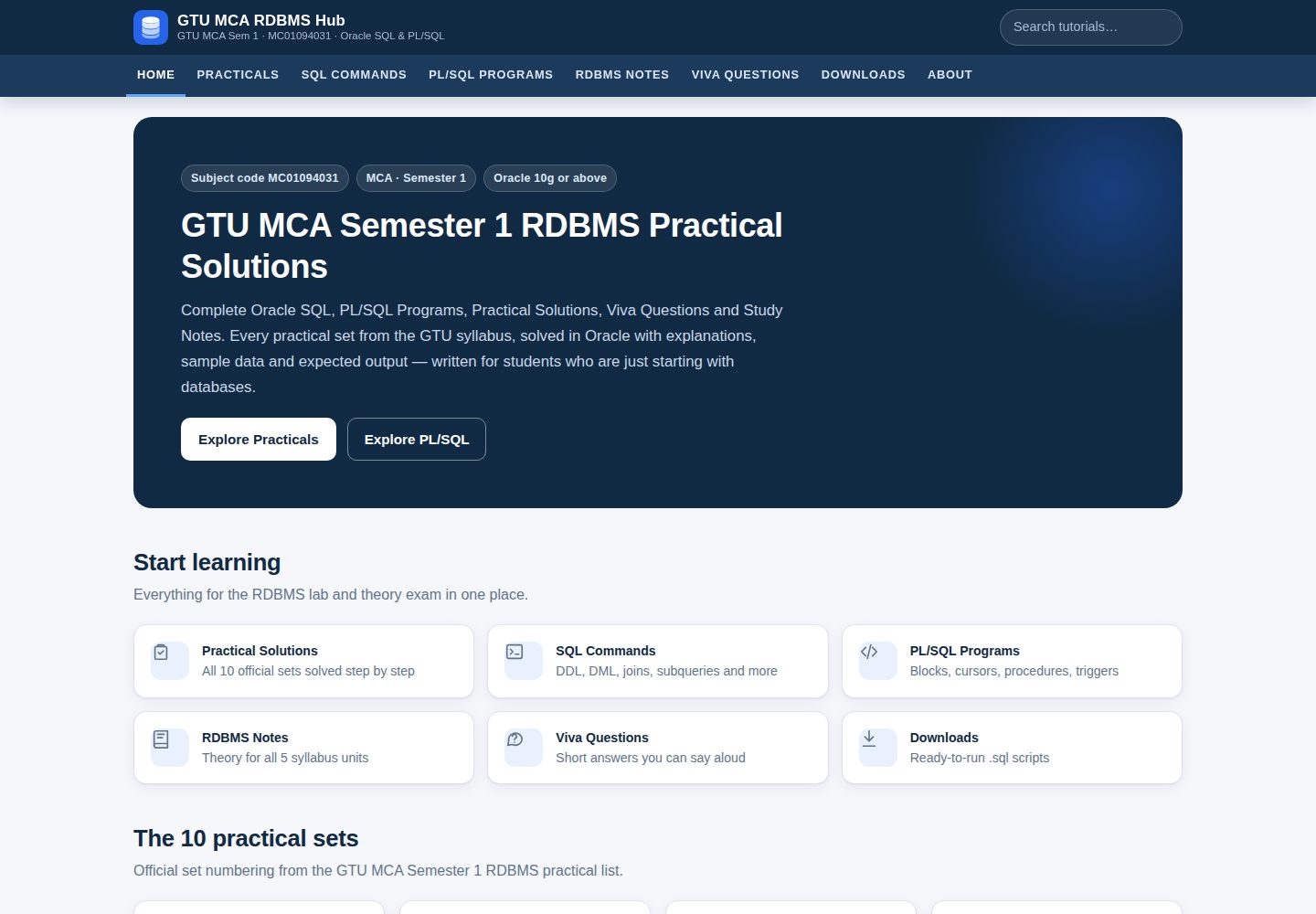
包含 10 个实践集的 Oracle SQL 与 PL/SQL 解答、解释和预期输出
HTML博客工具站企业官网
gtu-mca-rdbms-hub — HTML 博客模板
作者 hetmochi05
面向 GTU MCA 第一学期 RDBMS(MC01094031)的 Blogger 教学站点,包含 10 个实践集的 Oracle SQL/PLSQL 解答、说明、输出、笔记、答辩题与可下载脚本,并附带自定义主题和 Python 生成器。
看看你的网站会是什么样
浏览真实页面截图,比较内容排版与手机效果。点击下方缩略图切换,放大查看整页细节。
全部页面与视图 3
截图用于了解视觉与布局,交互效果请以实际项目为准。
采集于 2026-10-12查看来源
值得关注的模板亮点
从已有项目资料中,快速了解它的特点。
提供可下载的 .sql 脚本、答辩问题文本和 SQL 命令参考
附带自定义 Blogger 主题 XML,以及离线预览站点
提供 Python 生成器,可从结构化内容重建文章、页面、下载和主题
使用标签(Set-01 至 Set-10)自动关联实践文章与导航
模板详细介绍
这是一个为 GTU MCA 第一学期 RDBMS 课程(MC01094031)准备的 Blogger 网站模板。内容围绕 10 个实践集展开,每个实践集提供 Oracle SQL 与 PL/SQL 的解答、解释、预期输出、笔记和答辩问题,并附可下载的 .sql 脚本。站点还包含 SQL 命令参考、PL/SQL 课程、五个单元的理论笔记以及答辩问题库。
仓库提供自定义 Blogger 主题 XML、用于参考的 CSS/JS、logo 与 favicon,以及 10 篇实践文章和 10 个静态页面的 HTML 源文件。此外包含离线预览目录、下载脚本、设置文档和 Python 生成器。
使用方式上,需要 Google 账号,按步骤创建博客、配置基本设置、上传主题、创建页面和文章。文章和页面内容需粘贴到 Blogger 的 HTML 视图。站点依赖标签(如 Set-01 至 Set-10)来关联实践文章,主题脚本会通过博客 feed 将标签链接替换为文章真实地址。
限制方面,该站点是独立教育资源,与 Gujarat Technological University 无隶属关系。主题默认不显示评论。页面 URL 由首次发布时的标题决定,若标题冲突可能生成带后缀的地址。生成器需要安装 sqlglot 和 duckdb 来计算 SELECT 语句的预期输出。
HTML博客工具站企业官网
适合你的项目吗?
适用场景
- GTU MCA 学生查找 RDBMS 实践题的参考解答与说明
- 教师或助教整理课程实践材料与答辩问题
- Blogger 用户参考自定义主题结构搭建教学博客
- 开发者使用 Python 生成器批量维护和更新实践内容
适合人群
- GTU MCA 第一学期 RDBMS 课程的学习者
- 需要发布 Oracle SQL/PLSQL 教学内容的 Blogger 用户
- 希望基于现有主题和生成器二次开发的教育资源维护者
上手与定制指南
结合仓库当前版本的说明,按下面的资料检查内容、配置与运行要求。
- 1
需要 Google 账号,按 README 步骤在 Blogger 创建博客并配置基本设置
- 2
上传 theme/gtu-rdbms-hub-theme.xml 安装主题,并将移动端设置改为桌面版
- 3
将 pages/ 和 posts/ 中的 HTML 内容粘贴到 Blogger 的 HTML 视图,并设置对应标签与固定链接
- 4
使用生成器需安装 sqlglot 和 duckdb,然后运行 python3 tools/build.py
- 5
Contact 页面发布前需替换占位邮箱地址
授权与来源资料
使用条件与限制
免费使用 · 保留许可声明本次收录的是公开仓库中采用 MIT 许可的免费版本;免费范围为该版本代码,不代表外部服务或第三方素材免费。
使用时需要遵守
- 允许免费使用、修改、商用和分发该版本代码。
- 分发代码副本或实质性部分时,保留原作者版权声明和完整 MIT 许可声明。
- 代码按现状提供;担保与责任限制以原许可证及适用法律为准。
额外费用与待核对事项
- 演示图片、字体、图标及其他第三方素材需按各自许可核对,不能仅凭代码的 MIT 许可判断。
- 域名、托管、数据库、支付或 AI 等外部服务可能另外收费。
- 使用该模板发布站点需要 Google 账号,并需按步骤花费约 45–60 分钟完成 Blogger 配置。
- 使用生成器重建内容时需安装 sqlglot 和 duckdb 两个第三方 Python 包,用于计算 SELECT 语句的预期输出。
- 发布 Contact 页面前必须将占位邮箱替换为真实邮箱地址,否则页面信息不完整。
- 主题默认不显示评论区域,如需评论功能需自行修改主题并添加 Blogger 默认评论组件。
- 页面 URL 由首次发布时的标题决定,若标题冲突可能生成带后缀的地址,需按文档处理。
- 作者未在 Oracle 服务器上实际执行过代码,预期输出由样本数据计算得出,需自行在实验环境运行验证。
查看原文依据
Permission is hereby granted, free of charge
许可证原文
You need a Google account and about 45–60 minutes.
README 原文
pip install sqlglot duckdb # needed to compute expected outputs
README 原文
**Contact page:** before publishing, replace `[your-email-address-here]` with your real address
README 原文
The theme deliberately shows no comment section
README 原文
Blogger makes the page URL from the title used the first time you publish.
README 原文
https://github.com/hetmochi05/gtu-mca-rdbms-hub/blob/main/LICENSEhttps://github.com/hetmochi05/gtu-mca-rdbms-hub/blob/main/README.mdit has **not** been executed on an Oracle server by the author.
README 原文
DeepSeek 根据仓库许可证和 README 整理 ·2026-10-12。结果仅覆盖已读取资料,依赖、图片、字体及后续条款变更以各自原文为准。
项目核对记录与介绍依据
模板资料
- 来源平台
- GitHub
- 资料与维护参考分
- 资料较完整 · 85 / 100
- 技术栈
- HTML
- 网站类型
- 博客 · 工具站 · 企业官网
这个分数如何计算
本站按许可资料(最高30分)、演示链接(12分)、预览图(10分)、Star数(15分)、记录的维护时间(15分)、描述完整度(8分)、功能记录(5分)和分类资料(5分)计算。它不是代码、安全或性能测试,也不是 Google 评分;有链接不代表已实测可用。
这个项目需要核对什么
- 记录的仓库更新时间
- 2026-10-12
- 截图检查日期
- 2026-10-12
已收录演示链接。请用你的内容与屏幕尺寸检查;有演示不代表表单、认证或支付已经可用。
目录记录的主要技术栈是 HTML。请通过依赖清单和锁文件核对实际版本与托管要求。这些说明基于收录资料,不代表代码审计或部署实测。
查看具体选型方法 →介绍的制作与核对状态
介绍由 AI 辅助整理目录与仓库资料。仓库作者不等于这篇介绍的审核者。
审核声明: [email protected] · 2026-10-13
查看当时使用的来源资料
SHA-256: 1d2f1a0fe8b42f26da9d5e47d89d3e1533bff733f3d9a264e36393ec0c5e271b
2026-10-12T17:09:48.492Z
来源文件 / 仓库# GTU MCA RDBMS Hub — Blogger website A complete, ready-to-publish Google Blogger website for **GTU MCA Semester 1 — Relational Database Management Systems (MC01094031)**: all 10 practical sets solved in Oracle SQL / PL/SQL, an SQL command reference, PL/SQL lessons, five-unit theory notes, viva questions and downloadable scripts. > Independent educational resource — not affiliated with Gujarat Technological University. ## 🌐 Live links | | Link | |---|---| | **Blogger website (main site)** | **[gtu-mca-rdbms-guide.blogspot.com](https://gtu-mca-rdbms-guide.blogspot.com/)** | | **Live preview (GitHub Pages)** | [hetmochi05.github.io/gtu-mca-rdbms-hub/](https://hetmochi05.github.io/gtu-mca-rdbms-hub/preview/) | | **Author** | Het Mochi · [LinkedIn](https://www.linkedin.com/in/het-mochi-57a518321) · [GitHub](https://github.com/hetmochi05) | The Blogger website is the full site with search and post pages. The GitHub Pages link is a static preview of the same design and content. --- ## 1. What is in this folder ``` gtu-rdbms-hub/ ├── theme/ │ ├── gtu-rdbms-hub-theme.xml ← the Blogger theme (upload this) │ ├── site.css, site.js ← same CSS/JS that is embedded in the theme (for reference) │ ├── logo.svg, logo-512.png ← site logo │ └── favicon-64.png ← favicon for Blogger settings ├── posts/ ← 10 practical articles (paste each into a Blogger POST) │ └── set-01.html … set-10.html ├── pages/ ← 10 static pages (paste each into a Blogger PAGE) │ ├── practicals.html sql-commands.html plsql-programs.html rdbms-notes.html │ ├── viva-questions.html downloads.html │ └── about.html disclaimer.html privacy-policy.html contact.html ├── downloads/ ← the same scripts offered on the Downloads page │ ├── set-01-….sql … set-10-….sql │ ├── gtu-mca-rdbms-all-practicals.sql │ ├── gtu-mca-rdbms-viva-questions.txt │ └── oracle-sql-command-reference.txt ├── preview/ ← offline preview of the whole site (open index.html) ├── docs/ │ ├── blogger-setup-sheet.md ← exact titles, labels, permalinks, descriptions to type │ ├── content-checklist.md ← question-by-question status │ ├── FINAL-CHECKLIST.md ← completed / partial / pending items │ └── post-settings.json └── tools/ ← the generator (only needed if you want to change content) ``` **Important:** the files in `posts/` and `pages/` contain HTML. Always paste them in Blogger's **HTML view**, never in the normal (compose) view. --- ## 2. Preview the site on your computer Open `preview/index.html` in any browser (double-click it). Every page, link, filter, copy button and download button works. The yellow bar at the top reminds you it is a preview: search and Blogger features only work after publishing. The preview is **not** the Blogger theme — Blogger only uses `theme/gtu-rdbms-hub-theme.xml`. Both use the same CSS, JavaScript and markup, so they look the same. --- ## 3. Publish on Blogger — step by step You need a Google account and about 45–60 minutes. Do the steps in this order. ### Step 1 — Create the blog 1. Go to **blogger.com** and sign in. 2. Click **New blog** (or **Create your blog**). 3. Title: `GTU MCA RDBMS Hub`. 4. Address: choose something like `gtu-mca-rdbms-hub.blogspot.com` (pick any free name). 5. Display name: your name or "GTU MCA RDBMS Hub". Click **Finish**. ### Step 2 — Basic settings (left menu → **Settings**) | Setting | Value | |---|---| | Basic → Description | `GTU MCA Semester 1 RDBMS (MC01094031) practical solutions in Oracle SQL and PL/SQL, notes and viva questions.` | | Basic → Favicon | upload `theme/favicon-64.png` | | HTTPS → HTTPS redirect | **On** | | Comments → Comment location | **Hide** (this theme does not show comments; see §8) | | Site feed → Allow blog feed | **Full** or **Until Jump Break** (needed so the practical links can find each post — do **not** choose *None*) | | Crawlers and indexing → Enable search description | **On**, then write the same description as above | | Formatting → Time zone | (GMT+05:30) India Standard Time | ### Step 3 — Install the theme 1. Left menu → **Theme**. 2. Click the small **▼ arrow** next to **Customize** → **Backup** → **Download** (keeps a copy of the old theme, just in case). 3. Click the **▼ arrow** again → **Restore** → **Upload** → choose `theme/gtu-rdbms-hub-theme.xml`. 4. If Blogger asks to remove widgets that are not in the new theme, click **Remove widgets**. 5. Click the **▼ arrow** → **Mobile settings** → choose **Desktop** → **Save**. (The theme is fully responsive; this makes phones get it too.) ### Step 4 — Create the 10 pages For **each** row of the table, do: 1. Left menu → **Pages** → **+ New page**. 2. Type the **title exactly as shown** (it decides the page URL). 3. Click the toolbar's first drop-down (**Compose view**) and switch to **HTML view**. 4. Open the file from `pages/` in Notepad (or any text editor), **Select all → Copy**, then paste into Blogger. 5. Click **Publish** → **Confirm**. | Title to type (first publish) | File | URL Blogger creates | |---|---|---| | Practicals | `pages/practicals.html` | `/p/practicals.html` | | SQL Commands | `pages/sql-commands.html` | `/p/sql-commands.html` | | PLSQL Programs | `pages/plsql-programs.html` | `/p/plsql-programs.html` | | RDBMS Notes | `pages/rdbms-notes.html` | `/p/rdbms-notes.html` | | Viva Questions | `pages/viva-questions.html` | `/p/viva-questions.html` | | Downloads | `pages/downloads.html` | `/p/downloads.html` | | About | `pages/about.html` | `/p/about.html` | | Disclaimer | `pages/disclaimer.html` | `/p/disclaimer.html` | | Privacy Policy | `pages/privacy-policy.html` | `/p/privacy-policy.html` | | Contact | `pages/contact.html` | `/p/contact.html` | - After publishing **PLSQL Programs** you can edit it and change the title to **PL/SQL Programs** — the URL does not change. - **Contact page:** before publishing, replace `[your-email-address-here]` with your real address (or delete that line and add Blogger's Contact Form gadget, §6). - After each page is live, open it (Pages → *View*) and check that the address bar matches the third column. If Blogger created a different URL, see §7. ### Step 5 — Create the 10 practical posts Open `docs/blogger-setup-sheet.md` — it lists the exact title, labels, permalink and search description for each post. For **Set 1, then Set 2, … up to Set 10**: 1. Left menu → **Posts** → **+ New post**. 2. Paste the **Post title** from the setup sheet. 3. Switch to **HTML view** and paste the whole content of `posts/set-0N.html`. 4. In the right-hand **Post settings** panel: - **Labels:** type the labels exactly, separated by commas, e.g. `Set-01, Practicals, Basic SQL`. The `Set-01` … `Set-10` labels are essential — all practical links, the sidebar and previous/next navigation use them. - **Permalink → Custom permalink:** e.g. `gtu-mca-rdbms-set-1-solution`. - **Search description:** paste from the sheet. 5. Click **Publish**. Publishing Set 1 first and Set 10 last makes the homepage *Latest tutorials* list show the newest sets first. ### Step 6 — Check the live site Open your blog address and check: - [ ] The homepage shows the hero, the six quick cards, the 10 set cards and *Latest tutorials*. - [ ] Every top-menu item opens the right page. - [ ] Clicking a set card opens that practical (the link is upgraded automatically to the post's real address; before that it shows the post through its label). - [ ] On a practical: **Copy** buttons copy only their own block; **Download .sql** saves a file; *Previous/Next practical* work. - [ ] On the Practicals page the topic filters and the search box narrow the cards. - [ ] On a phone: the ☰ menu opens and closes, code scrolls sideways, nothing is cut off. ### Step 7 — Search engines (optional but recommended) 1. Blogger already creates `https://YOUR-BLOG.blogspot.com/sitemap.xml` and a correct `robots.txt` automatically. Leave **Custom robots.txt** and **Custom robots header tags** **off** unless you know you need them. 2. Go to **search.google.com/search-console**, add your blog address as a property (Blogger blogs verify automatically when you use the same Google account), then **Sitemaps → Add** `sitemap.xml`. 3. The theme already outputs canonical URLs and Open Graph tags (through Blogger's `all-head-content`), a meta description from each post's *Search description*, and `noindex` for search-result pages. --- ## 4. How labels are used | Label | Purpose | |---|---| | `Set-01` … `Set-10` | Identifies each practical. Links use `/search/label/Set-0N`, and the theme's script replaces that with the post's real URL by reading the blog feed. Use **exactly one** post per Set label. | | `Practicals` | Shows the *Home › Practicals › post* breadcrumb and highlights PRACTICALS in the menu. | | `Basic SQL`, `Constraints`, `Joins`, `Subqueries`, `Aggregate Functions`, `Views and Sequences`, `PLSQL`, `Procedures`, `Functions`, `Cursors`, `Triggers` | Topic labels. Clicking one on a post shows every post on that topic. | --- ## 5. Updating navigation links The top menu, footer, sidebar and homepage cards are part of the theme. To change a link: 1. **Theme → ▼ → Edit HTML**. 2. Press **Ctrl+F** (inside the code editor) and search for the old URL, e.g. `/p/practicals.html`. 3. Change it (there may be several occurrences — header, footer, homepage, sidebar) and click **Save** (💾 icon). Links **inside** posts and pages are in those posts/pages; edit them in HTML view. --- ## 6. Adding gadgets (optional) **Layout** shows a *Sidebar gadgets* area under the built-in sidebar. Click **Add a Gadget** there to add, for example, **Contact Form**, **Popular Posts** or **Labels**. Blogger renders them with its default markup. --- ## 7. If Blogger created a different page URL Blogger makes the page URL from the title used the first time you publish. If, for example, *PLSQL Programs* became `/p/plsql-programs_10.html` (this happens when a page with that URL existed before and was deleted): - Easiest: delete the page, **empty it from the trash too**, and create it again with the exact title; or - Replace the URL in the theme (§5) and in any post/page that links to it. --- ## 8. Comments The theme deliberately shows no comment section, which keeps the pages fast and avoids spam moderation. If you want comments, keep Settings → Comments → *Comment location: Embedded* and add Blogger's default comment includable to the Blog widget (Theme → Edit HTML). This is optional and not needed for the site to work. --- ## 9. Adding a future practical (e.g. Set 11) or changing content **Without the generator (simple):** 1. Copy any `posts/set-XX.html`, edit the text and code in a text editor, and publish it as a new post with labels `Set-11, Practicals, …`. 2. Add a card for it: Theme → Edit HTML → search for `Set-10` → duplicate the `<article class="set-card">…</article>` block of Set 10 in the homepage section and change `Set-10`/`10` to `Set-11`/`11`. Do the same for the sidebar `<li>` and in `pages/practicals.html`. **With the generator (recommended for bigger changes):** everything is produced from `tools/content/*.py`. ```bash pip install sqlglot duckdb # needed to compute expected outputs python3 tools/build.py # rebuilds posts/, pages/, downloads/, theme/, preview/, docs/ ``` - Edit a practical in `tools/content/setNN.py` (each question is a `Q(...)` with text, code, explanation). - Change theme layout in `tools/theme.py`, styles in `tools/assets/site.css`, behaviour in `tools/assets/site.js`. - A new set: create `tools/content/set11.py` following the same structure and change `range(1, 11)` in `tools/build.py` to `range(1, 12)`. - Re-publish only what changed: re-upload the theme and re-paste the edited posts/pages. Expected outputs of SELECT statements are **computed** by running the Oracle SQL (translated with `sqlglot`) on DuckDB against the same sample data, so they always match the data shown in the article. --- ## 10. Fixing common Blogger XML errors | Error message when uploading/saving the theme | Cause and fix | |---|---| | *The entity name must immediately follow the '&' in the entity reference* | A raw `&` in the HTML part of the theme. Write `&` (or put scripts inside `//<![CDATA[ … //]]>`). | | *The element type "br" must be terminated by the matching end-tag* | XML needs self-closed tags: `<br/>`, `<img …/>`, `<input …/>`, `<meta …/>`. | | *Open quote is expected for attribute* | Every attribute value needs quotes: `class='x'`. | | *The content of elements must consist of well-formed character data or markup* | A `<` inside text or a script outside CDATA. Use `<` or wrap the script in CDATA. | | *More than one widget was found with id: …* | Two widgets share an id. Give each a unique id (`HTML1`, `HTML2`, …). | | *Invalid variable declaration in page skin* | A `$` or `<Variable>` inside `<b:skin>`. Keep plain CSS only. | | *We were unable to save your template … widget … not found* | You removed a widget that Layout still lists. Re-upload the full theme file. | | Theme uploads but the page is blank | Check Settings → *Mobile settings → Desktop*, then clear the browser cache. | The theme file was validated with an XML parser before delivery. If you edit it, keep a backup first (Theme → Backup). --- ## 11. Troubleshooting - **A set card opens a "Posts labelled Set-0N" list instead of the article** — either the post is not published yet, its label is misspelt (`Set-1` instead of `Set-01`), or the blog feed is set to *None*. The list still shows the article, so nothing is broken. - **Download button missing** — the browser has JavaScript disabled, or the post was pasted in compose view (re-paste in HTML view). - **Copy button says "Press Ctrl+C"** — the browser blocked the clipboard; the code is selected for you. - **Code shows as one long line** — the content was pasted in compose view. Delete it and paste again in HTML view. --- ## 12. About the content - All question wording and numbering is copied from the official GTU syllabus PDF (MC01094031, w.e.f. 2024-25), including its spelling. Where the PDF splits one instruction across two numbers (Set 2 items 2–3 and 4–5, Set 5 items 12–13) or repeats a question (Set 5 items 2 and 10), the numbering is kept and the article explains it. - Set 1 uses the PDF's own department records. The other sets' rows are sample data built around the PDF's examples (Surat, Sejal, Chirag, Piyush, Ajaykumar, ORACLE FUNDAMENTALS, …), because the PDF gives no data for them. - All solutions target **Oracle 10g or above** and avoid newer-only features (no `FETCH FIRST`, identity columns or `LISTAGG`); places where newer versions differ are noted in the articles. - Code has been syntax-reviewed and the SQL statements were parse-checked; it has **not** been executed on an Oracle server by the author. Expected outputs are computed from the sample data — please run the scripts in your lab.
看看同类模板
对比同技术栈与用途的模板,找到更适合的视觉与内容结构。

mazer
Free and Open-source Bootstrap 5 Admin Dashboard Template and Landing Page
HTML · 后台

Freelancer
Freelancer 是 Start Bootstrap 出品的单页作品集模板,专为自由职业者、设计师和小型工作室设计。 页面结构清晰,包含多个内容区块、响应式作品集网格,每个作品项目配有模态窗口展示详情。
HTML · 作品集

Casper
Casper 是 Ghost 官方出品的经典主题,曾长期作为默认主题,现在仍持续维护。 它的定位很纯粹:一套结构清晰、注释详尽的博客主题,适合直接使用,也适合作为学习 Ghost 主题开发的入门范本。
HTML · 杂志资讯

Creative
Creative 是 Start Bootstrap 团队维护的一款单页营销模板,定位明确:为创意机构或产品服务提供一个以作品展示和行动号召为核心的落地页。
HTML · 企业官网

startbootstrap-agency
Agency 是 Start Bootstrap 维护的单页代理商作品集主题,基于 Bootstrap 构建,MIT 许可。
HTML · 企业官网
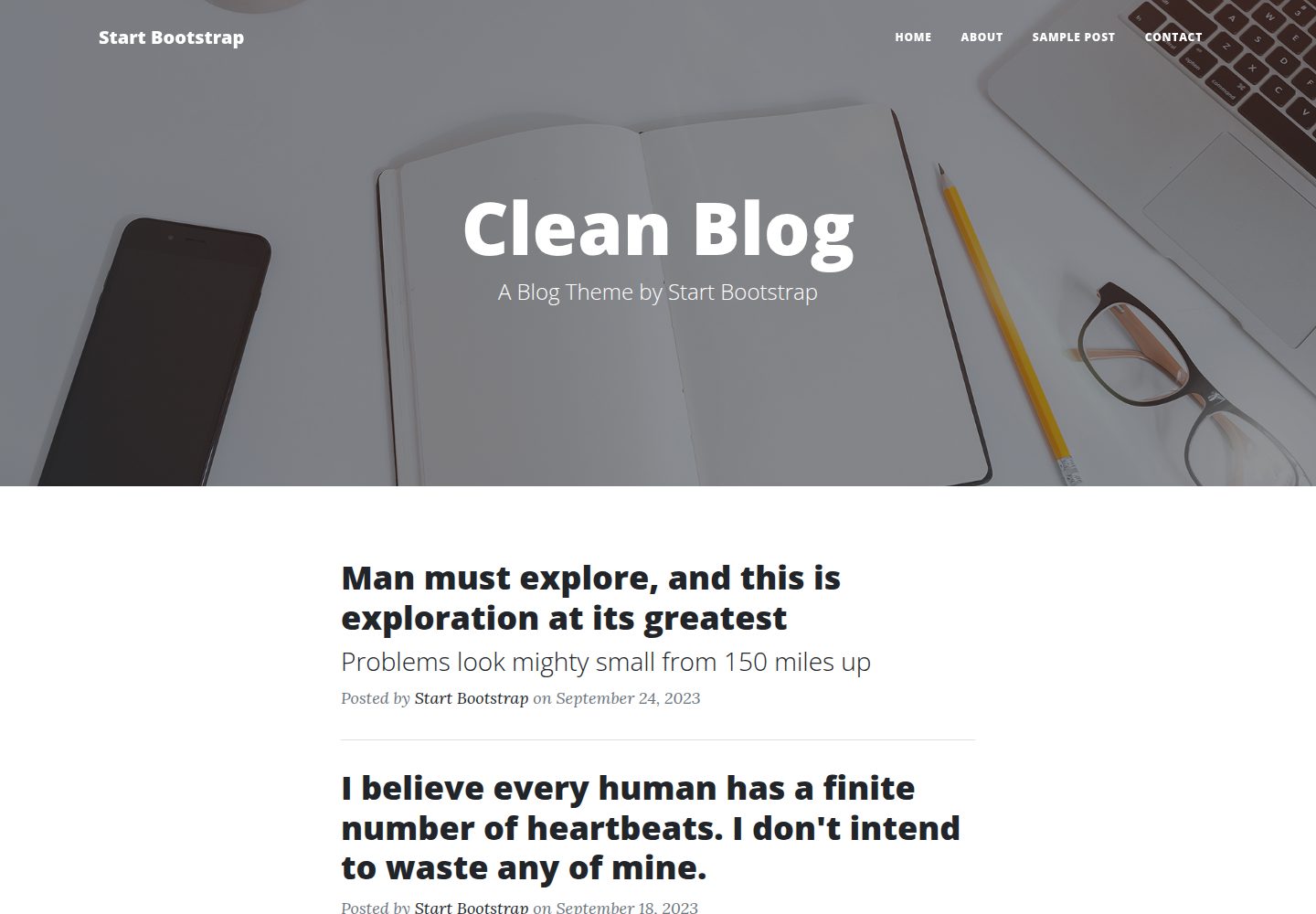
startbootstrap-clean-blog
A clean Bootstrap blog theme created by Start Bootstrap
HTML · 博客