Manage works based on Astro Content Collections; place Markdown and images in a folder to automatically generate work pages
AstroPortfolio
Vault — Astro Portfolio Template
By hilava999
Vault is an Astro-based illustration portfolio and gallery theme that automatically generates work pages from Markdown and images.
Explore the design
Compare the page layouts and mobile experience. Open any screenshot for a closer look.
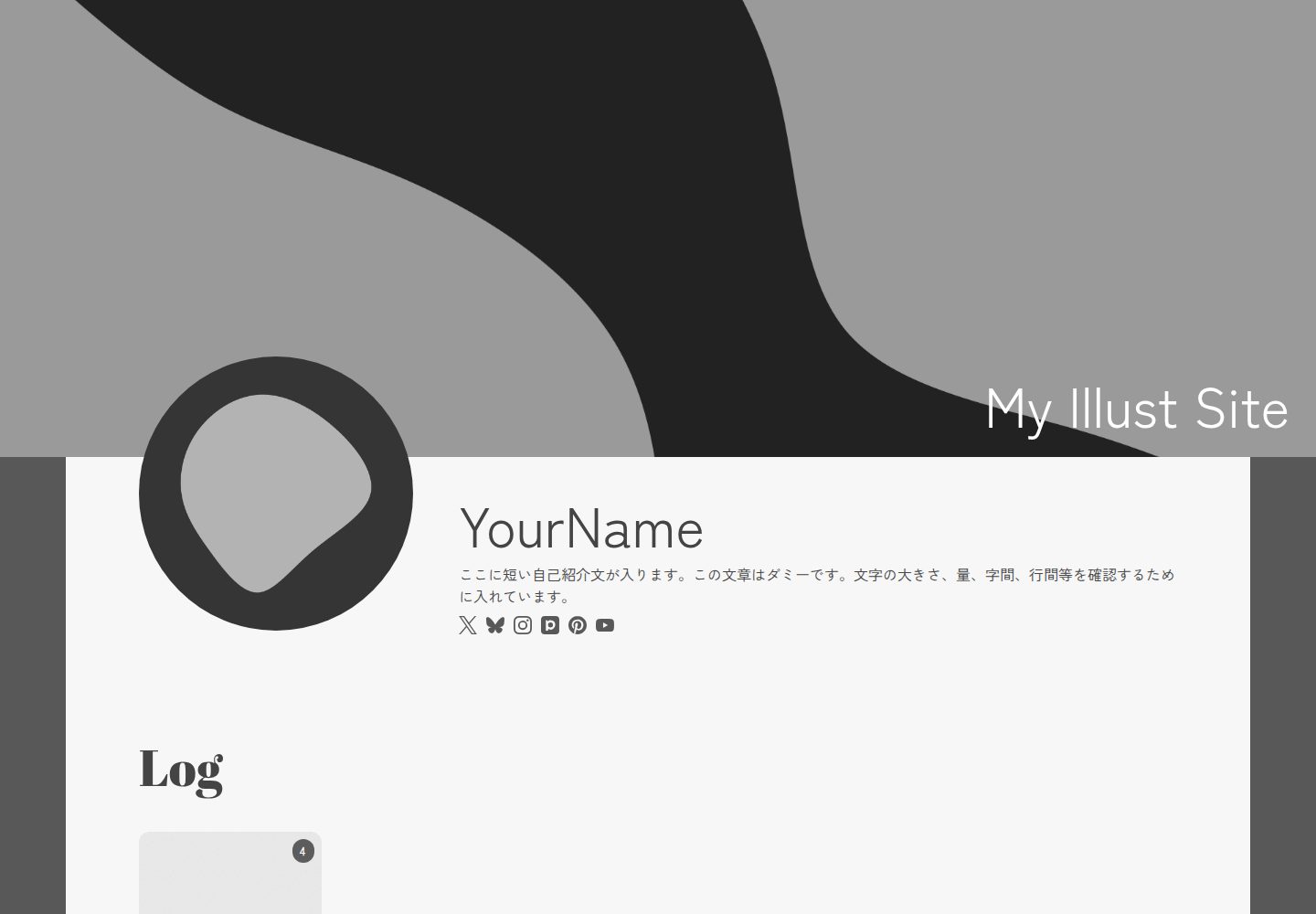
Desktop homepage
Desktop captureTop of page
Actual screenshot captured by the server browser.
One original preview is available. Open the full image to inspect the design.
Screenshots show visual appearance; interactive behavior may differ.
Recorded 2026-10-12View source
What stands out
A quick read of the recorded project description.
Display works in a Masonry waterfall layout, with PhotoSwipe for enlarged image viewing
Support adding tags to works
Centrally configure site title, description, theme color, header image, icons, bio, social links, and OGP image via src/config/siteConfig.ts
Includes OGP support and responsive adaptation
The homepage provides an optional CreditLink attribution component that can be removed as needed
Template Details
Vault is an Astro theme for displaying and documenting illustration work, suited to archiving works by folder and automatically generating gallery pages. Work management is based on Astro Content Collections: create a folder for each work under src/content/log, place index.md and images inside, and the page is generated automatically; images within the same folder are collected into a gallery. The frontmatter of index.md supports date (publication date, required), cover (cover image, required), and tags (optional). Site information is configured centrally in src/config/siteConfig.ts, including site title, description, theme color, header image, icons, personal bio, social links, and OGP image. The layout uses a Masonry waterfall grid, images open in PhotoSwipe for enlarged viewing, and tag functionality and responsive adaptation are included. Before deployment, you need to modify the personal information in siteConfig and fill in your own site URL in the site field of astro.config.mjs to ensure OGP displays correctly. The README specifies Node.js 22 or later and Astro 7.x as the runtime environment, and it can be deployed to Cloudflare Pages (recommended), Netlify, Vercel, and other static hosts. The theme is released under the MIT license, and the homepage includes a CreditLink component by default, which can be removed as needed.
AstroPortfolio
Is it right for your project?
Use Cases
- Illustrators organizing and publishing a personal illustration portfolio
- Archiving series works by folder in gallery form with tags
- Deploying the portfolio to static hosts such as Cloudflare Pages, Netlify, or Vercel
Suitable For
- Creators using Astro who want to manage works via Markdown
- Illustration portfolio sites that need a waterfall gallery and enlarged image browsing
- Users willing to modify site configuration and site URL before deployment
Getting started & customization
Use these recorded setup notes alongside the repository instructions for your chosen version.
- 1
Runtime environment requires Node.js 22 or later and Astro 7.x
- 2
After cloning the repository, run npm install, then start local development with npm run dev
- 3
Edit src/config/siteConfig.ts to fill in site title, description, theme color, header image, icons, bio, social links, and OGP image
- 4
Fill in your own site URL in the site field of astro.config.mjs to ensure OGP images display correctly
- 5
Place works in separate folders under src/content/log, each containing index.md (date and cover required, tags optional) and images; when deploying to Cloudflare Pages, the build command is npm run build and the output directory is dist
License & source material
Usage conditions & limitations
Free to use · keep license noticeThis entry covers the free version under the MIT license in the public repository; the free scope is the code of this version and does not mean external services or third-party assets are free.
Must comply with when using
- Free use, modification, commercial use, and distribution of this version's code are permitted.
- When distributing copies or substantial portions of the code, retain the original author's copyright notice and the full MIT license notice.
- The code is provided as is; warranties and limitations of liability are governed by the original license and applicable law.
Additional costs & items to verify
- Demo images, fonts, icons, and other third-party assets must be checked against their respective licenses and cannot be judged solely by the code's MIT license.
- External services such as domains, hosting, databases, payments, or AI may incur separate charges.
- Before deployment, you must edit src/config/siteConfig.ts to replace the site title, personal bio, SNS links, etc., with your own information; otherwise the site will retain the theme author's default content.
- To make OGP images display correctly, you must fill in your own site URL in the site field of astro.config.mjs; otherwise OGP-related functionality will not work properly.
- The homepage includes the CreditLink attribution component by default; whether to keep it is optional. If you find it affects the design, you can remove it yourself at /src/pages/index.astro.
View Original Text Basis
Permission is hereby granted, free of charge
Original License Text
> デプロイ前に `src/config/siteConfig.ts` を編集し、サイトタイトルやプロフィール、SNSリンクなどをご自身の情報へ変更してください。
Original README
OGP画像を正しく表示させるために`astro.config.mjs` の`site`に自分のサイトURLを設定してください。
Original README
https://github.com/hilava999/Vault/blob/main/LICENSEhttps://github.com/hilava999/Vault/blob/main/README.mdトップページにクレジットを置いていますが、表示するか否かは任意です。デザイン上、邪魔に感じましたら削除しても構いません。
Original README
Compiled by DeepSeek based on repository license and README ·2026-10-12. Results only cover the materials read; dependencies, images, fonts, and subsequent term changes are subject to their respective original texts.
Project checks & description sources
Template Information
- Source platforms
- GitHub
- Documentation and maintenance reference score
- More documented · 83 / 100
- Technologies
- Astro
- Website type
- Portfolio
How this score is calculated
Our heuristic uses license records (up to 30), a demo link (12), a preview (10), stars (15), recorded maintenance (15), description completeness (8), feature records (5) and classification data (5). It is not a code, security or performance test, or a Google score. A link does not establish tested functionality.
What to verify for this project
- Repository update recorded
- 2026-07-01
- Screenshot last checked
- 2026-10-12
A demo link is listed. Check it with your own content and viewport sizes; its presence does not confirm that forms, authentication or payments work.
The catalog identifies Astro as the primary stack. Check the actual dependency manifest and lockfile for versions and hosting requirements. These notes use recorded metadata, not a code audit or a deployment test.
Use a selection guide →How this description was prepared
AI-assisted description based on catalog records and repository material. Repository authors are not automatically the reviewers of this description.
Review declaration: [email protected] · 2026-10-13
Inspect the recorded source material
SHA-256: 65fed58e8dbcc9976f58844dde9b9b4497e4da003acccbc9301a4dd25fc977c7
2026-10-12T23:13:17.181Z
Source file / repository# Vault ### 🖼️ Astro製のイラスト作品の展示・ログ向けテーマ Markdownファイルと画像を追加するだけで、作品ページを自動生成できます。 イラストの保管庫(Vault)のように、作品をシンプルにまとめられることを目指して開発しました。 [](https://nodejs.org/) [](https://astro.build/)  [🖥️デモサイト](https://vault-livedemo.pages.dev/)  ## コンセプト Vault は、イラスト作品をシンプルに整理・公開するための Astro テーマです。作品の追加は Markdown ファイルと画像を配置するだけ。作品管理に手間をかけず、創作そのものに集中できることを目指しています。 ## ✨️ 特徴 - Astro Content Collections を利用した作品管理 - Markdown + 画像だけで作品ページを自動生成 - Masonryレイアウト - PhotoSwipeによる画像拡大表示 - タグ機能 - コンフィグファイルによる簡単なサイト設定 - OGP対応 - レスポンシブ対応 ## 📦️ 動作環境 - Node.js 22以上 - Astro 7.x ## 🚀 インストール ```bash git clone https://github.com/hilava999/Vault.git cd Vault npm install npm run dev ``` ## ⚙️ 初期設定 `src/config/siteConfig.ts` を編集してください。 設定できる項目 - サイトタイトル - サイト説明 - テーマカラー - ヘッダー画像 - アイコン画像 - プロフィール - SNSリンク - OGP画像 ## 🖼️ 作品の追加方法 フォルダを `src/content/log` に作成し、作品を入れてください。 例 ```text src/content/log/ 001/ ├ index.md ├ image1.webp ├ image2.webp 002/ ├ index.md ├ image.webp ``` 各フォルダ内に `index.md` を作成し、作品情報を記述します。同じフォルダ内の画像は自動で取得され、ギャラリーとして表示されます。 `index.md`の記入例 ```markdown --- date: YYYY-MM-DD cover: ./cover.png tags: ["タグ1","タグ2"] --- ``` - date → 投稿日、必須 - cover → サムネイル画像の指定、必須 - tags → タグ、任意 ## ❗️注意事項 > デプロイ前に `src/config/siteConfig.ts` を編集し、サイトタイトルやプロフィール、SNSリンクなどをご自身の情報へ変更してください。 ### OGPについて OGP画像を正しく表示させるために`astro.config.mjs` の`site`に自分のサイトURLを設定してください。 ## ☁️ デプロイ ### Cloudflare Pages(推奨) |項目|設定値| |---|---| |Framework preset|Astro| |Build command|`npm run build`| |Build output directory|`dist`| 他、Netlify、Vercelなどの静的ホスティングに対応しています。詳しくは[Astroのドキュメント](https://docs.astro.build/ja/getting-started/)をご確認ください。 ## 📷️ スクリーンショット ### トップページ  ### 作品ページ  ## 📝 ライセンス MIT License ### クレジットについて トップページにクレジットを置いていますが、表示するか否かは任意です。デザイン上、邪魔に感じましたら削除しても構いません。削除する場合は、`/src/pages/index.astro`の以下のコードを削除してください。 ```astro <CreditLink /> ``` ## 🙏 使用ライブラリ - Astro - PhotoSwipe - MiniMasonry - Astro Icon ## 🐞 不具合・要望 不具合報告や機能要望は Issue よりお気軽にお知らせください。 ## ⭐️ 最後に このテーマが皆さんの創作活動のお役に立てれば嬉しいです。
Explore similar templates
Compare previews and descriptions within the same stack and category.

astro-theme-cactus
Astro Cactus is an Astro-based blog and portfolio theme that uses Markdown/MDX content collections to manage posts, notes, and tags, with frontmatter type-checked by a schema.
Astro · Portfolio

astrofy
Astrofy is a free and open-source personal portfolio website template built with Astro and TailwindCSS, with built-in blog, CV timeline, project showcase, store, and RSS feed modules.
Astro · Portfolio

astro-nano
Astro Nano is a static, minimalist portfolio and blog template built with Astro, Tailwind, and TypeScript without frontend frameworks. It includes light/dark themes, animated UI, automatic sitemap and RSS feed generation, and Markdown/MDX support with component imports.
Astro · Portfolio

astro-erudite
astro-erudite is an opinionated, unstyled static blog template built with Astro and native CSS, with no UI or CSS framework and minimal dependencies.
Astro · Portfolio

astro-sphere
Astro Sphere is a static, minimalist portfolio and blog theme maintained by markhorn-dev, built mainly with Astro, Tailwind, and TypeScript, with a small amount of SolidJS for stateful components.
Astro · Portfolio

astro-micro
Astro Micro is a framework-free blog and portfolio theme for Astro, forked from Astro Nano. It adds Pagefind search and Giscus comments while retaining type safety, sitemap, RSS, Markdown and MDX support, and TailwindCSS with system, light, and dark themes.
Astro · Portfolio