Astro-based static Markdown blog that generates RSS, a sitemap, and structured metadata at build time
AstroBlog
pudding — Astro Blog Template
By huamurui
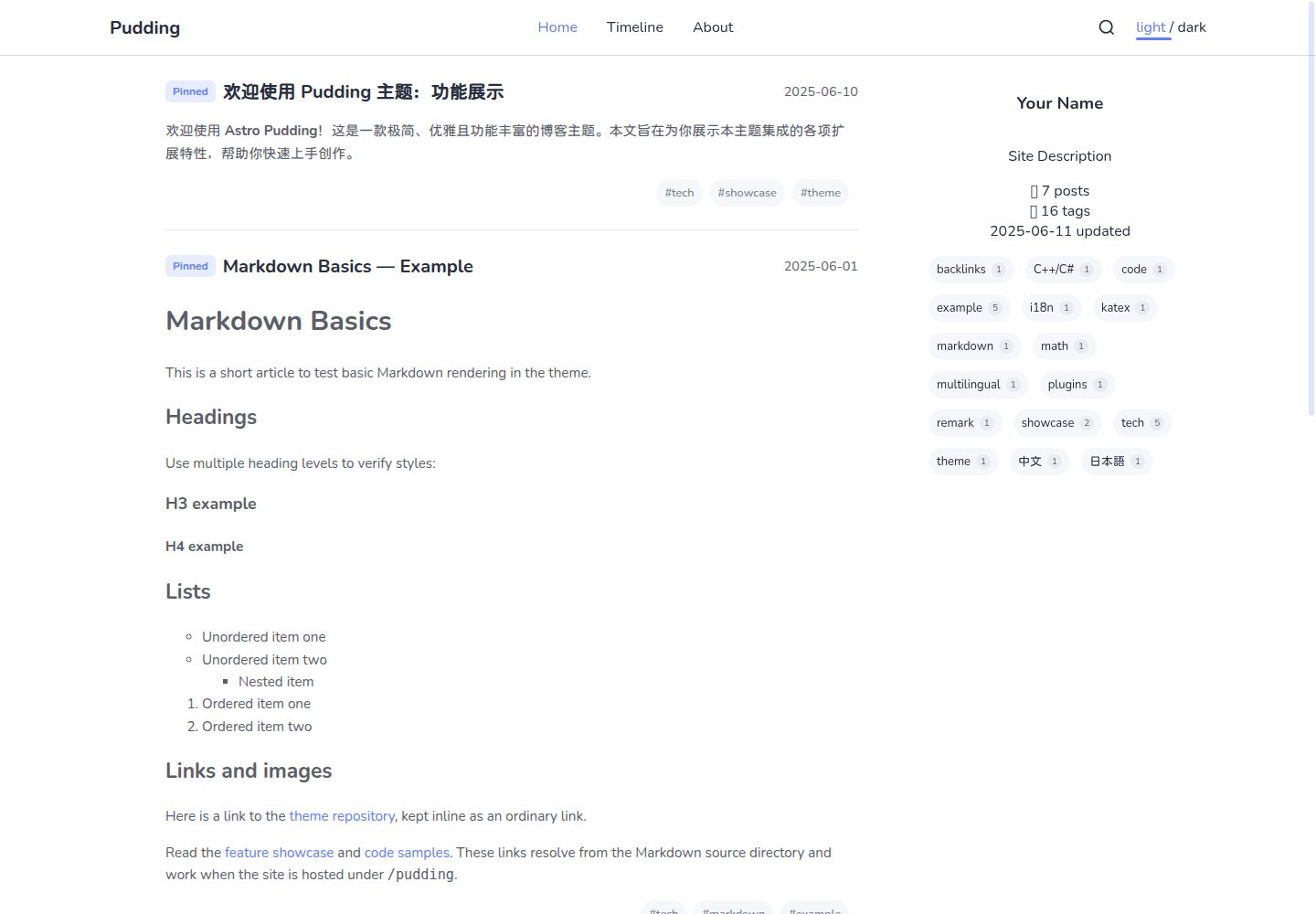
Pudding is an Astro-based static Markdown blog theme with light and dark themes, tag pages, timeline, search, backlinks, hover previews, and optional giscus comments.
Explore the design
Compare the page layouts and mobile experience. Open any screenshot for a closer look.
Desktop homepage1 / 3
Desktop captureTop of page
Actual screenshot captured by the server browser.
All pages & views 3
Screenshots show visual appearance; interactive behavior may differ.
Recorded 2026-10-05View source
What stands out
A quick read of the recorded project description.
Light and dark theme switching with a responsive post list on the homepage
Timeline, search, table-of-contents navigation, tag pages, and backlinks
Post link hover previews, click-to-zoom images, math formulas, and Expressive Code code blocks
Comments are disabled by default and can be enabled on demand via giscus
Template Details
Pudding is a static Markdown blog theme built with Astro. Posts are stored as .md files under src/posts/, and the build generates RSS, a sitemap, and structured metadata. The theme provides light and dark color schemes, a responsive post list on the homepage, and includes a timeline, search, table-of-contents navigation, tag pages, backlinks, hover previews, image zoom, math formulas (remark-math and KaTeX), and Expressive Code code blocks. Comments are disabled by default and can be enabled via giscus.
Before use, Node.js 22.12.0 or newer and pnpm 12.8.1 are required. Site name, description, author, navigation, social links, theme colors, language, and comments are configured in src/config/site.config.ts; when deploying to a GitHub Pages project page, the site, base, and url fields must be set correctly. Post links use paths relative to the source Markdown file, and the theme rewrites them to correct routes with the base; backlinks are generated from Markdown links in published posts, and after changing links you need to rerun pnpm generate and restart the development server.
The theme supports post-level frontmatter fields including title, date, description, tags, author, updated, pinned, draft, slug, image, and url. The directory structure maps to post IDs and list pages, and nested directories also generate list pages; tags support Unicode and characters such as +, /, #, and %, but links should be generated with getTagUrl. Markdown extensions include code blocks, inline and block math formulas, spoiler text, standalone link cards, and clickable zoomable images. Full posts allow raw HTML and scripts from trusted authors, while hover previews and homepage summaries remove scripts, event handlers, and interactive embeds.
This template is MIT licensed, and the code may be used, modified, used commercially, and distributed for free, but third-party assets such as demo images, fonts, and icons require separate license checks, and external services such as domains and hosting may incur additional charges.
AstroBlog
Is it right for your project?
Use Cases
- Building a personal technical blog or notes site and managing posts as Markdown files
- Needing tag categorization, a timeline, and search to organize a larger number of posts
- Wanting to connect posts within the site through backlinks and hover previews
- Displaying code blocks, math formulas, and zoomable images in posts
- Deploying to static hosting platforms such as GitHub Pages
Suitable For
- Individual developers familiar with Markdown writing who want to publish a blog with a static site
- Bloggers who need light and dark themes, tag pages, and in-site search
- Users who accept adjusting site information and navigation through a configuration file
- Front-end users willing to use a Node.js and pnpm build workflow
Getting started & customization
Use these recorded setup notes alongside the repository instructions for your chosen version.
- 1
Requires Node.js 22.12.0 or newer and pnpm 12.8.1; the repository .nvmrc selects Node 22, and packageManager pins pnpm.
- 2
After cloning the repository, run pnpm install --frozen-lockfile, then start the development server with pnpm dev; the default address is http://localhost:4321/pudding/.
- 3
Modify the site name, description, author, navigation, social links, theme colors, language, and comment settings in src/config/site.config.ts; when deploying to a GitHub Pages project page, fill in site, base, and url correctly.
- 4
Place posts under src/posts/; only title and date are required. After changing post links, run pnpm generate and restart the development server to refresh backlinks.
- 5
Comments are disabled by default; to enable them, you must enable Discussions in the GitHub repository, install the giscus app, generate an ID, fill it into siteConfig.giscus, and set enabled: true.
License & source material
Usage conditions & limitations
Free to use · keep license noticeThis entry covers the free version in the public repository under the MIT license; the free scope is the code of that version and does not mean external services or third-party assets are free.
Must comply with when using
- The code of this version may be used, modified, used commercially, and distributed for free.
- When distributing copies or substantial portions of the code, retain the original author's copyright notice and the full MIT license notice.
- The code is provided as is; warranties and limitations of liability are governed by the original license and applicable law.
Additional costs & items to verify
- Demo images, fonts, icons, and other third-party assets require checking their respective licenses and cannot be judged solely by the code's MIT license.
- External services such as domains, hosting, databases, payments, or AI may incur additional charges.
- Comments are disabled by default; to enable them, you must use a public GitHub repository, enable Discussions, install the giscus app, and generate a repository/category ID at giscus.app, which is additional configuration dependent on external services and accounts.
- When a post banner image uses a remote absolute URL, that remote host must be added to the allowlist in astro.config.mjs, otherwise it cannot be processed through Astro's image pipeline.
- Full post pages allow trusted authors to insert raw HTML and scripts and are not a sandbox for untrusted HTML; imported Markdown content must be reviewed before publishing.
- Line numbers and collapsible sections for code blocks require installing additional Expressive Code plugins, which are not enabled by default in this template.
- Link cards fetch target page metadata during development or build and cache it to .cache/link-previews.json, which involves network requests to external URLs.
- pnpm preview can only preview completed build output and does not rebuild the site, so a build must be run first.
- During development, after changing post links, you must rerun pnpm generate and restart the development server for backlinks to refresh.
- This template is not configured for MDX; posts only support .md files and cannot directly use MDX syntax.
View Original Text Basis
Permission is hereby granted, free of charge
Original License Text
Comments are disabled by default. Choose a public GitHub repository, enable Discussions, install the giscus app, and generate repository/category IDs at [giscus.app](https://giscus.app/).
Original README
Its remote host must be allowed in `astro.config.mjs` for Astro's banner image pipeline.
Original README
Full articles allow raw HTML and scripts from **trusted authors**. Review imported Markdown before publishing; full article rendering is not an untrusted HTML sandbox.
Original README
Line numbers and collapsible sections require additional Expressive Code plugins and are not enabled by this template.
Original README
Metadata is fetched during development/build and cached in `.cache/link-previews.json`.
Original README
`pnpm preview` requires a completed build; it does not rebuild the site.
Original README
After changing article links during development, run `pnpm generate` and restart the dev server to refresh backlinks.
Original README
https://github.com/huamurui/pudding/blob/main/LICENSEhttps://github.com/huamurui/pudding/blob/main/README.mdMDX is not configured.
Original README
Compiled by DeepSeek based on repository license and README ·2026-10-05. Results only cover the materials read; dependencies, images, fonts, and subsequent term changes are subject to their respective original texts.
Project checks & description sources
Template Information
- Source platforms
- Astro Themes
- Documentation and maintenance reference score
- More documented · 75 / 100
- Technologies
- Astro
- Website type
- Blog
How this score is calculated
Our heuristic uses license records (up to 30), a demo link (12), a preview (10), stars (15), recorded maintenance (15), description completeness (8), feature records (5) and classification data (5). It is not a code, security or performance test, or a Google score. A link does not establish tested functionality.
What to verify for this project
- Repository update recorded
- 2026-10-01
- Screenshot last checked
- 2026-10-05
A demo link is listed. Check it with your own content and viewport sizes; its presence does not confirm that forms, authentication or payments work.
The catalog identifies Astro as the primary stack. Check the actual dependency manifest and lockfile for versions and hosting requirements. These notes use recorded metadata, not a code audit or a deployment test.
Use a selection guide →How this description was prepared
AI-assisted description based on catalog records and repository material. Repository authors are not automatically the reviewers of this description.
Review declaration: [email protected] · 2026-10-06
Inspect the recorded source material
SHA-256: db1fd1ad0b5432bce1d4bfd8e7113c4f8db8e3ff8eda35fd04e3a55045121ee6
2026-10-05T20:50:18.345Z
Source file / repository# Astro Theme Pudding [简体中文](README.zh-CN.md) · [Demo](https://huamurui.github.io/pudding/) Pudding is a static Markdown blog theme built with Astro 7 and Svelte 5. It includes light and dark themes, responsive post lists, a timeline, search, directory navigation, tag pages, backlinks, hover previews, image zoom, math, and Expressive Code. RSS, a sitemap, and structured metadata are generated during the build. Comments are optional through giscus. ## Screenshots Captured from this repository's demo content. The same home page appears in light mode at the upper left and dark mode at the lower right, with the dividing line tilted slightly counterclockwise.  <details> <summary>Desktop home, dark article, and mobile layout</summary>   <img src="docs/screenshots/mobile-math-light.jpg" alt="Math & KaTeX article on mobile in the light theme" width="360"> </details> ## Get started Use **Node.js 22.12.0 or newer** and **pnpm 12.8.1**. The repository's `.nvmrc` selects Node 22, and `packageManager` pins pnpm. ```sh git clone https://github.com/huamurui/pudding.git cd pudding # If you use nvm: nvm install && nvm use npm install --global [email protected] pnpm install --frozen-lockfile pnpm dev ``` With the supplied configuration, open `http://localhost:4321/pudding/`. Before publishing, edit the site configuration and replace the sample posts, About page, and links. | Command | Purpose | | --- | --- | | `pnpm generate` | Generate `.cache/backlinks.json` from published Markdown posts. | | `pnpm dev` | Generate backlinks and start the development server. | | `pnpm check` | Generate backlinks, then check Astro and Svelte types. | | `pnpm test` | Run the regression tests. | | `pnpm lint` | Check source code with ESLint. | | `pnpm lint:fix` | Apply available ESLint fixes. | | `pnpm build` | Generate backlinks and build the static site into `dist/`. | | `pnpm preview` | Serve the existing production build locally. | | `pnpm build:infos` | Alias for `pnpm build`. | After changing article links during development, run `pnpm generate` and restart the dev server to refresh backlinks. `pnpm preview` requires a completed build; it does not rebuild the site. ## Configure your site Edit `src/config/site.config.ts`. Keep the existing object and update its fields: site name, description, author, navigation, social links, theme colors, locale, and comments. | Field | Role | Project Pages example | | --- | --- | --- | | `site` | Public origin passed to Astro for absolute URLs. | `https://YOUR_USER.github.io` | | `base` | Path prefix for local routes and assets; `''` at the domain root. | `/pudding` | | `url` | Full public site address; RSS uses it as a compatibility fallback after Astro's `site` and the configured `site`. | `https://YOUR_USER.github.io/pudding/` | For a GitHub repository named `pudding`: ```ts site: 'https://YOUR_USER.github.io', base: '/pudding', url: 'https://YOUR_USER.github.io/pudding/', ``` For a user site (`YOUR_USER.github.io`) or a custom domain hosted at its root: ```ts site: 'https://YOUR_USER.github.io', base: '', url: 'https://YOUR_USER.github.io/', ``` Replace the hostname in the applicable fields for a custom domain. A repository rename also requires updating `base` and `url`. Do not put `/pudding` in both `site` and `base`. Configuration links such as `./about`, `/rss.xml`, and `./sitemap.xml` pass through the theme's base-aware URL helper. In Astro/Svelte components, use `buildUrl`, `getPostUrl`, and `getTagUrl` from `src/utils/helpers.ts`. Raw HTML links in Markdown are used as written: `/images/example.png` points to the domain root even when `base` is `/pudding`. Choose `en-US` or `zh-CN` with `locale`. Interface translations live in `src/config/i18n.config.ts`; this setting does not change the language of articles. ## Write posts Add `.md` files under `src/posts/`. MDX is not configured. Only `title` and `date` are required: ```yaml --- title: "My first post" date: "2026-01-01T09:00:00+08:00" description: "A short description for metadata and RSS." tags: ["Astro", "C++/C#", "中文"] author: "Your Name" updated: "2026-01-02T10:30:00+08:00" pinned: false draft: false slug: "notes/my-first-post" image: url: "https://images.unsplash.com/photo-1579546929518-9e396f3cc809?w=1200&q=80" alt: "A colorful gradient" --- ``` | Field | Behavior | | --- | --- | | `title` | Required nonempty title. | | `date` | Required date or datetime. `2026-01-01` is valid; quote datetimes and include a timezone. Sorting uses the full timestamp; the displayed date is its UTC calendar date. | | `description` | Optional plain description. Metadata and RSS use an excerpt when absent; home cards use a rich excerpt from the body. | | `tags` | Optional list. Labels are trimmed, Unicode-normalized, and deduplicated; empty labels are invalid. | | `author` | Optional author override for article metadata. | | `updated` | Optional modification date for structured metadata. | | `pinned` | Defaults to `false`; pinned posts appear first on the home page. | | `draft` | Defaults to `false`; drafts are excluded from public routes, lists, search, tags, feeds, previews, and backlinks. | | `slug` | Optional article ID override; see path rules below. | | `image` | Optional banner with an absolute URL and optional `alt`, also displayed as its caption. Its remote host must be allowed in `astro.config.mjs` for Astro's banner image pipeline. | | `url` | Optional canonical override. Use an absolute HTTP(S) URL when republishing; it does not move the local article route. | Put `<!-- more -->` after the part of the body to show in home cards. Without it, the first paragraph or list is used. ### Paths, directories, and tags `src/posts/tech/my-post.md` gets the ID `tech/my-post`, served at `/pudding/posts/tech/my-post/` with the supplied base. Default path segments use GitHub-style slugging. A nested `index.md` represents its directory: `tech/index.md` gets the ID `tech`. A root `index.md` keeps the ID `index`. `slug` replaces the entire ID, including directory segments. Use a nonempty relative path such as `guides/getting-started`, preferably with lowercase letters, digits, Unicode, and hyphens. Avoid leading/trailing slashes, empty segments, `.` or `..`, backslashes, URL schemes, percent-encoded delimiters, and `?` or `#`. The theme preserves Astro's custom slug behavior and does not repair invalid paths. Duplicate IDs fail backlink generation, including collisions caused by default slugging or custom slugs. Listing pages are generated for every containing directory, including nested ones. If an article occupies a directory URL, the article takes precedence while the menu retains its children. For example, `tech/index.md` and `tech/tools/editor.md` can coexist: `/posts/tech/` displays the index article, while `/posts/tech/tools/` lists descendants. `tech.md` and `tech/index.md` cannot coexist because both have the ID `tech`. Tag labels may contain Unicode and characters such as `+`, `/`, `#`, `%`, and `?`. Safe, distinct tag URLs are generated without changing their display labels. Use `getTagUrl` rather than concatenating a label into a URL. ### Article links and previews Use paths relative to the **source Markdown file**, preferably including `.md`. For example, from a post in `src/posts/tech/`: ```md [Feature showcase](./theme-showcase.md) [Math examples](./math-and-katex.md#math-examples) [Markdown extensions](./plugins-and-extensions.md) ``` Known article links are rewritten to the correct base-aware route, including custom slugs. Extensionless paths, directory `index.md` targets, query strings, fragments, and reference-style links are supported. Links to known drafts become plain text; unknown targets and asset links stay unchanged. Heading fragments follow Markdown heading slugging. Published article links support hover previews. Previews and home excerpts retain rich formatting while removing scripts, event handlers, and interactive embeds. Open the full article to use interactive content. Backlinks are generated from published articles' Markdown links; self-links do not create backlinks. ## Markdown extensions ### Code and math Expressive Code provides syntax highlighting, editor/terminal frames, copy buttons, titles, and line/text markers: ````md ```js title="hello.js" {2} const name = 'Pudding' console.log(`Hello, ${name}!`) ``` ```` Line numbers and collapsible sections require additional Expressive Code plugins and are not enabled by this template. See the [marker guide](https://expressive-code.com/key-features/text-markers/) for more syntax. Use `$E = mc^2$` for inline math and a pair of `$$` lines around display math. Rendering uses `remark-math` and KaTeX. ### Spoilers ```md This is ||blurred text|| and this is |||blacked-out text|||. ``` Both forms are inline plain text. Reveal with a click, Enter, or Space. Keep each delimiter pair in one text span; nested Markdown formatting and pipe characters inside it are not supported. ### Link cards A standalone paragraph containing one HTTP(S) Markdown link or bare URL can become a card: ```md [Astro](https://astro.build/) https://github.com/huamurui/pudding ``` Leave a blank line before and after it. Links inside sentences remain ordinary links. Metadata is fetched during development/build and cached in `.cache/link-previews.json`. Unavailable pages or pages without suitable metadata keep the original link; a failed request does not stop the build. Delete that cache file to refresh metadata. ### Images Markdown images support lazy loading and click-to-zoom. Remote Markdown images are regular image elements rather than downloaded for Astro transformation; banner images use Astro's image pipeline. Markdown alt text does not automatically create a caption. Add a caption paragraph, or use trusted HTML `<figure>` / `<figcaption>`. ### Interactive articles Full articles allow raw HTML and scripts from **trusted authors**. Review imported Markdown before publishing; full article rendering is not an untrusted HTML sandbox. The theme uses Astro's client router. Add native `data-astro-rerun` to inline scripts that initialize on each visit. Use an IIFE or `type="module"` to avoid redeclaring globals, and dispose listeners, timers, and observers before a page swap: ```html <button type="button" data-demo-counter>Count: 0</button> <script data-astro-rerun> (() => { const button = document.querySelector('[data-demo-counter]') if (!button) return const controller = new AbortController() let count = 0 button.addEventListener('click', () => { button.textContent = `Count: ${++count}` }, { signal: controller.signal }) document.addEventListener('astro:before-swap', () => { controller.abort() }, { once: true, signal: controller.signal }) })() </script> ``` This uses Astro's native script lifecycle; no custom rerun attribute is needed. Interactive scripts are removed from hover previews and home excerpts. ## Comments Comments are disabled by default. Choose a public GitHub repository, enable Discussions, install the giscus app, and generate repository/category IDs at [giscus.app](https://giscus.app/). Copy the values into `siteConfig.giscus`, then set `enabled: true`. Keep generated string values for `strict`, `reactionsEnabled`, and `emitMetadata`. `lang` sets the comment language. `mapping: 'pathname'` associates comments with the full deployed path, including the base; changing a slug or deployment base can change its discussion mapping. The comment component loads when visible and follows the site's light/dark theme. ## Deploy to GitHub Pages 1. Create your repository from this theme and push to `main`. 2. Configure `site`, `base`, and `url` for your account and repository name. 3. In **Settings → Pages → Build and deployment**, choose **GitHub Actions** as the source. 4. Push to `main`, or run the included workflow manually from `main`. The workflow in `.github/workflows/` runs lint, type checks, tests, and a production build on pull requests and pushes to `main`. Deployment runs only on `main` outside pull requests. Quality checks read pnpm from `packageManager` and Node from `.nvmrc`; the Astro build uses Node 22. For another default branch, update both the triggers and deployment condition. See [GitHub's guide](https://docs.github.com/en/pages/configuring-a-custom-domain-for-your-github-pages-site) for custom domains. Other static hosts can publish `dist/` after `pnpm build`. The output uses directory-style routes with trailing slashes. RSS is at `/rss.xml`, the sitemap at `/sitemap.xml`, and robots rules at `/robots.txt`, all under the configured base. ## Project structure ```text src/config/ Site settings and interface translations src/posts/ Markdown articles; tech/ contains feature samples src/pages/ Routes, feeds, search data, and preview endpoints src/components/ Astro and Svelte interface components src/layouts/ Shared page layout src/plugin/ Markdown transforms src/scripts/ Browser behavior and navigation lifecycle src/utils/ Content, URL, excerpt, and metadata helpers src/data/links.json Links page entries scripts/ Backlink generation and source-path resolution tests/ Regression tests public/ Static assets, fonts, and feed stylesheets .github/workflows/ GitHub Pages checks and deployment ``` `dist/`, `.astro/`, `.cache/`, and `node_modules/` are generated and ignored by Git. Keep `pnpm-lock.yaml` committed. Caches are disposable and rebuilt as needed; they are not article source. ## License and credits [MIT](LICENSE). Built with [Astro](https://astro.build/) and [Svelte](https://svelte.dev/), with code rendering by [Expressive Code](https://expressive-code.com/). Design inspiration includes [fuwari](https://github.com/saicaca/fuwari).
Explore similar templates
Compare previews and descriptions within the same stack and category.

astrowind
AstroWind is a free, open-source Astro starter theme using Astro and Tailwind CSS, released under the MIT license.
Astro · Blog

astro-paper
AstroPaper is a minimal, responsive, accessible, and SEO-friendly Astro blog theme. Articles are stored as Markdown/MDX in src/content/posts/, with subdirectories affecting URLs.
Astro · Blog

fuwari
Fuwari is a static blog template built with Astro and Tailwind CSS for personal blogs. It manages posts as Markdown files in src/content/posts/, with frontmatter for title, date, description, cover, tags, categories, draft status, and language.
Astro · Blog

Firefly
Firefly is a clean personal blog theme forked from Astro and Fuwari, offering four background modes, single/double sidebar and list/grid layouts, Pagefind client-side full-text search, and a six-language UI.
Astro · Blog

astro-theme-cactus
Astro Cactus is an Astro-based blog and portfolio theme that uses Markdown/MDX content collections to manage posts, notes, and tags, with frontmatter type-checked by a schema.
Astro · Portfolio

astrofy
Astrofy is a free and open-source personal portfolio website template built with Astro and TailwindCSS, with built-in blog, CV timeline, project showcase, store, and RSS feed modules.
Astro · Portfolio