基于 Astro 的静态 Markdown 博客,构建时生成 RSS、站点地图和结构化元数据
Astro博客
pudding — Astro 博客模板
作者 huamurui
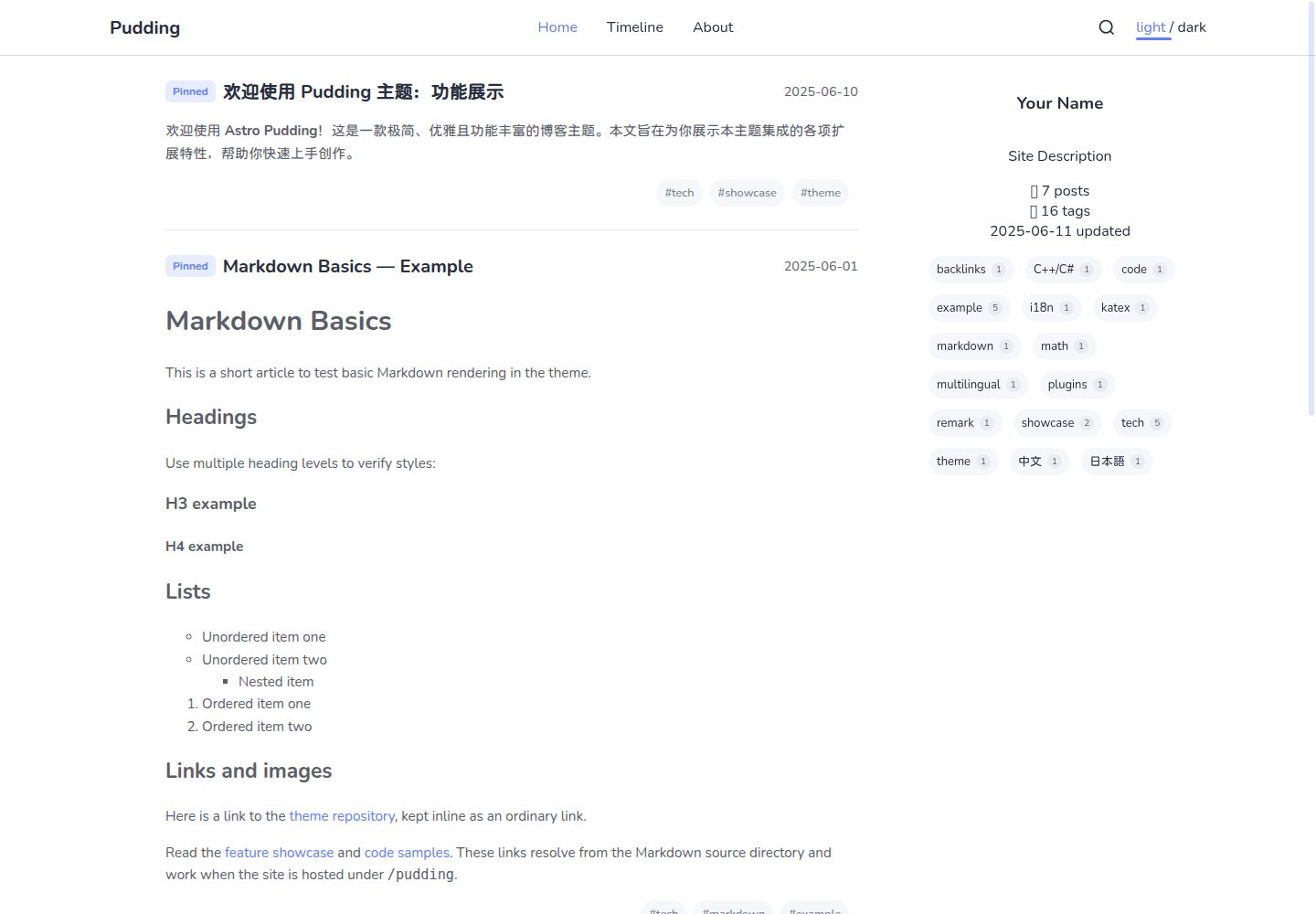
Pudding 是一个基于 Astro 的静态 Markdown 博客主题,支持亮暗主题、标签页、时间线、搜索、反向链接与悬停预览,可选 giscus 评论。
看看你的网站会是什么样
浏览真实页面截图,比较内容排版与手机效果。点击下方缩略图切换,放大查看整页细节。
全部页面与视图 3
截图用于了解视觉与布局,交互效果请以实际项目为准。
采集于 2026-10-05查看来源
值得关注的模板亮点
从已有项目资料中,快速了解它的特点。
亮色与暗色主题切换,首页文章列表响应式布局
时间线、搜索、目录导航、标签页与反向链接
文章链接悬停预览、图片点击缩放、数学公式与 Expressive Code 代码块
评论默认关闭,可通过 giscus 按需启用
模板详细介绍
Pudding 是一个用 Astro 构建的静态 Markdown 博客主题,文章以 .md 文件放在 src/posts/ 下,构建时生成 RSS、站点地图和结构化元数据。主题提供亮/暗两套配色,首页文章列表响应式排列,并带有时间线、搜索、目录导航、标签页、反向链接、悬停预览、图片缩放、数学公式(remark-math 与 KaTeX)以及 Expressive Code 代码块。评论默认关闭,可通过 giscus 接入。
使用前需要 Node.js 22.12.0 或更新版本以及 pnpm 12.8.1。站点名称、描述、作者、导航、社交链接、主题色、语言和评论等都在 src/config/site.config.ts 中配置;部署到 GitHub Pages 项目页时需要正确设置 site、base 和 url 三个字段。文章链接使用相对于源 Markdown 文件的路径,主题会将其重写为带 base 的正确路由;反向链接由已发布文章的 Markdown 链接生成,修改链接后需重新运行 pnpm generate 并重启开发服务器。
主题支持文章级 frontmatter 字段,包括 title、date、description、tags、author、updated、pinned、draft、slug、image 和 url。目录结构会映射为文章 ID 和列表页,嵌套目录也会生成列表页;标签标签支持 Unicode 及 +、/、#、% 等字符,但应使用 getTagUrl 生成链接。Markdown 扩展包括代码块、行内与块级数学公式、剧透文本、独立链接卡片和可点击缩放的图片。完整文章允许来自可信作者的原始 HTML 与脚本,悬停预览和首页摘要会移除脚本、事件处理器和交互式嵌入。
该模板采用 MIT 许可,可免费使用、修改、商用和分发代码,但演示图片、字体、图标等第三方素材需单独核对许可,域名、托管等外部服务可能另外收费。
Astro博客
适合你的项目吗?
适用场景
- 搭建个人技术博客或笔记站点,以 Markdown 文件管理文章
- 需要标签分类、时间线和搜索来组织较多文章
- 希望通过反向链接和悬停预览串联站内文章
- 在文章中展示代码块、数学公式和可缩放图片
- 部署到 GitHub Pages 等静态托管平台
适合人群
- 熟悉 Markdown 写作、希望用静态站点发布博客的个人开发者
- 需要亮暗主题、标签页和站内搜索的博客作者
- 接受通过配置文件调整站点信息与导航的用户
- 愿意使用 Node.js 与 pnpm 构建流程的前端使用者
上手与定制指南
结合仓库当前版本的说明,按下面的资料检查内容、配置与运行要求。
- 1
需要 Node.js 22.12.0 或更新版本以及 pnpm 12.8.1;仓库 .nvmrc 选择 Node 22,packageManager 固定 pnpm。
- 2
克隆仓库后运行 pnpm install --frozen-lockfile,再用 pnpm dev 启动开发服务器,默认地址为 http://localhost:4321/pudding/。
- 3
在 src/config/site.config.ts 中修改站点名称、描述、作者、导航、社交链接、主题色、语言和评论设置;部署到 GitHub Pages 项目页时正确填写 site、base 和 url。
- 4
文章放在 src/posts/ 下,仅 title 和 date 为必填;修改文章链接后运行 pnpm generate 并重启开发服务器以刷新反向链接。
- 5
评论默认关闭,需在 GitHub 仓库启用 Discussions、安装 giscus 应用并生成 ID 后填入 siteConfig.giscus 并设置 enabled: true。
授权与来源资料
使用条件与限制
免费使用 · 保留许可声明本次收录的是公开仓库中采用 MIT 许可的免费版本;免费范围为该版本代码,不代表外部服务或第三方素材免费。
使用时需要遵守
- 允许免费使用、修改、商用和分发该版本代码。
- 分发代码副本或实质性部分时,保留原作者版权声明和完整 MIT 许可声明。
- 代码按现状提供;担保与责任限制以原许可证及适用法律为准。
额外费用与待核对事项
- 演示图片、字体、图标及其他第三方素材需按各自许可核对,不能仅凭代码的 MIT 许可判断。
- 域名、托管、数据库、支付或 AI 等外部服务可能另外收费。
- 评论功能默认关闭;如需启用,必须使用公开的 GitHub 仓库、开启 Discussions、安装 giscus 应用并在 giscus.app 生成仓库/分类 ID,属于依赖外部服务与账号的额外配置。
- 文章横幅图片使用远程绝对 URL 时,必须在 astro.config.mjs 中把该远程主机加入允许列表,否则无法通过 Astro 的图片管线处理。
- 完整文章页面允许可信作者插入原始 HTML 与脚本,且并非不可信 HTML 沙箱;发布前需自行审查导入的 Markdown 内容。
- 代码块的行号与可折叠区块需要额外安装 Expressive Code 插件,本模板默认未启用。
- 链接卡片会在开发或构建时抓取目标页面元数据并缓存到 .cache/link-previews.json,涉及对外部 URL 的网络请求。
- pnpm preview 只能预览已完成的构建产物,不会重新构建站点,使用前需先执行构建。
- 开发过程中修改文章链接后,必须重新运行 pnpm generate 并重启开发服务器,反向链接才会刷新。
- 本模板未配置 MDX,文章仅支持 .md 文件,不能直接使用 MDX 语法。
查看原文依据
Permission is hereby granted, free of charge
许可证原文
Comments are disabled by default. Choose a public GitHub repository, enable Discussions, install the giscus app, and generate repository/category IDs at [giscus.app](https://giscus.app/).
README 原文
Its remote host must be allowed in `astro.config.mjs` for Astro's banner image pipeline.
README 原文
Full articles allow raw HTML and scripts from **trusted authors**. Review imported Markdown before publishing; full article rendering is not an untrusted HTML sandbox.
README 原文
Line numbers and collapsible sections require additional Expressive Code plugins and are not enabled by this template.
README 原文
Metadata is fetched during development/build and cached in `.cache/link-previews.json`.
README 原文
`pnpm preview` requires a completed build; it does not rebuild the site.
README 原文
After changing article links during development, run `pnpm generate` and restart the dev server to refresh backlinks.
README 原文
https://github.com/huamurui/pudding/blob/main/LICENSEhttps://github.com/huamurui/pudding/blob/main/README.mdMDX is not configured.
README 原文
DeepSeek 根据仓库许可证和 README 整理 ·2026-10-05。结果仅覆盖已读取资料,依赖、图片、字体及后续条款变更以各自原文为准。
项目核对记录与介绍依据
模板资料
- 来源平台
- Astro Themes
- 资料与维护参考分
- 资料较完整 · 75 / 100
- 技术栈
- Astro
- 网站类型
- 博客
这个分数如何计算
本站按许可资料(最高30分)、演示链接(12分)、预览图(10分)、Star数(15分)、记录的维护时间(15分)、描述完整度(8分)、功能记录(5分)和分类资料(5分)计算。它不是代码、安全或性能测试,也不是 Google 评分;有链接不代表已实测可用。
这个项目需要核对什么
- 记录的仓库更新时间
- 2026-10-01
- 截图检查日期
- 2026-10-05
已收录演示链接。请用你的内容与屏幕尺寸检查;有演示不代表表单、认证或支付已经可用。
目录记录的主要技术栈是 Astro。请通过依赖清单和锁文件核对实际版本与托管要求。这些说明基于收录资料,不代表代码审计或部署实测。
查看具体选型方法 →介绍的制作与核对状态
介绍由 AI 辅助整理目录与仓库资料。仓库作者不等于这篇介绍的审核者。
审核声明: [email protected] · 2026-10-06
查看当时使用的来源资料
SHA-256: db1fd1ad0b5432bce1d4bfd8e7113c4f8db8e3ff8eda35fd04e3a55045121ee6
2026-10-05T20:50:18.345Z
来源文件 / 仓库# Astro Theme Pudding [简体中文](README.zh-CN.md) · [Demo](https://huamurui.github.io/pudding/) Pudding is a static Markdown blog theme built with Astro 7 and Svelte 5. It includes light and dark themes, responsive post lists, a timeline, search, directory navigation, tag pages, backlinks, hover previews, image zoom, math, and Expressive Code. RSS, a sitemap, and structured metadata are generated during the build. Comments are optional through giscus. ## Screenshots Captured from this repository's demo content. The same home page appears in light mode at the upper left and dark mode at the lower right, with the dividing line tilted slightly counterclockwise.  <details> <summary>Desktop home, dark article, and mobile layout</summary>   <img src="docs/screenshots/mobile-math-light.jpg" alt="Math & KaTeX article on mobile in the light theme" width="360"> </details> ## Get started Use **Node.js 22.12.0 or newer** and **pnpm 12.8.1**. The repository's `.nvmrc` selects Node 22, and `packageManager` pins pnpm. ```sh git clone https://github.com/huamurui/pudding.git cd pudding # If you use nvm: nvm install && nvm use npm install --global [email protected] pnpm install --frozen-lockfile pnpm dev ``` With the supplied configuration, open `http://localhost:4321/pudding/`. Before publishing, edit the site configuration and replace the sample posts, About page, and links. | Command | Purpose | | --- | --- | | `pnpm generate` | Generate `.cache/backlinks.json` from published Markdown posts. | | `pnpm dev` | Generate backlinks and start the development server. | | `pnpm check` | Generate backlinks, then check Astro and Svelte types. | | `pnpm test` | Run the regression tests. | | `pnpm lint` | Check source code with ESLint. | | `pnpm lint:fix` | Apply available ESLint fixes. | | `pnpm build` | Generate backlinks and build the static site into `dist/`. | | `pnpm preview` | Serve the existing production build locally. | | `pnpm build:infos` | Alias for `pnpm build`. | After changing article links during development, run `pnpm generate` and restart the dev server to refresh backlinks. `pnpm preview` requires a completed build; it does not rebuild the site. ## Configure your site Edit `src/config/site.config.ts`. Keep the existing object and update its fields: site name, description, author, navigation, social links, theme colors, locale, and comments. | Field | Role | Project Pages example | | --- | --- | --- | | `site` | Public origin passed to Astro for absolute URLs. | `https://YOUR_USER.github.io` | | `base` | Path prefix for local routes and assets; `''` at the domain root. | `/pudding` | | `url` | Full public site address; RSS uses it as a compatibility fallback after Astro's `site` and the configured `site`. | `https://YOUR_USER.github.io/pudding/` | For a GitHub repository named `pudding`: ```ts site: 'https://YOUR_USER.github.io', base: '/pudding', url: 'https://YOUR_USER.github.io/pudding/', ``` For a user site (`YOUR_USER.github.io`) or a custom domain hosted at its root: ```ts site: 'https://YOUR_USER.github.io', base: '', url: 'https://YOUR_USER.github.io/', ``` Replace the hostname in the applicable fields for a custom domain. A repository rename also requires updating `base` and `url`. Do not put `/pudding` in both `site` and `base`. Configuration links such as `./about`, `/rss.xml`, and `./sitemap.xml` pass through the theme's base-aware URL helper. In Astro/Svelte components, use `buildUrl`, `getPostUrl`, and `getTagUrl` from `src/utils/helpers.ts`. Raw HTML links in Markdown are used as written: `/images/example.png` points to the domain root even when `base` is `/pudding`. Choose `en-US` or `zh-CN` with `locale`. Interface translations live in `src/config/i18n.config.ts`; this setting does not change the language of articles. ## Write posts Add `.md` files under `src/posts/`. MDX is not configured. Only `title` and `date` are required: ```yaml --- title: "My first post" date: "2026-01-01T09:00:00+08:00" description: "A short description for metadata and RSS." tags: ["Astro", "C++/C#", "中文"] author: "Your Name" updated: "2026-01-02T10:30:00+08:00" pinned: false draft: false slug: "notes/my-first-post" image: url: "https://images.unsplash.com/photo-1579546929518-9e396f3cc809?w=1200&q=80" alt: "A colorful gradient" --- ``` | Field | Behavior | | --- | --- | | `title` | Required nonempty title. | | `date` | Required date or datetime. `2026-01-01` is valid; quote datetimes and include a timezone. Sorting uses the full timestamp; the displayed date is its UTC calendar date. | | `description` | Optional plain description. Metadata and RSS use an excerpt when absent; home cards use a rich excerpt from the body. | | `tags` | Optional list. Labels are trimmed, Unicode-normalized, and deduplicated; empty labels are invalid. | | `author` | Optional author override for article metadata. | | `updated` | Optional modification date for structured metadata. | | `pinned` | Defaults to `false`; pinned posts appear first on the home page. | | `draft` | Defaults to `false`; drafts are excluded from public routes, lists, search, tags, feeds, previews, and backlinks. | | `slug` | Optional article ID override; see path rules below. | | `image` | Optional banner with an absolute URL and optional `alt`, also displayed as its caption. Its remote host must be allowed in `astro.config.mjs` for Astro's banner image pipeline. | | `url` | Optional canonical override. Use an absolute HTTP(S) URL when republishing; it does not move the local article route. | Put `<!-- more -->` after the part of the body to show in home cards. Without it, the first paragraph or list is used. ### Paths, directories, and tags `src/posts/tech/my-post.md` gets the ID `tech/my-post`, served at `/pudding/posts/tech/my-post/` with the supplied base. Default path segments use GitHub-style slugging. A nested `index.md` represents its directory: `tech/index.md` gets the ID `tech`. A root `index.md` keeps the ID `index`. `slug` replaces the entire ID, including directory segments. Use a nonempty relative path such as `guides/getting-started`, preferably with lowercase letters, digits, Unicode, and hyphens. Avoid leading/trailing slashes, empty segments, `.` or `..`, backslashes, URL schemes, percent-encoded delimiters, and `?` or `#`. The theme preserves Astro's custom slug behavior and does not repair invalid paths. Duplicate IDs fail backlink generation, including collisions caused by default slugging or custom slugs. Listing pages are generated for every containing directory, including nested ones. If an article occupies a directory URL, the article takes precedence while the menu retains its children. For example, `tech/index.md` and `tech/tools/editor.md` can coexist: `/posts/tech/` displays the index article, while `/posts/tech/tools/` lists descendants. `tech.md` and `tech/index.md` cannot coexist because both have the ID `tech`. Tag labels may contain Unicode and characters such as `+`, `/`, `#`, `%`, and `?`. Safe, distinct tag URLs are generated without changing their display labels. Use `getTagUrl` rather than concatenating a label into a URL. ### Article links and previews Use paths relative to the **source Markdown file**, preferably including `.md`. For example, from a post in `src/posts/tech/`: ```md [Feature showcase](./theme-showcase.md) [Math examples](./math-and-katex.md#math-examples) [Markdown extensions](./plugins-and-extensions.md) ``` Known article links are rewritten to the correct base-aware route, including custom slugs. Extensionless paths, directory `index.md` targets, query strings, fragments, and reference-style links are supported. Links to known drafts become plain text; unknown targets and asset links stay unchanged. Heading fragments follow Markdown heading slugging. Published article links support hover previews. Previews and home excerpts retain rich formatting while removing scripts, event handlers, and interactive embeds. Open the full article to use interactive content. Backlinks are generated from published articles' Markdown links; self-links do not create backlinks. ## Markdown extensions ### Code and math Expressive Code provides syntax highlighting, editor/terminal frames, copy buttons, titles, and line/text markers: ````md ```js title="hello.js" {2} const name = 'Pudding' console.log(`Hello, ${name}!`) ``` ```` Line numbers and collapsible sections require additional Expressive Code plugins and are not enabled by this template. See the [marker guide](https://expressive-code.com/key-features/text-markers/) for more syntax. Use `$E = mc^2$` for inline math and a pair of `$$` lines around display math. Rendering uses `remark-math` and KaTeX. ### Spoilers ```md This is ||blurred text|| and this is |||blacked-out text|||. ``` Both forms are inline plain text. Reveal with a click, Enter, or Space. Keep each delimiter pair in one text span; nested Markdown formatting and pipe characters inside it are not supported. ### Link cards A standalone paragraph containing one HTTP(S) Markdown link or bare URL can become a card: ```md [Astro](https://astro.build/) https://github.com/huamurui/pudding ``` Leave a blank line before and after it. Links inside sentences remain ordinary links. Metadata is fetched during development/build and cached in `.cache/link-previews.json`. Unavailable pages or pages without suitable metadata keep the original link; a failed request does not stop the build. Delete that cache file to refresh metadata. ### Images Markdown images support lazy loading and click-to-zoom. Remote Markdown images are regular image elements rather than downloaded for Astro transformation; banner images use Astro's image pipeline. Markdown alt text does not automatically create a caption. Add a caption paragraph, or use trusted HTML `<figure>` / `<figcaption>`. ### Interactive articles Full articles allow raw HTML and scripts from **trusted authors**. Review imported Markdown before publishing; full article rendering is not an untrusted HTML sandbox. The theme uses Astro's client router. Add native `data-astro-rerun` to inline scripts that initialize on each visit. Use an IIFE or `type="module"` to avoid redeclaring globals, and dispose listeners, timers, and observers before a page swap: ```html <button type="button" data-demo-counter>Count: 0</button> <script data-astro-rerun> (() => { const button = document.querySelector('[data-demo-counter]') if (!button) return const controller = new AbortController() let count = 0 button.addEventListener('click', () => { button.textContent = `Count: ${++count}` }, { signal: controller.signal }) document.addEventListener('astro:before-swap', () => { controller.abort() }, { once: true, signal: controller.signal }) })() </script> ``` This uses Astro's native script lifecycle; no custom rerun attribute is needed. Interactive scripts are removed from hover previews and home excerpts. ## Comments Comments are disabled by default. Choose a public GitHub repository, enable Discussions, install the giscus app, and generate repository/category IDs at [giscus.app](https://giscus.app/). Copy the values into `siteConfig.giscus`, then set `enabled: true`. Keep generated string values for `strict`, `reactionsEnabled`, and `emitMetadata`. `lang` sets the comment language. `mapping: 'pathname'` associates comments with the full deployed path, including the base; changing a slug or deployment base can change its discussion mapping. The comment component loads when visible and follows the site's light/dark theme. ## Deploy to GitHub Pages 1. Create your repository from this theme and push to `main`. 2. Configure `site`, `base`, and `url` for your account and repository name. 3. In **Settings → Pages → Build and deployment**, choose **GitHub Actions** as the source. 4. Push to `main`, or run the included workflow manually from `main`. The workflow in `.github/workflows/` runs lint, type checks, tests, and a production build on pull requests and pushes to `main`. Deployment runs only on `main` outside pull requests. Quality checks read pnpm from `packageManager` and Node from `.nvmrc`; the Astro build uses Node 22. For another default branch, update both the triggers and deployment condition. See [GitHub's guide](https://docs.github.com/en/pages/configuring-a-custom-domain-for-your-github-pages-site) for custom domains. Other static hosts can publish `dist/` after `pnpm build`. The output uses directory-style routes with trailing slashes. RSS is at `/rss.xml`, the sitemap at `/sitemap.xml`, and robots rules at `/robots.txt`, all under the configured base. ## Project structure ```text src/config/ Site settings and interface translations src/posts/ Markdown articles; tech/ contains feature samples src/pages/ Routes, feeds, search data, and preview endpoints src/components/ Astro and Svelte interface components src/layouts/ Shared page layout src/plugin/ Markdown transforms src/scripts/ Browser behavior and navigation lifecycle src/utils/ Content, URL, excerpt, and metadata helpers src/data/links.json Links page entries scripts/ Backlink generation and source-path resolution tests/ Regression tests public/ Static assets, fonts, and feed stylesheets .github/workflows/ GitHub Pages checks and deployment ``` `dist/`, `.astro/`, `.cache/`, and `node_modules/` are generated and ignored by Git. Keep `pnpm-lock.yaml` committed. Caches are disposable and rebuilt as needed; they are not article source. ## License and credits [MIT](LICENSE). Built with [Astro](https://astro.build/) and [Svelte](https://svelte.dev/), with code rendering by [Expressive Code](https://expressive-code.com/). Design inspiration includes [fuwari](https://github.com/saicaca/fuwari).
看看同类模板
对比同技术栈与用途的模板,找到更适合的视觉与内容结构。

astrowind
⭕️ AstroWind: A free template using Astro v7 and Tailwind CSS v4. Astro starter theme.
Astro · 博客

astro-paper
A minimal, accessible and SEO-friendly Astro blog theme.
Astro · 博客

fuwari
✨A static blog template built with Astro.
Astro · 博客

Firefly
Firefly 是一款基于 Astro 的静态博客主题,由 CuteLeaf 在 saicaca 的 Fuwari 模板基础上二次开发,主打清新美观的视觉风格。
Astro · 博客

astro-theme-cactus
A simple Astro theme. Use it to create your blog or website.
Astro · 作品集

astrofy
Astrofy is a free and open-source template for your Personal Portfolio Website built with Astro and TailwindCS…
Astro · 作品集