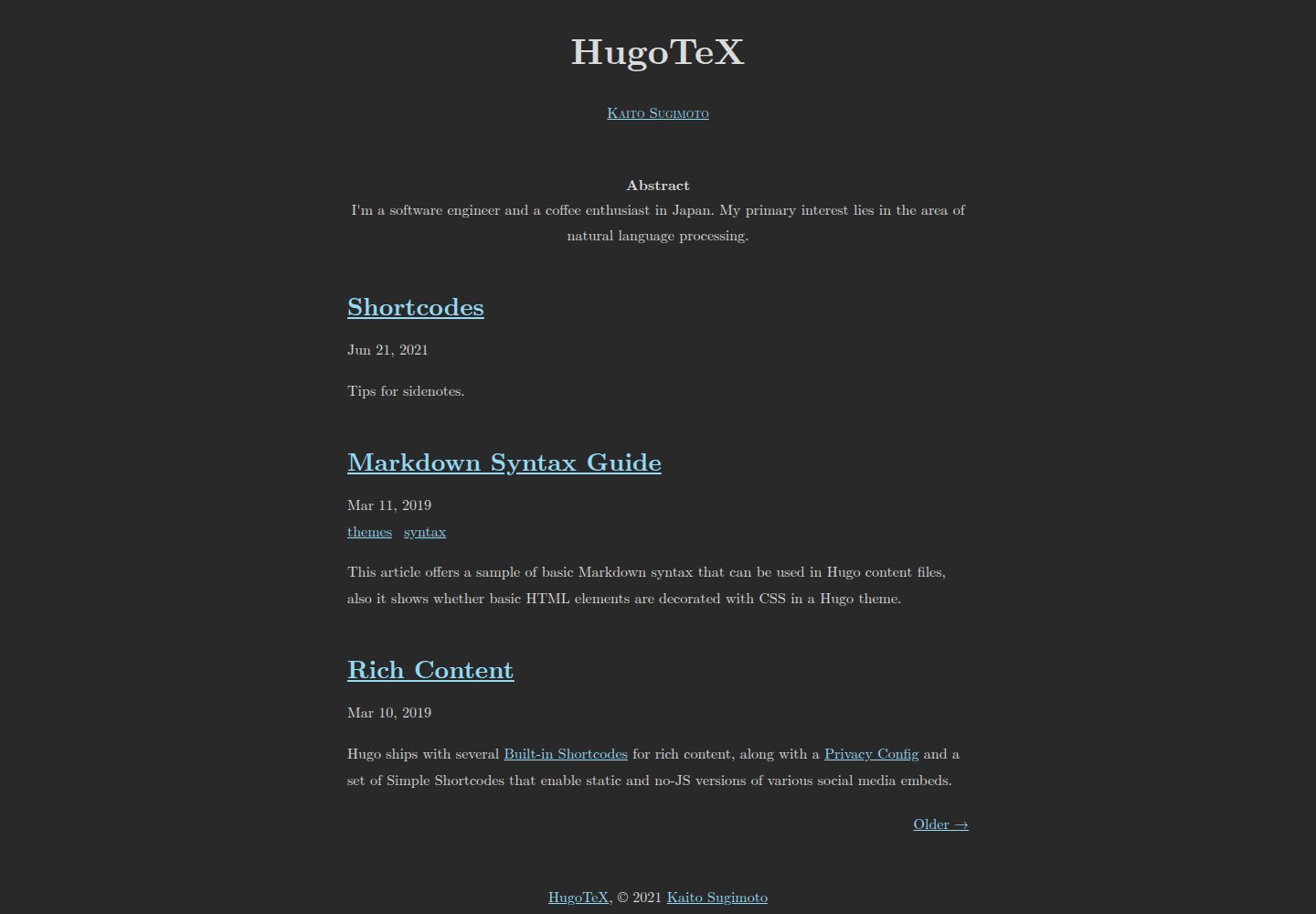
A document-style blog theme inspired by LaTeX typography, with a visual style based on LaTeX.css
HugoBlog
HugoTeX — Hugo Blog Template
By hugotex-dev
HugoTeX is a Hugo blog theme inspired by LaTeX typography, aimed at technical writing and academic content, with server-side KaTeX math rendering, sidenotes, summaries, and automatic dark mode.
Explore the design
Compare the page layouts and mobile experience. Open any screenshot for a closer look.
Desktop homepage1 / 3
Desktop captureTop of page
Actual screenshot captured by the server browser.
All pages & views 3
Screenshots show visual appearance; interactive behavior may differ.
Recorded 2026-10-02View source
What stands out
A quick read of the recorded project description.
Server-side KaTeX math rendering for inline and display formulas without client-side JavaScript
The sidenote shortcode provides margin notes: shown in the right margin on desktop, expanded by clicking the number on mobile
Automatic dark mode follows the system preference, and can also be forced dark or light via parameters
Content before <!--more--> is automatically displayed as an academic-style summary
Built-in support for OpenGraph, Twitter Card, meta description, and canonical links
Template Details
HugoTeX is a Hugo theme whose repository describes it as a “LaTeX style hugo theme,” aiming to present Hugo sites as document pages with the classic typographic feel of LaTeX. It suits researchers, mathematical content authors, and technical bloggers writing paper notes, tutorials, and articles containing formulas.
The theme’s typographic style references LaTeX.css, providing LaTeX-style document styling. Mathematical formulas are rendered server-side via KaTeX without relying on client-side JavaScript; inline formulas in the body use $...$, and display formulas use $$...$$, handled by Hugo’s transform.ToMath, requiring the Goldmark passthrough extension to be enabled in the configuration.
For content organization, the theme supports sidenotes (the sidenote shortcode): on desktop they appear in the right margin, while on mobile they are hidden by default and expand after clicking the reference number. Content before <!--more--> is displayed as an academic-style summary. The theme also provides automatic dark mode (following the system prefers-color-scheme), and can force dark or light via parameters; it also includes built-in OpenGraph and Twitter Card support and outputs meta description and canonical links.
Installation methods include Git submodule, Hugo Modules, and direct cloning; the README requires Hugo version 0.158.0 or higher. The theme is MIT licensed, permitting free use, modification, commercial use, and distribution of this version of the code, provided the copyright and license notice are retained when distributing. Third-party assets such as demo images, fonts, and icons must have their licenses checked separately, and external services such as domains and hosting may incur separate charges.
HugoBlog
Is it right for your project?
Use Cases
- Writing research notes or paper-style articles containing many mathematical formulas
- Publishing technical tutorials and documentation that require code highlighting and clear typography
- Presenting academic summaries and sidenote supplementary explanations in LaTeX style
- Building a static blog that supports dark mode and has social sharing previews
Suitable For
- Researchers and academic writers
- Mathematics and STEM content creators
- Technical blog and documentation authors
- Hugo users who prefer the look of LaTeX typography
Getting started & customization
Use these recorded setup notes alongside the repository instructions for your chosen version.
- 1
Requires Hugo version 0.158.0 or higher and Git installed
- 2
Can be installed via Git submodule, Hugo Modules, or direct cloning into the themes directory
- 3
The Goldmark passthrough extension must be enabled in the configuration (inline $...$, block $$...$$) to support mathematical formulas
- 4
Dark mode follows the system by default and can be forced with the darkmode or lightmode parameters; the code highlighting style can be changed in markup.highlight
- 5
Custom styles can be placed in assets/css/custom.css in the site directory
License & source material
Usage conditions & limitations
Free to use · keep license noticeThis entry covers the free version under the MIT license in the public repository; the free scope is the code of this version and does not mean that external services or third-party assets are free.
Must comply with when using
- Permits free use, modification, commercial use, and distribution of this version of the code.
- When distributing copies or substantial portions of the code, retain the original author’s copyright notice and the complete MIT license notice.
- The code is provided as is; warranties and limitations of liability are governed by the original license and applicable law.
Additional costs & items to verify
- The sidenote feature depends on the third-party CSS library LaTeX.css, which is an independent project whose license differs from the theme’s MIT license; its license terms must be checked separately before distribution or commercial use.
- The theme’s styling heavily references the third-party project LaTeX.css; that asset’s license is independent of the MIT license for the theme code, and its authorization scope should be confirmed before use.
- Using this theme requires Hugo 0.158.0 or higher installed locally, which is an external tool dependency that must be downloaded and configured separately.
- The online demo provided in the README is hosted on external services such as Cloudflare Pages; deploying an actual site may incur domain and hosting costs that must be assessed independently.
- Demo images, fonts, icons, and other third-party assets must be checked under their respective licenses and cannot be judged solely by the code’s MIT license.
- External services such as domains, hosting, databases, payments, or AI may incur separate charges.
View Original Text Basis
Permission is hereby granted, free of charge
Original License Text
This feature is powered by [LaTeX.css](https://latex.vercel.app/).
Original README
This theme is heavily inspired by: - [LaTeX.css](https://latex.vercel.app/) - CSS library mimicking LaTeX style
Original README
- Hugo >= **0.158.0** ([Download Hugo](https://gohugo.io/installation/))
Original README
https://github.com/hugotex-dev/HugoTeX/blob/main/LICENSEhttps://github.com/hugotex-dev/HugoTeX/blob/main/README.md**[Live Demo →](https://hugotex.pages.dev/)**
Original README
Compiled by DeepSeek based on repository license and README ·2026-10-02. Results only cover the materials read; dependencies, images, fonts, and subsequent term changes are subject to their respective original texts.
Project checks & description sources
Template Information
- Source platforms
- Hugo Themes
- Documentation and maintenance reference score
- More documented · 83 / 100
- Technologies
- Hugo
- Website type
- Blog
How this score is calculated
Our heuristic uses license records (up to 30), a demo link (12), a preview (10), stars (15), recorded maintenance (15), description completeness (8), feature records (5) and classification data (5). It is not a code, security or performance test, or a Google score. A link does not establish tested functionality.
What to verify for this project
- Repository update recorded
- 2026-07-18
- Screenshot last checked
- 2026-10-02
A demo link is listed. Check it with your own content and viewport sizes; its presence does not confirm that forms, authentication or payments work.
The catalog identifies Hugo as the primary stack. Check the actual dependency manifest and lockfile for versions and hosting requirements. These notes use recorded metadata, not a code audit or a deployment test.
Use a selection guide →How this description was prepared
AI-assisted description based on catalog records and repository material. Repository authors are not automatically the reviewers of this description.
Automatically checked against source and license rules; no manual editorial review.
Inspect the recorded source material
SHA-256: 756a918c5e6f6deaacdb7dcd6144c1ff84af4f77cf5492cf564b99101b41cc8e
2026-10-02T22:54:23.224Z
Source file / repository# HugoTeX
[](https://gohugo.io/)
[](https://opensource.org/licenses/MIT)
[](https://github.com/hugotex-dev/HugoTeX/stargazers)
> A LaTeX-inspired Hugo theme for elegant technical writing and academic content
Transform your Hugo site into a beautifully typeset document with the classic aesthetics of LaTeX. Perfect for researchers, mathematicians, and anyone who appreciates excellent typography.

**[Live Demo →](https://hugotex.pages.dev/)**
## ✨ Features
- 📐 **LaTeX-style Typography** - Classic, elegant document styling inspired by LaTeX
- ⚡ **Server-Side Math Rendering** - KaTeX with zero JavaScript overhead, instant page loads
- 🌓 **Automatic Dark Mode** - Respects system preferences with seamless theme switching
- 📱 **Mobile Optimized** - Fast and responsive on all devices
- 🚀 **Lightning Fast** - No client-side JavaScript required for math rendering
- 🔍 **SEO-Friendly** - Built-in OpenGraph and Twitter Card support
- 📝 **Sidenotes Support** - Elegant margin notes for supplementary content
- 📄 **Article Abstracts** - Automatically displays content before `<!--more-->` as an academic-style abstract
- 🎨 **Customizable** - Easy theming with simple configuration
- ♿ **Accessible** - Works perfectly even with JavaScript disabled
## 🎯 Perfect For
- **Researchers & Academics** - Write papers and notes with LaTeX-quality output
- **Technical Bloggers** - Share tutorials and documentation with beautiful code and math
- **Mathematics Content** - Display complex equations with proper typesetting
- **Science Communicators** - Present technical content in an elegant, readable format
- **Anyone** - Who appreciates clean, professional typography
## 🚀 Quick Start
### Prerequisites
- Hugo >= **0.158.0** ([Download Hugo](https://gohugo.io/installation/))
- Git
### Try It Out
```bash
# Clone the repository
git clone https://github.com/hugotex-dev/HugoTeX
cd HugoTeX/exampleSite
# Start the development server
hugo server -t ../..
# Open http://localhost:1313/ in your browser
```
## 📦 Installation
### Method 1: Git Submodule (Recommended)
```bash
# Add the theme as a submodule to your Hugo site
cd your-hugo-site
git submodule add https://github.com/hugotex-dev/HugoTeX.git themes/HugoTeX
# Update your config
echo 'theme = "HugoTeX"' >> hugo.toml
```
### Method 2: Hugo Modules
```bash
# Initialize your site as a Hugo module
hugo mod init github.com/yourusername/yoursite
# Add to your hugo.toml
cat >> hugo.toml << EOF
[module]
[[module.imports]]
path = "github.com/hugotex-dev/HugoTeX"
EOF
# Get the theme
hugo mod get
```
### Method 3: Direct Clone
```bash
# Clone directly into themes directory
cd your-hugo-site/themes
git clone https://github.com/hugotex-dev/HugoTeX.git
```
## ⚙️ Configuration
### Basic Setup
Create or update your `hugo.toml`:
```toml
baseURL = "https://example.com/"
title = "My Hugo Site"
theme = "HugoTeX"
languageCode = "en"
DefaultContentLanguage = "en"
enableInlineShortcodes = true
footnoteReturnLinkContents = "^"
[pagination]
pagerSize = 10
[Params]
description = "A short site description"
darkmode = true # Set to true to enforce dark mode
# lightmode = true # Set to true to enforce light mode
[Params.Favicon]
ico = "/favicon.ico"
svg = "/favicon.svg"
png = "/favicon.png"
[Params.Author]
name = "Your Name"
abstract = """
Your bio goes here. This appears on the homepage.
"""
[taxonomies]
category = "categories"
tag = "tags"
series = "series"
[markup]
[markup.goldmark]
[markup.goldmark.renderer]
unsafe = true
[markup.goldmark.extensions]
[markup.goldmark.extensions.passthrough]
enable = true
[markup.goldmark.extensions.passthrough.delimiters]
inline = [['$', '$']]
block = [['$$', '$$']]
[markup.highlight]
style = "paraiso-dark" # Syntax highlighting style
```
### Theme Options
**Dark Mode Control**
By default, dark mode automatically activates based on the user's system `prefers-color-scheme` setting.
- Set `darkmode = true` to enforce dark mode
- Set `lightmode = true` to enforce light mode
- Omit both for automatic switching
### Favicon Support
Define icon paths once under `[Params.Favicon]`. Every field is optional; only provided values are rendered.
The recommended setup uses `/favicon.ico`, `/favicon.svg`, and `/favicon.png`.
`ico` should point to a multi-size `.ico` file, at minimum 16, 32, and 48 px, for legacy browser support.
`png` is rendered as both a 180x180 PNG favicon fallback and the Apple touch icon.
```toml
[Params.Favicon]
ico = "/favicon.ico" # Legacy multi-size .ico fallback
svg = "/favicon.svg" # SVG icon for modern browsers
png = "/favicon.png" # 180x180 PNG fallback and Apple touch icon
```
Place these files in the site's `static` directory:
`static/favicon.ico`, `static/favicon.svg`, and `static/favicon.png`.
For an SVG with shadows, filters, or transparent padding, render a large
PNG first, trim the transparent canvas, then resize and re-center the
result:
```sh
rsvg-convert -f png -w 2048 -h 2048 -o /tmp/favicon-2048.png static/favicon.svg
convert /tmp/favicon-2048.png -alpha set -trim +repage -resize 180x180 -background none -gravity center -extent 180x180 static/favicon.png
convert /tmp/favicon-2048.png -alpha set -trim +repage -resize 16x16 -background none -gravity center -extent 16x16 /tmp/favicon-16.png
convert /tmp/favicon-2048.png -alpha set -trim +repage -resize 32x32 -background none -gravity center -extent 32x32 /tmp/favicon-32.png
convert /tmp/favicon-2048.png -alpha set -trim +repage -resize 48x48 -background none -gravity center -extent 48x48 /tmp/favicon-48.png
convert /tmp/favicon-16.png /tmp/favicon-32.png /tmp/favicon-48.png static/favicon.ico
rm -f /tmp/favicon-2048.png /tmp/favicon-16.png /tmp/favicon-32.png /tmp/favicon-48.png
```
### Meta Descriptions
HugoTeX renders a `<meta name="description">` tag in the document head
when description content is available. Page front matter `description`
has the highest priority; otherwise an article summary before
`<!--more-->` is used as the description. On the home page,
`Params.Author.abstract` is used as the description when no explicit
page description exists. Finally, `Params.description` provides a site
level fallback for all pages.
```toml
[Params]
description = "A short site description"
```
Use front matter `description` when a page needs a precise search or
social preview description:
```toml
+++
title = "An article"
description = "A concise description of the article."
+++
```
### Canonical URLs
HugoTeX renders a canonical link in the document head for every page. By
default it uses Hugo's `.Permalink`, derived from `baseURL` and the page
URL.
Set `relcanonical` in page front matter only when the page should declare
a different canonical URL, for example when the same content also exists
at another permanent address. The value is rendered without conversion,
so it must be a full absolute URL with scheme and host; do not use
relative paths.
```toml
+++
title = "A duplicated page"
relcanonical = "https://example.com/original-page/"
+++
```
### Social Media Integration
Enable rich previews on social platforms:
```toml
[Params]
twittercard = true
opengraph = true
```
See [Hugo's Internal Templates](https://gohugo.io/templates/internal/) for advanced configuration.
## 📐 Math Typesetting
HugoTeX uses [KaTeX](https://katex.org/) with **server-side rendering** for mathematical notation.
### Why Server-Side?
- ⚡ **Zero JavaScript overhead** - Math renders instantly, no client-side processing
- 📱 **Better mobile performance** - Especially on slower devices
- ♿ **Works without JavaScript** - Accessible by default
- 🚀 **Faster page loads** - No render blocking
### Usage
Simply write math expressions in your Markdown:
**Inline math:** `$E = mc^2$` → $E = mc^2$
**Display math:**
```markdown
$$
\int_{-\infty}^{\infty} e^{-x^2} dx = \sqrt{\pi}
$$
```
Math is automatically processed using Hugo's built-in `transform.ToMath` function. The passthrough extension (shown in config above) enables this functionality.
**Reference:** [Hugo Math in Markdown](https://gohugo.io/content-management/mathematics/) | [KaTeX Supported Functions](https://katex.org/docs/supported.html)
## 🎨 Shortcodes
### Sidenotes
Create elegant margin notes with the sidenote shortcode:
```markdown
Here's some text with a sidenote.{{%/* sidenote */%}}This appears in the margin.{{%/* /sidenote */%}}
```
**Behavior:**
- **Desktop:** Displays in the right margin
- **Mobile:** Hidden by default, revealed by clicking the reference number
This feature is powered by [LaTeX.css](https://latex.vercel.app/).
## 🎨 Customization
### Syntax Highlighting
Change the code highlighting theme in your config:
```toml
[markup.highlight]
style = "monokai" # Try: github, dracula, nord, etc.
```
To use different code highlighting styles for light and dark modes,
keep the light style in Hugo's standard markup configuration and set
only the dark style under theme parameters:
```toml
[markup.highlight]
style = "tango"
[Params.SyntaxHighlighting]
DarkStyle = "paraiso-dark"
```
`LightStyle` is optional; when omitted, HugoTeX uses
`markup.highlight.style` as the light style. Forced light mode renders
only the light style, forced dark mode renders only the dark style, and
automatic mode renders both variants while CSS follows
`prefers-color-scheme`.
Browse available styles: [Chroma Style Gallery](https://xyproto.github.io/splash/docs/)
### Custom CSS
Add custom styles by creating `assets/css/custom.css` in your site directory.
## 🌟 Showcase
Using HugoTeX? We'd love to feature your site! Open an issue or PR to add it here.
## 🤝 Contributing
Contributions are welcome! Here's how you can help:
- 🐛 **Report bugs** - Open an issue describing the problem
- ✨ **Suggest features** - Share your ideas for improvements
- 📝 **Improve documentation** - Help make the docs clearer
- 🔧 **Submit pull requests** - Fix bugs or add features
Before contributing:
1. Check existing issues and PRs
2. Test your changes thoroughly
3. Follow the existing code style
4. Update documentation as needed
## 📄 License
MIT License - see [LICENSE](LICENSE) for details
## 🙏 Credits
This theme is heavily inspired by:
- [LaTeX.css](https://latex.vercel.app/) - CSS library mimicking LaTeX style
- [latex-css](https://latex.now.sh/) - Original inspiration
## 📚 Similar Projects
Looking for alternatives? Check out:
- [hugo-theme-texify](https://github.com/queensferryme/hugo-theme-texify/) - Another excellent LaTeX-inspired theme
---
**Made with ❤️ by the [HugoTeX team](https://github.com/hugotex-dev)**
If you find HugoTeX useful, please consider giving it a ⭐ on GitHub!
Explore similar templates
Compare previews and descriptions within the same stack and category.

hugo-PaperMod
A fast, clean, responsive Hugo theme for blogs and lightweight portfolios, with three layout modes (Regular, Home-Info, Profile), automatic and manual light/dark themes, Fuse.js client-side search, multilingual support, and built-in Open Graph, Twitter Cards, and Schema.org data.
Hugo · Portfolio

LoveIt
LoveIt is a clean, elegant, and feature-rich Hugo blog theme derived from LeaveIt and KeepIt, MIT-licensed. It offers light/dark modes, responsive layout, multilingual support, and search via Lunr.js or Algolia.
Hugo · Blog

hugo-coder
hugo-coder is a minimalist Hugo blog theme maintained by luizdepra under the MIT license. It provides a clean, text-focused blog appearance, configuration documentation in the docs directory, and a complete exampleSite with hugo.toml.
Hugo · Blog

blowfish
Blowfish is a Hugo personal website and blog theme built with Tailwind CSS 4, focused on lightness, simplicity, and content-first presentation.
Hugo · Blog

hugo-paper
hugo-paper is a simple, clean, and customizable Hugo blog theme configured through config.toml or hugo.toml.
Hugo · Blog

hextra
Hextra is a Hugo theme for documentation and blog sites, built on Hugo and Tailwind CSS with design referencing Nextra.
Hugo · Documentation