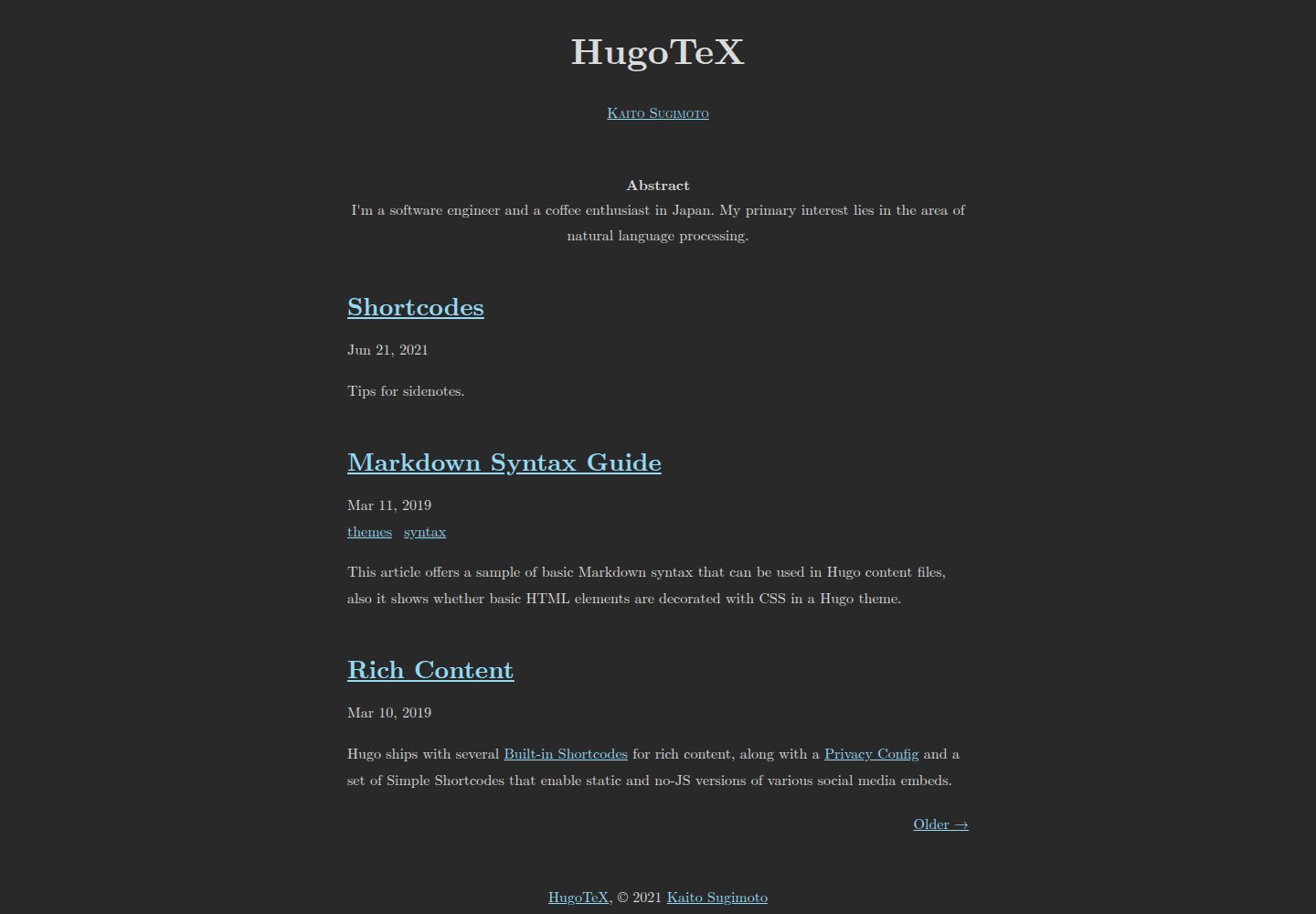
受 LaTeX 排版风格启发的文档式博客主题,基于 LaTeX.css 的视觉风格
Hugo博客
HugoTeX — Hugo 博客模板
作者 hugotex-dev
HugoTeX 是一个受 LaTeX 排版风格启发的 Hugo 博客主题,面向技术写作与学术内容,支持服务端 KaTeX 数学渲染、边注、摘要与自动深色模式。
看看你的网站会是什么样
浏览真实页面截图,比较内容排版与手机效果。点击下方缩略图切换,放大查看整页细节。
全部页面与视图 3
截图用于了解视觉与布局,交互效果请以实际项目为准。
采集于 2026-10-02查看来源
值得关注的模板亮点
从已有项目资料中,快速了解它的特点。
KaTeX 服务端数学渲染,行内与独立公式无需客户端 JavaScript
sidenote 短代码提供页边注:桌面端显示在右侧边距,移动端点击编号展开
自动深色模式跟随系统偏好,也可通过参数强制深色或浅色
<!--more--> 之前的内容自动作为学术风格摘要展示
内置 OpenGraph、Twitter Card、meta description 与 canonical 链接支持
模板详细介绍
HugoTeX 是一个 Hugo 主题,仓库描述为“LaTeX style hugo theme”,目标是把 Hugo 站点呈现为具有 LaTeX 经典排版观感的文档页面。它适合研究人员、数学内容作者和技术博客作者,用于撰写论文笔记、教程和包含公式的文章。
主题的排版风格参考 LaTeX.css,提供 LaTeX 风格的文档样式。数学公式通过 KaTeX 在服务端渲染,不依赖客户端 JavaScript;正文中的行内公式使用 $...$,独立公式使用 $$...$$,由 Hugo 的 transform.ToMath 处理,需要在配置中启用 Goldmark 的 passthrough 扩展。
内容组织方面,主题支持边注(sidenote 短代码):桌面端显示在右侧页边距,移动端默认隐藏、点击引用编号后展开。文章在 <!--more--> 之前的内容会作为学术风格的摘要展示。主题还提供自动深色模式(跟随系统 prefers-color-scheme),也可通过参数强制深色或浅色;同时内置 OpenGraph 与 Twitter Card 支持,并输出 meta description 与 canonical 链接。
安装方式包括 Git 子模块、Hugo Modules 和直接克隆三种;README 要求 Hugo 版本不低于 0.158.0。主题采用 MIT 许可,允许免费使用、修改、商用和分发该版本代码,分发时需保留版权与许可声明。演示图片、字体、图标等第三方素材需单独核对其许可,域名与托管等外部服务可能另行收费。
Hugo博客
适合你的项目吗?
适用场景
- 撰写包含大量数学公式的研究笔记或论文式文章
- 发布技术教程与文档,需要代码高亮和清晰排版
- 以 LaTeX 风格呈现学术摘要与边注补充说明的内容
- 搭建支持深色模式、并具备社交分享预览的静态博客
适合人群
- 研究人员与学术写作者
- 数学与理工科内容创作者
- 技术博客与文档作者
- 偏好 LaTeX 排版观感的 Hugo 用户
上手与定制指南
结合仓库当前版本的说明,按下面的资料检查内容、配置与运行要求。
- 1
需要 Hugo 版本不低于 0.158.0,并安装 Git
- 2
可通过 Git 子模块、Hugo Modules 或直接克隆到 themes 目录三种方式安装
- 3
需在配置中启用 Goldmark passthrough 扩展(行内 $...$、块级 $$...$$)以支持数学公式
- 4
深色模式默认跟随系统,可用 darkmode 或 lightmode 参数强制;代码高亮样式可在 markup.highlight 中更换
- 5
自定义样式可放在站点目录的 assets/css/custom.css
授权与来源资料
使用条件与限制
免费使用 · 保留许可声明本次收录的是公开仓库中采用 MIT 许可的免费版本;免费范围为该版本代码,不代表外部服务或第三方素材免费。
使用时需要遵守
- 允许免费使用、修改、商用和分发该版本代码。
- 分发代码副本或实质性部分时,保留原作者版权声明和完整 MIT 许可声明。
- 代码按现状提供;担保与责任限制以原许可证及适用法律为准。
额外费用与待核对事项
- 边注功能依赖第三方 CSS 库 LaTeX.css,该库为独立项目,其许可与主题的 MIT 许可不同,分发或商用前需单独核对其许可条款。
- 主题样式大量参考第三方项目 LaTeX.css,该素材的许可与 MIT 主题代码许可相互独立,使用前应自行确认其授权范围。
- 使用该主题需本地安装 Hugo 0.158.0 或更高版本,属于外部工具依赖,需自行下载配置。
- README 提供的在线演示托管于 Cloudflare Pages 等外部服务,实际部署站点时域名与托管可能产生费用,需自行评估。
- 演示图片、字体、图标及其他第三方素材需按各自许可核对,不能仅凭代码的 MIT 许可判断。
- 域名、托管、数据库、支付或 AI 等外部服务可能另外收费。
查看原文依据
Permission is hereby granted, free of charge
许可证原文
This feature is powered by [LaTeX.css](https://latex.vercel.app/).
README 原文
This theme is heavily inspired by: - [LaTeX.css](https://latex.vercel.app/) - CSS library mimicking LaTeX style
README 原文
- Hugo >= **0.158.0** ([Download Hugo](https://gohugo.io/installation/))
README 原文
https://github.com/hugotex-dev/HugoTeX/blob/main/LICENSEhttps://github.com/hugotex-dev/HugoTeX/blob/main/README.md**[Live Demo →](https://hugotex.pages.dev/)**
README 原文
DeepSeek 根据仓库许可证和 README 整理 ·2026-10-02。结果仅覆盖已读取资料,依赖、图片、字体及后续条款变更以各自原文为准。
项目核对记录与介绍依据
模板资料
- 来源平台
- Hugo Themes
- 资料与维护参考分
- 资料较完整 · 83 / 100
- 技术栈
- Hugo
- 网站类型
- 博客
这个分数如何计算
本站按许可资料(最高30分)、演示链接(12分)、预览图(10分)、Star数(15分)、记录的维护时间(15分)、描述完整度(8分)、功能记录(5分)和分类资料(5分)计算。它不是代码、安全或性能测试,也不是 Google 评分;有链接不代表已实测可用。
这个项目需要核对什么
- 记录的仓库更新时间
- 2026-07-18
- 截图检查日期
- 2026-10-02
已收录演示链接。请用你的内容与屏幕尺寸检查;有演示不代表表单、认证或支付已经可用。
目录记录的主要技术栈是 Hugo。请通过依赖清单和锁文件核对实际版本与托管要求。这些说明基于收录资料,不代表代码审计或部署实测。
查看具体选型方法 →介绍的制作与核对状态
介绍由 AI 辅助整理目录与仓库资料。仓库作者不等于这篇介绍的审核者。
已完成服务器许可规则与 AI 来源核对;未经过人工编辑审核。
查看当时使用的来源资料
SHA-256: 756a918c5e6f6deaacdb7dcd6144c1ff84af4f77cf5492cf564b99101b41cc8e
2026-10-02T22:54:23.224Z
来源文件 / 仓库# HugoTeX
[](https://gohugo.io/)
[](https://opensource.org/licenses/MIT)
[](https://github.com/hugotex-dev/HugoTeX/stargazers)
> A LaTeX-inspired Hugo theme for elegant technical writing and academic content
Transform your Hugo site into a beautifully typeset document with the classic aesthetics of LaTeX. Perfect for researchers, mathematicians, and anyone who appreciates excellent typography.

**[Live Demo →](https://hugotex.pages.dev/)**
## ✨ Features
- 📐 **LaTeX-style Typography** - Classic, elegant document styling inspired by LaTeX
- ⚡ **Server-Side Math Rendering** - KaTeX with zero JavaScript overhead, instant page loads
- 🌓 **Automatic Dark Mode** - Respects system preferences with seamless theme switching
- 📱 **Mobile Optimized** - Fast and responsive on all devices
- 🚀 **Lightning Fast** - No client-side JavaScript required for math rendering
- 🔍 **SEO-Friendly** - Built-in OpenGraph and Twitter Card support
- 📝 **Sidenotes Support** - Elegant margin notes for supplementary content
- 📄 **Article Abstracts** - Automatically displays content before `<!--more-->` as an academic-style abstract
- 🎨 **Customizable** - Easy theming with simple configuration
- ♿ **Accessible** - Works perfectly even with JavaScript disabled
## 🎯 Perfect For
- **Researchers & Academics** - Write papers and notes with LaTeX-quality output
- **Technical Bloggers** - Share tutorials and documentation with beautiful code and math
- **Mathematics Content** - Display complex equations with proper typesetting
- **Science Communicators** - Present technical content in an elegant, readable format
- **Anyone** - Who appreciates clean, professional typography
## 🚀 Quick Start
### Prerequisites
- Hugo >= **0.158.0** ([Download Hugo](https://gohugo.io/installation/))
- Git
### Try It Out
```bash
# Clone the repository
git clone https://github.com/hugotex-dev/HugoTeX
cd HugoTeX/exampleSite
# Start the development server
hugo server -t ../..
# Open http://localhost:1313/ in your browser
```
## 📦 Installation
### Method 1: Git Submodule (Recommended)
```bash
# Add the theme as a submodule to your Hugo site
cd your-hugo-site
git submodule add https://github.com/hugotex-dev/HugoTeX.git themes/HugoTeX
# Update your config
echo 'theme = "HugoTeX"' >> hugo.toml
```
### Method 2: Hugo Modules
```bash
# Initialize your site as a Hugo module
hugo mod init github.com/yourusername/yoursite
# Add to your hugo.toml
cat >> hugo.toml << EOF
[module]
[[module.imports]]
path = "github.com/hugotex-dev/HugoTeX"
EOF
# Get the theme
hugo mod get
```
### Method 3: Direct Clone
```bash
# Clone directly into themes directory
cd your-hugo-site/themes
git clone https://github.com/hugotex-dev/HugoTeX.git
```
## ⚙️ Configuration
### Basic Setup
Create or update your `hugo.toml`:
```toml
baseURL = "https://example.com/"
title = "My Hugo Site"
theme = "HugoTeX"
languageCode = "en"
DefaultContentLanguage = "en"
enableInlineShortcodes = true
footnoteReturnLinkContents = "^"
[pagination]
pagerSize = 10
[Params]
description = "A short site description"
darkmode = true # Set to true to enforce dark mode
# lightmode = true # Set to true to enforce light mode
[Params.Favicon]
ico = "/favicon.ico"
svg = "/favicon.svg"
png = "/favicon.png"
[Params.Author]
name = "Your Name"
abstract = """
Your bio goes here. This appears on the homepage.
"""
[taxonomies]
category = "categories"
tag = "tags"
series = "series"
[markup]
[markup.goldmark]
[markup.goldmark.renderer]
unsafe = true
[markup.goldmark.extensions]
[markup.goldmark.extensions.passthrough]
enable = true
[markup.goldmark.extensions.passthrough.delimiters]
inline = [['$', '$']]
block = [['$$', '$$']]
[markup.highlight]
style = "paraiso-dark" # Syntax highlighting style
```
### Theme Options
**Dark Mode Control**
By default, dark mode automatically activates based on the user's system `prefers-color-scheme` setting.
- Set `darkmode = true` to enforce dark mode
- Set `lightmode = true` to enforce light mode
- Omit both for automatic switching
### Favicon Support
Define icon paths once under `[Params.Favicon]`. Every field is optional; only provided values are rendered.
The recommended setup uses `/favicon.ico`, `/favicon.svg`, and `/favicon.png`.
`ico` should point to a multi-size `.ico` file, at minimum 16, 32, and 48 px, for legacy browser support.
`png` is rendered as both a 180x180 PNG favicon fallback and the Apple touch icon.
```toml
[Params.Favicon]
ico = "/favicon.ico" # Legacy multi-size .ico fallback
svg = "/favicon.svg" # SVG icon for modern browsers
png = "/favicon.png" # 180x180 PNG fallback and Apple touch icon
```
Place these files in the site's `static` directory:
`static/favicon.ico`, `static/favicon.svg`, and `static/favicon.png`.
For an SVG with shadows, filters, or transparent padding, render a large
PNG first, trim the transparent canvas, then resize and re-center the
result:
```sh
rsvg-convert -f png -w 2048 -h 2048 -o /tmp/favicon-2048.png static/favicon.svg
convert /tmp/favicon-2048.png -alpha set -trim +repage -resize 180x180 -background none -gravity center -extent 180x180 static/favicon.png
convert /tmp/favicon-2048.png -alpha set -trim +repage -resize 16x16 -background none -gravity center -extent 16x16 /tmp/favicon-16.png
convert /tmp/favicon-2048.png -alpha set -trim +repage -resize 32x32 -background none -gravity center -extent 32x32 /tmp/favicon-32.png
convert /tmp/favicon-2048.png -alpha set -trim +repage -resize 48x48 -background none -gravity center -extent 48x48 /tmp/favicon-48.png
convert /tmp/favicon-16.png /tmp/favicon-32.png /tmp/favicon-48.png static/favicon.ico
rm -f /tmp/favicon-2048.png /tmp/favicon-16.png /tmp/favicon-32.png /tmp/favicon-48.png
```
### Meta Descriptions
HugoTeX renders a `<meta name="description">` tag in the document head
when description content is available. Page front matter `description`
has the highest priority; otherwise an article summary before
`<!--more-->` is used as the description. On the home page,
`Params.Author.abstract` is used as the description when no explicit
page description exists. Finally, `Params.description` provides a site
level fallback for all pages.
```toml
[Params]
description = "A short site description"
```
Use front matter `description` when a page needs a precise search or
social preview description:
```toml
+++
title = "An article"
description = "A concise description of the article."
+++
```
### Canonical URLs
HugoTeX renders a canonical link in the document head for every page. By
default it uses Hugo's `.Permalink`, derived from `baseURL` and the page
URL.
Set `relcanonical` in page front matter only when the page should declare
a different canonical URL, for example when the same content also exists
at another permanent address. The value is rendered without conversion,
so it must be a full absolute URL with scheme and host; do not use
relative paths.
```toml
+++
title = "A duplicated page"
relcanonical = "https://example.com/original-page/"
+++
```
### Social Media Integration
Enable rich previews on social platforms:
```toml
[Params]
twittercard = true
opengraph = true
```
See [Hugo's Internal Templates](https://gohugo.io/templates/internal/) for advanced configuration.
## 📐 Math Typesetting
HugoTeX uses [KaTeX](https://katex.org/) with **server-side rendering** for mathematical notation.
### Why Server-Side?
- ⚡ **Zero JavaScript overhead** - Math renders instantly, no client-side processing
- 📱 **Better mobile performance** - Especially on slower devices
- ♿ **Works without JavaScript** - Accessible by default
- 🚀 **Faster page loads** - No render blocking
### Usage
Simply write math expressions in your Markdown:
**Inline math:** `$E = mc^2$` → $E = mc^2$
**Display math:**
```markdown
$$
\int_{-\infty}^{\infty} e^{-x^2} dx = \sqrt{\pi}
$$
```
Math is automatically processed using Hugo's built-in `transform.ToMath` function. The passthrough extension (shown in config above) enables this functionality.
**Reference:** [Hugo Math in Markdown](https://gohugo.io/content-management/mathematics/) | [KaTeX Supported Functions](https://katex.org/docs/supported.html)
## 🎨 Shortcodes
### Sidenotes
Create elegant margin notes with the sidenote shortcode:
```markdown
Here's some text with a sidenote.{{%/* sidenote */%}}This appears in the margin.{{%/* /sidenote */%}}
```
**Behavior:**
- **Desktop:** Displays in the right margin
- **Mobile:** Hidden by default, revealed by clicking the reference number
This feature is powered by [LaTeX.css](https://latex.vercel.app/).
## 🎨 Customization
### Syntax Highlighting
Change the code highlighting theme in your config:
```toml
[markup.highlight]
style = "monokai" # Try: github, dracula, nord, etc.
```
To use different code highlighting styles for light and dark modes,
keep the light style in Hugo's standard markup configuration and set
only the dark style under theme parameters:
```toml
[markup.highlight]
style = "tango"
[Params.SyntaxHighlighting]
DarkStyle = "paraiso-dark"
```
`LightStyle` is optional; when omitted, HugoTeX uses
`markup.highlight.style` as the light style. Forced light mode renders
only the light style, forced dark mode renders only the dark style, and
automatic mode renders both variants while CSS follows
`prefers-color-scheme`.
Browse available styles: [Chroma Style Gallery](https://xyproto.github.io/splash/docs/)
### Custom CSS
Add custom styles by creating `assets/css/custom.css` in your site directory.
## 🌟 Showcase
Using HugoTeX? We'd love to feature your site! Open an issue or PR to add it here.
## 🤝 Contributing
Contributions are welcome! Here's how you can help:
- 🐛 **Report bugs** - Open an issue describing the problem
- ✨ **Suggest features** - Share your ideas for improvements
- 📝 **Improve documentation** - Help make the docs clearer
- 🔧 **Submit pull requests** - Fix bugs or add features
Before contributing:
1. Check existing issues and PRs
2. Test your changes thoroughly
3. Follow the existing code style
4. Update documentation as needed
## 📄 License
MIT License - see [LICENSE](LICENSE) for details
## 🙏 Credits
This theme is heavily inspired by:
- [LaTeX.css](https://latex.vercel.app/) - CSS library mimicking LaTeX style
- [latex-css](https://latex.now.sh/) - Original inspiration
## 📚 Similar Projects
Looking for alternatives? Check out:
- [hugo-theme-texify](https://github.com/queensferryme/hugo-theme-texify/) - Another excellent LaTeX-inspired theme
---
**Made with ❤️ by the [HugoTeX team](https://github.com/hugotex-dev)**
If you find HugoTeX useful, please consider giving it a ⭐ on GitHub!
看看同类模板
对比同技术栈与用途的模板,找到更适合的视觉与内容结构。

hugo-PaperMod
PaperMod 是 Hugo 生态里知名度较高的主题之一,定位很明确:给博客和轻量作品集站点提供一套干净、响应式的阅读界面。
Hugo · 作品集

LoveIt
❤️A clean, elegant but advanced blog theme for Hugo 一个简洁、优雅且高效的 Hugo 主题
Hugo · 博客

hugo-coder
A minimalist blog theme for hugo.
Hugo · 博客

blowfish
Personal Website & Blog Theme for Hugo
Hugo · 博客

hugo-paper
🪺 A simple, clean, customizable Hugo theme
Hugo · 博客

hextra
Hextra 是一个 Hugo 主题,定位在文档站与博客之间:既提供侧边栏导航、目录、面包屑、分页这类文档站结构,也能承载博客内容。
Hugo · 文档