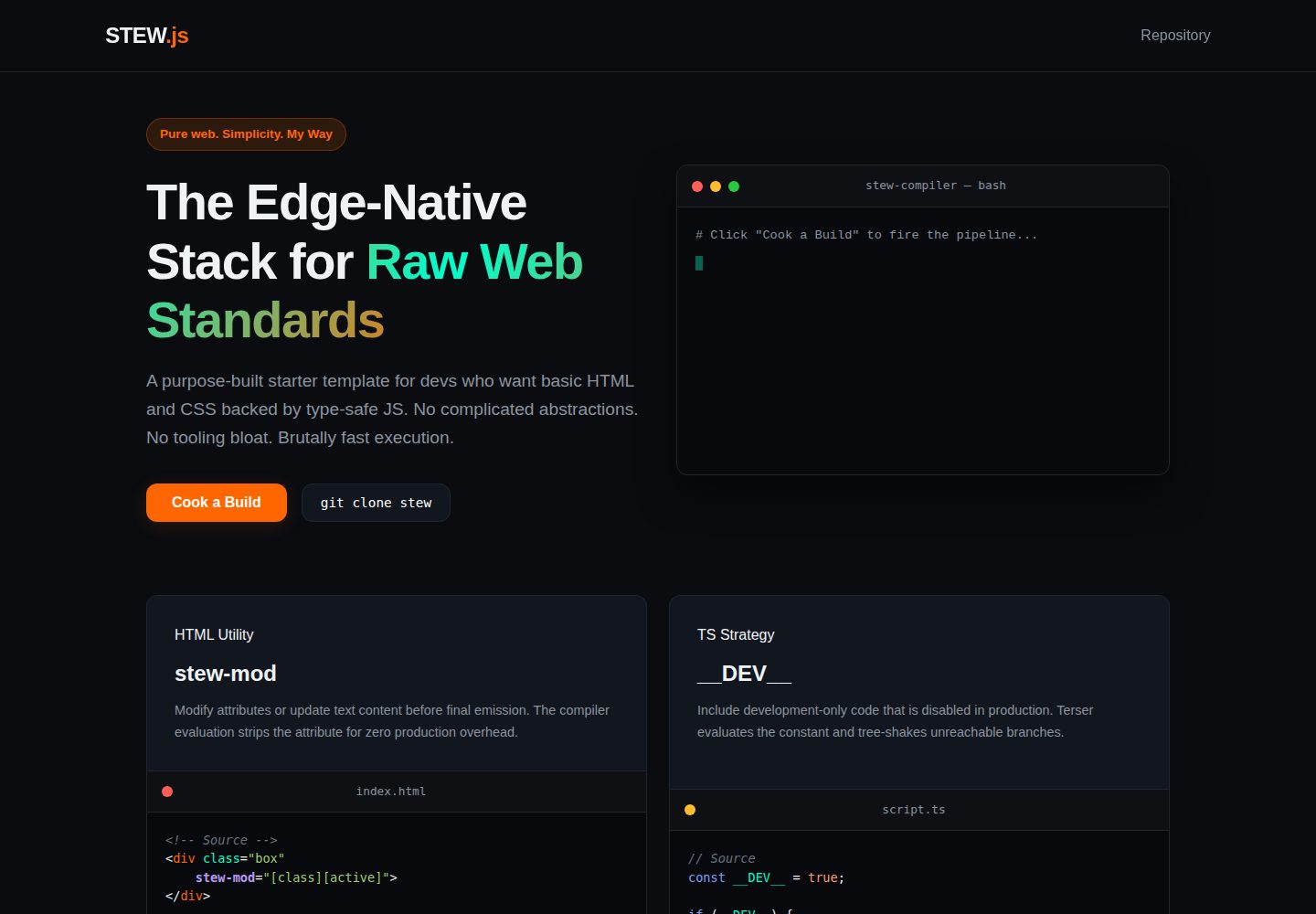
Uses raw HTML5/CSS3 and TypeScript, without introducing complex frontend frameworks
HTMLStarter
Stew — HTML Starter Template
By IchimakiKasura
Stew is a minimal starter template based on raw HTML/CSS and TypeScript, with its own custom build scripts, deployable via Cloudflare Pages and Workers.
Explore the design
Compare the page layouts and mobile experience. Open any screenshot for a closer look.
Desktop homepage1 / 2
Desktop captureTop of page
Actual screenshot captured by the server browser.
All pages & views 2
Screenshots show visual appearance; interactive behavior may differ.
Recorded 2026-10-03View source
What stands out
A quick read of the recorded project description.
Includes custom compilers and bundlers in the build directory, invoked via npm scripts
Provides multiple npm commands for local development, testing, and production builds
Includes deployment instructions for Cloudflare Pages frontend and Workers edge API
Data layer is not locked in; can connect to external databases or Cloudflare D1/KV
MIT licensed, allowing use, modification, commercial use, and distribution
Template Details
Stew is a minimal starter template for edge deployment, written in raw HTML5/CSS3 and TypeScript, without relying on complex frontend frameworks. The repository includes custom compilers and bundlers in the build directory, driven by npm scripts for local development, testing, and production builds. The template contains src static site source code, ts client logic, api/worker.js edge Worker entry, and wrangler configuration files. Deployment is split into two parts: frontend artifacts are uploaded to Cloudflare Pages, and backend Worker code is pasted into the Cloudflare online editor for deployment. The data storage layer is not bound; you can connect to PostgreSQL, MongoDB, Supabase, etc. via HTTP or WebSocket, or use Cloudflare D1 or KV and declare bindings in the wrangler configuration. The author explicitly states that the project is built according to personal preferences and does not accept issues; if changes are needed, you can fork it yourself.
HTMLStarter
Is it right for your project?
Use Cases
- Developers who want to build static sites with raw HTML/CSS and TypeScript and deploy to edge networks
- Small projects that need to manage both frontend static assets and edge Worker APIs
- Starter projects that want to use Cloudflare Pages and Workers as hosting solutions and choose their own data storage
- Personal projects that want to fork and modify a minimal MIT-licensed template
Suitable For
- Developers who prefer raw Web standards and do not want to introduce heavy frameworks
- Projects that need a lightweight starter and accept configuring their own database and hosting services
- Site or API prototypes primarily targeting the Cloudflare edge platform
- Independent developers who prefer to modify the template code directly rather than submit issues
Getting started & customization
Use these recorded setup notes alongside the repository instructions for your chosen version.
- 1
Node.js must be installed in advance; after cloning the repository, run npm install to install dependencies
- 2
For local development, use npm run test:dev to run esbuild watch and the Wrangler simulator simultaneously
- 3
For production builds, use npm run build:prod to generate the dist directory artifacts
- 4
When deploying the frontend, upload the dist directory to Cloudflare Pages and bind a domain
- 5
When deploying the backend, paste the export default handler from worker/worker.js into the Cloudflare Workers online editor and save to deploy
License & source material
Usage conditions & limitations
Free to use · keep license noticeThis entry covers the free version under the MIT license in the public repository; the free scope is the code of this version and does not imply that external services or third-party assets are free.
Must comply with when using
- You are allowed to use, modify, commercially use, and distribute the code of this version for free.
- When distributing copies or substantial portions of the code, retain the original author's copyright notice and the full MIT license notice.
- The code is provided as is; warranties and limitations of liability are governed by the original license and applicable law.
Additional costs & items to verify
- The author explicitly states that issues are not accepted; if changes are needed, you can only fork and modify it yourself, and cannot report problems or request fixes through official channels.
- The build tooling is designed entirely according to the author's personal preferences and is not guaranteed to be general-purpose or to match other developers' workflows.
- The author only says PR suggestions may be accepted, with uncertain wording, and does not promise to merge any external contributions.
- The launch process given in the README depends on Cloudflare Pages and Workers services; using this hosting solution requires registering a Cloudflare account and may incur corresponding service fees.
- Using Cloudflare D1 or KV requires declaring bindings in the wrangler configuration yourself, which is an external service configuration requirement, not something the template provides out of the box.
- Demo images, fonts, icons, and other third-party assets must be checked against their respective licenses and cannot be judged solely by the code's MIT license.
- External services such as domains, hosting, databases, payments, or AI may incur additional charges.
View Original Text Basis
Permission is hereby granted, free of charge
Original License Text
No issues will be accepted.
Original README
This build tool is built entirely on my own preferences.
Original README
Pull request suggestions might be.
Original README
If you want to make it live using Cloudflare:
Original README
https://github.com/IchimakiKasura/Stew/blob/stew/LICENSEhttps://github.com/IchimakiKasura/Stew/blob/stew/readme.mdTo use them, simply hook up your bindings directly inside your `wrangler.json` / `wrangler.jsonc` configs.
Original README
Compiled by DeepSeek based on repository license and README ·2026-10-03. Results only cover the materials read; dependencies, images, fonts, and subsequent term changes are subject to their respective original texts.
Project checks & description sources
Template Information
- Source platforms
- GitHub
- Documentation and maintenance reference score
- More documented · 83 / 100
- Technologies
- HTML
- Website type
- Starter
How this score is calculated
Our heuristic uses license records (up to 30), a demo link (12), a preview (10), stars (15), recorded maintenance (15), description completeness (8), feature records (5) and classification data (5). It is not a code, security or performance test, or a Google score. A link does not establish tested functionality.
What to verify for this project
- Repository update recorded
- 2026-08-28
- Screenshot last checked
- 2026-10-03
A demo link is listed. Check it with your own content and viewport sizes; its presence does not confirm that forms, authentication or payments work.
The catalog identifies HTML as the primary stack. Check the actual dependency manifest and lockfile for versions and hosting requirements. These notes use recorded metadata, not a code audit or a deployment test.
Use a selection guide →How this description was prepared
AI-assisted description based on catalog records and repository material. Repository authors are not automatically the reviewers of this description.
Review declaration: [email protected] · 2026-10-04
Inspect the recorded source material
SHA-256: cd873d59f2099eeb165165fe8bf33750ef9036a5f34411c4f69c4157c8b382b6
2026-10-03T23:20:05.696Z
Source file / repository<div align=center> <img src="./docs/stew.png" height=150px> # STEW Starter A minimal, high-performance project template built on my STEW. I purpose-built this template for developers who want to stick to raw HTML and CSS, backed by the reliability of type-safe JavaScript, without dealing with complex frameworks or bloated tooling. </div> **Live Landing Page:** Check out the interactive demo page at [ichimakikasura.github.io/Stew/](https://ichimakikasura.github.io/Stew/) > **Note:** This build tool is built entirely on my own preferences. It works exactly how I like to build, skipping the heavy setup and keeping things simple. Feel free to tweak it, tear it apart, or modify it your own way. > > **Contributions:** No issues will be accepted. As I mentioned above, if you want changes, you can fork it and modify it your own way. Pull request suggestions might be. --- ## Project Structure ```text ├── build/ # Custom compiler and bundler ├── src/ # Static site source and app assets │ └── wrangler.jsonc # Edge deployment configuration ├── ts/ # Client-side TypeScript logic ├── api/ # Worker entrypoints │ └── worker.js # For production/live ├── package.json ├── tsconfig.json ├── wrangler.dev.json # Local/Testing stage configuration ├── wrangler.prod.json # Production test configuration └── readme.md ``` --- ### Docs - [Overview](docs/overview.md) --- ## Local Testing & Workflows Ensure you have Node.js installed, then clone the repository and install dependencies: ```bash npm install ``` I included several custom utility pipelines depending on your development workflow: #### Full Integration Test To run my custom esbuild compiler watcher alongside the active Cloudflare Wrangler emulator concurrently: ```bash npm run test:dev ``` #### Preivew Production build This will build and launch a live server of your site in a production settings. Though it lacks live reload but thats whats the `npm run test:site` for development :> ```bash npm run test:prod ``` #### Available Build and Test Commands - `npm run test:site` — Initiates the site without the `api` integration. - `npm run build:test` — Compile TypeScript and execute the builder in test mode. - `npm run build:ts` — Run the raw TypeScript compiler. - `npm run ts:watch` — Use esbuild to watch and bundle client script changes directly into `src/js/`. - `npm run test:ts` — Run a deep, verbose diagnostic check on your TypeScript configurations. - `npm run update:stew` — Updates the `build` folder only. --- ## Deployment Workflow To prepare build artifacts for the live web, generate the optimized code output: ```bash npm run build:prod ``` ### If you want to make it live using Cloudflare: #### 1. Frontend & Client-Side Assets 1. Navigate to your Cloudflare Dashboard and spin up a new Pages project. 2. Upload the newly generated production `dist/` directory and link it up to your domain. #### 2. Backend API (Edge Worker) 1. Head over to Workers & Pages in your Cloudflare dashboard and create a new Worker. 2. Open your local `worker/worker.js` file and copy the native ES Module handler (`export default`). 3. Paste it directly into the Cloudflare online code editor, hit Save and Deploy, and you are live. --- ## Database & Storage I don't lock this starter into any specific database layer. You are free to configure your data storage however you prefer (PostgreSQL, MongoDB, Supabase, etc.) via HTTP or WebSockets. ### My Recommended Native Options If you are deploying to Cloudflare and want zero-cold-start performance, I highly recommend using their built-in data primitives: - **Cloudflare D1** — A native serverless SQL database built on SQLite. Perfect for relational data. - **Cloudflare KV** — A global, low-latency, key-value data store. Perfect for configurations, quick data caching, or session tracking. To use them, simply hook up your bindings directly inside your `wrangler.json` / `wrangler.jsonc` configs. --- ## License This project is licensed under the MIT License — feel free to use it for whatever you want.
Explore similar templates
Compare previews and descriptions within the same stack and category.

startbootstrap-simple-sidebar
A Bootstrap off-canvas sidebar navigation HTML starter template from Start Bootstrap. It provides directly editable HTML and CSS in the dist directory, while the source uses Pug, SCSS, and JavaScript with npm build scripts for live preview and compilation.
HTML · Starter

adminkit
AdminKit is a free, MIT-licensed HTML admin and dashboard template built on Bootstrap 5. The free version includes 15 demo pages, 1 plugin, and 1 color scheme, with hundreds of UI components, forms, tables, charts, and icons.
HTML · Admin dashboard

Landing-Page
A general-purpose landing page HTML template maintained by Tailwind Toolbox, written in pure HTML and loading the complete Tailwind CSS via CDN.
HTML · Corporate Website

light-bootstrap-dashboard
Light Bootstrap Dashboard is a free, MIT-licensed admin dashboard template from Creative Tim, built on Bootstrap with a responsive static HTML structure.
HTML · Admin dashboard

sing-app
Sing App Lite is a free, open-source admin dashboard template from Flatlogic, built with Bootstrap 4.5 and SCSS. It provides a responsive layout, dashboard examples, typography, tables, notifications, basic charts, icons, maps, and a hover sidebar, along with styled Bootstrap components.
HTML · Admin dashboard

startbootstrap-modern-business
Modern Business is a multipurpose Bootstrap full-site HTML template from Start Bootstrap with 17 standalone pages covering home, about, services, portfolio, pricing, blog, FAQ, and contact.
HTML · Starter