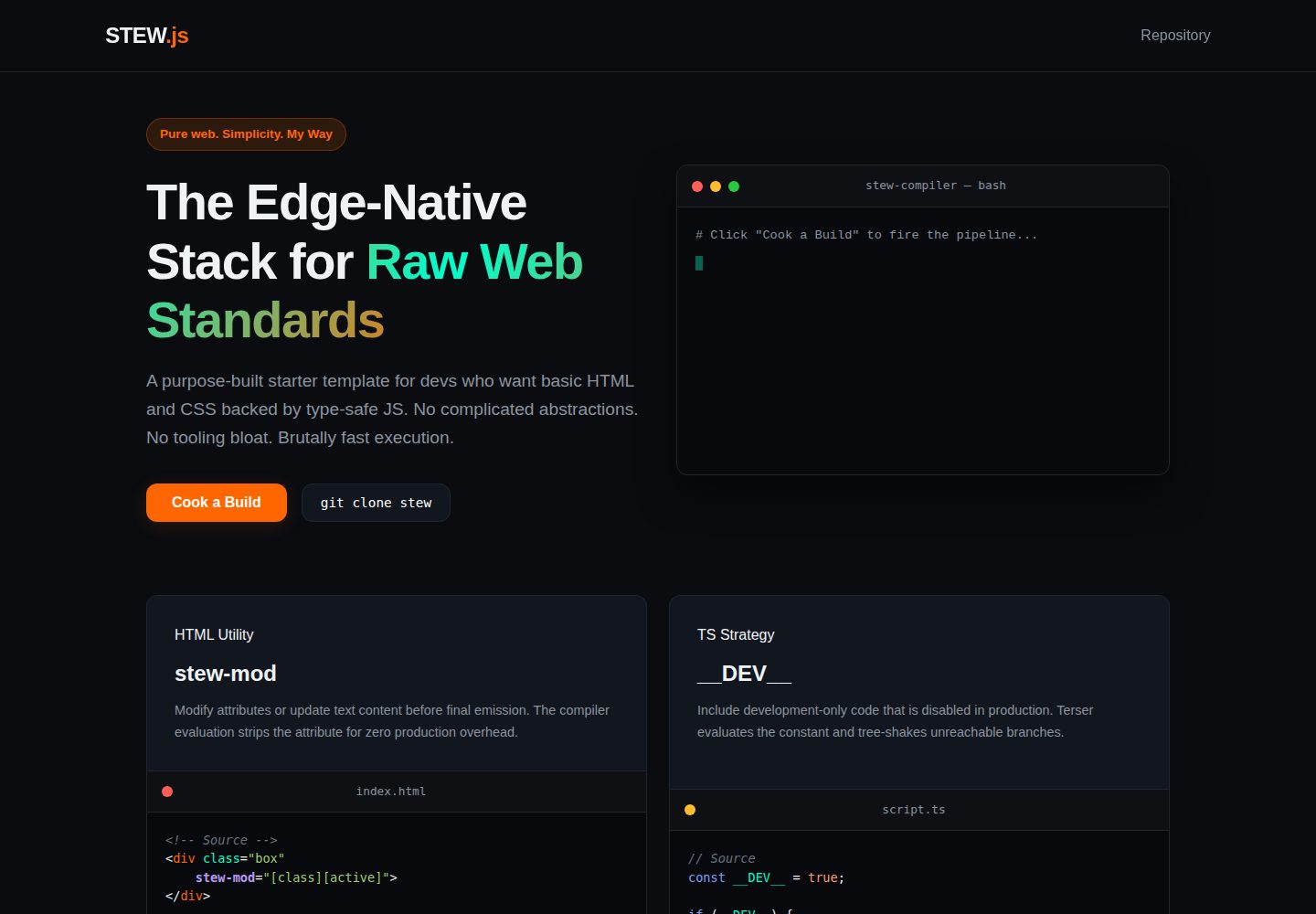
使用原生 HTML5/CSS3 与 TypeScript,不引入复杂前端框架
HTML启动器
Stew — HTML 启动器模板
作者 IchimakiKasura
Stew 是一个基于原生 HTML/CSS 与 TypeScript 的极简启动器模板,自带自定义构建脚本,并可按 Cloudflare Pages 与 Workers 的方式部署。
看看你的网站会是什么样
浏览真实页面截图,比较内容排版与手机效果。点击下方缩略图切换,放大查看整页细节。
全部页面与视图 2
截图用于了解视觉与布局,交互效果请以实际项目为准。
采集于 2026-10-03查看来源
值得关注的模板亮点
从已有项目资料中,快速了解它的特点。
自带 build 目录中的自定义编译器与打包器,通过 npm 脚本调用
提供本地开发、测试与生产构建的多条 npm 命令
包含 Cloudflare Pages 前端与 Workers 边缘 API 的部署说明
数据层不锁定,可接入外部数据库或 Cloudflare D1/KV
MIT 许可,允许使用、修改、商用与分发
模板详细介绍
Stew 是一个面向边缘部署的极简启动器模板,使用原生 HTML5/CSS3 与 TypeScript 编写,不依赖复杂前端框架。仓库自带 build 目录中的自定义编译器与打包器,通过 npm 脚本驱动本地开发、测试与生产构建。模板包含 src 静态站点源码、ts 客户端逻辑、api/worker.js 边缘 Worker 入口,以及 wrangler 系列配置文件。部署路径分为两部分:前端产物上传至 Cloudflare Pages,后端 Worker 代码粘贴到 Cloudflare 在线编辑器部署。数据存储层不做绑定,可自行通过 HTTP 或 WebSocket 接入 PostgreSQL、MongoDB、Supabase 等,也可使用 Cloudflare D1 或 KV,并在 wrangler 配置中声明绑定。作者明确说明该项目按个人偏好构建,不接受 issue,如需改动可自行 fork。
HTML启动器
适合你的项目吗?
适用场景
- 希望以原生 HTML/CSS 和 TypeScript 搭建静态站点并部署到边缘网络的开发者
- 需要同时管理前端静态资源与边缘 Worker API 的小型项目
- 想以 Cloudflare Pages 与 Workers 作为托管方案并自行选择数据存储的起步项目
- 希望基于 MIT 许可的极简模板进行 fork 与二次修改的个人项目
适合人群
- 偏好原生 Web 标准、不愿引入重型框架的开发者
- 需要轻量启动器并接受自行配置数据库与托管服务的项目
- 以 Cloudflare 边缘平台为主要部署目标的站点或 API 原型
- 希望直接修改模板代码而非提交 issue 的独立开发者
上手与定制指南
结合仓库当前版本的说明,按下面的资料检查内容、配置与运行要求。
- 1
需要预先安装 Node.js,克隆仓库后执行 npm install 安装依赖
- 2
本地开发可使用 npm run test:dev 同时运行 esbuild 监听与 Wrangler 模拟器
- 3
生产构建使用 npm run build:prod 生成 dist 目录产物
- 4
部署前端时将 dist 目录上传至 Cloudflare Pages 并绑定域名
- 5
部署后端时将 worker/worker.js 中的 export default 处理函数粘贴到 Cloudflare Workers 在线编辑器并保存部署
授权与来源资料
使用条件与限制
免费使用 · 保留许可声明本次收录的是公开仓库中采用 MIT 许可的免费版本;免费范围为该版本代码,不代表外部服务或第三方素材免费。
使用时需要遵守
- 允许免费使用、修改、商用和分发该版本代码。
- 分发代码副本或实质性部分时,保留原作者版权声明和完整 MIT 许可声明。
- 代码按现状提供;担保与责任限制以原许可证及适用法律为准。
额外费用与待核对事项
- 作者明确表示不接受 issue;如需改动,只能自行 fork 修改,无法通过官方渠道反馈问题或请求修复。
- 该构建工具完全按作者个人偏好设计,不保证通用性或符合其他开发者的工作流习惯。
- 作者仅表示可能接受 PR 建议,措辞不确定,不承诺合并任何外部贡献。
- README 给出的上线流程依赖 Cloudflare Pages 与 Workers 服务,使用该托管方案需自行注册 Cloudflare 账号并可能产生相应服务费用。
- 使用 Cloudflare D1 或 KV 需自行在 wrangler 配置中声明绑定,属于外部服务配置要求,非模板开箱即用。
- 演示图片、字体、图标及其他第三方素材需按各自许可核对,不能仅凭代码的 MIT 许可判断。
- 域名、托管、数据库、支付或 AI 等外部服务可能另外收费。
查看原文依据
Permission is hereby granted, free of charge
许可证原文
No issues will be accepted.
README 原文
This build tool is built entirely on my own preferences.
README 原文
Pull request suggestions might be.
README 原文
If you want to make it live using Cloudflare:
README 原文
https://github.com/IchimakiKasura/Stew/blob/stew/LICENSEhttps://github.com/IchimakiKasura/Stew/blob/stew/readme.mdTo use them, simply hook up your bindings directly inside your `wrangler.json` / `wrangler.jsonc` configs.
README 原文
DeepSeek 根据仓库许可证和 README 整理 ·2026-10-03。结果仅覆盖已读取资料,依赖、图片、字体及后续条款变更以各自原文为准。
项目核对记录与介绍依据
模板资料
- 来源平台
- GitHub
- 资料与维护参考分
- 资料较完整 · 83 / 100
- 技术栈
- HTML
- 网站类型
- 启动器
这个分数如何计算
本站按许可资料(最高30分)、演示链接(12分)、预览图(10分)、Star数(15分)、记录的维护时间(15分)、描述完整度(8分)、功能记录(5分)和分类资料(5分)计算。它不是代码、安全或性能测试,也不是 Google 评分;有链接不代表已实测可用。
这个项目需要核对什么
- 记录的仓库更新时间
- 2026-08-28
- 截图检查日期
- 2026-10-03
已收录演示链接。请用你的内容与屏幕尺寸检查;有演示不代表表单、认证或支付已经可用。
目录记录的主要技术栈是 HTML。请通过依赖清单和锁文件核对实际版本与托管要求。这些说明基于收录资料,不代表代码审计或部署实测。
查看具体选型方法 →介绍的制作与核对状态
介绍由 AI 辅助整理目录与仓库资料。仓库作者不等于这篇介绍的审核者。
审核声明: [email protected] · 2026-10-04
查看当时使用的来源资料
SHA-256: cd873d59f2099eeb165165fe8bf33750ef9036a5f34411c4f69c4157c8b382b6
2026-10-03T23:20:05.696Z
来源文件 / 仓库<div align=center> <img src="./docs/stew.png" height=150px> # STEW Starter A minimal, high-performance project template built on my STEW. I purpose-built this template for developers who want to stick to raw HTML and CSS, backed by the reliability of type-safe JavaScript, without dealing with complex frameworks or bloated tooling. </div> **Live Landing Page:** Check out the interactive demo page at [ichimakikasura.github.io/Stew/](https://ichimakikasura.github.io/Stew/) > **Note:** This build tool is built entirely on my own preferences. It works exactly how I like to build, skipping the heavy setup and keeping things simple. Feel free to tweak it, tear it apart, or modify it your own way. > > **Contributions:** No issues will be accepted. As I mentioned above, if you want changes, you can fork it and modify it your own way. Pull request suggestions might be. --- ## Project Structure ```text ├── build/ # Custom compiler and bundler ├── src/ # Static site source and app assets │ └── wrangler.jsonc # Edge deployment configuration ├── ts/ # Client-side TypeScript logic ├── api/ # Worker entrypoints │ └── worker.js # For production/live ├── package.json ├── tsconfig.json ├── wrangler.dev.json # Local/Testing stage configuration ├── wrangler.prod.json # Production test configuration └── readme.md ``` --- ### Docs - [Overview](docs/overview.md) --- ## Local Testing & Workflows Ensure you have Node.js installed, then clone the repository and install dependencies: ```bash npm install ``` I included several custom utility pipelines depending on your development workflow: #### Full Integration Test To run my custom esbuild compiler watcher alongside the active Cloudflare Wrangler emulator concurrently: ```bash npm run test:dev ``` #### Preivew Production build This will build and launch a live server of your site in a production settings. Though it lacks live reload but thats whats the `npm run test:site` for development :> ```bash npm run test:prod ``` #### Available Build and Test Commands - `npm run test:site` — Initiates the site without the `api` integration. - `npm run build:test` — Compile TypeScript and execute the builder in test mode. - `npm run build:ts` — Run the raw TypeScript compiler. - `npm run ts:watch` — Use esbuild to watch and bundle client script changes directly into `src/js/`. - `npm run test:ts` — Run a deep, verbose diagnostic check on your TypeScript configurations. - `npm run update:stew` — Updates the `build` folder only. --- ## Deployment Workflow To prepare build artifacts for the live web, generate the optimized code output: ```bash npm run build:prod ``` ### If you want to make it live using Cloudflare: #### 1. Frontend & Client-Side Assets 1. Navigate to your Cloudflare Dashboard and spin up a new Pages project. 2. Upload the newly generated production `dist/` directory and link it up to your domain. #### 2. Backend API (Edge Worker) 1. Head over to Workers & Pages in your Cloudflare dashboard and create a new Worker. 2. Open your local `worker/worker.js` file and copy the native ES Module handler (`export default`). 3. Paste it directly into the Cloudflare online code editor, hit Save and Deploy, and you are live. --- ## Database & Storage I don't lock this starter into any specific database layer. You are free to configure your data storage however you prefer (PostgreSQL, MongoDB, Supabase, etc.) via HTTP or WebSockets. ### My Recommended Native Options If you are deploying to Cloudflare and want zero-cold-start performance, I highly recommend using their built-in data primitives: - **Cloudflare D1** — A native serverless SQL database built on SQLite. Perfect for relational data. - **Cloudflare KV** — A global, low-latency, key-value data store. Perfect for configurations, quick data caching, or session tracking. To use them, simply hook up your bindings directly inside your `wrangler.json` / `wrangler.jsonc` configs. --- ## License This project is licensed under the MIT License — feel free to use it for whatever you want.
看看同类模板
对比同技术栈与用途的模板,找到更适合的视觉与内容结构。

startbootstrap-simple-sidebar
An off canvas sidebar navigation Bootstrap HTML template created by Start Bootstrap
HTML · 启动器

adminkit
AdminKit is a free & open-source HTML dashboard & admin template based on Bootstrap 5
HTML · 后台

Landing-Page
Tailwind CSS Starter Template - Landing Page
HTML · 企业官网

light-bootstrap-dashboard
Light Bootstrap Dashboard is an admin dashboard template designed to be beautiful and simple.
HTML · 后台

sing-app
💥Free and open-source admin dashboard template built with Bootstrap 4.5 💥
HTML · 后台

startbootstrap-modern-business
A multipurpose Bootstrap full website template created by Start Bootstrap
HTML · 启动器