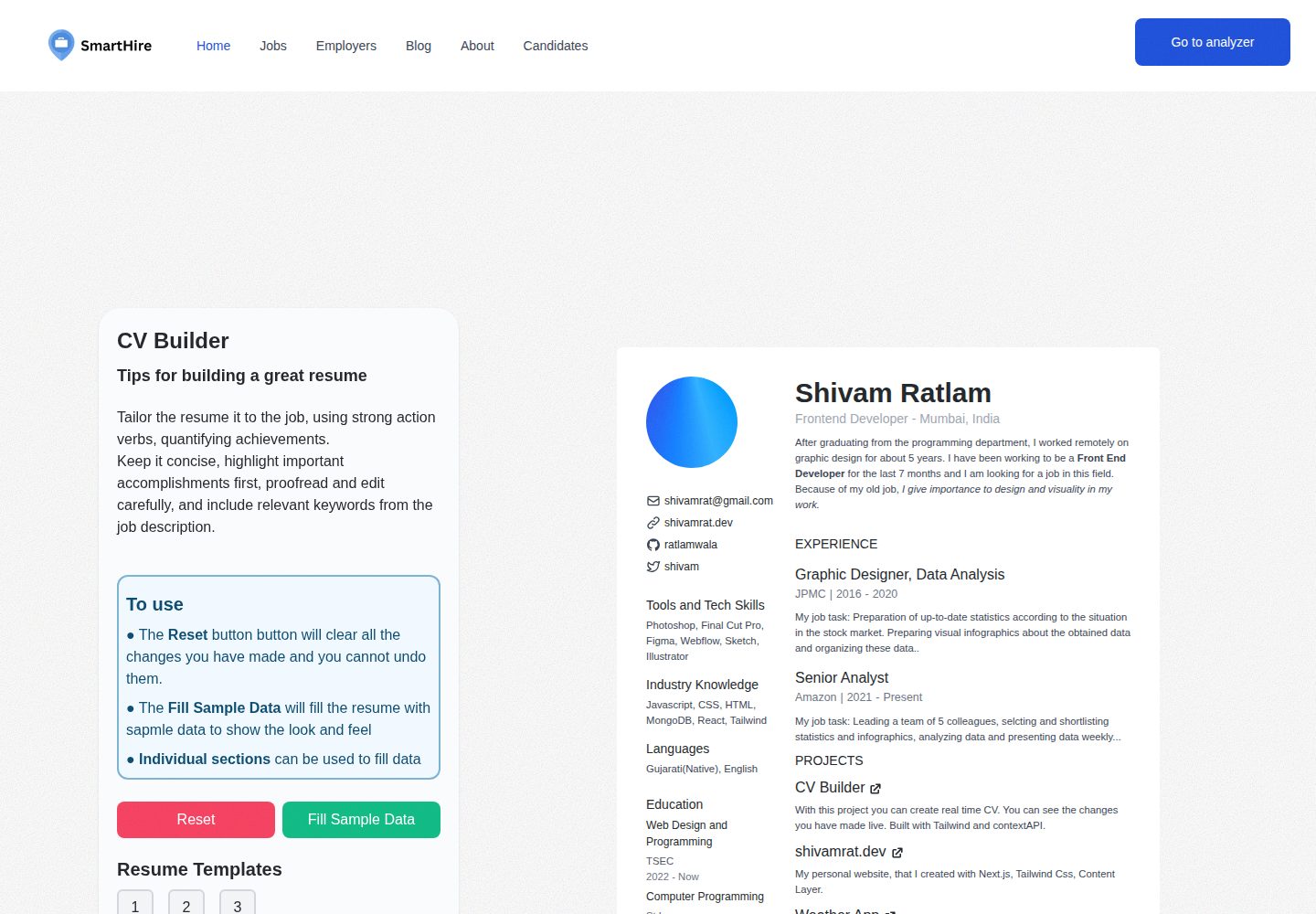
Provides sectioned forms for personal, skills, education, projects, and work experience
Next.jsReactPortfolio
Resume-builder — Next.js Portfolio Template
By Idris110
Resume Builder is a resume generation tool based on the README description. After users fill in personal information, skills, education, projects, and work experience, they can select a template, preview in real time, and download or share the resume.
Explore the design
Compare the page layouts and mobile experience. Open any screenshot for a closer look.
Desktop homepage1 / 2
Desktop captureTop of page
Actual screenshot captured by the server browser.
All pages & views 2
Screenshots show visual appearance; interactive behavior may differ.
Recorded 2026-10-13View source
What stands out
A quick read of the recorded project description.
Supports selecting resume styles from multiple templates
Offers real-time preview to facilitate adjustments before downloading
The README states it can be downloaded in formats such as PDF or Word
Supports sharing the resume directly through the application
Local running uses npm install and npm start, with default port 3000
Template Details
This project is aimed at users who need to create a professional CV. The README states that it allows users to input information about themselves, skills, education, projects, and work experience, and provides multiple templates to choose from. The interface is described as simple and intuitive, suitable for users of different experience levels to fill in their information. The application includes a real-time preview feature, allowing users to view and adjust the resume before finalizing it. After previewing, the README says the resume can be downloaded in formats such as PDF or Word, or shared directly through the application.
Regarding the usage flow, the README lists the steps: open the application, fill in each section, select a template, preview, and download or share. Running locally requires cloning the repository, entering the project directory, executing npm install, and then running npm start, with the default access address being http://localhost:3000. The README does not provide the tech stack, dependency list, number of templates, complete list of export formats, details of the sharing mechanism, data storage method, or deployment instructions.
Next.jsReactPortfolio
Is it right for your project?
Use Cases
- Need to quickly generate a structured resume based on personal experience
- Want to try different templates to adjust the resume appearance
- Check resume content and layout through real-time preview before downloading
- Export the completed resume as PDF or Word and send it to recruiters
- Distribute the resume through the in-app sharing feature
Suitable For
- Job seekers who need to create a professional CV
- Users who want to organize skills, education, projects, and work experience using forms
- People who need multiple template choices and real-time preview of resume effects
- Users who want to download the resume in PDF or Word format
Getting started & customization
Use these recorded setup notes alongside the repository instructions for your chosen version.
- 1
Clone the repository: git clone https://github.com/Idris110/CV-builder
- 2
Enter the project directory: cd CV-builder
- 3
Install dependencies: npm install
- 4
Run the application: npm start, default access at http://localhost:3000
- 5
The README does not provide production deployment, environment variable, or database configuration instructions
License & source material
Usage conditions & limitations
Free to use · keep license noticeThis entry includes the free version under the MIT license in the public repository; the free scope is the code of this version and does not mean that external services or third-party materials are free.
Must comply with when using
- Allows free use, modification, commercial use, and distribution of this version's code.
- When distributing copies or substantial portions of the code, retain the original author's copyright notice and the complete MIT license notice.
- The code is provided as is; warranties and limitations of liability are governed by the original license and applicable law.
Additional costs & items to verify
- Demo images, fonts, icons, and other third-party materials need to be checked against their respective licenses and cannot be judged solely by the code's MIT license.
- External services such as domains, hosting, databases, payments, or AI may incur additional charges.
View Original Text Basis
https://github.com/Idris110/Resume-builder/blob/master/LICENSEhttps://github.com/Idris110/Resume-builder/blob/master/README.mdPermission is hereby granted, free of charge
Original License Text
Compiled by DeepSeek based on repository license and README ·2026-10-13. Results only cover the materials read; dependencies, images, fonts, and subsequent term changes are subject to their respective original texts.
Project checks & description sources
Template Information
- Source platforms
- GitHub
- Documentation and maintenance reference score
- Partly documented · 73 / 100
- Technologies
- Next.js · React
- Website type
- Portfolio
How this score is calculated
Our heuristic uses license records (up to 30), a demo link (12), a preview (10), stars (15), recorded maintenance (15), description completeness (8), feature records (5) and classification data (5). It is not a code, security or performance test, or a Google score. A link does not establish tested functionality.
What to verify for this project
- Repository update recorded
- 2024-02-26
- Screenshot last checked
- 2026-10-13
A demo link is listed. Check it with your own content and viewport sizes; its presence does not confirm that forms, authentication or payments work.
The catalog identifies Next.js as the primary stack. Check the actual dependency manifest and lockfile for versions and hosting requirements. These notes use recorded metadata, not a code audit or a deployment test.
Use a selection guide →How this description was prepared
AI-assisted description based on catalog records and repository material. Repository authors are not automatically the reviewers of this description.
Review declaration: codex-user-requested-batch-review-20261015 · 2026-10-15
Inspect the recorded source material
SHA-256: 2f42cd0afd6121856a2fd9f11ad4f87a7ffec8dd1dba06034f59357732bdc93c
2026-10-13T18:02:55.985Z
Source file / repository# Resume Builder 🏅 Welcome to the Resume Builder project! This tool allows you to effortlessly create a professional CV by simply providing information about yourself, your skills, education, projects, and work experiences. Additionally, it offers a variety of templates to choose from, ensuring that your CV reflects your unique style. <br/> <p align="center"> <img src="public/ss1.png" width="90%"/> </p> ## Features ### 1. User-Friendly Interface 🚀 The tool provides a simple and intuitive interface, making it easy for users of all levels to input their information effortlessly. The clean and organized design ensures a smooth and enjoyable user experience. ### 2. Template Selection 📝 Choose from a diverse range of professionally designed templates to tailor your CV, ensuring it not only showcases your qualifications but also reflects your unique style. Experiment with different templates to find the one that best suits your professional identity. ### 3. Sections for Every Detail ✍🏻 The application prompts you to provide detailed information about yourself, your skills, education, projects, and work experiences. This ensures that your CV is comprehensive and captures all the essential aspects of your professional journey. The detailed sections help you present a well-rounded and compelling professional profile. ### 4. Preview Option ⏪ See a real-time preview of your CV before finalizing. This feature allows you to make instant adjustments and ensures that your CV meets the highest standards of professionalism. The preview option lets you review and fine-tune your CV until you are completely satisfied with the result. ### 5. Download and Share 🔗 Once satisfied with the preview, download your CV in various formats such as PDF or Word. You can also share your CV directly through the application, streamlining the process of sending your professional profile to potential employers. The download and share options provide flexibility and convenience in sharing your CV with employers, colleagues, or on professional networking platforms. ## Getting Started 🚀 1. **Clone the Repository**: ```bash git clone https://github.com/Idris110/CV-builder ``` 2. **Navigate to the Project Directory**: ```bash cd CV-builder ``` 3. **Install Dependencies**: ```bash npm install ``` 4. **Run the Application**: ```bash npm start ``` The application will be accessible at `http://localhost:3000` by default. ## Usage 1. Open the application in your web browser. 2. Fill in the details in each section, such as About Yourself, Skills, Education, Projects, and Experiences. 3. Choose a template that suits your preferences. 4. Preview your CV to ensure everything looks as expected. 5. Download your CV in the desired format or share it directly. ## Contributing 🛠️ We welcome contributions from the community! If you have ideas for improvements or bug fixes, feel free to open an issue or submit a pull request.
Explore similar templates
Compare previews and descriptions within the same stack and category.

react-resume-template
A personal resume website template for software developers, built with Next.js, React, and TypeScript and styled with Tailwind CSS. Site content is driven by a single data file at /src/data/data.tsx, with types in dataDef.ts and images in src/images/.
Next.js · Portfolio

nxt-lnk
nxt-lnk is a Next.js-based bio link page template that manages personal information and links via BioData.js and LinksData.js, positioned as a self-hosted alternative to Linktree. It groups links by type, supports enabling/disabling individual links, and offers hexagonal or oval avatars.
Next.js · Portfolio

sylph
Sylph is a minimal portfolio and blog template built on Next.js, supporting MDX/Markdown writing, light/dark themes, and automatic OG image generation. It includes sitemap, robots.txt, metadata, and syntax highlighting, with automatic blog timestamps.
Next.js · Portfolio

sleek-portfolio
A modern, responsive portfolio template built with Next.js 15, TypeScript, Tailwind CSS, and Shadcn UI. It includes an MDX blog, project showcase, work experience timeline, and a contact form that receives messages via Telegram Bot.
Next.js · Portfolio

research-website-template
A React + Next.js template for research personal websites, aimed at PhD students and researchers. It centralizes publications, projects, and other content in src/data as arrays of objects, with optional fields automatically generating UI components.
Next.js · Portfolio

shadcn-portfolio
A developer portfolio template built with Next.js 15, shadcn/ui, Tailwind CSS, and Framer Motion, featuring an MDX blog, light and dark modes, responsive design, and SEO meta tags.
Next.js · Portfolio