Astro handles routing, build-time Sanity queries, static pages, metadata, and structured data; Svelte handles page views and reusable components
AstroSvelteStarter
tamar-recipes — Astro Starter Template
By igal-abachi-dev
A Hebrew RTL recipe site starter built with Astro, Svelte, and Sanity, including recipe browsing, kitchen tools, and draft preview.
Explore the design
Compare the page layouts and mobile experience. Open any screenshot for a closer look.
Desktop homepage1 / 3
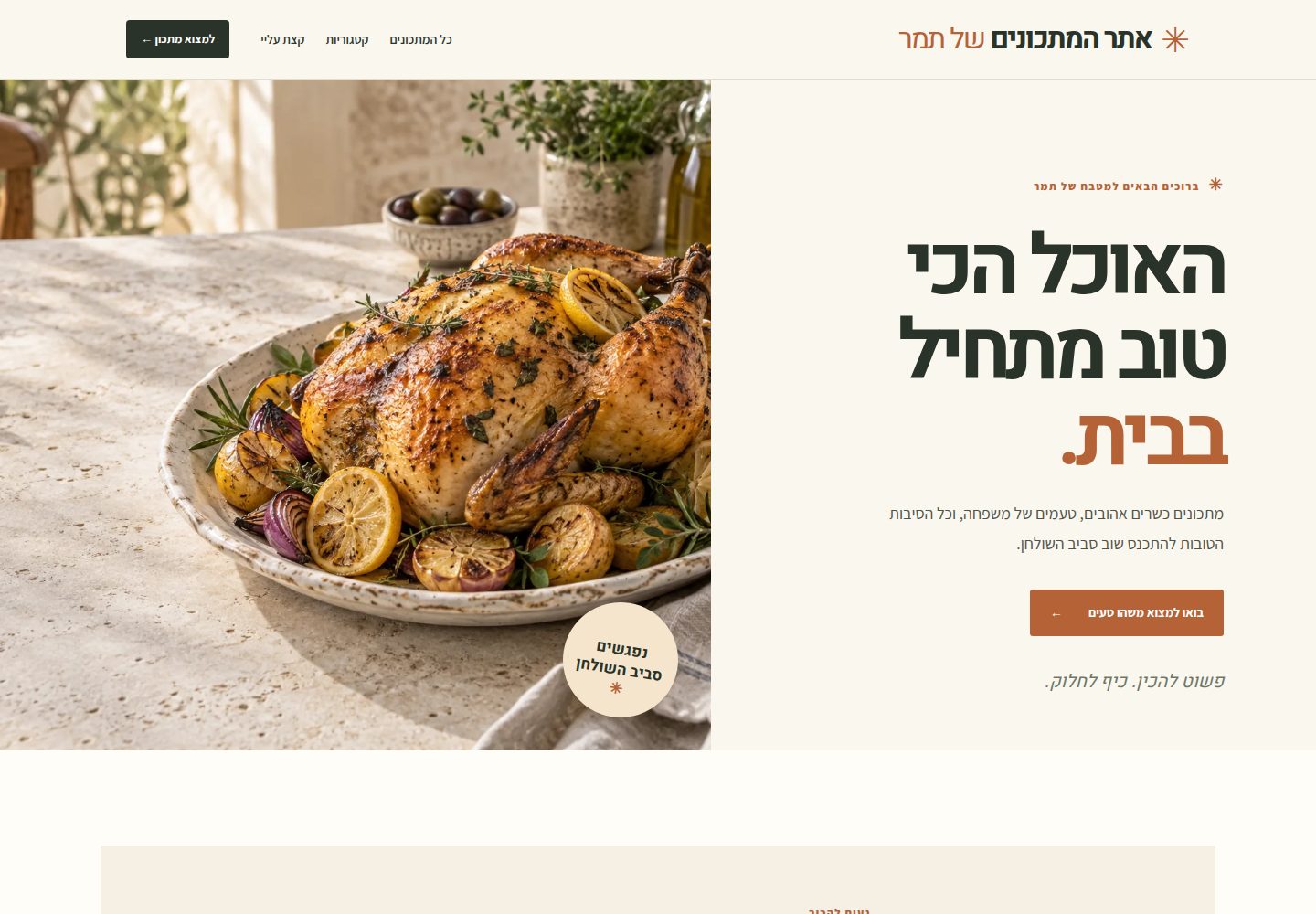
Desktop captureTop of page
Actual screenshot captured by the server browser.
All pages & views 3
Screenshots show visual appearance; interactive behavior may differ.
Recorded 2026-09-30View source
What stands out
A quick read of the recorded project description.
Recipe discovery includes category pages, a searchable archive, and vegetarian, gluten-free, lactose-free, and Passover filters, with search supporting ingredient names and Hebrew substring matching
Recipe pages provide grouped ingredients, component recipes, numbered steps, brief/full views, related recipes, print styles, and lazy-loaded YouTube embeds
Kitchen tools include serving scaling, unit conversion, multiple timers, serving-time planning, a cooking mode with progress saving, screen Wake Lock, and sharing
The Sanity editing model covers time ranges, equipment, oven and stovetop settings, doneness targets, timelines, variations, storage, sources, kosher suitability, and author notes
Published content outputs Recipe and Breadcrumb JSON-LD, robots.txt, llms.txt, a sitemap, and an /rss.xml feed
Template Details
This is a Hebrew-language, right-to-left recipe website starter built with Astro, Svelte, and Sanity, intended for authors to publish their own tested recipes and for readers to use while cooking. Astro handles routing, build-time Sanity queries, static pages, metadata, and structured data; Svelte handles page views and reusable UI components, with only search and recipe tools hydrating in the browser; Sanity manages recipes, categories, and site settings documents, with the editing Studio hosted separately.
The site includes category pages, a searchable archive, and filters for vegetarian, gluten-free, lactose-free, and Passover recipes, with search supporting ingredient names and Hebrew substring matching. Recipe pages provide grouped ingredients, component recipes, numbered steps, brief/full views, related recipes, print styles, and lazy-loaded YouTube embeds, with Mux as an optional video source. Kitchen tools include serving scaling, original/metric/US units, multiple timers, serving-time planning, a cooking mode with progress saving, screen Wake Lock where supported, and sharing; numeric ingredients can be scaled, while free-text amounts and notes remain as-is. Sanity fields cover time ranges, equipment, oven and stovetop settings, doneness targets, timelines, variations, storage, sources, kosher suitability, and author notes; simple recipes can leave advanced fields empty.
For publishing, published recipes output crawlable static HTML with canonical links, social metadata, Recipe and Breadcrumb JSON-LD, robots.txt, and llms.txt; a sitemap is generated after configuring real content and the live site URL and enabling indexing; /rss.xml provides a feed of published recipes, excluding demo recipes and drafts. Publishing a Sanity document does not automatically update deployed static pages; a Sanity webhook must call the host's deploy hook to trigger a rebuild; draft preview reads Sanity on request without waiting for a rebuild, previewing saved drafts in Sanity Presentation via an authenticated Vercel function.
Current project status: the site and editor schema are implemented. Without a Sanity project ID, the repository builds with clearly labeled example recipes; these pages are noindex, and robots.txt also disallows crawling. Public release still requires author-confirmed recipes and photos, a Sanity project, a final domain, and a webhook that triggers a rebuild on publish. The public site has no accounts, comments, contact forms, or embedded admin routes.
AstroSvelteStarter
Is it right for your project?
Use Cases
- Publishing author-tested recipes for Hebrew readers with right-to-left reading support
- Using serving scaling, unit conversion, timers, and cooking mode step by step while cooking
- Filtering and finding recipes by dietary needs such as vegetarian, gluten-free, lactose-free, or Passover
- Previewing saved drafts in Sanity Presentation, then publishing and triggering a static site rebuild after confirmation
- Subscribing to published recipes via /rss.xml or keeping content for a personal archive
Suitable For
- Individual authors or home cooks who need a Hebrew RTL recipe site
- Projects that want to manage structured recipe data with Sanity and output static pages with Astro
- Recipe sites that need kitchen tools such as serving scaling, unit conversion, timers, and cooking mode
- Non-developers willing to follow documentation to complete installation, account connection, and deployment via a desktop coding agent
- Lightweight publishing approaches that accept a public site without accounts, comments, or embedded admin routes
Getting started & customization
Use these recorded setup notes alongside the repository instructions for your chosen version.
- 1
Without a Sanity project ID, the repository builds with clearly labeled example recipes; example pages are noindex and robots.txt disallows crawling
- 2
Public release requires author-confirmed recipes and photos, a Sanity project, a final domain, and a webhook that triggers a rebuild on publish
- 3
Publishing a Sanity document does not automatically update deployed static pages; a Sanity webhook must be configured to call the host's deploy hook
- 4
Draft preview depends on an authenticated Vercel function that reads drafts on request in Sanity Presentation
- 5
The README provides a desktop coding agent setup flow for non-developers; account logins, CAPTCHAs, and tokens must be entered on the provider pages
License & source material
Usage conditions & limitations
Free to use · keep license noticeThis entry covers the free version under the BSD-3-Clause license in the public repository; the free scope is the code in that version and does not mean external services or third-party assets are free.
Must comply with when using
- Free use, modification, commercial use, and distribution in source or binary form are permitted.
- Source distribution must retain the copyright notice, the three conditions, and the disclaimer; binary distribution must reproduce these in documentation or accompanying materials.
- Without prior written permission, the names of the copyright holder or contributors may not be used to endorse or promote derivative products.
- The code is provided as-is; warranties and liability limitations are governed by the original license and applicable law.
Additional costs & items to verify
- Before public release, you must prepare author-confirmed recipes and photos, create a Sanity project, determine the final domain, and configure a webhook that triggers a rebuild on publish; otherwise it can only build with example content.
- Publishing a Sanity document does not automatically update deployed static pages; you must configure a Sanity webhook to call the host's deploy hook to trigger a rebuild, or the content will not go live.
- Draft preview depends on an authenticated Vercel function, is only available in a Vercel deployment environment, and requires configuring a server-side preview secret.
- Using real content requires creating your own Sanity project and dataset and configuring the corresponding environment variables; without configuration, only example recipes are shown.
- The editing Studio must be deployed separately to Sanity hosting and requires choosing an available Studio hostname; the public site does not include embedded admin routes.
- The full deployment process requires registering or logging into GitHub, Vercel, and Sanity accounts and completing each provider's authorization and verification.
- Among the desktop coding agents recommended in the README, Claude Code Desktop requires a paid Claude plan that includes Code or billed Console access; free plans do not include Code.
- The Factory App mentioned in the README requires an additional $20 per month Pro subscription and is an optional tool cost.
- Codex free plans have usage limits, while paid plans provide more usage; heavy use may require payment.
- Currently only Hebrew content is published; English translation is a later editing stage and can only be published after a reviewer is available.
- Project materials mention optional paid versions or features; this entry only covers the public free code and does not include paid upgrades.
- Demo images, fonts, icons, and other third-party assets must be checked against their respective licenses and cannot be judged solely by the code's BSD-3-Clause license.
- External services such as domains, hosting, databases, payments, or AI may incur separate charges.
View Original Text Basis
Redistribution and use in source and binary forms, with or without modification, are permitted
Original License Text
A public launch still needs Tamar-approved recipes and photos, a Sanity project, a final domain, and a publish-to-rebuild webhook.
Original README
Publishing a Sanity document does not change an already deployed static page. A Sanity webhook must call the hosting provider's deploy hook to rebuild the site.
Original README
An authenticated Vercel function lets Tamar preview saved drafts in Sanity Presentation before publishing.
Original README
Create a Sanity project and dataset. Set the matching `PUBLIC_SANITY_*` and `SANITY_STUDIO_*` values in `.env`.
Original README
Deploy the editor to Sanity hosting with `pnpm sanity:deploy` after choosing an available Studio hostname.
Original README
The agent will guide the rest; you’ll sign in to or create GitHub, Vercel, and Sanity accounts when asked.
Original README
Requires a Claude plan that includes Code or billed Console access.
Original README
Adds a separate $20/month Pro subscription.
Original README
Codex is available on Free and paid plans; usage limits vary, and paid plans include more usage.
Original README
https://github.com/igal-abachi-dev/tamar-recipes/blob/main/LICENSEhttps://github.com/igal-abachi-dev/tamar-recipes/blob/main/README.mdEnglish translation is a later editorial stage. Hebrew is the only published language until translations have a reviewer.
Original README
Compiled by DeepSeek based on repository license and README ·2026-10-01. Results only cover the materials read; dependencies, images, fonts, and subsequent term changes are subject to their respective original texts.
Project checks & description sources
Template Information
- Source platforms
- GitHub
- Documentation and maintenance reference score
- More documented · 88 / 100
- Technologies
- Astro · Svelte
- Website type
- Starter
How this score is calculated
Our heuristic uses license records (up to 30), a demo link (12), a preview (10), stars (15), recorded maintenance (15), description completeness (8), feature records (5) and classification data (5). It is not a code, security or performance test, or a Google score. A link does not establish tested functionality.
What to verify for this project
- Repository update recorded
- 2026-09-27
- Screenshot last checked
- 2026-10-01
A demo link is listed. Check it with your own content and viewport sizes; its presence does not confirm that forms, authentication or payments work.
The catalog identifies Astro as the primary stack. Check the actual dependency manifest and lockfile for versions and hosting requirements. These notes use recorded metadata, not a code audit or a deployment test.
Use a selection guide →How this description was prepared
AI-assisted description based on catalog records and repository material. Repository authors are not automatically the reviewers of this description.
Automatically checked against source and license rules; no manual editorial review.
Inspect the recorded source material
SHA-256: ad3b1bb7e7d34b8c4fc82e47db64504c47d515564f6365f2ff20af59f80fd6ad
2026-10-01T14:50:04.466Z
Source file / repository# אתר המתכונים של תמר **Tamar Recipes** is a Hebrew-first, right-to-left recipe site built with Astro 7, Svelte 5, and Sanity. It is designed for Tamar to publish her own tested recipes and for readers to use them while cooking: clear ingredients and steps, practical timing, and optional kitchen tools. > **Project status:** The site and editor schemas are implemented. Without a Sanity project ID, the repository builds with clearly labeled sample recipes. Those pages are `noindex`, and `robots.txt` disallows crawling. A public launch still needs Tamar-approved recipes and photos, a Sanity project, a final domain, and a publish-to-rebuild webhook. ## How it works | Layer | Responsibility | | -------- | ------------------------------------------------------------------------------------------------- | | Astro | Routes, build-time Sanity queries, static pages, metadata, and structured data | | Svelte 5 | Page views and reusable interface components; only search and recipe tools hydrate in the browser | | Sanity | Recipe, category, and site settings documents; a separately hosted editing Studio | | Video | YouTube embeds first; optional Mux video when a recipe has no YouTube video | | Styling | Project CSS tokens and self-hosted Assistant and Heebo fonts | Publishing a Sanity document does not change an already deployed static page. A Sanity webhook must call the hosting provider's deploy hook to rebuild the site. Draft previews read Sanity on request and do not wait for a rebuild. ## What is included - **Recipe discovery:** category pages, a searchable archive, and filters for vegetarian, gluten-free, lactose-free, and Passover recipes. Search includes ingredient names and supports Hebrew substring matching. - **Cookable recipe pages:** grouped ingredients, component recipes, numbered steps, a short/full reading view, related recipes, print styles, and lazy YouTube embeds. Mux is available as an optional video source. - **Kitchen tools:** serving scaling, original/metric/US customary measures, multiple timers, a serving-time planner, cooking mode with saved progress, screen Wake Lock where supported, and sharing. Numeric ingredients scale; free-text amounts and notes stay as Tamar wrote them. - **Detailed editing model:** Sanity fields for time ranges, equipment, oven and burner settings, doneness targets, timelines, variations, storage, sources, kosher adaptations, and Tamar's own cooking notes. Simple recipes can leave advanced fields empty. - **Static publishing and draft preview:** crawlable published recipe HTML, canonical and social metadata, Recipe and Breadcrumb JSON-LD, `robots.txt`, `llms.txt`, and a sitemap when real content and a live site URL are configured and indexing is enabled. An authenticated Vercel function lets Tamar preview saved drafts in Sanity Presentation before publishing. - **RSS:** `/rss.xml` provides a feed of published recipes for feed readers and personal archives. Demo recipes and Sanity drafts are not included. The public site has no accounts, comments, contact form, or embedded administration route. Sanity Studio is deployed separately and uses Sanity's editor sign-in. ## A focused recipe product, compared with Ghost Ghost is a full publishing platform for websites, newsletters, memberships, paid subscriptions, comments, and audience growth. Tamar's site is a focused recipe product: Sanity manages the content, while the public site turns structured recipe data into pages and cooking tools. Ghost can publish recipes too, but these recipe-specific capabilities would need custom development or integrations there: - Structured ingredient quantities with serving scaling and metric or US customary measures. - Component recipes and sub-recipes with their own ingredients and steps. - Cooking mode, step timers, screen Wake Lock, and a serving-time planner. - Kashrut, Passover, and dietary classifications designed for recipe browsing. - Oven modes, doneness targets, timelines, and recipe variations. - A print-optimized recipe layout and static recipe pages that keep ingredients and instructions readable without JavaScript. Ghost has broader publishing and audience tools that this project intentionally leaves out, as recorded in [plan.md](plan.md): Ghost is designed to run a publication and its audience; this site is designed to help readers find and cook Tamar's recipes. ## Set up with an agent For cooks who do not code, open the repository folder in a desktop coding agent and give it one setup request. The agent should install or guide you through installing the prerequisites, connect the accounts, configure this existing project, and deploy it. The agent can use its built-in terminal; you do not need to open a command line or edit code. You handle sign-in, two-factor checks, and approvals on the providers' own pages. See the [agent setup guide](docs/agent-setup.md) for the full flow. ### Start on a new Windows PC The cook only needs Windows, Chrome, and an internet connection to begin. They do not need Git, GitHub, Node.js, pnpm, or an AI agent installed yet. Send them this message: > Here’s the recipe-site starter: https://github.com/igal-abachi-dev/tamar-recipes . On your Windows PC, install the [ChatGPT desktop app](https://chatgpt.com/download/) and choose Codex (Free has limited use; paid plans include more). If you already have Claude Pro or Max, you can use [Claude Desktop](https://claude.com/download/) and its Code tab instead. In Chrome, open the repository(https://github.com/igal-abachi-dev/tamar-recipes) and choose **Code → Download ZIP**. In File Explorer, right-click the downloaded ZIP in **Downloads**, choose **Extract All**, then **Extract**. Open the extracted `tamar-recipes-main` folder as a local project in your chosen agent, Copy this prompt into the agent after opening the repository: > I’m a cook, not a developer. Set up and deploy this recipe site for me by following `docs/agent-setup.md` and using the `recipe-site-setup` skill if available. First inspect the project and tell me what is already done. Check whether Node.js 22.12+, Git, and pnpm 10.17.0 are installed; install or guide me through installing anything missing, using the official instructions for my computer. Then help me create or sign in to GitHub, Vercel, and Sanity, connect them, deploy the public site and its existing Sanity Studio, and verify publishing triggers a site rebuild. Do the file and command work yourself. Explain each step simply and pause only when I need to sign in, approve access, choose an account/hostname, or approve recipe content. I will enter passwords, verification codes, tokens, and deploy-hook URLs directly in the provider's own pages; never ask me to paste them into chat or put secrets in code or scripts. Keep sample content noindexed until I approve the real site for launch. Start with the earliest incomplete step and preserve anything already configured. The agent will guide the rest; you’ll sign in to or create GitHub, Vercel, and Sanity accounts when asked. You don’t need to write code or use a command line. The first-run sequence is: install a desktop agent, download the project ZIP(not git), use File Explorer's built-in **Extract All** action, o pen the extracted folder locally, and submit the README setup prompt. No extra ZIP utility is needed. The agent checks and installs or guides you through installing Git, Node.js, and pnpm, then helps put the project in your own GitHub repository and deploy it to Vercel and Sanity. The owner completes account signup, sign-in, verification, and access approvals. Enter passwords, verification codes, API tokens, and deploy-hook URLs only in the provider's own sign-in page or dashboard, never in the agent conversation. #### Install a desktop agent **Codex desktop (recommended if you are starting with no AI account):** 1. In Chrome, open [chatgpt.com/download](https://chatgpt.com/download/), download the ChatGPT app for Windows, and install it. 2. Open ChatGPT and sign in or create a free account. Codex is available on Free and paid plans; usage limits vary, and paid plans include more usage. 3. Choose **Codex** in the app, then open the extracted `tamar-recipes-main` folder as a local project. **Claude Code Desktop (if you already have Claude Pro or Max):** 1. In Chrome, open [claude.com/download](https://claude.com/download/), download Claude for Windows, and install it. 2. Open Claude and sign in with the account that has Pro or Max. Claude's Free plan does not include Code. 3. Choose the **Code** tab, start a local session, and select the extracted `tamar-recipes-main` folder. Then copy the prompt below into the agent. Both apps provide a built-in terminal the agent can use; the cook does not need to open PowerShell or Command Prompt. If the app offers folder-access choices, grant access to the extracted project folder only. **This is a desktop usability shortlist for local setup, not a coding-quality leaderboard.** Start with Codex or Claude Code if you already pay for ChatGPT or Claude. Cursor and Factory are other local desktop options if you prefer their workspace or want a separate product. | Agent | Fit for this setup | Trade-off | | --- | --- | --- | | **Codex desktop app** | Opens the local project and works with its files and terminal. ChatGPT offers Free and paid plan options; paid plans include more Codex usage. | Usage limits depend on the plan. | | **Claude Code Desktop** | Local project workspace with terminal, diff review, and approvals. It uses the same underlying Claude Code engine as the CLI. | Requires a Claude plan that includes Code or billed Console access. | | **Cursor Agent** | Local desktop app with a free Hobby tier and limited Agent requests; it can work in the project and use its terminal. | It is an IDE, so there is more interface to learn. | | **Factory App (Factory.com)** | Local-project desktop app focused on coding agents, with change review and multiple models. | Adds a separate $20/month Pro subscription. | The other names are less suited to this local, desktop-first setup. **Grok Build** is a terminal coding agent locally; its web builder targets new app creation and hosting. **Grok Bot** has a desktop client, but its normal Bot workflow runs on a persistent cloud computer and requires an eligible paid plan; local computer execution is a separate team feature. It also uses shared cloud browser sessions, so it needs broader trust than a project-scoped coding agent. **Muse Code** and **Oh My Pi (OMP)** are terminal agents, not the simple desktop workspace wanted here. **Amp** can run locally through its CLI or a configured local runner, but its browser-first flow runs remotely. These can suit developers; they are not the cook's first choice. ### Performance, app vs CLI, and context A CLI harness can sometimes beat a bundled coding product on coding tasks; I would not say Muse Code or OMP are inherently weaker. In one fixed-model study, Oh My Pi passed 20/20 tasks while Codex passed 15/20 with the same GLM-5.3-Flash model. In another controlled benchmark using the same Kimi K3 model across 30 tasks, frozen Codex scored 66.7%, Claude Code 63.3%, and OMP 56.7%. These results point in different directions because harness performance depends on model, tasks, configuration, and version; neither small benchmark is a universal ranking. ([20-task study](https://www.critique.sh/blog/mercury-harness-study-v2), [30-task study and frozen versions](https://unifiedharnessprotocol.dev/frontierharness/)) Muse Code's current Artificial Analysis comparison uses different best-available models for each product, so it cannot isolate the harness: Codex scores higher on its composite index (62 vs 54), while Muse is ahead on DeepSWE (72% vs 68%) and Codex leads Terminal-Bench (56% vs 32%). Cursor has had strong results: Artificial Analysis put Composer 2.5 third in its May 2026 index, but that tested the complete model-and-agent setup and predates the current benchmark version. I found no comparable public result for Factory. There is not enough current, controlled evidence to order Codex, Claude, Cursor, Factory, Muse, and OMP as a universal quality ranking. The desktop shortlist above is about an easier local workflow and subscriptions people already have. ([Muse/Codex comparison](https://artificialanalysis.ai/agents/coding-agents/comparisons/codex-vs-muse-code), [Cursor result and date](https://artificialanalysis.ai/articles/cursor-composer-2-5-coding-agent-index), [current benchmark methodology](https://artificialanalysis.ai/methodology/coding-agents-benchmarking/)) The CLI can feel more capable for command-heavy work because it works directly in a terminal: it can run scripts, inspect their output, and continue with fewer interface steps. Desktop apps vary: some provide the same terminal tools along with visual change review and approvals; others expose fewer tools. That can affect practical agentic ability, but CLI versus desktop does not inherently change the model's context-window limit. The model and plan set that limit. A lean CLI may use less context for interface instructions, while a desktop app may add useful project or review context. For this setup, use the desktop app with the local repository open and terminal access enabled. Give it the repository root so it reads `AGENTS.md`, the setup skill, and project files. The cook does not need to use a CLI. Official product references: [Codex plans](https://help.openai.com/en/articles/11369540-using-codex-with-your-chatgpt-plan), [Claude Code Desktop](https://code.claude.com/docs/en/desktop), [Factory App](https://docs.factory.ai/factory-app/quickstart) and [pricing](https://factory.com/pricing), [Cursor pricing](https://cursor.com/pricing), [Grok Build](https://github.com/xai-org/grok-build), [Grok Bot setup](https://docs.x.ai/grok-bot/get-started), [Muse Code](https://dev.meta.ai/docs/muse-code), [Amp](https://ampcode.com/docs), [Oh My Pi](https://github.com/can1357/oh-my-pi). ## Run locally **Requirements:** Node.js 22.12 or newer and pnpm 10.17.0 (the version in `package.json`). ```sh pnpm install --frozen-lockfile ``` Copy `.env.example` to `.env`. You can leave the Sanity project ID empty to review the sample site. Start and manage the Astro development server in background mode: ```sh pnpm exec astro dev --background pnpm exec astro dev status pnpm exec astro dev logs pnpm exec astro dev stop ``` `astro dev status` shows the local address. The sample recipes are for design review only; they are not Tamar's finished content. ### Connect Sanity 1. Create a Sanity project and dataset. Set the matching `PUBLIC_SANITY_*` and `SANITY_STUDIO_*` values in `.env`. 2. Run `pnpm sanity:dev` to edit locally. Create the site settings document, categories, and Tamar-reviewed recipes. 3. Deploy the editor to Sanity hosting with `pnpm sanity:deploy` after choosing an available Studio hostname. Editors then sign in through Sanity; there is no `/studio` or `/admin` page on the public site. | Variable | Used by | Purpose | | -------------------------- | ----------------- | ----------------------------------------------------------------------------------------- | | `PUBLIC_SITE_URL` | Website build | Final canonical origin and sitemap URL; `https://example.com` is only a local placeholder | | `PUBLIC_SANITY_PROJECT_ID` | Website build | Enables real Sanity content instead of sample content | | `PUBLIC_SANITY_DATASET` | Website build | Dataset to fetch, normally `production` | | `SANITY_STUDIO_PROJECT_ID` | Studio | Same Sanity project as the website | | `SANITY_STUDIO_DATASET` | Studio | Same dataset as the website | | `SANITY_STUDIO_HOSTNAME` | Studio deployment | Optional `*.sanity.studio` hostname prefix | | `SANITY_STUDIO_PREVIEW_URL` | Studio | HTTPS origin of the site shown in Sanity Presentation | | `SANITY_READ_TOKEN` | Preview function | Server-only Sanity Viewer token for reading drafts | | `PREVIEW_SECRET` | Preview function | Server-only signing key for short-lived preview sessions | Treat `PUBLIC_*` values as public and never put secrets in them. When a real Sanity ID is configured, a content fetch error fails the build instead of silently showing sample recipes. ## Commands | Command | Purpose | | -------------------- | ----------------------------------------------------------------------------- | | `pnpm check` | Check formatting, Astro and Svelte types, Sanity schemas, and recipe behavior | | `pnpm build` | Generate static pages and the Vercel preview function | | `pnpm preview` | Preview a completed build locally | | `pnpm format` | Format Astro, Svelte, TypeScript, and CSS source | | `pnpm format:check` | Check formatting without changing files | | `pnpm sanity:dev` | Run the Sanity Studio locally | | `pnpm sanity:deploy` | Deploy the Studio to Sanity hosting | ## Content and publishing The core Sanity documents are `recipe`, `category`, and the `siteSettings` singleton. Tamar enters recipes manually from her previous site; this repository does not import the old Ghost content or preserve its URLs. Each published recipe should use Tamar-approved text and photography. See the [editorial guide](docs/editorial.md) for entry rules, tested quantities, dietary and Passover labels, and review before publication. Serving changes use numeric ingredient quantities and any known gram or milliliter equivalents. Original amounts remain in static HTML for readers and crawlers, and on live recipes they are also used in JSON-LD. Printing works without JavaScript. Converted measures are approximate where household and US customary units differ; the interface does not infer an ingredient's mass from its volume. For launch, deploy with Vercel's Astro preset, set `PUBLIC_SITE_URL` to the final HTTPS origin, and connect a Sanity publish webhook to the host's deploy hook. Configure the server-only preview secrets and Studio preview origin. Verify the built pages, draft preview, indexing controls, and video playback on the final domain. The [deployment guide](docs/deployment.md) covers the steps. ## Repository map ```text src/pages/ Astro routes and static endpoints src/layouts/ Document shell, metadata, and JSON-LD output src/components/pages/ Static Svelte page views src/components/ui/ Reusable recipe UI src/components/islands/ Browser search and kitchen controls src/lib/ Sanity queries, content loading, and recipe helpers src/sanity/schemas/ Sanity document and recipe-part schemas src/styles/ Global CSS tokens and print styles scripts/ Schema and recipe behavior checks docs/ Editorial and deployment guides ``` ## Further reading - [Product plan](plan.md) — scope, design decisions, and release sequence - [Editorial guide](docs/editorial.md) — how Tamar enters and checks recipes - [Deployment guide](docs/deployment.md) — Sanity Studio, hosting, and rebuild webhook - [Development conventions](AGENTS.md) — Astro/Svelte boundaries and local workflow English translation is a later editorial stage. Hebrew is the only published language until translations have a reviewer.
Explore similar templates
Compare previews and descriptions within the same stack and category.

astrowind
AstroWind is a free, open-source Astro starter theme using Astro and Tailwind CSS, released under the MIT license.
Astro · Blog
accessible-astro-starter
An accessibility-focused Astro 6 starter template with WCAG 2.2 AA practices, Tailwind CSS 4, TypeScript, Prettier, ESLint, form validation, blog and portfolio examples, and preference toggles for dark mode, high contrast, and reduced motion.
Astro · Blog

astro-erudite
astro-erudite is an opinionated, unstyled static blog template built with Astro and native CSS, with no UI or CSS framework and minimal dependencies.
Astro · Portfolio

astro-shopify
A lightweight Shopify headless ecommerce starter template built with Astro and Svelte, integrating the Shopify Storefront API for product and inventory data, with built-in cart state management and basic add-to-cart and checkout flow.
Astro · E-commerce

brutal
Brutal is a neobrutalism Astro starter theme from ElianCodes, derived from the author's personal site and generalized. It includes a Markdown blog collection, build-time RSS and sitemap, image optimization, Tailwind CSS styling, and Biome checks, with no JavaScript by default.
Astro · Starter

qwind
Qwind is a free and open-source website template built on Qwik and Tailwind CSS, featuring directory-based routing via QwikCity, a Markdown blog, dark mode, and static deployment configuration.
Astro · Tool Site