Astro 负责路由、构建时 Sanity 查询、静态页面、元数据与结构化数据,Svelte 负责页面视图与可复用组件
AstroSvelte启动器
tamar-recipes — Astro 启动器模板
作者 igal-abachi-dev
一个使用 Astro、Svelte 与 Sanity 构建的希伯来语 RTL 食谱站点启动器,包含食谱浏览、厨房工具与草稿预览。
看看你的网站会是什么样
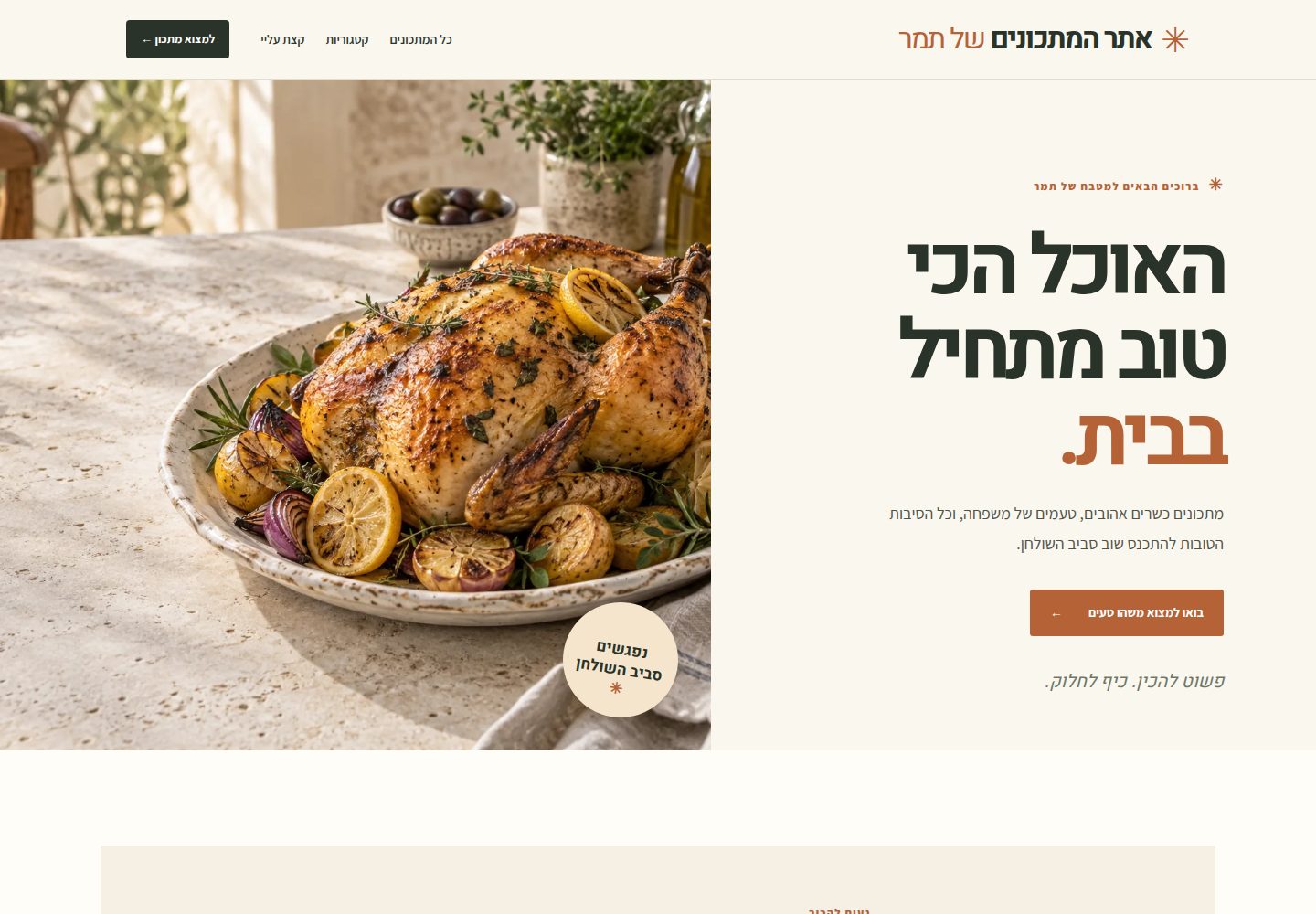
浏览真实页面截图,比较内容排版与手机效果。点击下方缩略图切换,放大查看整页细节。
全部页面与视图 3
截图用于了解视觉与布局,交互效果请以实际项目为准。
采集于 2026-09-30查看来源
值得关注的模板亮点
从已有项目资料中,快速了解它的特点。
食谱发现包含分类页、可搜索归档,以及素食、无麸质、无乳糖和逾越节筛选,搜索支持食材名与希伯来语子串匹配
食谱页提供分组食材、组件食谱、编号步骤、简读/全读视图、相关食谱、打印样式与懒加载 YouTube 嵌入
厨房工具包括份量缩放、单位换算、多个计时器、上菜时间规划、带进度保存的烹饪模式、屏幕 Wake Lock 与分享
Sanity 编辑模型覆盖时间范围、设备、烤箱与炉灶设置、熟度目标、时间线、变体、储存、来源、洁食适配与作者笔记
已发布内容输出 Recipe 与 Breadcrumb JSON-LD、robots.txt、llms.txt、sitemap 与 /rss.xml 订阅源
模板详细介绍
这是一个面向希伯来语、从右到左排版的食谱网站启动器,使用 Astro、Svelte 与 Sanity 构建,供作者发布自己测试过的食谱,也方便读者在烹饪时使用。Astro 负责路由、构建时 Sanity 查询、静态页面、元数据与结构化数据;Svelte 负责页面视图与可复用界面组件,只有搜索和食谱工具会在浏览器中水合;Sanity 管理食谱、分类与站点设置文档,编辑 Studio 单独托管。
站点包含分类页、可搜索归档,以及素食、无麸质、无乳糖和逾越节食谱筛选,搜索支持食材名与希伯来语子串匹配。食谱页提供分组食材、组件食谱、编号步骤、简读/全读视图、相关食谱、打印样式和懒加载 YouTube 嵌入,Mux 作为可选视频来源。厨房工具包括份量缩放、原始/公制/美制单位、多个计时器、上菜时间规划、带进度保存的烹饪模式、受支持时的屏幕 Wake Lock 以及分享;数值型食材可缩放,自由文本用量与备注保持原样。Sanity 字段覆盖时间范围、设备、烤箱与炉灶设置、熟度目标、时间线、变体、储存、来源、洁食适配和作者笔记,简单食谱可留空高级字段。
发布方面,已发布食谱输出可抓取的静态 HTML,包含规范链接、社交元数据、Recipe 与 Breadcrumb JSON-LD、robots.txt、llms.txt,在配置真实内容与线上站点 URL 并启用索引后生成 sitemap;/rss.xml 提供已发布食谱的订阅源,不含演示食谱与草稿。发布 Sanity 文档不会自动更新已部署的静态页,需要 Sanity webhook 调用托管方的 deploy hook 触发重建;草稿预览按请求读取 Sanity,不等待重建,通过一个需认证的 Vercel 函数在 Sanity Presentation 中预览已保存草稿。
项目当前状态:站点与编辑器 schema 已实现。没有 Sanity 项目 ID 时,仓库会以明确标注的示例食谱构建,这些页面为 noindex,robots.txt 也禁止抓取。公开发布仍需要作者确认的食谱与照片、Sanity 项目、最终域名以及发布触发重建的 webhook。公开站点没有账户、评论、联系表单或内嵌管理路由。
AstroSvelte启动器
适合你的项目吗?
适用场景
- 为希伯来语读者发布作者本人测试过的食谱,并支持从右到左阅读
- 在烹饪过程中使用份量缩放、单位换算、计时器与烹饪模式逐步操作
- 按素食、无麸质、无乳糖或逾越节等饮食需求筛选和查找食谱
- 在 Sanity Presentation 中预览已保存草稿,确认后再发布并触发静态站点重建
- 通过 /rss.xml 订阅已发布食谱,或为个人归档保留内容
适合人群
- 需要希伯来语 RTL 食谱站点的个人作者或家庭厨师
- 希望用 Sanity 管理结构化食谱数据、用 Astro 输出静态页面的项目
- 需要份量缩放、单位换算、计时器与烹饪模式等厨房工具的食谱站点
- 愿意按文档通过桌面编码代理完成安装、连接账户与部署的非开发者
- 接受公开站点不含账户、评论与内嵌管理路由的轻量发布方案
上手与定制指南
结合仓库当前版本的说明,按下面的资料检查内容、配置与运行要求。
- 1
没有 Sanity 项目 ID 时,仓库会以明确标注的示例食谱构建,示例页面为 noindex 且 robots.txt 禁止抓取
- 2
公开发布需要作者确认的食谱与照片、Sanity 项目、最终域名,以及发布触发重建的 webhook
- 3
发布 Sanity 文档不会自动更新已部署的静态页,需要配置 Sanity webhook 调用托管方的 deploy hook
- 4
草稿预览依赖一个需认证的 Vercel 函数,在 Sanity Presentation 中按请求读取草稿
- 5
README 提供面向非开发者的桌面编码代理设置流程,账户登录、验证码与令牌需在服务商页面自行输入
授权与来源资料
使用条件与限制
免费使用 · 保留许可声明本次收录的是公开仓库中采用 BSD-3-Clause 许可的免费版本;免费范围为该版本代码,不代表外部服务或第三方素材免费。
使用时需要遵守
- 允许免费使用、修改、商用以及源代码或二进制形式的分发。
- 源代码分发需保留版权声明、三项条件和免责声明;二进制分发需在文档或随附材料中重现这些内容。
- 未经事先书面许可,不得使用权利人或贡献者的名称为衍生产品背书或推广。
- 代码按现状提供;担保与责任限制以原许可证及适用法律为准。
额外费用与待核对事项
- 公开发布前必须准备作者确认的食谱与照片、创建 Sanity 项目、确定最终域名,并配置发布触发重建的 webhook,否则只能以示例内容构建。
- 发布 Sanity 文档不会自动更新已部署的静态页面,必须配置 Sanity webhook 调用托管方的 deploy hook 触发重建,否则内容不会上线。
- 草稿预览依赖一个需认证的 Vercel 函数,仅在 Vercel 部署环境下可用,并需配置服务端预览密钥。
- 使用真实内容需自行创建 Sanity 项目与数据集,并配置对应的环境变量;未配置时仅显示示例食谱。
- 编辑 Studio 需单独部署到 Sanity 托管并选择可用的 Studio 主机名,公开站点不包含内嵌管理路由。
- 完整部署流程需要自行注册或登录 GitHub、Vercel 与 Sanity 账户,并完成各服务商的授权与验证。
- README 推荐的桌面编码代理中,Claude Code Desktop 需要包含 Code 的付费 Claude 计划或计费 Console 访问,免费计划不含 Code。
- README 提及的 Factory App 需要额外每月 20 美元的 Pro 订阅,属于可选工具成本。
- Codex 免费计划有使用限制,付费计划提供更多用量;重度使用可能需要付费。
- 目前仅发布希伯来语内容,英文翻译属于后续编辑阶段,需有审校者后才可发布。
- 项目资料提及可选付费版本或功能;本次仅收录公开免费代码,不包含付费升级。
- 演示图片、字体、图标及其他第三方素材需按各自许可核对,不能仅凭代码的 BSD-3-Clause 许可判断。
- 域名、托管、数据库、支付或 AI 等外部服务可能另外收费。
查看原文依据
Redistribution and use in source and binary forms, with or without modification, are permitted
许可证原文
A public launch still needs Tamar-approved recipes and photos, a Sanity project, a final domain, and a publish-to-rebuild webhook.
README 原文
Publishing a Sanity document does not change an already deployed static page. A Sanity webhook must call the hosting provider's deploy hook to rebuild the site.
README 原文
An authenticated Vercel function lets Tamar preview saved drafts in Sanity Presentation before publishing.
README 原文
Create a Sanity project and dataset. Set the matching `PUBLIC_SANITY_*` and `SANITY_STUDIO_*` values in `.env`.
README 原文
Deploy the editor to Sanity hosting with `pnpm sanity:deploy` after choosing an available Studio hostname.
README 原文
The agent will guide the rest; you’ll sign in to or create GitHub, Vercel, and Sanity accounts when asked.
README 原文
Requires a Claude plan that includes Code or billed Console access.
README 原文
Adds a separate $20/month Pro subscription.
README 原文
Codex is available on Free and paid plans; usage limits vary, and paid plans include more usage.
README 原文
https://github.com/igal-abachi-dev/tamar-recipes/blob/main/LICENSEhttps://github.com/igal-abachi-dev/tamar-recipes/blob/main/README.mdEnglish translation is a later editorial stage. Hebrew is the only published language until translations have a reviewer.
README 原文
DeepSeek 根据仓库许可证和 README 整理 ·2026-10-01。结果仅覆盖已读取资料,依赖、图片、字体及后续条款变更以各自原文为准。
项目核对记录与介绍依据
模板资料
- 来源平台
- GitHub
- 资料与维护参考分
- 资料较完整 · 88 / 100
- 技术栈
- Astro · Svelte
- 网站类型
- 启动器
这个分数如何计算
本站按许可资料(最高30分)、演示链接(12分)、预览图(10分)、Star数(15分)、记录的维护时间(15分)、描述完整度(8分)、功能记录(5分)和分类资料(5分)计算。它不是代码、安全或性能测试,也不是 Google 评分;有链接不代表已实测可用。
这个项目需要核对什么
- 记录的仓库更新时间
- 2026-09-27
- 截图检查日期
- 2026-10-01
已收录演示链接。请用你的内容与屏幕尺寸检查;有演示不代表表单、认证或支付已经可用。
目录记录的主要技术栈是 Astro。请通过依赖清单和锁文件核对实际版本与托管要求。这些说明基于收录资料,不代表代码审计或部署实测。
查看具体选型方法 →介绍的制作与核对状态
介绍由 AI 辅助整理目录与仓库资料。仓库作者不等于这篇介绍的审核者。
已完成服务器许可规则与 AI 来源核对;未经过人工编辑审核。
查看当时使用的来源资料
SHA-256: ad3b1bb7e7d34b8c4fc82e47db64504c47d515564f6365f2ff20af59f80fd6ad
2026-10-01T14:50:04.466Z
来源文件 / 仓库# אתר המתכונים של תמר **Tamar Recipes** is a Hebrew-first, right-to-left recipe site built with Astro 7, Svelte 5, and Sanity. It is designed for Tamar to publish her own tested recipes and for readers to use them while cooking: clear ingredients and steps, practical timing, and optional kitchen tools. > **Project status:** The site and editor schemas are implemented. Without a Sanity project ID, the repository builds with clearly labeled sample recipes. Those pages are `noindex`, and `robots.txt` disallows crawling. A public launch still needs Tamar-approved recipes and photos, a Sanity project, a final domain, and a publish-to-rebuild webhook. ## How it works | Layer | Responsibility | | -------- | ------------------------------------------------------------------------------------------------- | | Astro | Routes, build-time Sanity queries, static pages, metadata, and structured data | | Svelte 5 | Page views and reusable interface components; only search and recipe tools hydrate in the browser | | Sanity | Recipe, category, and site settings documents; a separately hosted editing Studio | | Video | YouTube embeds first; optional Mux video when a recipe has no YouTube video | | Styling | Project CSS tokens and self-hosted Assistant and Heebo fonts | Publishing a Sanity document does not change an already deployed static page. A Sanity webhook must call the hosting provider's deploy hook to rebuild the site. Draft previews read Sanity on request and do not wait for a rebuild. ## What is included - **Recipe discovery:** category pages, a searchable archive, and filters for vegetarian, gluten-free, lactose-free, and Passover recipes. Search includes ingredient names and supports Hebrew substring matching. - **Cookable recipe pages:** grouped ingredients, component recipes, numbered steps, a short/full reading view, related recipes, print styles, and lazy YouTube embeds. Mux is available as an optional video source. - **Kitchen tools:** serving scaling, original/metric/US customary measures, multiple timers, a serving-time planner, cooking mode with saved progress, screen Wake Lock where supported, and sharing. Numeric ingredients scale; free-text amounts and notes stay as Tamar wrote them. - **Detailed editing model:** Sanity fields for time ranges, equipment, oven and burner settings, doneness targets, timelines, variations, storage, sources, kosher adaptations, and Tamar's own cooking notes. Simple recipes can leave advanced fields empty. - **Static publishing and draft preview:** crawlable published recipe HTML, canonical and social metadata, Recipe and Breadcrumb JSON-LD, `robots.txt`, `llms.txt`, and a sitemap when real content and a live site URL are configured and indexing is enabled. An authenticated Vercel function lets Tamar preview saved drafts in Sanity Presentation before publishing. - **RSS:** `/rss.xml` provides a feed of published recipes for feed readers and personal archives. Demo recipes and Sanity drafts are not included. The public site has no accounts, comments, contact form, or embedded administration route. Sanity Studio is deployed separately and uses Sanity's editor sign-in. ## A focused recipe product, compared with Ghost Ghost is a full publishing platform for websites, newsletters, memberships, paid subscriptions, comments, and audience growth. Tamar's site is a focused recipe product: Sanity manages the content, while the public site turns structured recipe data into pages and cooking tools. Ghost can publish recipes too, but these recipe-specific capabilities would need custom development or integrations there: - Structured ingredient quantities with serving scaling and metric or US customary measures. - Component recipes and sub-recipes with their own ingredients and steps. - Cooking mode, step timers, screen Wake Lock, and a serving-time planner. - Kashrut, Passover, and dietary classifications designed for recipe browsing. - Oven modes, doneness targets, timelines, and recipe variations. - A print-optimized recipe layout and static recipe pages that keep ingredients and instructions readable without JavaScript. Ghost has broader publishing and audience tools that this project intentionally leaves out, as recorded in [plan.md](plan.md): Ghost is designed to run a publication and its audience; this site is designed to help readers find and cook Tamar's recipes. ## Set up with an agent For cooks who do not code, open the repository folder in a desktop coding agent and give it one setup request. The agent should install or guide you through installing the prerequisites, connect the accounts, configure this existing project, and deploy it. The agent can use its built-in terminal; you do not need to open a command line or edit code. You handle sign-in, two-factor checks, and approvals on the providers' own pages. See the [agent setup guide](docs/agent-setup.md) for the full flow. ### Start on a new Windows PC The cook only needs Windows, Chrome, and an internet connection to begin. They do not need Git, GitHub, Node.js, pnpm, or an AI agent installed yet. Send them this message: > Here’s the recipe-site starter: https://github.com/igal-abachi-dev/tamar-recipes . On your Windows PC, install the [ChatGPT desktop app](https://chatgpt.com/download/) and choose Codex (Free has limited use; paid plans include more). If you already have Claude Pro or Max, you can use [Claude Desktop](https://claude.com/download/) and its Code tab instead. In Chrome, open the repository(https://github.com/igal-abachi-dev/tamar-recipes) and choose **Code → Download ZIP**. In File Explorer, right-click the downloaded ZIP in **Downloads**, choose **Extract All**, then **Extract**. Open the extracted `tamar-recipes-main` folder as a local project in your chosen agent, Copy this prompt into the agent after opening the repository: > I’m a cook, not a developer. Set up and deploy this recipe site for me by following `docs/agent-setup.md` and using the `recipe-site-setup` skill if available. First inspect the project and tell me what is already done. Check whether Node.js 22.12+, Git, and pnpm 10.17.0 are installed; install or guide me through installing anything missing, using the official instructions for my computer. Then help me create or sign in to GitHub, Vercel, and Sanity, connect them, deploy the public site and its existing Sanity Studio, and verify publishing triggers a site rebuild. Do the file and command work yourself. Explain each step simply and pause only when I need to sign in, approve access, choose an account/hostname, or approve recipe content. I will enter passwords, verification codes, tokens, and deploy-hook URLs directly in the provider's own pages; never ask me to paste them into chat or put secrets in code or scripts. Keep sample content noindexed until I approve the real site for launch. Start with the earliest incomplete step and preserve anything already configured. The agent will guide the rest; you’ll sign in to or create GitHub, Vercel, and Sanity accounts when asked. You don’t need to write code or use a command line. The first-run sequence is: install a desktop agent, download the project ZIP(not git), use File Explorer's built-in **Extract All** action, o pen the extracted folder locally, and submit the README setup prompt. No extra ZIP utility is needed. The agent checks and installs or guides you through installing Git, Node.js, and pnpm, then helps put the project in your own GitHub repository and deploy it to Vercel and Sanity. The owner completes account signup, sign-in, verification, and access approvals. Enter passwords, verification codes, API tokens, and deploy-hook URLs only in the provider's own sign-in page or dashboard, never in the agent conversation. #### Install a desktop agent **Codex desktop (recommended if you are starting with no AI account):** 1. In Chrome, open [chatgpt.com/download](https://chatgpt.com/download/), download the ChatGPT app for Windows, and install it. 2. Open ChatGPT and sign in or create a free account. Codex is available on Free and paid plans; usage limits vary, and paid plans include more usage. 3. Choose **Codex** in the app, then open the extracted `tamar-recipes-main` folder as a local project. **Claude Code Desktop (if you already have Claude Pro or Max):** 1. In Chrome, open [claude.com/download](https://claude.com/download/), download Claude for Windows, and install it. 2. Open Claude and sign in with the account that has Pro or Max. Claude's Free plan does not include Code. 3. Choose the **Code** tab, start a local session, and select the extracted `tamar-recipes-main` folder. Then copy the prompt below into the agent. Both apps provide a built-in terminal the agent can use; the cook does not need to open PowerShell or Command Prompt. If the app offers folder-access choices, grant access to the extracted project folder only. **This is a desktop usability shortlist for local setup, not a coding-quality leaderboard.** Start with Codex or Claude Code if you already pay for ChatGPT or Claude. Cursor and Factory are other local desktop options if you prefer their workspace or want a separate product. | Agent | Fit for this setup | Trade-off | | --- | --- | --- | | **Codex desktop app** | Opens the local project and works with its files and terminal. ChatGPT offers Free and paid plan options; paid plans include more Codex usage. | Usage limits depend on the plan. | | **Claude Code Desktop** | Local project workspace with terminal, diff review, and approvals. It uses the same underlying Claude Code engine as the CLI. | Requires a Claude plan that includes Code or billed Console access. | | **Cursor Agent** | Local desktop app with a free Hobby tier and limited Agent requests; it can work in the project and use its terminal. | It is an IDE, so there is more interface to learn. | | **Factory App (Factory.com)** | Local-project desktop app focused on coding agents, with change review and multiple models. | Adds a separate $20/month Pro subscription. | The other names are less suited to this local, desktop-first setup. **Grok Build** is a terminal coding agent locally; its web builder targets new app creation and hosting. **Grok Bot** has a desktop client, but its normal Bot workflow runs on a persistent cloud computer and requires an eligible paid plan; local computer execution is a separate team feature. It also uses shared cloud browser sessions, so it needs broader trust than a project-scoped coding agent. **Muse Code** and **Oh My Pi (OMP)** are terminal agents, not the simple desktop workspace wanted here. **Amp** can run locally through its CLI or a configured local runner, but its browser-first flow runs remotely. These can suit developers; they are not the cook's first choice. ### Performance, app vs CLI, and context A CLI harness can sometimes beat a bundled coding product on coding tasks; I would not say Muse Code or OMP are inherently weaker. In one fixed-model study, Oh My Pi passed 20/20 tasks while Codex passed 15/20 with the same GLM-5.3-Flash model. In another controlled benchmark using the same Kimi K3 model across 30 tasks, frozen Codex scored 66.7%, Claude Code 63.3%, and OMP 56.7%. These results point in different directions because harness performance depends on model, tasks, configuration, and version; neither small benchmark is a universal ranking. ([20-task study](https://www.critique.sh/blog/mercury-harness-study-v2), [30-task study and frozen versions](https://unifiedharnessprotocol.dev/frontierharness/)) Muse Code's current Artificial Analysis comparison uses different best-available models for each product, so it cannot isolate the harness: Codex scores higher on its composite index (62 vs 54), while Muse is ahead on DeepSWE (72% vs 68%) and Codex leads Terminal-Bench (56% vs 32%). Cursor has had strong results: Artificial Analysis put Composer 2.5 third in its May 2026 index, but that tested the complete model-and-agent setup and predates the current benchmark version. I found no comparable public result for Factory. There is not enough current, controlled evidence to order Codex, Claude, Cursor, Factory, Muse, and OMP as a universal quality ranking. The desktop shortlist above is about an easier local workflow and subscriptions people already have. ([Muse/Codex comparison](https://artificialanalysis.ai/agents/coding-agents/comparisons/codex-vs-muse-code), [Cursor result and date](https://artificialanalysis.ai/articles/cursor-composer-2-5-coding-agent-index), [current benchmark methodology](https://artificialanalysis.ai/methodology/coding-agents-benchmarking/)) The CLI can feel more capable for command-heavy work because it works directly in a terminal: it can run scripts, inspect their output, and continue with fewer interface steps. Desktop apps vary: some provide the same terminal tools along with visual change review and approvals; others expose fewer tools. That can affect practical agentic ability, but CLI versus desktop does not inherently change the model's context-window limit. The model and plan set that limit. A lean CLI may use less context for interface instructions, while a desktop app may add useful project or review context. For this setup, use the desktop app with the local repository open and terminal access enabled. Give it the repository root so it reads `AGENTS.md`, the setup skill, and project files. The cook does not need to use a CLI. Official product references: [Codex plans](https://help.openai.com/en/articles/11369540-using-codex-with-your-chatgpt-plan), [Claude Code Desktop](https://code.claude.com/docs/en/desktop), [Factory App](https://docs.factory.ai/factory-app/quickstart) and [pricing](https://factory.com/pricing), [Cursor pricing](https://cursor.com/pricing), [Grok Build](https://github.com/xai-org/grok-build), [Grok Bot setup](https://docs.x.ai/grok-bot/get-started), [Muse Code](https://dev.meta.ai/docs/muse-code), [Amp](https://ampcode.com/docs), [Oh My Pi](https://github.com/can1357/oh-my-pi). ## Run locally **Requirements:** Node.js 22.12 or newer and pnpm 10.17.0 (the version in `package.json`). ```sh pnpm install --frozen-lockfile ``` Copy `.env.example` to `.env`. You can leave the Sanity project ID empty to review the sample site. Start and manage the Astro development server in background mode: ```sh pnpm exec astro dev --background pnpm exec astro dev status pnpm exec astro dev logs pnpm exec astro dev stop ``` `astro dev status` shows the local address. The sample recipes are for design review only; they are not Tamar's finished content. ### Connect Sanity 1. Create a Sanity project and dataset. Set the matching `PUBLIC_SANITY_*` and `SANITY_STUDIO_*` values in `.env`. 2. Run `pnpm sanity:dev` to edit locally. Create the site settings document, categories, and Tamar-reviewed recipes. 3. Deploy the editor to Sanity hosting with `pnpm sanity:deploy` after choosing an available Studio hostname. Editors then sign in through Sanity; there is no `/studio` or `/admin` page on the public site. | Variable | Used by | Purpose | | -------------------------- | ----------------- | ----------------------------------------------------------------------------------------- | | `PUBLIC_SITE_URL` | Website build | Final canonical origin and sitemap URL; `https://example.com` is only a local placeholder | | `PUBLIC_SANITY_PROJECT_ID` | Website build | Enables real Sanity content instead of sample content | | `PUBLIC_SANITY_DATASET` | Website build | Dataset to fetch, normally `production` | | `SANITY_STUDIO_PROJECT_ID` | Studio | Same Sanity project as the website | | `SANITY_STUDIO_DATASET` | Studio | Same dataset as the website | | `SANITY_STUDIO_HOSTNAME` | Studio deployment | Optional `*.sanity.studio` hostname prefix | | `SANITY_STUDIO_PREVIEW_URL` | Studio | HTTPS origin of the site shown in Sanity Presentation | | `SANITY_READ_TOKEN` | Preview function | Server-only Sanity Viewer token for reading drafts | | `PREVIEW_SECRET` | Preview function | Server-only signing key for short-lived preview sessions | Treat `PUBLIC_*` values as public and never put secrets in them. When a real Sanity ID is configured, a content fetch error fails the build instead of silently showing sample recipes. ## Commands | Command | Purpose | | -------------------- | ----------------------------------------------------------------------------- | | `pnpm check` | Check formatting, Astro and Svelte types, Sanity schemas, and recipe behavior | | `pnpm build` | Generate static pages and the Vercel preview function | | `pnpm preview` | Preview a completed build locally | | `pnpm format` | Format Astro, Svelte, TypeScript, and CSS source | | `pnpm format:check` | Check formatting without changing files | | `pnpm sanity:dev` | Run the Sanity Studio locally | | `pnpm sanity:deploy` | Deploy the Studio to Sanity hosting | ## Content and publishing The core Sanity documents are `recipe`, `category`, and the `siteSettings` singleton. Tamar enters recipes manually from her previous site; this repository does not import the old Ghost content or preserve its URLs. Each published recipe should use Tamar-approved text and photography. See the [editorial guide](docs/editorial.md) for entry rules, tested quantities, dietary and Passover labels, and review before publication. Serving changes use numeric ingredient quantities and any known gram or milliliter equivalents. Original amounts remain in static HTML for readers and crawlers, and on live recipes they are also used in JSON-LD. Printing works without JavaScript. Converted measures are approximate where household and US customary units differ; the interface does not infer an ingredient's mass from its volume. For launch, deploy with Vercel's Astro preset, set `PUBLIC_SITE_URL` to the final HTTPS origin, and connect a Sanity publish webhook to the host's deploy hook. Configure the server-only preview secrets and Studio preview origin. Verify the built pages, draft preview, indexing controls, and video playback on the final domain. The [deployment guide](docs/deployment.md) covers the steps. ## Repository map ```text src/pages/ Astro routes and static endpoints src/layouts/ Document shell, metadata, and JSON-LD output src/components/pages/ Static Svelte page views src/components/ui/ Reusable recipe UI src/components/islands/ Browser search and kitchen controls src/lib/ Sanity queries, content loading, and recipe helpers src/sanity/schemas/ Sanity document and recipe-part schemas src/styles/ Global CSS tokens and print styles scripts/ Schema and recipe behavior checks docs/ Editorial and deployment guides ``` ## Further reading - [Product plan](plan.md) — scope, design decisions, and release sequence - [Editorial guide](docs/editorial.md) — how Tamar enters and checks recipes - [Deployment guide](docs/deployment.md) — Sanity Studio, hosting, and rebuild webhook - [Development conventions](AGENTS.md) — Astro/Svelte boundaries and local workflow English translation is a later editorial stage. Hebrew is the only published language until translations have a reviewer.
看看同类模板
对比同技术栈与用途的模板,找到更适合的视觉与内容结构。

astrowind
⭕️ AstroWind: A free template using Astro v7 and Tailwind CSS v4. Astro starter theme.
Astro · 博客
accessible-astro-starter
Accessible Astro Starter 是一个以无障碍为核心理念的 Astro 6 启动模板,由 incluud 团队维护。
Astro · 博客

astro-erudite
An opinionated, unstyled static blogging template built with Astro and native CSS.
Astro · 作品集

astro-shopify
astro-shopify 是一个面向开发者的轻量级电商启动模板,用于构建基于 Shopify 的无头店面。
Astro · 电商

brutal
A neobrutalism Astro starter theme
Astro · 启动器

qwind
⭕️ Qwind: A template to make your website using Qwik + Tailwind CSS.
Astro · 工具站