Astro handles static pages and content collections, while React is used for interactive components such as the archive list and search overlay
AstroStarter
wqqz.dev — Astro Starter Template
By imwqqz
An Astro-based personal portfolio and blog template that uses React for interactive components and Tailwind CSS for styling, with personal data centralized in a single JSON file and articles stored as Markdown in a content collection.
Explore the design
Compare the page layouts and mobile experience. Open any screenshot for a closer look.
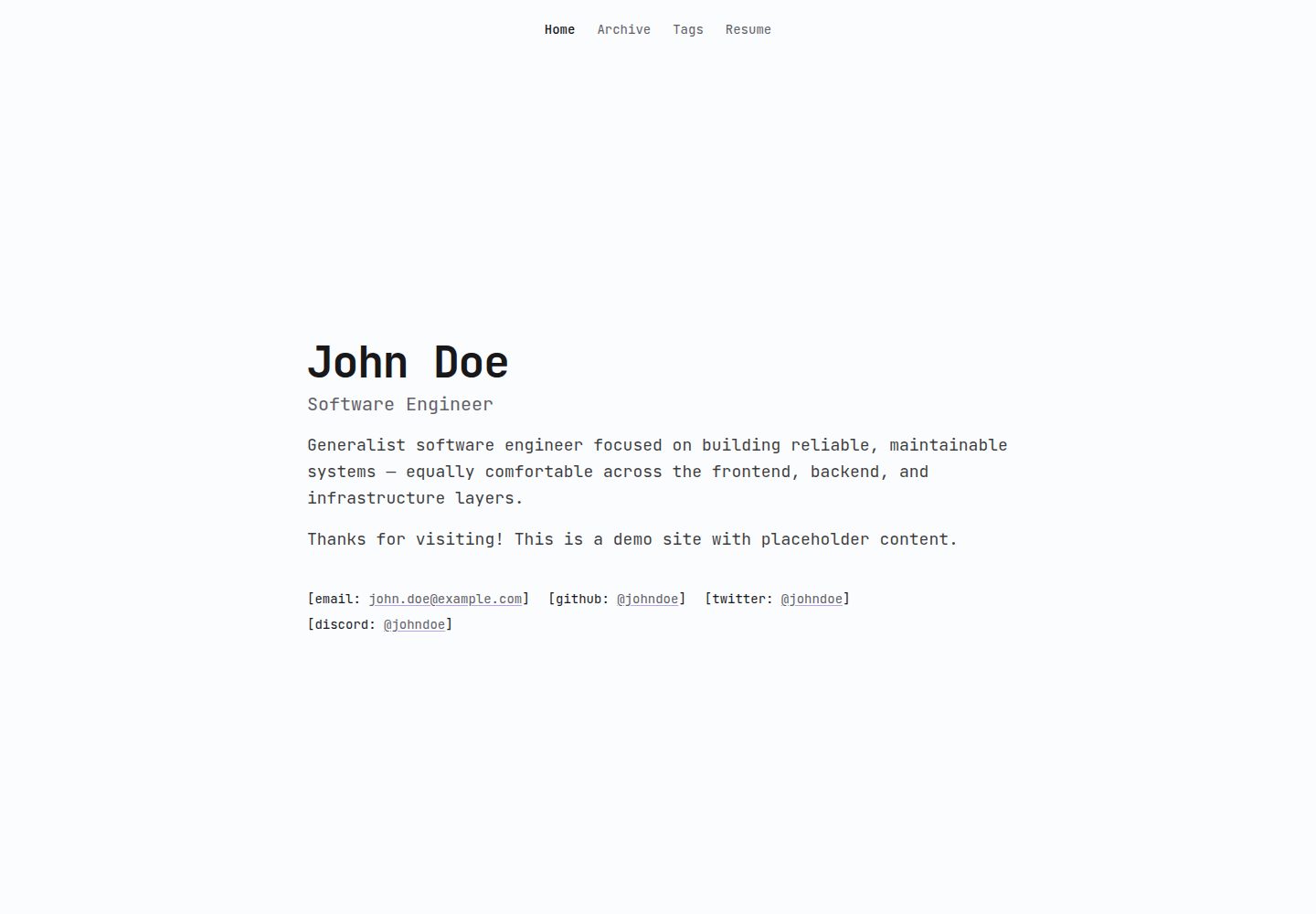
Desktop homepage1 / 2
Desktop captureTop of page
Actual screenshot captured by the server browser.
All pages & views 2
Screenshots show visual appearance; interactive behavior may differ.
Recorded 2026-10-01View source
What stands out
A quick read of the recorded project description.
Personal data, contact information, and resume are maintained in a single public/0user.json file
Blog posts are Markdown files under src/content/archives/, with frontmatter containing title, description, date, tags, and a draft toggle
Markdown supports callouts, code blocks with filename labels, terminal-style code blocks, and KaTeX mathematical formulas
Color tokens are centralized in src/styles/global.css, split into light and dark blocks with usage annotations
Template Details
wqqz.dev is an MIT-licensed open-source personal website template, with the repository named example-portfolio. It targets portfolio and blog use cases: static pages and content collections are built with Astro, interactive parts such as the archive list and search overlay are handled by React components, and overall styling uses Tailwind CSS.
Content organization has two entry points. Personal name, role, homepage paragraphs, site title and description, contact links such as email/GitHub/X/Discord, and resume information are centralized in public/0user.json; blog posts are Markdown files under src/content/archives/, with frontmatter providing title, description, date, tags, and draft status. Posts marked as drafts are not published until the draft flag is turned off. Markdown also supports callouts, code blocks with filename labels, terminal-style code blocks, and mathematical formulas via KaTeX.
Color schemes are centralized in src/styles/global.css, split into :root light and dark blocks, with each color token annotated for its purpose and adjustable via oklch values. The font is JetBrains Mono, loaded in src/layouts/Base.astro. The project requires Node.js 18 or later and uses pnpm to install dependencies and start the development server.
Limitations: the repository does not provide specific framework version numbers in its dependency manifest, so they are not listed here. The template's MIT license covers this version of the code; demo images, fonts, icons, and other third-party assets must be checked against their respective licenses; external services such as domains and hosting may incur separate charges.
AstroStarter
Is it right for your project?
Use Cases
- Building a personal portfolio homepage to display name, role, bio, and contact information
- Writing and publishing a technical blog with tags and draft status using Markdown
- Using code blocks, terminal examples, and mathematical formulas in articles
- Adjusting the site's light and dark themes by modifying color tokens
Suitable For
- Developers who want to manage personal site content with Astro and Markdown
- Users who need a combined portfolio and blog and prefer centralized personal data configuration
- Developers comfortable with Node.js 18+ and a pnpm workflow
Getting started & customization
Use these recorded setup notes alongside the repository instructions for your chosen version.
- 1
Requires Node.js v18 or later and uses pnpm as the package manager
- 2
After cloning the repository, run pnpm install to install dependencies, then run pnpm dev to start the development server
- 3
The development server defaults to http://localhost:4321; add --host to access it from other devices on the local network
- 4
Site information, contact links, and resume are modified in public/0user.json
- 5
Posts go under src/content/archives/; copy 0-draft-1.md or 0-draft-2.md to start writing, and turn off draft when publishing
License & source material
Usage conditions & limitations
Free to use · keep license noticeThis entry covers the free version in the public repository under the MIT license; the free scope is the code of this version and does not imply that external services or third-party assets are free.
Must comply with when using
- Permits free use, modification, commercial use, and distribution of this version of the code.
- When distributing copies or substantial portions of the code, retain the original author's copyright notice and the full MIT license notice.
- The code is provided as is; warranties and limitations of liability are governed by the original license and applicable law.
Additional costs & items to verify
- The MIT license permits free use, modification, and redistribution but requires retaining copyright and license notices; the "Be nice" note in the README is a community behavior expectation and does not constitute an additional legal restriction.
- The site font JetBrains Mono is a third-party font whose license is independent of the MIT code license; verify its licensing before commercial use or redistribution.
- Preview images and other demo assets in the repository may be provided by third parties, and their licenses are not granted along with the MIT code license; confirm separately before use.
- The local development server listens on port 4321 by default; if deploying to the public internet, domains and hosting services may incur additional costs that you must bear.
- Demo images, fonts, icons, and other third-party assets must be checked against their respective licenses and cannot be judged solely by the code's MIT license.
- External services such as domains, hosting, databases, payments, or AI may incur separate charges.
View Original Text Basis
Permission is hereby granted, free of charge
Original License Text
This project is licensed under the [MIT License ](LICENSE), Be nice.
Original README
The site uses JetBrains Mono for everything. That's loaded in `src/layouts/Base.astro`.
Original README

Original README
https://github.com/imwqqz/wqqz.dev/blob/master/LICENSEhttps://github.com/imwqqz/wqqz.dev/blob/master/README.mdOpen http://localhost:4321. Add `--host` to `pnpm dev` if you want to view it from another device on your network.
Original README
Compiled by DeepSeek based on repository license and README ·2026-10-01. Results only cover the materials read; dependencies, images, fonts, and subsequent term changes are subject to their respective original texts.
Project checks & description sources
Template Information
- Source platforms
- Astro Themes
- Documentation and maintenance reference score
- More documented · 75 / 100
- Technologies
- Astro
- Website type
- Starter
How this score is calculated
Our heuristic uses license records (up to 30), a demo link (12), a preview (10), stars (15), recorded maintenance (15), description completeness (8), feature records (5) and classification data (5). It is not a code, security or performance test, or a Google score. A link does not establish tested functionality.
What to verify for this project
- Repository update recorded
- 2026-09-27
- Screenshot last checked
- 2026-10-01
A demo link is listed. Check it with your own content and viewport sizes; its presence does not confirm that forms, authentication or payments work.
The catalog identifies Astro as the primary stack. Check the actual dependency manifest and lockfile for versions and hosting requirements. These notes use recorded metadata, not a code audit or a deployment test.
Use a selection guide →How this description was prepared
AI-assisted description based on catalog records and repository material. Repository authors are not automatically the reviewers of this description.
Automatically checked against source and license rules; no manual editorial review.
Inspect the recorded source material
SHA-256: 7f25f4e275ac0b0ed079358e21b47720dd36deaf017e25162d6b338d8c52ecc3
2026-10-01T03:38:21.397Z
Source file / repository# example-portfolio
> Highly customizable and performant portfolio template built with Astro, React, and Tailwind CSS.

## What's inside






- [Astro](https://astro.build) for static pages and content collections
- [React](https://react.dev) for the interactive bits, like the archive list and search overlay
- [Tailwind CSS v4](https://tailwindcss.com) for all the styling
- [Expressive Code](https://expressive-code.com) for highlighted code blocks, file tabs, and terminal windows
- [KaTeX](https://katex.org) so you can write math in your markdown
## Getting started
You'll need Node.js (v18 or newer) and `pnpm`.
```bash
# grab a copy of the repo
git clone https://github.com/example/example-portfolio
cd example-portfolio
# install the dependencies
pnpm install
# run the dev server and start editing
pnpm dev
```
Open http://localhost:4321. Add `--host` to `pnpm dev` if you want to view it from another device on your network.
## Site content
### Your personal info lives in `public/0user.json`
This is the one file you'll touch the most. It holds your name and role, the home page paragraphs, site metadata like the title and description, every contact link (email, GitHub, X, Discord), and the whole resume section.
```json
{
"name": "John Doe",
"contacts": [
{ "label": "email", "text": "[email protected]", "href": "mailto:[email protected]" }
]
}
```
### Blog posts live in `src/content/archives/*.md`
Each post is a plain markdown file. The frontmatter at the top tells the site what to show:
```yaml
---
title: Post title
description: Short summary shown in listings and search.
date: 2026-09-20
tags:
- security
draft: true # remove this (or set false) to publish the post
---
```
The easiest way to start is to copy `0-draft-1.md` or `0-draft-2.md`, fill them with your writing, and flip `draft` off when you're ready.
Some nice extras your markdown supports:
```md
> [!NOTE] / [!TIP] / [!SUCCESS] / [!IMPORTANT] / [!WARNING] / [!CAUTION] callout boxes
```ts title="app.ts" a code block with a file tab
```bash frame="terminal" group="run" tab="pnpm" a terminal window, tabs if you group
```
## Customizing colors
The whole color scheme lives in `src/styles/global.css`, split into a light block (`:root`) and a dark block. Every color has a short comment next to it saying what it's used for, so you can just tweak the `oklch(...)` values and see the difference.
```css
--background: oklch(99% .002 286); /* page background */
--accent: oklch(54% .22 293); /* highlight: links, focus */
```
The site uses JetBrains Mono for everything. That's loaded in `src/layouts/Base.astro`.
## Project structure
```
example-portfolio/
├── public/
│ └── 0user.json # your site info, contacts, resume
├── src/
│ ├── content/archives/ # your blog posts
│ ├── pages/ # home, archives, tags, resume, 404
│ ├── components/ # a few React and Astro components
│ ├── layouts/ # Base.astro handles the head, metadata, and fonts
│ ├── lib/ # helpers for info, archives, search, tags
│ └── styles/ # global.css holds the color tokens
├── README.md
└── LICENSE
```
> This project is licensed under the [MIT License ](LICENSE), Be nice. Details in [CODE_OF_CONDUCT.md](CODE_OF_CONDUCT.md).Explore similar templates
Compare previews and descriptions within the same stack and category.

astrowind
AstroWind is a free, open-source Astro starter theme using Astro and Tailwind CSS, released under the MIT license.
Astro · Blog
accessible-astro-starter
An accessibility-focused Astro 6 starter template with WCAG 2.2 AA practices, Tailwind CSS 4, TypeScript, Prettier, ESLint, form validation, blog and portfolio examples, and preference toggles for dark mode, high contrast, and reduced motion.
Astro · Blog

astro-erudite
astro-erudite is an opinionated, unstyled static blog template built with Astro and native CSS, with no UI or CSS framework and minimal dependencies.
Astro · Portfolio

astro-shopify
A lightweight Shopify headless ecommerce starter template built with Astro and Svelte, integrating the Shopify Storefront API for product and inventory data, with built-in cart state management and basic add-to-cart and checkout flow.
Astro · E-commerce

brutal
Brutal is a neobrutalism Astro starter theme from ElianCodes, derived from the author's personal site and generalized. It includes a Markdown blog collection, build-time RSS and sitemap, image optimization, Tailwind CSS styling, and Biome checks, with no JavaScript by default.
Astro · Starter

qwind
Qwind is a free and open-source website template built on Qwik and Tailwind CSS, featuring directory-based routing via QwikCity, a Markdown blog, dark mode, and static deployment configuration.
Astro · Tool Site