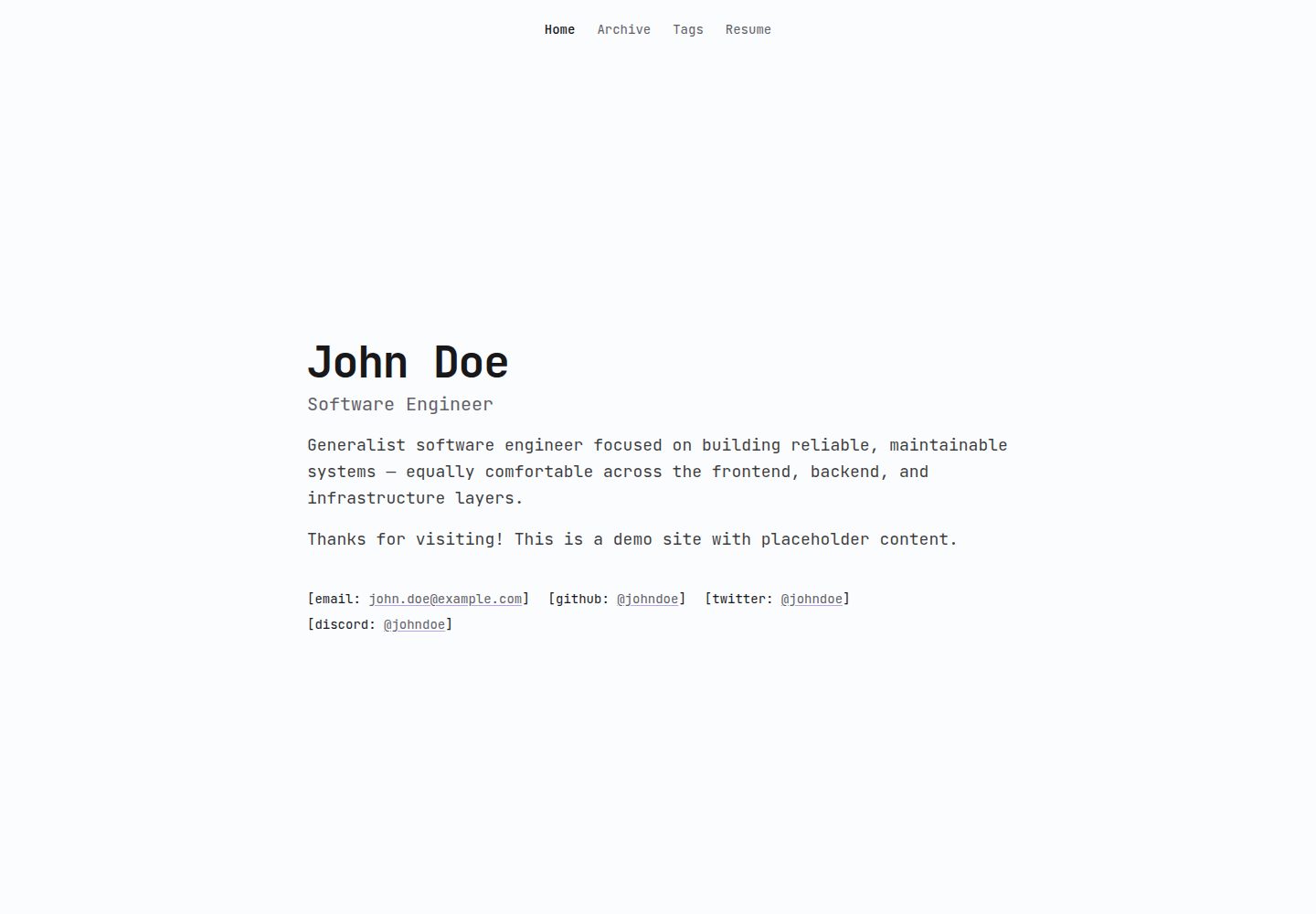
Astro 负责静态页面与内容集合,React 用于归档列表、搜索浮层等交互组件
Astro启动器
wqqz.dev — Astro 启动器模板
作者 imwqqz
基于 Astro 的个人作品集与博客模板,使用 React 处理交互组件、Tailwind CSS 负责样式,个人资料集中在单个 JSON 文件,文章以 Markdown 存放在内容集合中。
看看你的网站会是什么样
浏览真实页面截图,比较内容排版与手机效果。点击下方缩略图切换,放大查看整页细节。
全部页面与视图 2
截图用于了解视觉与布局,交互效果请以实际项目为准。
采集于 2026-10-01查看来源
值得关注的模板亮点
从已有项目资料中,快速了解它的特点。
个人资料、联系方式与简历统一放在 public/0user.json 中维护
博客文章为 src/content/archives/ 下的 Markdown,frontmatter 含标题、描述、日期、标签与 draft 开关
Markdown 支持提示框、带文件名标签的代码块、终端样式代码块以及 KaTeX 数学公式
配色 token 集中在 src/styles/global.css,分浅色与深色两块并附用途注释
模板详细介绍
wqqz.dev 是一个采用 MIT 许可的开源个人网站模板,仓库名为 example-portfolio。它面向作品集与博客场景:静态页面和内容集合由 Astro 构建,归档列表和搜索浮层等交互部分由 React 组件承担,整体样式使用 Tailwind CSS。
内容组织上有两个入口。个人姓名、角色、首页段落、站点标题与描述、邮箱/GitHub/X/Discord 等联系链接以及简历信息集中在 public/0user.json;博客文章则是 src/content/archives/ 下的 Markdown 文件,通过 frontmatter 提供标题、描述、日期、标签和 draft 状态,草稿标记未关闭时不会发布。Markdown 还支持提示框、带文件名标签的代码块和终端样式代码块,并可通过 KaTeX 书写数学公式。
配色集中在 src/styles/global.css,分为 :root 浅色块与深色块,每个颜色 token 带有用途注释,可按 oklch 值调整。字体使用 JetBrains Mono,在 src/layouts/Base.astro 中加载。项目要求 Node.js 18 或更新版本,并使用 pnpm 安装依赖与启动开发服务器。
限制方面:仓库未提供依赖清单中具体框架版本号,因此不在此列出。模板的 MIT 许可覆盖的是该版本代码,演示图片、字体、图标及其他第三方素材需按各自许可核对;域名、托管等外部服务可能另行收费。
Astro启动器
适合你的项目吗?
适用场景
- 搭建个人作品集主页,展示姓名、角色、简介与联系方式
- 用 Markdown 撰写并发布带标签和草稿状态的技术博客
- 在文章中使用代码块、终端示例和数学公式
- 通过修改颜色 token 调整站点浅色与深色主题
适合人群
- 希望用 Astro 与 Markdown 管理个人站点内容的开发者
- 需要作品集与博客合一、且偏好集中式个人资料配置的用户
- 能接受 Node.js 18+ 与 pnpm 工作流的开发者
上手与定制指南
结合仓库当前版本的说明,按下面的资料检查内容、配置与运行要求。
- 1
需要 Node.js v18 或更新版本,并使用 pnpm 作为包管理器
- 2
克隆仓库后执行 pnpm install 安装依赖,再运行 pnpm dev 启动开发服务器
- 3
开发服务器默认地址为 http://localhost:4321,加 --host 可从局域网其他设备访问
- 4
站点信息、联系链接与简历在 public/0user.json 中修改
- 5
文章放在 src/content/archives/ 下,可复制 0-draft-1.md 或 0-draft-2.md 开始写作,发布时关闭 draft
授权与来源资料
使用条件与限制
免费使用 · 保留许可声明本次收录的是公开仓库中采用 MIT 许可的免费版本;免费范围为该版本代码,不代表外部服务或第三方素材免费。
使用时需要遵守
- 允许免费使用、修改、商用和分发该版本代码。
- 分发代码副本或实质性部分时,保留原作者版权声明和完整 MIT 许可声明。
- 代码按现状提供;担保与责任限制以原许可证及适用法律为准。
额外费用与待核对事项
- MIT 许可允许自由使用、修改与再分发,但要求保留版权与许可声明;README 中“Be nice”为社区行为期望,不构成额外法律限制。
- 站点字体 JetBrains Mono 为第三方字体,其许可独立于 MIT 代码许可,商用或再分发前需自行核对该字体授权。
- 仓库中的预览图片等演示素材可能由第三方提供,其许可不随 MIT 代码许可一并授予,使用前需单独确认。
- 本地开发服务器默认监听 4321 端口;如需部署到公网,域名与托管服务可能产生额外费用,需自行承担。
- 演示图片、字体、图标及其他第三方素材需按各自许可核对,不能仅凭代码的 MIT 许可判断。
- 域名、托管、数据库、支付或 AI 等外部服务可能另外收费。
查看原文依据
Permission is hereby granted, free of charge
许可证原文
This project is licensed under the [MIT License ](LICENSE), Be nice.
README 原文
The site uses JetBrains Mono for everything. That's loaded in `src/layouts/Base.astro`.
README 原文

README 原文
https://github.com/imwqqz/wqqz.dev/blob/master/LICENSEhttps://github.com/imwqqz/wqqz.dev/blob/master/README.mdOpen http://localhost:4321. Add `--host` to `pnpm dev` if you want to view it from another device on your network.
README 原文
DeepSeek 根据仓库许可证和 README 整理 ·2026-10-01。结果仅覆盖已读取资料,依赖、图片、字体及后续条款变更以各自原文为准。
项目核对记录与介绍依据
模板资料
- 来源平台
- Astro Themes
- 资料与维护参考分
- 资料较完整 · 75 / 100
- 技术栈
- Astro
- 网站类型
- 启动器
这个分数如何计算
本站按许可资料(最高30分)、演示链接(12分)、预览图(10分)、Star数(15分)、记录的维护时间(15分)、描述完整度(8分)、功能记录(5分)和分类资料(5分)计算。它不是代码、安全或性能测试,也不是 Google 评分;有链接不代表已实测可用。
这个项目需要核对什么
- 记录的仓库更新时间
- 2026-09-27
- 截图检查日期
- 2026-10-01
已收录演示链接。请用你的内容与屏幕尺寸检查;有演示不代表表单、认证或支付已经可用。
目录记录的主要技术栈是 Astro。请通过依赖清单和锁文件核对实际版本与托管要求。这些说明基于收录资料,不代表代码审计或部署实测。
查看具体选型方法 →介绍的制作与核对状态
介绍由 AI 辅助整理目录与仓库资料。仓库作者不等于这篇介绍的审核者。
已完成服务器许可规则与 AI 来源核对;未经过人工编辑审核。
查看当时使用的来源资料
SHA-256: 7f25f4e275ac0b0ed079358e21b47720dd36deaf017e25162d6b338d8c52ecc3
2026-10-01T03:38:21.397Z
来源文件 / 仓库# example-portfolio
> Highly customizable and performant portfolio template built with Astro, React, and Tailwind CSS.

## What's inside






- [Astro](https://astro.build) for static pages and content collections
- [React](https://react.dev) for the interactive bits, like the archive list and search overlay
- [Tailwind CSS v4](https://tailwindcss.com) for all the styling
- [Expressive Code](https://expressive-code.com) for highlighted code blocks, file tabs, and terminal windows
- [KaTeX](https://katex.org) so you can write math in your markdown
## Getting started
You'll need Node.js (v18 or newer) and `pnpm`.
```bash
# grab a copy of the repo
git clone https://github.com/example/example-portfolio
cd example-portfolio
# install the dependencies
pnpm install
# run the dev server and start editing
pnpm dev
```
Open http://localhost:4321. Add `--host` to `pnpm dev` if you want to view it from another device on your network.
## Site content
### Your personal info lives in `public/0user.json`
This is the one file you'll touch the most. It holds your name and role, the home page paragraphs, site metadata like the title and description, every contact link (email, GitHub, X, Discord), and the whole resume section.
```json
{
"name": "John Doe",
"contacts": [
{ "label": "email", "text": "[email protected]", "href": "mailto:[email protected]" }
]
}
```
### Blog posts live in `src/content/archives/*.md`
Each post is a plain markdown file. The frontmatter at the top tells the site what to show:
```yaml
---
title: Post title
description: Short summary shown in listings and search.
date: 2026-09-20
tags:
- security
draft: true # remove this (or set false) to publish the post
---
```
The easiest way to start is to copy `0-draft-1.md` or `0-draft-2.md`, fill them with your writing, and flip `draft` off when you're ready.
Some nice extras your markdown supports:
```md
> [!NOTE] / [!TIP] / [!SUCCESS] / [!IMPORTANT] / [!WARNING] / [!CAUTION] callout boxes
```ts title="app.ts" a code block with a file tab
```bash frame="terminal" group="run" tab="pnpm" a terminal window, tabs if you group
```
## Customizing colors
The whole color scheme lives in `src/styles/global.css`, split into a light block (`:root`) and a dark block. Every color has a short comment next to it saying what it's used for, so you can just tweak the `oklch(...)` values and see the difference.
```css
--background: oklch(99% .002 286); /* page background */
--accent: oklch(54% .22 293); /* highlight: links, focus */
```
The site uses JetBrains Mono for everything. That's loaded in `src/layouts/Base.astro`.
## Project structure
```
example-portfolio/
├── public/
│ └── 0user.json # your site info, contacts, resume
├── src/
│ ├── content/archives/ # your blog posts
│ ├── pages/ # home, archives, tags, resume, 404
│ ├── components/ # a few React and Astro components
│ ├── layouts/ # Base.astro handles the head, metadata, and fonts
│ ├── lib/ # helpers for info, archives, search, tags
│ └── styles/ # global.css holds the color tokens
├── README.md
└── LICENSE
```
> This project is licensed under the [MIT License ](LICENSE), Be nice. Details in [CODE_OF_CONDUCT.md](CODE_OF_CONDUCT.md).看看同类模板
对比同技术栈与用途的模板,找到更适合的视觉与内容结构。

astrowind
⭕️ AstroWind: A free template using Astro v7 and Tailwind CSS v4. Astro starter theme.
Astro · 博客
accessible-astro-starter
Accessible Astro Starter 是一个以无障碍为核心理念的 Astro 6 启动模板,由 incluud 团队维护。
Astro · 博客

astro-erudite
An opinionated, unstyled static blogging template built with Astro and native CSS.
Astro · 作品集

astro-shopify
astro-shopify 是一个面向开发者的轻量级电商启动模板,用于构建基于 Shopify 的无头店面。
Astro · 电商

brutal
A neobrutalism Astro starter theme
Astro · 启动器

qwind
⭕️ Qwind: A template to make your website using Qwik + Tailwind CSS.
Astro · 工具站