A minimalist two-column Hugo blog theme derived from Anatole, used for instantiator.dev
HugoBlog
blog-theme-anatole-instantiator — Hugo Blog Template
By instantiator
A Hugo blog theme based on Anatole, used to generate instantiator.dev, released under the MIT license, supporting dark mode, multilingual content, and optional comment and analytics services.
Explore the design
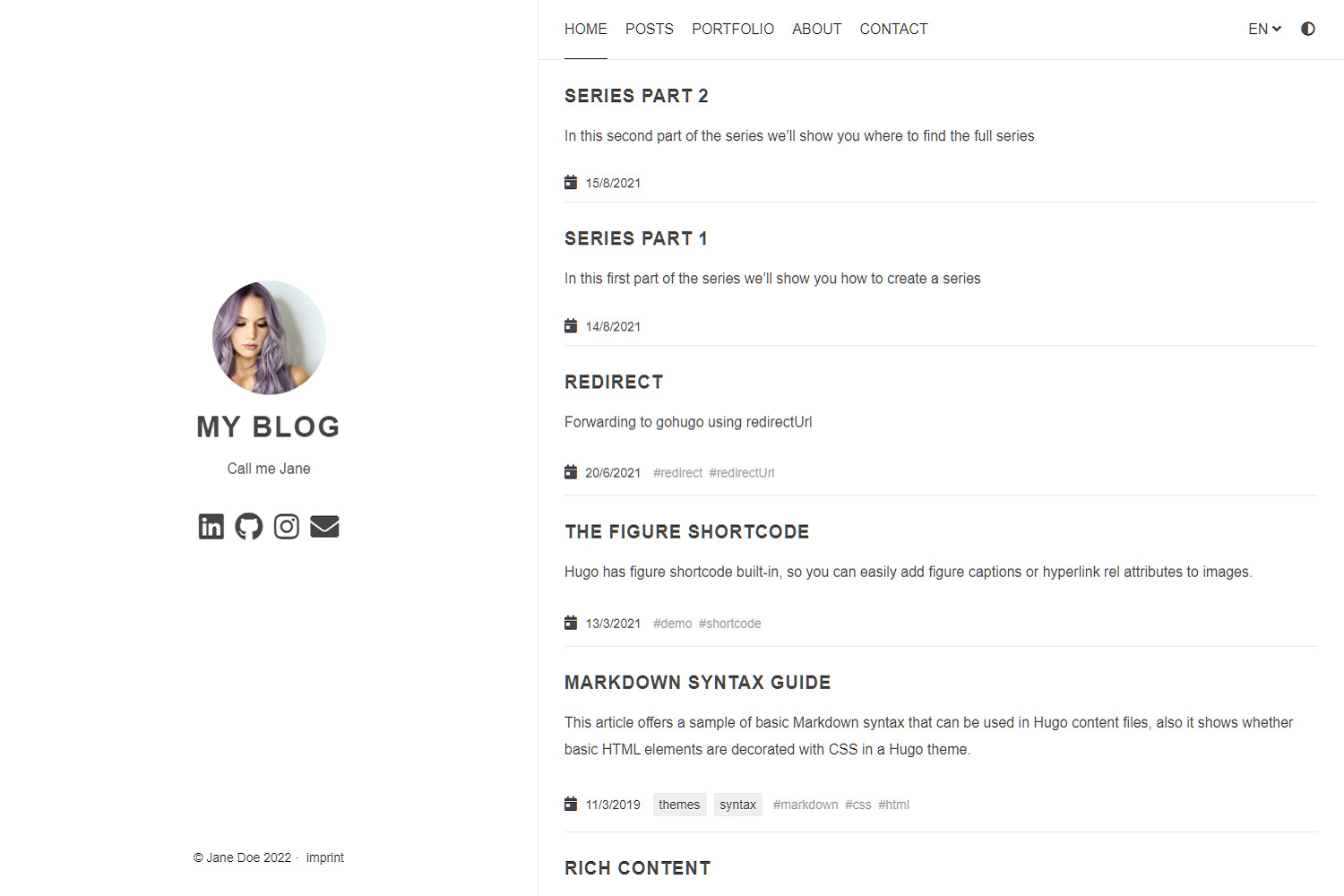
Compare the page layouts and mobile experience. Open any screenshot for a closer look.
Author preview
Author-provided previewTop of page
Preview provided in the project README.
One original preview is available. Open the full image to inspect the design.
Screenshots show visual appearance; interactive behavior may differ.
Recorded 2026-10-11View source
What stands out
A quick read of the recorded project description.
Configure avatar, tagline, navigation menu, date format, and article section name via config.toml
Supports dark mode with a theme toggle and can disable animations
Supports multilingual and RTL language directions
Optional Disqus, Commento, and Utteranc.es comments, plus Google Analytics and Simple Analytics
Supports KaTeX/MathJax math formulas, Formspree contact form, Twitter Cards, and Open Graph
Template Details
This is the Hugo blog theme used by instantiator for instantiator.dev, derived from lxndrblz's Anatole theme. The repository itself is released under the MIT license, and the README describes its positioning as a minimalist two-column blog theme and lists configurable features.
The theme is configured via config.toml, allowing settings for avatar and tagline, navigation menu, favicon, copyright year, date format, per-page summary and "read more" link, whether to show full content on the homepage, and the article section name (e.g., post or blog). On the display side, it supports dark mode with a theme toggle and can disable animations.
For content and integrations, the theme supports multilingual and RTL language directions, optional Disqus, Commento, and Utteranc.es comments, Google Analytics (including GA4's gtagId), Simple Analytics, Google site verification, KaTeX/MathJax math formulas, Formspree contact form, Twitter Cards and Open Graph, article thumbnails and image zoom, syntax highlighting, and allows adding custom CSS and JavaScript.
Usage limitations: Formspree, Disqus, Commento, Utteranc.es, Google Analytics, Simple Analytics, and other services mentioned in the README are external services that require configuring endpoints or accounts, and their quotas and fees must be checked separately; the Utteranc.es script has no built-in integrity check, so when using a strict CSP, the relevant domains must be whitelisted; the licenses for third-party assets such as demo images, fonts, and icons must be confirmed separately.
HugoBlog
Is it right for your project?
Use Cases
- Building a personal tech blog focused on article lists
- Blog sites requiring multilingual or RTL language support
- Hugo sites that want to optionally integrate comments, analytics, or math rendering
Suitable For
- Bloggers using Hugo who prefer to configure most settings via config.toml
- Personal sites needing dark mode, multilingual support, and optional comment systems
- Developers willing to configure third-party services (comments, analytics, forms) themselves
Getting started & customization
Use these recorded setup notes alongside the repository instructions for your chosen version.
- 1
Add the theme as a submodule to a Hugo project: git submodule add <repo> themes/anatole, and configure config.toml
- 2
Refer to exampleSite's config.toml and content, and preview locally with hugo server
- 3
External services such as Formspree, Disqus, Commento, Utteranc.es, Google Analytics, and Simple Analytics require configuring endpoints or accounts yourself
- 4
When using a strict CSP, add domain whitelists for external scripts such as Utteranc.es
- 5
Licenses for third-party assets such as demo images, fonts, and icons must be confirmed separately
License & source material
Usage conditions & limitations
Free to use · keep license noticeThis entry covers the free version in the public repository under the MIT license; the free scope applies to that version's code, not to external services or third-party assets.
Must comply with when using
- Free use, modification, commercial use, and distribution of this version's code are permitted.
- When distributing copies or substantial portions of the code, retain the original author's copyright notice and the full MIT license notice.
- The code is provided as-is; warranties and liability limitations are governed by the original license and applicable law.
Additional costs & items to verify
- The README mentions the Formspree form service; actual submissions require configuring a service endpoint, and its usage quotas and fees must be checked separately.
- Demo images, fonts, icons, and other third-party assets must be checked under their respective licenses and cannot be judged solely by the code's MIT license.
- External services such as domains, hosting, databases, payments, or AI may incur additional charges.
- Disqus comments are optional and will only display if a Disqus shortname is configured in config.toml; otherwise, no comments are shown.
- Utteranc.es comments are optional and will only display if a GitHub repository (repo) is specified in config.toml.
- The Utteranc.es script has no built-in integrity check; when using a strict CSP, you must whitelist the relevant domains yourself.
- Google Analytics is optional and requires providing a valid tracking code (e.g., UA or GA4's gtagId) to enable.
- Simple Analytics is optional and requires setting enable to true in config.toml to enable.
- The Formspree contact form is optional and requires configuring the contactFormAction endpoint in config.toml before use.
- When including remote JavaScript, integrity checks and minification are not applied; you must adjust CSP settings yourself.
- The avatar image in exampleSite is provided by a third party (an Unsplash user), and its asset license must be confirmed separately.
- Thumbnails in exampleSite articles are provided by third parties (Unsplash users), and their asset licenses must be confirmed separately.
View Original Text Basis
Permission is hereby granted, free of charge
Original License Text
No comment section is shown on the `single.html`, unless a Disqus code is specified in the `config.toml` file.
Original README
No comment section is shown on the `single.html` unless a `repo` is specified in the `config.toml` file.
Original README
The script currently has no built-in integrity check, due to limitations of [Utterances](https://github.com/utterance/utterances/issues/40).
Original README
To use Google Analytics, a valid tracking code has to be added.
Original README
To use Simple Analytics, it has to be enabled by setting the parameter to true.
Original README
Step 1: Configure the `contactFormAction` in the `config.toml`
Original README
You can also include links to remote javascript files (hosted on CDNs for example). But be aware, that integrity settings and minification won't be applied. Further make sure to adjust your CSP.
Original README
Go to [Kareya Saleh](https://unsplash.com/photos/tLKOj6cNwe0) for providing the profile picture in the exampleSite.
Original README
https://github.com/instantiator/blog-theme-anatole-instantiator/blob/main/LICENSEhttps://github.com/instantiator/blog-theme-anatole-instantiator/blob/main/README.mdGo to [Ales Krivec](https://unsplash.com/photos/4miBe6zg5r0) for providing the thumbnail picture in the exampleSite post.
Original README
Compiled by DeepSeek based on repository license and README ·2026-10-11. Results only cover the materials read; dependencies, images, fonts, and subsequent term changes are subject to their respective original texts.
Project checks & description sources
Template Information
- Source platforms
- GitHub
- Documentation and maintenance reference score
- Less documented · 53 / 100
- Technologies
- Hugo
- Website type
- Blog
How this score is calculated
Our heuristic uses license records (up to 30), a demo link (12), a preview (10), stars (15), recorded maintenance (15), description completeness (8), feature records (5) and classification data (5). It is not a code, security or performance test, or a Google score. A link does not establish tested functionality.
What to verify for this project
- Repository update recorded
- 2023-07-02
- Screenshot last checked
- 2026-10-11
No demo link is recorded. Use the repository instructions to evaluate the project locally; the screenshot alone cannot establish interactive behavior.
The catalog identifies Hugo as the primary stack. Check the actual dependency manifest and lockfile for versions and hosting requirements. These notes use recorded metadata, not a code audit or a deployment test.
Use a selection guide →How this description was prepared
AI-assisted description based on catalog records and repository material. Repository authors are not automatically the reviewers of this description.
Review declaration: [email protected] · 2026-10-13
Inspect the recorded source material
SHA-256: ff2864e0033c0385cc8c3d998216c1f544b69d70609ee9412805bcd1f592f692
2026-10-11T19:21:57.634Z
Source file / repository# blog-theme
The theme for [instantiator.dev](https://instantiator.dev) is derived from the [Anatole](https://github.com/lxndrblz/anatole) blog theme.
## Anatole  [](https://alexbilz.com/)
Anatole is a beautiful minimalist two-column [hugo](https://gohugo.io/) theme based on farbox-theme-Anatole.
## Features
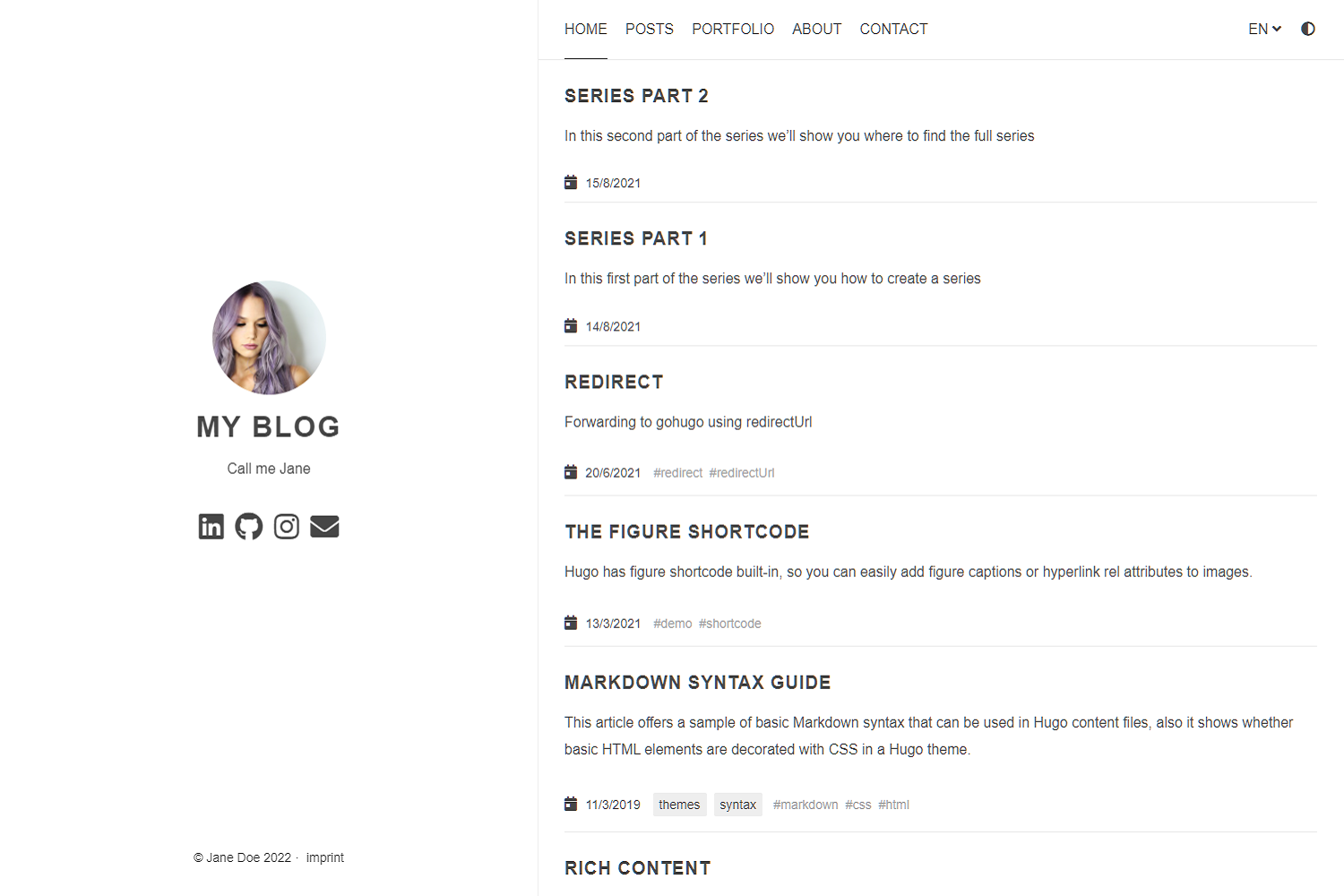
Anatole's aims to be minimalistic and sleek, but still brings some great functionality.
### Features include
- Profile picture and slogan
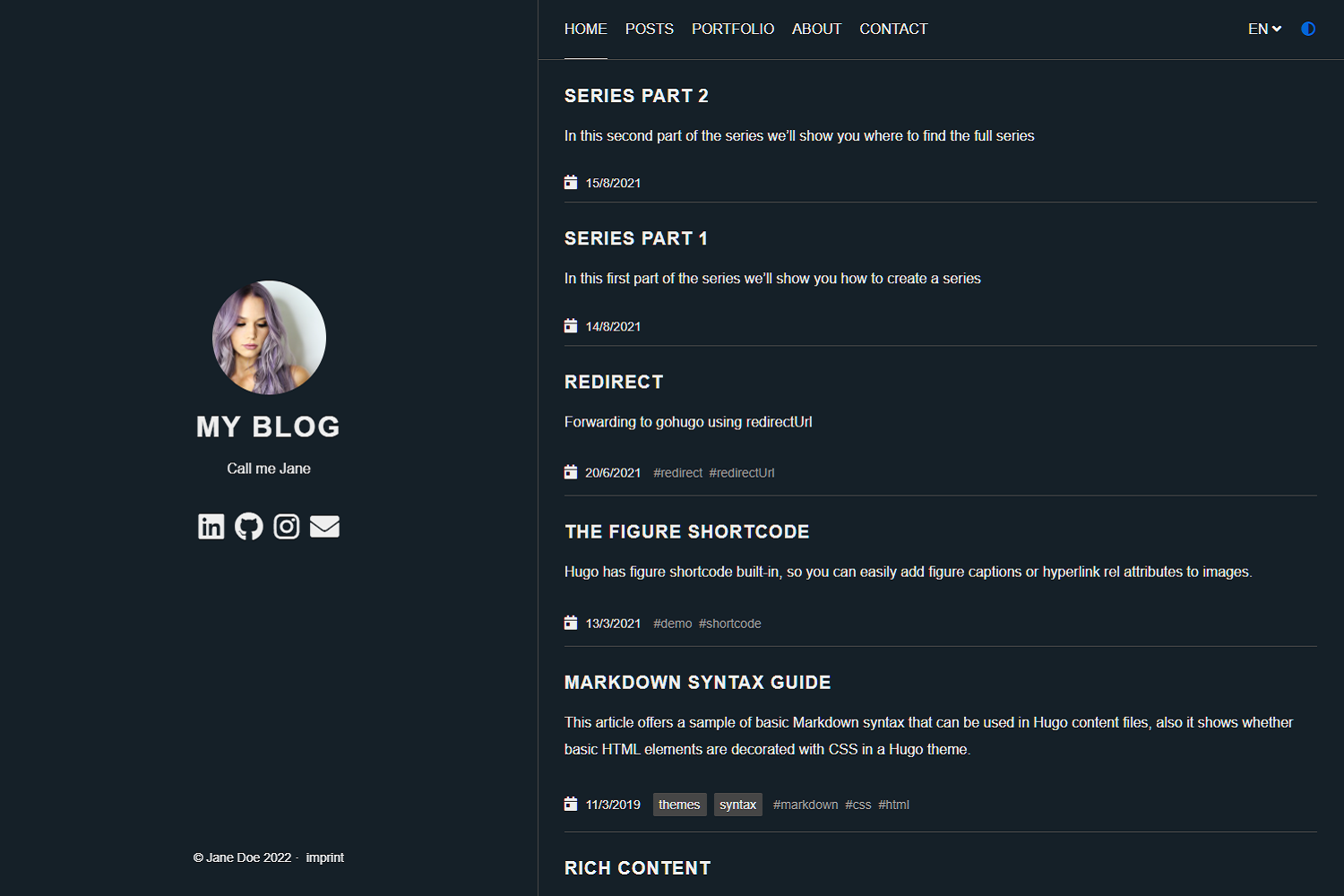
- Dark mode
- Navigation items
- Pagination
- Multilingual
- RTL support
- Post Thumbnails (optional)
- 100⁄100 Google Lighthouse score
- Google Analytics (optional)
- Comments powered by Disqus, Commento or Utteranc.es (optional)
- SimpleAnalytics (optional)
- Katex support (optional)
- Formspree Contact Form (optional)
- Twitter Cards support
- Open Graph support
- MIT License
- Fontawesome 5.15.1 icons
- Custom CSS (optional)
- Custom JavaScript (optional)
- Medium like zoom for images
- Compliant to strict CSP
- Syntax highlighting
- Uses Hugo pipes to process assets
## Preview the exampleSite
```shell
git clone https://github.com/lxndrblz/anatole.git anatole
cd anatole/exampleSite
hugo server --themesDir ../..
```
## Quick Start
1. Add the repository into your Hugo Project repository as a submodule: `git submodule add https://github.com/lxndrblz/anatole.git themes/anatole`.
2. Configure your `config.toml`. Feel free to copy the demo `config.toml` and some content from the exampleSite.
3. Build your site with `hugo serve` and admire the result at `http://localhost:1313/`.
## Update your installation
If you want to get the latest update of the `Anatole` theme please execute this command:
```shell
git submodule update --remote --merge
```
## Modifying the config.toml
Ìn this section I'll discuss the custom parameters available within the `config.toml`. The complete [sample](https://github.com/lxndrblz/anatole/blob/master/exampleSite/config.toml) can be found in the exampleSite folder.
### Profile picture and slogan
```toml
[params]
title = "I'm Jane Doe"
author = "Jane Doe"
description = "Call me Jane"
profilePicture = "images/profile.jpg"
```
Please note that the slogan can be multi-lined (note the three quotes at the beginning and end):
```toml
[params]
description = """
Call me Jane
Blogging from Texas
"""
```
### Favicon
Add your own favicon in `static/favicons/favicon.ico`.
### Copyright
By default, the copyright will show the current year, but you can change this by configuring the `copyright` parameter.
```toml
copyright = "2020-2021"
```
### Navigation items
Non-content entries can be added right from the `config.toml` file.
```toml
[menu]
[[menu.main]]
name = "Home"
identifier = "home"
weight = 100
url = "/"
[[menu.main]]
name = "Posts"
weight = 200
identifier = "posts"
url = "/post/"
[[menu.main]]
name = "About"
weight = 300
identifier = "about"
url = "/about/"
```
### Prefer dark theme
You can easily enable the dark mode from the `config.toml` all you have to do is to set the parameter `displayMode` to `dark`. If you don't specify any displayMode, then the light version will be loaded.
Please also note that returning visitors will see the theme that was last displayed to them on your site. If your user has his system configured to dark mode, then this will also take precedence over the `displayMode` set in the `config.toml`.
```toml
[params]
displayMode = "dark"
```
### Disable Theme Switcher
You can easily disable the theme switcher from the `config.toml`. All you have to do is to set the parameter `disableThemeSwitcher` to `true`.
```toml
[params]
disableThemeSwitcher = true # Theme switcher is enabled by default
```
### Disable Animations
You can easily disable the animations from the `config.toml`. All you have to do is to set the parameter `doNotLoadAnimations` to `true`.
```toml
[params]
doNotLoadAnimations = true # Animations are loaded by default
```
### Control the date Format
You can change the default date formating for the `list.html`, the `single.html` and the `index.html`. Simply configure the matching parameters.
```toml
[params]
singleDateFormat = "Mon, Jan 2, 2006"
indexDateFormat = "Mon, Jan 2, 2006"
listDateFormat = "Jan 2"
```
### Read-more Links
You can enable read-more links for truncated posts by setting the `readMore = true`. The length of the preview is controlled by Hugo's `summarylength`. Read-more links are disabled by default.
```toml
[params]
readMore = true
```
### Have a static page as a home page
If you prefer having a static page as your home page rather than a listing of the latest posts, then make sure you leave the `mainSections` parameter blank:
```toml
[params]
mainSections = []
```
Put any content into the `_index.md` file located in the content directory. If you want, you can also have some static text and the posts below. In such case, simply keep the `mainSections = ["post"]` and put any static content in the `_index.md`.
### Rename post section
If you want to have a different post section identifier, such as `/blog`, you can specify the section name using `postSectionName`:
```toml
[params]
postSectionName = "blog"
```
If the parameter is not set, it will default to `post`. Be sure to check the name of the folder containing your post files and change it accordingly in order for links to reflect the new post section name.
### Show full post content on the home page
If you prefer the full content of your posts to appear on the home page rather than a summary of each post, then set the parameter `fullPostContent` to `true`.
```toml
[params]
fullPostContent = true
```
### Multilingual support
Anatole supports multilingual page setups. All you need to do is to add the languages to your 'config.toml'. For each language you can set the custom options like title or description. It's important to include a `LanguageName`, as it will be displayed in the main menu.
```toml
[Languages]
[Languages.en]
title = "My blog"
weight = 1
LanguageName = "EN"
[Languages.de]
title = "Mein blog"
description = "Ich bin Jane"
weight = 2
LanguageName = "DE"
```
There are two ways of translating your content either by adding a suffix in the filename eg. `mypost.de.md` or by setting a contentDir (a certain directory) for each language. [Link to the Hugo documentation](https://gohugo.io/content-management/multilingual/). If you want to use the option with the `contentDir`, you will have to add the `contentDir` parameter for each language:
```toml
[languages]
[languages.en]
contentDir = "content/english"
languageName = "EN"
weight = 1
```
To make sure your menu is linking to the correct localized content, make sure that you customize the menu items to include the language prefix. Your menu might look like the following:
```toml
[[Languages.de.menu.main]]
url = "/de/"
identifier = "home"
name = "Startseite"
weight = 100
[[Languages.de.menu.main]]
name = "Beiträge"
weight = 200
identifier = "posts"
url = "/de/post/"
[[Languages.de.menu.main]]
name = "Über"
weight = 300
identifier = "about"
url = "/de/about/"
```
Anatole currently ships with support for some basic languages. Contributions for other language translations are welcome.
### RTL suppourt
Anatole support RTL langauges and flip the whole theme for that. To enable the RTL mode for specific langauge it's enough to write the following code in the language params.
```toml
LanguageDirection = "rtl"
```
### :100: Google Lighthouse score
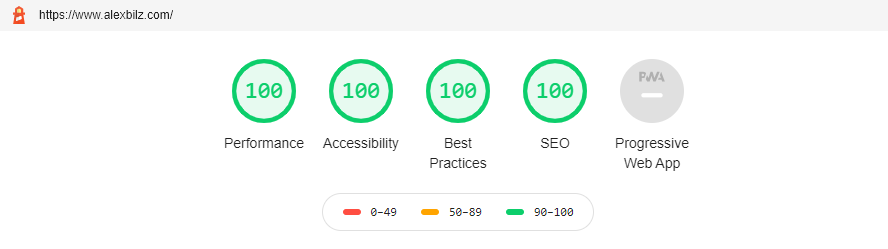
The theme is optimized to adhere to the requirements checked for in the Lighthouse Audit. On my [personal site](https://www.alexbilz.com) I was able to reach a perfect 100⁄100 score.
### Comments powered by Disqus
No comment section is shown on the `single.html`, unless a Disqus code is specified in the `config.toml` file.
```toml
disqusShortname = "XXX"
```
### Comments powered by Utteranc.es
No comment section is shown on the `single.html` unless a `repo` is specified in the `config.toml` file. If uncertain how parameter to configure, check out the official [documentation}(https://utteranc.es/).
```toml
[params.utterances]
repo = "githubuser/reponame"
issueTerm = "pathname"
theme= "preferred-color-scheme"
# label =
```
Two notes on the security of Utteranc.es
- If you are using a strict CSP, you'll have to add the domain to it.
- The script currently has no built-in integrity check, due to limitations of [Utterances](https://github.com/utterance/utterances/issues/40).
### Comments powered by Commento
You can use [Commento](https://commento.io/) as an alternative to Disqus. All you need to do is to configure a `CommentoURL`:
```toml
[params]
CommentoURL = "https://commento.example.com/js/commento.js"
```
### Disabling Comments Per Page
Comments can be disabled per page by setting `disableComments: true` on the pages [Front Matter](https://gohugo.io/content-management/front-matter/)
### Google Analytics
To use Google Analytics, a valid tracking code has to be added. If you don't want to load the code, then commend out the parameter.
```toml
googleAnalytics = "UA-123-45"
```
To use the modern Google Analytics 4, include the following under `[params]` replacing the id with your own.
```toml
[params]
gtagId = "G-XXXXXXXXXX"
```
### Simple Analytics
To use Simple Analytics, it has to be enabled by setting the parameter to true. If you are using a custom subdomain to evade Adblockers, then specify the URL without a trailing slash.
```toml
[params.simpleAnalytics]
enable = true
# customurl = "https://analytics.example.com"
```
### Google Site Verification
To use Google Site Verification, add the following line to the `[params]`:
```toml
[params]
googleSiteVerify = "ABCDEFGHIJKLMNOPQRSTUVWXYZ0123456789"
```
Replace the hash with the one Google provided you.
### Beautiful math functions
```toml
## Math settings
[params.math]
enable = false # options: true, false. Enable math support globally, default: false. You can always enable math on per page.
use = "katex" # options: "katex", "mathjax". default is "katex".
```
### Formspree Contact Form on the Contact page
Step 1: Configure the `contactFormAction` in the `config.toml`
```toml
[params]
#contactFormAction = "https://formspree.io/f/your-form-hash-here"
```
Step 2: Activate the `contact: true` or `contact=true` in the frontmatter of a page. See `exampleSite/content/contact.html` as an example.
### Twitter Cards support
In order to use the full functionality of Twitter cards, you will have to define a couple of settings in the `config.toml` and the frontmatter of a page.
In the `config.toml` you can configure a site feature image. This image will be displayed, if no image is defined in the frontmatter of a page.
```toml
[params]
images = ["images/site-feature-image.png"]
```
To define a custom image of a page, you might want to add the following to the frontmatter of a post.
```toml
images = ["post-cover.png"]
```
### Open Graph Support
The [internal template for Open Graph protocol](https://gohugo.io/templates/internal/#open-graph) uses a mix of configuration variables; settings in `config.toml` and frontmatter of the page. In a nutshell, you will have to configure a taxonomies series.
### Post Thumbnails
Thumbnails can be enabled easily by setting the `thumbnail` parameter in the frontmatter of a post to an image such as `"images/landscape.jpg"`.
```md
+++
...
tags = [
"thumbnail",
]
thumbnail= "images/landscape.jpg"
+++
```
Make sure to put the image in the `static/images/` directory.
### Custom CSS
You can add your custom CSS files with the `customCss` parameter of the configuration file. Put your files into the `assets/css` directory.
```toml
customCss = ["css/custom.css", "css/styles.css"]
```
On the user-side it will look like this:
```text
.
└── assets
└── css
├── custom.css
└── styles.css
```
### Custom JavaScript
You can add your custom JS files with the `customJs` parameter of the configuration file. Put your files into the `assets/js` directory.
```toml
[params]
customJs = ["js/hello.js", "js/world.js"]
```
On the user-side it will look like this:
```text
.
└── assets
└── js
├── hello.js
└── world.js
```
`hello.js` and `world.js` will be bundled into a `custom.min.js`.
You can also include links to remote javascript files (hosted on CDNs for example). But be aware, that integrity settings and minification won't be applied. Further make sure to adjust your CSP. You can load a remote script like this:
```toml
[params]
customJs = ["http://cdn.exmple.org/fancyscript.js"]
```
Both approaches can even be mixed:
```toml
[params]
customJs = ["https://cdn.exmple.org/fancyscript.js", "js/world.js"]
```
### Medium Like Zoom
Enabled by default, the medium like zoom for images can be disabled by adding the following config under `[params]`.
```toml
[params]
enableMediumZoom = false
```
### Content Security Policy
The theme is compliant with most strict CSP policies out of the box. A sample CSP for an Anatole-based site would look something like this:
```text
Content-Security-Policy "
base-uri 'self';
connect-src 'self';
default-src 'self';
frame-ancestors 'none';
font-src 'self' cdnjs.cloudflare.com;
img-src 'self';
object-src 'none';
script-src 'self';
style-src 'self' cdnjs.cloudflare.com;
"
```
If you want to configure the security headers for a site running on Netlify, you want to make sure you create a special `_headers` file in your sites static folder. The content might look like the following:
```text
/*
X-Frame-Options: DENY
X-Clacks-Overhead: "GNU Terry Pratchett"
X-XSS-Protection: 1; mode=block
X-Content-Type-Options: nosniff
Referrer-Policy: same-origin
Content-Security-Policy: base-uri 'self'; connect-src 'self'; default-src 'self'; frame-ancestors 'none'; font-src 'self' cdnjs.cloudflare.com; img-src 'self'; object-src 'none'; script-src 'self'; style-src 'self' cdnjs.cloudflare.com;
Strict-Transport-Security: max-age=63072000; includeSubDomains; preload
```
### Configurable pagination section
You can configure the pages shown on the front page by altering the `mainSections` parameter:
```toml
[params]
mainSections = ["post", "docs"]
```
### Robots.txt
If you want Hugo to generate a robots.txt, you will have to set the `enableRobotsTXT` in the `config.toml` to `true`. By default a robots.txt, which allows search engine crawlers to access to any page, will be generated. It will look like this:
```text
User-agent: *
```
If certain sites should be excluded from being accessed, you might want to setup a custom robots.txt file within your `static` folder of your site.
### Syntax highlighting
This theme has support for either Hugo's lightning-fast Chroma code highlighting. See the [Hugo docs](https://gohugo.io/content-management/syntax-highlighting/) for more information.
To enable Chroma, add the following to your site parameters:
```toml
pygmentsCodeFences = true
pygmentsUseClasses = true
```
Then, you can generate a different style by running:
```shell
hugo gen chromastyles --style=monokailight > assets/css/syntax.css
```
If you get any errors, make sure the `assets/css/` directory exists within your sites root folder.
Include the newly generated `syntax.css` like a standard custom CSS script:
```toml
[params]
customCss = ["css/syntax.css"]
```
## License
Anatole is licensed under the [MIT license](https://github.com/lxndrblz/anatole/blob/master/LICENSE).
## Maintenance
This theme is maintained by its author [Alexander Bilz](https://github.com/lxndrblz) and with the help from these awesome [contributors](https://github.com/lxndrblz/anatole/graphs/contributors). Please open an issue/pull request if you want to contribute to making this theme better and more feature-complete. For PRs please make sure that they align with theme's goals: minimalism, speed and elegance.
## Sponsoring
If you like this theme, give it a star on GitHub, and consider supporting its development:
[](https://ko-fi.com/lxndrblz/)
## Special Thanks 🎁
- Go to [Cai Cai](https://github.com/hi-caicai), for the great Anatole Farbox theme that formed the foundation for this theme.
- Go to [Kareya Saleh](https://unsplash.com/photos/tLKOj6cNwe0) for providing the profile picture in the exampleSite.
- Go to [Ales Krivec](https://unsplash.com/photos/4miBe6zg5r0) for providing the thumbnail picture in the exampleSite post.
Explore similar templates
Compare previews and descriptions within the same stack and category.

hugo-PaperMod
A fast, clean, responsive Hugo theme for blogs and lightweight portfolios, with three layout modes (Regular, Home-Info, Profile), automatic and manual light/dark themes, Fuse.js client-side search, multilingual support, and built-in Open Graph, Twitter Cards, and Schema.org data.
Hugo · Portfolio

LoveIt
LoveIt is a clean, elegant, and feature-rich Hugo blog theme derived from LeaveIt and KeepIt, MIT-licensed. It offers light/dark modes, responsive layout, multilingual support, and search via Lunr.js or Algolia.
Hugo · Blog

hugo-coder
hugo-coder is a minimalist Hugo blog theme maintained by luizdepra under the MIT license. It provides a clean, text-focused blog appearance, configuration documentation in the docs directory, and a complete exampleSite with hugo.toml.
Hugo · Blog

blowfish
Blowfish is a Hugo personal website and blog theme built with Tailwind CSS 4, focused on lightness, simplicity, and content-first presentation.
Hugo · Blog

hugo-paper
hugo-paper is a simple, clean, and customizable Hugo blog theme configured through config.toml or hugo.toml.
Hugo · Blog

hextra
Hextra is a Hugo theme for documentation and blog sites, built on Hugo and Tailwind CSS with design referencing Nextra.
Hugo · Documentation