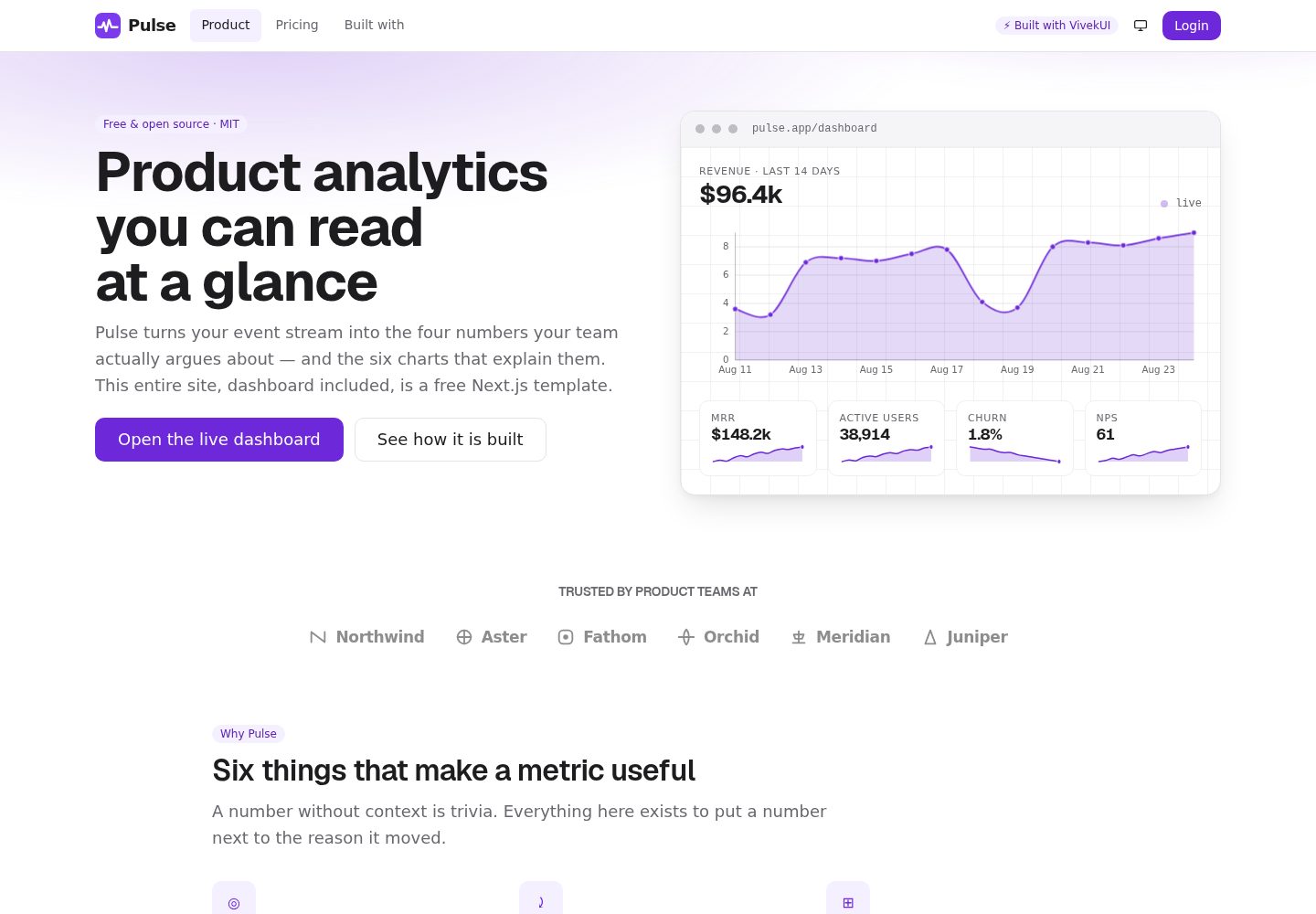
A Next.js SaaS template combining a marketing site and a simulated login dashboard, with all data from typed mock modules under data/
Next.jsReactAdmin dashboardSaaSCorporate Website
Pulse-Analytics — Next.js Admin dashboard Template
By intellectwithvivek
Pulse Analytics is an open-source SaaS template built on Next.js and VivekUI, comprising a marketing site and a simulated post-login dashboard, with all data coming from typed mock modules under the data/ directory.
Explore the design
Compare the page layouts and mobile experience. Open any screenshot for a closer look.
Desktop homepage1 / 2
Desktop captureTop of page
Actual screenshot captured by the server browser.
All pages & views 2
Screenshots show visual appearance; interactive behavior may differ.
Recorded 2026-10-15View source
What stands out
A quick read of the recorded project description.
The dashboard includes six chart types: AreaChart, BarChart, LineChart, PieChart, ProgressRing, and Sparkline, all pure SVG
Charts can render in React Server Components and come with visually hidden data tables; series are distinguished without relying on color
No UI runtime dependencies other than VivekUI; Tailwind, shadcn, MUI, Recharts, Chart.js, and D3 are not used
Includes SEO and AEO configuration: per-route Metadata, canonical, sitemap, robots, generated OG cards, manifest, multiple JSON-LD, and llms.txt
Provides dashboard page examples such as DataTable, KanbanBoard, date-range reports, and export
Template Details
Pulse Analytics is an open-source Next.js SaaS template aimed at product analytics products, providing both a marketing site and a simulated post-login dashboard. The marketing site includes a hero, logo cloud, features, data, customer testimonials, pricing, FAQ, CTA, newsletter, and footer; the dashboard includes KPI cards, six chart types, data tables, a Kanban board, and a report view with date range and export. The README states the project uses the VivekUI component library, with no other UI dependencies installed, and no Tailwind, PostCSS plugins, shadcn, MUI, Recharts, Chart.js, or D3. The six charts are pure SVG, can render in React Server Components, and come with visually hidden data tables. The project also includes per-route Metadata API, canonical, sitemap, robots, generated OG cards, web app manifest, multiple JSON-LD, and public/llms.txt. The README explicitly states there is no .env to fill in and no database to start; all numbers are in typed modules under data/. The README provides no information about a real backend, authentication, or production deployment beyond this; connecting a real backend requires replacing the exports in data/ yourself, and you can set DataTable to manual mode as described for server-driven tables.
Next.jsDashboardSaaSCorporate website
Is it right for your project?
Use Cases
- As a starting point for a product analytics SaaS marketing site, after replacing copy and brand assets
- As a dashboard interface reference or prototype with charts, tables, and a Kanban board
- To see how VivekUI components combine in marketing pages and dashboards
- As a reference implementation for SEO, JSON-LD, and llms.txt configuration in a Next.js project
Suitable For
- Developers who need a Next.js SaaS template and want both marketing pages and a dashboard interface
- Projects that want to use VivekUI and avoid introducing other UI or chart libraries
- Developers who need a reference for rendering pure SVG charts in server components
- Projects that need example data tables, a Kanban board, and report views
Getting started & customization
Use these recorded setup notes alongside the repository instructions for your chosen version.
- 1
Requires Node.js 20.9+, with 22 LTS recommended; run git clone, npm install, npm run dev, then visit http://localhost:3000
- 2
There is no .env to fill in and no database to start; all numbers are in typed modules under data/
- 3
Before deployment, set your own domain in lib/site.ts; SITE.url is the build basis for metadataBase, canonical, sitemap, and JSON-LD
- 4
Brand replacement involves files such as lib/site.ts, data/, lib/content.ts, app/globals.css, components/site/logo.tsx, app/icon.svg, and app/opengraph-image.tsx
- 5
To connect a real backend, replace the exports in data/; for server-driven tables, set DataTable's manual and use onSortChange, onSearchChange, onPageChange, and totalRows
License & source material
Usage conditions & limitations
Free to use · keep license noticeThis entry covers the free version under the MIT license in the public repository; the free scope is the code of that version and does not mean external services or third-party assets are free.
Must comply with when using
- You may use, modify, commercialize, and distribute the code of this version for free.
- When distributing copies or substantial portions of the code, retain the original author's copyright notice and the full MIT license notice.
- The code is provided as is; warranties and limitations of liability are governed by the original license and applicable law.
Additional costs & items to verify
- Demo images, fonts, icons, and other third-party assets must be checked against their respective licenses and cannot be judged solely by the code's MIT license.
- External services such as domain, hosting, database, payment, or AI may incur separate charges.
- The project depends on the @the_viveksingh/vivek-ui component library (^0.5.0); using the template requires installing this external npm package as well.
- Before deployment, you must set your own domain in lib/site.ts; SITE.url is the build basis for metadataBase, canonical, sitemap, and JSON-LD.
- The runtime requires Node.js 20.9+, with 22 LTS recommended.
- The template contains no real authentication logic; "Login" is just a link to /dashboard, and integrating real login requires your own implementation.
- To connect a real backend, you must replace the exports in the data/ directory yourself; the template only provides typed mock data.
View Original Text Basis
Permission is hereby granted, free of charge
Original License Text
"@the_viveksingh/vivek-ui": "^0.5.0",
Original README
Before deploying, set your own domain in [`lib/site.ts`](lib/site.ts) — `SITE.url` is what
Original README
Requires **Node.js 20.9+** (22 LTS recommended).
Original README
3. There is no auth to unpick — "Login" is a `<Link href="/dashboard">`.
Original README
https://github.com/intellectwithvivek/Pulse-Analytics/blob/main/LICENSEhttps://github.com/intellectwithvivek/Pulse-Analytics/blob/main/README.md1. Replace the exports in [`data/`](data/) with your own fetches. The chart shapes are
Original README
Compiled by DeepSeek based on repository license and README ·2026-10-15. Results only cover the materials read; dependencies, images, fonts, and subsequent term changes are subject to their respective original texts.
Project checks & description sources
Template Information
- Source platforms
- GitHub
- Documentation and maintenance reference score
- More documented · 88 / 100
- Technologies
- Next.js · React
- Website type
- Admin dashboard · SaaS · Corporate Website
How this score is calculated
Our heuristic uses license records (up to 30), a demo link (12), a preview (10), stars (15), recorded maintenance (15), description completeness (8), feature records (5) and classification data (5). It is not a code, security or performance test, or a Google score. A link does not establish tested functionality.
What to verify for this project
- Repository update recorded
- 2026-08-29
- Screenshot last checked
- 2026-10-15
A demo link is listed. Check it with your own content and viewport sizes; its presence does not confirm that forms, authentication or payments work.
The catalog identifies Next.js as the primary stack. Check the actual dependency manifest and lockfile for versions and hosting requirements. These notes use recorded metadata, not a code audit or a deployment test.
Use a selection guide →How this description was prepared
AI-assisted description based on catalog records and repository material. Repository authors are not automatically the reviewers of this description.
Review declaration: codex-user-requested-batch-review-20261017 · 2026-10-16
Inspect the recorded source material
SHA-256: 1539007254aa90520febb6a8a20ee1d563a3895a216b97253b896b9438579737
2026-10-15T12:02:53.641Z
Source file / repository<div align="center">
# Pulse Analytics
**A free, open-source Next.js 16 SaaS template — marketing site *and* a working dashboard.**
All six charts included. No chart library installed.
[](https://nextjs.org)
[](https://react.dev)
[](https://www.typescriptlang.org)
[](https://www.npmjs.com/package/@the_viveksingh/vivek-ui)
[](#zero-runtime-ui-dependencies)
[](LICENSE)
### [**Live demo →**](https://pulseanalytics.vivekkumarsingh.in)
[](https://vercel.com/new/clone?repository-url=https%3A%2F%2Fgithub.com%2Fintellectwithvivek%2FPulse-Analytics)
</div>
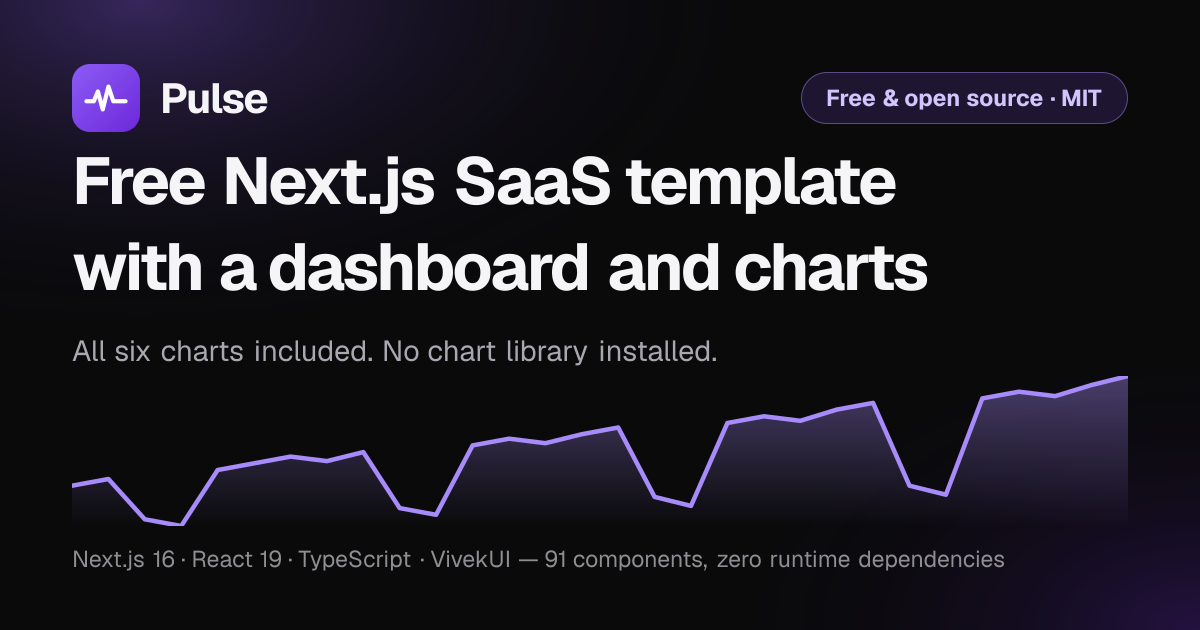
> The card above is generated by [`app/opengraph-image.tsx`](app/opengraph-image.tsx) at
> build time from the same revenue series the dashboard plots — not a stock image. For a
> real screenshot of `/dashboard`, drop one at `public/screenshot.png` and reference it
> here.
---
## What this is
A complete, production-shaped template for a product-analytics SaaS, built to show what
[VivekUI](https://ui.vivekkumarsingh.in/docs?utm_source=vivekui-template&utm_campaign=saas&utm_medium=readme)
can do without any other UI dependency:
- A **marketing site** — hero, logo cloud, features, stats, testimonials, pricing, FAQ,
CTA, newsletter, footer.
- A **mock logged-in dashboard** — KPI cards, six chart types, a data table, a Kanban
board, and a reports view with a date range and an export.
- **SEO and AEO wiring** — per-route Metadata API with canonicals, `sitemap.ts`,
`robots.ts` (AI crawlers named and allowed), a generated OG card, a web app manifest,
and `WebSite` + `SoftwareApplication` + `SoftwareSourceCode` + `Offer` + `FAQPage` +
`BreadcrumbList` + `Person` JSON-LD, plus `public/llms.txt`.
The hero "screenshot" is the detail worth clicking through for: it is **not an image**. It
is a live `AreaChart` and four live `Sparkline`s inside a framed panel, server-rendered
from the same mock data the dashboard uses. The product demo *is* the hero.
## Quick start
Requires **Node.js 20.9+** (22 LTS recommended).
```bash
git clone https://github.com/intellectwithvivek/Pulse-Analytics.git
cd Pulse-Analytics
npm install
npm run dev
```
Open <http://localhost:3000>. There is no `.env` to fill in and no database to start —
every number lives in typed modules under [`data/`](data/).
Before deploying, set your own domain in [`lib/site.ts`](lib/site.ts) — `SITE.url` is what
`metadataBase`, the canonical URLs, the sitemap and every JSON-LD node are built from.
## Make it yours
Five files cover almost everything. In the order you will want them:
| # | File | What to change |
| --- | --- | --- |
| 1 | [`lib/site.ts`](lib/site.ts) | Domain, repo URL, product name. **Change `SITE.url` first** — `metadataBase`, every canonical tag, the sitemap, the manifest and all JSON-LD derive from it. |
| 2 | [`data/`](data/) | `analytics.ts`, `customers.ts`, `roadmap.ts` — every number on the site, as typed modules. |
| 3 | [`lib/content.ts`](lib/content.ts) | Pricing plans, the comparison matrix, and the FAQ (which also feeds the `FAQPage` schema, so the two cannot disagree). |
| 4 | [`app/globals.css`](app/globals.css) | The accent, in about eight custom properties at the top of the file. |
| 5 | [`components/site/logo.tsx`](components/site/logo.tsx) + [`app/icon.svg`](app/icon.svg) + [`app/opengraph-image.tsx`](app/opengraph-image.tsx) | The brand: navbar mark, favicon, social card. |
### Rebranding checklist
- [ ] `SITE.url` and `SITE.repo` in `lib/site.ts`
- [ ] Swap the mark in `components/site/logo.tsx`, `app/icon.svg`, `public/logo.svg` and `public/logo-mark.svg`
(all three share one path — `M4 18h4.5l2.5-6 3 11 3.5-14 3 9H28`)
- [ ] Accent tokens in `app/globals.css` (`--vk-color-primary`, `--vk-chart-1`)
- [ ] `theme_color` in [`app/manifest.ts`](app/manifest.ts) and `themeColor` in `app/layout.tsx`
- [ ] Copy in `app/page.tsx`, `lib/content.ts` and `public/llms.txt`
- [ ] Point the footer credit wherever you like, or remove it — MIT, no attribution required
### Brand assets
| Asset | Source | Served at |
| --- | --- | --- |
| Favicon | [`app/icon.svg`](app/icon.svg) | `/icon.svg` |
| iOS home screen | [`app/apple-icon.tsx`](app/apple-icon.tsx) (generated PNG) | `/apple-icon` |
| Social card | [`app/opengraph-image.tsx`](app/opengraph-image.tsx) (generated PNG) | `/opengraph-image` |
| Full logo | [`public/logo.svg`](public/logo.svg) | `/logo.svg` |
| Mark only | [`public/logo-mark.svg`](public/logo-mark.svg) | `/logo-mark.svg` |
| Manifest | [`app/manifest.ts`](app/manifest.ts) | `/manifest.webmanifest` |
The two generated images use the Geist faces committed under `assets/`. `next/og` bundles
only Geist *Regular*, so without a real 700 face every bold weight silently renders as
regular — which is why the files are in the repo rather than fetched at build time.
## Routes
| Route | What it demonstrates |
| --- | --- |
| `/` | Hero with a live chart panel, logo cloud, features, stats, testimonials, pricing preview, FAQ, CTA, newsletter |
| `/pricing` | Three tiers, a monthly/yearly `Switch`, a feature comparison `Table`, an FAQ |
| `/dashboard` | **All six charts** — four KPI cards with sparklines, area, bar, line, pie, progress rings, activity timeline |
| `/dashboard/customers` | `DataTable` — sortable, searchable, paginated, selectable, with row actions and an empty state |
| `/dashboard/roadmap` | `KanbanBoard` with drag-and-drop, WIP limits, and a full keyboard move path |
| `/dashboard/reports` | Date range, four-chart grid, export → `Toast` |
| `/built-with` | Every component mapped to the section it draws, deep-linked to its docs |
## The six charts
| Chart | Where |
| --- | --- |
| [`AreaChart`](https://ui.vivekkumarsingh.in/docs/charts/area-chart) | Hero panel · dashboard revenue · reports |
| [`BarChart`](https://ui.vivekkumarsingh.in/docs/charts/bar-chart) | Signups by channel · feature adoption (horizontal) |
| [`LineChart`](https://ui.vivekkumarsingh.in/docs/charts/line-chart) | Retention across three cohorts |
| [`PieChart`](https://ui.vivekkumarsingh.in/docs/charts/pie-chart) | Plan mix, as a donut |
| [`ProgressRing`](https://ui.vivekkumarsingh.in/docs/charts/progress-ring) | Three quarterly goals |
| [`Sparkline`](https://ui.vivekkumarsingh.in/docs/charts/sparkline) | The trend inside each KPI card |
They are pure SVG with no measurement step, so **every one renders in a React Server
Component** — view source on `/dashboard` and the paths are already in the HTML. Each also
emits a visually hidden data table, and tells series apart by dash pattern and marker
shape as well as colour, so they stay readable in greyscale and with any form of colour
blindness.
### Zero runtime UI dependencies
```jsonc
// package.json — dependencies, in full
{
"@the_viveksingh/vivek-ui": "^0.5.0",
"next": "16.3.2",
"react": "19.2.8",
"react-dom": "19.2.8"
}
```
No Tailwind, no PostCSS plugin, no shadcn, no MUI. No Recharts, no Chart.js, no D3. Setup
is one install and two CSS imports in [`app/layout.tsx`](app/layout.tsx):
```tsx
import '@the_viveksingh/vivek-ui/styles.css'
import '@the_viveksingh/vivek-ui/charts.css' // charts ship as a separate entry point
```
## Project layout
```
app/
layout.tsx root layout — fonts, theme, viewport, WebSite + SourceCode JSON-LD
page.tsx marketing homepage
globals.css the Violet accent, and this site's own CSS
icon.svg favicon
apple-icon.tsx generated 180x180 iOS icon
opengraph-image.tsx generated 1200x630 social card
manifest.ts sitemap.ts robots.ts
pricing/ plans, comparison table, FAQ
built-with/ the component map
dashboard/
layout.tsx wraps every dashboard page in the shell
page.tsx all six charts
loading.tsx Skeleton state matched to the real layout
customers/ roadmap/ reports/
components/
site/ logo, navbar, footer, install snippet, JSON-LD helpers
marketing/ hero panel, pricing tiers, logos, newsletter
dashboard/ shell, KPI card, tables, board, reports, icons
data/ typed mock series — swap these for your API
lib/ site config, UTM helpers, copy, component inventory
assets/ Geist 400/700 TTF, for the generated images only
public/
llms.txt attribution and structure, for answer engines
logo.svg icon.svg brand assets at stable paths
```
## Theming
Every value is a CSS custom property, so the whole library re-skins from one block —
see the top of [`app/globals.css`](app/globals.css):
```css
:root {
--vk-color-primary: #6d28d9; /* Violet, 7:1 against white */
--vk-chart-1: #6d28d9; /* what Sparkline and ProgressRing default to */
}
```
Marketing pages are light-first and the dashboard is dark-first. There is one
`ThemeProvider` for the site, so the dashboard takes the global theme unless the visitor
has expressed no preference at all (`'system'`), in which case it goes dark. An explicit
choice from the toggle always wins — see the note in
[`components/dashboard/dash-shell.tsx`](components/dashboard/dash-shell.tsx) for why the
override is applied in two places.
## Connecting a real backend
1. Replace the exports in [`data/`](data/) with your own fetches. The chart shapes are
the library's own types (`ChartDatum[]`, `PieDatum[]`, `number[]`), so nothing needs a
transform layer.
2. For server-driven tables, set `manual` on the `DataTable` and use `onSortChange`,
`onSearchChange` and `onPageChange` with `totalRows`.
3. There is no auth to unpick — "Login" is a `<Link href="/dashboard">`.
## Accessibility
The quality bar this was built to, and what the library gives you for free:
- One `<h1>` per page, and heading level kept separate from visual size.
- Charts carry `title`/`description` plus a hidden data table; series never rely on
colour alone.
- The Kanban board has a complete keyboard path — the HTML5 drag API has none — announced
through a live region.
- Every icon-only control has a real accessible name (`IconButton` requires it at the
type level).
- Visible focus rings, `prefers-reduced-motion` respected, and a skip link on every
marketing page.
## Scripts
```bash
npm run dev # Turbopack dev server
npm run build # production build — should finish with zero errors
npm run start # serve the production build
npm run lint # eslint
```
## Powered by VivekUI
Built with ❤️ using [VivekUI](https://ui.vivekkumarsingh.in/docs?utm_source=vivekui-template&utm_campaign=saas&utm_medium=readme)
— 91 React components · 6 SVG charts · zero runtime dependencies. One install, one CSS
import, no config.
```bash
npm i @the_viveksingh/vivek-ui
```
[Docs](https://ui.vivekkumarsingh.in/docs?utm_source=vivekui-template&utm_campaign=saas&utm_medium=readme)
· [npm](https://www.npmjs.com/package/@the_viveksingh/vivek-ui)
· [GitHub](https://github.com/intellectwithvivek/vivek_UI)
· [Vivek Kumar Singh](https://vivekkumarsingh.in/?utm_source=vivekui-template&utm_campaign=saas&utm_medium=readme)
## Licence
MIT — free for commercial use. **The credit in the footer is removable**; a star on the
repository is appreciated instead.
Explore similar templates
Compare previews and descriptions within the same stack and category.

Next.js SaaS Starter
The official Next.js SaaS starter template, integrating email/password authentication, Stripe Checkout subscriptions, a dashboard with user/team CRUD, basic Owner/Member RBAC, and activity logging.
Next.js · SaaS

SaaS-Boilerplate
SaaS-Boilerplate is an open-source SaaS starter template built with Next.js App Router, React 19, TypeScript, Tailwind CSS, and Shadcn UI.
Next.js · SaaS

next-shadcn-dashboard-starter
An MIT-licensed admin dashboard starter built with Next.js 16, shadcn/ui, Tailwind CSS v4, and TypeScript.
Next.js · Admin dashboard

create-t3-turbo
A full-stack TypeScript monorepo starter from T3 OSS, listed in the Vercel template directory. It splits apps for Next.js, Expo and optional TanStack Start, with shared packages for tRPC v11, better-auth, Drizzle + Supabase and shadcn/ui.
Next.js · Starter

saas-starter-kit
BoxyHQ's open-source Next.js enterprise SaaS starter template provides a reusable foundation with authentication, team management, SAML SSO, directory sync, webhooks, audit logs, and Stripe payments.
Next.js · SaaS

Studio Admin · Radix UI
Studio Admin is an admin dashboard template built with Next.js 16, TypeScript, Tailwind CSS v4, and Shadcn UI.
Next.js · Admin dashboard