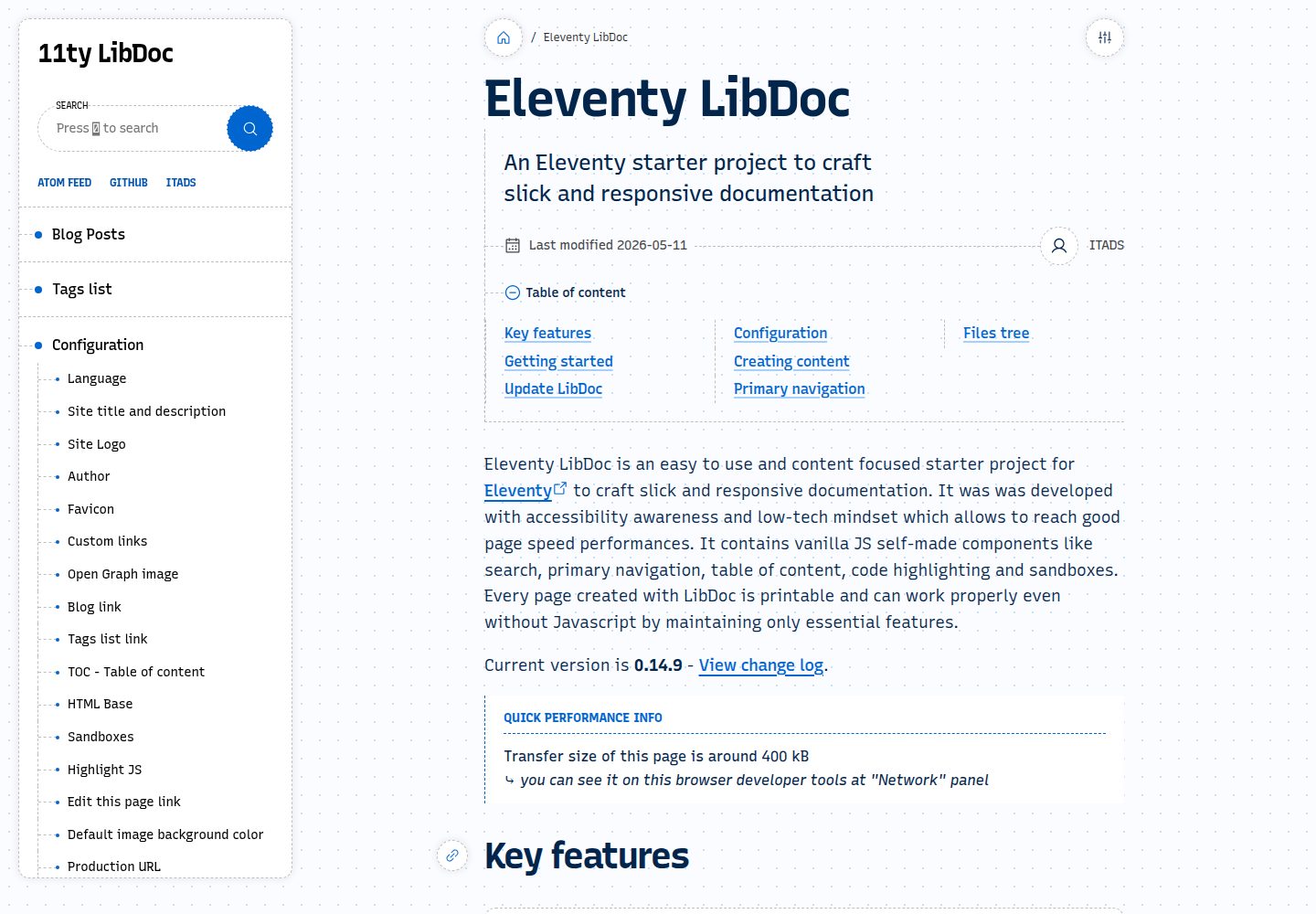
Built-in fuzzy and standard search modes, with a keyboard shortcut to focus the search box
EleventyBlogDocumentationStarter
eleventy-libdoc — Eleventy Blog Template
By ita-design-system
Eleventy LibDoc is an Eleventy-based documentation and blog starter template with built-in search, navigation, table of contents, code highlighting, and sandbox components written in vanilla JavaScript, supporting light and dark modes and graceful degradation without JavaScript.
Explore the design
Compare the page layouts and mobile experience. Open any screenshot for a closer look.
Desktop homepage1 / 3
Desktop captureTop of page
Actual screenshot captured by the server browser.
All pages & views 3
Screenshots show visual appearance; interactive behavior may differ.
Recorded 2026-09-30View source
What stands out
A quick read of the recorded project description.
Provides a floating table of contents that shows the current position as the page scrolls, while retaining a static table of contents
Includes code highlighting and a responsive two-column sandbox for displaying small demos or full HTML pages
Supports light and dark color schemes, printable pages, and degraded operation without JavaScript
Provides an Atom feed so readers can subscribe to blog content
Can transcode and resize source images, outputting formats suitable for production use
Template Details
Eleventy LibDoc is an Eleventy starter project aimed at documentation and blog use cases, with the repository under the MIT license. It provides search, main navigation, a floating table of contents, code highlighting, sandboxes, an Atom feed, light and dark modes, and image transcoding. Pages are printable and retain basic functionality when JavaScript is disabled. The project is still in active development before v1.0.0, and the README explicitly states that full backward compatibility is not guaranteed and that many features may change. Before use, you need to clone the repository, run npm install, fill in the site configuration in settings.json, and then build or preview locally via Eleventy commands.
EleventyBlogDocumentationStarter
Is it right for your project?
Use Cases
- Building a structured documentation site for an open-source project or product
- Creating a content-focused blog that needs search, table of contents, and subscription features
- Embedding interactive code examples or HTML demos in documentation
- Sites that need print-friendly pages, light and dark mode support, and a fallback for no-JavaScript environments
Suitable For
- Developers familiar with Eleventy or static site generators who want to quickly start a documentation project
- Teams that need mixed documentation and blog content and value accessibility and baseline performance
- Users willing to accept that features may change before v1.0.0 and to track updates themselves
Getting started & customization
Use these recorded setup notes alongside the repository instructions for your chosen version.
- 1
After cloning or forking the repository, run npm install
- 2
Fill in the site configuration in settings.json; see the official configuration documentation for specific parameters
- 3
Preview locally with npx @11ty/eleventy --serve, or build with npx @11ty/eleventy
- 4
When updating the template, first back up files such as _data, _includes, core, .eleventy.js, and package.json, then replace them with the new version and reinstall dependencies
- 5
Third-party assets such as demo images, fonts, and icons must have their licenses checked separately; the MIT license of the code alone is not sufficient to judge them
License & source material
Usage conditions & limitations
Free to use · keep license noticeThis entry covers the free version of the public repository under the MIT license; the free scope is the code of this version and does not mean that external services or third-party assets are free.
Must comply with when using
- Permits free use, modification, commercial use, and distribution of this version's code.
- When distributing copies or substantial portions of the code, retain the original author's copyright notice and the full MIT license notice.
- The code is provided as is; warranties and limitations of liability are governed by the original license and applicable law.
Additional costs & items to verify
- The project is in active development before v1.0.0, and the README explicitly states that full backward compatibility is not guaranteed and that many features may change; assess upgrade risks yourself before use.
- Full backward compatibility is not guaranteed; upgrading to a new version may break existing configuration or custom content.
- Many features may change, and sites that depend on specific features or interfaces need to track updates themselves.
- As a starter template, custom modifications to files or directories such as _data, _includes, core, .eleventy.js, and package.json must be manually saved and migrated to the new version when updating the template, otherwise they will be lost.
- Demo images, fonts, icons, and other third-party assets must be checked against their respective licenses; the MIT license of the code alone is not sufficient to judge them.
- External services such as domains, hosting, databases, payments, or AI may incur additional charges.
View Original Text Basis
Permission is hereby granted, free of charge
Original License Text
Eleventy LibDoc is still under active development and therefore before reaching v1.0.0:
Original README
Full backward compatibility is not guaranteed.
Original README
Many features are subject to change.
Original README
https://github.com/ita-design-system/eleventy-libdoc/blob/main/LICENSEhttps://github.com/ita-design-system/eleventy-libdoc/blob/main/README.mdAs a starter template, any edit made into the following files and folders needs to be saved and pasted into the new version.
Original README
Compiled by DeepSeek based on repository license and README ·2026-10-02. Results only cover the materials read; dependencies, images, fonts, and subsequent term changes are subject to their respective original texts.
Project checks & description sources
Template Information
- Source platforms
- GitHub
- Documentation and maintenance reference score
- More documented · 96 / 100
- Technologies
- Eleventy
- Website type
- Blog · Documentation · Starter
How this score is calculated
Our heuristic uses license records (up to 30), a demo link (12), a preview (10), stars (15), recorded maintenance (15), description completeness (8), feature records (5) and classification data (5). It is not a code, security or performance test, or a Google score. A link does not establish tested functionality.
What to verify for this project
- Repository update recorded
- 2026-09-11
- Screenshot last checked
- 2026-10-02
A demo link is listed. Check it with your own content and viewport sizes; its presence does not confirm that forms, authentication or payments work.
The catalog identifies Eleventy as the primary stack. Check the actual dependency manifest and lockfile for versions and hosting requirements. These notes use recorded metadata, not a code audit or a deployment test.
Use a selection guide →How this description was prepared
AI-assisted description based on catalog records and repository material. Repository authors are not automatically the reviewers of this description.
Automatically checked against source and license rules; no manual editorial review.
Inspect the recorded source material
SHA-256: ad6c4ec26bc2d30145a745d333381188a11dba2d61e3d29819a4d83acfd36983
2026-10-02T15:22:38.612Z
Source file / repository# Eleventy LibDoc
[Eleventy LibDoc website](https://eleventy-libdoc.netlify.app/) | [11ty website](11ty)
Eleventy LibDoc is an easy to use and content focused starter project for [Eleventy][11ty] to craft slick and responsive documentation. It was was developed with accessibility awareness and low-tech mindset which allows to reach good page speed performances. It contains vanilla JS self-made components like search, primary navigation, table of content, code highlighting and sandboxes. Every page created with LibDoc is printable and can work properly even without Javascript by maintaining only essential features.
[](https://app.netlify.com/sites/11ty-libdoc-blank/deploys)

<img width="1471" height="625" alt="image" src="https://github.com/user-attachments/assets/9af60d6f-8d5b-463e-9570-b5a6e54a8515" />
<img width="1461" height="617" alt="image" src="https://github.com/user-attachments/assets/f37bbe07-f65a-4a4f-acb1-6892ec202aac" />
> [!NOTE]
> Eleventy LibDoc is still under active development and therefore before reaching v1.0.0:
> * Full backward compatibility is not guaranteed.
> * Many features are subject to change.
## Getting started
1. Clone or fork <https://github.com/ita-design-system/eleventy-libdoc>
2. Run `npm install`
3. Enter your own settings in `settings.json`. [Configuration](https://eleventy-libdoc.netlify.app/configuration/).
4. Build `npx @11ty/eleventy --serve` or `npx @11ty/eleventy` (if you already have your own web server).
[View deployment of this repository](https://11ty-libdoc-blank.netlify.app)
## Update LibDoc
This process shows how to update Eleventy LibDoc Starter template.
> [!NOTE]
> As a starter template, any edit made into the following files and folders needs to be saved and pasted into the new version.
> **If edits were made into these files/folders, please save it and paste changes into the new version.**
1. Delete the following files and folders:
* `_data`
* `_includes`
* `core`
* `node_modules`
* `.eleventy.js`
* `package-lock.json`
* `package.json`
2. Replace the same files and folders from the new Eleventy LibDoc version.
3. Run `npm install`, then you get the latest version. You can verify current version at the bottom of each page.
## Key features
* **Content focused** <br>LibDoc is easy to install, deploy and use.
* **Accessibility** <br>LibDoc was developed with accessibility awareness.
* **Performance** <br>Low front-end dependencies and vanilla JS self-made components make LibDoc cross-browser compatibility and good performances. <a href="https://developers.google.com/speed/pagespeed/insights/?url=eleventy-libdoc.netlify.app" target="_blank">View performances</a>.
* **Search** <br>Fuzzy and standard search modes. Keyboard shortcut 🆂 allows quick focus on search input field. Fuzzy search makes easy keyboard based navigation whereas standard search allows to find an exact match..
* **Smart navigation** <br>On page change, the primary navigation menu keeps its position.
* **Smart table of content** <br>In addition of a pure static table of content, LibDoc generates a floating <abbr title="Table of Content">TOC</abbr> always visible that also displays the current window scroll position.
* **Fallback if no Javascript available** <br>LibDoc can work even without Javascript with reduced features.
* **Image transcoding** <br>LibDoc transcodes and resizes your source images into production ready formats.
* **Printable** <br>Every page created with LibDoc can be printed.
* **Light and dark modes** <br>LibDoc’s interface is available with both light and dark mode color schemes.
* **Slick code highlighting** <br>Display your code in a nice style and adjust which code languages you really use.
* **Sandboxes** <br>Showcase small demos or full HTML pages into a responsive dual pane.
* **Atom feed** <br>The Atom feed allows visitors to subscribe to post blog content.
## Documentation
* [LibDoc’s homepage](https://eleventy-libdoc.netlify.app) <br>The website containing LibDocs’s presentation and comprehensive documentation.
* [Configuration](https://eleventy-libdoc.netlify.app/configuration/) <br>List and descriptions of every LibDoc parameter.
* [Creating content](https://eleventy-libdoc.netlify.app/creating-content/) <br>How LibDoc can display your content in multiple ways.
* [Front matter](https://eleventy-libdoc.netlify.app/front-matter/) <br>Documentation of all front matter settings related to a LibDoc page.
* [Primary navigation](https://eleventy-libdoc.netlify.app/primary-navigation/) <br>Detailed features of LibDoc’s primary navigation.
* [SEO](https://eleventy-libdoc.netlify.app/configuration/seo/) <br>How LibDoc’s configuration and pages parameters are applied for Search Engine Optimization.
* [Credits](https://eleventy-libdoc.netlify.app/configuration/credits/) <br>LibDoc could not work without these resources.
[11ty]: https://www.11ty.dev/
Explore similar templates
Compare previews and descriptions within the same stack and category.

eleventy-base-blog
The officially maintained Eleventy blog starter template, MIT licensed, includes posts, tag pages, archives, an about page, a 404 page, an Atom feed, and sitemap.xml, with per-page CSS bundling, syntax highlighting, and image optimization.
Eleventy · Blog

eleventy-garden
An Eleventy-based digital garden starter template for building a personal knowledge site organized through hyperlinks. It supports Roam-style double-bracket links, backlink display, and hover cards for backlinks.
Eleventy · Starter

eleventastic
Eleventastic is an Eleventy starter kit by Max Böck, used as the base for new 11ty projects. It integrates Sass, Webpack, SVG icon sprites, critical CSS, and HTML minification into the 11ty build without external steps.
Eleventy · Starter

neat-starter
An Eleventy-based static site starter template integrating Netlify CMS, Alpine.js, and Tailwind CSS. It provides a ready-to-run example site, a one-click Netlify deploy button, and an MIT-licensed codebase.
Eleventy · Starter

Eleventy-Starter-Boilerplate
An Eleventy-based blog starter template with Tailwind CSS, Webpack, PostCSS, ESLint, and Prettier, optional Netlify CMS, and built-in SEO metadata, sitemap, and 404 page.
Eleventy · Blog

eleventy-plus-vite
A static site starter combining Eleventy and Vite, with a live-reloading development server, Vite-based production post-processing, a PostCSS pipeline with Autoprefixer and cssnano, critical CSS inlining and asynchronous CSS loading, a web font loading strategy example, fluid typography, basic dark mode, an…
Eleventy · Starter