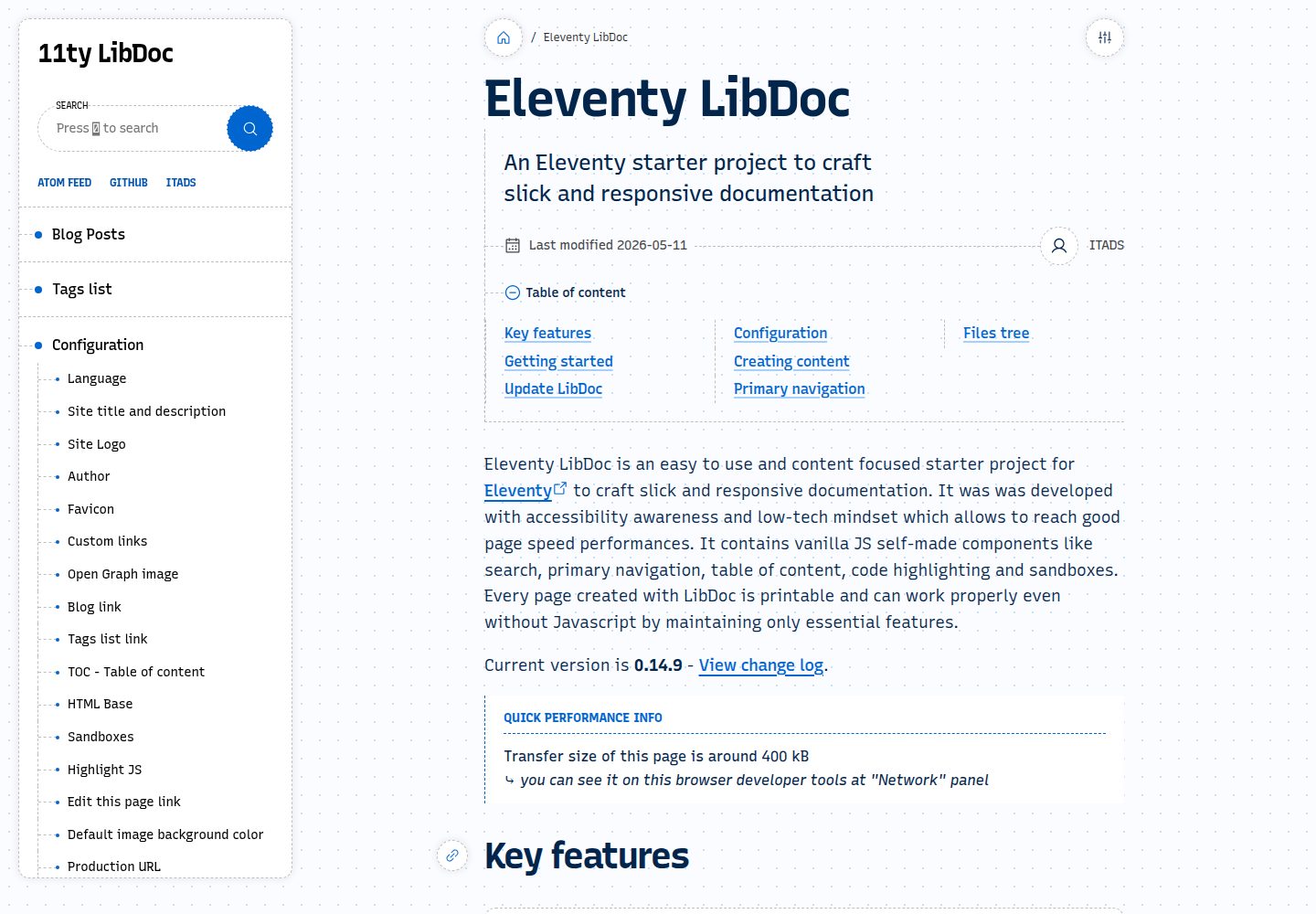
内置模糊与标准两种搜索模式,支持键盘快捷键聚焦搜索框
Eleventy博客文档启动器
eleventy-libdoc — Eleventy 博客模板
作者 ita-design-system
Eleventy LibDoc 是一个基于 Eleventy 的文档与博客启动模板,内置搜索、导航、目录、代码高亮和沙箱等原生 JS 组件,支持明暗模式与无 JavaScript 降级。
看看你的网站会是什么样
浏览真实页面截图,比较内容排版与手机效果。点击下方缩略图切换,放大查看整页细节。
全部页面与视图 3
截图用于了解视觉与布局,交互效果请以实际项目为准。
采集于 2026-09-30查看来源
值得关注的模板亮点
从已有项目资料中,快速了解它的特点。
提供浮动目录,随页面滚动显示当前位置,并保留静态目录
包含代码高亮与响应式双栏沙箱,用于展示小型演示或完整 HTML 页面
支持明暗两种配色方案,页面可打印,无 JavaScript 时降级运行
提供 Atom 订阅源,方便读者订阅博客内容
可对源图片进行转码与缩放,输出适合生产使用的格式
模板详细介绍
Eleventy LibDoc 是一个面向文档与博客场景的 Eleventy 启动项目,仓库采用 MIT 许可。它提供搜索、主导航、浮动目录、代码高亮、沙箱、Atom 订阅、明暗模式以及图片转码等能力,页面可打印,并在禁用 JavaScript 时保留基础功能。项目当前仍处于 v1.0.0 之前的活跃开发阶段,README 明确说明不保证完全向后兼容,许多功能可能发生变化。使用前需要克隆仓库、执行 npm install,并在 settings.json 中填写站点配置,再通过 Eleventy 命令构建或本地预览。
Eleventy博客文档启动器
适合你的项目吗?
适用场景
- 为开源项目或产品搭建结构化的文档站点
- 创建以内容为主的博客,并需要搜索、目录与订阅功能
- 在文档中嵌入可交互的代码示例或 HTML 演示
- 需要打印友好、支持明暗模式且对无 JavaScript 环境有降级方案的站点
适合人群
- 熟悉 Eleventy 或静态站点生成器,希望快速启动文档项目的开发者
- 需要文档与博客混合内容,并重视可访问性与基础性能的团队
- 愿意接受项目在 v1.0.0 前功能可能变化、自行跟进更新的使用者
上手与定制指南
结合仓库当前版本的说明,按下面的资料检查内容、配置与运行要求。
- 1
克隆或 fork 仓库后运行 npm install
- 2
在 settings.json 中填写站点配置,具体参数见官方配置文档
- 3
使用 npx @11ty/eleventy --serve 本地预览,或 npx @11ty/eleventy 构建
- 4
更新模板时需先备份 _data、_includes、core、.eleventy.js、package.json 等文件,再替换为新版本并重新安装依赖
- 5
演示图片、字体、图标等第三方素材需单独核对其许可,不能仅凭代码的 MIT 许可判断
授权与来源资料
使用条件与限制
免费使用 · 保留许可声明本次收录的是公开仓库中采用 MIT 许可的免费版本;免费范围为该版本代码,不代表外部服务或第三方素材免费。
使用时需要遵守
- 允许免费使用、修改、商用和分发该版本代码。
- 分发代码副本或实质性部分时,保留原作者版权声明和完整 MIT 许可声明。
- 代码按现状提供;担保与责任限制以原许可证及适用法律为准。
额外费用与待核对事项
- 项目处于 v1.0.0 之前的活跃开发阶段,README 明确说明不保证完全向后兼容,许多功能可能发生变化,使用前需自行评估升级风险。
- 不保证完全向后兼容,升级到新版本时可能破坏现有配置或自定义内容。
- 许多功能可能发生变化,依赖特定功能或接口的站点需自行跟进更新。
- 作为启动模板,对 _data、_includes、core、.eleventy.js、package.json 等文件或目录的自定义修改,在更新模板时必须手动保存并迁移到新版本,否则会丢失。
- 演示图片、字体、图标及其他第三方素材需按各自许可核对,不能仅凭代码的 MIT 许可判断。
- 域名、托管、数据库、支付或 AI 等外部服务可能另外收费。
查看原文依据
Permission is hereby granted, free of charge
许可证原文
Eleventy LibDoc is still under active development and therefore before reaching v1.0.0:
README 原文
Full backward compatibility is not guaranteed.
README 原文
Many features are subject to change.
README 原文
https://github.com/ita-design-system/eleventy-libdoc/blob/main/LICENSEhttps://github.com/ita-design-system/eleventy-libdoc/blob/main/README.mdAs a starter template, any edit made into the following files and folders needs to be saved and pasted into the new version.
README 原文
DeepSeek 根据仓库许可证和 README 整理 ·2026-10-02。结果仅覆盖已读取资料,依赖、图片、字体及后续条款变更以各自原文为准。
项目核对记录与介绍依据
模板资料
- 来源平台
- GitHub
- 资料与维护参考分
- 资料较完整 · 96 / 100
- 技术栈
- Eleventy
- 网站类型
- 博客 · 文档 · 启动器
这个分数如何计算
本站按许可资料(最高30分)、演示链接(12分)、预览图(10分)、Star数(15分)、记录的维护时间(15分)、描述完整度(8分)、功能记录(5分)和分类资料(5分)计算。它不是代码、安全或性能测试,也不是 Google 评分;有链接不代表已实测可用。
这个项目需要核对什么
- 记录的仓库更新时间
- 2026-09-11
- 截图检查日期
- 2026-10-02
已收录演示链接。请用你的内容与屏幕尺寸检查;有演示不代表表单、认证或支付已经可用。
目录记录的主要技术栈是 Eleventy。请通过依赖清单和锁文件核对实际版本与托管要求。这些说明基于收录资料,不代表代码审计或部署实测。
查看具体选型方法 →介绍的制作与核对状态
介绍由 AI 辅助整理目录与仓库资料。仓库作者不等于这篇介绍的审核者。
已完成服务器许可规则与 AI 来源核对;未经过人工编辑审核。
查看当时使用的来源资料
SHA-256: ad6c4ec26bc2d30145a745d333381188a11dba2d61e3d29819a4d83acfd36983
2026-10-02T15:22:38.612Z
来源文件 / 仓库# Eleventy LibDoc
[Eleventy LibDoc website](https://eleventy-libdoc.netlify.app/) | [11ty website](11ty)
Eleventy LibDoc is an easy to use and content focused starter project for [Eleventy][11ty] to craft slick and responsive documentation. It was was developed with accessibility awareness and low-tech mindset which allows to reach good page speed performances. It contains vanilla JS self-made components like search, primary navigation, table of content, code highlighting and sandboxes. Every page created with LibDoc is printable and can work properly even without Javascript by maintaining only essential features.
[](https://app.netlify.com/sites/11ty-libdoc-blank/deploys)

<img width="1471" height="625" alt="image" src="https://github.com/user-attachments/assets/9af60d6f-8d5b-463e-9570-b5a6e54a8515" />
<img width="1461" height="617" alt="image" src="https://github.com/user-attachments/assets/f37bbe07-f65a-4a4f-acb1-6892ec202aac" />
> [!NOTE]
> Eleventy LibDoc is still under active development and therefore before reaching v1.0.0:
> * Full backward compatibility is not guaranteed.
> * Many features are subject to change.
## Getting started
1. Clone or fork <https://github.com/ita-design-system/eleventy-libdoc>
2. Run `npm install`
3. Enter your own settings in `settings.json`. [Configuration](https://eleventy-libdoc.netlify.app/configuration/).
4. Build `npx @11ty/eleventy --serve` or `npx @11ty/eleventy` (if you already have your own web server).
[View deployment of this repository](https://11ty-libdoc-blank.netlify.app)
## Update LibDoc
This process shows how to update Eleventy LibDoc Starter template.
> [!NOTE]
> As a starter template, any edit made into the following files and folders needs to be saved and pasted into the new version.
> **If edits were made into these files/folders, please save it and paste changes into the new version.**
1. Delete the following files and folders:
* `_data`
* `_includes`
* `core`
* `node_modules`
* `.eleventy.js`
* `package-lock.json`
* `package.json`
2. Replace the same files and folders from the new Eleventy LibDoc version.
3. Run `npm install`, then you get the latest version. You can verify current version at the bottom of each page.
## Key features
* **Content focused** <br>LibDoc is easy to install, deploy and use.
* **Accessibility** <br>LibDoc was developed with accessibility awareness.
* **Performance** <br>Low front-end dependencies and vanilla JS self-made components make LibDoc cross-browser compatibility and good performances. <a href="https://developers.google.com/speed/pagespeed/insights/?url=eleventy-libdoc.netlify.app" target="_blank">View performances</a>.
* **Search** <br>Fuzzy and standard search modes. Keyboard shortcut 🆂 allows quick focus on search input field. Fuzzy search makes easy keyboard based navigation whereas standard search allows to find an exact match..
* **Smart navigation** <br>On page change, the primary navigation menu keeps its position.
* **Smart table of content** <br>In addition of a pure static table of content, LibDoc generates a floating <abbr title="Table of Content">TOC</abbr> always visible that also displays the current window scroll position.
* **Fallback if no Javascript available** <br>LibDoc can work even without Javascript with reduced features.
* **Image transcoding** <br>LibDoc transcodes and resizes your source images into production ready formats.
* **Printable** <br>Every page created with LibDoc can be printed.
* **Light and dark modes** <br>LibDoc’s interface is available with both light and dark mode color schemes.
* **Slick code highlighting** <br>Display your code in a nice style and adjust which code languages you really use.
* **Sandboxes** <br>Showcase small demos or full HTML pages into a responsive dual pane.
* **Atom feed** <br>The Atom feed allows visitors to subscribe to post blog content.
## Documentation
* [LibDoc’s homepage](https://eleventy-libdoc.netlify.app) <br>The website containing LibDocs’s presentation and comprehensive documentation.
* [Configuration](https://eleventy-libdoc.netlify.app/configuration/) <br>List and descriptions of every LibDoc parameter.
* [Creating content](https://eleventy-libdoc.netlify.app/creating-content/) <br>How LibDoc can display your content in multiple ways.
* [Front matter](https://eleventy-libdoc.netlify.app/front-matter/) <br>Documentation of all front matter settings related to a LibDoc page.
* [Primary navigation](https://eleventy-libdoc.netlify.app/primary-navigation/) <br>Detailed features of LibDoc’s primary navigation.
* [SEO](https://eleventy-libdoc.netlify.app/configuration/seo/) <br>How LibDoc’s configuration and pages parameters are applied for Search Engine Optimization.
* [Credits](https://eleventy-libdoc.netlify.app/configuration/credits/) <br>LibDoc could not work without these resources.
[11ty]: https://www.11ty.dev/
看看同类模板
对比同技术栈与用途的模板,找到更适合的视觉与内容结构。

eleventy-base-blog
A starter repository for a blog web site using the Eleventy static site generator.
Eleventy · 博客

eleventy-garden
:seedling: A starter site for building a mind garden with eleventy
Eleventy · 启动器

eleventastic
An Eleventy Starter Kit
Eleventy · 启动器

neat-starter
Starter Template for Netlify CMS, Eleventy, Alpine JS & Tailwind CSS
Eleventy · 启动器

Eleventy-Starter-Boilerplate
🚀 Eleventy Starter is production-ready with SEO-friendly for quickly starting a blog. ⚡ Built with Eleventy, …
Eleventy · 博客

eleventy-plus-vite
A clean and fast Eleventy Starter Project with Vite
Eleventy · 启动器