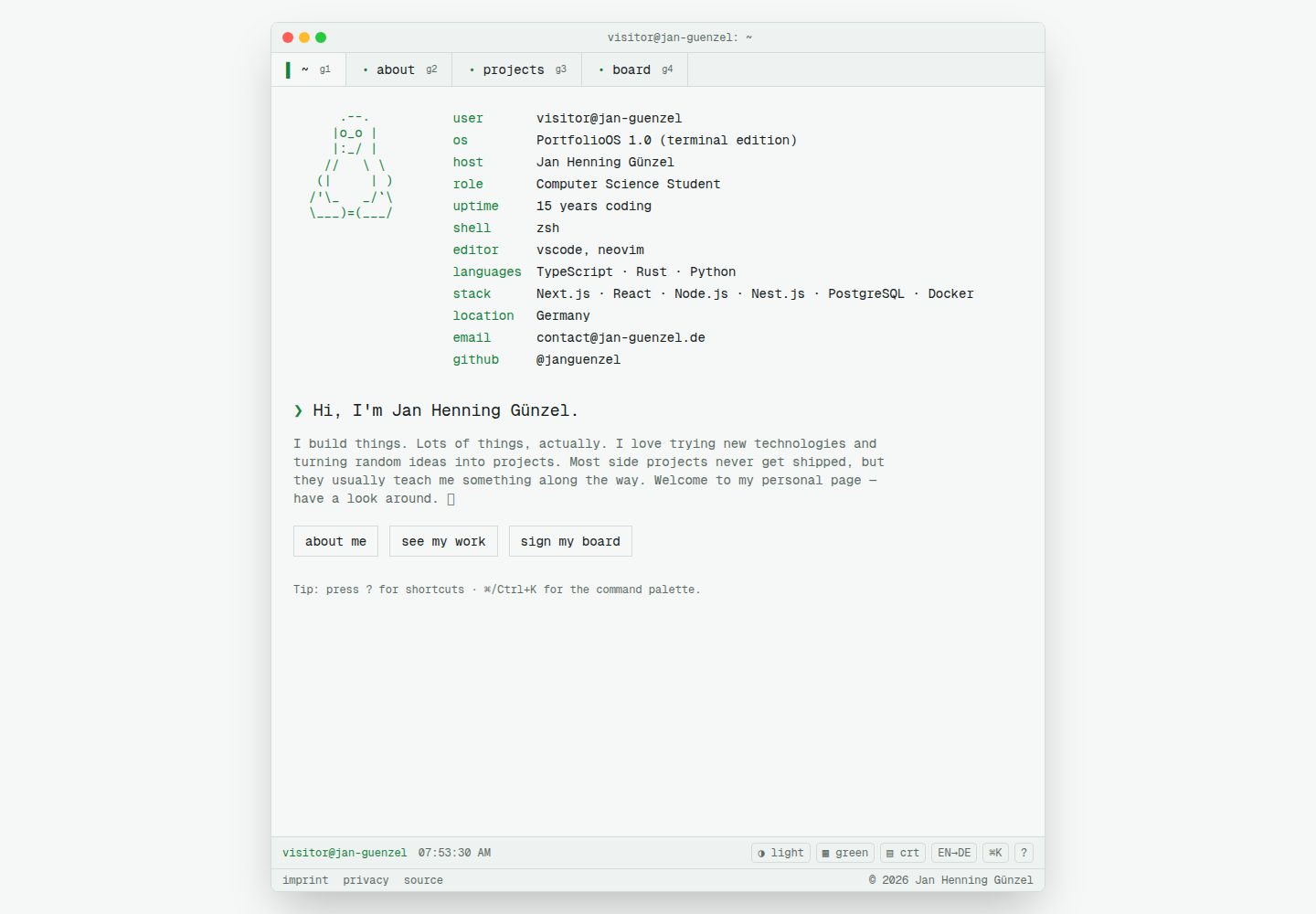
Terminal emulator interface: each tab is a real Next.js route, with a title bar, tab strip, and status bar
Next.jsReactPortfolio
personal-website — Next.js Portfolio Template
By janguenzel
A personal portfolio website built with Next.js, using a tabbed terminal emulator as its interface, supporting bilingual English/German content, multiple themes, and keyboard navigation.
Explore the design
Compare the page layouts and mobile experience. Open any screenshot for a closer look.
Desktop homepage1 / 3
Desktop captureTop of page
Actual screenshot captured by the server browser.
All pages & views 3
Screenshots show visual appearance; interactive behavior may differ.
Recorded 2026-10-13View source
What stands out
A quick read of the recorded project description.
Keyboard-first navigation: shortcuts for command palette, tab switching, theme and color scheme switching, language switching, etc.
Bilingual support: custom route-based i18n, with English and German dictionaries kept key-aligned
Theme system: CSS variable tokens, light/dark mode plus four named color schemes, flicker-free switching
Optional guestbook: GitHub OAuth login, JSON file in development, Neon Postgres in production
Degradable animations: typewriter, scanlines, matrix rain, and other effects controlled by prefers-reduced-motion
Template Details
This template turns a personal website into a tabbed terminal emulator: each terminal tab corresponds to a real Next.js route (located under app/[locale]/…), rather than a client-side single-page view. The site includes a terminal shell (title bar, tab strip, status bar), and navigation can be done either by clicking tabs with the mouse or entirely via keyboard, including shortcuts for a command palette, tab switching, theme switching, and language switching.
Content and configuration are separated. Public information (name, role, social accounts, fastfetch text) comes from NEXT_PUBLIC_* environment variables, while legal/version notice data comes from server-only environment variables, so you can replace it with your own information without changing code. Project content and personal bio are centralized in the content/ directory.
The site is bilingual (English/German), using custom route-based i18n, with all user-facing strings kept key-aligned in en.json and de.json. Themes use CSS variable tokens, supporting light/dark mode and four named color schemes, switched via data-theme and data-scheme, and applied by an inline script before paint to avoid flicker.
Optional features include a guestbook with GitHub OAuth login, using a local JSON file in development and Neon Postgres in production; the guestbook is disabled when the relevant environment variables are not configured. Animations (typewriter intro, blinking cursor, CRT scanlines, matrix rain, etc.) are all controlled by prefers-reduced-motion and degrade to static fallbacks.
SEO and accessibility include per-page metadata, canonical and hreflang, sitemap, robots, language-specific OpenGraph images, and JSON-LD; tabs are real links with aria-current, overlays use dialog semantics, focus is visible, and contrast meets WCAG AA in both themes.
Limitations: the template does not provide ready-to-use hosted demo data; you need to fill in environment variables yourself. The guestbook depends on an external GitHub OAuth app and database service. Third-party assets such as demo images, fonts, and icons must be checked separately under their respective licenses.
Next.jsPortfolio
Is it right for your project?
Use Cases
- Building a personal portfolio website to showcase projects and bio in a terminal style
- Developers who need a bilingual (English/German) personal site
- Deployments where site information is configured via environment variables without hardcoding personal information
- Projects for studying Next.js App Router, custom i18n, and CSS variable theming
- Lightweight interactive features requiring a guestbook with GitHub login
Suitable For
- Developers familiar with Next.js and TypeScript who are willing to configure environment variables themselves
- Personal website authors who prefer terminal aesthetics and keyboard operation
- Independent developers who need a bilingual portfolio and want content separated from code
Getting started & customization
Use these recorded setup notes alongside the repository instructions for your chosen version.
- 1
After cloning the repository, run npm install, copy .env.example to .env and fill in environment variables, then run npm run dev
- 2
Public site information is configured via NEXT_PUBLIC_* variables; legal/version notice data is configured via server-only variables
- 3
To enable the guestbook, set AUTH_SECRET, GITHUB_CLIENT_ID, GITHUB_CLIENT_SECRET, and DATABASE_URL, and set the OAuth callback URL to <NEXT_PUBLIC_SITE_URL>/api/auth/callback
- 4
Edit project and bio content in the content/ directory
- 5
Available scripts include npm run build, npm run start, npm run lint, npm run typecheck, and npm test
License & source material
Usage conditions & limitations
Free to use · keep license noticeThis listing covers the free version under the MIT license in the public repository; the free scope is the code of that version and does not imply that external services or third-party assets are free.
Must comply with when using
- You are allowed to use, modify, commercially use, and distribute the code of this version for free.
- When distributing copies or substantial portions of the code, retain the original author's copyright notice and the full MIT license notice.
- The code is provided as is; warranties and limitations of liability are governed by the original license and applicable law.
Additional costs & items to verify
- Demo images, fonts, icons, and other third-party assets must be checked under their respective licenses; they cannot be judged solely by the code's MIT license.
- External services such as domains, hosting, databases, payments, or AI may incur additional charges.
- The guestbook is an optional feature and is enabled only after setting environment variables such as AUTH_SECRET, GITHUB_CLIENT_ID, and GITHUB_CLIENT_SECRET; if not set, the site runs normally but without the guestbook.
- Enabling the guestbook requires creating a GitHub OAuth app and obtaining a client ID yourself, depending on external GitHub services and accounts.
- The production guestbook and visit statistics require connecting to a Neon Postgres database; if not configured, only local JSON files under .data/ are used, which is not suitable for production.
- When using GitHub OAuth login, the callback URL must be configured as <NEXT_PUBLIC_SITE_URL>/api/auth/callback, otherwise the login flow cannot complete.
- If legal/version notice variables such as IMPRINT_NAME are not set, the /imprint and /privacy pages display placeholder content, and you need to fill in real information yourself.
View Original Text Basis
Permission is hereby granted, free of charge
Original License Text
The GitHub-authenticated message board only activates when these are set. Leave them empty to run the site without the board.
Original README
OAuth app client ID ([create one here](https://github.com/settings/developers)).
Original README
Neon Postgres connection string for board + visit storage in production. Auto-injected by Vercel once a Neon database is connected (`POSTGRES_URL` is also accepted); unset, the board uses a local JSON file under `.data/`.
Original README
For the GitHub OAuth app, set the **Authorization callback URL** to `<NEXT_PUBLIC_SITE_URL>/api/auth/callback`.
Original README
https://github.com/janguenzel/personal-website/blob/main/LICENSEhttps://github.com/janguenzel/personal-website/blob/main/README.mdUntil `IMPRINT_NAME` is set, placeholder values are shown.
Original README
Compiled by DeepSeek based on repository license and README ·2026-10-13. Results only cover the materials read; dependencies, images, fonts, and subsequent term changes are subject to their respective original texts.
Project checks & description sources
Template Information
- Source platforms
- GitHub
- Documentation and maintenance reference score
- More documented · 83 / 100
- Technologies
- Next.js · React
- Website type
- Portfolio
How this score is calculated
Our heuristic uses license records (up to 30), a demo link (12), a preview (10), stars (15), recorded maintenance (15), description completeness (8), feature records (5) and classification data (5). It is not a code, security or performance test, or a Google score. A link does not establish tested functionality.
What to verify for this project
- Repository update recorded
- 2026-06-19
- Screenshot last checked
- 2026-10-13
A demo link is listed. Check it with your own content and viewport sizes; its presence does not confirm that forms, authentication or payments work.
The catalog identifies Next.js as the primary stack. Check the actual dependency manifest and lockfile for versions and hosting requirements. These notes use recorded metadata, not a code audit or a deployment test.
Use a selection guide →How this description was prepared
AI-assisted description based on catalog records and repository material. Repository authors are not automatically the reviewers of this description.
Review declaration: [email protected] · 2026-10-13
Inspect the recorded source material
SHA-256: 4549be8a02fe331da31892d309b976ecaff795da3397777c17911382766fe999
2026-10-13T07:53:47.193Z
Source file / repository# personal-website — Terminal Portfolio [](https://github.com/janguenzel/personal-website/actions/workflows/ci.yml) [](./LICENSE) A personal website written in **Next.js 16** with **Tailwind CSS v4** and **Framer Motion**, dressed up as a **tabbed terminal emulator**. Every tab is a real route, navigation is keyboard-first with an interactive prompt and a command palette, and the whole thing is bilingual (English / German), themeable (dark + light + extra color schemes), and full of tasteful, reduced-motion-safe animation. ## Fork it & make it yours Like it? **Fork it.** This project is intentionally built to be forkable — nothing personal is committed to the repo. All public details (name, role, socials, fastfetch text) come from `NEXT_PUBLIC_*` env vars, and legal/imprint data comes from server-only env vars, so the whole site re-themes around you without touching a line of code. It's released under the [MIT License](./LICENSE), so you're free to use, copy, modify, extend, publish, and distribute it for your own purposes — personal or commercial. Just keep the copyright notice. Go build your own terminal portfolio. 🚀 And if this made you smile or saved you some time — **drop a ⭐ on the repo**. It costs you one click and genuinely makes my day. Thank you! 😊 ## Getting started Once you've cloned the repo: ```bash npm install # install dependencies cp .env.example .env # then fill in the values (see "Environment variables" below) npm run dev # start the dev server at http://localhost:3000 ``` Other useful scripts: ```bash npm run build # production build (run this before declaring done) npm run start # serve the production build npm run lint # ESLint npm run typecheck # tsc --noEmit npm test # run the Vitest unit + component suite npm run test:watch # Vitest in watch mode npm run test:coverage # coverage report (./coverage) ``` > **Note:** Next.js 16 has breaking changes vs. older versions. The bundled guides under > `node_modules/next/dist/docs/` are the source of truth. ## Environment variables Copy `.env.example` to `.env` (local) or set these in your host's environment (production). Everything has a sensible fallback, so the site runs out of the box — the values below just personalize it and enable the optional GitHub message board. ### Public site config (`NEXT_PUBLIC_*`) Safe to expose to the browser. Powers SEO tags, the title bar, and the fastfetch landing. | Variable | Description | Default | | ---------------------------- | ------------------------------------------------------------------ | ------------------------------------------------- | | `NEXT_PUBLIC_SITE_URL` | Canonical absolute URL, no trailing slash (SEO + OAuth redirects). | `http://localhost:3000` | | `NEXT_PUBLIC_SITE_NAME` | Display name in the title bar / metadata. | `Jan Henning Günzel` | | `NEXT_PUBLIC_SITE_HOST` | Shell-style host for the prompt (`user@host`). | `jan-guenzel` | | `NEXT_PUBLIC_SITE_USER` | Shell-style username for the prompt. | `visitor` | | `NEXT_PUBLIC_SITE_ROLE` | Your role, shown in fastfetch. | `Software Engineer` | | `NEXT_PUBLIC_SITE_LOCATION` | Your location, shown in fastfetch. | `Germany` | | `NEXT_PUBLIC_SITE_EMAIL` | Public contact address on the landing page. | `[email protected]` | | `NEXT_PUBLIC_GITHUB_USER` | GitHub username (links + socials). | `janguenzel` | | `NEXT_PUBLIC_TWITTER_HANDLE` | Twitter/X handle (empty = hidden). | _empty_ | | `NEXT_PUBLIC_LINKEDIN_URL` | Full LinkedIn profile URL (empty = hidden). | _empty_ | | `NEXT_PUBLIC_SITE_DISTRO` | Fastfetch "OS" flavour text. | `PortfolioOS 1.0 (terminal edition)` | | `NEXT_PUBLIC_SITE_SHELL` | Fastfetch shell value. | `zsh` | | `NEXT_PUBLIC_SITE_EDITOR` | Fastfetch editor value. | `vscode, neovim` | | `NEXT_PUBLIC_SITE_LANGUAGES` | Comma-separated languages for fastfetch. | `TypeScript,Rust,Python` | | `NEXT_PUBLIC_SITE_STACK` | Comma-separated stack for fastfetch. | `Next.js,React,Node.js,Nest.js,PostgreSQL,Docker` | | `NEXT_PUBLIC_CODING_SINCE` | ISO date you started coding (drives the fastfetch "uptime"). | `2015-01-01` | ### Legal / imprint config (server-only) Read server-side only and rendered into the `/imprint` and `/privacy` pages (both `noindex`), so your real name and address never get committed or shipped to clients. Until `IMPRINT_NAME` is set, placeholder values are shown. | Variable | Description | | ----------------- | ---------------------------------------------------------------- | | `IMPRINT_NAME` | Your legal name. Setting this marks the imprint as "configured". | | `IMPRINT_STREET` | Street address. | | `IMPRINT_CITY` | Postal code + city. | | `IMPRINT_COUNTRY` | Country. | | `IMPRINT_EMAIL` | Contact email (falls back to `NEXT_PUBLIC_SITE_EMAIL`). | | `IMPRINT_PHONE` | Phone number (optional). | | `IMPRINT_VAT_ID` | VAT ID (optional). | ### Auth & message board (optional) The GitHub-authenticated message board only activates when these are set. Leave them empty to run the site without the board. | Variable | Description | | ---------------------- | ----------------------------------------------------------------------------------------------------------------------------------------------------------------------------------------------------------------------------- | | `AUTH_SECRET` | Secret used to sign the HMAC-SHA256 session cookie. Use a long random string. | | `GITHUB_CLIENT_ID` | OAuth app client ID ([create one here](https://github.com/settings/developers)). | | `GITHUB_CLIENT_SECRET` | OAuth app client secret. | | `DATABASE_URL` | Neon Postgres connection string for board + visit storage in production. Auto-injected by Vercel once a Neon database is connected (`POSTGRES_URL` is also accepted); unset, the board uses a local JSON file under `.data/`. | For the GitHub OAuth app, set the **Authorization callback URL** to `<NEXT_PUBLIC_SITE_URL>/api/auth/callback`. ## How it works A bit more detail on what's under the hood: - **Routing = tabs.** Each terminal "tab" is a real Next.js route under `app/[locale]/…`, not a client-only SPA view. `proxy.ts` (Next 16's middleware) redirects locale-less paths to `/[locale]/…`, and the `[locale]` layout wraps every page in the terminal chrome (title bar, tab strip, status bar). `lib/nav.ts` is the single source of truth for tabs — the TabBar, command palette, hotkeys, and sitemap all derive from it. - **Server-first.** Pages are React Server Components that read locale dictionaries directly. Interactive pieces (the shell, board, palette, effects) are client components with a low boundary. - **Dual navigation.** Click tabs _or_ drive everything from the keyboard: `⌘/Ctrl+K` opens the command palette, `Ctrl+]`/`[` switch tabs, `g`+number jumps, `⌘/Ctrl+J` toggles the theme, `Ctrl+.` cycles the color scheme, `?` shows help, and `L` swaps the language. (Browser-reserved combos are deliberately avoided.) - **i18n.** Custom, route-based i18n. Every user-facing string is a key present in **both** `lib/i18n/dictionaries/en.json` and `de.json`, kept at full parity. German is natural and informal ("du"). - **Theming.** All colors are CSS-variable tokens (no inline hex). Light/dark via `data-theme`, four named color schemes via `data-scheme`, applied pre-paint by a no-FOUC inline script and persisted to localStorage + cookie. - **Auth & board.** A hand-rolled GitHub OAuth web flow (zero auth deps) sets a signed httpOnly session cookie via Web Crypto. The message board lives behind a pluggable backend — a local JSON file in dev, Neon Postgres (via `@neondatabase/serverless`) in production — with a per-user post cooldown and edit/delete of your own messages. - **Animation & gimmicks.** A boot-style typewriter intro, blinking block cursor, glitch-on-hover ASCII, CRT scanline toggle, matrix rain (Konami code), and `motion` transitions — every effect is gated behind `prefers-reduced-motion` and degrades to a calm static fallback. - **SEO & a11y.** Per-page metadata with canonical + hreflang alternates, a sitemap, robots, per-locale OpenGraph images, and JSON-LD. Route tabs are real links with `aria-current`, overlays are proper dialogs, focus is visible, and contrast meets WCAG AA in both themes. ### Tech stack | Concern | Choice | | --------- | ---------------------------------------------------- | | Framework | Next.js 16 (App Router / RSC, Turbopack) | | UI | React 19 | | Language | TypeScript (strict) | | Styling | Tailwind CSS v4 (CSS-first `@theme`, no config file) | | State | Zustand | | Animation | Framer Motion (`motion`) + CSS + canvas | | i18n | Custom, route-based | | Auth | Hand-rolled GitHub OAuth (Web Crypto signed cookie) | | Storage | JSON file (dev) / Neon Postgres (prod) | | Tests | Vitest + React Testing Library (jsdom) | ### Project layout ``` proxy.ts # Next 16 middleware: locale redirect (cookie/Accept-Language) + locale cookie app/ # routes (one per terminal tab) + API routes, sitemap, robots, OG images components/ # terminal shell, fastfetch, board, about, ui, effects lib/ # i18n, store, hooks, themes, nav, site/imprint config, auth, board content/ # projects + about bio (the only place to edit your content) test/ # Vitest unit + component tests ``` Forking? Start with `lib/site.ts` env vars and `content/{projects,about}.ts` — that's where your identity and work live. --- Licensed under [MIT](./LICENSE).
Explore similar templates
Compare previews and descriptions within the same stack and category.

react-resume-template
A personal resume website template for software developers, built with Next.js, React, and TypeScript and styled with Tailwind CSS. Site content is driven by a single data file at /src/data/data.tsx, with types in dataDef.ts and images in src/images/.
Next.js · Portfolio

nxt-lnk
nxt-lnk is a Next.js-based bio link page template that manages personal information and links via BioData.js and LinksData.js, positioned as a self-hosted alternative to Linktree. It groups links by type, supports enabling/disabling individual links, and offers hexagonal or oval avatars.
Next.js · Portfolio

sylph
Sylph is a minimal portfolio and blog template built on Next.js, supporting MDX/Markdown writing, light/dark themes, and automatic OG image generation. It includes sitemap, robots.txt, metadata, and syntax highlighting, with automatic blog timestamps.
Next.js · Portfolio

sleek-portfolio
A modern, responsive portfolio template built with Next.js 15, TypeScript, Tailwind CSS, and Shadcn UI. It includes an MDX blog, project showcase, work experience timeline, and a contact form that receives messages via Telegram Bot.
Next.js · Portfolio

research-website-template
A React + Next.js template for research personal websites, aimed at PhD students and researchers. It centralizes publications, projects, and other content in src/data as arrays of objects, with optional fields automatically generating UI components.
Next.js · Portfolio

shadcn-portfolio
A developer portfolio template built with Next.js 15, shadcn/ui, Tailwind CSS, and Framer Motion, featuring an MDX blog, light and dark modes, responsive design, and SEO meta tags.
Next.js · Portfolio