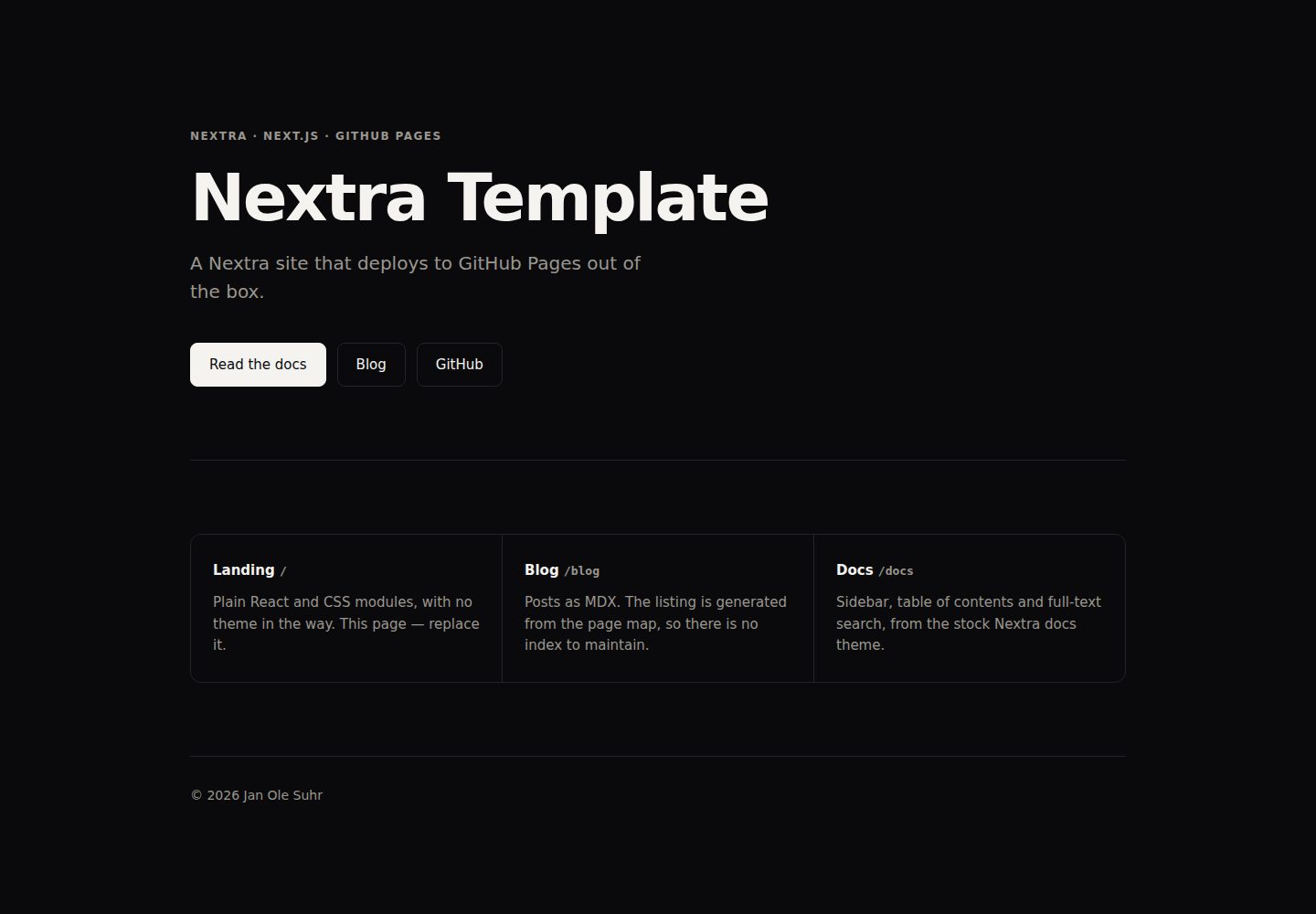
Three page areas: landing, blog and docs — keep the ones you need and delete the rest
Next.jsReactBlogDocumentationCorporate Website
nextra-template — Next.js Blog Template
By janole
A Nextra-based site template with three page areas — landing, blog and docs — deployed to GitHub Pages via GitHub Actions.
Explore the design
Compare the page layouts and mobile experience. Open any screenshot for a closer look.
Desktop homepage1 / 3
Desktop captureTop of page
Actual screenshot captured by the server browser.
All pages & views 3
Screenshots show visual appearance; interactive behavior may differ.
Recorded 2026-10-14View source
What stands out
A quick read of the recorded project description.
The landing page uses plain React and CSS modules, without loading the docs theme styles
The docs use nextra-theme-docs, including a sidebar, table of contents and search
Pagefind builds a full-text search index after the build
Deploys to GitHub Pages via GitHub Actions, with basePath and site URL derived from GITHUB_REPOSITORY
Provides the `pnpm run init` command to name the site, remove page areas and rewrite the README and AGENTS.md
Template Details
This template is a Nextra site that provides three page areas: landing (`/`), blog (`/blog`) and docs (`/docs`). The landing page is built from `app/(site)/` using plain React and CSS modules, without loading the docs theme styles; the blog is generated from `content/blog/*.mdx`, with the list coming from the page map; the docs are generated from `content/docs/*.mdx` together with `nextra-theme-docs`, including a sidebar, table of contents and search. The template also includes Pagefind full-text search (indexed after each build), social cards drawn at build time based on `site.config.ts`, dark mode, and a CI workflow. For deployment, the README explains that after setting the repository as a GitHub template, you run `pnpm install`, `pnpm run init`, `pnpm run dev`, and set Source to GitHub Actions in the repository Settings → Pages, then push to `main`. `site-base-path.mjs` derives the `basePath` and the site's absolute URL from `GITHUB_REPOSITORY`, so project sites, user sites and custom domains (`public/CNAME`) all require no manual configuration of the deployment URL. The README also explains the steps to manually remove a page area, and that setting a `surfaces` flag to `false` only hides that area from the landing page — its pages remain accessible via URL. The README does not provide information on performance, production readiness, or any features beyond those described above.
Next.jsBlogDocumentationBusiness website
Is it right for your project?
Use Cases
- Creating a new documentation or blog site as a GitHub template
- Projects that need all three page structures: landing, blog and docs
- Static sites that want automatic deployment to GitHub Pages using GitHub Actions
- Sites that need full-text search, dark mode and build-time social card generation
Suitable For
- Developers using Nextra who want to quickly set up multiple page areas
- Projects that need to deploy the site to GitHub Pages
- Users who want to start from a template and trim page areas as needed
Getting started & customization
Use these recorded setup notes alongside the repository instructions for your chosen version.
- 1
Create a repository from this template on GitHub, or run `gh repo create <name> --template janole/nextra-template --public`
- 2
After cloning the repository, run `pnpm install`, `pnpm run init`, `pnpm run dev`
- 3
In the repository Settings → Pages, set Source to GitHub Actions, then push to `main`
- 4
The deployment URL requires no manual configuration; `site-base-path.mjs` derives the basePath and the site's absolute URL from `GITHUB_REPOSITORY`
- 5
Before modifying the build, read `AGENTS.md`, which documents the zod overrides, the derived basePath and the necessity of the catch-all route
License & source material
Usage conditions & limitations
Free to use · keep license noticeThis entry covers the free version under the MIT license in the public repository; the free scope is the code of this version and does not mean that external services or third-party assets are free.
Must comply with when using
- You are allowed to use, modify, commercialize and distribute the code of this version for free.
- When distributing copies or substantial portions of the code, retain the original author's copyright notice and the full MIT license notice.
- The code is provided as is; warranties and limitations of liability are governed by the original license and applicable law.
Additional costs & items to verify
- Demo images, fonts, icons and other third-party assets must be checked against their respective licenses; the MIT license of the code alone cannot be used to judge them.
- External services such as domains, hosting, databases, payments or AI may incur separate charges.
View Original Text Basis
https://github.com/janole/nextra-template/blob/main/LICENSEhttps://github.com/janole/nextra-template/blob/main/README.mdPermission is hereby granted, free of charge
Original License Text
Compiled by DeepSeek based on repository license and README ·2026-10-14. Results only cover the materials read; dependencies, images, fonts, and subsequent term changes are subject to their respective original texts.
Project checks & description sources
Template Information
- Source platforms
- GitHub
- Documentation and maintenance reference score
- More documented · 85 / 100
- Technologies
- Next.js · React
- Website type
- Blog · Documentation · Corporate Website
How this score is calculated
Our heuristic uses license records (up to 30), a demo link (12), a preview (10), stars (15), recorded maintenance (15), description completeness (8), feature records (5) and classification data (5). It is not a code, security or performance test, or a Google score. A link does not establish tested functionality.
What to verify for this project
- Repository update recorded
- 2026-09-15
- Screenshot last checked
- 2026-10-14
A demo link is listed. Check it with your own content and viewport sizes; its presence does not confirm that forms, authentication or payments work.
The catalog identifies Next.js as the primary stack. Check the actual dependency manifest and lockfile for versions and hosting requirements. These notes use recorded metadata, not a code audit or a deployment test.
Use a selection guide →How this description was prepared
AI-assisted description based on catalog records and repository material. Repository authors are not automatically the reviewers of this description.
Review declaration: codex-user-requested-batch-review-20261017 · 2026-10-16
Inspect the recorded source material
SHA-256: c878fae0765e816936b83da1772b2a06ca50fa7efaf3ab3fdaea9fe3d65e3463
2026-10-14T23:44:49.453Z
Source file / repository# nextra-template
A [Nextra](https://nextra.site) site with three surfaces — **landing**, **blog**, **docs** —
that deploys itself to GitHub Pages. Use it as a GitHub template, keep the surfaces you
want, throw the rest away.
Live: <https://janole.github.io/nextra-template/>
## Start a site
1. **Use this template** on GitHub (or `gh repo create <name> --template janole/nextra-template --public`).
2. Clone it, then:
```bash
pnpm install
pnpm run init # names the site, drops surfaces, rewrites README + AGENTS.md, deletes itself
pnpm run dev
```
3. Enable Pages: **Settings → Pages → Source: GitHub Actions**. Push to `main`.
That's the whole setup. Nothing about the deployment URL is configured by hand —
`site-base-path.mjs` derives `basePath` and the absolute site URL from
`GITHUB_REPOSITORY`, so a project site (`/<repo>`), a user site
(`<owner>.github.io`) and a custom domain (`public/CNAME`) all work untouched.
## What you get
| Surface | Route | Built from |
| --- | --- | --- |
| Landing | `/` | `app/(site)/` — plain React + CSS modules, no theme loaded |
| Blog | `/blog` | `content/blog/*.mdx`; the listing is generated from the page map |
| Docs | `/docs` | `content/docs/*.mdx` with `nextra-theme-docs` — sidebar, TOC, search |
Plus: full-text search (Pagefind, indexed after every build), a social card drawn from
`site.config.ts` at build time, dark mode, and a CI workflow that runs the same gate you
run locally.
The two root layouts are deliberate. `app/(site)` never imports the docs theme's
stylesheet, so the landing page starts from nothing and can look like anything; the docs
and blog share `app/(content)`. Next allows one root layout per route group as long as
there is no `app/layout.tsx` — don't add one.
## Removing a surface by hand
`pnpm run init` does this for you. If you change your mind later:
- **Blog** — delete `app/(content)/blog/` and `content/blog/`, drop the `blog` key from
`content/_meta.js`, and set `surfaces.blog = false` in `site.config.ts`.
- **Docs** — delete `content/docs/`, drop the `docs` key from `content/_meta.js`, and set
`surfaces.docs = false`. The themed layout stays; the blog still uses it.
- **Landing** — delete `app/(site)/` and rename `app/(content)/[...mdxPath]` to
`app/(content)/[[...mdxPath]]` so the catch-all answers `/`. Then give `/` something to
render: move `content/docs/*` up into `content/`, or add a `content/index.mdx`.
Setting a `surfaces` flag to `false` without deleting anything hides the surface from the
landing page while leaving its pages reachable by URL.
Whichever route you take, fix `AGENTS.md` afterwards — `init` rewrites it because a trap
described in the template's terms ("the catch-all is required, not optional") reads as an
instruction to undo the change you just made.
## Commands
```bash
pnpm run dev # next dev
pnpm run build # static export to out/, then Pagefind indexes it
pnpm run ok # build + typecheck + lint --fix + test
pnpm run qa # same, but lint without --fix (what CI runs)
```
`AGENTS.md` documents the traps that cost time to rediscover — the load-bearing `zod`
overrides, the derived `basePath`, why the catch-all is required rather than optional.
Read it before changing the build.
## Licence
MIT.
Explore similar templates
Compare previews and descriptions within the same stack and category.

tailwind-nextjs-starter-blog
A Next.js and Tailwind CSS blog starter template using Contentlayer for Markdown/MDX, with built-in SEO, code highlighting, and tags. It targets personal technical blogs and migration from Jekyll/Hugo to React, and supports one-click Vercel deployment.
Next.js · Blog

SaaS-Boilerplate
SaaS-Boilerplate is an open-source SaaS starter template built with Next.js App Router, React 19, TypeScript, Tailwind CSS, and Shadcn UI.
Next.js · SaaS

Next-JS-Landing-Page-Starter-Template
A free Next.js landing page starter template written in Tailwind CSS and TypeScript, featuring built-in navbar, hero, features, CTA banner, and footer sections.
Next.js · Corporate Website

next-saas-starter
A free Next.js SaaS marketing landing page template from Blazity, using static generation and styled-components with no extra UI library.
Next.js · SaaS

startup-nextjs
Startup is a free, MIT-licensed Next.js template from NextJSTemplates for SaaS startups and corporate landing pages.
Next.js · SaaS

shadcn-landing-page
A Next.js landing page template built with Shadcn, TypeScript, and Tailwind, converted from a Shadcn-Vue version. It includes sections such as Navbar, mobile Sidebar, Hero, Pricing, FAQ, and Footer, and highlights responsive design, navigation, and dark mode.
Next.js · Corporate Website