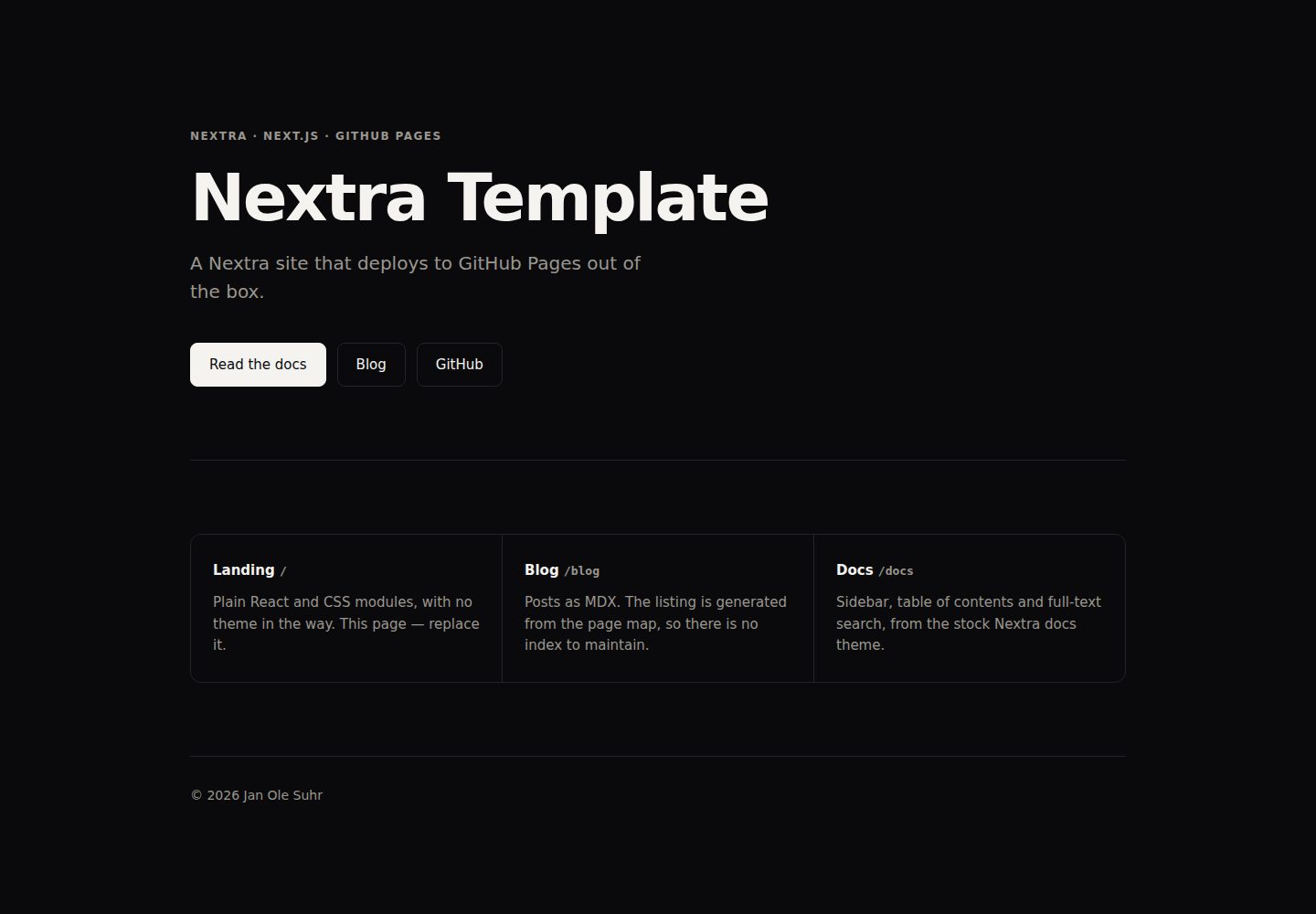
三个页面区域:landing、blog、docs,可保留需要的部分并删除其余部分
Next.jsReact博客文档企业官网
nextra-template — Next.js 博客模板
作者 janole
基于 Nextra 的站点模板,包含 landing、blog、docs 三个页面区域,并通过 GitHub Actions 部署到 GitHub Pages。
看看你的网站会是什么样
浏览真实页面截图,比较内容排版与手机效果。点击下方缩略图切换,放大查看整页细节。
全部页面与视图 3
截图用于了解视觉与布局,交互效果请以实际项目为准。
采集于 2026-10-14查看来源
值得关注的模板亮点
从已有项目资料中,快速了解它的特点。
landing 使用普通 React 与 CSS modules,不加载文档主题样式
docs 使用 nextra-theme-docs,包含侧边栏、目录和搜索
构建后由 Pagefind 建立全文搜索索引
通过 GitHub Actions 部署到 GitHub Pages,basePath 与站点 URL 从 GITHUB_REPOSITORY 推导
提供 `pnpm run init` 命令用于命名站点、移除页面区域并重写 README 与 AGENTS.md
模板详细介绍
该模板是一个 Nextra 站点,提供三个页面区域:landing(`/`)、blog(`/blog`)和 docs(`/docs`)。landing 由 `app/(site)/` 构建,使用普通 React 与 CSS modules,不加载文档主题样式;blog 由 `content/blog/*.mdx` 生成,列表来自页面映射;docs 由 `content/docs/*.mdx` 配合 `nextra-theme-docs` 生成,包含侧边栏、目录和搜索。模板还包含 Pagefind 全文搜索(每次构建后建立索引)、构建时根据 `site.config.ts` 绘制的社交卡片、深色模式,以及一个 CI 工作流。部署方面,README 说明将仓库设为 GitHub 模板后,执行 `pnpm install`、`pnpm run init`、`pnpm run dev`,并在仓库 Settings → Pages 中将 Source 设为 GitHub Actions,推送到 `main` 即可。`site-base-path.mjs` 从 `GITHUB_REPOSITORY` 推导 `basePath` 和站点绝对 URL,因此项目站点、用户站点和自定义域名(`public/CNAME`)都无需手动配置部署 URL。README 也说明了手动移除某个页面区域的步骤,以及将 `surfaces` 标志设为 `false` 只会从 landing 页隐藏该区域、其页面仍可通过 URL 访问。README 未提供关于性能、生产就绪程度或除上述内容外的其他功能说明。
Next.js博客文档企业官网
适合你的项目吗?
适用场景
- 作为 GitHub 模板创建新的文档或博客站点
- 需要同时包含 landing、blog 和 docs 三种页面结构的项目
- 希望使用 GitHub Actions 自动部署到 GitHub Pages 的静态站点
- 需要全文搜索、深色模式和构建时生成社交卡片的站点
适合人群
- 使用 Nextra 并希望快速搭建多页面区域的开发者
- 需要将站点部署到 GitHub Pages 的项目
- 希望以模板方式开始并可按需裁剪页面区域的用户
上手与定制指南
结合仓库当前版本的说明,按下面的资料检查内容、配置与运行要求。
- 1
在 GitHub 上使用该模板创建仓库,或执行 `gh repo create <name> --template janole/nextra-template --public`
- 2
克隆仓库后执行 `pnpm install`、`pnpm run init`、`pnpm run dev`
- 3
在仓库 Settings → Pages 中将 Source 设为 GitHub Actions,然后推送到 `main`
- 4
部署 URL 无需手动配置,`site-base-path.mjs` 会从 `GITHUB_REPOSITORY` 推导 basePath 和站点绝对 URL
- 5
修改构建前应阅读 `AGENTS.md`,其中记录了 zod 覆盖、推导的 basePath 以及 catch-all 路由的必要性
授权与来源资料
使用条件与限制
免费使用 · 保留许可声明本次收录的是公开仓库中采用 MIT 许可的免费版本;免费范围为该版本代码,不代表外部服务或第三方素材免费。
使用时需要遵守
- 允许免费使用、修改、商用和分发该版本代码。
- 分发代码副本或实质性部分时,保留原作者版权声明和完整 MIT 许可声明。
- 代码按现状提供;担保与责任限制以原许可证及适用法律为准。
额外费用与待核对事项
- 演示图片、字体、图标及其他第三方素材需按各自许可核对,不能仅凭代码的 MIT 许可判断。
- 域名、托管、数据库、支付或 AI 等外部服务可能另外收费。
查看原文依据
https://github.com/janole/nextra-template/blob/main/LICENSEhttps://github.com/janole/nextra-template/blob/main/README.mdPermission is hereby granted, free of charge
许可证原文
DeepSeek 根据仓库许可证和 README 整理 ·2026-10-14。结果仅覆盖已读取资料,依赖、图片、字体及后续条款变更以各自原文为准。
项目核对记录与介绍依据
模板资料
- 来源平台
- GitHub
- 资料与维护参考分
- 资料较完整 · 85 / 100
- 技术栈
- Next.js · React
- 网站类型
- 博客 · 文档 · 企业官网
这个分数如何计算
本站按许可资料(最高30分)、演示链接(12分)、预览图(10分)、Star数(15分)、记录的维护时间(15分)、描述完整度(8分)、功能记录(5分)和分类资料(5分)计算。它不是代码、安全或性能测试,也不是 Google 评分;有链接不代表已实测可用。
这个项目需要核对什么
- 记录的仓库更新时间
- 2026-09-15
- 截图检查日期
- 2026-10-14
已收录演示链接。请用你的内容与屏幕尺寸检查;有演示不代表表单、认证或支付已经可用。
目录记录的主要技术栈是 Next.js。请通过依赖清单和锁文件核对实际版本与托管要求。这些说明基于收录资料,不代表代码审计或部署实测。
查看具体选型方法 →介绍的制作与核对状态
介绍由 AI 辅助整理目录与仓库资料。仓库作者不等于这篇介绍的审核者。
审核声明: codex-user-requested-batch-review-20261017 · 2026-10-16
查看当时使用的来源资料
SHA-256: c878fae0765e816936b83da1772b2a06ca50fa7efaf3ab3fdaea9fe3d65e3463
2026-10-14T23:44:49.453Z
来源文件 / 仓库# nextra-template
A [Nextra](https://nextra.site) site with three surfaces — **landing**, **blog**, **docs** —
that deploys itself to GitHub Pages. Use it as a GitHub template, keep the surfaces you
want, throw the rest away.
Live: <https://janole.github.io/nextra-template/>
## Start a site
1. **Use this template** on GitHub (or `gh repo create <name> --template janole/nextra-template --public`).
2. Clone it, then:
```bash
pnpm install
pnpm run init # names the site, drops surfaces, rewrites README + AGENTS.md, deletes itself
pnpm run dev
```
3. Enable Pages: **Settings → Pages → Source: GitHub Actions**. Push to `main`.
That's the whole setup. Nothing about the deployment URL is configured by hand —
`site-base-path.mjs` derives `basePath` and the absolute site URL from
`GITHUB_REPOSITORY`, so a project site (`/<repo>`), a user site
(`<owner>.github.io`) and a custom domain (`public/CNAME`) all work untouched.
## What you get
| Surface | Route | Built from |
| --- | --- | --- |
| Landing | `/` | `app/(site)/` — plain React + CSS modules, no theme loaded |
| Blog | `/blog` | `content/blog/*.mdx`; the listing is generated from the page map |
| Docs | `/docs` | `content/docs/*.mdx` with `nextra-theme-docs` — sidebar, TOC, search |
Plus: full-text search (Pagefind, indexed after every build), a social card drawn from
`site.config.ts` at build time, dark mode, and a CI workflow that runs the same gate you
run locally.
The two root layouts are deliberate. `app/(site)` never imports the docs theme's
stylesheet, so the landing page starts from nothing and can look like anything; the docs
and blog share `app/(content)`. Next allows one root layout per route group as long as
there is no `app/layout.tsx` — don't add one.
## Removing a surface by hand
`pnpm run init` does this for you. If you change your mind later:
- **Blog** — delete `app/(content)/blog/` and `content/blog/`, drop the `blog` key from
`content/_meta.js`, and set `surfaces.blog = false` in `site.config.ts`.
- **Docs** — delete `content/docs/`, drop the `docs` key from `content/_meta.js`, and set
`surfaces.docs = false`. The themed layout stays; the blog still uses it.
- **Landing** — delete `app/(site)/` and rename `app/(content)/[...mdxPath]` to
`app/(content)/[[...mdxPath]]` so the catch-all answers `/`. Then give `/` something to
render: move `content/docs/*` up into `content/`, or add a `content/index.mdx`.
Setting a `surfaces` flag to `false` without deleting anything hides the surface from the
landing page while leaving its pages reachable by URL.
Whichever route you take, fix `AGENTS.md` afterwards — `init` rewrites it because a trap
described in the template's terms ("the catch-all is required, not optional") reads as an
instruction to undo the change you just made.
## Commands
```bash
pnpm run dev # next dev
pnpm run build # static export to out/, then Pagefind indexes it
pnpm run ok # build + typecheck + lint --fix + test
pnpm run qa # same, but lint without --fix (what CI runs)
```
`AGENTS.md` documents the traps that cost time to rediscover — the load-bearing `zod`
overrides, the derived `basePath`, why the catch-all is required rather than optional.
Read it before changing the build.
## Licence
MIT.
看看同类模板
对比同技术栈与用途的模板,找到更适合的视觉与内容结构。

tailwind-nextjs-starter-blog
tailwind-nextjs-starter-blog 是一个面向个人技术博客的 Next.js 与 Tailwind CSS 启动模板,其 v2 版本基于 App Router 与 React Server Comp…
Next.js · 博客

SaaS-Boilerplate
🚀🎉📚 SaaS Boilerplate built with Next.js + Tailwind CSS + Shadcn UI + TypeScript. ⚡️ Full-stack React applic…
Next.js · SaaS

Next-JS-Landing-Page-Starter-Template
🚀 Free NextJS Landing Page Template written in Tailwind CSS 3 and TypeScript ⚡️ Made with developer experienc…
Next.js · 企业官网

next-saas-starter
⚡️ Free Next.js responsive landing page template for SaaS products made using JAMStack architecture.
Next.js · SaaS

startup-nextjs
Startup is free Next.js template for SaaS startups comes with all the essential pages, components, and section…
Next.js · SaaS

shadcn-landing-page
New design 🎉 Nextjs + Shadcn + TypeScript + Tailwind. Landing page template ease-to-use
Next.js · 企业官网