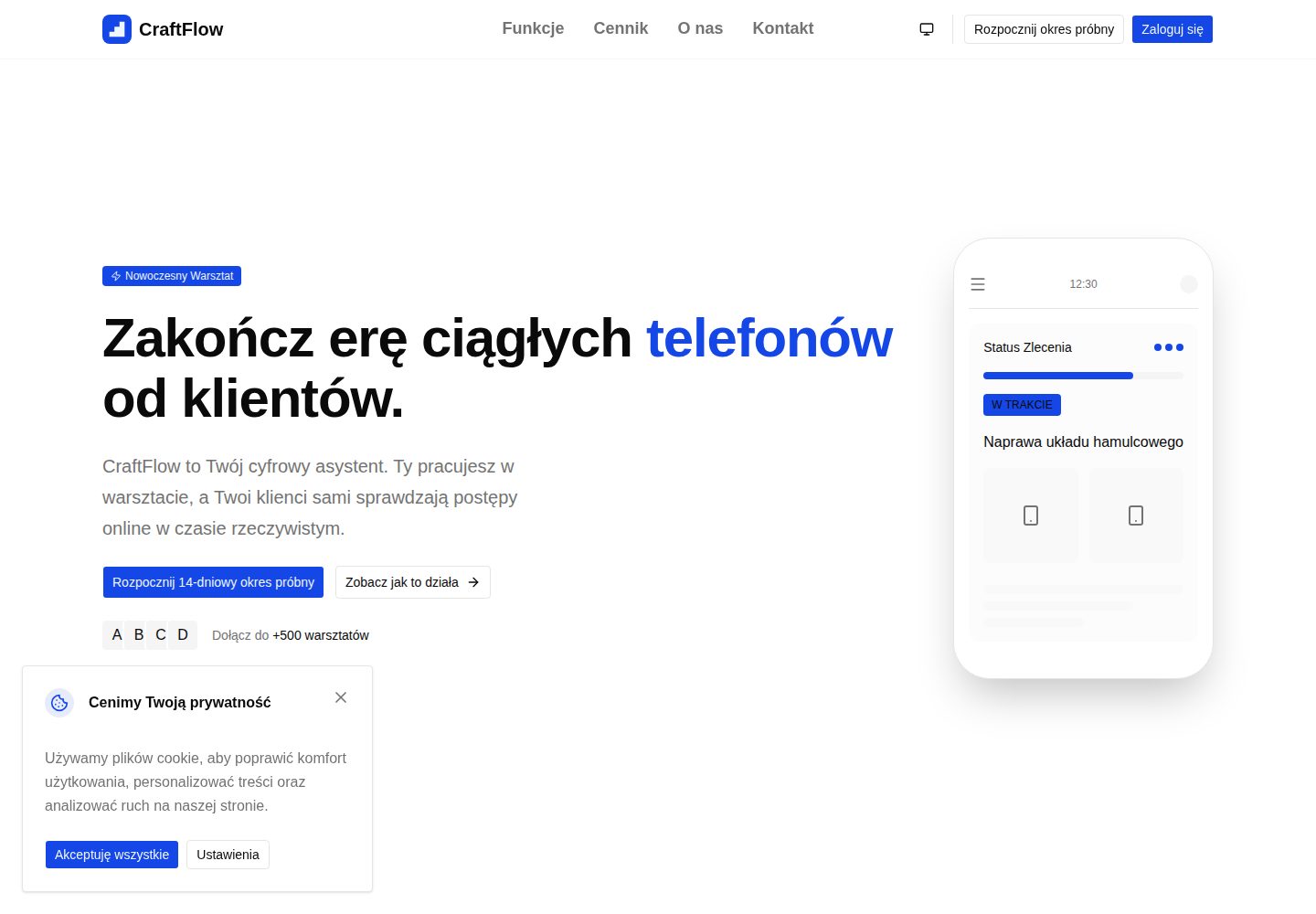
Contractors can manage construction stages through project timelines and mark them complete, while clients view read-only progress via a single link
Next.jsReactSaaS
craft-flow — Next.js SaaS Template
By JanSzewczyk
CraftFlow is a B2B2C SaaS template for craftsmen: contractors can create project timelines and share progress with clients via a link, while the client side supports guest viewing and, after registration, saving history.
Explore the design
Compare the page layouts and mobile experience. Open any screenshot for a closer look.
Desktop homepage1 / 3
Desktop captureTop of page
Actual screenshot captured by the server browser.
All pages & views 3
Screenshots show visual appearance; interactive behavior may differ.
Recorded 2026-10-14View source
What stands out
A quick read of the recorded project description.
Supports uploading PDF contracts and JPEG/PNG/WEBP photos, with attachments provided by Supabase Storage with optimized thumbnails
Project templates use a deep copy mechanism, so template changes do not affect already created projects
After client registration, the server matches CRM data by email and links historical projects to the global Clerk ID
Clerk Billing provides a 14-day trial and subscription limits for the Basic, Standard, and Premium tiers
The admin panel supports a KPI overview, banning contractor accounts, and impersonation for technical support
Template Details
CraftFlow's README positions it as a SaaS platform for craftsmen such as carpenters, plumbers, and renovators. Its core is enabling contractors to create project timelines and show clients real-time progress through a single link, reducing repeated client questions about progress and contracts and on-site photos scattered across text messages and emails. The contractor area includes a paginated project list, timeline stage management, contract and photo uploads, project templates, a client CRM, branding customization, and light/dark theme switching. The client side provides a read-only guest view based on publicToken and guides clients to register via an Authwall; after registration, the server matches CRM data by email and links historical projects. Subscriptions and permissions are managed by Clerk Billing. The README lists differences among the Basic, Standard, and Premium tiers in active project count, template count, and branding features, and offers a 14-day trial. The admin panel is available only after assigning the admin role in Clerk and includes a KPI overview, account banning, and impersonation support. For the tech stack, the README lists Next.js App Router, React Server Components, TypeScript, Tailwind CSS, @szum-tech/design-system, Clerk, Drizzle ORM, Supabase, Resend, React Email, React Hook Form, Zod, T3 Env, Pino, next-themes, as well as testing and quality tools such as Vitest, Playwright, Storybook, ESLint, and Prettier. The README does not provide information about actual deployment scale, performance metrics, or production environment operation.
Next.jsReactSaaS
Is it right for your project?
Use Cases
- A craftsman or renovation contractor needs to show clients the current stage and progress of a project
- A contractor wants to centrally manage client contact information, project contracts, and on-site photos
- A client wants to view renovation progress via a link and, after registering, keep a long-term history
- A developer needs a Next.js SaaS starter template integrating Clerk, Supabase, Drizzle, and Resend
Suitable For
- Craftsmen such as carpenters, plumbers, and renovators who need to sync project progress with clients
- Developers who want to build on an existing SaaS template or learn a full-stack architecture
- Teams that need to evaluate how Clerk Billing, Supabase Storage, and Drizzle ORM are integrated
Getting started & customization
Use these recorded setup notes alongside the repository instructions for your chosen version.
- 1
Requires Node.js 24.x or higher and uses npm to install dependencies; the project sets legacy-peer-deps=true via .npmrc
- 2
Requires Clerk, Supabase, and Resend accounts, and you need to copy .env.example to .env.local and fill in the corresponding keys
- 3
Database initialization requires running npm run db:generate and npm run db:migrate
- 4
The development server is started with npm run dev, with the default address at http://localhost:3000
- 5
The README does not provide complete steps for production deployment
License & source material
Usage conditions & limitations
Free to use · keep license noticeThis entry covers the free version under the MIT license in the public repository; the free scope is the code of this version and does not mean that external services or third-party assets are free.
Must comply with when using
- You are allowed to use, modify, commercialize, and distribute the code of this version for free.
- When distributing copies or substantial portions of the code, retain the original author's copyright notice and the complete MIT license notice.
- The code is provided as is; warranties and limitations of liability are governed by the original license and applicable law.
Additional costs & items to verify
- Demo images, fonts, icons, and other third-party assets must be checked against their respective licenses and cannot be judged solely by the code's MIT license.
- External services such as domains, hosting, databases, payments, or AI may incur additional charges.
- Using Clerk for authentication and subscription billing requires registering a Clerk account and providing keys.
- A Supabase project is required for the PostgreSQL database and file storage.
- A Resend account is required for sending transactional emails.
- It is a B2B subscription model with only a 14-day trial, after which a paid subscription is required.
- The Basic plan is limited to 5 active projects and 2 templates, with branding features locked.
- The Standard plan is limited to 20 active projects and 10 templates.
- The admin panel is available only after assigning the admin role in Clerk.
- The AI code review workflow requires configuring the OPENAI_API_KEY key.
View Original Text Basis
Permission is hereby granted, free of charge
Original License Text
- A [Clerk](https://clerk.com/) account — authentication and subscription billing
Original README
- A [Supabase](https://supabase.com/) project — PostgreSQL database and file storage
Original README
- A [Resend](https://resend.com/) account — transactional email
Original README
B2B subscription model with a 14-day trial:
Original README
| **Basic** | 5 | 2 | Locked |
Original README
| **Standard** | 20 | 10 | ✅ Unlocked |
Original README
Available only after assigning the `admin` role in Clerk:
Original README
https://github.com/JanSzewczyk/craft-flow/blob/main/LICENSEhttps://github.com/JanSzewczyk/craft-flow/blob/main/README.mdAutomated code review on every PR via OpenAI (requires `OPENAI_API_KEY` secret).
Original README
Compiled by DeepSeek based on repository license and README ·2026-10-14. Results only cover the materials read; dependencies, images, fonts, and subsequent term changes are subject to their respective original texts.
Project checks & description sources
Template Information
- Source platforms
- GitHub
- Documentation and maintenance reference score
- More documented · 85 / 100
- Technologies
- Next.js · React
- Website type
- SaaS
How this score is calculated
Our heuristic uses license records (up to 30), a demo link (12), a preview (10), stars (15), recorded maintenance (15), description completeness (8), feature records (5) and classification data (5). It is not a code, security or performance test, or a Google score. A link does not establish tested functionality.
What to verify for this project
- Repository update recorded
- 2026-10-13
- Screenshot last checked
- 2026-10-14
A demo link is listed. Check it with your own content and viewport sizes; its presence does not confirm that forms, authentication or payments work.
The catalog identifies Next.js as the primary stack. Check the actual dependency manifest and lockfile for versions and hosting requirements. These notes use recorded metadata, not a code audit or a deployment test.
Use a selection guide →How this description was prepared
AI-assisted description based on catalog records and repository material. Repository authors are not automatically the reviewers of this description.
Review declaration: codex-user-requested-batch-review-20261015 · 2026-10-15
Inspect the recorded source material
SHA-256: 2b4a9d1d85da87ccc05f3184c04eddeac21c06ede4433af991025243da4ea46d
2026-10-14T17:06:22.127Z
Source file / repository<div align="center">
# 🔨 CraftFlow
[](https://vercel.com/new?utm_medium=default-template&filter=next.js&utm_source=github&utm_campaign=craft-flow)
[](https://opensource.org/licenses/MIT)
[](https://github.com/JanSzewczyk/craft-flow/actions/workflows/pr-check.yml)
[](https://github.com/JanSzewczyk/craft-flow/stargazers)
**A SaaS platform for craftsmen — create project timelines and share progress with clients via a single link**
[Product](#-product) • [Tech Stack](#-tech-stack) • [Getting Started](#-getting-started) •
[Documentation](#-table-of-contents)
</div>
---
## 👋 What is CraftFlow?
**Problem:** Craftsmen (carpenters, plumbers, finishers) waste time answering client questions ("What stage is my order
at?"). Documents, contracts, and job-site photos are scattered across SMS messages, emails, and chat apps.
**Solution:** CraftFlow is a simple B2B2C SaaS platform that lets a craftsman create a **project timeline** and share it
with a client via a single link. The client sees real-time progress, while the contractor manages all their jobs in one
place.
**Growth model (PLG):** Clients receive the link as Guests but are encouraged to create a free account to save their
renovation history forever. By signing up, they enter the CraftFlow ecosystem — becoming a free marketing channel.
## ✨ Product
### 🧑🔧 Contractor Zone (`/app/*`)
- **📋 Project Management** — Paginated job list, create new projects, and assign them to clients
- **🗓️ Project Timeline** — Add execution stages, mark them as complete, and track progress
- **📁 Files & Attachments** — Upload contracts (PDF) and photos (JPEG/PNG/WEBP); Supabase Storage serves optimized
thumbnails
- **📄 Templates (`/app/templates`)** — Project "recipes" (e.g. "Window Installation") copied via Deep Copy — template
changes don't affect existing projects
- **👥 Client CRM (`/app/clients`)** — Contact database; relational protection prevents deleting clients with active
projects
- **🎨 Branding (`/app/branding`)** — Customize logo, primary color, and default email message shown in the client
portal
- **🌙 Light & Dark Theme** — System-wide light/dark/system theme switching available across all views
### 👁️ Client View & PLG Mechanics
- **🔗 Guest View (`/status/[publicToken]`)** — Clean, read-only project view with contractor branding; a Data Mock
Object (DMO) protects internal notes from unauthorized access
- **🚪 Authwall (PLG)** — A prompt on the timeline encouraging clients to sign up to "save their renovation history
forever"
- **✨ Account Auto-Linking** — When a client signs up, the server searches their email across all CRM databases and
links historical projects to their global Clerk ID
- **🖥️ Client Portal (`/client/*`)** — Registered client dashboard with active jobs and history views
### 💳 Subscriptions & Limits (Clerk Billing)
B2B subscription model with a 14-day trial:
| Plan | Active Projects | Templates | Branding |
| ------------ | --------------- | --------- | ----------- |
| **Basic** | 5 | 2 | Locked |
| **Standard** | 20 | 10 | ✅ Unlocked |
| **Premium** | Unlimited | Unlimited | ✅ Unlocked |
### 🏗️ Onboarding & Authorization
- **Role-based Registration** — Sign-up form assigns `publicMetadata.roles: ["contractor"]` in Clerk
- **Plan Selection** — Clerk Billing plan selection is enforced before entering the dashboard
- **Stepper State Persistence** — Onboarding progress is saved to the database, preventing data loss on refresh
- **Middleware Protection** — Middleware blocks `/app/*` for users without `onboardingComplete: true` and an active plan
### 🔐 Admin Panel
Available only after assigning the `admin` role in Clerk:
- KPI overview: number of active contractors, MRR, PLG growth
- Ability to ban a contractor account and provide technical support (Impersonate)
---
## 🛠️ Tech Stack
### 🏗️ Core
- [](https://nextjs.org/)
— App Router, Turbopack, React Compiler (automatic memoization)
- [](https://react.dev/)
— React Server Components and Server Actions
- [](https://www.typescriptlang.org/)
— strict mode, `noUncheckedIndexedAccess`, `ts-reset`
- [](https://tailwindcss.com/)
— CSS-first configuration paired with
[@szum-tech/design-system](https://www.npmjs.com/package/@szum-tech/design-system)
- [](https://www.npmjs.com/package/@szum-tech/design-system)
— Radix UI components, OKLCH design tokens, `lucide-react` icons
### 🔐 Auth & Data
- [](https://clerk.com/)
— Authentication with Custom UI (hooks: `useSignIn`, `useSignUp`) and Clerk Billing for subscription plans
- [](https://orm.drizzle.team/)
— Type-safe SQL on PostgreSQL hosted in [Supabase](https://supabase.com/)
- [](https://supabase.com/)
— PostgreSQL hosting + Storage for project attachments
- [](https://resend.com/) +
[](https://react.email/)
— transactional emails rendered as React components
- [](https://react-hook-form.com/) +
[](https://zod.dev/)
— form handling with schema validation
### 🔧 Infrastructure
- [](https://env.t3.gg/)
— build-time validated, type-safe environment variables
- [](https://getpino.io/)
— high-performance structured JSON logging
- [](https://github.com/pacocoursey/next-themes)
— light/dark/system theme switching
### 🧪 Testing & Quality
- [](https://vitest.dev/)
— dual-project setup: `unit` (Node) and `storybook` (Playwright/Chromium)
- [](https://playwright.dev/)
— E2E tests with accessibility checks via `@axe-core/playwright`
- [](https://storybook.js.org/)
— browser-rendered interaction tests in CSF Next format
- [](https://eslint.org/) +
[](https://prettier.io/)
— pre-configured with [@szum-tech](https://www.npmjs.com/package/@szum-tech/eslint-config) shared configs
- [](https://www.npmjs.com/package/mimicry-js) +
[](https://fakerjs.dev/)
— typed test data builders
### 🤖 Automation
- **🚀 [GitHub Actions](https://github.com/features/actions)** — PR check (sharded test matrix), AI code review,
automated releases
- [](https://github.com/semantic-release/semantic-release)
— versioning and changelog on merge to `main`
---
## 📖 Table of Contents
- [✨ Product](#-product)
- [🛠️ Tech Stack](#️-tech-stack)
- [🎯 Getting Started](#-getting-started)
- [🚀 Deployment](#-deployment)
- [📃 Scripts Overview](#-scripts-overview)
- [🧪 Testing](#-testing)
- [🎨 Styling & Design System](#-styling--design-system)
- [💻 Environment Variables](#-environment-variables)
- [📝 Logging](#-logging)
- [🚀 GitHub Actions](#-github-actions)
- [🔒 Server-only Code](#-server-only-code)
- [📁 Project Structure](#-project-structure)
- [🤝 Contributing](#-contributing)
- [📜 License](#-license)
- [🙏 Acknowledgments](#-acknowledgments)
- [📧 Contact & Support](#-contact--support)
---
## 🎯 Getting Started
### 📋 Prerequisites
Before you begin, make sure you have:
- **Node.js** 24.x or higher (CI runs on Node 24)
- **npm** package manager (the project uses `legacy-peer-deps=true` via `.npmrc`)
- **Git** for version control
- A [Clerk](https://clerk.com/) account — authentication and subscription billing
- A [Supabase](https://supabase.com/) project — PostgreSQL database and file storage
- A [Resend](https://resend.com/) account — transactional email
### 📦 Installation
#### 1. Clone the Repository
```bash
git clone https://github.com/JanSzewczyk/craft-flow.git
cd craft-flow
```
#### 2. Install Dependencies
```bash
npm install
```
#### 3. Configure Environment Variables
Copy `.env.example` to `.env.local` and fill in the values:
```env
# Logging configuration
LOG_LEVEL=debug
# Clerk
NEXT_PUBLIC_CLERK_PUBLISHABLE_KEY=pk_test_xxxxxxxx
CLERK_SECRET_KEY=sk_test_xxxxxxxx
NEXT_PUBLIC_CLERK_SIGN_IN_URL=/sign-in
NEXT_PUBLIC_CLERK_SIGN_IN_FALLBACK_REDIRECT_URL=/
NEXT_PUBLIC_CLERK_SIGN_UP_FALLBACK_REDIRECT_URL=/
NEXT_PUBLIC_CLERK_SIGN_UP_URL=/sign-up
# Resend
RESEND_API_KEY=re_xxxxxxxx
[email protected]
# Supabase
DATABASE_URL=postgresql://postgres.[ref]:[password]@aws-0-[region].pooler.supabase.com:6543/postgres
SUPABASE_URL=https://[ref].supabase.co
SUPABASE_SERVICE_ROLE_KEY=eyJxxxxxxxx
```
#### 4. Set Up the Database
```bash
npm run db:generate
npm run db:migrate
```
#### 5. Start the Development Server
```bash
npm run dev
```
Open [http://localhost:3000](http://localhost:3000) in your browser.
---
## 🚀 Deployment
Deploy to **Vercel** with a single click:
[](https://vercel.com/new?utm_medium=default-template&filter=next.js&utm_source=github&utm_campaign=craft-flow)
### Deployment Steps
1. Click the "Deploy with Vercel" button
2. Connect your GitHub repository
3. Configure environment variables in the Vercel dashboard
4. Deploy — your application goes live with automatic CI/CD
---
## 📃 Scripts Overview
### 🛠️ Development
| Script | Description |
| ----------------- | --------------------------------------- |
| `npm run dev` | Start development server with Turbopack |
| `npm run build` | Production build |
| `npm run start` | Start production server |
| `npm run analyze` | Bundle analyzer (client, server, edge) |
### 🗄️ Database
| Script | Description |
| --------------------- | ----------------------------------------------- |
| `npm run db:generate` | Generate Drizzle migrations from schema changes |
| `npm run db:migrate` | Apply pending migrations |
| `npm run db:push` | Push schema directly (dev only) |
| `npm run db:studio` | Open Drizzle Studio GUI |
### 🧹 Code Quality
| Script | Description |
| ------------------------ | --------------------- |
| `npm run lint` | ESLint check |
| `npm run lint:fix` | ESLint auto-fix |
| `npm run prettier:check` | Prettier format check |
| `npm run prettier:write` | Prettier auto-fix |
| `npm run type-check` | TypeScript type check |
### 🧪 Testing
| Script | Description |
| ------------------------ | -------------------------------------------- |
| `npm run test` | Run all Vitest tests |
| `npm run test:coverage` | Generate full coverage report |
| `npm run test:unit` | Unit tests only (with coverage) |
| `npm run test:watch` | Watch mode |
| `npm run test:storybook` | Storybook component tests (Chromium browser) |
| `npm run test:e2e` | Playwright E2E tests (requires build) |
| `npm run test:e2e:ui` | Playwright UI mode |
### 📚 Storybook
| Script | Description |
| ------------------------- | ---------------------------- |
| `npm run storybook:dev` | Start Storybook on port 6006 |
| `npm run storybook:build` | Build static Storybook |
| `npm run storybook:serve` | Serve built Storybook |
---
## 🧪 Testing
CraftFlow has a three-layer testing infrastructure.
### 🔬 Unit Tests (Vitest — Node environment)
```bash
npm run test:unit
```
Unit tests use the `*.test.ts` pattern and run in the Node environment. Run a single file:
```bash
npx vitest run --project=unit path/to/file.test.ts
```
### 🧩 Component Tests (Vitest + Storybook — Playwright/Chromium)
```bash
npm run test:storybook
```
Storybook interaction tests run in a real Chromium browser via `@vitest/browser-playwright`. Stories use CSF Next format
with the `.test()` method:
```typescript
const meta = preview.meta({
title: "Features/...",
component: MyComponent,
args: { requiredProp: defaultBuilder.one() } // required props as default meta args
});
export const Default = meta.story({});
Default.test("renders correctly", async ({ canvas }) => { ... });
```
Run a single story file:
```bash
npx vitest run --project=storybook path/to/component.stories.tsx
```
### 🎭 End-to-End Tests (Playwright)
Build the app first, then run the tests:
```bash
npm run build && npm run test:e2e
```
Playwright UI mode for debugging:
```bash
npm run test:e2e:ui
```
---
## 🎨 Styling & Design System
CraftFlow uses **[Tailwind CSS 4](https://tailwindcss.com/)** with a CSS-first configuration and the
**[Szum-Tech Design System](https://www.npmjs.com/package/@szum-tech/design-system)**, which provides:
- ✅ Ready-made components built on [Radix UI](https://www.radix-ui.com/)
- 🎨 OKLCH semantic color tokens and design tokens
- 🌙 Light, dark, and system theme switching via [next-themes](https://github.com/pacocoursey/next-themes) — applies
across all views including the client portal
- 📖 [Component documentation](https://szum-tech-design-system.vercel.app/?path=/docs/components--docs)
### Usage
```typescript
import { Button, Card, Tooltip } from "@szum-tech/design-system";
```
Icons are provided via `lucide-react` (re-exported through the design system). Use `startIcon`/`endIcon` props on
`Button` — not children.
---
## 💻 Environment Variables
[T3 Env](https://env.t3.gg/) provides build-time validation of environment variables.
### Configuration Files
- **`data/env/server.ts`** — Server-only variables (CLERK_SECRET_KEY, RESEND_API_KEY, DATABASE_URL, SUPABASE_URL,
SUPABASE_SERVICE_ROLE_KEY, LOG_LEVEL, CONTACT_EMAIL_TO)
- **`data/env/client.ts`** — Client-safe variables (must use `NEXT_PUBLIC_` prefix)
### Benefits
- ✅ Fully typed access across the entire codebase
- ✅ Build-time validation — missing variables fail fast
- ✅ Empty strings treated as `undefined`
- ✅ Skip validation in Docker builds with `SKIP_ENV_VALIDATION=true`
---
## 📝 Logging
CraftFlow uses **[Pino](https://getpino.io/)** for structured JSON logging.
### Usage
```typescript
import logger, { createLogger } from "~/lib/logger";
const moduleLogger = createLogger({ module: "projects-service" });
moduleLogger.info({ userId, projectId }, "Project created successfully");
moduleLogger.error({ userId, operation: "createProject", errorCode: err.code }, "DB insert failed");
```
### Log Levels
```bash
LOG_LEVEL=fatal # Fatal errors only
LOG_LEVEL=error # Errors and above
LOG_LEVEL=warn # Warnings and above
LOG_LEVEL=info # Info and above (default)
LOG_LEVEL=debug # Debug messages and above
LOG_LEVEL=trace # Everything
```
### Built-in Logging
- **Request logging** — `proxy.ts` logs method, URL, status, and response time with a unique `X-Request-ID` header
- **Health check** — `app/api/health/route.ts` logs at info/debug/error levels
- **Error handlers** — `app/error.tsx` and `app/global-error.tsx` capture and log page and application errors
---
## 🚀 GitHub Actions
### Available Workflows
#### 1. ✅ PR Check (`pr-check.yml`)
Runs on every pull request with the following jobs:
- 🏗️ **Build** — Verifies the project builds successfully
- 📖 **Build Storybook** — Verifies Storybook builds successfully
- 🧹 **Prettier** — Code formatting check
- ⬣ **ESLint** — Code quality and linting
- 🛠️ **TypeScript** — Type checking
- ♻️ **Prewarm Playwright Cache** — Installs Chromium once before the test matrix to prevent cache-save race conditions
- 🧪 **Test (shard N/4)** — **4 parallel shards** using Vitest's native `--shard=N/4` mechanism. Each shard runs an
equal portion of unit (`*.test.ts`) and Storybook (`*.stories.tsx`) tests, with the
[blob reporter](https://vitest.dev/guide/improving-performance#sharding) producing a coverage shard per job.
- 📊 **Coverage Report** — Merges the 4 blob shards with `vitest run --merge-reports`, generates a unified coverage
summary, and posts it as a PR comment via
[vitest-coverage-report-action](https://github.com/davelosert/vitest-coverage-report-action).
- 🎭 **Playwright E2E** — End-to-end test suite (Chromium)
- 🔍 **Dependency Review** — Audits dependency changes for known vulnerabilities
The matrix uses `fail-fast: false` so a failure in one shard does not cancel the remaining three — all shards always
finish and the coverage report is always generated.
#### 2. 🤖 AI Code Review (`code-review.yml`)
Automated code review on every PR via OpenAI (requires `OPENAI_API_KEY` secret).
#### 3. 🚢 Publish (`publish.yml`)
Triggered on merge to `main`:
- 📦 Determines next version via [Semantic Release](https://github.com/semantic-release/semantic-release) +
[Conventional Commits](https://www.conventionalcommits.org/)
- 📝 Updates `CHANGELOG.md`
- 🏷️ Creates a GitHub release
- 🔢 Bumps version in `package.json`
---
## 🔒 Server-only Code
The [`server-only`](https://www.npmjs.com/package/server-only) package prevents server code from leaking into the client
bundle:
```typescript
import "server-only";
export async function getSecretData() {
// Build-time error if imported by a Client Component
}
```
The `lib/supabase/db.ts` database client uses `server-only` — it will never reach the browser.
---
## 📁 Project Structure
```
craft-flow/
├── .claude/ # Claude Code configuration (agents, skills, hooks)
├── .github/
│ └── workflows/ # GitHub Actions (pr-check, code-review, publish)
├── .storybook/ # Storybook configuration and decorators
├── __mocks__/ # Vitest module mocks
├── app/ # Next.js App Router
│ ├── (auth)/ # Auth pages (sign-in, sign-up, forgot-password)
│ ├── (marketing)/ # Public marketing pages
│ ├── (onboarding)/ # Onboarding flow with plan selection
│ ├── (public)/ # Public project status view (/status/[token])
│ ├── app/ # Contractor dashboard (projects, clients, templates)
│ ├── client/ # Client portal (active jobs, history)
│ └── api/ # API routes (health check)
├── components/ # Shared React components
├── constants/ # Static data and configuration
├── data/
│ └── env/ # T3 Env type-safe environment variables
├── docs/ # Project documentation
├── drizzle/ # Generated Drizzle migrations
├── features/ # Feature-driven domain modules (self-contained)
├── lib/
│ └── supabase/ # Drizzle ORM client and central schema exports
├── public/ # Static assets (images, fonts, icons)
├── stories/ # Standalone Storybook stories (design-system docs)
├── tests/
│ ├── e2e/ # Playwright end-to-end tests
│ ├── integration/ # Storybook integration test setup
│ └── unit/ # Vitest unit tests
├── types/ # Shared TypeScript type augmentations
├── utils/ # Shared utility helpers
├── drizzle.config.ts # Drizzle ORM configuration
├── next.config.ts # Next.js configuration
├── playwright.config.ts # Playwright E2E configuration
├── proxy.ts # Request logging middleware
├── tsconfig.json # TypeScript configuration
└── vitest.config.ts # Vitest configuration
```
### Key Directories
- **`app/`** — App Router with route groups: `(auth)`, `(marketing)`, `(onboarding)`, `(public)` for the guest status
view, `app/` for the contractor dashboard, and `client/` for the client portal
- **`features/{domain}/`** — 10 self-contained domain modules: `auth`, `billing`, `contact`, `contractor`, `crm`,
`marketing`, `onboarding`, `projects`, `shared`, `templates`. Each contains its own `components/`, `schemas/`,
`types/`, `server/db/`, `server/services/`, `server/actions/`, and `test/builders/`
- **`lib/supabase/`** — Drizzle ORM client (`db.ts`) and central schema exports (`schema.ts`) — server-only
- **`data/env/`** — T3 Env type-safe environment variable definitions
- **`tests/`** — Three test environments: unit (Node), Storybook (browser), E2E (Playwright)
### Important Configuration Files
- **`next.config.ts`** — Next.js build, React Compiler, image domains, health check rewrites
- **`drizzle.config.ts`** — ORM and migration configuration
- **`vitest.config.ts`** — Dual-project Vitest setup (unit + storybook)
- **`proxy.ts`** — Request logging middleware (not `middleware.ts`)
- **`tsconfig.json`** — TypeScript strict mode with `~/` path alias
- **`.npmrc`** — Sets `legacy-peer-deps=true` (required for the dependency tree)
---
## 🤝 Contributing
Contributions are welcome. Follow this flow:
1. Fork the repository
2. Create a branch (`git checkout -b feature/amazing-feature`)
3. Commit your changes using [Conventional Commits](https://www.conventionalcommits.org/)
4. Push the branch (`git push origin feature/amazing-feature`)
5. Open a Pull Request
Make sure your code passes all tests and lint checks before opening a PR.
---
## 📜 License
This project is licensed under the **MIT License**. See the [LICENSE](LICENSE) file for details.
---
## 🙏 Acknowledgments
CraftFlow is built with amazing open-source tools and libraries:
- [Next.js](https://nextjs.org/) — The React Framework
- [Tailwind CSS](https://tailwindcss.com/) — Utility-first CSS framework
- [TypeScript](https://www.typescriptlang.org/) — JavaScript with syntax for types
- [Vitest](https://vitest.dev/) — Next generation testing framework
- [Playwright](https://playwright.dev/) — E2E testing framework
- [Storybook](https://storybook.js.org/) — UI component explorer
- And many more amazing libraries!
---
## 📧 Contact & Support
Have questions, suggestions, or found an issue?
- 🐛 [Open an issue](https://github.com/JanSzewczyk/craft-flow/issues)
- ⭐ [Star this repository](https://github.com/JanSzewczyk/craft-flow)
- 👨💻 Check out my [GitHub profile](https://github.com/JanSzewczyk)
---
<div align="center">
**Made with ❤️ by [Szum-Tech](https://github.com/JanSzewczyk)**
If this project helped you, please consider giving it a ⭐ on GitHub!
[⬆ Back to Top](#-craftflow)
</div>
Explore similar templates
Compare previews and descriptions within the same stack and category.

Next.js SaaS Starter
The official Next.js SaaS starter template, integrating email/password authentication, Stripe Checkout subscriptions, a dashboard with user/team CRUD, basic Owner/Member RBAC, and activity logging.
Next.js · SaaS

SaaS-Boilerplate
SaaS-Boilerplate is an open-source SaaS starter template built with Next.js App Router, React 19, TypeScript, Tailwind CSS, and Shadcn UI.
Next.js · SaaS

create-t3-turbo
A full-stack TypeScript monorepo starter from T3 OSS, listed in the Vercel template directory. It splits apps for Next.js, Expo and optional TanStack Start, with shared packages for tRPC v11, better-auth, Drizzle + Supabase and shadcn/ui.
Next.js · Starter

saas-starter-kit
BoxyHQ's open-source Next.js enterprise SaaS starter template provides a reusable foundation with authentication, team management, SAML SSO, directory sync, webhooks, audit logs, and Stripe payments.
Next.js · SaaS
saasfly
Saasfly is an MIT-licensed Next.js SaaS starter template with built-in Clerk authentication, Stripe payment, PostgreSQL, Resend email, internationalization, SEO, tRPC, and Zustand. It is created via `bun create saasfly` and deployable on Vercel.
Next.js · SaaS

next-saas-starter
A free Next.js SaaS marketing landing page template from Blazity, using static generation and styled-components with no extra UI library.
Next.js · SaaS