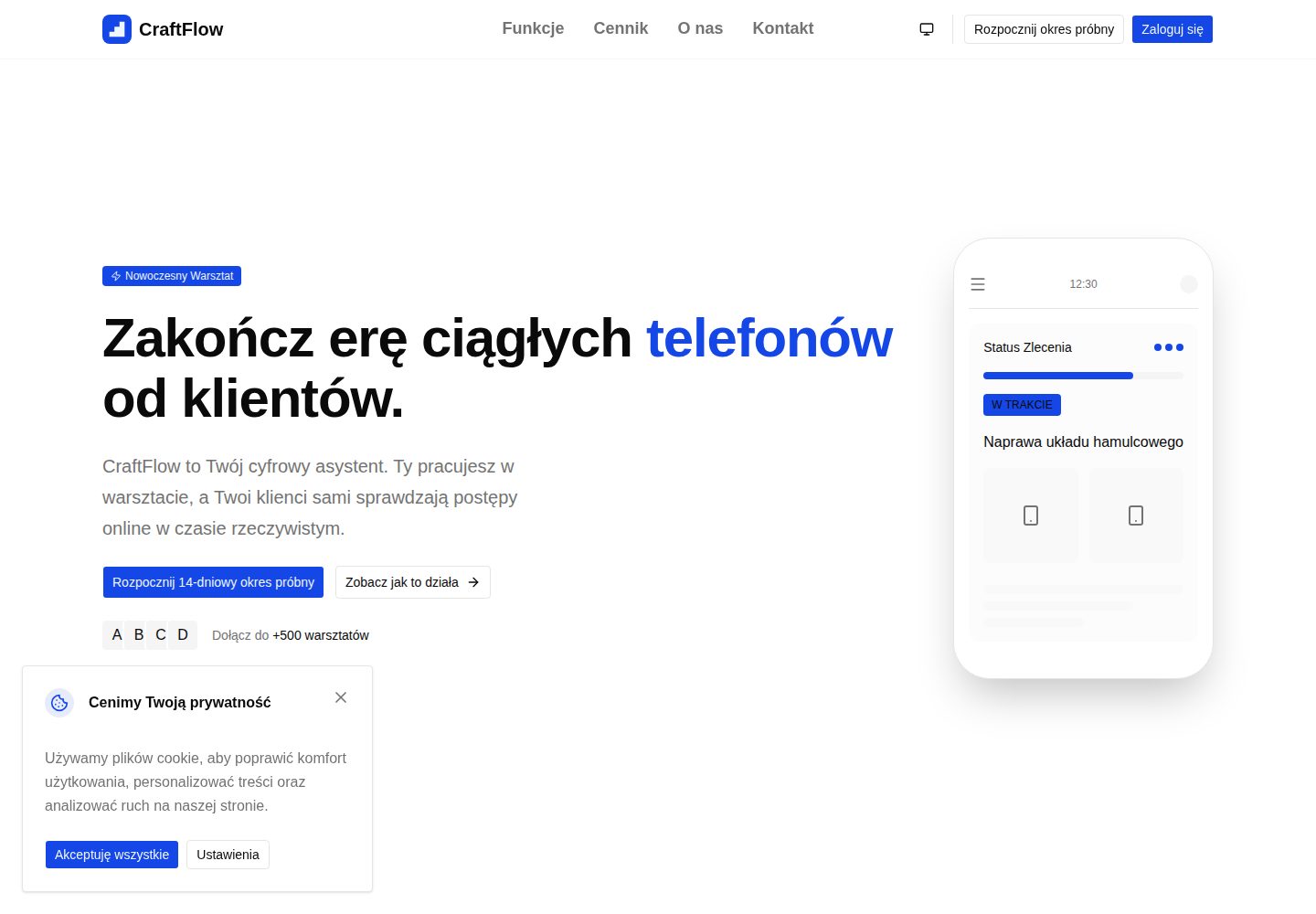
承包商可通过项目时间线管理施工阶段并标记完成,客户通过单一链接查看只读进度
Next.jsReactSaaS
craft-flow — Next.js SaaS模板
作者 JanSzewczyk
CraftFlow 是一个面向手工艺人的 B2B2C SaaS 模板,承包商可创建项目时间线并通过链接向客户分享进度,客户端支持访客查看与注册后保存历史。
看看你的网站会是什么样
浏览真实页面截图,比较内容排版与手机效果。点击下方缩略图切换,放大查看整页细节。
全部页面与视图 3
截图用于了解视觉与布局,交互效果请以实际项目为准。
采集于 2026-10-14查看来源
值得关注的模板亮点
从已有项目资料中,快速了解它的特点。
支持上传 PDF 合同与 JPEG/PNG/WEBP 照片,附件由 Supabase Storage 提供优化缩略图
项目模板采用深拷贝机制,模板变更不会影响已创建的项目
客户注册后服务端按邮箱匹配 CRM 数据,将历史项目关联到全局 Clerk ID
Clerk Billing 提供 14 天试用及 Basic、Standard、Premium 三档订阅限制
管理员面板支持 KPI 概览、封禁承包商账户和模拟登录技术支持
模板详细介绍
CraftFlow 的 README 将其定位为面向木工、水管工、装修工等手工艺人的 SaaS 平台,核心是让承包商创建项目时间线,并通过单一链接向客户展示实时进度,从而减少客户反复询问进度、合同与现场照片散落在短信和邮件中的问题。承包商区域包含分页项目列表、时间线阶段管理、合同与照片上传、项目模板、客户 CRM、品牌定制以及明暗主题切换。客户端提供基于 publicToken 的只读访客视图,并通过 Authwall 引导客户注册,注册后服务端会按邮箱匹配 CRM 数据并关联历史项目。订阅与权限由 Clerk Billing 管理,README 列出了 Basic、Standard、Premium 三档在活跃项目数、模板数和品牌功能上的差异,并提供 14 天试用。管理员面板需在 Clerk 中分配 admin 角色后使用,包含 KPI 概览、封禁账户和模拟登录支持。技术栈方面 README 列出了 Next.js App Router、React Server Components、TypeScript、Tailwind CSS、@szum-tech/design-system、Clerk、Drizzle ORM、Supabase、Resend、React Email、React Hook Form、Zod、T3 Env、Pino、next-themes,以及 Vitest、Playwright、Storybook、ESLint、Prettier 等测试与质量工具。README 未提供关于实际部署规模、性能指标或生产环境运行情况的说明。
Next.jsReactSaaS
适合你的项目吗?
适用场景
- 手工艺人或装修承包商需要向客户展示项目当前阶段和进度
- 承包商希望集中管理客户联系方式、项目合同和现场照片
- 客户希望通过链接查看装修进度,并注册后长期保存历史记录
- 开发者需要一个集成 Clerk、Supabase、Drizzle 和 Resend 的 Next.js SaaS 起始模板
适合人群
- 木工、水管工、装修工等需要与客户同步项目进度的手工艺人
- 希望基于现有 SaaS 模板二次开发或学习全栈架构的开发者
- 需要评估 Clerk Billing、Supabase Storage 与 Drizzle ORM 集成方式的团队
上手与定制指南
结合仓库当前版本的说明,按下面的资料检查内容、配置与运行要求。
- 1
需要 Node.js 24.x 或更高版本,并使用 npm 安装依赖,项目通过 .npmrc 设置 legacy-peer-deps=true
- 2
需准备 Clerk、Supabase 和 Resend 账户,并将 .env.example 复制为 .env.local 填写相应密钥
- 3
数据库初始化需运行 npm run db:generate 和 npm run db:migrate
- 4
开发服务器通过 npm run dev 启动,默认地址为 http://localhost:3000
- 5
README 未提供生产环境部署的完整步骤说明
授权与来源资料
使用条件与限制
免费使用 · 保留许可声明本次收录的是公开仓库中采用 MIT 许可的免费版本;免费范围为该版本代码,不代表外部服务或第三方素材免费。
使用时需要遵守
- 允许免费使用、修改、商用和分发该版本代码。
- 分发代码副本或实质性部分时,保留原作者版权声明和完整 MIT 许可声明。
- 代码按现状提供;担保与责任限制以原许可证及适用法律为准。
额外费用与待核对事项
- 演示图片、字体、图标及其他第三方素材需按各自许可核对,不能仅凭代码的 MIT 许可判断。
- 域名、托管、数据库、支付或 AI 等外部服务可能另外收费。
- 使用 Clerk 进行身份验证和订阅计费,需要注册 Clerk 账户并提供密钥。
- 需要 Supabase 项目用于 PostgreSQL 数据库和文件存储。
- 需要 Resend 账户用于发送事务性邮件。
- B2B 订阅模式,仅提供 14 天试用,之后需付费订阅。
- Basic 套餐限制为 5 个活跃项目和 2 个模板,品牌功能锁定。
- Standard 套餐限制为 20 个活跃项目和 10 个模板。
- 管理员面板仅在 Clerk 中分配 admin 角色后才可用。
- AI 代码审查工作流需要配置 OPENAI_API_KEY 密钥。
查看原文依据
Permission is hereby granted, free of charge
许可证原文
- A [Clerk](https://clerk.com/) account — authentication and subscription billing
README 原文
- A [Supabase](https://supabase.com/) project — PostgreSQL database and file storage
README 原文
- A [Resend](https://resend.com/) account — transactional email
README 原文
B2B subscription model with a 14-day trial:
README 原文
| **Basic** | 5 | 2 | Locked |
README 原文
| **Standard** | 20 | 10 | ✅ Unlocked |
README 原文
Available only after assigning the `admin` role in Clerk:
README 原文
https://github.com/JanSzewczyk/craft-flow/blob/main/LICENSEhttps://github.com/JanSzewczyk/craft-flow/blob/main/README.mdAutomated code review on every PR via OpenAI (requires `OPENAI_API_KEY` secret).
README 原文
DeepSeek 根据仓库许可证和 README 整理 ·2026-10-14。结果仅覆盖已读取资料,依赖、图片、字体及后续条款变更以各自原文为准。
项目核对记录与介绍依据
模板资料
- 来源平台
- GitHub
- 资料与维护参考分
- 资料较完整 · 85 / 100
- 技术栈
- Next.js · React
- 网站类型
- SaaS
这个分数如何计算
本站按许可资料(最高30分)、演示链接(12分)、预览图(10分)、Star数(15分)、记录的维护时间(15分)、描述完整度(8分)、功能记录(5分)和分类资料(5分)计算。它不是代码、安全或性能测试,也不是 Google 评分;有链接不代表已实测可用。
这个项目需要核对什么
- 记录的仓库更新时间
- 2026-10-13
- 截图检查日期
- 2026-10-14
已收录演示链接。请用你的内容与屏幕尺寸检查;有演示不代表表单、认证或支付已经可用。
目录记录的主要技术栈是 Next.js。请通过依赖清单和锁文件核对实际版本与托管要求。这些说明基于收录资料,不代表代码审计或部署实测。
查看具体选型方法 →介绍的制作与核对状态
介绍由 AI 辅助整理目录与仓库资料。仓库作者不等于这篇介绍的审核者。
审核声明: codex-user-requested-batch-review-20261015 · 2026-10-15
查看当时使用的来源资料
SHA-256: 2b4a9d1d85da87ccc05f3184c04eddeac21c06ede4433af991025243da4ea46d
2026-10-14T17:06:22.127Z
来源文件 / 仓库<div align="center">
# 🔨 CraftFlow
[](https://vercel.com/new?utm_medium=default-template&filter=next.js&utm_source=github&utm_campaign=craft-flow)
[](https://opensource.org/licenses/MIT)
[](https://github.com/JanSzewczyk/craft-flow/actions/workflows/pr-check.yml)
[](https://github.com/JanSzewczyk/craft-flow/stargazers)
**A SaaS platform for craftsmen — create project timelines and share progress with clients via a single link**
[Product](#-product) • [Tech Stack](#-tech-stack) • [Getting Started](#-getting-started) •
[Documentation](#-table-of-contents)
</div>
---
## 👋 What is CraftFlow?
**Problem:** Craftsmen (carpenters, plumbers, finishers) waste time answering client questions ("What stage is my order
at?"). Documents, contracts, and job-site photos are scattered across SMS messages, emails, and chat apps.
**Solution:** CraftFlow is a simple B2B2C SaaS platform that lets a craftsman create a **project timeline** and share it
with a client via a single link. The client sees real-time progress, while the contractor manages all their jobs in one
place.
**Growth model (PLG):** Clients receive the link as Guests but are encouraged to create a free account to save their
renovation history forever. By signing up, they enter the CraftFlow ecosystem — becoming a free marketing channel.
## ✨ Product
### 🧑🔧 Contractor Zone (`/app/*`)
- **📋 Project Management** — Paginated job list, create new projects, and assign them to clients
- **🗓️ Project Timeline** — Add execution stages, mark them as complete, and track progress
- **📁 Files & Attachments** — Upload contracts (PDF) and photos (JPEG/PNG/WEBP); Supabase Storage serves optimized
thumbnails
- **📄 Templates (`/app/templates`)** — Project "recipes" (e.g. "Window Installation") copied via Deep Copy — template
changes don't affect existing projects
- **👥 Client CRM (`/app/clients`)** — Contact database; relational protection prevents deleting clients with active
projects
- **🎨 Branding (`/app/branding`)** — Customize logo, primary color, and default email message shown in the client
portal
- **🌙 Light & Dark Theme** — System-wide light/dark/system theme switching available across all views
### 👁️ Client View & PLG Mechanics
- **🔗 Guest View (`/status/[publicToken]`)** — Clean, read-only project view with contractor branding; a Data Mock
Object (DMO) protects internal notes from unauthorized access
- **🚪 Authwall (PLG)** — A prompt on the timeline encouraging clients to sign up to "save their renovation history
forever"
- **✨ Account Auto-Linking** — When a client signs up, the server searches their email across all CRM databases and
links historical projects to their global Clerk ID
- **🖥️ Client Portal (`/client/*`)** — Registered client dashboard with active jobs and history views
### 💳 Subscriptions & Limits (Clerk Billing)
B2B subscription model with a 14-day trial:
| Plan | Active Projects | Templates | Branding |
| ------------ | --------------- | --------- | ----------- |
| **Basic** | 5 | 2 | Locked |
| **Standard** | 20 | 10 | ✅ Unlocked |
| **Premium** | Unlimited | Unlimited | ✅ Unlocked |
### 🏗️ Onboarding & Authorization
- **Role-based Registration** — Sign-up form assigns `publicMetadata.roles: ["contractor"]` in Clerk
- **Plan Selection** — Clerk Billing plan selection is enforced before entering the dashboard
- **Stepper State Persistence** — Onboarding progress is saved to the database, preventing data loss on refresh
- **Middleware Protection** — Middleware blocks `/app/*` for users without `onboardingComplete: true` and an active plan
### 🔐 Admin Panel
Available only after assigning the `admin` role in Clerk:
- KPI overview: number of active contractors, MRR, PLG growth
- Ability to ban a contractor account and provide technical support (Impersonate)
---
## 🛠️ Tech Stack
### 🏗️ Core
- [](https://nextjs.org/)
— App Router, Turbopack, React Compiler (automatic memoization)
- [](https://react.dev/)
— React Server Components and Server Actions
- [](https://www.typescriptlang.org/)
— strict mode, `noUncheckedIndexedAccess`, `ts-reset`
- [](https://tailwindcss.com/)
— CSS-first configuration paired with
[@szum-tech/design-system](https://www.npmjs.com/package/@szum-tech/design-system)
- [](https://www.npmjs.com/package/@szum-tech/design-system)
— Radix UI components, OKLCH design tokens, `lucide-react` icons
### 🔐 Auth & Data
- [](https://clerk.com/)
— Authentication with Custom UI (hooks: `useSignIn`, `useSignUp`) and Clerk Billing for subscription plans
- [](https://orm.drizzle.team/)
— Type-safe SQL on PostgreSQL hosted in [Supabase](https://supabase.com/)
- [](https://supabase.com/)
— PostgreSQL hosting + Storage for project attachments
- [](https://resend.com/) +
[](https://react.email/)
— transactional emails rendered as React components
- [](https://react-hook-form.com/) +
[](https://zod.dev/)
— form handling with schema validation
### 🔧 Infrastructure
- [](https://env.t3.gg/)
— build-time validated, type-safe environment variables
- [](https://getpino.io/)
— high-performance structured JSON logging
- [](https://github.com/pacocoursey/next-themes)
— light/dark/system theme switching
### 🧪 Testing & Quality
- [](https://vitest.dev/)
— dual-project setup: `unit` (Node) and `storybook` (Playwright/Chromium)
- [](https://playwright.dev/)
— E2E tests with accessibility checks via `@axe-core/playwright`
- [](https://storybook.js.org/)
— browser-rendered interaction tests in CSF Next format
- [](https://eslint.org/) +
[](https://prettier.io/)
— pre-configured with [@szum-tech](https://www.npmjs.com/package/@szum-tech/eslint-config) shared configs
- [](https://www.npmjs.com/package/mimicry-js) +
[](https://fakerjs.dev/)
— typed test data builders
### 🤖 Automation
- **🚀 [GitHub Actions](https://github.com/features/actions)** — PR check (sharded test matrix), AI code review,
automated releases
- [](https://github.com/semantic-release/semantic-release)
— versioning and changelog on merge to `main`
---
## 📖 Table of Contents
- [✨ Product](#-product)
- [🛠️ Tech Stack](#️-tech-stack)
- [🎯 Getting Started](#-getting-started)
- [🚀 Deployment](#-deployment)
- [📃 Scripts Overview](#-scripts-overview)
- [🧪 Testing](#-testing)
- [🎨 Styling & Design System](#-styling--design-system)
- [💻 Environment Variables](#-environment-variables)
- [📝 Logging](#-logging)
- [🚀 GitHub Actions](#-github-actions)
- [🔒 Server-only Code](#-server-only-code)
- [📁 Project Structure](#-project-structure)
- [🤝 Contributing](#-contributing)
- [📜 License](#-license)
- [🙏 Acknowledgments](#-acknowledgments)
- [📧 Contact & Support](#-contact--support)
---
## 🎯 Getting Started
### 📋 Prerequisites
Before you begin, make sure you have:
- **Node.js** 24.x or higher (CI runs on Node 24)
- **npm** package manager (the project uses `legacy-peer-deps=true` via `.npmrc`)
- **Git** for version control
- A [Clerk](https://clerk.com/) account — authentication and subscription billing
- A [Supabase](https://supabase.com/) project — PostgreSQL database and file storage
- A [Resend](https://resend.com/) account — transactional email
### 📦 Installation
#### 1. Clone the Repository
```bash
git clone https://github.com/JanSzewczyk/craft-flow.git
cd craft-flow
```
#### 2. Install Dependencies
```bash
npm install
```
#### 3. Configure Environment Variables
Copy `.env.example` to `.env.local` and fill in the values:
```env
# Logging configuration
LOG_LEVEL=debug
# Clerk
NEXT_PUBLIC_CLERK_PUBLISHABLE_KEY=pk_test_xxxxxxxx
CLERK_SECRET_KEY=sk_test_xxxxxxxx
NEXT_PUBLIC_CLERK_SIGN_IN_URL=/sign-in
NEXT_PUBLIC_CLERK_SIGN_IN_FALLBACK_REDIRECT_URL=/
NEXT_PUBLIC_CLERK_SIGN_UP_FALLBACK_REDIRECT_URL=/
NEXT_PUBLIC_CLERK_SIGN_UP_URL=/sign-up
# Resend
RESEND_API_KEY=re_xxxxxxxx
[email protected]
# Supabase
DATABASE_URL=postgresql://postgres.[ref]:[password]@aws-0-[region].pooler.supabase.com:6543/postgres
SUPABASE_URL=https://[ref].supabase.co
SUPABASE_SERVICE_ROLE_KEY=eyJxxxxxxxx
```
#### 4. Set Up the Database
```bash
npm run db:generate
npm run db:migrate
```
#### 5. Start the Development Server
```bash
npm run dev
```
Open [http://localhost:3000](http://localhost:3000) in your browser.
---
## 🚀 Deployment
Deploy to **Vercel** with a single click:
[](https://vercel.com/new?utm_medium=default-template&filter=next.js&utm_source=github&utm_campaign=craft-flow)
### Deployment Steps
1. Click the "Deploy with Vercel" button
2. Connect your GitHub repository
3. Configure environment variables in the Vercel dashboard
4. Deploy — your application goes live with automatic CI/CD
---
## 📃 Scripts Overview
### 🛠️ Development
| Script | Description |
| ----------------- | --------------------------------------- |
| `npm run dev` | Start development server with Turbopack |
| `npm run build` | Production build |
| `npm run start` | Start production server |
| `npm run analyze` | Bundle analyzer (client, server, edge) |
### 🗄️ Database
| Script | Description |
| --------------------- | ----------------------------------------------- |
| `npm run db:generate` | Generate Drizzle migrations from schema changes |
| `npm run db:migrate` | Apply pending migrations |
| `npm run db:push` | Push schema directly (dev only) |
| `npm run db:studio` | Open Drizzle Studio GUI |
### 🧹 Code Quality
| Script | Description |
| ------------------------ | --------------------- |
| `npm run lint` | ESLint check |
| `npm run lint:fix` | ESLint auto-fix |
| `npm run prettier:check` | Prettier format check |
| `npm run prettier:write` | Prettier auto-fix |
| `npm run type-check` | TypeScript type check |
### 🧪 Testing
| Script | Description |
| ------------------------ | -------------------------------------------- |
| `npm run test` | Run all Vitest tests |
| `npm run test:coverage` | Generate full coverage report |
| `npm run test:unit` | Unit tests only (with coverage) |
| `npm run test:watch` | Watch mode |
| `npm run test:storybook` | Storybook component tests (Chromium browser) |
| `npm run test:e2e` | Playwright E2E tests (requires build) |
| `npm run test:e2e:ui` | Playwright UI mode |
### 📚 Storybook
| Script | Description |
| ------------------------- | ---------------------------- |
| `npm run storybook:dev` | Start Storybook on port 6006 |
| `npm run storybook:build` | Build static Storybook |
| `npm run storybook:serve` | Serve built Storybook |
---
## 🧪 Testing
CraftFlow has a three-layer testing infrastructure.
### 🔬 Unit Tests (Vitest — Node environment)
```bash
npm run test:unit
```
Unit tests use the `*.test.ts` pattern and run in the Node environment. Run a single file:
```bash
npx vitest run --project=unit path/to/file.test.ts
```
### 🧩 Component Tests (Vitest + Storybook — Playwright/Chromium)
```bash
npm run test:storybook
```
Storybook interaction tests run in a real Chromium browser via `@vitest/browser-playwright`. Stories use CSF Next format
with the `.test()` method:
```typescript
const meta = preview.meta({
title: "Features/...",
component: MyComponent,
args: { requiredProp: defaultBuilder.one() } // required props as default meta args
});
export const Default = meta.story({});
Default.test("renders correctly", async ({ canvas }) => { ... });
```
Run a single story file:
```bash
npx vitest run --project=storybook path/to/component.stories.tsx
```
### 🎭 End-to-End Tests (Playwright)
Build the app first, then run the tests:
```bash
npm run build && npm run test:e2e
```
Playwright UI mode for debugging:
```bash
npm run test:e2e:ui
```
---
## 🎨 Styling & Design System
CraftFlow uses **[Tailwind CSS 4](https://tailwindcss.com/)** with a CSS-first configuration and the
**[Szum-Tech Design System](https://www.npmjs.com/package/@szum-tech/design-system)**, which provides:
- ✅ Ready-made components built on [Radix UI](https://www.radix-ui.com/)
- 🎨 OKLCH semantic color tokens and design tokens
- 🌙 Light, dark, and system theme switching via [next-themes](https://github.com/pacocoursey/next-themes) — applies
across all views including the client portal
- 📖 [Component documentation](https://szum-tech-design-system.vercel.app/?path=/docs/components--docs)
### Usage
```typescript
import { Button, Card, Tooltip } from "@szum-tech/design-system";
```
Icons are provided via `lucide-react` (re-exported through the design system). Use `startIcon`/`endIcon` props on
`Button` — not children.
---
## 💻 Environment Variables
[T3 Env](https://env.t3.gg/) provides build-time validation of environment variables.
### Configuration Files
- **`data/env/server.ts`** — Server-only variables (CLERK_SECRET_KEY, RESEND_API_KEY, DATABASE_URL, SUPABASE_URL,
SUPABASE_SERVICE_ROLE_KEY, LOG_LEVEL, CONTACT_EMAIL_TO)
- **`data/env/client.ts`** — Client-safe variables (must use `NEXT_PUBLIC_` prefix)
### Benefits
- ✅ Fully typed access across the entire codebase
- ✅ Build-time validation — missing variables fail fast
- ✅ Empty strings treated as `undefined`
- ✅ Skip validation in Docker builds with `SKIP_ENV_VALIDATION=true`
---
## 📝 Logging
CraftFlow uses **[Pino](https://getpino.io/)** for structured JSON logging.
### Usage
```typescript
import logger, { createLogger } from "~/lib/logger";
const moduleLogger = createLogger({ module: "projects-service" });
moduleLogger.info({ userId, projectId }, "Project created successfully");
moduleLogger.error({ userId, operation: "createProject", errorCode: err.code }, "DB insert failed");
```
### Log Levels
```bash
LOG_LEVEL=fatal # Fatal errors only
LOG_LEVEL=error # Errors and above
LOG_LEVEL=warn # Warnings and above
LOG_LEVEL=info # Info and above (default)
LOG_LEVEL=debug # Debug messages and above
LOG_LEVEL=trace # Everything
```
### Built-in Logging
- **Request logging** — `proxy.ts` logs method, URL, status, and response time with a unique `X-Request-ID` header
- **Health check** — `app/api/health/route.ts` logs at info/debug/error levels
- **Error handlers** — `app/error.tsx` and `app/global-error.tsx` capture and log page and application errors
---
## 🚀 GitHub Actions
### Available Workflows
#### 1. ✅ PR Check (`pr-check.yml`)
Runs on every pull request with the following jobs:
- 🏗️ **Build** — Verifies the project builds successfully
- 📖 **Build Storybook** — Verifies Storybook builds successfully
- 🧹 **Prettier** — Code formatting check
- ⬣ **ESLint** — Code quality and linting
- 🛠️ **TypeScript** — Type checking
- ♻️ **Prewarm Playwright Cache** — Installs Chromium once before the test matrix to prevent cache-save race conditions
- 🧪 **Test (shard N/4)** — **4 parallel shards** using Vitest's native `--shard=N/4` mechanism. Each shard runs an
equal portion of unit (`*.test.ts`) and Storybook (`*.stories.tsx`) tests, with the
[blob reporter](https://vitest.dev/guide/improving-performance#sharding) producing a coverage shard per job.
- 📊 **Coverage Report** — Merges the 4 blob shards with `vitest run --merge-reports`, generates a unified coverage
summary, and posts it as a PR comment via
[vitest-coverage-report-action](https://github.com/davelosert/vitest-coverage-report-action).
- 🎭 **Playwright E2E** — End-to-end test suite (Chromium)
- 🔍 **Dependency Review** — Audits dependency changes for known vulnerabilities
The matrix uses `fail-fast: false` so a failure in one shard does not cancel the remaining three — all shards always
finish and the coverage report is always generated.
#### 2. 🤖 AI Code Review (`code-review.yml`)
Automated code review on every PR via OpenAI (requires `OPENAI_API_KEY` secret).
#### 3. 🚢 Publish (`publish.yml`)
Triggered on merge to `main`:
- 📦 Determines next version via [Semantic Release](https://github.com/semantic-release/semantic-release) +
[Conventional Commits](https://www.conventionalcommits.org/)
- 📝 Updates `CHANGELOG.md`
- 🏷️ Creates a GitHub release
- 🔢 Bumps version in `package.json`
---
## 🔒 Server-only Code
The [`server-only`](https://www.npmjs.com/package/server-only) package prevents server code from leaking into the client
bundle:
```typescript
import "server-only";
export async function getSecretData() {
// Build-time error if imported by a Client Component
}
```
The `lib/supabase/db.ts` database client uses `server-only` — it will never reach the browser.
---
## 📁 Project Structure
```
craft-flow/
├── .claude/ # Claude Code configuration (agents, skills, hooks)
├── .github/
│ └── workflows/ # GitHub Actions (pr-check, code-review, publish)
├── .storybook/ # Storybook configuration and decorators
├── __mocks__/ # Vitest module mocks
├── app/ # Next.js App Router
│ ├── (auth)/ # Auth pages (sign-in, sign-up, forgot-password)
│ ├── (marketing)/ # Public marketing pages
│ ├── (onboarding)/ # Onboarding flow with plan selection
│ ├── (public)/ # Public project status view (/status/[token])
│ ├── app/ # Contractor dashboard (projects, clients, templates)
│ ├── client/ # Client portal (active jobs, history)
│ └── api/ # API routes (health check)
├── components/ # Shared React components
├── constants/ # Static data and configuration
├── data/
│ └── env/ # T3 Env type-safe environment variables
├── docs/ # Project documentation
├── drizzle/ # Generated Drizzle migrations
├── features/ # Feature-driven domain modules (self-contained)
├── lib/
│ └── supabase/ # Drizzle ORM client and central schema exports
├── public/ # Static assets (images, fonts, icons)
├── stories/ # Standalone Storybook stories (design-system docs)
├── tests/
│ ├── e2e/ # Playwright end-to-end tests
│ ├── integration/ # Storybook integration test setup
│ └── unit/ # Vitest unit tests
├── types/ # Shared TypeScript type augmentations
├── utils/ # Shared utility helpers
├── drizzle.config.ts # Drizzle ORM configuration
├── next.config.ts # Next.js configuration
├── playwright.config.ts # Playwright E2E configuration
├── proxy.ts # Request logging middleware
├── tsconfig.json # TypeScript configuration
└── vitest.config.ts # Vitest configuration
```
### Key Directories
- **`app/`** — App Router with route groups: `(auth)`, `(marketing)`, `(onboarding)`, `(public)` for the guest status
view, `app/` for the contractor dashboard, and `client/` for the client portal
- **`features/{domain}/`** — 10 self-contained domain modules: `auth`, `billing`, `contact`, `contractor`, `crm`,
`marketing`, `onboarding`, `projects`, `shared`, `templates`. Each contains its own `components/`, `schemas/`,
`types/`, `server/db/`, `server/services/`, `server/actions/`, and `test/builders/`
- **`lib/supabase/`** — Drizzle ORM client (`db.ts`) and central schema exports (`schema.ts`) — server-only
- **`data/env/`** — T3 Env type-safe environment variable definitions
- **`tests/`** — Three test environments: unit (Node), Storybook (browser), E2E (Playwright)
### Important Configuration Files
- **`next.config.ts`** — Next.js build, React Compiler, image domains, health check rewrites
- **`drizzle.config.ts`** — ORM and migration configuration
- **`vitest.config.ts`** — Dual-project Vitest setup (unit + storybook)
- **`proxy.ts`** — Request logging middleware (not `middleware.ts`)
- **`tsconfig.json`** — TypeScript strict mode with `~/` path alias
- **`.npmrc`** — Sets `legacy-peer-deps=true` (required for the dependency tree)
---
## 🤝 Contributing
Contributions are welcome. Follow this flow:
1. Fork the repository
2. Create a branch (`git checkout -b feature/amazing-feature`)
3. Commit your changes using [Conventional Commits](https://www.conventionalcommits.org/)
4. Push the branch (`git push origin feature/amazing-feature`)
5. Open a Pull Request
Make sure your code passes all tests and lint checks before opening a PR.
---
## 📜 License
This project is licensed under the **MIT License**. See the [LICENSE](LICENSE) file for details.
---
## 🙏 Acknowledgments
CraftFlow is built with amazing open-source tools and libraries:
- [Next.js](https://nextjs.org/) — The React Framework
- [Tailwind CSS](https://tailwindcss.com/) — Utility-first CSS framework
- [TypeScript](https://www.typescriptlang.org/) — JavaScript with syntax for types
- [Vitest](https://vitest.dev/) — Next generation testing framework
- [Playwright](https://playwright.dev/) — E2E testing framework
- [Storybook](https://storybook.js.org/) — UI component explorer
- And many more amazing libraries!
---
## 📧 Contact & Support
Have questions, suggestions, or found an issue?
- 🐛 [Open an issue](https://github.com/JanSzewczyk/craft-flow/issues)
- ⭐ [Star this repository](https://github.com/JanSzewczyk/craft-flow)
- 👨💻 Check out my [GitHub profile](https://github.com/JanSzewczyk)
---
<div align="center">
**Made with ❤️ by [Szum-Tech](https://github.com/JanSzewczyk)**
If this project helped you, please consider giving it a ⭐ on GitHub!
[⬆ Back to Top](#-craftflow)
</div>
看看同类模板
对比同技术栈与用途的模板,找到更适合的视觉与内容结构。

Next.js SaaS Starter
Next.js SaaS Starter 是 Next.js 官方维护的 SaaS 起点模板,定位介于学习资源和可直接部署的脚手架之间。
Next.js · SaaS

SaaS-Boilerplate
🚀🎉📚 SaaS Boilerplate built with Next.js + Tailwind CSS + Shadcn UI + TypeScript. ⚡️ Full-stack React applic…
Next.js · SaaS

create-t3-turbo
create-t3-turbo 是一个面向全栈 TypeScript 的 monorepo 起点,由 T3 OSS 维护,在 Vercel 模板目录中收录。
Next.js · 启动器

saas-starter-kit
🔥 Enterprise SaaS Starter Kit - Kickstart your enterprise app development with the Next.js SaaS boilerplate �…
Next.js · SaaS
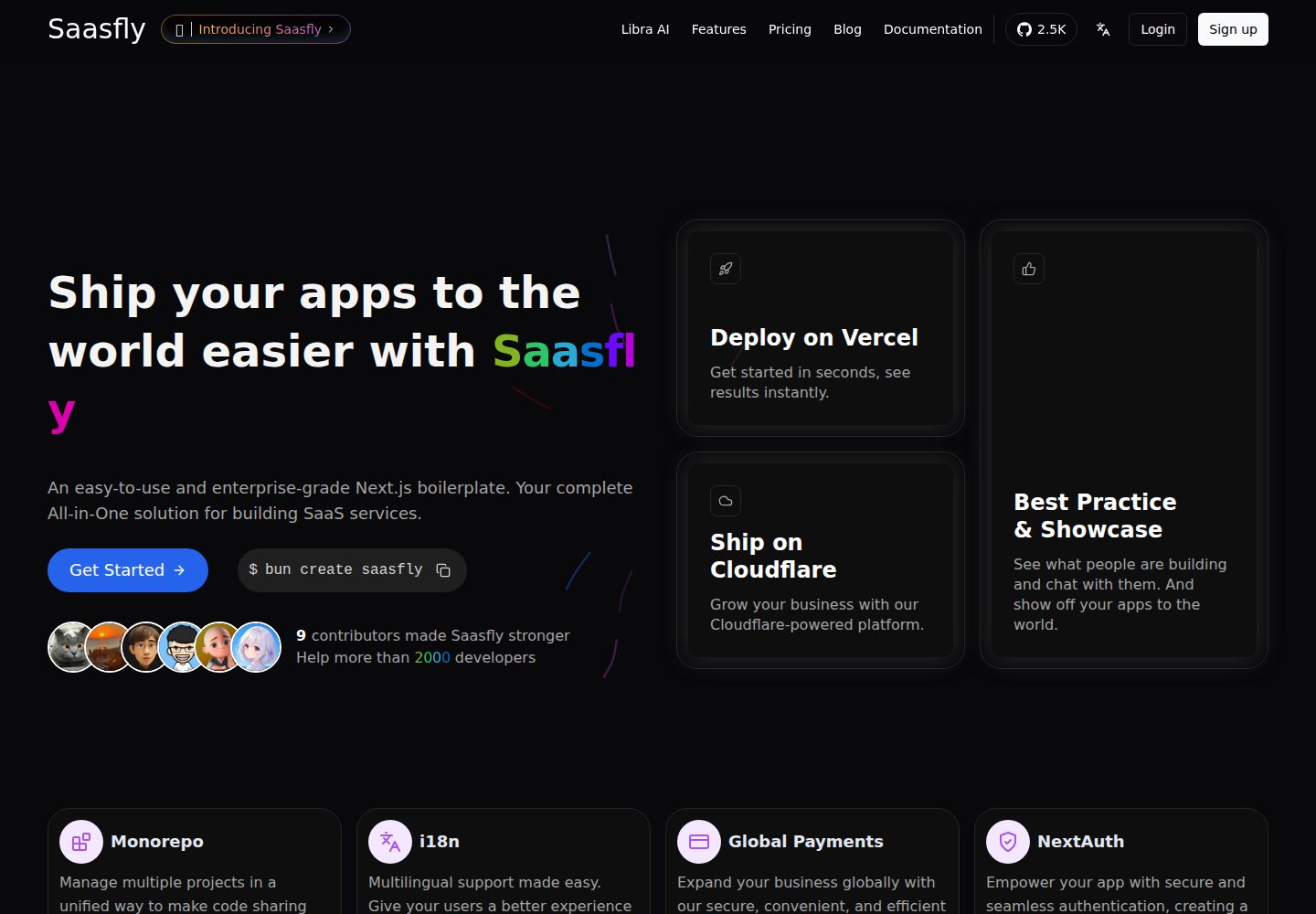
saasfly
Your Next SaaS Template or Boilerplate ! A magic trip start with `bun create saasfly` . The more stars, the mo…
Next.js · SaaS

next-saas-starter
⚡️ Free Next.js responsive landing page template for SaaS products made using JAMStack architecture.
Next.js · SaaS