One command completes macOS or Windows environment setup, non-interactive by default, about 3–5 minutes
HTMLAdmin dashboardPortfolio
Pegasus — HTML Admin dashboard Template
By jerickevans-gif
Pegasus is an installation script and companion toolkit for designers that configures a Claude Code or OpenCode development environment on macOS or Windows with one command, bundled with a visual dashboard, 15 templates, 31 skills, MCP bridges and the pegasus helper command.
Explore the design
Compare the page layouts and mobile experience. Open any screenshot for a closer look.
Desktop homepage1 / 2
Desktop captureTop of page
Actual screenshot captured by the server browser.
All pages & views 2
Screenshots show visual appearance; interactive behavior may differ.
Recorded 2026-10-15View source
What stands out
A quick read of the recorded project description.
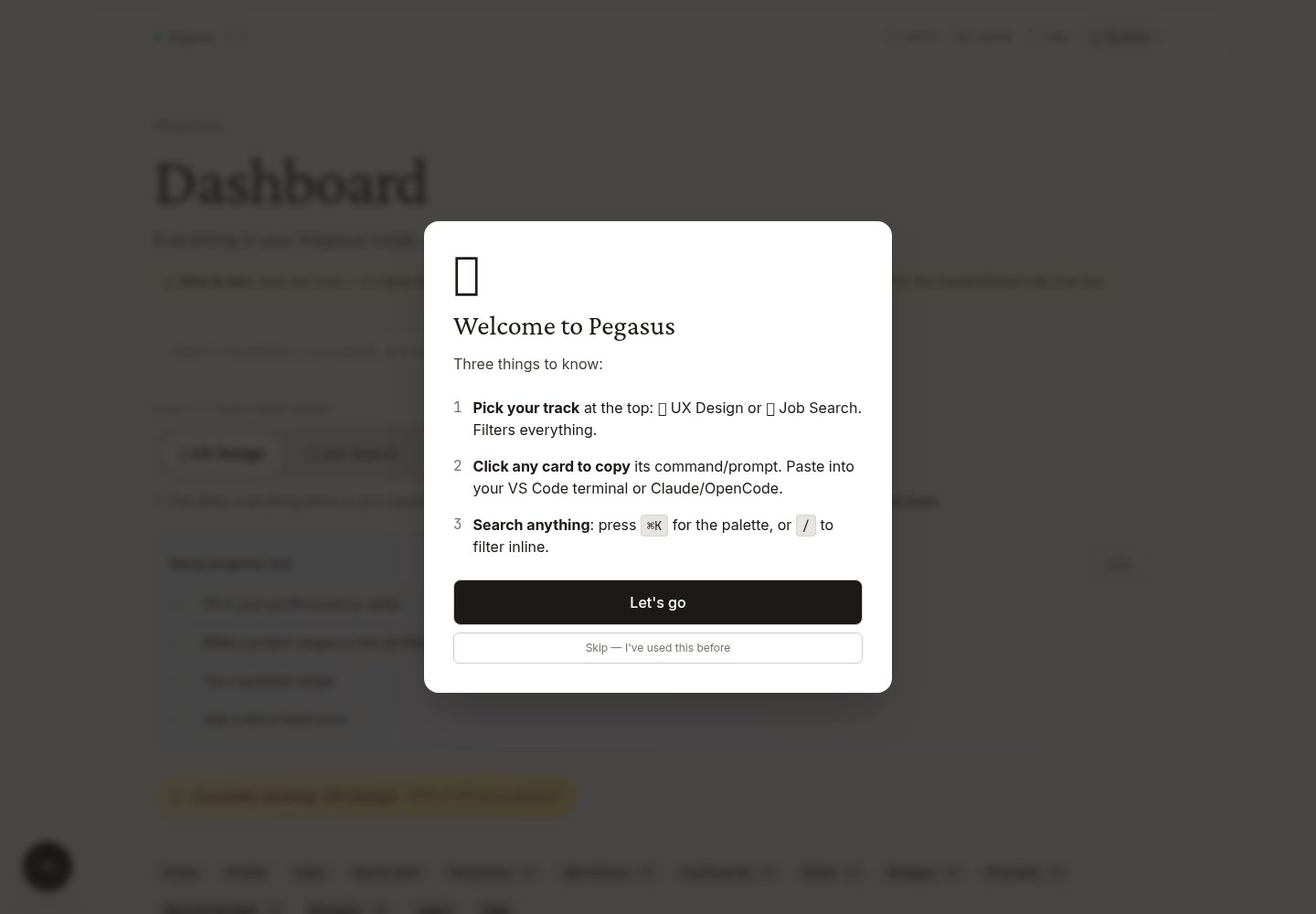
After installation a visual dashboard is provided, supporting dual-track filtering for UX Design and Job Search
15 built-in templates covering portfolios, case studies, resumes, link pages, illustration galleries and more
31 AI skills load automatically, readable by both Claude Code and OpenCode
Provides the pegasus helper command, wrapping common flows such as creating projects, deploying, opening the dashboard and diagnostics
No telemetry, no analytics, no remote logging; updates are pulled from GitHub only when pegasus update is explicitly run
Template Details
Pegasus is a local development environment setup for designers; the repository provides installation scripts, a visual dashboard, templates, AI skills and helper commands. The README states its target users are designers who want to use Claude Code or OpenCode to deliver portfolios, case-study presentations, interview demos and prototypes, but do not want to spend time configuring their machine.
Installation is via curl executing install.sh on macOS, and via PowerShell executing install.ps1 on Windows. It is a one-shot install by default, taking about 3–5 minutes; after installation it automatically opens the visual dashboard in the browser and launches VS Code showing a cheat sheet. What gets installed covers VS Code plus 15 extensions, Claude Code and OpenCode, Surge CLI, Bun/Node/npm/Git/Homebrew or winget, ffmpeg/ImageMagick/SVGO/potrace, Lighthouse/Pa11y/Wrangler, and a ~/Design-Projects/ folder containing CLAUDE.md, COMMANDS.md, PROMPTS.md and other documents.
The dashboard provides dual-track filtering for UX Design and Job Search, workflow recipe copying, a profile system, a local job results database, dark mode and PWA offline installation. There are 15 templates in total, including portfolio, case-study-deck, scroll-case-study, landing-page, resume, link-in-bio, illustration-gallery and others. There are 31 skills in total, installed to ~/.claude/skills/, readable by both Claude Code and OpenCode. MCP bridges are installed via connect.sh, covering Figma, Playwright, Webflow, Notion, Linear, Stripe, Cloudflare, GitHub, Context7 and others; Adobe/Procreate/Framer only provide workflow guides.
The README does not provide the specific tech stack, browser compatibility, performance metrics or production readiness of each template; the preview screenshots only prove that desktop and mobile page screenshots exist, not that the pages function.
HTMLBackendPortfolio
Is it right for your project?
Use Cases
- Designers use Claude Code or OpenCode to quickly build a portfolio site or case-study page
- Preparing job application materials, including resume tailoring, cover letter generation, interview preparation and salary negotiation preparation
- Browsing and filtering templates, skills, MCP bridges and prompts through the visual dashboard
- Using pegasus new to create a project from a template with automatic Git initialization and VS Code launch
- Using pegasus deploy to deploy the current folder to Surge or GitHub Pages
Suitable For
- Designers who want to use an AI coding assistant but do not want to configure a development environment manually
- Design practitioners who need to quickly produce portfolios, case-study presentations or interview demo prototypes
- Users who care about both UX design projects and the job search process and want the two workflows to intersect
- Users on macOS or Windows who are willing to configure their local environment via command-line installation scripts
Getting started & customization
Use these recorded setup notes alongside the repository instructions for your chosen version.
- 1
macOS install command: curl -fsSL https://raw.githubusercontent.com/jerickevans-gif/Pegasus/main/install.sh | bash
- 2
Windows install command: irm https://raw.githubusercontent.com/jerickevans-gif/Pegasus/main/install.ps1 | iex
- 3
One-shot install by default; pass the --custom parameter for a step-by-step question flow
- 4
After installation it automatically opens the visual dashboard in the browser and launches VS Code
- 5
Optionally run connect.sh to install MCP bridges, and desktop-apps.sh to install standalone desktop apps
License & source material
Usage conditions & limitations
Free to use · keep license noticeThis listing covers the free version under the MIT license in the public repository; the free scope is the code of that version and does not mean external services or third-party assets are free.
Must comply with when using
- Free use, modification, commercial use and distribution of this version's code are permitted.
- When distributing copies or substantial portions of the code, retain the original author's copyright notice and the full MIT license notice.
- The code is provided as is; warranties and limitations of liability are governed by the original license and applicable law.
Additional costs & items to verify
- Demo images, fonts, icons and other third-party assets must be checked against their respective licenses and cannot be judged solely by the code's MIT license.
- External services such as domains, hosting, databases, payments or AI may incur separate charges.
- The install script is pulled remotely from GitHub via curl and executed directly with bash, so the contents of that remote script must be trusted.
- The Windows install script is pulled remotely from GitHub via irm and executed directly with iex, so the contents of that remote script must be trusted.
- One-shot install by default, taking about 3–5 minutes; a step-by-step question flow requires passing the --custom parameter.
- pegasus deploy relies on external hosting services such as Surge or GitHub Pages for deployment.
- One-click deployment relies on the third-party command-line tool Surge CLI.
- The Figma bridge requires connection through an MCP server and may involve a Figma account or authorization.
- Bridges such as Webflow, Notion, Linear, Stripe and Cloudflare depend on accounts for the corresponding third-party services.
- Adobe, Procreate and Framer currently have no corresponding MCP and only provide workflow guides; automatic bridging is not possible.
- The Google (Gmail/Drive/Calendar) bridge requires a claude.ai connector and depends on that external service.
- pegasus signin opens third-party login pages such as GitHub, Surge, Figma, Adobe, Webflow and Google; using the related features requires the corresponding accounts.
- connect.sh is pulled remotely from GitHub via curl and executed directly with bash, so the contents of that remote script must be trusted.
- desktop-apps.sh is pulled remotely from GitHub via curl and executed directly with bash, so the contents of that remote script must be trusted.
- Skipping Claude's per-action confirmation with the bypassPermissions setting is an advanced usage and requires reading about and accepting the corresponding risks.
- Updates are pulled from GitHub only when pegasus update is explicitly run; at other times there is no network connection.
View Original Text Basis
Permission is hereby granted, free of charge
Original License Text
curl -fsSL https://raw.githubusercontent.com/jerickevans-gif/Pegasus/main/install.sh | bash
Original README
irm https://raw.githubusercontent.com/jerickevans-gif/Pegasus/main/install.ps1 | iex
Original README
The installer is **one-shot** by default: no questions after "Ready?", everything installs in 3–5 minutes. Pass `--custom` if you want the question-by-question flow.
Original README
pegasus deploy # ship to free hosting
Original README
- **Surge CLI** — one-command deploys
Original README
- **Figma** (read designs into Claude)
Original README
- **Webflow, Notion, Linear, Stripe, Cloudflare**
Original README
- **Adobe / Procreate / Framer** — workflow guides (no MCPs exist for these yet)
Original README
- **Google** (Gmail/Drive/Calendar via claude.ai connectors)
Original README
| `pegasus signin` | Open all the sign-in pages (GitHub, Surge, Figma, Adobe, Webflow, Google) |
Original README
curl -fsSL https://raw.githubusercontent.com/jerickevans-gif/Pegasus/main/connect.sh | bash
Original README
curl -fsSL https://raw.githubusercontent.com/jerickevans-gif/Pegasus/main/desktop-apps.sh | bash
Original README
By default Claude asks before each action. To skip those prompts (advanced — read the trade-offs), see [Claude Code's permissions docs](https://docs.claude.com/en/docs/claude-code/iam) for the `bypassPermissions` setting.
Original README
https://github.com/jerickevans-gif/Pegasus/blob/main/LICENSEhttps://github.com/jerickevans-gif/Pegasus/blob/main/README.mdPegasus has no telemetry, no analytics, no remote logging. Everything runs on your machine and only fetches from GitHub when you explicitly run `pegasus update`.
Original README
Compiled by DeepSeek based on repository license and README ·2026-10-16. Results only cover the materials read; dependencies, images, fonts, and subsequent term changes are subject to their respective original texts.
Project checks & description sources
Template Information
- Source platforms
- GitHub
- Documentation and maintenance reference score
- More documented · 88 / 100
- Technologies
- HTML
- Website type
- Admin dashboard · Portfolio
How this score is calculated
Our heuristic uses license records (up to 30), a demo link (12), a preview (10), stars (15), recorded maintenance (15), description completeness (8), feature records (5) and classification data (5). It is not a code, security or performance test, or a Google score. A link does not establish tested functionality.
What to verify for this project
- Repository update recorded
- 2026-07-20
- Screenshot last checked
- 2026-10-16
A demo link is listed. Check it with your own content and viewport sizes; its presence does not confirm that forms, authentication or payments work.
The catalog identifies HTML as the primary stack. Check the actual dependency manifest and lockfile for versions and hosting requirements. These notes use recorded metadata, not a code audit or a deployment test.
Use a selection guide →How this description was prepared
AI-assisted description based on catalog records and repository material. Repository authors are not automatically the reviewers of this description.
Review declaration: codex-user-requested-batch-review-20261017 · 2026-10-16
Inspect the recorded source material
SHA-256: bba9a6c598fd1c1508e3be70e261704bad43ea12c8249693ac04d296dbf2d86a
2026-10-16T06:08:19.965Z
Source file / repository# Pegasus > A one-command setup that turns your laptop into an AI-powered design studio. Built for designers, not developers. [](LICENSE) [](https://claude.com/claude-code) [](https://opencode.ai) [](#privacy) [](#what-you-get) Designers who want to use Claude Code or OpenCode to ship portfolios, case-study decks, interview presentations, and prototypes — without spending a weekend configuring a machine. **Run one command. Walk away.** Come back to a configured laptop with a visual dashboard, working starter projects, 31 AI skills auto-loaded, 15 templates, 10 cross-pollinating workflow recipes, 16 MCP bridges, and a `pegasus` helper command that wraps every common workflow. **Try the dashboard live:** **[jerickevans-gif.github.io/Pegasus](https://jerickevans-gif.github.io/Pegasus/)** — the same dashboard that ships with `install.sh`, served as a public PWA so you can preview before installing. ## Two tracks, one setup 🎨 **UX Design** — portfolio sites, case studies, mood boards, illustration galleries, slide decks, components labs. 💼 **Job Search** — resume tailoring, cover letters, interview prep, salary negotiation, BuiltIn + LinkedIn job pulls. ⊕ **Both** — cross-pollinating workflows that bridge the two. Pick a track in the visual dashboard. Pegasus filters templates, skills, MCPs, and prompts to your current focus. ## Quick start ### macOS ```bash curl -fsSL https://raw.githubusercontent.com/jerickevans-gif/Pegasus/main/install.sh | bash ``` ### Windows ```powershell irm https://raw.githubusercontent.com/jerickevans-gif/Pegasus/main/install.ps1 | iex ``` The installer is **one-shot** by default: no questions after "Ready?", everything installs in 3–5 minutes. Pass `--custom` if you want the question-by-question flow. When it finishes, a visual dashboard auto-opens in your browser and VS Code launches with the cheatsheet. ## Then run ```bash pegasus new portfolio my-site # working portfolio + opens VS Code cd ~/Design-Projects/my-site claude # talk to the agent pegasus deploy # ship to free hosting ``` That's the whole loop. Make → edit → preview → ship → repeat. ## What you get ### Apps and CLIs - **VS Code** with 15 designer-friendly extensions (Tailwind, Live Preview, Color Highlight, Image Preview, Mermaid, GitHub Actions, CodeSnap, Python, Figma, Material Icons, more) - **Claude Code** + **OpenCode** — both AI coding agents, your choice - **Surge CLI** — one-command deploys - **Bun, Node, npm, Git, Homebrew/winget** — the foundations - **ffmpeg, ImageMagick, SVGO, potrace** — image and vector toolchain - **Lighthouse, Pa11y, Wrangler** — performance, accessibility, Cloudflare ### Templates — 15 (`pegasus new <type> <name>`) - **portfolio** — single-page with hero, project grid, about, contact - **case-study-deck** — reveal.js slide deck for interviews - **scroll-case-study** — long-form scrollable case study - **landing-page** — coming-soon page with email capture - **resume** — printable single-page CV - **link-in-bio** — Linktree replacement on your domain - **illustration-gallery** — masonry grid for paintings, vector art - **mood-board, components-lab, agency-page, error-page, podcast-page, newsletter-archive** — see the dashboard for the rest ### Skills — 31 (auto-loaded by Claude and OpenCode) - **Design:** ux-ui-audit (17-section audit), vector-workflow (Procreate → web), portfolio-case-study, content-writer - **Job search:** job-finder (BuiltIn + LinkedIn ranked), resume-tailor, cover-letter-generator, interview-prep, salary-negotiation-prep, career-ops-* (research, outreach, evaluate, triage, tailor-resume) - Plus 16 more — see the **Skills** section in the dashboard for the full list with descriptions. ### Visual dashboard - **Two-track filter** (🎨 UX Design / 💼 Job Search / ⊕ Both) for templates, skills, MCPs, prompts. - **Workflow recipes** with a "📋 Copy all prompts" button on every card. - **Profile system** that skills reference for personalized output. JSON-Schema-validated. - **Job Results** local database — paste/drop the markdown table Claude returns, see ranked cards. - **Dark mode toggle** (system / light / dark). - **Pulse widget**, Cmd-K palette, keyboard shortcuts. - **PWA installable** with offline service worker. ### Bridges (MCP servers — `connect.sh` installs them) - **Figma** (read designs into Claude) - **Playwright** (browser automation) - **Webflow, Notion, Linear, Stripe, Cloudflare** - **GitHub, Context7** (live docs) - **Adobe / Procreate / Framer** — workflow guides (no MCPs exist for these yet) - **Google** (Gmail/Drive/Calendar via claude.ai connectors) ### A `~/Design-Projects/` folder containing - A starter `CLAUDE.md` so Claude knows it's working with a designer - **COMMANDS.md** — every command worth knowing - **PROMPTS.md** — copy-paste prompts grouped by use case - **POSSIBILITIES.md** — directory of what's possible - **GLOSSARY.md** — every dev word in plain English - **RECOMMENDED.md** — curated MIT-licensed external repos - **TROUBLESHOOTING.md** — five most common issues + fixes ## The pegasus command After install, you have one helper that wraps the most common flows: | Command | What it does | |---|---| | `pegasus new <type> <name>` | Create a project from a template, git init, open VS Code | | `pegasus deploy` | Deploy current folder (Surge or GitHub Pages) | | `pegasus dashboard` | Open the visual dashboard in your browser | | `pegasus tour` | 5-minute guided walkthrough | | `pegasus jobs` | Run the job-finder skill | | `pegasus signin` | Open all the sign-in pages (GitHub, Surge, Figma, Adobe, Webflow, Google) | | `pegasus clone <url> <name>` | Clone any GitHub repo as a starter project | | `pegasus doctor` | Diagnose what's installed / missing | | `pegasus update` | Refresh templates + skills from GitHub | | `pegasus help` | Full command list | ## The companion commands After the main install, two more one-liners give you extras: ```bash # Connect every design tool (Figma, Playwright, Webflow, Notion, GitHub, Linear, Stripe, etc.) curl -fsSL https://raw.githubusercontent.com/jerickevans-gif/Pegasus/main/connect.sh | bash # Install standalone desktop apps (Claude desktop, CLIs for use outside VS Code) curl -fsSL https://raw.githubusercontent.com/jerickevans-gif/Pegasus/main/desktop-apps.sh | bash ``` ## Works with both agents Whether a designer uses **Claude Code in VS Code** or **OpenCode in VS Code**, Pegasus works for both. Skills install to `~/.claude/skills/` which both agents read. ## Power user: faster Claude Code By default Claude asks before each action. To skip those prompts (advanced — read the trade-offs), see [Claude Code's permissions docs](https://docs.claude.com/en/docs/claude-code/iam) for the `bypassPermissions` setting. ## Privacy Pegasus has no telemetry, no analytics, no remote logging. Everything runs on your machine and only fetches from GitHub when you explicitly run `pegasus update`. ## License MIT. Fork it, remix it, share it.
Explore similar templates
Compare previews and descriptions within the same stack and category.

AdminLTE
An HTML admin dashboard built with Bootstrap 5 and vanilla JavaScript. Astro builds the documentation; React, Vue and Angular editions live in separate repositories.
HTML · Admin dashboard

gentelella
Gentelella v4 is a free, open-source admin dashboard template maintained by Colorlib, built with vanilla JavaScript, SCSS, and Vite 8 without Bootstrap or jQuery.
HTML · Admin dashboard

simplefolio
Simplefolio is a minimal single-page portfolio template for developers, built with HTML, Bootstrap, SCSS, and Parcel under the MIT license. It includes Hero, About, Projects, Contact, and Footer sections, with content edited in /src/index.html and theme colors controlled by two SCSS variables.
HTML · Portfolio

coreui-free-bootstrap-admin-template
A free Bootstrap admin template maintained by CoreUI, built on CoreUI's own UI component library. It provides compiled HTML pages and Pug template source code, covering dashboards, authentication, forms, components, icons, and error pages.
HTML · Admin dashboard

dashboards
A collection of responsive dashboard HTML templates open-sourced by Keen IO, built on CSS Grid, offering multiple prebuilt admin data interface layouts.
HTML · Admin dashboard

SB Admin 2
SB Admin 2 is a classic Bootstrap admin template from Start Bootstrap, offering dashboards, charts, tables, and common management pages.
HTML · Admin dashboard