一条命令完成 macOS 或 Windows 环境配置,默认无交互,约 3–5 分钟
HTML后台作品集
Pegasus — HTML 后台模板
作者 jerickevans-gif
Pegasus 是一个面向设计师的安装脚本与配套工具集,通过一条命令在 macOS 或 Windows 上配置 Claude Code 或 OpenCode 开发环境,附带可视化仪表盘、15 个模板、31 个技能、MCP 桥接和 pegasus 辅助命令。
看看你的网站会是什么样
浏览真实页面截图,比较内容排版与手机效果。点击下方缩略图切换,放大查看整页细节。
全部页面与视图 2
截图用于了解视觉与布局,交互效果请以实际项目为准。
采集于 2026-10-15查看来源
值得关注的模板亮点
从已有项目资料中,快速了解它的特点。
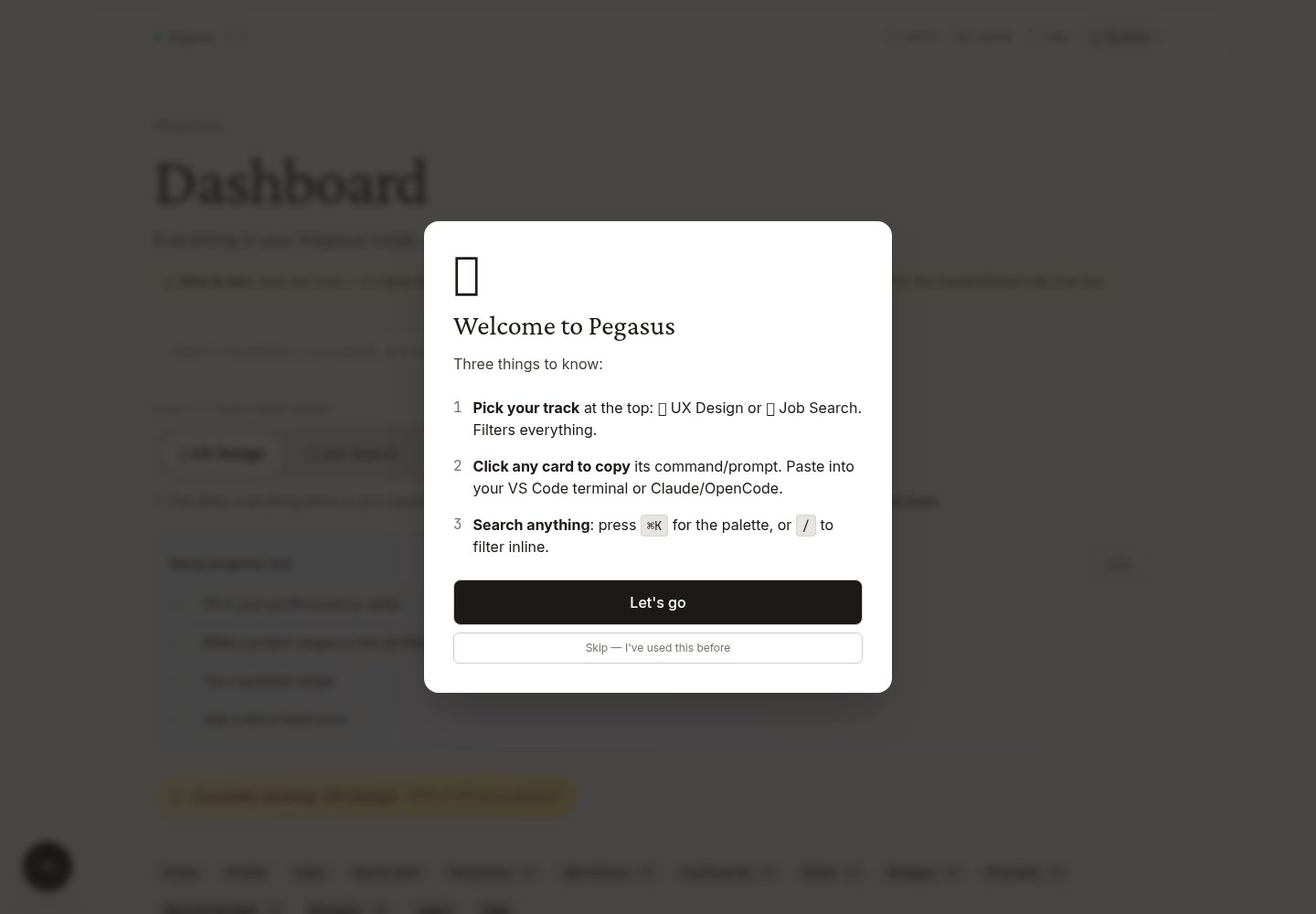
安装后提供可视化仪表盘,支持 UX Design 与 Job Search 双轨筛选
内置 15 个模板,覆盖作品集、案例研究、简历、链接页、插画画廊等
31 个 AI 技能自动加载,Claude Code 与 OpenCode 均可读取
提供 pegasus 辅助命令,封装创建项目、部署、打开仪表盘、诊断等常用流程
无遥测、无分析、无远程日志,仅在显式运行 pegasus update 时从 GitHub 拉取更新
模板详细介绍
Pegasus 是一个面向设计师的本地开发环境配置方案,仓库提供安装脚本、可视化仪表盘、模板、AI 技能和辅助命令。README 说明其目标用户是希望使用 Claude Code 或 OpenCode 交付作品集、案例研究演示、面试演示和原型,但不想花时间配置机器的设计师。
安装方式为 macOS 上通过 curl 执行 install.sh,Windows 上通过 PowerShell 执行 install.ps1。默认一次性安装,约 3–5 分钟,安装完成后自动打开浏览器中的可视化仪表盘,并启动 VS Code 显示速查表。安装内容涵盖 VS Code 及 15 个扩展、Claude Code 与 OpenCode、Surge CLI、Bun/Node/npm/Git/Homebrew 或 winget、ffmpeg/ImageMagick/SVGO/potrace、Lighthouse/Pa11y/Wrangler,以及一个 ~/Design-Projects/ 文件夹和其中的 CLAUDE.md、COMMANDS.md、PROMPTS.md 等文档。
仪表盘提供 UX Design 与 Job Search 双轨筛选、工作流配方复制、个人资料系统、本地职位结果数据库、深色模式、PWA 离线安装等功能。模板共 15 个,包括 portfolio、case-study-deck、scroll-case-study、landing-page、resume、link-in-bio、illustration-gallery 等。技能共 31 个,安装到 ~/.claude/skills/,Claude Code 与 OpenCode 均可读取。MCP 桥接通过 connect.sh 安装,涵盖 Figma、Playwright、Webflow、Notion、Linear、Stripe、Cloudflare、GitHub、Context7 等,Adobe/Procreate/Framer 仅提供工作流指南。
README 未提供各模板的具体技术栈、浏览器兼容性、性能指标或生产就绪程度说明;预览截图仅证明桌面和移动端页面截图存在,不证明页面功能。
HTML后台作品集
适合你的项目吗?
适用场景
- 设计师使用 Claude Code 或 OpenCode 快速搭建作品集网站或案例研究页面
- 准备求职材料,包括简历定制、求职信生成、面试准备和薪资谈判准备
- 通过可视化仪表盘浏览和筛选模板、技能、MCP 桥接与提示词
- 使用 pegasus new 从模板创建项目并自动初始化 Git、打开 VS Code
- 使用 pegasus deploy 将当前文件夹部署到 Surge 或 GitHub Pages
适合人群
- 希望使用 AI 编码助手但不想手动配置开发环境的设计师
- 需要快速产出作品集、案例研究演示或面试演示原型的设计从业者
- 同时关注 UX 设计项目与求职流程,希望两者工作流可交叉的用户
- 使用 macOS 或 Windows,并愿意通过命令行安装脚本配置本地环境的用户
上手与定制指南
结合仓库当前版本的说明,按下面的资料检查内容、配置与运行要求。
- 1
macOS 安装命令:curl -fsSL https://raw.githubusercontent.com/jerickevans-gif/Pegasus/main/install.sh | bash
- 2
Windows 安装命令:irm https://raw.githubusercontent.com/jerickevans-gif/Pegasus/main/install.ps1 | iex
- 3
默认一次性安装,如需逐项问答流程可传入 --custom 参数
- 4
安装完成后自动打开浏览器中的可视化仪表盘,并启动 VS Code
- 5
可选运行 connect.sh 安装 MCP 桥接,运行 desktop-apps.sh 安装独立桌面应用
授权与来源资料
使用条件与限制
免费使用 · 保留许可声明本次收录的是公开仓库中采用 MIT 许可的免费版本;免费范围为该版本代码,不代表外部服务或第三方素材免费。
使用时需要遵守
- 允许免费使用、修改、商用和分发该版本代码。
- 分发代码副本或实质性部分时,保留原作者版权声明和完整 MIT 许可声明。
- 代码按现状提供;担保与责任限制以原许可证及适用法律为准。
额外费用与待核对事项
- 演示图片、字体、图标及其他第三方素材需按各自许可核对,不能仅凭代码的 MIT 许可判断。
- 域名、托管、数据库、支付或 AI 等外部服务可能另外收费。
- 安装脚本通过 curl 从 GitHub 远程拉取并直接以 bash 执行,需信任该远程脚本内容。
- Windows 安装脚本通过 irm 从 GitHub 远程拉取并直接以 iex 执行,需信任该远程脚本内容。
- 默认一次性安装,安装过程约 3–5 分钟;如需逐项问答流程须传入 --custom 参数。
- pegasus deploy 依赖 Surge 或 GitHub Pages 等外部托管服务进行部署。
- 一键部署依赖 Surge CLI 这一第三方命令行工具。
- Figma 桥接需通过 MCP 服务器连接,可能涉及 Figma 账户或授权。
- Webflow、Notion、Linear、Stripe、Cloudflare 等桥接依赖对应第三方服务账户。
- Adobe、Procreate、Framer 目前没有对应 MCP,仅提供工作流指南,无法自动桥接。
- Google(Gmail/Drive/Calendar)桥接需通过 claude.ai 连接器,依赖该外部服务。
- pegasus signin 会打开 GitHub、Surge、Figma、Adobe、Webflow、Google 等第三方登录页面,使用相关功能需相应账户。
- connect.sh 通过 curl 从 GitHub 远程拉取并直接以 bash 执行,需信任该远程脚本内容。
- desktop-apps.sh 通过 curl 从 GitHub 远程拉取并直接以 bash 执行,需信任该远程脚本内容。
- 跳过 Claude 每次操作前确认的 bypassPermissions 设置属高级用法,需自行阅读并承担相应风险。
- 仅在显式运行 pegasus update 时从 GitHub 拉取更新,其余时间不联网。
查看原文依据
Permission is hereby granted, free of charge
许可证原文
curl -fsSL https://raw.githubusercontent.com/jerickevans-gif/Pegasus/main/install.sh | bash
README 原文
irm https://raw.githubusercontent.com/jerickevans-gif/Pegasus/main/install.ps1 | iex
README 原文
The installer is **one-shot** by default: no questions after "Ready?", everything installs in 3–5 minutes. Pass `--custom` if you want the question-by-question flow.
README 原文
pegasus deploy # ship to free hosting
README 原文
- **Surge CLI** — one-command deploys
README 原文
- **Figma** (read designs into Claude)
README 原文
- **Webflow, Notion, Linear, Stripe, Cloudflare**
README 原文
- **Adobe / Procreate / Framer** — workflow guides (no MCPs exist for these yet)
README 原文
- **Google** (Gmail/Drive/Calendar via claude.ai connectors)
README 原文
| `pegasus signin` | Open all the sign-in pages (GitHub, Surge, Figma, Adobe, Webflow, Google) |
README 原文
curl -fsSL https://raw.githubusercontent.com/jerickevans-gif/Pegasus/main/connect.sh | bash
README 原文
curl -fsSL https://raw.githubusercontent.com/jerickevans-gif/Pegasus/main/desktop-apps.sh | bash
README 原文
By default Claude asks before each action. To skip those prompts (advanced — read the trade-offs), see [Claude Code's permissions docs](https://docs.claude.com/en/docs/claude-code/iam) for the `bypassPermissions` setting.
README 原文
https://github.com/jerickevans-gif/Pegasus/blob/main/LICENSEhttps://github.com/jerickevans-gif/Pegasus/blob/main/README.mdPegasus has no telemetry, no analytics, no remote logging. Everything runs on your machine and only fetches from GitHub when you explicitly run `pegasus update`.
README 原文
DeepSeek 根据仓库许可证和 README 整理 ·2026-10-16。结果仅覆盖已读取资料,依赖、图片、字体及后续条款变更以各自原文为准。
项目核对记录与介绍依据
模板资料
- 来源平台
- GitHub
- 资料与维护参考分
- 资料较完整 · 88 / 100
- 技术栈
- HTML
- 网站类型
- 后台 · 作品集
这个分数如何计算
本站按许可资料(最高30分)、演示链接(12分)、预览图(10分)、Star数(15分)、记录的维护时间(15分)、描述完整度(8分)、功能记录(5分)和分类资料(5分)计算。它不是代码、安全或性能测试,也不是 Google 评分;有链接不代表已实测可用。
这个项目需要核对什么
- 记录的仓库更新时间
- 2026-07-20
- 截图检查日期
- 2026-10-16
已收录演示链接。请用你的内容与屏幕尺寸检查;有演示不代表表单、认证或支付已经可用。
目录记录的主要技术栈是 HTML。请通过依赖清单和锁文件核对实际版本与托管要求。这些说明基于收录资料,不代表代码审计或部署实测。
查看具体选型方法 →介绍的制作与核对状态
介绍由 AI 辅助整理目录与仓库资料。仓库作者不等于这篇介绍的审核者。
审核声明: codex-user-requested-batch-review-20261017 · 2026-10-16
查看当时使用的来源资料
SHA-256: bba9a6c598fd1c1508e3be70e261704bad43ea12c8249693ac04d296dbf2d86a
2026-10-16T06:08:19.965Z
来源文件 / 仓库# Pegasus > A one-command setup that turns your laptop into an AI-powered design studio. Built for designers, not developers. [](LICENSE) [](https://claude.com/claude-code) [](https://opencode.ai) [](#privacy) [](#what-you-get) Designers who want to use Claude Code or OpenCode to ship portfolios, case-study decks, interview presentations, and prototypes — without spending a weekend configuring a machine. **Run one command. Walk away.** Come back to a configured laptop with a visual dashboard, working starter projects, 31 AI skills auto-loaded, 15 templates, 10 cross-pollinating workflow recipes, 16 MCP bridges, and a `pegasus` helper command that wraps every common workflow. **Try the dashboard live:** **[jerickevans-gif.github.io/Pegasus](https://jerickevans-gif.github.io/Pegasus/)** — the same dashboard that ships with `install.sh`, served as a public PWA so you can preview before installing. ## Two tracks, one setup 🎨 **UX Design** — portfolio sites, case studies, mood boards, illustration galleries, slide decks, components labs. 💼 **Job Search** — resume tailoring, cover letters, interview prep, salary negotiation, BuiltIn + LinkedIn job pulls. ⊕ **Both** — cross-pollinating workflows that bridge the two. Pick a track in the visual dashboard. Pegasus filters templates, skills, MCPs, and prompts to your current focus. ## Quick start ### macOS ```bash curl -fsSL https://raw.githubusercontent.com/jerickevans-gif/Pegasus/main/install.sh | bash ``` ### Windows ```powershell irm https://raw.githubusercontent.com/jerickevans-gif/Pegasus/main/install.ps1 | iex ``` The installer is **one-shot** by default: no questions after "Ready?", everything installs in 3–5 minutes. Pass `--custom` if you want the question-by-question flow. When it finishes, a visual dashboard auto-opens in your browser and VS Code launches with the cheatsheet. ## Then run ```bash pegasus new portfolio my-site # working portfolio + opens VS Code cd ~/Design-Projects/my-site claude # talk to the agent pegasus deploy # ship to free hosting ``` That's the whole loop. Make → edit → preview → ship → repeat. ## What you get ### Apps and CLIs - **VS Code** with 15 designer-friendly extensions (Tailwind, Live Preview, Color Highlight, Image Preview, Mermaid, GitHub Actions, CodeSnap, Python, Figma, Material Icons, more) - **Claude Code** + **OpenCode** — both AI coding agents, your choice - **Surge CLI** — one-command deploys - **Bun, Node, npm, Git, Homebrew/winget** — the foundations - **ffmpeg, ImageMagick, SVGO, potrace** — image and vector toolchain - **Lighthouse, Pa11y, Wrangler** — performance, accessibility, Cloudflare ### Templates — 15 (`pegasus new <type> <name>`) - **portfolio** — single-page with hero, project grid, about, contact - **case-study-deck** — reveal.js slide deck for interviews - **scroll-case-study** — long-form scrollable case study - **landing-page** — coming-soon page with email capture - **resume** — printable single-page CV - **link-in-bio** — Linktree replacement on your domain - **illustration-gallery** — masonry grid for paintings, vector art - **mood-board, components-lab, agency-page, error-page, podcast-page, newsletter-archive** — see the dashboard for the rest ### Skills — 31 (auto-loaded by Claude and OpenCode) - **Design:** ux-ui-audit (17-section audit), vector-workflow (Procreate → web), portfolio-case-study, content-writer - **Job search:** job-finder (BuiltIn + LinkedIn ranked), resume-tailor, cover-letter-generator, interview-prep, salary-negotiation-prep, career-ops-* (research, outreach, evaluate, triage, tailor-resume) - Plus 16 more — see the **Skills** section in the dashboard for the full list with descriptions. ### Visual dashboard - **Two-track filter** (🎨 UX Design / 💼 Job Search / ⊕ Both) for templates, skills, MCPs, prompts. - **Workflow recipes** with a "📋 Copy all prompts" button on every card. - **Profile system** that skills reference for personalized output. JSON-Schema-validated. - **Job Results** local database — paste/drop the markdown table Claude returns, see ranked cards. - **Dark mode toggle** (system / light / dark). - **Pulse widget**, Cmd-K palette, keyboard shortcuts. - **PWA installable** with offline service worker. ### Bridges (MCP servers — `connect.sh` installs them) - **Figma** (read designs into Claude) - **Playwright** (browser automation) - **Webflow, Notion, Linear, Stripe, Cloudflare** - **GitHub, Context7** (live docs) - **Adobe / Procreate / Framer** — workflow guides (no MCPs exist for these yet) - **Google** (Gmail/Drive/Calendar via claude.ai connectors) ### A `~/Design-Projects/` folder containing - A starter `CLAUDE.md` so Claude knows it's working with a designer - **COMMANDS.md** — every command worth knowing - **PROMPTS.md** — copy-paste prompts grouped by use case - **POSSIBILITIES.md** — directory of what's possible - **GLOSSARY.md** — every dev word in plain English - **RECOMMENDED.md** — curated MIT-licensed external repos - **TROUBLESHOOTING.md** — five most common issues + fixes ## The pegasus command After install, you have one helper that wraps the most common flows: | Command | What it does | |---|---| | `pegasus new <type> <name>` | Create a project from a template, git init, open VS Code | | `pegasus deploy` | Deploy current folder (Surge or GitHub Pages) | | `pegasus dashboard` | Open the visual dashboard in your browser | | `pegasus tour` | 5-minute guided walkthrough | | `pegasus jobs` | Run the job-finder skill | | `pegasus signin` | Open all the sign-in pages (GitHub, Surge, Figma, Adobe, Webflow, Google) | | `pegasus clone <url> <name>` | Clone any GitHub repo as a starter project | | `pegasus doctor` | Diagnose what's installed / missing | | `pegasus update` | Refresh templates + skills from GitHub | | `pegasus help` | Full command list | ## The companion commands After the main install, two more one-liners give you extras: ```bash # Connect every design tool (Figma, Playwright, Webflow, Notion, GitHub, Linear, Stripe, etc.) curl -fsSL https://raw.githubusercontent.com/jerickevans-gif/Pegasus/main/connect.sh | bash # Install standalone desktop apps (Claude desktop, CLIs for use outside VS Code) curl -fsSL https://raw.githubusercontent.com/jerickevans-gif/Pegasus/main/desktop-apps.sh | bash ``` ## Works with both agents Whether a designer uses **Claude Code in VS Code** or **OpenCode in VS Code**, Pegasus works for both. Skills install to `~/.claude/skills/` which both agents read. ## Power user: faster Claude Code By default Claude asks before each action. To skip those prompts (advanced — read the trade-offs), see [Claude Code's permissions docs](https://docs.claude.com/en/docs/claude-code/iam) for the `bypassPermissions` setting. ## Privacy Pegasus has no telemetry, no analytics, no remote logging. Everything runs on your machine and only fetches from GitHub when you explicitly run `pegasus update`. ## License MIT. Fork it, remix it, share it.
看看同类模板
对比同技术栈与用途的模板,找到更适合的视觉与内容结构。

AdminLTE
基于 HTML、Bootstrap 5 和原生 JavaScript 的管理后台模板。Astro 用于构建文档;React、Vue 与 Angular 版本分别位于其他仓库。
HTML · 后台

gentelella
Free admin dashboard template — vanilla JS, SCSS, Vite 8. No Bootstrap, no jQuery.
HTML · 后台

simplefolio
⚡️ A minimal portfolio template for Developers
HTML · 作品集

coreui-free-bootstrap-admin-template
Free Bootstrap Admin & Dashboard Template Built for AI-Assisted Development
HTML · 后台

dashboards
Responsive dashboard templates 📊✨
HTML · 后台

SB Admin 2
SB Admin 2 是 Start Bootstrap 推出的开源后台模板,基于 Bootstrap 构建,整体风格偏向经典管理界面。
HTML · 后台