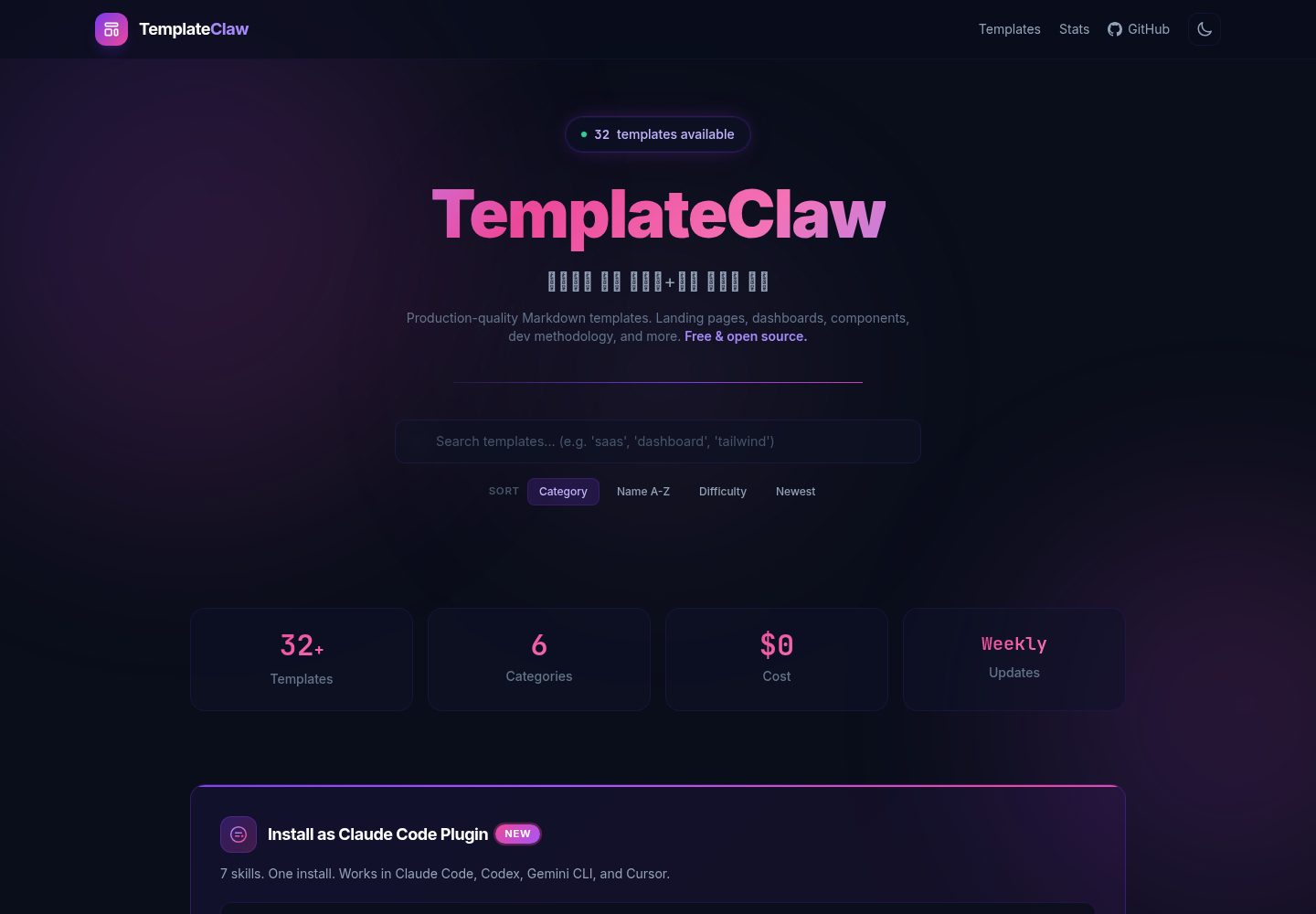
32 HTML templates organized into 6 categories: landing pages, dashboards, UI components, development methodology, project configuration, and refactoring
HTMLAdmin dashboardCorporate Website
templateclaw — HTML Admin dashboard Template
By jeromwolf
TemplateClaw is a template collection distributed as Claude Code skills. It contains 32 HTML templates covering landing pages, dashboards, UI components, project configuration, development methodology, and refactoring checklists, generated through slash commands or the CLI.
Explore the design
Compare the page layouts and mobile experience. Open any screenshot for a closer look.
Desktop homepage1 / 2
Desktop captureTop of page
Actual screenshot captured by the server browser.
All pages & views 2
Screenshots show visual appearance; interactive behavior may differ.
Recorded 2026-10-02View source
What stands out
A quick read of the recorded project description.
Distributed as 7 Claude Code slash commands; entering the /templateclaw family of commands generates content
Provides CLI usage: templateclaw list and templateclaw get, so templates can be used without Claude Code
Provides three Agent API access methods: api.json, api-full.json, and templates/{name}.md
Templates are based on the Tailwind CSS CDN with no build step, using a dark theme and glassmorphism design
Skills follow the Agent Skills open standard and declare compatibility with Claude Code, Codex, Gemini CLI, and Cursor
Template Details
TemplateClaw organizes templates as Claude Code slash commands (skills). Entering the /templateclaw family of commands in a session generates the corresponding content. The repository provides 7 skills: /templateclaw interactive scaffolding, /templateclaw-landing landing pages, /templateclaw-dashboard dashboards, /templateclaw-ui UI components, /templateclaw-setup project configuration files, /templateclaw-dev development methodology guides, and /templateclaw-refactor refactoring checklists.
There are 32 templates in 6 categories: 5 landing pages (SaaS, portfolio, product, startup, app), 4 dashboards (admin, analytics, monitoring, CRM), 8 UI components (cards, forms, navigation, modals, tables, hero, footer, pricing), 5 development methodology guides (TDD, CI/CD, code review, Git workflow, API design), 7 project configuration files (README, CLAUDE.md, AGENTS.md, .env, Docker, agent guide, contribution guide), and 3 refactoring checklists (performance, security audit, database migration).
There are three installation methods: install as a Claude Code plugin via /plugin marketplace add and /plugin install; manually copy the skills/ directory into the project's .claude/skills/; or use the CLI (install the script with curl, then run templateclaw list / templateclaw get). The templates are HTML, styled with the Tailwind CSS CDN, require no build step, and use a dark theme with purple-pink gradients, glassmorphism, and aurora animations, with mobile-first responsiveness.
The repository also provides an Agent API: api.json is a lightweight metadata-only catalog, api-full.json includes template content, and templates/{name}.md contains individual template files, which can be referenced in CLAUDE.md. The skills follow the Agent Skills open standard and declare compatibility with Claude Code, OpenAI Codex, Gemini CLI, Cursor, and other tools. The repository describes an automated update process that scans trends weekly and generates new templates, but whether that process actually runs depends on the current state of the repository.
HTMLDashboardCorporate website
Is it right for your project?
Use Cases
- Generate a SaaS or portfolio landing page in a Claude Code session with /templateclaw-landing
- Generate admin, analytics, monitoring, or CRM dashboard interfaces with /templateclaw-dashboard
- Generate project configuration files such as README, CLAUDE.md, .env.example, and docker-compose.yml with /templateclaw-setup
- Consult development methodology guides such as TDD, CI/CD, code review, Git workflow, and API design with /templateclaw-dev
- Let AI coding assistants retrieve template content programmatically through api.json or templates/{name}.md
Suitable For
- Developers using Claude Code who want to quickly generate pages and configuration files with slash commands
- Frontend projects that need ready-made HTML landing pages or dashboard interfaces as a starting point
- Teams that want to integrate the templates into their own AI coding assistants (Codex, Gemini CLI, Cursor, etc.)
- Individuals or small teams that need standard project configuration files such as README, Docker, and CI/CD
Getting started & customization
Use these recorded setup notes alongside the repository instructions for your chosen version.
- 1
Recommended installation as a Claude Code plugin: first /plugin marketplace add jeromwolf/templateclaw, then /plugin install templateclaw
- 2
For manual installation, clone the repository and copy the skills/ directory into the project's .claude/skills/
- 3
For the CLI method, run install.sh via curl, then use the templateclaw list and templateclaw get commands
- 4
Templates use the Tailwind CSS CDN and require no npm install or build step
- 5
The MIT license covers only the repository code; third-party assets such as demo images, fonts, and icons must be checked separately for licensing
License & source material
Usage conditions & limitations
Free to use · keep license noticeThis entry covers the free version of the public repository under the MIT license; the free scope applies to that version's code and does not mean external services or third-party assets are free.
Must comply with when using
- Use, modification, commercial use, and distribution of that version's code are permitted free of charge.
- When distributing copies or substantial portions of the code, retain the original author's copyright notice and the full MIT license notice.
- The code is provided as is; warranties and limitations of liability are governed by the original license and applicable law.
Additional costs & items to verify
- The CLI installation method requires downloading and directly executing the install.sh script from a remote address, which is an external service dependency; verify the script's contents and security before use.
- The automated update process relies on DuckDuckGo for trend scanning and involves external services such as Claude Haiku analysis and Telegram notifications; these external dependencies are not features of the templates themselves.
- The recommended installation method depends on the Claude Code plugin marketplace and must be run in a Claude Code environment; users not using Claude Code need to use another installation method.
- Demo images, fonts, icons, and other third-party assets must be checked against their respective licenses and cannot be judged solely by the code's MIT license.
- External services such as domains, hosting, databases, payments, or AI may incur separate charges.
View Original Text Basis
Permission is hereby granted, free of charge
Original License Text
curl -fsSL https://jeromwolf.github.io/templateclaw/install.sh | bash
Original README
Weekly: Scan design/dev trends (DuckDuckGo)
Original README
https://github.com/jeromwolf/templateclaw/blob/main/LICENSEhttps://github.com/jeromwolf/templateclaw/blob/main/README.md/plugin marketplace add jeromwolf/templateclaw
Original README
Compiled by DeepSeek based on repository license and README ·2026-10-02. Results only cover the materials read; dependencies, images, fonts, and subsequent term changes are subject to their respective original texts.
Project checks & description sources
Template Information
- Source platforms
- GitHub
- Documentation and maintenance reference score
- More documented · 88 / 100
- Technologies
- HTML
- Website type
- Admin dashboard · Corporate Website
How this score is calculated
Our heuristic uses license records (up to 30), a demo link (12), a preview (10), stars (15), recorded maintenance (15), description completeness (8), feature records (5) and classification data (5). It is not a code, security or performance test, or a Google score. A link does not establish tested functionality.
What to verify for this project
- Repository update recorded
- 2026-03-29
- Screenshot last checked
- 2026-10-02
A demo link is listed. Check it with your own content and viewport sizes; its presence does not confirm that forms, authentication or payments work.
The catalog identifies HTML as the primary stack. Check the actual dependency manifest and lockfile for versions and hosting requirements. These notes use recorded metadata, not a code audit or a deployment test.
Use a selection guide →How this description was prepared
AI-assisted description based on catalog records and repository material. Repository authors are not automatically the reviewers of this description.
Automatically checked against source and license rules; no manual editorial review.
Inspect the recorded source material
SHA-256: d47b0d5e74dffe18185bafba51ba25f6e71724cd18c8f020a8d74209b39a90aa
2026-10-02T14:28:51.785Z
Source file / repository<p align="center">
<img src="https://img.shields.io/badge/templates-32-7C3AED?style=for-the-badge" alt="32 Templates" />
<img src="https://img.shields.io/badge/skills-7-EC4899?style=for-the-badge" alt="7 Skills" />
<img src="https://img.shields.io/badge/cost-$0-10B981?style=for-the-badge" alt="Free" />
<img src="https://img.shields.io/badge/license-MIT-3B82F6?style=for-the-badge" alt="MIT" />
</p>
<h1 align="center">TemplateClaw</h1>
<p align="center">
<strong>32 production-ready templates as Claude Code skills.</strong><br/>
Type a slash command. Get a complete landing page, dashboard, or project setup.<br/>
No npm install. No build step. Just <code>/templateclaw</code>.
</p>
<p align="center">
<a href="https://jeromwolf.github.io/templateclaw/">Browse Templates</a> ·
<a href="#install">Install</a> ·
<a href="#skills">Skills</a> ·
<a href="#api">Agent API</a>
</p>
---
## Why TemplateClaw?
Every new project starts the same way: you need a landing page, a dashboard, a README, CI/CD config, and you spend hours googling and copy-pasting.
**TemplateClaw turns that into a single command.**
| Without TemplateClaw | With TemplateClaw |
|---------------------|-------------------|
| Google "modern landing page template 2026" | `/templateclaw-landing saas` |
| Search "admin dashboard glassmorphism" | `/templateclaw-dashboard admin` |
| Copy README from another project and edit | `/templateclaw-setup readme` |
| Write CI/CD from scratch every time | `/templateclaw-dev cicd` |
| Look up TDD best practices again | `/templateclaw-dev tdd` |
---
## Install
### As a Claude Code Plugin (recommended)
```bash
# Add the marketplace
/plugin marketplace add jeromwolf/templateclaw
# Install
/plugin install templateclaw
```
That's it. 7 new slash commands are now available in your Claude Code session.
### Manual (copy skills to your project)
```bash
git clone https://github.com/jeromwolf/templateclaw.git
cp -r templateclaw/skills/ .claude/skills/
```
### CLI (no Claude Code needed)
```bash
curl -fsSL https://jeromwolf.github.io/templateclaw/install.sh | bash
templateclaw list
templateclaw get saas-landing
```
---
## Skills
| Skill | What it does | Example |
|-------|-------------|---------|
| `/templateclaw` | Interactive project scaffolding | `/templateclaw "SaaS with auth"` |
| `/templateclaw-landing` | Generate landing pages (5 styles) | `/templateclaw-landing portfolio` |
| `/templateclaw-dashboard` | Generate dashboards (4 styles) | `/templateclaw-dashboard analytics` |
| `/templateclaw-ui` | Generate UI components (8 types) | `/templateclaw-ui cards,forms,nav` |
| `/templateclaw-setup` | Project setup files | `/templateclaw-setup all` |
| `/templateclaw-dev` | Dev methodology guides | `/templateclaw-dev tdd` |
| `/templateclaw-refactor` | Refactoring checklists | `/templateclaw-refactor security` |
### Quick Examples
**Scaffold a complete SaaS project:**
```
/templateclaw "Build a SaaS analytics dashboard with landing page"
```
Claude generates: landing page + dashboard + README + CLAUDE.md + Docker Compose + CI/CD pipeline.
**Generate a landing page:**
```
/templateclaw-landing saas
```
Output: A complete, responsive HTML page with glassmorphism design, hero section, pricing table, and CTA — ready to deploy.
**Set up a new project:**
```
/templateclaw-setup all
```
Output: README.md, CLAUDE.md, AGENTS.md, .env.example, docker-compose.yml — customized to your tech stack.
---
## Templates
32 templates across 6 categories, all following 2026 design trends:
| Category | Count | Includes |
|----------|-------|----------|
| **Landing Pages** | 5 | SaaS, Portfolio, Product, Startup, App |
| **Dashboard** | 4 | Admin, Analytics, Monitoring, CRM |
| **UI Components** | 8 | Cards, Forms, Nav, Modal, Table, Hero, Footer, Pricing |
| **Dev Methodology** | 5 | TDD, CI/CD, Code Review, Git Workflow, API Design |
| **Project Setup** | 7 | README, CLAUDE.md, AGENTS.md, .env, Docker, Agent Guide, Contributing |
| **Refactoring** | 3 | Performance, Security Audit, DB Migration |
### Design
- **Theme**: Dark (#0A0E1A) + Violet (#7C3AED) + Pink (#EC4899) gradients
- **Effects**: Glassmorphism, aurora animations, hover micro-interactions
- **Framework**: Tailwind CSS (CDN, no build step)
- **Responsive**: Mobile-first, 3→2→1 column grid
- **Accessible**: Semantic HTML, ARIA labels, keyboard navigation
Browse all templates with live previews: **[jeromwolf.github.io/templateclaw](https://jeromwolf.github.io/templateclaw/)**
---
## Agent API
TemplateClaw is **AI Agent native**. Any AI coding assistant can use our templates programmatically.
### Endpoints
| Endpoint | Description |
|----------|-------------|
| [`/api.json`](https://jeromwolf.github.io/templateclaw/api.json) | Lightweight catalog (metadata only) |
| [`/api-full.json`](https://jeromwolf.github.io/templateclaw/api-full.json) | Full catalog with template content |
| [`/templates/{name}.md`](https://jeromwolf.github.io/templateclaw/templates/) | Individual template files |
### Use in CLAUDE.md
Add this to any project's `CLAUDE.md` to give your AI agent access:
```markdown
## Templates
When creating UI components or project files, fetch templates from TemplateClaw:
- API: https://jeromwolf.github.io/templateclaw/api.json
- Get template: https://jeromwolf.github.io/templateclaw/templates/{filename}
```
### Cross-Tool Compatibility
TemplateClaw skills follow the [Agent Skills open standard](https://agentskills.io), compatible with:
- Claude Code
- OpenAI Codex
- Gemini CLI
- Cursor
- Any tool supporting the Agent Skills spec
---
## Auto-Update Pipeline
TemplateClaw automatically evolves:
```
Weekly: Scan design/dev trends (DuckDuckGo)
→ Claude Haiku analyzes trends
→ Generates 3 new templates
→ Rebuilds site
→ Deploys to GitHub Pages
→ Telegram notification
```
New templates appear automatically. No manual updates needed.
---
## Contributing
We welcome contributions! See [CONTRIBUTING.md](CONTRIBUTING.md) for details.
**Quick start:**
1. Fork this repo
2. Add a template to `templates/your-template.md` following the [template format](CONTRIBUTING.md#template-format)
3. Open a PR
**Good first issues:** Check the [Issues](https://github.com/jeromwolf/templateclaw/issues) tab.
---
## License
MIT — use these templates in any project, commercial or personal.
---
<p align="center">
<sub>Built with the automated pipeline from <a href="https://github.com/jeromwolf/flux-openclaw">flux-openclaw</a></sub>
</p>
Explore similar templates
Compare previews and descriptions within the same stack and category.

gentelella
Gentelella v4 is a free, open-source admin dashboard template maintained by Colorlib, built with vanilla JavaScript, SCSS, and Vite 8 without Bootstrap or jQuery.
HTML · Admin dashboard

coreui-free-bootstrap-admin-template
A free Bootstrap admin template maintained by CoreUI, built on CoreUI's own UI component library. It provides compiled HTML pages and Pug template source code, covering dashboards, authentication, forms, components, icons, and error pages.
HTML · Admin dashboard

dashboards
A collection of responsive dashboard HTML templates open-sourced by Keen IO, built on CSS Grid, offering multiple prebuilt admin data interface layouts.
HTML · Admin dashboard

SB Admin 2
SB Admin 2 is a classic Bootstrap admin template from Start Bootstrap, offering dashboards, charts, tables, and common management pages.
HTML · Admin dashboard

Adminator-admin-dashboard
Adminator 4 is a vanilla HTML, CSS and JavaScript admin dashboard template with a CSS-variable token design system, built-in light and dark themes, no jQuery or Bootstrap dependency, and 18 pages covering dashboards, mail, calendar, charts, forms, tables and error pages.
HTML · Admin dashboard

SB Admin
SB Admin is a lightweight, open-source Bootstrap admin template from Start Bootstrap. It offers a sidebar-and-top-bar layout with data tables, forms, and stat cards, plus responsive design.
HTML · Admin dashboard