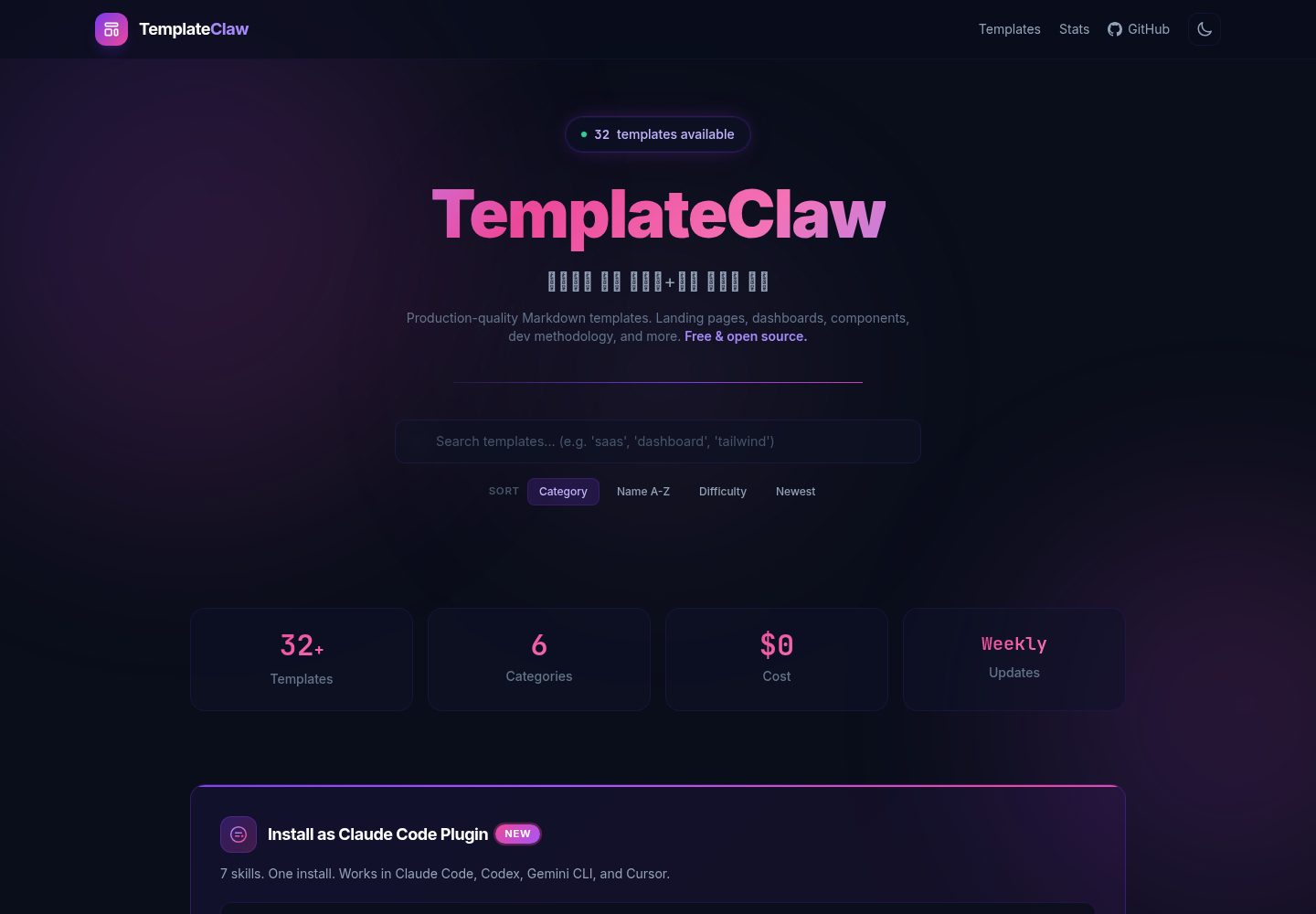
32 个 HTML 模板按落地页、仪表盘、UI 组件、开发方法、项目配置、重构 6 类组织
HTML后台企业官网
templateclaw — HTML 后台模板
作者 jeromwolf
TemplateClaw 是一个以 Claude Code 技能形式分发的模板集合,包含 32 个 HTML 模板,覆盖落地页、后台仪表盘、UI 组件、项目配置、开发方法与重构清单,通过斜杠命令或 CLI 生成。
看看你的网站会是什么样
浏览真实页面截图,比较内容排版与手机效果。点击下方缩略图切换,放大查看整页细节。
全部页面与视图 2
截图用于了解视觉与布局,交互效果请以实际项目为准。
采集于 2026-10-02查看来源
值得关注的模板亮点
从已有项目资料中,快速了解它的特点。
以 7 个 Claude Code 斜杠命令分发,输入 /templateclaw 系列命令即可生成内容
提供 CLI 用法:templateclaw list 与 templateclaw get,无需 Claude Code 也可取用模板
提供 api.json、api-full.json 与 templates/{name}.md 三种 Agent API 访问方式
模板基于 Tailwind CSS CDN,无构建步骤,采用深色主题与玻璃拟态设计
技能遵循 Agent Skills 开放标准,声明兼容 Claude Code、Codex、Gemini CLI、Cursor
模板详细介绍
TemplateClaw 把模板组织成 Claude Code 的斜杠命令(skills),在会话中输入 /templateclaw 系列命令即可生成对应内容。仓库提供 7 个技能:/templateclaw 交互式脚手架、/templateclaw-landing 落地页、/templateclaw-dashboard 仪表盘、/templateclaw-ui UI 组件、/templateclaw-setup 项目配置文件、/templateclaw-dev 开发方法指南、/templateclaw-refactor 重构清单。
模板共 32 个,分 6 类:落地页 5 个(SaaS、作品集、产品、初创、应用)、仪表盘 4 个(管理、分析、监控、CRM)、UI 组件 8 个(卡片、表单、导航、弹窗、表格、Hero、页脚、定价)、开发方法 5 个(TDD、CI/CD、代码评审、Git 工作流、API 设计)、项目配置 7 个(README、CLAUDE.md、AGENTS.md、.env、Docker、Agent 指南、贡献指南)、重构 3 个(性能、安全审计、数据库迁移)。
安装方式有三种:作为 Claude Code 插件通过 /plugin marketplace add 与 /plugin install 安装;手动把 skills/ 目录复制到项目的 .claude/skills/;或使用 CLI(curl 安装脚本后执行 templateclaw list / templateclaw get)。模板为 HTML,样式基于 Tailwind CSS CDN,无需构建步骤,设计采用深色主题配紫粉渐变、玻璃拟态与极光动画,移动优先响应式。
仓库还提供 Agent API:api.json 为仅含元数据的轻量目录,api-full.json 含模板内容,templates/{name}.md 为单个模板文件,可在 CLAUDE.md 中引用。技能遵循 Agent Skills 开放标准,声明兼容 Claude Code、OpenAI Codex、Gemini CLI、Cursor 等工具。仓库描述了一个每周扫描趋势并生成新模板的自动更新流程,但该流程的实际运行情况需以仓库现状为准。
HTML后台企业官网
适合你的项目吗?
适用场景
- 在 Claude Code 会话中用 /templateclaw-landing 生成 SaaS 或作品集落地页
- 用 /templateclaw-dashboard 生成管理、分析、监控或 CRM 类后台界面
- 用 /templateclaw-setup 生成 README、CLAUDE.md、.env.example、docker-compose.yml 等项目配置文件
- 用 /templateclaw-dev 查阅 TDD、CI/CD、代码评审、Git 工作流、API 设计等开发方法指南
- 通过 api.json 或 templates/{name}.md 让 AI 编码助手以程序化方式获取模板内容
适合人群
- 使用 Claude Code 并希望用斜杠命令快速生成页面与配置文件的开发者
- 需要现成 HTML 落地页或后台仪表盘界面作为起点的前端项目
- 希望把模板接入自有 AI 编码助手(Codex、Gemini CLI、Cursor 等)的团队
- 需要 README、Docker、CI/CD 等标准项目配置文件的个人或小团队
上手与定制指南
结合仓库当前版本的说明,按下面的资料检查内容、配置与运行要求。
- 1
推荐以 Claude Code 插件安装:先 /plugin marketplace add jeromwolf/templateclaw,再 /plugin install templateclaw
- 2
手动安装可克隆仓库后把 skills/ 目录复制到项目的 .claude/skills/
- 3
CLI 方式通过 curl 执行 install.sh,然后使用 templateclaw list 与 templateclaw get 命令
- 4
模板使用 Tailwind CSS CDN,无需 npm install 或构建步骤
- 5
MIT 许可仅覆盖仓库代码,演示图片、字体、图标等第三方素材需单独核对许可
授权与来源资料
使用条件与限制
免费使用 · 保留许可声明本次收录的是公开仓库中采用 MIT 许可的免费版本;免费范围为该版本代码,不代表外部服务或第三方素材免费。
使用时需要遵守
- 允许免费使用、修改、商用和分发该版本代码。
- 分发代码副本或实质性部分时,保留原作者版权声明和完整 MIT 许可声明。
- 代码按现状提供;担保与责任限制以原许可证及适用法律为准。
额外费用与待核对事项
- CLI 安装方式需从远程地址下载并直接执行 install.sh 脚本,属于外部服务依赖,使用前应自行确认脚本内容与安全性。
- 自动更新流程依赖 DuckDuckGo 进行趋势扫描,并涉及 Claude Haiku 分析与 Telegram 通知等外部服务,这些外部依赖并非模板本身功能。
- 推荐安装方式依赖 Claude Code 插件市场,需在 Claude Code 环境中执行,非 Claude Code 用户需改用其他安装方式。
- 演示图片、字体、图标及其他第三方素材需按各自许可核对,不能仅凭代码的 MIT 许可判断。
- 域名、托管、数据库、支付或 AI 等外部服务可能另外收费。
查看原文依据
Permission is hereby granted, free of charge
许可证原文
curl -fsSL https://jeromwolf.github.io/templateclaw/install.sh | bash
README 原文
Weekly: Scan design/dev trends (DuckDuckGo)
README 原文
https://github.com/jeromwolf/templateclaw/blob/main/LICENSEhttps://github.com/jeromwolf/templateclaw/blob/main/README.md/plugin marketplace add jeromwolf/templateclaw
README 原文
DeepSeek 根据仓库许可证和 README 整理 ·2026-10-02。结果仅覆盖已读取资料,依赖、图片、字体及后续条款变更以各自原文为准。
项目核对记录与介绍依据
模板资料
- 来源平台
- GitHub
- 资料与维护参考分
- 资料较完整 · 88 / 100
- 技术栈
- HTML
- 网站类型
- 后台 · 企业官网
这个分数如何计算
本站按许可资料(最高30分)、演示链接(12分)、预览图(10分)、Star数(15分)、记录的维护时间(15分)、描述完整度(8分)、功能记录(5分)和分类资料(5分)计算。它不是代码、安全或性能测试,也不是 Google 评分;有链接不代表已实测可用。
这个项目需要核对什么
- 记录的仓库更新时间
- 2026-03-29
- 截图检查日期
- 2026-10-02
已收录演示链接。请用你的内容与屏幕尺寸检查;有演示不代表表单、认证或支付已经可用。
目录记录的主要技术栈是 HTML。请通过依赖清单和锁文件核对实际版本与托管要求。这些说明基于收录资料,不代表代码审计或部署实测。
查看具体选型方法 →介绍的制作与核对状态
介绍由 AI 辅助整理目录与仓库资料。仓库作者不等于这篇介绍的审核者。
已完成服务器许可规则与 AI 来源核对;未经过人工编辑审核。
查看当时使用的来源资料
SHA-256: d47b0d5e74dffe18185bafba51ba25f6e71724cd18c8f020a8d74209b39a90aa
2026-10-02T14:28:51.785Z
来源文件 / 仓库<p align="center">
<img src="https://img.shields.io/badge/templates-32-7C3AED?style=for-the-badge" alt="32 Templates" />
<img src="https://img.shields.io/badge/skills-7-EC4899?style=for-the-badge" alt="7 Skills" />
<img src="https://img.shields.io/badge/cost-$0-10B981?style=for-the-badge" alt="Free" />
<img src="https://img.shields.io/badge/license-MIT-3B82F6?style=for-the-badge" alt="MIT" />
</p>
<h1 align="center">TemplateClaw</h1>
<p align="center">
<strong>32 production-ready templates as Claude Code skills.</strong><br/>
Type a slash command. Get a complete landing page, dashboard, or project setup.<br/>
No npm install. No build step. Just <code>/templateclaw</code>.
</p>
<p align="center">
<a href="https://jeromwolf.github.io/templateclaw/">Browse Templates</a> ·
<a href="#install">Install</a> ·
<a href="#skills">Skills</a> ·
<a href="#api">Agent API</a>
</p>
---
## Why TemplateClaw?
Every new project starts the same way: you need a landing page, a dashboard, a README, CI/CD config, and you spend hours googling and copy-pasting.
**TemplateClaw turns that into a single command.**
| Without TemplateClaw | With TemplateClaw |
|---------------------|-------------------|
| Google "modern landing page template 2026" | `/templateclaw-landing saas` |
| Search "admin dashboard glassmorphism" | `/templateclaw-dashboard admin` |
| Copy README from another project and edit | `/templateclaw-setup readme` |
| Write CI/CD from scratch every time | `/templateclaw-dev cicd` |
| Look up TDD best practices again | `/templateclaw-dev tdd` |
---
## Install
### As a Claude Code Plugin (recommended)
```bash
# Add the marketplace
/plugin marketplace add jeromwolf/templateclaw
# Install
/plugin install templateclaw
```
That's it. 7 new slash commands are now available in your Claude Code session.
### Manual (copy skills to your project)
```bash
git clone https://github.com/jeromwolf/templateclaw.git
cp -r templateclaw/skills/ .claude/skills/
```
### CLI (no Claude Code needed)
```bash
curl -fsSL https://jeromwolf.github.io/templateclaw/install.sh | bash
templateclaw list
templateclaw get saas-landing
```
---
## Skills
| Skill | What it does | Example |
|-------|-------------|---------|
| `/templateclaw` | Interactive project scaffolding | `/templateclaw "SaaS with auth"` |
| `/templateclaw-landing` | Generate landing pages (5 styles) | `/templateclaw-landing portfolio` |
| `/templateclaw-dashboard` | Generate dashboards (4 styles) | `/templateclaw-dashboard analytics` |
| `/templateclaw-ui` | Generate UI components (8 types) | `/templateclaw-ui cards,forms,nav` |
| `/templateclaw-setup` | Project setup files | `/templateclaw-setup all` |
| `/templateclaw-dev` | Dev methodology guides | `/templateclaw-dev tdd` |
| `/templateclaw-refactor` | Refactoring checklists | `/templateclaw-refactor security` |
### Quick Examples
**Scaffold a complete SaaS project:**
```
/templateclaw "Build a SaaS analytics dashboard with landing page"
```
Claude generates: landing page + dashboard + README + CLAUDE.md + Docker Compose + CI/CD pipeline.
**Generate a landing page:**
```
/templateclaw-landing saas
```
Output: A complete, responsive HTML page with glassmorphism design, hero section, pricing table, and CTA — ready to deploy.
**Set up a new project:**
```
/templateclaw-setup all
```
Output: README.md, CLAUDE.md, AGENTS.md, .env.example, docker-compose.yml — customized to your tech stack.
---
## Templates
32 templates across 6 categories, all following 2026 design trends:
| Category | Count | Includes |
|----------|-------|----------|
| **Landing Pages** | 5 | SaaS, Portfolio, Product, Startup, App |
| **Dashboard** | 4 | Admin, Analytics, Monitoring, CRM |
| **UI Components** | 8 | Cards, Forms, Nav, Modal, Table, Hero, Footer, Pricing |
| **Dev Methodology** | 5 | TDD, CI/CD, Code Review, Git Workflow, API Design |
| **Project Setup** | 7 | README, CLAUDE.md, AGENTS.md, .env, Docker, Agent Guide, Contributing |
| **Refactoring** | 3 | Performance, Security Audit, DB Migration |
### Design
- **Theme**: Dark (#0A0E1A) + Violet (#7C3AED) + Pink (#EC4899) gradients
- **Effects**: Glassmorphism, aurora animations, hover micro-interactions
- **Framework**: Tailwind CSS (CDN, no build step)
- **Responsive**: Mobile-first, 3→2→1 column grid
- **Accessible**: Semantic HTML, ARIA labels, keyboard navigation
Browse all templates with live previews: **[jeromwolf.github.io/templateclaw](https://jeromwolf.github.io/templateclaw/)**
---
## Agent API
TemplateClaw is **AI Agent native**. Any AI coding assistant can use our templates programmatically.
### Endpoints
| Endpoint | Description |
|----------|-------------|
| [`/api.json`](https://jeromwolf.github.io/templateclaw/api.json) | Lightweight catalog (metadata only) |
| [`/api-full.json`](https://jeromwolf.github.io/templateclaw/api-full.json) | Full catalog with template content |
| [`/templates/{name}.md`](https://jeromwolf.github.io/templateclaw/templates/) | Individual template files |
### Use in CLAUDE.md
Add this to any project's `CLAUDE.md` to give your AI agent access:
```markdown
## Templates
When creating UI components or project files, fetch templates from TemplateClaw:
- API: https://jeromwolf.github.io/templateclaw/api.json
- Get template: https://jeromwolf.github.io/templateclaw/templates/{filename}
```
### Cross-Tool Compatibility
TemplateClaw skills follow the [Agent Skills open standard](https://agentskills.io), compatible with:
- Claude Code
- OpenAI Codex
- Gemini CLI
- Cursor
- Any tool supporting the Agent Skills spec
---
## Auto-Update Pipeline
TemplateClaw automatically evolves:
```
Weekly: Scan design/dev trends (DuckDuckGo)
→ Claude Haiku analyzes trends
→ Generates 3 new templates
→ Rebuilds site
→ Deploys to GitHub Pages
→ Telegram notification
```
New templates appear automatically. No manual updates needed.
---
## Contributing
We welcome contributions! See [CONTRIBUTING.md](CONTRIBUTING.md) for details.
**Quick start:**
1. Fork this repo
2. Add a template to `templates/your-template.md` following the [template format](CONTRIBUTING.md#template-format)
3. Open a PR
**Good first issues:** Check the [Issues](https://github.com/jeromwolf/templateclaw/issues) tab.
---
## License
MIT — use these templates in any project, commercial or personal.
---
<p align="center">
<sub>Built with the automated pipeline from <a href="https://github.com/jeromwolf/flux-openclaw">flux-openclaw</a></sub>
</p>
看看同类模板
对比同技术栈与用途的模板,找到更适合的视觉与内容结构。

gentelella
Free admin dashboard template — vanilla JS, SCSS, Vite 8. No Bootstrap, no jQuery.
HTML · 后台

coreui-free-bootstrap-admin-template
Free Bootstrap Admin & Dashboard Template Built for AI-Assisted Development
HTML · 后台

dashboards
Responsive dashboard templates 📊✨
HTML · 后台

SB Admin 2
SB Admin 2 是 Start Bootstrap 推出的开源后台模板,基于 Bootstrap 构建,整体风格偏向经典管理界面。
HTML · 后台

Adminator-admin-dashboard
Adminator is easy to use and well design admin dashboard template with dark mode for web apps, websites, servi…
HTML · 后台

SB Admin
SB Admin 是 Start Bootstrap 推出的开源后台管理模板,基于 Bootstrap 构建,定位是简洁、实用的管理界面。
HTML · 后台