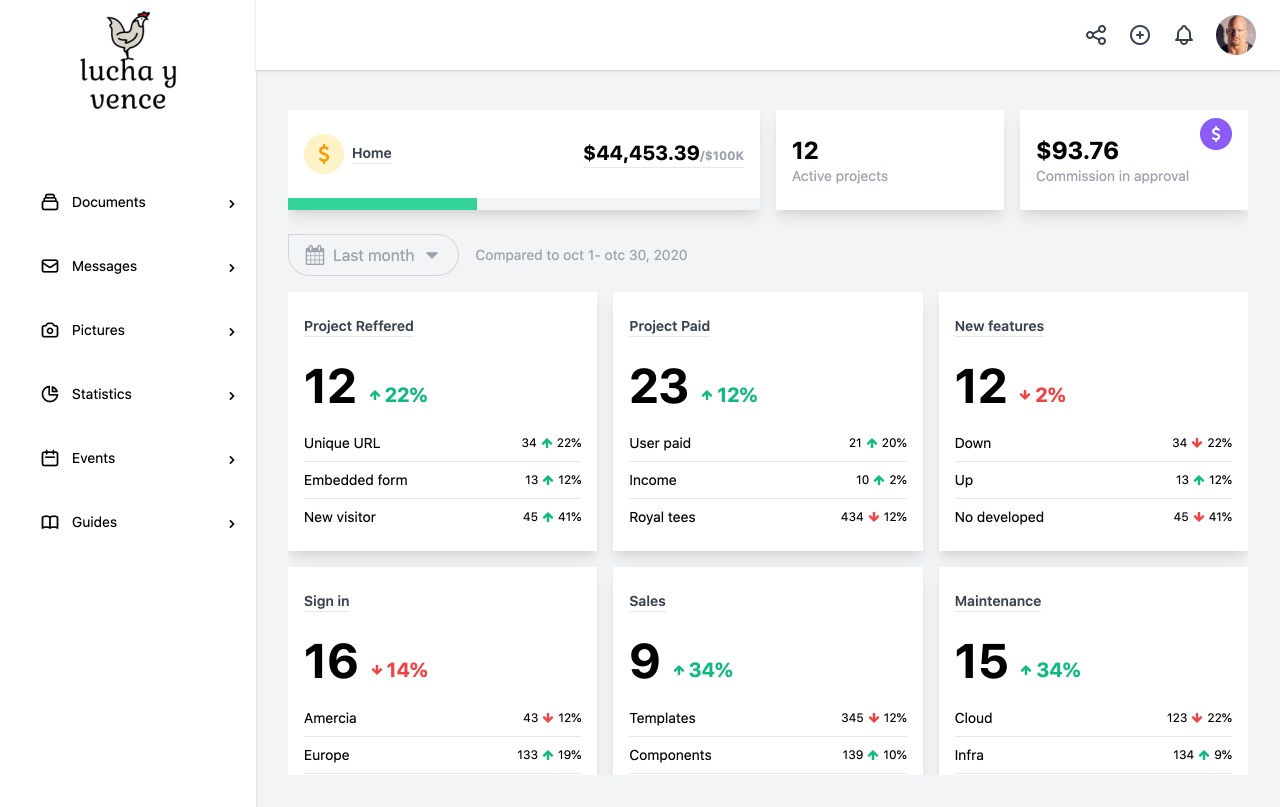
Admin dashboard template based on React and Create React App
ReactAdmin dashboard
dashboard-v8-cra — React Admin dashboard Template
By Jhonnyc
Salvia-kit Dashboard v8 admin template built with React and Create React App, released under the MIT license.
Explore the design
Compare the page layouts and mobile experience. Open any screenshot for a closer look.
Author preview
Author-provided previewTop of page
Preview provided in the project README.
One original preview is available. Open the full image to inspect the design.
Screenshots show visual appearance; interactive behavior may differ.
Recorded 2026-10-13View source
What stands out
A quick read of the recorded project description.
Part of the Salvia-kit Dashboard v8 series
Repository includes a standard MIT license file, permitting commercial use and modification
README provides the author's preview image and a browser support table
Uses Create React App's start, test, build, and eject scripts
Template Details
This is a Dashboard v8 admin template from Salvia-kit, written in React and scaffolded with Create React App. The 'cra' in the repository name dashboard-v8-cra refers to Create React App.
The template is positioned as a data-oriented admin interface. The README provides the author's preview image and notes that documentation can be viewed at the /guides/documentation path on the local development server. The README also lists a browser support table for Chrome, Firefox, Edge, Safari, and Opera, along with a link to the contribution guidelines for the salvia-kit/dashboard-v8-cra repository.
The project uses the standard Create React App scripts: yarn start launches development mode and previews on port 3000, yarn test runs tests in interactive watch mode, yarn build outputs a production build to the build directory, and yarn eject exports the build configuration but is irreversible. The README also includes a startup note for npm run dev / yarn dev, which coexists with the CRA scripts; in practice, the repository scripts should be treated as authoritative.
Regarding licensing, the repository contains a standard MIT license file, permitting free use, modification, commercial use, and distribution of this version's code, provided the copyright notice and license notice are retained when distributing. The licensing of third-party assets such as demo images, fonts, and icons must be verified separately, and external services such as domains, hosting, and databases may incur separate charges. The repository's update record stops in 2021.
ReactAdmin dashboard
Is it right for your project?
Use Cases
- Building a data-display admin interface
- Using as a UI starting point for further development of a React admin project
- Learning how a Create React App project's directory and scripts are organized
Suitable For
- Developers who need a foundational React admin interface template
- Teams that accept the Create React App scaffolding approach
- Projects that want to modify code based on an MIT-licensed foundation
Getting started & customization
Use these recorded setup notes alongside the repository instructions for your chosen version.
- 1
Use yarn start to launch development mode, previewing on port 3000 by default
- 2
Use yarn build to generate a production build, output to the build directory
- 3
yarn eject is irreversible; after running it, you must maintain the build configuration yourself
- 4
The README also includes a startup note for npm run dev / yarn dev; refer to the repository's actual scripts
- 5
Third-party assets such as demo images, fonts, and icons require separate license verification
License & source material
Usage conditions & limitations
Free to use · keep license noticeThis entry covers the free version in the public repository under the MIT license; the free scope applies to this version's code and does not imply that external services or third-party assets are free.
Must comply with when using
- Permits free use, modification, commercial use, and distribution of this version's code.
- When distributing copies or substantial portions of the code, retain the original author's copyright notice and the full MIT license notice.
- The code is provided as is; warranties and limitations of liability are governed by the original license and applicable law.
Additional costs & items to verify
- Demo images, fonts, icons, and other third-party assets must be checked under their respective licenses; the code's MIT license alone is not sufficient to determine this.
- External services such as domains, hosting, databases, payments, or AI may incur separate charges.
View Original Text Basis
https://github.com/Jhonnyc/dashboard-v8-cra/blob/main/LICENCE.mdhttps://github.com/Jhonnyc/dashboard-v8-cra/blob/main/README.mdPermission is hereby granted, free of charge
Original License Text
Compiled by DeepSeek based on repository license and README ·2026-10-13. Results only cover the materials read; dependencies, images, fonts, and subsequent term changes are subject to their respective original texts.
Project checks & description sources
Template Information
- Source platforms
- GitHub
- Documentation and maintenance reference score
- Less documented · 53 / 100
- Technologies
- React
- Website type
- Admin dashboard
How this score is calculated
Our heuristic uses license records (up to 30), a demo link (12), a preview (10), stars (15), recorded maintenance (15), description completeness (8), feature records (5) and classification data (5). It is not a code, security or performance test, or a Google score. A link does not establish tested functionality.
What to verify for this project
- Repository update recorded
- 2021-07-20
- Screenshot last checked
- 2026-10-13
No demo link is recorded. Use the repository instructions to evaluate the project locally; the screenshot alone cannot establish interactive behavior.
The catalog identifies React as the primary stack. Check the actual dependency manifest and lockfile for versions and hosting requirements. These notes use recorded metadata, not a code audit or a deployment test.
Use a selection guide →How this description was prepared
AI-assisted description based on catalog records and repository material. Repository authors are not automatically the reviewers of this description.
Review declaration: [email protected] · 2026-10-13
Inspect the recorded source material
SHA-256: d692b1951d22f114ca972eab034b1249f105c4f5ceedcb685d371729d77efe65
2026-10-13T04:43:48.559Z
Source file / repository# Salvia-kit Dashboard v8 create-react-app 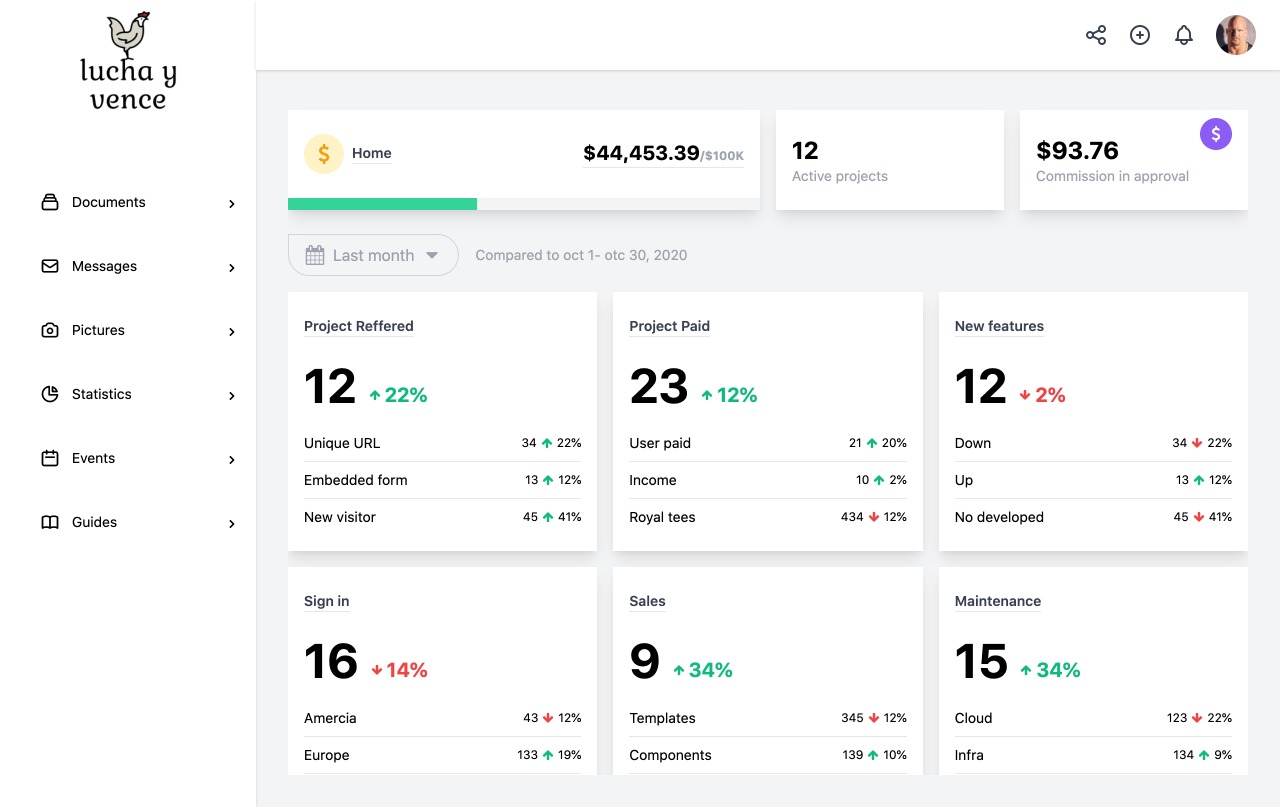 ## 📋 Documentation You can see the documentation on [http://localhost:3000/guides/documentation](http://localhost:3000/admin/documentation) ## Browser Support | Chrome | Firefox | Edge | Safari | Opera | |:---:|:---:|:---:|:---:|:---:| | <img src="https://github.com/creativetimofficial/public-assets/blob/master/logos/chrome-logo.png?raw=true" width="64" height="64"> | <img src="https://raw.githubusercontent.com/creativetimofficial/public-assets/master/logos/firefox-logo.png" width="64" height="64"> | <img src="https://raw.githubusercontent.com/creativetimofficial/public-assets/master/logos/edge-logo.png" width="64" height="64"> | <img src="https://raw.githubusercontent.com/creativetimofficial/public-assets/master/logos/safari-logo.png" width="64" height="64"> | <img src="https://raw.githubusercontent.com/creativetimofficial/public-assets/master/logos/opera-logo.png" width="64" height="64"> | ## Contribution If you would like to contribute on the project, fixing bugs, please follow our [Contribution guide](https://github.com/salvia-kit/dashboard-v8-cra/blob/main/contributing.md) First, run the development server: ```bash npm run dev # or yarn dev ``` Open [http://localhost:3000](http://localhost:3000) with your browser to see the result. # Getting Started with Create React App This project was bootstrapped with [Create React App](https://github.com/facebook/create-react-app). ## Available Scripts In the project directory, you can run: ### `yarn start` Runs the app in the development mode.\ Open [http://localhost:3000](http://localhost:3000) to view it in the browser. The page will reload if you make edits.\ You will also see any lint errors in the console. ### `yarn test` Launches the test runner in the interactive watch mode.\ See the section about [running tests](https://facebook.github.io/create-react-app/docs/running-tests) for more information. ### `yarn build` Builds the app for production to the `build` folder.\ It correctly bundles React in production mode and optimizes the build for the best performance. The build is minified and the filenames include the hashes.\ Your app is ready to be deployed! See the section about [deployment](https://facebook.github.io/create-react-app/docs/deployment) for more information. ### `yarn eject` **Note: this is a one-way operation. Once you `eject`, you can’t go back!** If you aren’t satisfied with the build tool and configuration choices, you can `eject` at any time. This command will remove the single build dependency from your project. Instead, it will copy all the configuration files and the transitive dependencies (webpack, Babel, ESLint, etc) right into your project so you have full control over them. All of the commands except `eject` will still work, but they will point to the copied scripts so you can tweak them. At this point you’re on your own. You don’t have to ever use `eject`. The curated feature set is suitable for small and middle deployments, and you shouldn’t feel obligated to use this feature. However we understand that this tool wouldn’t be useful if you couldn’t customize it when you are ready for it. ## Learn More You can learn more in the [Create React App documentation](https://facebook.github.io/create-react-app/docs/getting-started). To learn React, check out the [React documentation](https://reactjs.org/). ### Code Splitting This section has moved here: [https://facebook.github.io/create-react-app/docs/code-splitting](https://facebook.github.io/create-react-app/docs/code-splitting) ### Analyzing the Bundle Size This section has moved here: [https://facebook.github.io/create-react-app/docs/analyzing-the-bundle-size](https://facebook.github.io/create-react-app/docs/analyzing-the-bundle-size) ### Making a Progressive Web App This section has moved here: [https://facebook.github.io/create-react-app/docs/making-a-progressive-web-app](https://facebook.github.io/create-react-app/docs/making-a-progressive-web-app) ### Advanced Configuration This section has moved here: [https://facebook.github.io/create-react-app/docs/advanced-configuration](https://facebook.github.io/create-react-app/docs/advanced-configuration) ### Deployment This section has moved here: [https://facebook.github.io/create-react-app/docs/deployment](https://facebook.github.io/create-react-app/docs/deployment) ### `yarn build` fails to minify This section has moved here: [https://facebook.github.io/create-react-app/docs/troubleshooting#npm-run-build-fails-to-minify](https://facebook.github.io/create-react-app/docs/troubleshooting#npm-run-build-fails-to-minify)
Explore similar templates
Compare previews and descriptions within the same stack and category.
ant-design-pro
Ant Design Pro is an enterprise-grade React admin scaffold built on React 19, Umi Max 4, and antd 6 with TypeScript.
React · Admin dashboard

coreui-free-react-admin-template
CoreUI's free React admin template, built on React and the CoreUI component library, provides dashboard layouts, sidebar navigation, routing, and example views. It includes .cursorrules, ARCHITECTURE.md, and DEVELOPMENT.md context files, plus JSDoc comments and PropTypes, to support AI-assisted development.
React · Admin dashboard

fastapi-react
A Cookiecutter template for FastAPI + React (TypeScript) full-stack projects, integrating PostgreSQL, SQLAlchemy, Alembic, Celery, Redis, JWT authentication, a react-admin admin panel, and a Docker Compose development environment with Nginx reverse proxy.
React · Admin dashboard

react-antd-admin-template
A React + Ant Design admin template for mid- and back-office products, with built-in login/logout, dynamic routing, permission checks, and user management.
React · Admin dashboard

react-saas-template
A React and Material-UI template for SaaS or admin websites, offering dashboard, chart, blog, payment, and file upload components. It uses Create-React-App, React-Router, Recharts, React-Stripe-js, React-Dropzone, and React-Cropper, with theme colors centralized in src/theme.js.
React · Admin dashboard

react-material-admin
React Material Admin is an MIT-licensed React admin template by Flatlogic, built on Material-UI. It provides dashboards, charts, tables, authentication, profile, and notification pages, with three color themes and responsive layouts.
React · Admin dashboard