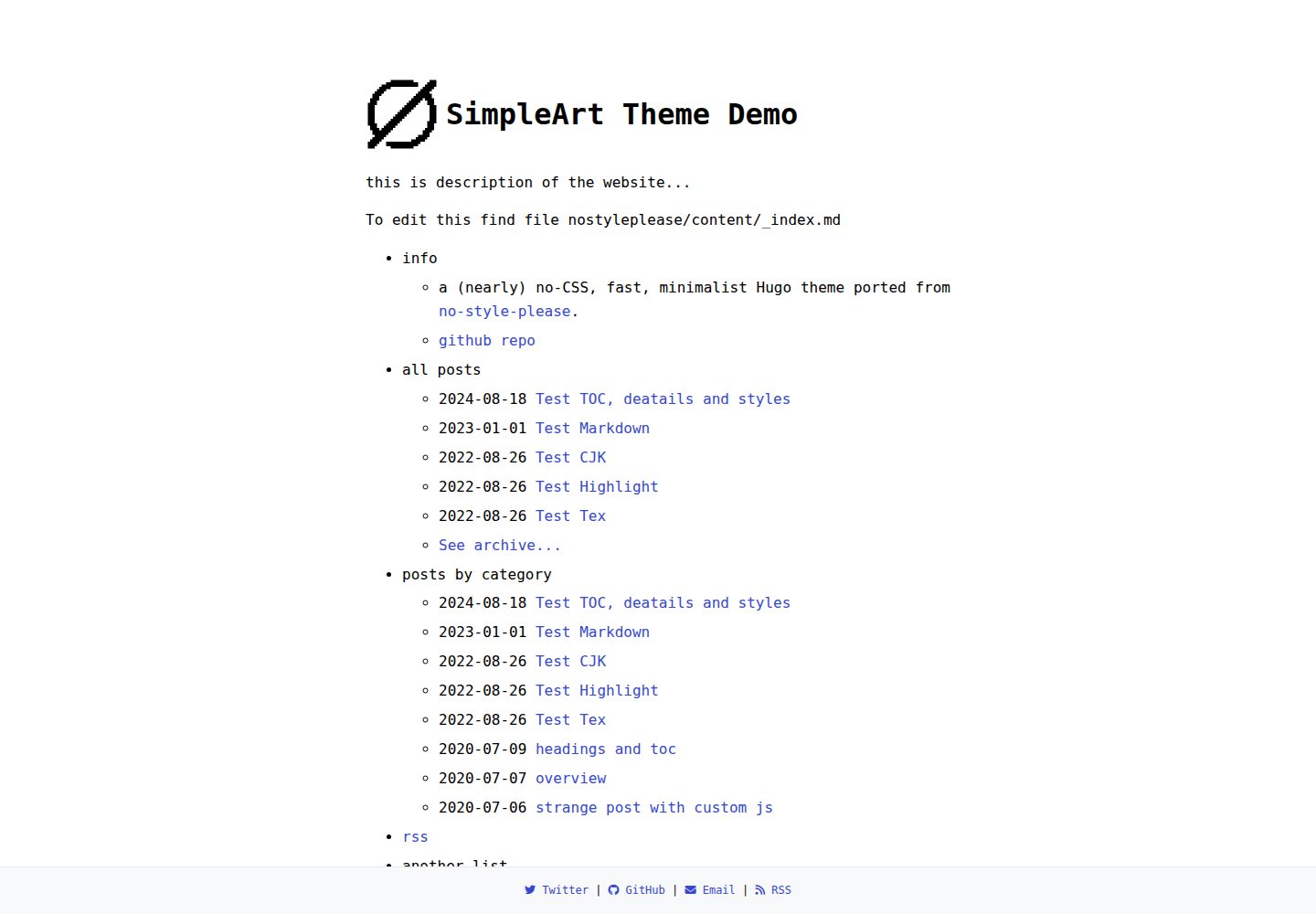
Almost no CSS minimalist design, with styles centralized in main.scss for easy modification
HugoBlog
simpleart — Hugo Blog Template
By jiaphyper
Simpleart is a minimalist Hugo blog theme ported from hugo-theme-nostyleplease, presenting content with almost no CSS and supporting light/dark modes, random reading, MathJax and RSS.
Explore the design
Compare the page layouts and mobile experience. Open any screenshot for a closer look.
Desktop homepage1 / 2
Desktop captureTop of page
Actual screenshot captured by the server browser.
All pages & views 2
Screenshots show visual appearance; interactive behavior may differ.
Recorded 2026-10-12View source
What stands out
A quick read of the recorded project description.
Supports three appearance modes—light, dark and auto—and adapts to responsive layouts
Built-in random reading button that jumps to a random post, with configurable button text
Provides subscription feeds using Hugo's built-in RSS template, and supports MathJax math formulas
Menu defined by data/menu.toml, supporting nested entries, post lists and RSS links
Configurable Google AdSense ad slots, footer social links and copyright information
Template Details
Simpleart is a Hugo blog theme, with the repository at jiaphyper/simpleart, under the MIT license. It is ported from hugo-theme-nostyleplease and positioned as an "almost no CSS" minimalist style, where pages focus on content and typography, making it suitable for blogs centered on text reading. The theme offers three appearance modes—light, dark and auto—and adapts to responsive layouts. Functionally it includes a random reading button, RSS subscription (using Hugo's built-in RSS template) and MathJax math formula support. Configuration is centralized in hugo.toml, where the blog name, author, date format, appearance mode and more can be adjusted; the menu structure is defined by data/menu.toml, supporting nested entries, post lists and RSS links. Posts can add a table of contents via the toc and tocBorder parameters in front matter, and the post list can optionally be grouped and displayed in reverse chronological order. The theme also provides configuration options for Google AdSense ad slots, footer social links and copyright information. Installation involves cloning the repository or adding it as a submodule into themes/simpleart, then copying the theme's hugo.toml, content and static directories to the site root, and finally starting a local preview with hugo server -D. When using the random reading feature, the content/random.md file must not be deleted.
HugoBlog
Is it right for your project?
Use Cases
- Building a personal blog focused on text reading
- Content sites needing a minimalist style with low stylistic interference
- Blogs wanting a random reading entry point for posts
- Technical blogs needing to display math formulas in posts
- Hugo sites wanting to quickly adjust menus, footers and ad slots via configuration files
Suitable For
- Developers building static blogs with Hugo
- Writers preferring minimalist typography and content-first presentation
- Personal sites needing light/dark modes and RSS subscription
- Blog authors wanting to render math formulas in posts
Getting started & customization
Use these recorded setup notes alongside the repository instructions for your chosen version.
- 1
Clone the repository or add it as a submodule into the themes/simpleart directory
- 2
Copy the theme's hugo.toml, content and static to the site root, overwriting the corresponding files
- 3
Start the local development server with hugo server -D, accessible by default at http://localhost:1313
- 4
Do not delete content/random.md when using the random reading feature
- 5
The theme code is under the MIT license, but third-party assets such as demo images, fonts and icons need separate license verification
License & source material
Usage conditions & limitations
Free to use · keep license noticeThis entry covers the free version under the MIT license in the public repository; the free scope is the code of this version and does not mean external services or third-party assets are free.
Must comply with when using
- Free use, modification, commercial use and distribution of this version's code are permitted.
- When distributing copies or substantial portions of the code, retain the original author's copyright notice and the full MIT license notice.
- The code is provided as is; warranties and limitations of liability are governed by the original license and applicable law.
Additional costs & items to verify
- Demo images, fonts, icons and other third-party assets need to be checked under their respective licenses and cannot be judged solely by the code's MIT license.
- External services such as domains, hosting, databases, payments or AI may incur additional charges.
- When using the random reading feature, the content/random.md file must not be deleted, otherwise the feature will not work properly.
- Enabling Google AdSense ad slots requires a valid AdSense account and the site must pass AdSense review, which is an external service requirement.
View Original Text Basis
Permission is hereby granted, free of charge
Original License Text
> Note: `content/random.md` file **CAN NOT** be deleted when you want to use random wondering.
Original README
https://github.com/jiaphyper/simpleart/blob/main/LICENSEhttps://github.com/jiaphyper/simpleart/blob/main/README.mdRequires valid AdSense account and approved site
Original README
Compiled by DeepSeek based on repository license and README ·2026-10-12. Results only cover the materials read; dependencies, images, fonts, and subsequent term changes are subject to their respective original texts.
Project checks & description sources
Template Information
- Source platforms
- GitHub
- Documentation and maintenance reference score
- Partly documented · 66 / 100
- Technologies
- Hugo
- Website type
- Blog
How this score is calculated
Our heuristic uses license records (up to 30), a demo link (12), a preview (10), stars (15), recorded maintenance (15), description completeness (8), feature records (5) and classification data (5). It is not a code, security or performance test, or a Google score. A link does not establish tested functionality.
What to verify for this project
- Repository update recorded
- 2025-05-07
- Screenshot last checked
- 2026-10-12
A demo link is listed. Check it with your own content and viewport sizes; its presence does not confirm that forms, authentication or payments work.
The catalog identifies Hugo as the primary stack. Check the actual dependency manifest and lockfile for versions and hosting requirements. These notes use recorded metadata, not a code audit or a deployment test.
Use a selection guide →How this description was prepared
AI-assisted description based on catalog records and repository material. Repository authors are not automatically the reviewers of this description.
Review declaration: codex-user-requested-batch-review-20261015 · 2026-10-15
Inspect the recorded source material
SHA-256: 1c9ca66908dd47f9cb5bfceb6ab532e4e0d20f0d4d730a503f1009953ed76f02
2026-10-12T02:37:10.040Z
Source file / repository
# Simpleart

A (nearly) no-CSS, fast, minimalist [Hugo](https://gohugo.io/) theme ported from [hugo-theme-nostyleplease](https://github.com/hanwenguo/hugo-theme-nostyleplease).

<img src="https://raw.githubusercontent.com/jiaphyper/simpleart/main/screenshot.png" width="60%"/>

## 🌐 Live Demo

Check out the live demo of SimpleArt theme:

👉 [Demo](https://jiaphyper.github.io/simpleart/)


## Features

* Fast (**under 4kb of CSS!**)
* Randomly wondering for articles
* Light, dark and auto modes
* Responsive
* Content first (typography optimized for maximum readability)
* RSS feed (using Hugo's embedded RSS template)
* MathJax support


## Installation

The easiest way is to clone this repo (or add as a submodule) to `themes/simpleart`

### 1. Clone the Theme
```bash
git clone https://github.com/jiaphyper/simpleart.git themes/simpleart
```

> Once you download or git clone the theme repo, you can **DELETE** the `theme.toml` file, `config.toml` file and `exampleSite` folder.
> Follow the instruction of `README.md`.


### 2. Replace Configuration
Replace your site's hugo.toml with the theme's configuration file:

```bash
cp -f themes/simpleart/hugo.toml ./hugo.toml
```

### 3. Copy Content Files
Overwrite your site's content directory:

```bash
cp -R themes/simpleart/content/ ./content/
```

### 4. Copy Static Assets
Replace static files (images, JS, CSS, etc.):

```bash
cp -R themes/simpleart/static/ ./static/
```

## 5. Run the Development Server

Start the Hugo development server with this command:

```bash
hugo server -D
```

this will

+ Start a local web server (-D includes draft content)

+ Automatically reload when files change

+ Print the access URL to your terminal

After running the command:

+ Open your web browser

+ Visit: http://localhost:1313

+ You should see your blog with the theme applied

Note:

> Press Ctrl+C in terminal to stop the server
> The `-D` flag shows draft posts (remove it for production)


## Usage

You can edit `hugo.toml` file to customize your blog. You can change things such as the name of the blog, the author, the appearance of the theme (light, dark or auto), how dates are formatted, etc. Customizable fields should be straightforward to understand.

### Random reading

Set `random_reading_enable = true`, the webpage appears a wondering button. by clicking the button, the webpage directs a random page of your articles. You can edit the button text by `random_button_text`

```toml
[params]
  random_reading_enable = false
  random_button_text = "Wondering"
```

- When enabled (`random_reading_enable = true`), a button appears in your webpage
- Clicking the button will redirect visitors to a randomly selected article
- The button text can be customized via `random_button_text`

> Note: `content/random.md` file **CAN NOT** be deleted when you want to use random wondering.

### Advertising & Footer Configuration

#### Google AdSense Integration

Configure your AdSense settings in `hugo.toml`:

```toml
[params.adsense]
  enable = true                 # Enable/disable AdSense globally
  client_id = "ca-pub-xxxxxxxxxxxxxxx"  # Your AdSense publisher ID
  article_top_slot = "123456789"    # Article top ad slot ID
  article_bottom_slot = "123456789" # Article bottom ad slot ID
```

**Implementation Notes:**

- Auto Ads will automatically place ads in optimal locations
- Article slots will display ads at the top/bottom of your content
- Requires valid AdSense account and approved site

#### Footer Configuration

Customize your footer with social links and copyright:

```toml
[params.footer]
  copyright = "© 2017 - {{ now.Format \"2006\" }}"  # Dynamic year range

  # Social links with Font Awesome icons
  links = [
    { icon = "fa-brands fa-twitter", text = "Twitter", url = "https://x.com/username" },
    { icon = "fa-brands fa-github", text = "GitHub", url = "https://github.com/username" },
    { icon = "fa-solid fa-envelope", text = "Email", url = "mailto:[email protected]" },
    { icon = "fa-solid fa-rss", text = "RSS", url = "/index.xml" }
  ]
```
> You can found icon in [fontawesome](https://fontawesome.com).
> If you want to revise footer, you can edit in `themes/simpleart/layouts/partials/footer.html`.


### Customize the menu (Homepage)

In order to add/edit/delete entries from the main menu, you have to edit the `/themes/simpleart/data/menu.toml` file. Through that file you can define the structure of the menu. Take a look at the default configuration to get an idea of how it works and read on for a more comprehensive explanation.

The example of `menu.toml` is as follows.

```toml
[[entries]]
title = "info"

  [[entries.entries]]
  title = "a (nearly) no-CSS, fast, minimalist Hugo theme ported from <a href='https://github.com/hanwenguo/hugo-theme-nostyleplease/'>no-style-please</a>."

  [[entries.entries]]
  title = "github repo"
  url = "https://github.com/jiaphyper/simpleart"


[[entries]]
title = "all posts"

  [entries.post_list]
  limit = 5
  show_more = true
  show_more_text = "See archive..."
  show_more_url = "posts"

[[entries]]
title = "posts by category"

  [entries.post_list]
  section = "posts"
  show_more = true
  show_more_text = "See more posts..."
  show_more_url = "posts"

[[entries]]
title = "rss"
url = "index.xml"

[[entries]]
title = "another list"

  [[entries.entries]]
  title = "with subitems"

    [[entries.entries.entries]]
    title = "with subsubitems"

    [[entries.entries.entries]]
    title = "example page"
    url = "about"

[[entries]]
title = "PRO TIP"
entries = [
   { title = "to edit this menu, edit data/menu.toml file" }
  ]
```


### Section pages

A so-called section page is a page that shows a list of posts in a specific section. It should be automatically created by hugo when a new section is created.

### Customize the index page

The `index.md` page should use layout `home`, which is the layout that displays the menu. If you want to have some content after the menu, you can just add that content in the `_index.md` file, and it will automatically show under the menu.

Another thing you can do to customize the index page is show the description of your blog between the title and the menu. To do this, just edit `config.toml` and change `params.theme_config.show_description` to `true`.


### Adding table of contents

You can add a table of contents by supplying the `toc: true` param to your post front matter. If you want a border around it you can also set `tocBorder: true`. The toc style behavior is handled by Goldmark and the defaults can be found in the `hugo.toml` file.

### Posts list group by date in descending order.

just edit `hugo.toml` and change `params.theme_config.isListGroupByDate` to `true`.

### Last but not least

1. you can edit the css in `themes/simpleart/assests/css/main.scss` file.
2. change logo in `static` folder.


## Contributing

Bug reports and pull requests are welcome on GitHub at https://github.com/jiaphyper/simpleart/.

## Acknowledge

Some of the code comes from [hugo-theme-nostyleplease](https://github.com/hanwenguo/hugo-theme-nostyleplease/), a fork of this theme.

## License

The theme is available as open source under the terms of the [MIT License](https://opensource.org/licenses/MIT).
Explore similar templates
Compare previews and descriptions within the same stack and category.

hugo-PaperMod
A fast, clean, responsive Hugo theme for blogs and lightweight portfolios, with three layout modes (Regular, Home-Info, Profile), automatic and manual light/dark themes, Fuse.js client-side search, multilingual support, and built-in Open Graph, Twitter Cards, and Schema.org data.
Hugo · Portfolio

LoveIt
LoveIt is a clean, elegant, and feature-rich Hugo blog theme derived from LeaveIt and KeepIt, MIT-licensed. It offers light/dark modes, responsive layout, multilingual support, and search via Lunr.js or Algolia.
Hugo · Blog

hugo-coder
hugo-coder is a minimalist Hugo blog theme maintained by luizdepra under the MIT license. It provides a clean, text-focused blog appearance, configuration documentation in the docs directory, and a complete exampleSite with hugo.toml.
Hugo · Blog

blowfish
Blowfish is a Hugo personal website and blog theme built with Tailwind CSS 4, focused on lightness, simplicity, and content-first presentation.
Hugo · Blog

hugo-paper
hugo-paper is a simple, clean, and customizable Hugo blog theme configured through config.toml or hugo.toml.
Hugo · Blog

hextra
Hextra is a Hugo theme for documentation and blog sites, built on Hugo and Tailwind CSS with design referencing Nextra.
Hugo · Documentation