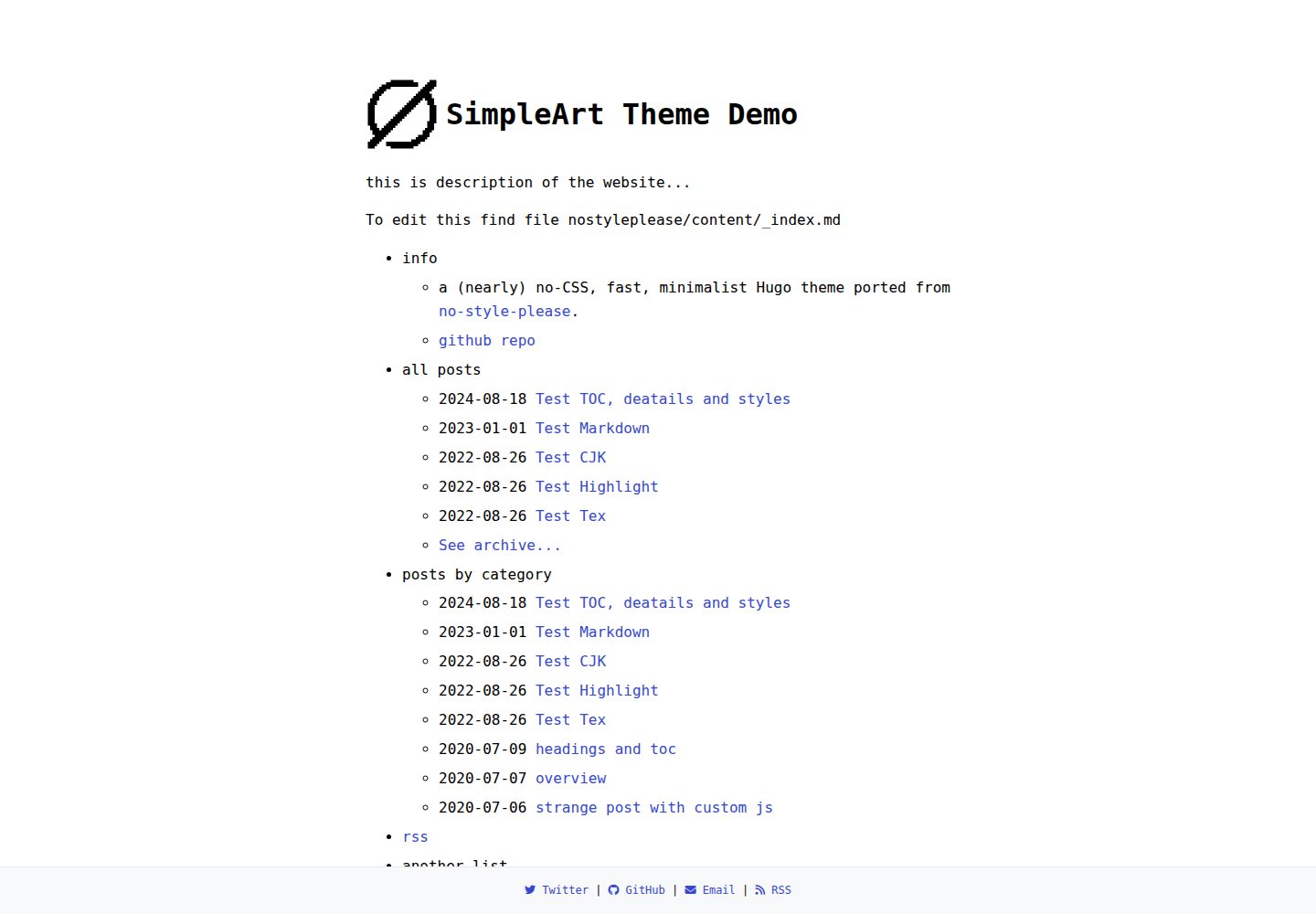
近乎无 CSS 的极简设计,样式集中在 main.scss 中便于修改
Hugo博客
simpleart — Hugo 博客模板
作者 jiaphyper
Simpleart 是一个基于 Hugo 的极简博客主题,移植自 hugo-theme-nostyleplease,以近乎无 CSS 的方式呈现内容,支持明暗模式、随机阅读、MathJax 与 RSS。
看看你的网站会是什么样
浏览真实页面截图,比较内容排版与手机效果。点击下方缩略图切换,放大查看整页细节。
全部页面与视图 2
截图用于了解视觉与布局,交互效果请以实际项目为准。
采集于 2026-10-12查看来源
值得关注的模板亮点
从已有项目资料中,快速了解它的特点。
支持明暗与自动三种外观模式,并适配响应式布局
内置随机阅读按钮,可跳转到随机文章,按钮文字可配置
使用 Hugo 内置 RSS 模板提供订阅源,并支持 MathJax 数学公式
菜单由 data/menu.toml 定义,支持嵌套条目、文章列表与 RSS 链接
可配置 Google AdSense 广告位与页脚社交链接、版权信息
模板详细介绍
Simpleart 是一个 Hugo 博客主题,仓库位于 jiaphyper/simpleart,采用 MIT 许可。它从 hugo-theme-nostyleplease 移植而来,定位是“近乎无 CSS”的极简风格,页面以内容与排版为主,适合以文字阅读为核心的博客。主题提供明暗与自动三种外观模式,并适配响应式布局。功能上包含随机阅读按钮、RSS 订阅(使用 Hugo 内置 RSS 模板)以及 MathJax 数学公式支持。配置集中在 hugo.toml,可调整博客名称、作者、日期格式、外观模式等;菜单结构由 data/menu.toml 定义,支持嵌套条目、文章列表与 RSS 链接。文章可通过 front matter 中的 toc 与 tocBorder 参数添加目录,并可选择按日期倒序分组显示文章列表。主题还提供 Google AdSense 广告位与页脚社交链接、版权信息的配置项。安装方式为将仓库克隆或作为子模块放入 themes/simpleart,再复制主题的 hugo.toml、content 与 static 目录到站点根目录,最后用 hugo server -D 启动本地预览。使用随机阅读功能时,content/random.md 文件不能删除。
Hugo博客
适合你的项目吗?
适用场景
- 搭建以文字阅读为主的个人博客
- 需要极简风格、低样式干扰的内容站点
- 希望为文章提供随机阅读入口的博客
- 需要在文章中展示数学公式的技术博客
- 希望通过配置文件快速调整菜单、页脚与广告位的 Hugo 站点
适合人群
- 使用 Hugo 构建静态博客的开发者
- 偏好极简排版与内容优先的写作者
- 需要明暗模式与 RSS 订阅的个人站点
- 希望在文章中渲染数学公式的博客作者
上手与定制指南
结合仓库当前版本的说明,按下面的资料检查内容、配置与运行要求。
- 1
将仓库克隆或作为子模块放入 themes/simpleart 目录
- 2
复制主题的 hugo.toml、content 与 static 到站点根目录覆盖对应文件
- 3
使用 hugo server -D 启动本地开发服务器,默认访问 http://localhost:1313
- 4
使用随机阅读功能时不要删除 content/random.md
- 5
主题代码采用 MIT 许可,但演示图片、字体、图标等第三方素材需单独核对许可
授权与来源资料
使用条件与限制
免费使用 · 保留许可声明本次收录的是公开仓库中采用 MIT 许可的免费版本;免费范围为该版本代码,不代表外部服务或第三方素材免费。
使用时需要遵守
- 允许免费使用、修改、商用和分发该版本代码。
- 分发代码副本或实质性部分时,保留原作者版权声明和完整 MIT 许可声明。
- 代码按现状提供;担保与责任限制以原许可证及适用法律为准。
额外费用与待核对事项
- 演示图片、字体、图标及其他第三方素材需按各自许可核对,不能仅凭代码的 MIT 许可判断。
- 域名、托管、数据库、支付或 AI 等外部服务可能另外收费。
- 使用随机阅读功能时,不能删除 content/random.md 文件,否则该功能无法正常工作。
- 启用 Google AdSense 广告位需要拥有有效的 AdSense 账号,且站点需通过 AdSense 审核,属于外部服务要求。
查看原文依据
Permission is hereby granted, free of charge
许可证原文
> Note: `content/random.md` file **CAN NOT** be deleted when you want to use random wondering.
README 原文
https://github.com/jiaphyper/simpleart/blob/main/LICENSEhttps://github.com/jiaphyper/simpleart/blob/main/README.mdRequires valid AdSense account and approved site
README 原文
DeepSeek 根据仓库许可证和 README 整理 ·2026-10-12。结果仅覆盖已读取资料,依赖、图片、字体及后续条款变更以各自原文为准。
项目核对记录与介绍依据
模板资料
- 来源平台
- GitHub
- 资料与维护参考分
- 资料一般 · 66 / 100
- 技术栈
- Hugo
- 网站类型
- 博客
这个分数如何计算
本站按许可资料(最高30分)、演示链接(12分)、预览图(10分)、Star数(15分)、记录的维护时间(15分)、描述完整度(8分)、功能记录(5分)和分类资料(5分)计算。它不是代码、安全或性能测试,也不是 Google 评分;有链接不代表已实测可用。
这个项目需要核对什么
- 记录的仓库更新时间
- 2025-05-07
- 截图检查日期
- 2026-10-12
已收录演示链接。请用你的内容与屏幕尺寸检查;有演示不代表表单、认证或支付已经可用。
目录记录的主要技术栈是 Hugo。请通过依赖清单和锁文件核对实际版本与托管要求。这些说明基于收录资料,不代表代码审计或部署实测。
查看具体选型方法 →介绍的制作与核对状态
介绍由 AI 辅助整理目录与仓库资料。仓库作者不等于这篇介绍的审核者。
审核声明: codex-user-requested-batch-review-20261015 · 2026-10-15
查看当时使用的来源资料
SHA-256: 1c9ca66908dd47f9cb5bfceb6ab532e4e0d20f0d4d730a503f1009953ed76f02
2026-10-12T02:37:10.040Z
来源文件 / 仓库
# Simpleart

A (nearly) no-CSS, fast, minimalist [Hugo](https://gohugo.io/) theme ported from [hugo-theme-nostyleplease](https://github.com/hanwenguo/hugo-theme-nostyleplease).

<img src="https://raw.githubusercontent.com/jiaphyper/simpleart/main/screenshot.png" width="60%"/>

## 🌐 Live Demo

Check out the live demo of SimpleArt theme:

👉 [Demo](https://jiaphyper.github.io/simpleart/)


## Features

* Fast (**under 4kb of CSS!**)
* Randomly wondering for articles
* Light, dark and auto modes
* Responsive
* Content first (typography optimized for maximum readability)
* RSS feed (using Hugo's embedded RSS template)
* MathJax support


## Installation

The easiest way is to clone this repo (or add as a submodule) to `themes/simpleart`

### 1. Clone the Theme
```bash
git clone https://github.com/jiaphyper/simpleart.git themes/simpleart
```

> Once you download or git clone the theme repo, you can **DELETE** the `theme.toml` file, `config.toml` file and `exampleSite` folder.
> Follow the instruction of `README.md`.


### 2. Replace Configuration
Replace your site's hugo.toml with the theme's configuration file:

```bash
cp -f themes/simpleart/hugo.toml ./hugo.toml
```

### 3. Copy Content Files
Overwrite your site's content directory:

```bash
cp -R themes/simpleart/content/ ./content/
```

### 4. Copy Static Assets
Replace static files (images, JS, CSS, etc.):

```bash
cp -R themes/simpleart/static/ ./static/
```

## 5. Run the Development Server

Start the Hugo development server with this command:

```bash
hugo server -D
```

this will

+ Start a local web server (-D includes draft content)

+ Automatically reload when files change

+ Print the access URL to your terminal

After running the command:

+ Open your web browser

+ Visit: http://localhost:1313

+ You should see your blog with the theme applied

Note:

> Press Ctrl+C in terminal to stop the server
> The `-D` flag shows draft posts (remove it for production)


## Usage

You can edit `hugo.toml` file to customize your blog. You can change things such as the name of the blog, the author, the appearance of the theme (light, dark or auto), how dates are formatted, etc. Customizable fields should be straightforward to understand.

### Random reading

Set `random_reading_enable = true`, the webpage appears a wondering button. by clicking the button, the webpage directs a random page of your articles. You can edit the button text by `random_button_text`

```toml
[params]
  random_reading_enable = false
  random_button_text = "Wondering"
```

- When enabled (`random_reading_enable = true`), a button appears in your webpage
- Clicking the button will redirect visitors to a randomly selected article
- The button text can be customized via `random_button_text`

> Note: `content/random.md` file **CAN NOT** be deleted when you want to use random wondering.

### Advertising & Footer Configuration

#### Google AdSense Integration

Configure your AdSense settings in `hugo.toml`:

```toml
[params.adsense]
  enable = true                 # Enable/disable AdSense globally
  client_id = "ca-pub-xxxxxxxxxxxxxxx"  # Your AdSense publisher ID
  article_top_slot = "123456789"    # Article top ad slot ID
  article_bottom_slot = "123456789" # Article bottom ad slot ID
```

**Implementation Notes:**

- Auto Ads will automatically place ads in optimal locations
- Article slots will display ads at the top/bottom of your content
- Requires valid AdSense account and approved site

#### Footer Configuration

Customize your footer with social links and copyright:

```toml
[params.footer]
  copyright = "© 2017 - {{ now.Format \"2006\" }}"  # Dynamic year range

  # Social links with Font Awesome icons
  links = [
    { icon = "fa-brands fa-twitter", text = "Twitter", url = "https://x.com/username" },
    { icon = "fa-brands fa-github", text = "GitHub", url = "https://github.com/username" },
    { icon = "fa-solid fa-envelope", text = "Email", url = "mailto:[email protected]" },
    { icon = "fa-solid fa-rss", text = "RSS", url = "/index.xml" }
  ]
```
> You can found icon in [fontawesome](https://fontawesome.com).
> If you want to revise footer, you can edit in `themes/simpleart/layouts/partials/footer.html`.


### Customize the menu (Homepage)

In order to add/edit/delete entries from the main menu, you have to edit the `/themes/simpleart/data/menu.toml` file. Through that file you can define the structure of the menu. Take a look at the default configuration to get an idea of how it works and read on for a more comprehensive explanation.

The example of `menu.toml` is as follows.

```toml
[[entries]]
title = "info"

  [[entries.entries]]
  title = "a (nearly) no-CSS, fast, minimalist Hugo theme ported from <a href='https://github.com/hanwenguo/hugo-theme-nostyleplease/'>no-style-please</a>."

  [[entries.entries]]
  title = "github repo"
  url = "https://github.com/jiaphyper/simpleart"


[[entries]]
title = "all posts"

  [entries.post_list]
  limit = 5
  show_more = true
  show_more_text = "See archive..."
  show_more_url = "posts"

[[entries]]
title = "posts by category"

  [entries.post_list]
  section = "posts"
  show_more = true
  show_more_text = "See more posts..."
  show_more_url = "posts"

[[entries]]
title = "rss"
url = "index.xml"

[[entries]]
title = "another list"

  [[entries.entries]]
  title = "with subitems"

    [[entries.entries.entries]]
    title = "with subsubitems"

    [[entries.entries.entries]]
    title = "example page"
    url = "about"

[[entries]]
title = "PRO TIP"
entries = [
   { title = "to edit this menu, edit data/menu.toml file" }
  ]
```


### Section pages

A so-called section page is a page that shows a list of posts in a specific section. It should be automatically created by hugo when a new section is created.

### Customize the index page

The `index.md` page should use layout `home`, which is the layout that displays the menu. If you want to have some content after the menu, you can just add that content in the `_index.md` file, and it will automatically show under the menu.

Another thing you can do to customize the index page is show the description of your blog between the title and the menu. To do this, just edit `config.toml` and change `params.theme_config.show_description` to `true`.


### Adding table of contents

You can add a table of contents by supplying the `toc: true` param to your post front matter. If you want a border around it you can also set `tocBorder: true`. The toc style behavior is handled by Goldmark and the defaults can be found in the `hugo.toml` file.

### Posts list group by date in descending order.

just edit `hugo.toml` and change `params.theme_config.isListGroupByDate` to `true`.

### Last but not least

1. you can edit the css in `themes/simpleart/assests/css/main.scss` file.
2. change logo in `static` folder.


## Contributing

Bug reports and pull requests are welcome on GitHub at https://github.com/jiaphyper/simpleart/.

## Acknowledge

Some of the code comes from [hugo-theme-nostyleplease](https://github.com/hanwenguo/hugo-theme-nostyleplease/), a fork of this theme.

## License

The theme is available as open source under the terms of the [MIT License](https://opensource.org/licenses/MIT).
看看同类模板
对比同技术栈与用途的模板,找到更适合的视觉与内容结构。

hugo-PaperMod
PaperMod 是 Hugo 生态里知名度较高的主题之一,定位很明确:给博客和轻量作品集站点提供一套干净、响应式的阅读界面。
Hugo · 作品集

LoveIt
❤️A clean, elegant but advanced blog theme for Hugo 一个简洁、优雅且高效的 Hugo 主题
Hugo · 博客

hugo-coder
A minimalist blog theme for hugo.
Hugo · 博客

blowfish
Personal Website & Blog Theme for Hugo
Hugo · 博客

hugo-paper
🪺 A simple, clean, customizable Hugo theme
Hugo · 博客

hextra
Hextra 是一个 Hugo 主题,定位在文档站与博客之间:既提供侧边栏导航、目录、面包屑、分页这类文档站结构,也能承载博客内容。
Hugo · 文档