All site data (business, contact details, opening hours, services, copy, reviews, photos, colors, legal information) is centralized in a single file, site.config.mjs.
HTMLPortfolio
JM-Web-Studio — HTML Portfolio Template
By jmartintechit-blip
JM-Web-Studio is a static website template for a fictional nail and beauty salon. All content is held in a single configuration file, demo and production modes are supported, and bookings are handled through a Cal.com embed.
Explore the design
Compare the page layouts and mobile experience. Open any screenshot for a closer look.
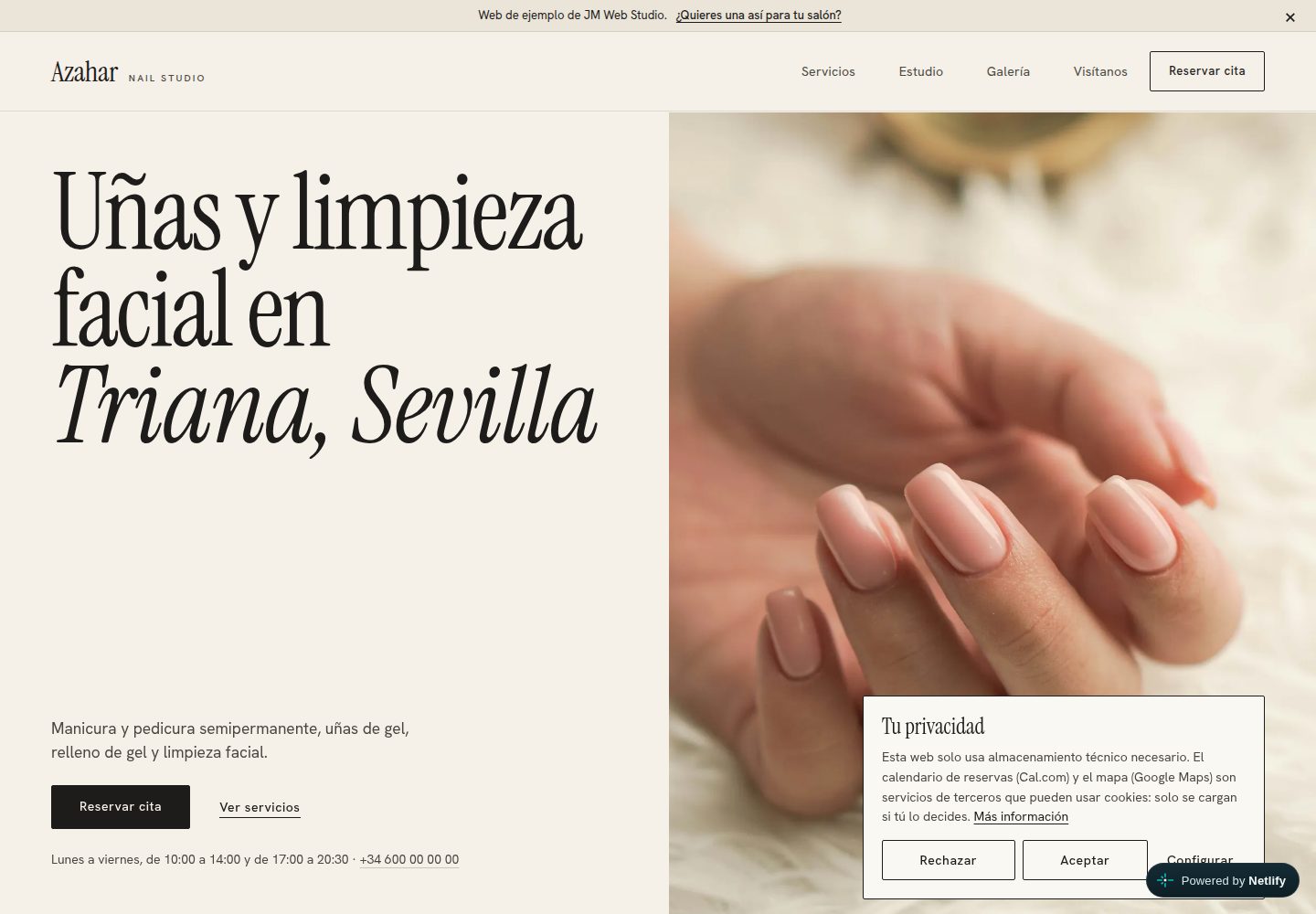
Desktop homepage1 / 2
Desktop captureTop of page
Actual screenshot captured by the server browser.
All pages & views 2
Screenshots show visual appearance; interactive behavior may differ.
Recorded 2026-10-20View source
What stands out
A quick read of the recorded project description.
The same codebase supports demo mode and production mode; production mode generates sitemap.xml and schema.org structured data, and fails the build when required data is missing.
Per-service online booking is implemented through a Cal.com embed, and Cal.com and Google Maps are loaded only after visitor consent.
An "open now" indicator is calculated from the configured opening hours, supporting split hours and lunch breaks.
Demo links support ?para=Name personalization; the name is inserted only as text and is limited to 60 characters.
The test suite contains 134 tests covering console errors, links, SEO, accessibility, WCAG AA contrast, mobile layout, keyboard use, reduced motion and page weight, among others.
Template Details
JM-Web-Studio is a static website template for small nail and beauty salons, and it also provides a demo site. All site content (business information, contact details, opening hours, services and prices, copy, reviews, photos, colors, legal information) comes from a single file, site.config.mjs; changing that file and the photos is enough to reuse it for a new client, with no need to edit HTML, CSS or JavaScript. The project has demo and production modes: demo mode shows a demo bar, sample labels, noindex and a robots.txt that blocks crawling, and does not generate a sitemap or structured data; production mode removes demo traces, generates sitemap.xml and schema.org local business data based on the configuration, and fails the build when required data is missing. Bookings are implemented through a Cal.com embed, and Google Maps and Cal.com are loaded only after visitor consent; a cookie banner and legal page templates are also provided. The build uses a custom Node.js static site generator, outputs to the dist/ directory, and can be deployed to Netlify. The README states clearly that the project is not a CMS, shop or booking engine, and has no backend or database; the legal pages are templates rather than legal advice; and the business, address and reviews in the demo are fictional. Known limitations include verification only in Chromium, no testing with screen readers, the real Cal.com calendar and Google Maps not being loaded in the development environment, Cal.com availability needing to be synchronized manually with opening hours, no Content-Security-Policy, and Lighthouse not having been run.
HTMLPortfolio
Is it right for your project?
Use Cases
- Show a nail or beauty salon owner a finished website demo tailored to their business type, with a link that can be personalized via ?para=Name.
- Create a site for a real client from the same codebase: edit site.config.mjs and the photos, turn off demo mode, then build and deploy.
- A small salon website that needs static hosting with no backend or database, with bookings handled by Cal.com.
- Deploy a static site on Netlify, using the build command and security headers already configured in netlify.toml.
Suitable For
- Small nail or beauty salons that need to show services and prices and accept online bookings.
- Salon owners who want to maintain website content through a single configuration file and avoid calling a developer for every change.
- Freelancers or small studios that need a demo site to show prospective clients the finished result.
- Developers who prefer a static site with no backend or database, using Netlify hosting and Cal.com bookings.
Getting started & customization
Use these recorded setup notes alongside the repository instructions for your chosen version.
- 1
Requires Node.js ≥ 20.12. After cloning the repository, run npm install, then npm run dev to start the local development server (http://localhost:8765).
- 2
Before running the tests for the first time, run npx playwright install chromium to install Chromium.
- 3
Running npm run build in local demo mode requires the SITE_URL environment variable to be set.
- 4
When building a site for a real client, edit all commented blocks in site.config.mjs, replace the demo photos in src/assets/img/photos/ and fill in alt text, then run npm run assets to regenerate the share image and icons.
- 5
Set modoDemo to false and set sitio.url, run npm run build and npm test, then publish the dist/ directory according to the configuration already present in netlify.toml.
License & source material
Usage conditions & limitations
Free to use · keep license noticeThis entry covers the free version under the MIT license in the public repository; the free scope is the code of that version and does not mean external services or third-party assets are free.
Must comply with when using
- The code of this version may be used, modified, used commercially and distributed free of charge.
- When distributing copies or substantial portions of the code, retain the original author's copyright notice and the complete MIT license notice.
- The code is provided as is; warranties and limitations of liability are governed by the original license and applicable law.
Additional costs & items to verify
- Demo images, fonts, icons and other third-party assets must be checked against their respective licenses and cannot be judged solely by the code's MIT license.
- External services such as domains, hosting, databases, payments or AI may incur separate charges.
- The site has no backend and no database and is not a CMS, shop or booking engine; bookings depend on the embedded Cal.com calendar.
- Per-service booking is implemented through a Cal.com embed and is loaded only after visitor consent.
- Google Maps is likewise loaded only after visitor consent; the cookie banner and legal pages are templates.
- Production mode requires sitio.url to be configured; demo mode uses SITE_URL or Netlify's URL environment variable.
- When modoDemo is false, missing required data such as the site URL or full address causes the build to fail.
- Opening hours must match Cal.com availability; reviews may only use real reviews for which permission has been obtained, or be left empty.
- Demo photos must be replaced and alt text filled in; stock photos must not be passed off as the client's actual premises.
- Verified only in Chromium and not tested in Safari, Firefox or with screen readers.
- The real Cal.com calendar and Google Maps are not loaded in the development environment; the integration is tested only against a stand-in for embed.js, and external links have not been tested.
- Cal.com availability is stored outside the repository and must be synchronized manually with opening hours; at the last check, weekday morning availability did not match what the site displayed.
- There is no Content-Security-Policy because the Cal.com embed has not yet been tested against a specific policy.
- The legal text is illustrative only and must be reviewed by a professional before public launch.
- Lighthouse performance measurement has not been run.
- The demo contact phone number is not stored in the repository; set the DEMO_WHATSAPP environment variable, otherwise it falls back to a fictional number.
- The MIT license covers only the code, not third-party resources: fonts are under SIL OFL 1.1, and demo photos come from Unsplash and are subject to the Unsplash license.
View Original Text Basis
Permission is hereby granted, free of charge
Original License Text
**What this is not.** It is not a real business: *Azahar Nail Studio*, its address and its reviews are invented, and the site says so. It is not a CMS, a shop or a booking engine: there is no backend and no database, and bookings are handled by an embedded [Cal.com](https://cal.com) calendar. The legal pages are templates, not legal advice.
Original README
- **Per-service online booking** through Cal.com, loaded only after the visitor gives consent.
Original README
- **Google Maps** also behind a consent gate; cookie banner and legal pages (legal notice, privacy, cookies).
Original README
| Public URL | `SITE_URL` / Netlify `URL` | `sitio.url` (required) |
Original README
With `modoDemo: false` the build **fails** if essential data is missing (site URL, full address) and **warns** about anything still pending.
Original README
2. Edit [`site.config.mjs`](site.config.mjs); every block is commented: `negocio` (name, brand, address, map query), `contacto`, `horario` (opening hours; **must match Cal.com availability**), `reservas` (Cal.com user and the list of services with minutes, price and slug), `textos`, `resenas` (**only real reviews** with permission, or an empty list), `colores`, `legal`.
Original README
3. Replace the demo photos in `src/assets/img/photos/` with the client's and write each photo's `alt` text in `fotos`. Do not present stock photos as the client's premises.
Original README
- Verified only in Chromium (not Safari or Firefox) and without screen readers.
Original README
- The real Cal.com calendar and the Google map could not be loaded from the development environment (no internet access there); the integration is tested against a stand-in for `embed.js`. External links were not checked live.
Original README
- Cal.com availability lives outside this repository and has to be kept in sync with `horario` by hand; at the last check, weekday-morning availability started at 09:00 while the site shows 10:00.
Original README
- There is no `Content-Security-Policy`, because the Cal.com embed was not tested against a concrete policy.
Original README
- The legal texts are indicative: have a professional review them before publishing a real site.
Original README
- Lighthouse has not been run.
Original README
- The demo's contact number is not stored in the repository: set the `DEMO_WHATSAPP` environment variable (digits with country code, e.g. in Netlify) or the demo falls back to a fictitious number.
Original README
https://github.com/jmartintechit-blip/JM-Web-Studio/blob/main/LICENSEhttps://github.com/jmartintechit-blip/JM-Web-Studio/blob/main/README.mdThe code is released under the [MIT licence](LICENSE). It does not cover third-party assets: the fonts *Instrument Serif* and *Hanken Grotesk* (SIL Open Font License 1.1) and the demo photographs from [Unsplash](https://unsplash.com), used under the [Unsplash licence](https://unsplash.com/license).
Original README
Compiled by DeepSeek based on repository license and README ·2026-10-20. Results only cover the materials read; dependencies, images, fonts, and subsequent term changes are subject to their respective original texts.
Project checks & description sources
Template Information
- Source platforms
- GitHub
- Documentation and maintenance reference score
- More documented · 80 / 100
- Technologies
- HTML
- Website type
- Portfolio
How this score is calculated
Our heuristic uses license records (up to 30), a demo link (12), a preview (10), stars (15), recorded maintenance (15), description completeness (8), feature records (5) and classification data (5). It is not a code, security or performance test, or a Google score. A link does not establish tested functionality.
What to verify for this project
- Repository update recorded
- 2026-10-20
- Screenshot last checked
- 2026-10-20
A demo link is listed. Check it with your own content and viewport sizes; its presence does not confirm that forms, authentication or payments work.
The catalog identifies HTML as the primary stack. Check the actual dependency manifest and lockfile for versions and hosting requirements. These notes use recorded metadata, not a code audit or a deployment test.
Use a selection guide →How this description was prepared
AI-assisted description based on catalog records and repository material. Repository authors are not automatically the reviewers of this description.
Review declaration: codex-user-requested-batch-review-20261021 · 2026-10-21
Inspect the recorded source material
SHA-256: a9c76af5e6c77b216b5e021f07fe576544f26b58b83146e8d393c8bd3459e6d9
2026-10-20T22:38:28.325Z
Source file / repository# JM Web Studio — salon website demo and template
**English** · [Español](README.es.md)
[](https://github.com/jmartintechit-blip/JM-Web-Studio/actions/workflows/ci.yml)
[](LICENSE)
[](https://jmwebstudiodemo.netlify.app/)
A fictional nail and beauty salon website that doubles as a reusable template: a small salon can show its services and prices and take online bookings without hiring a developer for every change.
**What this is not.** It is not a real business: *Azahar Nail Studio*, its address and its reviews are invented, and the site says so. It is not a CMS, a shop or a booking engine: there is no backend and no database, and bookings are handled by an embedded [Cal.com](https://cal.com) calendar. The legal pages are templates, not legal advice.
| Desktop | Mobile (first screen) |
| --- | --- |
|  |  |
|  |  |
**Live demo:** <https://jmwebstudiodemo.netlify.app/>. The screenshots above use a fictitious phone number.
## Why it exists
Small salons usually have either no website or one they cannot edit. This project is a way to show a salon owner a finished, high-quality site for *their* kind of business before asking for anything, and then reuse the same code for the real client:
1. **A demo site** that can be sent as a link, optionally personalised with `?para=Name`.
2. **A template**: every text, service, price, booking link, contact detail, opening hour, colour and legal field comes from one file, [`site.config.mjs`](site.config.mjs). To build a client site you change that file and the photos; with `modoDemo: false` it is ready for production.
## Features
- **One configuration file** for the whole site (business, contact, opening hours, services, texts, reviews, photos, colours, legal data).
- **Demo mode and production mode** from the same code (see the table below).
- **Per-service online booking** through Cal.com, loaded only after the visitor gives consent.
- **Google Maps** also behind a consent gate; cookie banner and legal pages (legal notice, privacy, cookies).
- **"Open now" indicator** computed from the configured opening hours, including split shifts and a midday break.
- **Personalised demo link** with `?para=Name` (the name is always inserted as text, never as HTML, capped at 60 characters).
- **Mobile-first first screen**: demo bar, salon name, large photo and the *Book* button are visible without scrolling at 390×844.
- **Accessibility and SEO checks** in the test suite, including WCAG AA contrast of the configured palette.
- **Self-hosted fonts** (no font CDN) and a static build with no runtime dependencies.
### Demo mode vs production mode
| | `modoDemo: true` (demo) | `modoDemo: false` (production) |
| --- | --- | --- |
| Demo bar and `?para=` | Yes | Not generated |
| "Sample reviews", "Sample address", "Sample page" notes | Yes | No |
| Salon WhatsApp button | Writes to the demo author | Writes to the business (`contacto.whatsappTexto`) |
| `<meta name="robots">` | `noindex, nofollow` on every page | None (the 404 page keeps `noindex`) |
| `robots.txt` | `Disallow: /` | `Allow: /` plus sitemap link |
| `sitemap.xml` | Not generated | Generated |
| Structured data (schema.org) | None | Local-business data built from the configuration |
| Share preview title/description | `demo.ogTitulo`, `demo.ogDescripcion` | `textos.titulo`, `textos.descripcionCorta` |
| Public URL | `SITE_URL` / Netlify `URL` | `sitio.url` (required) |
With `modoDemo: false` the build **fails** if essential data is missing (site URL, full address) and **warns** about anything still pending.
## Architecture
```mermaid
flowchart LR
CFG["site.config.mjs<br/>(single source of data)"] --> BUILD
SRC["src/<br/>templates, partials,<br/>CSS, JS, fonts, photos"] --> BUILD
BUILD["scripts/build.mjs<br/>config validation +<br/>template engine"] --> DIST["dist/<br/>static site"]
DIST --> NETLIFY["Netlify<br/>(publishes dist/)"]
NETLIFY -. "after consent" .-> CAL["Cal.com<br/>booking embed"]
NETLIFY -. "after consent" .-> MAPS["Google Maps<br/>embed"]
DIST --> VALIDATE["npm run validate<br/>HTML validation<br/>(demo + production)"]
DIST --> TESTS["npm test<br/>Playwright + Node test runner"]
CI["GitHub Actions"] --> VALIDATE
CI --> TESTS
```
The build is a small custom static-site generator (`{{x}}`, `{{{raw}}}`, `#if`, `#unless`, `#each`, partials) with no runtime dependencies. The only folder that is published is `dist/`.
## Technologies
| Area | Technology |
| --- | --- |
| Site | Plain HTML, CSS and JavaScript (no framework) |
| Build | Node.js ≥ 20.12, custom template engine (`scripts/template.mjs`) |
| Booking | [Cal.com](https://cal.com) embed |
| Hosting | Netlify (`netlify.toml`) |
| Browser tests | Playwright 1.56.1 (Chromium) |
| Test runner | Node.js built-in test runner |
| HTML validation | html-validate |
| CI | GitHub Actions, Dependabot |
| Fonts | Instrument Serif and Hanken Grotesk (SIL OFL 1.1), self-hosted |
## Quick start
```bash
git clone https://github.com/jmartintechit-blip/JM-Web-Studio.git && cd JM-Web-Studio
npm install
npm run dev # http://localhost:8765
```
Other commands:
```bash
npx playwright install chromium # first time only, needed for the tests
npm run build # generates dist/ (needs SITE_URL locally in demo mode)
npm run validate # builds in demo and production mode and validates the HTML of both
npm test # full test suite
npm run assets # regenerates the share image and icons from the configuration
npm run screenshots # regenerates docs/images/ (with a fictitious phone number)
```
### Create a site for a new client
Everything that is not specific to this salon lives in `site.config.mjs` and `src/assets/img/photos/`. No HTML, CSS or JavaScript needs to change.
1. Copy the project (clone it or use the repository as a template) and run `npm install`.
2. Edit [`site.config.mjs`](site.config.mjs); every block is commented: `negocio` (name, brand, address, map query), `contacto`, `horario` (opening hours; **must match Cal.com availability**), `reservas` (Cal.com user and the list of services with minutes, price and slug), `textos`, `resenas` (**only real reviews** with permission, or an empty list), `colores`, `legal`.
3. Replace the demo photos in `src/assets/img/photos/` with the client's and write each photo's `alt` text in `fotos`. Do not present stock photos as the client's premises.
4. Run `npm run assets` to regenerate the share image and icons.
5. Set `modoDemo: false` and `sitio.url: 'https://www.example.com'`.
6. Run `npm run build` (it prints warnings for anything missing) and `npm test`.
7. Publish on Netlify (`publish = "dist"`, `command = "node scripts/build.mjs"` are already in `netlify.toml`).
The demo bookable services are: semi-permanent manicure (45 min, €18), gel nails (90 min, €35), gel refill (75 min, €28), semi-permanent pedicure (60 min, €25) and facial cleansing (45 min, €30). Each one opens its own Cal.com event.
## Tests and quality
`npm test` runs **134 tests in 19 suites** (all passing at the time of writing; the same checks run in CI on every push to `main` and on pull requests). They run in real Chromium at five widths (360–1920 px) and cover:
- console errors, failed requests and horizontal overflow;
- links and anchors; static SEO and accessibility checks; WCAG AA contrast of the configured palette;
- that the page shows exactly what is configured, including per-service booking and consent (against a local stand-in for Cal.com's `embed.js`);
- mobile layout, keyboard use, reduced motion and page weight (critical resources under 250 KB, first load under 450 KB, uncompressed);
- the "open now" indicator with a fixed clock across every opening-hours slot;
- demo mode: exact bar and WhatsApp texts, `?para=` edge cases (HTML injection, control characters, 60-character limit, empty value), `noindex`, `robots.txt`, no sitemap or structured data, Open Graph, and the first screen at 390×844;
- production mode: no trace of the demo, indexable, schema.org consistent with the visible content, `robots.txt` and `sitemap.xml`;
- template mode: a completely different test business (`tests/fixtures/otro-negocio.config.mjs`) builds without any leftover demo data.
`npm run validate` additionally validates the compiled HTML of both modes with html-validate.
## Security
- No backend, database or user accounts: the output is static files.
- Third-party content (Cal.com, Google Maps) loads only after explicit consent.
- The `?para=` value is inserted as text, never as HTML.
- Security headers are set in `netlify.toml` (`X-Content-Type-Options`, `X-Frame-Options`, `Referrer-Policy`, `Permissions-Policy`).
- GitHub secret scanning with push protection is enabled; Dependabot checks npm packages and GitHub Actions weekly.
- To report a vulnerability, see [SECURITY.md](SECURITY.md).
## Known limitations
- Verified only in Chromium (not Safari or Firefox) and without screen readers.
- The real Cal.com calendar and the Google map could not be loaded from the development environment (no internet access there); the integration is tested against a stand-in for `embed.js`. External links were not checked live.
- Cal.com availability lives outside this repository and has to be kept in sync with `horario` by hand; at the last check, weekday-morning availability started at 09:00 while the site shows 10:00.
- There is no `Content-Security-Policy`, because the Cal.com embed was not tested against a concrete policy.
- The legal texts are indicative: have a professional review them before publishing a real site.
- The share image (`og-image.jpg`) is a file: run `npm run assets` after changing the business.
- Lighthouse has not been run.
- The demo's contact number is not stored in the repository: set the `DEMO_WHATSAPP` environment variable (digits with country code, e.g. in Netlify) or the demo falls back to a fictitious number.
## Roadmap
Ideas, not commitments:
- Run the suite in Firefox and WebKit as well as Chromium.
- Add a `Content-Security-Policy` once the Cal.com embed has been tested against it.
- Measure with Lighthouse and record the results here.
- Check Cal.com availability against `horario` automatically.
## AI assistance
This project was developed with AI assistance (Claude Code). The maintainer set the requirements and direction; the code, tests and documentation were written together with an AI model.
## Licences
The code is released under the [MIT licence](LICENSE). It does not cover third-party assets: the fonts *Instrument Serif* and *Hanken Grotesk* (SIL Open Font License 1.1) and the demo photographs from [Unsplash](https://unsplash.com), used under the [Unsplash licence](https://unsplash.com/license).
Explore similar templates
Compare previews and descriptions within the same stack and category.

simplefolio
Simplefolio is a minimal single-page portfolio template for developers, built with HTML, Bootstrap, SCSS, and Parcel under the MIT license. It includes Hero, About, Projects, Contact, and Footer sections, with content edited in /src/index.html and theme colors controlled by two SCSS variables.
HTML · Portfolio

Freelancer
A bright, single-page Bootstrap portfolio template for freelancers, designers, and small studios. It includes a responsive portfolio grid with modal detail windows and an SB Forms contact form that requires an API token.
HTML · Portfolio

Resume
A single-page resume and CV template from Start Bootstrap, built on Bootstrap with a fixed sidebar and content sections.
HTML · Portfolio

Creative
A single-page marketing template by Start Bootstrap for creative agencies and product services, built on Bootstrap with SCSS, featuring a portfolio grid and call-to-action sections. It includes pre-set SB Forms markers for form integration and npm build scripts for source customization.
HTML · Corporate Website

Grayscale
A dark single-page Bootstrap template from Start Bootstrap for photography, events and brand storytelling, with a large hero and clearly separated sections.
HTML · Corporate Website

startbootstrap-stylish-portfolio
A one-page Bootstrap portfolio theme from Start Bootstrap with multiple content sections and an off-canvas navigation menu. Basic use means editing HTML/CSS under dist and opening index.html; advanced use relies on npm with Pug and SCSS build scripts.
HTML · Portfolio