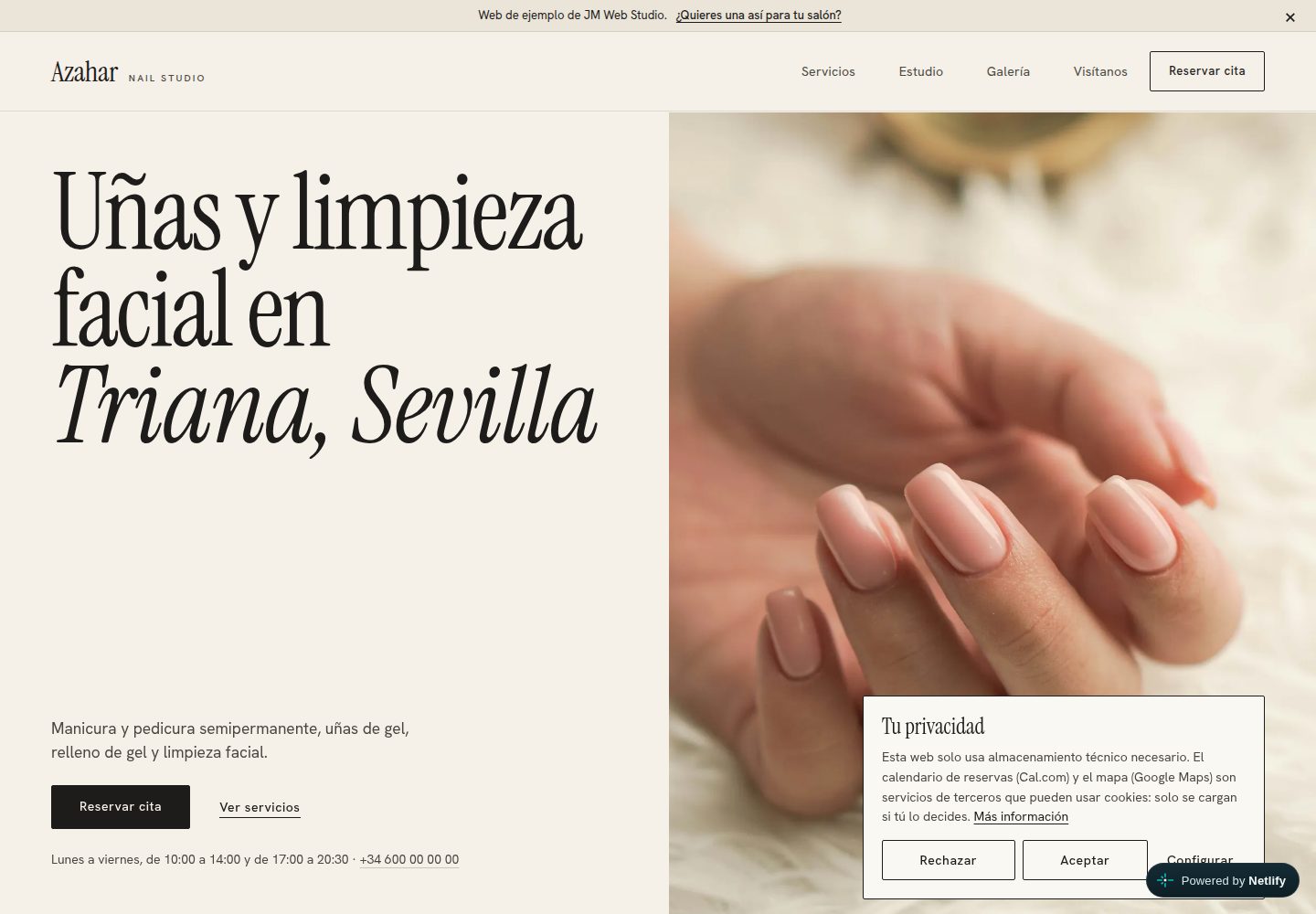
所有站点数据(业务、联系方式、营业时间、服务、文案、评价、照片、颜色、法律信息)集中在 site.config.mjs 一个文件。
HTML作品集
JM-Web-Studio — HTML 作品集模板
作者 jmartintechit-blip
JM-Web-Studio 是一个虚构美甲美容沙龙的静态网站模板,所有内容集中在一个配置文件,支持演示模式与生产模式,通过 Cal.com 嵌入处理预约。
看看你的网站会是什么样
浏览真实页面截图,比较内容排版与手机效果。点击下方缩略图切换,放大查看整页细节。
全部页面与视图 2
截图用于了解视觉与布局,交互效果请以实际项目为准。
采集于 2026-10-20查看来源
值得关注的模板亮点
从已有项目资料中,快速了解它的特点。
同一套代码支持演示模式与生产模式,生产模式会生成 sitemap.xml 和 schema.org 结构化数据,缺少必要数据时构建失败。
通过 Cal.com 嵌入实现按服务在线预约,Cal.com 和 Google Maps 仅在访客同意后加载。
根据配置的营业时间计算“现在营业”指示,支持分段营业时间和午休。
演示链接支持 ?para=Name 个性化,名称仅作为文本插入,长度上限 60 字符。
测试套件包含 134 个测试,覆盖控制台错误、链接、SEO、可访问性、WCAG AA 对比度、移动布局、键盘使用、减少动态效果和页面重量等。
模板详细介绍
JM-Web-Studio 是一个面向小型美甲美容沙龙的静态网站模板,同时提供演示站点。站点内容(业务信息、联系方式、营业时间、服务与价格、文案、评价、照片、颜色、法律信息)全部来自 site.config.mjs 一个文件,修改该文件和照片即可用于新客户,无需改动 HTML、CSS 或 JavaScript。项目包含演示模式与生产模式:演示模式会显示演示栏、示例标注、noindex 和 robots.txt 禁止抓取,不生成站点地图与结构化数据;生产模式则移除演示痕迹,生成 sitemap.xml 和基于配置的 schema.org 本地商家数据,并在缺少必要数据时构建失败。预约通过 Cal.com 嵌入实现,Google Maps 和 Cal.com 均在访客同意后加载,同时提供 Cookie 横幅和法律页面模板。构建使用 Node.js 自定义静态站点生成器,输出 dist/ 目录,可部署到 Netlify。README 明确说明该项目不是 CMS、商店或预约引擎,没有后端和数据库;法律页面是模板而非法律建议;演示中的商家、地址和评价均为虚构。已知限制包括仅在 Chromium 中验证、未使用屏幕阅读器测试、Cal.com 真实日历和 Google 地图未在开发环境中加载、Cal.com 可用时间需手动与营业时间同步、没有 Content-Security-Policy、未运行 Lighthouse 等。
HTML作品集
适合你的项目吗?
适用场景
- 向美甲或美容沙龙业主展示一个已完成的、针对其业务类型的网站演示,并可通过 ?para=Name 个性化链接。
- 基于同一代码库为真实客户创建站点:修改 site.config.mjs 和照片,关闭演示模式后构建部署。
- 需要静态托管、无后端和数据库的小型沙龙网站,预约交给 Cal.com 处理。
- 在 Netlify 上部署静态站点,并利用 netlify.toml 中已配置的构建命令和安全响应头。
适合人群
- 需要展示服务与价格并接受在线预约的小型美甲或美容沙龙。
- 希望用单个配置文件维护网站内容、避免每次修改都找开发者的沙龙业主。
- 需要演示站点向潜在客户展示成品效果的自由职业者或小型工作室。
- 偏好静态站点、无后端和数据库、使用 Netlify 托管和 Cal.com 预约的开发者。
上手与定制指南
结合仓库当前版本的说明,按下面的资料检查内容、配置与运行要求。
- 1
需要 Node.js ≥ 20.12,克隆仓库后运行 npm install,再运行 npm run dev 启动本地开发服务器(http://localhost:8765)。
- 2
首次运行测试前需执行 npx playwright install chromium 安装 Chromium。
- 3
本地演示模式下运行 npm run build 需要设置 SITE_URL 环境变量。
- 4
为真实客户建站时,编辑 site.config.mjs 中所有注释块,替换 src/assets/img/photos/ 中的演示照片并填写 alt 文本,然后运行 npm run assets 重新生成分享图和图标。
- 5
将 modoDemo 设为 false 并设置 sitio.url,运行 npm run build 和 npm test,然后按 netlify.toml 中已有的配置发布 dist/ 目录。
授权与来源资料
使用条件与限制
免费使用 · 保留许可声明本次收录的是公开仓库中采用 MIT 许可的免费版本;免费范围为该版本代码,不代表外部服务或第三方素材免费。
使用时需要遵守
- 允许免费使用、修改、商用和分发该版本代码。
- 分发代码副本或实质性部分时,保留原作者版权声明和完整 MIT 许可声明。
- 代码按现状提供;担保与责任限制以原许可证及适用法律为准。
额外费用与待核对事项
- 演示图片、字体、图标及其他第三方素材需按各自许可核对,不能仅凭代码的 MIT 许可判断。
- 域名、托管、数据库、支付或 AI 等外部服务可能另外收费。
- 站点无后端、无数据库,不是 CMS、商店或预约引擎;预约依赖嵌入的 Cal.com 日历。
- 按服务预约通过 Cal.com 嵌入实现,且仅在访客同意后加载。
- Google Maps 同样需访客同意后才加载;Cookie 横幅与法律页面为模板。
- 生产模式必须配置 sitio.url;演示模式使用 SITE_URL 或 Netlify 的 URL 环境变量。
- modoDemo 为 false 时,缺少站点 URL、完整地址等必要数据会导致构建失败。
- 营业时间必须与 Cal.com 的可用时间保持一致;评价只能使用获得许可的真实评价或留空。
- 需替换演示照片并填写 alt 文本,不得将图库照片冒充为客户实际场所。
- 仅在 Chromium 中验证,未在 Safari、Firefox 或屏幕阅读器下测试。
- 真实 Cal.com 日历与 Google 地图未在开发环境加载,集成仅针对 embed.js 替身测试,外部链接未实测。
- Cal.com 可用时间存于仓库外,需手动与营业时间同步;上次检查时工作日早晨可用时间与站点显示不一致。
- 没有 Content-Security-Policy,因 Cal.com 嵌入尚未针对具体策略测试。
- 法律文本仅为示意,正式发布前需专业人士审阅。
- 尚未运行 Lighthouse 性能测量。
- 演示联系电话不存于仓库,需设置 DEMO_WHATSAPP 环境变量,否则回退到虚构号码。
- MIT 许可仅覆盖代码,不含第三方资源:字体为 SIL OFL 1.1,演示照片来自 Unsplash 并适用 Unsplash 许可。
查看原文依据
Permission is hereby granted, free of charge
许可证原文
**What this is not.** It is not a real business: *Azahar Nail Studio*, its address and its reviews are invented, and the site says so. It is not a CMS, a shop or a booking engine: there is no backend and no database, and bookings are handled by an embedded [Cal.com](https://cal.com) calendar. The legal pages are templates, not legal advice.
README 原文
- **Per-service online booking** through Cal.com, loaded only after the visitor gives consent.
README 原文
- **Google Maps** also behind a consent gate; cookie banner and legal pages (legal notice, privacy, cookies).
README 原文
| Public URL | `SITE_URL` / Netlify `URL` | `sitio.url` (required) |
README 原文
With `modoDemo: false` the build **fails** if essential data is missing (site URL, full address) and **warns** about anything still pending.
README 原文
2. Edit [`site.config.mjs`](site.config.mjs); every block is commented: `negocio` (name, brand, address, map query), `contacto`, `horario` (opening hours; **must match Cal.com availability**), `reservas` (Cal.com user and the list of services with minutes, price and slug), `textos`, `resenas` (**only real reviews** with permission, or an empty list), `colores`, `legal`.
README 原文
3. Replace the demo photos in `src/assets/img/photos/` with the client's and write each photo's `alt` text in `fotos`. Do not present stock photos as the client's premises.
README 原文
- Verified only in Chromium (not Safari or Firefox) and without screen readers.
README 原文
- The real Cal.com calendar and the Google map could not be loaded from the development environment (no internet access there); the integration is tested against a stand-in for `embed.js`. External links were not checked live.
README 原文
- Cal.com availability lives outside this repository and has to be kept in sync with `horario` by hand; at the last check, weekday-morning availability started at 09:00 while the site shows 10:00.
README 原文
- There is no `Content-Security-Policy`, because the Cal.com embed was not tested against a concrete policy.
README 原文
- The legal texts are indicative: have a professional review them before publishing a real site.
README 原文
- Lighthouse has not been run.
README 原文
- The demo's contact number is not stored in the repository: set the `DEMO_WHATSAPP` environment variable (digits with country code, e.g. in Netlify) or the demo falls back to a fictitious number.
README 原文
https://github.com/jmartintechit-blip/JM-Web-Studio/blob/main/LICENSEhttps://github.com/jmartintechit-blip/JM-Web-Studio/blob/main/README.mdThe code is released under the [MIT licence](LICENSE). It does not cover third-party assets: the fonts *Instrument Serif* and *Hanken Grotesk* (SIL Open Font License 1.1) and the demo photographs from [Unsplash](https://unsplash.com), used under the [Unsplash licence](https://unsplash.com/license).
README 原文
DeepSeek 根据仓库许可证和 README 整理 ·2026-10-20。结果仅覆盖已读取资料,依赖、图片、字体及后续条款变更以各自原文为准。
项目核对记录与介绍依据
模板资料
- 来源平台
- GitHub
- 资料与维护参考分
- 资料较完整 · 80 / 100
- 技术栈
- HTML
- 网站类型
- 作品集
这个分数如何计算
本站按许可资料(最高30分)、演示链接(12分)、预览图(10分)、Star数(15分)、记录的维护时间(15分)、描述完整度(8分)、功能记录(5分)和分类资料(5分)计算。它不是代码、安全或性能测试,也不是 Google 评分;有链接不代表已实测可用。
这个项目需要核对什么
- 记录的仓库更新时间
- 2026-10-20
- 截图检查日期
- 2026-10-20
已收录演示链接。请用你的内容与屏幕尺寸检查;有演示不代表表单、认证或支付已经可用。
目录记录的主要技术栈是 HTML。请通过依赖清单和锁文件核对实际版本与托管要求。这些说明基于收录资料,不代表代码审计或部署实测。
查看具体选型方法 →介绍的制作与核对状态
介绍由 AI 辅助整理目录与仓库资料。仓库作者不等于这篇介绍的审核者。
审核声明: codex-user-requested-batch-review-20261021 · 2026-10-21
查看当时使用的来源资料
SHA-256: a9c76af5e6c77b216b5e021f07fe576544f26b58b83146e8d393c8bd3459e6d9
2026-10-20T22:38:28.325Z
来源文件 / 仓库# JM Web Studio — salon website demo and template
**English** · [Español](README.es.md)
[](https://github.com/jmartintechit-blip/JM-Web-Studio/actions/workflows/ci.yml)
[](LICENSE)
[](https://jmwebstudiodemo.netlify.app/)
A fictional nail and beauty salon website that doubles as a reusable template: a small salon can show its services and prices and take online bookings without hiring a developer for every change.
**What this is not.** It is not a real business: *Azahar Nail Studio*, its address and its reviews are invented, and the site says so. It is not a CMS, a shop or a booking engine: there is no backend and no database, and bookings are handled by an embedded [Cal.com](https://cal.com) calendar. The legal pages are templates, not legal advice.
| Desktop | Mobile (first screen) |
| --- | --- |
|  |  |
|  |  |
**Live demo:** <https://jmwebstudiodemo.netlify.app/>. The screenshots above use a fictitious phone number.
## Why it exists
Small salons usually have either no website or one they cannot edit. This project is a way to show a salon owner a finished, high-quality site for *their* kind of business before asking for anything, and then reuse the same code for the real client:
1. **A demo site** that can be sent as a link, optionally personalised with `?para=Name`.
2. **A template**: every text, service, price, booking link, contact detail, opening hour, colour and legal field comes from one file, [`site.config.mjs`](site.config.mjs). To build a client site you change that file and the photos; with `modoDemo: false` it is ready for production.
## Features
- **One configuration file** for the whole site (business, contact, opening hours, services, texts, reviews, photos, colours, legal data).
- **Demo mode and production mode** from the same code (see the table below).
- **Per-service online booking** through Cal.com, loaded only after the visitor gives consent.
- **Google Maps** also behind a consent gate; cookie banner and legal pages (legal notice, privacy, cookies).
- **"Open now" indicator** computed from the configured opening hours, including split shifts and a midday break.
- **Personalised demo link** with `?para=Name` (the name is always inserted as text, never as HTML, capped at 60 characters).
- **Mobile-first first screen**: demo bar, salon name, large photo and the *Book* button are visible without scrolling at 390×844.
- **Accessibility and SEO checks** in the test suite, including WCAG AA contrast of the configured palette.
- **Self-hosted fonts** (no font CDN) and a static build with no runtime dependencies.
### Demo mode vs production mode
| | `modoDemo: true` (demo) | `modoDemo: false` (production) |
| --- | --- | --- |
| Demo bar and `?para=` | Yes | Not generated |
| "Sample reviews", "Sample address", "Sample page" notes | Yes | No |
| Salon WhatsApp button | Writes to the demo author | Writes to the business (`contacto.whatsappTexto`) |
| `<meta name="robots">` | `noindex, nofollow` on every page | None (the 404 page keeps `noindex`) |
| `robots.txt` | `Disallow: /` | `Allow: /` plus sitemap link |
| `sitemap.xml` | Not generated | Generated |
| Structured data (schema.org) | None | Local-business data built from the configuration |
| Share preview title/description | `demo.ogTitulo`, `demo.ogDescripcion` | `textos.titulo`, `textos.descripcionCorta` |
| Public URL | `SITE_URL` / Netlify `URL` | `sitio.url` (required) |
With `modoDemo: false` the build **fails** if essential data is missing (site URL, full address) and **warns** about anything still pending.
## Architecture
```mermaid
flowchart LR
CFG["site.config.mjs<br/>(single source of data)"] --> BUILD
SRC["src/<br/>templates, partials,<br/>CSS, JS, fonts, photos"] --> BUILD
BUILD["scripts/build.mjs<br/>config validation +<br/>template engine"] --> DIST["dist/<br/>static site"]
DIST --> NETLIFY["Netlify<br/>(publishes dist/)"]
NETLIFY -. "after consent" .-> CAL["Cal.com<br/>booking embed"]
NETLIFY -. "after consent" .-> MAPS["Google Maps<br/>embed"]
DIST --> VALIDATE["npm run validate<br/>HTML validation<br/>(demo + production)"]
DIST --> TESTS["npm test<br/>Playwright + Node test runner"]
CI["GitHub Actions"] --> VALIDATE
CI --> TESTS
```
The build is a small custom static-site generator (`{{x}}`, `{{{raw}}}`, `#if`, `#unless`, `#each`, partials) with no runtime dependencies. The only folder that is published is `dist/`.
## Technologies
| Area | Technology |
| --- | --- |
| Site | Plain HTML, CSS and JavaScript (no framework) |
| Build | Node.js ≥ 20.12, custom template engine (`scripts/template.mjs`) |
| Booking | [Cal.com](https://cal.com) embed |
| Hosting | Netlify (`netlify.toml`) |
| Browser tests | Playwright 1.56.1 (Chromium) |
| Test runner | Node.js built-in test runner |
| HTML validation | html-validate |
| CI | GitHub Actions, Dependabot |
| Fonts | Instrument Serif and Hanken Grotesk (SIL OFL 1.1), self-hosted |
## Quick start
```bash
git clone https://github.com/jmartintechit-blip/JM-Web-Studio.git && cd JM-Web-Studio
npm install
npm run dev # http://localhost:8765
```
Other commands:
```bash
npx playwright install chromium # first time only, needed for the tests
npm run build # generates dist/ (needs SITE_URL locally in demo mode)
npm run validate # builds in demo and production mode and validates the HTML of both
npm test # full test suite
npm run assets # regenerates the share image and icons from the configuration
npm run screenshots # regenerates docs/images/ (with a fictitious phone number)
```
### Create a site for a new client
Everything that is not specific to this salon lives in `site.config.mjs` and `src/assets/img/photos/`. No HTML, CSS or JavaScript needs to change.
1. Copy the project (clone it or use the repository as a template) and run `npm install`.
2. Edit [`site.config.mjs`](site.config.mjs); every block is commented: `negocio` (name, brand, address, map query), `contacto`, `horario` (opening hours; **must match Cal.com availability**), `reservas` (Cal.com user and the list of services with minutes, price and slug), `textos`, `resenas` (**only real reviews** with permission, or an empty list), `colores`, `legal`.
3. Replace the demo photos in `src/assets/img/photos/` with the client's and write each photo's `alt` text in `fotos`. Do not present stock photos as the client's premises.
4. Run `npm run assets` to regenerate the share image and icons.
5. Set `modoDemo: false` and `sitio.url: 'https://www.example.com'`.
6. Run `npm run build` (it prints warnings for anything missing) and `npm test`.
7. Publish on Netlify (`publish = "dist"`, `command = "node scripts/build.mjs"` are already in `netlify.toml`).
The demo bookable services are: semi-permanent manicure (45 min, €18), gel nails (90 min, €35), gel refill (75 min, €28), semi-permanent pedicure (60 min, €25) and facial cleansing (45 min, €30). Each one opens its own Cal.com event.
## Tests and quality
`npm test` runs **134 tests in 19 suites** (all passing at the time of writing; the same checks run in CI on every push to `main` and on pull requests). They run in real Chromium at five widths (360–1920 px) and cover:
- console errors, failed requests and horizontal overflow;
- links and anchors; static SEO and accessibility checks; WCAG AA contrast of the configured palette;
- that the page shows exactly what is configured, including per-service booking and consent (against a local stand-in for Cal.com's `embed.js`);
- mobile layout, keyboard use, reduced motion and page weight (critical resources under 250 KB, first load under 450 KB, uncompressed);
- the "open now" indicator with a fixed clock across every opening-hours slot;
- demo mode: exact bar and WhatsApp texts, `?para=` edge cases (HTML injection, control characters, 60-character limit, empty value), `noindex`, `robots.txt`, no sitemap or structured data, Open Graph, and the first screen at 390×844;
- production mode: no trace of the demo, indexable, schema.org consistent with the visible content, `robots.txt` and `sitemap.xml`;
- template mode: a completely different test business (`tests/fixtures/otro-negocio.config.mjs`) builds without any leftover demo data.
`npm run validate` additionally validates the compiled HTML of both modes with html-validate.
## Security
- No backend, database or user accounts: the output is static files.
- Third-party content (Cal.com, Google Maps) loads only after explicit consent.
- The `?para=` value is inserted as text, never as HTML.
- Security headers are set in `netlify.toml` (`X-Content-Type-Options`, `X-Frame-Options`, `Referrer-Policy`, `Permissions-Policy`).
- GitHub secret scanning with push protection is enabled; Dependabot checks npm packages and GitHub Actions weekly.
- To report a vulnerability, see [SECURITY.md](SECURITY.md).
## Known limitations
- Verified only in Chromium (not Safari or Firefox) and without screen readers.
- The real Cal.com calendar and the Google map could not be loaded from the development environment (no internet access there); the integration is tested against a stand-in for `embed.js`. External links were not checked live.
- Cal.com availability lives outside this repository and has to be kept in sync with `horario` by hand; at the last check, weekday-morning availability started at 09:00 while the site shows 10:00.
- There is no `Content-Security-Policy`, because the Cal.com embed was not tested against a concrete policy.
- The legal texts are indicative: have a professional review them before publishing a real site.
- The share image (`og-image.jpg`) is a file: run `npm run assets` after changing the business.
- Lighthouse has not been run.
- The demo's contact number is not stored in the repository: set the `DEMO_WHATSAPP` environment variable (digits with country code, e.g. in Netlify) or the demo falls back to a fictitious number.
## Roadmap
Ideas, not commitments:
- Run the suite in Firefox and WebKit as well as Chromium.
- Add a `Content-Security-Policy` once the Cal.com embed has been tested against it.
- Measure with Lighthouse and record the results here.
- Check Cal.com availability against `horario` automatically.
## AI assistance
This project was developed with AI assistance (Claude Code). The maintainer set the requirements and direction; the code, tests and documentation were written together with an AI model.
## Licences
The code is released under the [MIT licence](LICENSE). It does not cover third-party assets: the fonts *Instrument Serif* and *Hanken Grotesk* (SIL Open Font License 1.1) and the demo photographs from [Unsplash](https://unsplash.com), used under the [Unsplash licence](https://unsplash.com/license).
看看同类模板
对比同技术栈与用途的模板,找到更适合的视觉与内容结构。

simplefolio
⚡️ A minimal portfolio template for Developers
HTML · 作品集

Freelancer
Freelancer 是 Start Bootstrap 出品的单页作品集模板,专为自由职业者、设计师和小型工作室设计。 页面结构清晰,包含多个内容区块、响应式作品集网格,每个作品项目配有模态窗口展示详情。
HTML · 作品集

Resume
Resume 是 Start Bootstrap 推出的简历与 CV 主题,基于 Bootstrap 构建,采用固定侧边栏加内容区块的结构。
HTML · 作品集

Creative
Creative 是 Start Bootstrap 团队维护的一款单页营销模板,定位明确:为创意机构或产品服务提供一个以作品展示和行动号召为核心的落地页。
HTML · 企业官网

Grayscale
Grayscale 是 Start Bootstrap 出品的深色系单页 HTML 模板,基于 Bootstrap 构建。 它的视觉重心放在大尺寸首屏和清晰的内容分区上,整体氛围偏暗,适合摄影、活动或品牌叙事类网站。
HTML · 企业官网

startbootstrap-stylish-portfolio
Stylish Portfolio 是 Start Bootstrap 维护的单页作品集主题,基于 Bootstrap 构建,采用多个内容区块加离屏导航菜单的结构。
HTML · 作品集