Hugo-based academic and personal blog theme derived from calintat's Minimal theme
HugoBlog
para-minimal — Hugo Blog Template
By joeycarter
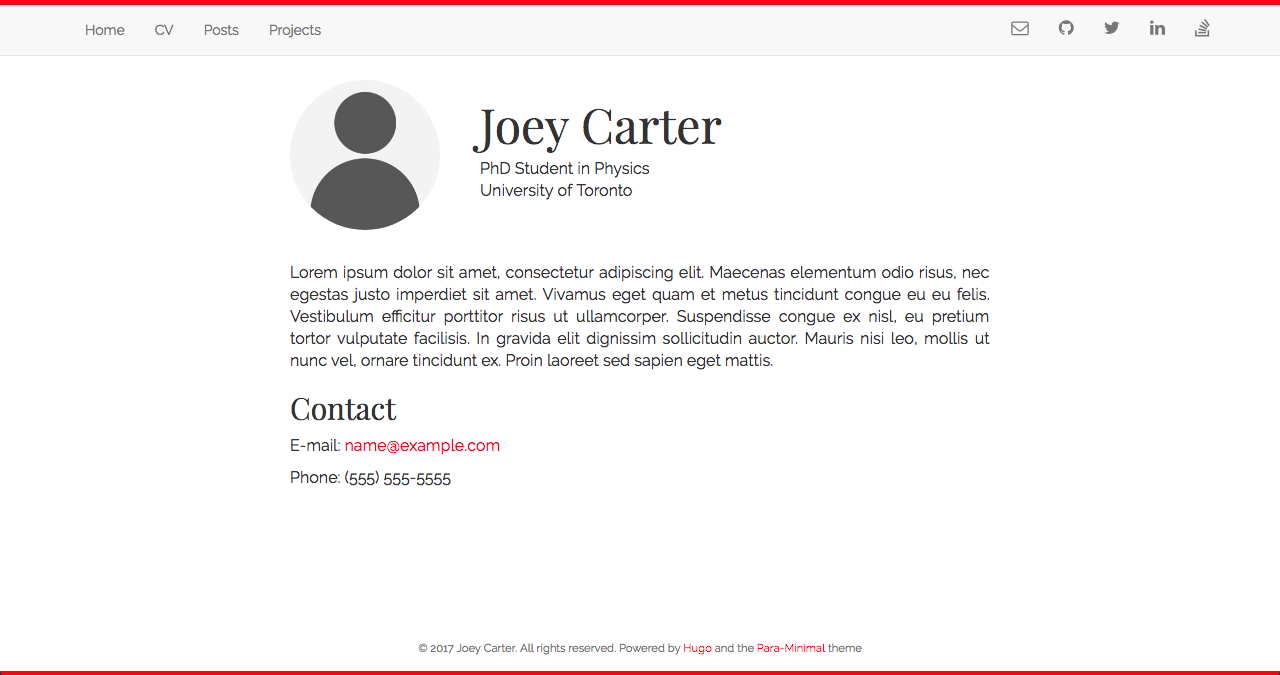
para-minimal is a Hugo-based academic and personal blog theme derived from calintat's Minimal theme. It provides three content types—homepage, info pages, and posts—and supports adjusting accent color, background color, fonts, and code highlighting via configuration.
Explore the design
Compare the page layouts and mobile experience. Open any screenshot for a closer look.
Author preview
Author-provided preview
Preview provided in the project README.
One original preview is available. Open the full image to inspect the design.
Screenshots show visual appearance; interactive behavior may differ.
Recorded 2026-10-02View source
What stands out
A quick read of the recorded project description.
Adjust colors and borders via accent, backgroundColor, and showBorder parameters in config.toml
Fonts loaded through Google Fonts, with the font name specified in configuration
highlight.js code highlighting enabled by default, with support for custom styles and additional languages
Distinguishes three content types—homepage, info pages, and posts—with info pages marked by type: "info"
Repository uses the MIT license; this version's code may be used, modified, used commercially, and distributed free of charge
Template Details
para-minimal is a Hugo theme maintained by joeycarter, positioned as an academic and personal blog. It is adapted from calintat's Minimal theme, uses the MIT license, and was last updated in 2020. The theme controls appearance through parameters in config.toml: accent sets the accent color, backgroundColor sets the background color, showBorder controls whether a 5px colored border appears above and below the page, and font specifies the Google Fonts font name. Code highlighting is provided by highlight.js and enabled by default; it can be disabled via highlight, the style selected via highlightStyle, and languages beyond the default common set loaded via highlightLanguages. Style and language names must use lowercase hyphen-separated forms.
For content organization, the theme distinguishes three content types: the homepage is defined by layouts/index.html, the avatar image is placed in static/img/ and its path modified in that template, and the personal bio is written in content/_index.md; info pages (such as CV or research interests) go directly under content/ with type: "info" and disableComments: true set in front matter; blog posts go under content/post/ and can be created with hugo new post/filename.md, with front matter fields from the theme's archetypes/post.md. Installation supports git submodule or cloning directly into the themes directory. Configuration can be copied from exampleSite/config.toml to the site root and then modified. The README recommends using the theme's bundled archetypes.
The theme documentation does not describe its responsive behavior, browser compatibility range, or production performance, nor does it list the required Hugo version. The repository has few stars and its most recent update is relatively old; before adopting it, verify its usability under the current Hugo version.
HugoBlog
Is it right for your project?
Use Cases
- Building a personal academic homepage to display an avatar, bio, and research directions
- Publishing technical or academic blog posts with code highlighting
- Creating info pages such as a CV or research interests that differ in format from posts
- Quickly adjusting accent and background colors through configuration in a Hugo site
Suitable For
- Individual users building sites with Hugo
- Authors who need an academic homepage and blog to coexist
- Developers who want to adjust theme appearance with minimal configuration
- Users who accept a theme that has not been updated for a while and will verify compatibility themselves
Getting started & customization
Use these recorded setup notes alongside the repository instructions for your chosen version.
- 1
Recommended installation as a git submodule into the themes directory for easier future updates
- 2
Copy exampleSite/config.toml to the site root and fill in personal information
- 3
For the homepage, copy the theme's layouts/index.html to the site's layouts directory and modify as needed
- 4
Place the avatar image in static/img/ and modify the image path in index.html
- 5
The README recommends deleting the site's default archetypes/default.md and using the theme's archetypes instead
License & source material
Usage conditions & limitations
Free to use · keep license noticeThis entry covers the free version under the MIT license in the public repository; the free scope is this version's code and does not mean external services or third-party assets are free.
Must comply with when using
- Permits free use, modification, commercial use, and distribution of this version's code.
- When distributing copies or substantial portions of the code, retain the original author's copyright notice and the full MIT license notice.
- The code is provided as is; warranties and limitations of liability are governed by the original license and applicable law.
Additional costs & items to verify
- The theme loads fonts through Google Fonts, so the site makes requests to Google's external services at runtime; for fully offline use or to avoid third-party requests, replace the font approach yourself.
- Code highlighting relies on the third-party library highlight.js and is enabled by default; if this external dependency is not needed, set highlight to false in configuration to disable it.
- Demo images, fonts, icons, and other third-party assets must be checked against their respective licenses; the code's MIT license alone cannot be used to judge them.
- External services such as domains, hosting, databases, payments, or AI may incur additional charges.
View Original Text Basis
Permission is hereby granted, free of charge
Original License Text
The theme uses [Google Fonts](https://fonts.google.com) to load its font.
Original README
https://github.com/joeycarter/para-minimal/blob/master/LICENSEhttps://github.com/joeycarter/para-minimal/blob/master/README.mdThe theme supports syntax highlighting thanks to [highlight.js](https://highlightjs.org), which is enabled by default.
Original README
Compiled by DeepSeek based on repository license and README ·2026-10-02. Results only cover the materials read; dependencies, images, fonts, and subsequent term changes are subject to their respective original texts.
Project checks & description sources
Template Information
- Source platforms
- GitHub
- Documentation and maintenance reference score
- Partly documented · 56 / 100
- Technologies
- Hugo
- Website type
- Blog
How this score is calculated
Our heuristic uses license records (up to 30), a demo link (12), a preview (10), stars (15), recorded maintenance (15), description completeness (8), feature records (5) and classification data (5). It is not a code, security or performance test, or a Google score. A link does not establish tested functionality.
What to verify for this project
- Repository update recorded
- 2020-11-10
- Screenshot last checked
- 2026-10-02
No demo link is recorded. Use the repository instructions to evaluate the project locally; the screenshot alone cannot establish interactive behavior.
The catalog identifies Hugo as the primary stack. Check the actual dependency manifest and lockfile for versions and hosting requirements. These notes use recorded metadata, not a code audit or a deployment test.
Use a selection guide →How this description was prepared
AI-assisted description based on catalog records and repository material. Repository authors are not automatically the reviewers of this description.
Automatically checked against source and license rules; no manual editorial review.
Inspect the recorded source material
SHA-256: 2f82bdabf545a0a223c5074cd60f1ae9fc548f8bfb0ff76f3f2f50899d03ef75
2026-10-02T21:11:40.061Z
Source file / repository# Para-Minimal
[](https://github.com/joeycarter/para-minimal/blob/master/LICENSE)
An academic and personal blog theme powered by [Hugo](https://gohugo.io), based on the [Minimal](https://github.com/calintat/minimal) theme by [calintat](https://github.com/calintat).

## Installation
You can install the theme either as a clone or submodule. I recommend the latter. From the root of your Hugo site, type the following:
```bash
$ git submodule add https://github.com/joeycarter/para-minimal.git themes/minimal
```
Now you can get updates to Para-Minimal in the future by updating the submodule:
```bash
$ git submodule update --remote themes/para-minimal
```
or simply by navigating to `themes/para-minimal` and doing a `git pull`.
## Configuration
After installation, take a look at the `exampleSite` directory inside `themes/para-minimal`.
To get started, copy the `config.toml` file inside `exampleSite` to the root of your Hugo site:
```bash
$ cp themes/minimal/exampleSite/config.toml .
```
Now edit this file and add your own information. Note that some fields can be ommited.
I recommend you use the theme's archetypes, so you can delete your site's `archetypes/default.md`.
## Features
You can tweak the look of the theme to suit your needs in a number of ways:
- The accent colour can be changed by using the `accent` field in `config.toml`.
- You can also change the background colour by using `backgroundColor`.
- Add colored 5px borders at the top and bottom of pages by setting `showBorder` to `true`.
Personally I prefer a dark accent colour with a light background, for example:
```toml
[params]
accent = "red"
showBorder = true
backgroundColor = "white"
```
### Fonts
The theme uses [Google Fonts](https://fonts.google.com) to load its font. To change the font, edit the following in your config file:
```toml
[params]
font = "Open Sans" # should match the name on Google Fonts!
```
### Syntax highlighting
The theme supports syntax highlighting thanks to [highlight.js](https://highlightjs.org), which is enabled by default. To disable syntax highlting, set `highlight` to `false` in your config file.
You can change the style used for the highlighting by using the `highlightStyle` field.
Only the "common" languages will be loaded by default. To load more, use `highlightLanguages`.
A list of all the available styles and languages can be found [here](https://highlightjs.org/static/demo/).
Please note the style and languages should be written in hyphen-separated lowercase, for example:
```toml
[params]
highlight = true
highlightStyle = "solarized-dark"
highlightLanguages = ["go", "haskell", "kotlin", "scala", "swift"]
```
## Adding and Editing Content
All of your content (with a few exceptions) goes in `content/`. There are a few different types of content that you can include in your website using this theme:
### The Homepage
To create your homepage, copy `themes/para-minimal/layouts/index.html` to `layouts/index.html` and edit as you see fit. To add your avatar, place an image in `static/img/` and edit the image path in `index.html`.
To add a short blurb about yourself on you homepage, write this in `content/_index.md`.
### "Information" Pages
These are pages that contain information about you, such as your CV or research interests, that require different format from a blog post.
These pages are written in Markdown as always, and go directly in `content/`. In the header section, add the following lines:
```yaml
type: "info"
disableComments: true
```
### Posts
Blog posts go in `content/post/`. To create a new blog post, use hugo:
```bash
$ hugo new post/my-blog-post.md
```
This creates a new Markdown file with the header pulled from the template in `themes/para-minimal/archetypes/post.md`.
Explore similar templates
Compare previews and descriptions within the same stack and category.

hugo-PaperMod
A fast, clean, responsive Hugo theme for blogs and lightweight portfolios, with three layout modes (Regular, Home-Info, Profile), automatic and manual light/dark themes, Fuse.js client-side search, multilingual support, and built-in Open Graph, Twitter Cards, and Schema.org data.
Hugo · Portfolio

LoveIt
LoveIt is a clean, elegant, and feature-rich Hugo blog theme derived from LeaveIt and KeepIt, MIT-licensed. It offers light/dark modes, responsive layout, multilingual support, and search via Lunr.js or Algolia.
Hugo · Blog

hugo-coder
hugo-coder is a minimalist Hugo blog theme maintained by luizdepra under the MIT license. It provides a clean, text-focused blog appearance, configuration documentation in the docs directory, and a complete exampleSite with hugo.toml.
Hugo · Blog

blowfish
Blowfish is a Hugo personal website and blog theme built with Tailwind CSS 4, focused on lightness, simplicity, and content-first presentation.
Hugo · Blog

hugo-paper
hugo-paper is a simple, clean, and customizable Hugo blog theme configured through config.toml or hugo.toml.
Hugo · Blog

hextra
Hextra is a Hugo theme for documentation and blog sites, built on Hugo and Tailwind CSS with design referencing Nextra.
Hugo · Documentation