基于 Hugo 的学术与个人博客主题,衍生自 calintat 的 Minimal 主题
Hugo博客
para-minimal — Hugo 博客模板
作者 joeycarter
para-minimal 是一个基于 Hugo 的学术与个人博客主题,源自 calintat 的 Minimal 主题,提供主页、信息页与文章三种内容类型,并支持在配置中调整强调色、背景色、字体与代码高亮。
看看你的网站会是什么样
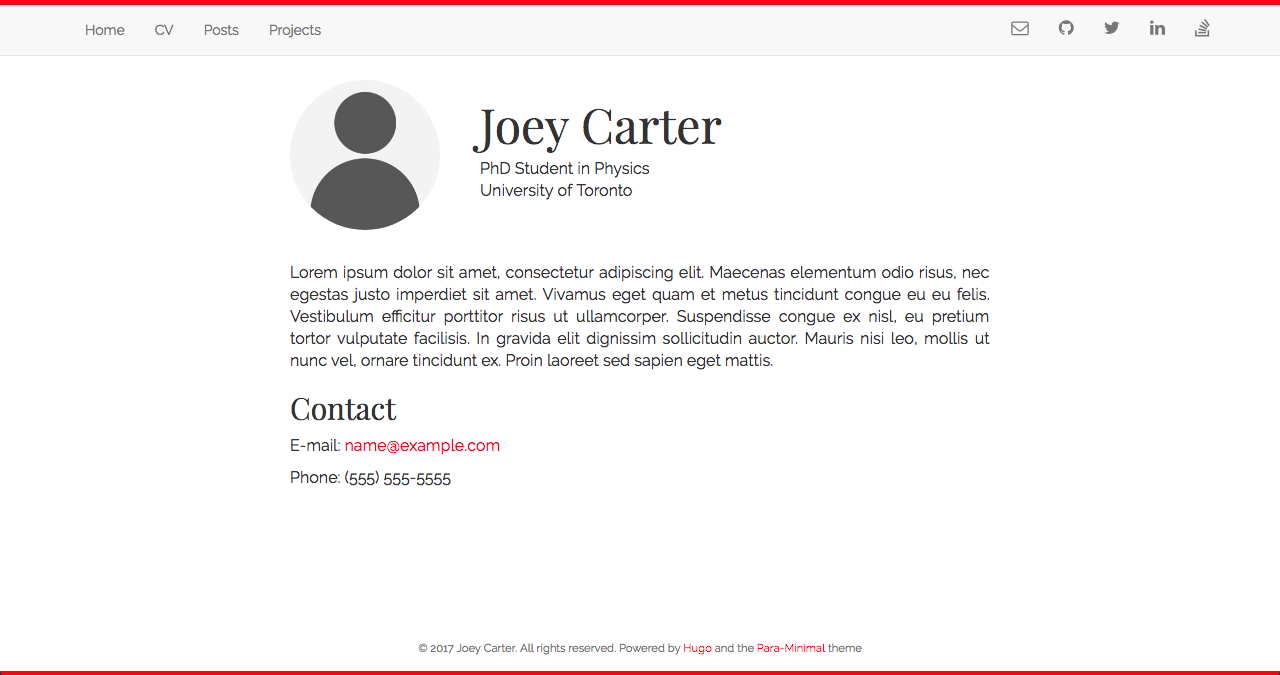
浏览真实页面截图,比较内容排版与手机效果。点击下方缩略图切换,放大查看整页细节。
目前有 1 张原始预览,可打开完整图片查看设计细节。
截图用于了解视觉与布局,交互效果请以实际项目为准。
采集于 2026-10-02查看来源
值得关注的模板亮点
从已有项目资料中,快速了解它的特点。
通过 config.toml 的 accent、backgroundColor、showBorder 参数调整配色与边框
字体通过 Google Fonts 加载,可在配置中指定字体名称
默认启用 highlight.js 代码高亮,支持自定义样式与额外语言
区分主页、信息页与文章三类内容,信息页使用 type: "info" 标记
仓库采用 MIT 许可,可免费使用、修改、商用和分发该版本代码
模板详细介绍
para-minimal 是一个由 joeycarter 维护的 Hugo 主题,定位为学术与个人博客。它基于 calintat 的 Minimal 主题改造,仓库采用 MIT 许可,最后更新于 2020 年。主题通过 config.toml 中的参数控制外观:accent 设置强调色,backgroundColor 设置背景色,showBorder 控制页面上下是否显示 5px 彩色边框,font 指定 Google Fonts 字体名称。代码高亮由 highlight.js 提供并默认启用,可通过 highlight 关闭,用 highlightStyle 选择样式,用 highlightLanguages 加载除默认常用语言之外的语言,样式与语言名需使用连字符分隔的小写形式。
内容组织上,主题区分三类内容:主页由 layouts/index.html 定义,头像图片放在 static/img/ 并在该模板中修改路径,个人简介写在 content/_index.md;信息页(如简历、研究兴趣)直接放在 content/ 下,在 front matter 中设置 type: "info" 与 disableComments: true;博客文章放在 content/post/,可用 hugo new post/文件名.md 创建,头部字段来自主题的 archetypes/post.md。安装方式支持 git submodule 或直接克隆到 themes 目录,配置可从 exampleSite/config.toml 复制到站点根目录后修改,README 建议使用主题自带的 archetypes。
主题资料未说明其响应式行为、浏览器兼容范围或生产环境表现,也未列出所依赖的 Hugo 版本;仓库星标数较少,最近一次更新距今较久,采用前建议先核对当前 Hugo 版本下的可用性。
Hugo博客
适合你的项目吗?
适用场景
- 搭建个人学术主页,展示头像、简介与研究方向
- 发布技术或学术类博客文章,并使用代码高亮
- 创建简历、研究兴趣等与文章格式不同的信息页面
- 在 Hugo 站点中通过配置快速调整强调色与背景色
适合人群
- 使用 Hugo 构建站点的个人用户
- 需要学术主页与博客共存的作者
- 希望以少量配置调整主题外观的开发者
- 能接受较久未更新主题并自行验证兼容性的用户
上手与定制指南
结合仓库当前版本的说明,按下面的资料检查内容、配置与运行要求。
- 1
推荐以 git submodule 方式安装到 themes 目录,便于后续更新
- 2
将 exampleSite/config.toml 复制到站点根目录后填写个人信息
- 3
主页需复制主题的 layouts/index.html 到站点 layouts 目录并按需修改
- 4
头像图片放入 static/img/,并在 index.html 中修改图片路径
- 5
README 建议删除站点自带的 archetypes/default.md,改用主题的 archetypes
授权与来源资料
使用条件与限制
免费使用 · 保留许可声明本次收录的是公开仓库中采用 MIT 许可的免费版本;免费范围为该版本代码,不代表外部服务或第三方素材免费。
使用时需要遵守
- 允许免费使用、修改、商用和分发该版本代码。
- 分发代码副本或实质性部分时,保留原作者版权声明和完整 MIT 许可声明。
- 代码按现状提供;担保与责任限制以原许可证及适用法律为准。
额外费用与待核对事项
- 主题通过 Google Fonts 加载字体,站点运行时会向 Google 的外部服务发起请求;如需完全离线或避免第三方请求,需自行替换字体方案。
- 代码高亮依赖第三方库 highlight.js,默认启用;若不需要该外部依赖,可在配置中将 highlight 设为 false 关闭。
- 演示图片、字体、图标及其他第三方素材需按各自许可核对,不能仅凭代码的 MIT 许可判断。
- 域名、托管、数据库、支付或 AI 等外部服务可能另外收费。
查看原文依据
Permission is hereby granted, free of charge
许可证原文
The theme uses [Google Fonts](https://fonts.google.com) to load its font.
README 原文
https://github.com/joeycarter/para-minimal/blob/master/LICENSEhttps://github.com/joeycarter/para-minimal/blob/master/README.mdThe theme supports syntax highlighting thanks to [highlight.js](https://highlightjs.org), which is enabled by default.
README 原文
DeepSeek 根据仓库许可证和 README 整理 ·2026-10-02。结果仅覆盖已读取资料,依赖、图片、字体及后续条款变更以各自原文为准。
项目核对记录与介绍依据
模板资料
- 来源平台
- GitHub
- 资料与维护参考分
- 资料一般 · 56 / 100
- 技术栈
- Hugo
- 网站类型
- 博客
这个分数如何计算
本站按许可资料(最高30分)、演示链接(12分)、预览图(10分)、Star数(15分)、记录的维护时间(15分)、描述完整度(8分)、功能记录(5分)和分类资料(5分)计算。它不是代码、安全或性能测试,也不是 Google 评分;有链接不代表已实测可用。
这个项目需要核对什么
- 记录的仓库更新时间
- 2020-11-10
- 截图检查日期
- 2026-10-02
目前没有记录演示链接。请依据仓库说明在本地评估;仅凭截图无法确认交互行为。
目录记录的主要技术栈是 Hugo。请通过依赖清单和锁文件核对实际版本与托管要求。这些说明基于收录资料,不代表代码审计或部署实测。
查看具体选型方法 →介绍的制作与核对状态
介绍由 AI 辅助整理目录与仓库资料。仓库作者不等于这篇介绍的审核者。
已完成服务器许可规则与 AI 来源核对;未经过人工编辑审核。
查看当时使用的来源资料
SHA-256: 2f82bdabf545a0a223c5074cd60f1ae9fc548f8bfb0ff76f3f2f50899d03ef75
2026-10-02T21:11:40.061Z
来源文件 / 仓库# Para-Minimal
[](https://github.com/joeycarter/para-minimal/blob/master/LICENSE)
An academic and personal blog theme powered by [Hugo](https://gohugo.io), based on the [Minimal](https://github.com/calintat/minimal) theme by [calintat](https://github.com/calintat).

## Installation
You can install the theme either as a clone or submodule. I recommend the latter. From the root of your Hugo site, type the following:
```bash
$ git submodule add https://github.com/joeycarter/para-minimal.git themes/minimal
```
Now you can get updates to Para-Minimal in the future by updating the submodule:
```bash
$ git submodule update --remote themes/para-minimal
```
or simply by navigating to `themes/para-minimal` and doing a `git pull`.
## Configuration
After installation, take a look at the `exampleSite` directory inside `themes/para-minimal`.
To get started, copy the `config.toml` file inside `exampleSite` to the root of your Hugo site:
```bash
$ cp themes/minimal/exampleSite/config.toml .
```
Now edit this file and add your own information. Note that some fields can be ommited.
I recommend you use the theme's archetypes, so you can delete your site's `archetypes/default.md`.
## Features
You can tweak the look of the theme to suit your needs in a number of ways:
- The accent colour can be changed by using the `accent` field in `config.toml`.
- You can also change the background colour by using `backgroundColor`.
- Add colored 5px borders at the top and bottom of pages by setting `showBorder` to `true`.
Personally I prefer a dark accent colour with a light background, for example:
```toml
[params]
accent = "red"
showBorder = true
backgroundColor = "white"
```
### Fonts
The theme uses [Google Fonts](https://fonts.google.com) to load its font. To change the font, edit the following in your config file:
```toml
[params]
font = "Open Sans" # should match the name on Google Fonts!
```
### Syntax highlighting
The theme supports syntax highlighting thanks to [highlight.js](https://highlightjs.org), which is enabled by default. To disable syntax highlting, set `highlight` to `false` in your config file.
You can change the style used for the highlighting by using the `highlightStyle` field.
Only the "common" languages will be loaded by default. To load more, use `highlightLanguages`.
A list of all the available styles and languages can be found [here](https://highlightjs.org/static/demo/).
Please note the style and languages should be written in hyphen-separated lowercase, for example:
```toml
[params]
highlight = true
highlightStyle = "solarized-dark"
highlightLanguages = ["go", "haskell", "kotlin", "scala", "swift"]
```
## Adding and Editing Content
All of your content (with a few exceptions) goes in `content/`. There are a few different types of content that you can include in your website using this theme:
### The Homepage
To create your homepage, copy `themes/para-minimal/layouts/index.html` to `layouts/index.html` and edit as you see fit. To add your avatar, place an image in `static/img/` and edit the image path in `index.html`.
To add a short blurb about yourself on you homepage, write this in `content/_index.md`.
### "Information" Pages
These are pages that contain information about you, such as your CV or research interests, that require different format from a blog post.
These pages are written in Markdown as always, and go directly in `content/`. In the header section, add the following lines:
```yaml
type: "info"
disableComments: true
```
### Posts
Blog posts go in `content/post/`. To create a new blog post, use hugo:
```bash
$ hugo new post/my-blog-post.md
```
This creates a new Markdown file with the header pulled from the template in `themes/para-minimal/archetypes/post.md`.
看看同类模板
对比同技术栈与用途的模板,找到更适合的视觉与内容结构。

hugo-PaperMod
PaperMod 是 Hugo 生态里知名度较高的主题之一,定位很明确:给博客和轻量作品集站点提供一套干净、响应式的阅读界面。
Hugo · 作品集

LoveIt
❤️A clean, elegant but advanced blog theme for Hugo 一个简洁、优雅且高效的 Hugo 主题
Hugo · 博客

hugo-coder
A minimalist blog theme for hugo.
Hugo · 博客

blowfish
Personal Website & Blog Theme for Hugo
Hugo · 博客

hugo-paper
🪺 A simple, clean, customizable Hugo theme
Hugo · 博客

hextra
Hextra 是一个 Hugo 主题,定位在文档站与博客之间:既提供侧边栏导航、目录、面包屑、分页这类文档站结构,也能承载博客内容。
Hugo · 文档