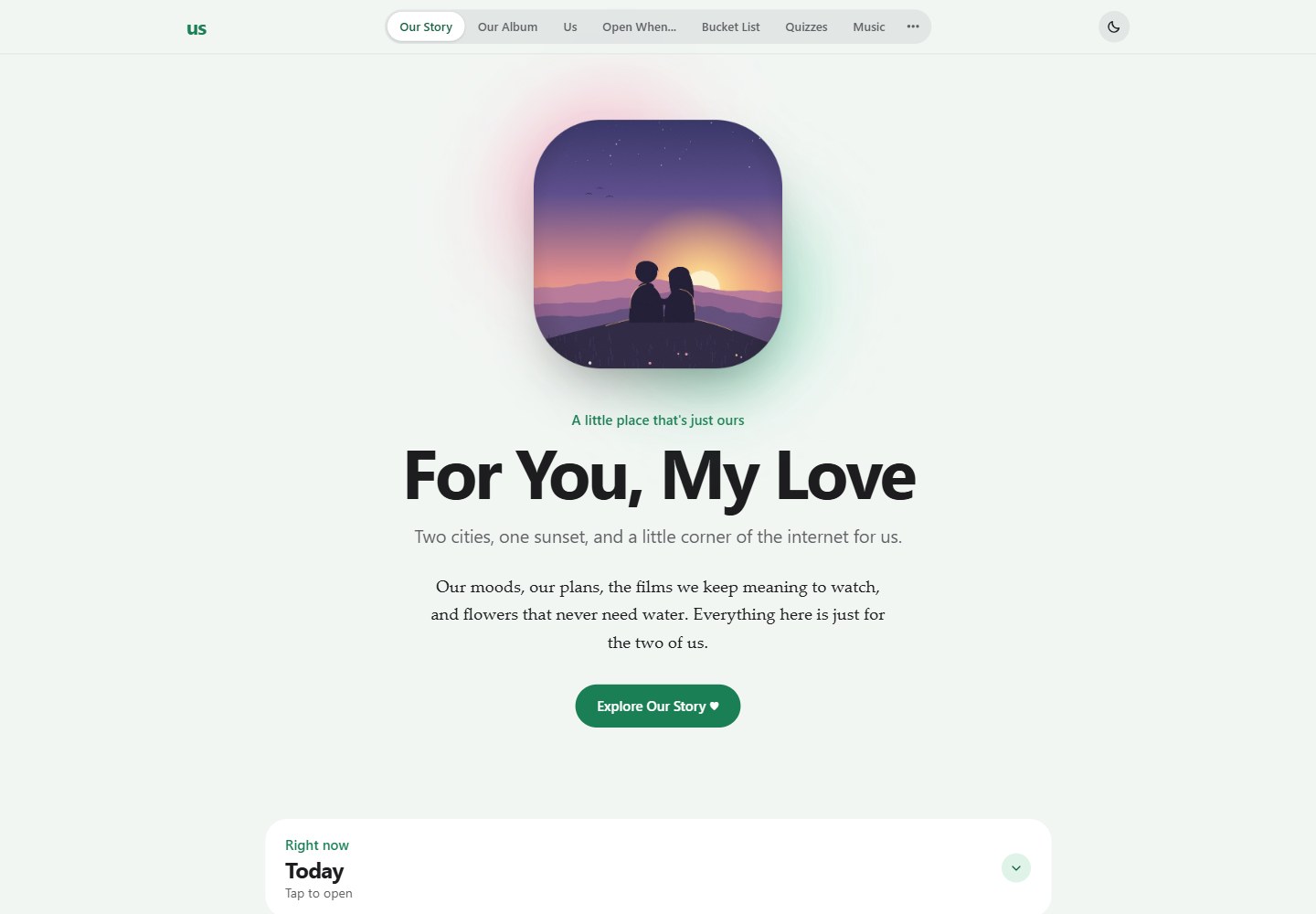
A single-page application in plain HTML, CSS and JavaScript; the README states explicitly that there is no build step, and personalization is concentrated in the CONFIG object in js/data/config.js
HTMLStarter
couples-website — HTML Starter Template
By JohanJoestar333
A single-page website template for two people, built with plain HTML, CSS and JavaScript with no build step, configurable with shared data, an album, a Photo Booth video call, a bouquet, games, a calendar and other modules.
Explore the design
Compare the page layouts and mobile experience. Open any screenshot for a closer look.
Desktop homepage1 / 2
Desktop captureTop of page
Actual browser screenshot of the verified live demo.
All pages & views 2
Screenshots show visual appearance; interactive behavior may differ.
Recorded 2026-10-21View source
What stands out
A quick read of the recorded project description.
Our Story includes a relationship timer, a reunion countdown, weather for two locations with moon phase, Things I Miss, a growth record and a Today widget
Our Album supports static photo categories and Our Memories uploads, with photos stored in Cloudinary and metadata in Firebase, plus a lightbox viewer
The Bouquet supports 5 wrappings, 13 flowers and 3 bows, can be dragged, scaled, rotated and reordered, wilts after a week and is then deleted automatically, and can be exported as PNG
Photo Booth offers a two-camera video call; after taking photos you can enter a strip editor with stickers, text, filters, backgrounds and PNG export
Shared features sync through Firebase Firestore, with optional Cloudinary, Metered TURN, TMDB and Cloudflare Worker integrations
Template Details
This is a single-page website template for two people to use together, built entirely from plain HTML, CSS and JavaScript; the README states explicitly that there is no build step. Most personalization is concentrated in the CONFIG object in js/data/config.js, including names, dates, photos and keys. The page is organized into tabs covering areas such as Our Story, Our Album, Us, Open When…, Bucket List, Quizzes, Music, Bouquet, Photo Booth, Calendar, Day Cards and Our Games.
Shared features depend on Firebase Firestore; album uploads use Cloudinary; cross-network Photo Booth calls require Metered TURN; movie search can optionally connect to TMDB; news headlines can optionally use a Cloudflare Worker. The README states that these services offer free tiers, and that the site remains usable without Firebase configured, but each device then keeps only its own data. The site has no password screen, so anyone who has the link can open it; once Firebase is enabled, anyone with the link can also read and modify shared data, so the README advises keeping the link private and not storing sensitive information.
Running locally requires a static file server and cannot be opened directly via file://; use python3 -m http.server or the VS Code Live Server. Deployment is offered in two ways, Vercel and GitHub Pages, both built through scripts/build.sh, which injects optional keys as placeholders. The README does not document specific framework versions, performance metrics or production-environment guarantees.
HTMLLauncher
Is it right for your project?
Use Cases
- Build a shared website with stories, an album, lists, a calendar and messages for a couple or two friends
- Try a multi-tab personal website template with no build step locally or in a static hosting environment
- Use Firebase to sync shared data such as lists, calendar events, music playlists and the bouquet
- Make a two-person video call through Photo Booth and create photo strips with stickers and filters
- Deploy the template to Vercel or GitHub Pages and configure optional service keys following the README steps
Suitable For
- Developers who want to build a two-person shared website from plain front-end static files
- People willing to configure optional services such as Firebase and Cloudinary per the README and handle access control themselves
- Users who need a lightweight website template with an installable PWA, dark mode and core offline functionality
- Developers who want to study the single-page multi-tab structure, the Photo Booth strip editor or the bouquet interaction implementation
Getting started & customization
Use these recorded setup notes alongside the repository instructions for your chosen version.
- 1
Running locally requires a static file server and cannot be opened directly via file://; run python3 -m http.server 8000 in the project root, or use the VS Code Live Server
- 2
Edit names, dates, photos and keys in CONFIG in js/data/config.js; without service keys configured, shared features run in local mode
- 3
Shared data requires configuring Firebase Firestore per docs/firebase-setup.md; album uploads require configuring Cloudinary; cross-network Photo Booth requires configuring Metered TURN
- 4
When deploying to Vercel or GitHub Pages, the build script scripts/build.sh injects optional key placeholders; for GitHub Pages, set Source to GitHub Actions under Settings → Pages
- 5
The site has no login or password screen, so anyone with the link can access it; once Firebase is enabled they can also modify shared data, so the README advises keeping the link private and consulting SECURITY.md for access restrictions
License & source material
Usage conditions & limitations
Free to use · keep license noticeThis listing covers the free version under the MIT license in the public repository; the free scope is that version's code and does not mean external services or third-party assets are free.
Must comply with when using
- You may use, modify, use commercially and distribute this version's code free of charge.
- When distributing copies or substantial portions of the code, retain the original author's copyright notice and the full MIT license notice.
- The code is provided as is; warranties and limitations of liability are governed by the original license and applicable law.
Additional costs & items to verify
- The README mentions Firebase integration; before enabling the related dynamic features you must configure it yourself and check Firebase's quotas and charges.
- Demo images, fonts, icons and other third-party assets must be checked against their own licenses and cannot be judged solely by the code's MIT license.
- External services such as domains, hosting, databases, payments or AI may incur separate charges.
- The site has no password screen, so anyone with the link can open it; sensitive information should not be stored.
- Once Firebase is enabled, anyone with the link can read and modify shared data, so the link must be kept private.
- All shared features depend on Firebase Firestore and must be configured yourself per the documentation.
- Album photo uploads depend on Cloudinary and must be configured yourself.
- Cross-network Photo Booth calls require the Metered TURN service.
- Movie search is an optional feature and requires connecting TMDB.
- News headlines are an optional feature and require building your own Cloudflare Worker.
- The site requires a static file server and cannot be opened directly via file://.
- When using TMDB movie search, the TMDB attribution must be retained in the footer, and the project is not endorsed or certified by TMDB.
- Custom stickers may only use images you made yourself or have the right to use.
View Original Text Basis
Permission is hereby granted, free of charge
Original License Text
The site has no password screen: **anyone who has the link can open it.** Don't
Original README
> ⚠️ The site has no login. If you turn on Firebase, anyone with your link can
Original README
| Firebase (Firestore) | All shared features | [`docs/firebase-setup.md`](docs/firebase-setup.md) |
Original README
| Cloudinary | Memory photo uploads | [`docs/cloudinary-setup.md`](docs/cloudinary-setup.md) |
Original README
| Metered TURN | Photo Booth across different networks | [`docs/turn-setup.md`](docs/turn-setup.md) |
Original README
| TMDB | Movie search (optional) | `CONFIG.tmdb` comment in `config.js` |
Original README
| Cloudflare Worker | News headlines (optional) | [`news-backend/README.md`](news-backend/README.md) |
Original README
The site needs a static file server (it does not work from `file://`):
Original README
uses the TMDB API but is not endorsed or certified by TMDB. The credit is shown
Original README
https://github.com/JohanJoestar333/couples-website/blob/main/LICENSEhttps://github.com/JohanJoestar333/couples-website/blob/main/README.mdThey appear under **Stickers → My stickers ⭐** on every device. Only use
Original README
Compiled by DeepSeek based on repository license and README ·2026-10-20. Results only cover the materials read; dependencies, images, fonts, and subsequent term changes are subject to their respective original texts.
Project checks & description sources
Template Information
- Source platforms
- GitHub
- Documentation and maintenance reference score
- More documented · 83 / 100
- Technologies
- HTML
- Website type
- Starter
How this score is calculated
Our heuristic uses license records (up to 30), a demo link (12), a preview (10), stars (15), recorded maintenance (15), description completeness (8), feature records (5) and classification data (5). It is not a code, security or performance test, or a Google score. A link does not establish tested functionality.
What to verify for this project
- Repository update recorded
- 2026-10-20
- Screenshot last checked
- 2026-10-21
A demo link is listed. Check it with your own content and viewport sizes; its presence does not confirm that forms, authentication or payments work.
The catalog identifies HTML as the primary stack. Check the actual dependency manifest and lockfile for versions and hosting requirements. These notes use recorded metadata, not a code audit or a deployment test.
Use a selection guide →How this description was prepared
AI-assisted description based on catalog records and repository material. Repository authors are not automatically the reviewers of this description.
Review declaration: codex-user-requested-batch-review-20261021 · 2026-10-21
Inspect the recorded source material
SHA-256: 9047cee0e2f0b14bf8ef947e8e946d893cf872436f7986b37373532d92e450ca
2026-10-20T22:45:18.745Z
Source file / repository# 💚 Couple Website Template A small website template for two people: a single-page app with shared live data, photo memories, a Photo Booth video call, a weekly bouquet, games, quizzes, music, a shared calendar and more. It is plain HTML, CSS and JavaScript — **no build step**. Almost everything you will personalize lives in one file: the `CONFIG` object in [`js/data/config.js`](js/data/config.js). The hero, closing photo and album come filled with original illustrated demo pictures (`assets/photos/demo/`) so you can see how a finished page looks. Swap them for your own photos in `config.js`. --- ## ✨ Features | Tab / area | What's inside | Data | |---|---|---| | **Our Story** | Hero, relationship counter, reunion countdown, weather for both cities (current + 7-day forecast, local time, moon phase), "Things I Miss", growth notes, little things, and the **Today** widget (moods, calendar, day card, bouquet, quote, news) | Local + Firebase | | **Our Album** | Static photo categories + live "Our Memories" uploads, lightbox | Photos → Cloudinary, metadata → Firebase | | **Us** | Favorites, fun facts, "Our Firsts" timeline | Local | | **Open When…** | Letters to open on different days / moods | Local | | **Bucket List** | Shared to-do list, plus **Movie Nights**: To Watch / Watched lists, TMDB search with posters, and a 5-star rating from each of you | Firebase (+ TMDB) | | **Quizzes** | Interactive quizzes about each other | Local | | **Music** | Shared playlists (YouTube / SoundCloud) with a persistent **mini-player** that keeps playing while you browse | Firebase | | **Bouquet** 💐 | Arrange a digital bouquet on a notebook page (see below) | Firebase | | **Photo Booth** | Live two-camera video call, take a photo strip together, then style it in the strip editor | WebRTC (+ TURN) | | **Calendar** | Shared events with daily / weekly / monthly / yearly repeats | Firebase | | **Day Cards** | Short notes (optionally voice) that expire after 24 h unless saved; can be read aloud | Firebase | | **Our Games** | Five card decks for couples | Local | ### 💐 Bouquet Send each other flowers. Pick one of **5 wraps**, add any of **13 flowers and 3 bows**, then drag, resize, rotate and reorder them on a notebook page (there is also "tuck behind wrap"), with an optional note. The bouquet: - stays fresh for **one week**, then wilts and deletes itself — or is replaced the moment a new one is made (only one is live at a time); - shows up in the **Today** widget on the home page, with a freshness badge; - can be saved as a **PNG**, with or without the notebook page; - syncs live through the `bouquets` Firestore collection. Art lives in `assets/stickers/` (`flower-*`, `bouquet-wrap-*`, `bow-*`) and is all original (see [License and credits](#-license-and-credits)). To add a flower, drop a transparent PNG there and add a line to `BOUQUET_FLOWERS` in `js/app.js`. ### Extra touches - **Installable app (PWA)**: add it to your home screen or dock; it opens full-screen and the core site works offline. - **"While you were away"** notifications for shared changes from the last 24 h, plus attention dots on tabs. - A **dark mode** toggle (remembered per device). - **Haptics**: subtle vibration feedback on phones (Android and iOS 17.4+), with an on/off switch in the footer. - Optional Cloudflare Worker for cleaner world-news headlines. --- ## 📁 Project structure ```text couple-website-template/ ├── index.html Page structure and tabs ├── manifest.json PWA name, icons, colors ├── service-worker.js PWA offline cache (must stay at the root) │ ├── css/ │ ├── style.css Base design + components │ ├── enhancements.css Scroll panes, depth and motion polish │ ├── photobooth-studio.css Photo Booth strip editor │ └── modern.css Apple-style redesign — colour tokens live here │ ├── js/ │ ├── data/ │ │ ├── config.js ⭐ CONFIG — names, dates, photos, keys (edit this) │ │ ├── quotes.js 365 bundled daily quotes │ │ ├── quizzes.js Quiz questions │ │ └── games.js Game decks │ ├── app.js All site behaviour (start with its table of contents) │ ├── enhancements.js Scroll panes and visual polish │ ├── photobooth-studio.js Strip editor (stickers, text, filters, backdrop, export) │ ├── haptics.js Vibration feedback │ └── pwa.js Service-worker registration + update banner │ ├── assets/ │ ├── photos/ Your photos (demo/ holds the illustrated demo pictures) │ ├── stickers/ Transparent PNGs: bouquet art, also used as Photo Booth stickers │ └── icons/ PWA and Apple touch icons │ ├── scripts/ │ └── build.sh Builds _site/ for Vercel and GitHub Pages │ ├── tools/ │ ├── draw-bouquet-art.py Draws the bouquet flowers and bows (optional) │ └── draw-demo-photos.py Draws the demo photos (optional) │ ├── docs/ Setup guides (see below) ├── news-backend/ Optional Cloudflare Worker for news ├── .github/workflows/ GitHub Pages deploy ├── vercel.json Vercel deploy settings ├── LICENSE MIT license (code and docs) ├── SECURITY.md Data handled and known trade-offs └── .gitignore Files Git should not track ``` Scripts are loaded in the order listed in `index.html`: data files first, then `app.js`, then the add-ons. See [`docs/architecture.md`](docs/architecture.md). --- ## 🚀 Quick start (local) Get the project with the green **Use this template** button on GitHub (or download the zip), then: The site needs a static file server (it does not work from `file://`): ```bash python3 -m http.server 8000 # from the project root # then open http://localhost:8000 ``` Or use the **Live Server** extension in VS Code. Locally the service keys are placeholders, so shared features run in local-only mode. Edit `js/data/config.js` and refresh to see your changes. --- ## 🔓 Access The site has no password screen: **anyone who has the link can open it.** Don't put sensitive information on it. If you need to restrict access, put the site behind your hosting provider's access control — see [`SECURITY.md`](SECURITY.md). --- ## ☁️ Live sync and other services | Service | Used for | Guide | |---|---|---| | Firebase (Firestore) | All shared features | [`docs/firebase-setup.md`](docs/firebase-setup.md) | | Cloudinary | Memory photo uploads | [`docs/cloudinary-setup.md`](docs/cloudinary-setup.md) | | Metered TURN | Photo Booth across different networks | [`docs/turn-setup.md`](docs/turn-setup.md) | | TMDB | Movie search (optional) | `CONFIG.tmdb` comment in `config.js` | | Cloudflare Worker | News headlines (optional) | [`news-backend/README.md`](news-backend/README.md) | All of them are free tiers. Without Firebase the site still works, but each device only keeps its own data. > ⚠️ The site has no login. If you turn on Firebase, anyone with your link can > read and change the shared data — keep the link private and don't store > anything sensitive in it. --- ## 🌐 Deployment Two free options. Both run the same build (`scripts/build.sh`), so pick whichever you like: - **[Vercel](#option-a-vercel)**: connect the repo once and every push goes live. A good fit if you already use GitHub Pages for something else. - **[GitHub Pages](#option-b-github-pages)**: nothing to sign up for; uses the workflow in `.github/workflows/deploy.yml`. ### Option A: Vercel 1. **Push the project to GitHub** (steps 1–2 of Option B below). 2. **Import it.** On [vercel.com/new](https://vercel.com/new), pick the repo and press **Deploy**. `vercel.json` already sets everything: no framework, build command `bash scripts/build.sh`, output folder `_site`. 3. **(Optional) add your keys** under **Project → Settings → Environment Variables**, using the same names as the GitHub secrets listed below. Then redeploy (Deployments → ⋯ → Redeploy). Leave them out to run in local-only mode. 4. **Turn off the Pages workflow** so it doesn't fail on every push: in the GitHub repo go to **Settings → Secrets and variables → Actions → Variables → New repository variable**, name `PAGES_DEPLOY`, value `off`. Every push to `main` now redeploys on Vercel, and pull requests get their own preview links. ### Option B: GitHub Pages **GitHub Actions** is GitHub's built-in automation. The file `.github/workflows/deploy.yml` tells it to build and publish your site every time you push to `main`, so you never upload files by hand. 1. **Create the repository.** On GitHub choose **New repository**, give it a name, and leave it empty (no README, no `.gitignore`, no license — this project already has them). 2. **Push the project.** In the project folder: ```bash git init git add . git commit -m "First commit" git branch -M main git remote add origin https://github.com/<username>/<repo>.git git push -u origin main ``` 3. **Turn on GitHub Pages.** In the repo go to **Settings → Pages**. Under **Build and deployment → Source** choose **GitHub Actions**. *This step is required — without it nothing is published.* 4. **(Optional) add your secrets.** Go to **Settings → Secrets and variables → Actions → New repository secret** and add the Firebase, Cloudinary, TMDB or TURN values you want. Skip this to try the site without live features. 5. **Run the workflow.** Open the **Actions** tab, pick **Deploy to GitHub Pages**, and press **Run workflow**. (The very first push also starts it, but that run fails if you had not done step 3 yet — just re-run it.) A green check means it worked. 6. **Open your site** at `https://<username>.github.io/<repo>/`. The link is also shown in **Settings → Pages**. From now on every push to `main` redeploys automatically. A change to a secret only takes effect on the next run, so press **Run workflow** after editing one. **If something goes wrong:** open the failed run in the **Actions** tab and click the red step to read the log. "Get Pages site failed" or "Not Found" means step 3 was skipped. A 404 right after a green run usually clears in a minute or two. ### What the build does `scripts/build.sh` runs on every deploy, on Vercel and on GitHub Pages. It: 1. copies only the site files (`index.html`, manifest, service worker, `css/`, `js/`, `assets/`) into a staging folder — docs and backend code are not published; 2. injects the `__PLACEHOLDER__` values from repository secrets (Vercel: environment variables). All of them are optional: a missing secret only switches that feature off, with a warning in the log; 3. stamps the service-worker cache with the commit id, so installed copies of the app always update — **you no longer bump `CACHE_VERSION` by hand**. Secret / environment variable names (all optional): `FIREBASE_API_KEY`, `FIREBASE_AUTH_DOMAIN`, `FIREBASE_PROJECT_ID`, `FIREBASE_STORAGE_BUCKET`, `FIREBASE_MESSAGING_SENDER_ID`, `FIREBASE_APP_ID`, `CLOUDINARY_CLOUD_NAME`, `CLOUDINARY_UPLOAD_PRESET`, `TMDB_ACCESS_TOKEN`, `METERED_TURN_DOMAIN`, `METERED_TURN_API_KEY` (optional). --- ## 🎞️ Photo Booth strip editor After the photos are taken, the strip opens in an editor (`js/photobooth-studio.js`): - **Tabs:** Frame · Stickers · Text · Dot art · Filters · Spot · Backdrop - **Toolbar:** Undo/Redo, Zoom, Eye line, Gutters, Cut strip, Reset - **Controls:** drag to move, corner to resize, top handle to rotate, arrow keys to nudge, `Delete` to remove, `Ctrl/Cmd + Z` to undo, pinch on touch - **Export:** PNG (1080×1920 with a backdrop) **Your own stickers:** save transparent PNGs in `assets/stickers/`, then list them in `CONFIG.photoBoothStickers`: ```js photoBoothStickers: ["assets/stickers/heart.png", "assets/stickers/bow.png"], ``` They appear under **Stickers → My stickers ⭐** on every device. Only use images you made or have the right to use. --- ## 🛠️ Common customizations | To change | Edit | |---|---| | Names, dates, cities | `NAMES` (top of `config.js`), `relationshipStart`, `reunionDate`, `partnerALocation`, `partnerBLocation` | | Hero text and photo | `CONFIG.hero`, `CONFIG.photos.hero` | | Album | `CONFIG.photos` + `CONFIG.album` + files in `assets/photos/` | | Open When letters | `CONFIG.openWhen` | | Starting bucket-list items | `CONFIG.bucketList` | | Playlists | `CONFIG.playlists` | | Colors, fonts | Section 1 of `css/modern.css` | For new tabs, new Firestore collections or a design overhaul, read the [tutorial](docs/tutorial.md). --- ## 📜 License and credits - **Code and docs:** [MIT License](LICENSE), © 2026 Thomas. If you fork this to make your own site, you can add your name to the copyright line. - **Bouquet art** in `assets/stickers/` is original and covered by the same MIT license: the five paper and lace wraps (`bouquet-wrap-*`) were made by the author, and the flowers and bows (`flower-*`, `bow-*`) are drawn in code by [`tools/draw-bouquet-art.py`](tools/draw-bouquet-art.py), so you can restyle or recolor them and re-render. - **Demo photos** in `assets/photos/demo/` are original illustrations drawn by [`tools/draw-demo-photos.py`](tools/draw-demo-photos.py), also MIT. - **Movie data and posters:** [TMDB](https://www.themoviedb.org). This product uses the TMDB API but is not endorsed or certified by TMDB. The credit is shown in the site footer — keep it if you use movie search. - **Weather and moon data:** [Open-Meteo](https://open-meteo.com), fetched live and not stored. - **World news (optional):** BBC News RSS, through your own Cloudflare Worker. --- ## 📖 Documentation map | File | Purpose | |---|---| | [`docs/tutorial.md`](docs/tutorial.md) | Beginner guide — start here | | [`docs/architecture.md`](docs/architecture.md) | How the code is organized | | [`docs/firebase-setup.md`](docs/firebase-setup.md) | Firebase / Firestore setup and rules | | [`docs/cloudinary-setup.md`](docs/cloudinary-setup.md) | Photo upload setup | | [`docs/turn-setup.md`](docs/turn-setup.md) | Photo Booth across networks | | [`news-backend/README.md`](news-backend/README.md) | News Cloudflare Worker | | [`SECURITY.md`](SECURITY.md) | Security model and trade-offs | --- Made with ♥ for someone special.
Explore similar templates
Compare previews and descriptions within the same stack and category.

startbootstrap-simple-sidebar
A Bootstrap off-canvas sidebar navigation HTML starter template from Start Bootstrap. It provides directly editable HTML and CSS in the dist directory, while the source uses Pug, SCSS, and JavaScript with npm build scripts for live preview and compilation.
HTML · Starter

adminkit
AdminKit is a free, MIT-licensed HTML admin and dashboard template built on Bootstrap 5. The free version includes 15 demo pages, 1 plugin, and 1 color scheme, with hundreds of UI components, forms, tables, charts, and icons.
HTML · Admin dashboard

Landing-Page
A general-purpose landing page HTML template maintained by Tailwind Toolbox, written in pure HTML and loading the complete Tailwind CSS via CDN.
HTML · Corporate Website

light-bootstrap-dashboard
Light Bootstrap Dashboard is a free, MIT-licensed admin dashboard template from Creative Tim, built on Bootstrap with a responsive static HTML structure.
HTML · Admin dashboard

sing-app
Sing App Lite is a free, open-source admin dashboard template from Flatlogic, built with Bootstrap 4.5 and SCSS. It provides a responsive layout, dashboard examples, typography, tables, notifications, basic charts, icons, maps, and a hover sidebar, along with styled Bootstrap components.
HTML · Admin dashboard

startbootstrap-modern-business
Modern Business is a multipurpose Bootstrap full-site HTML template from Start Bootstrap with 17 standalone pages covering home, about, services, portfolio, pricing, blog, FAQ, and contact.
HTML · Starter