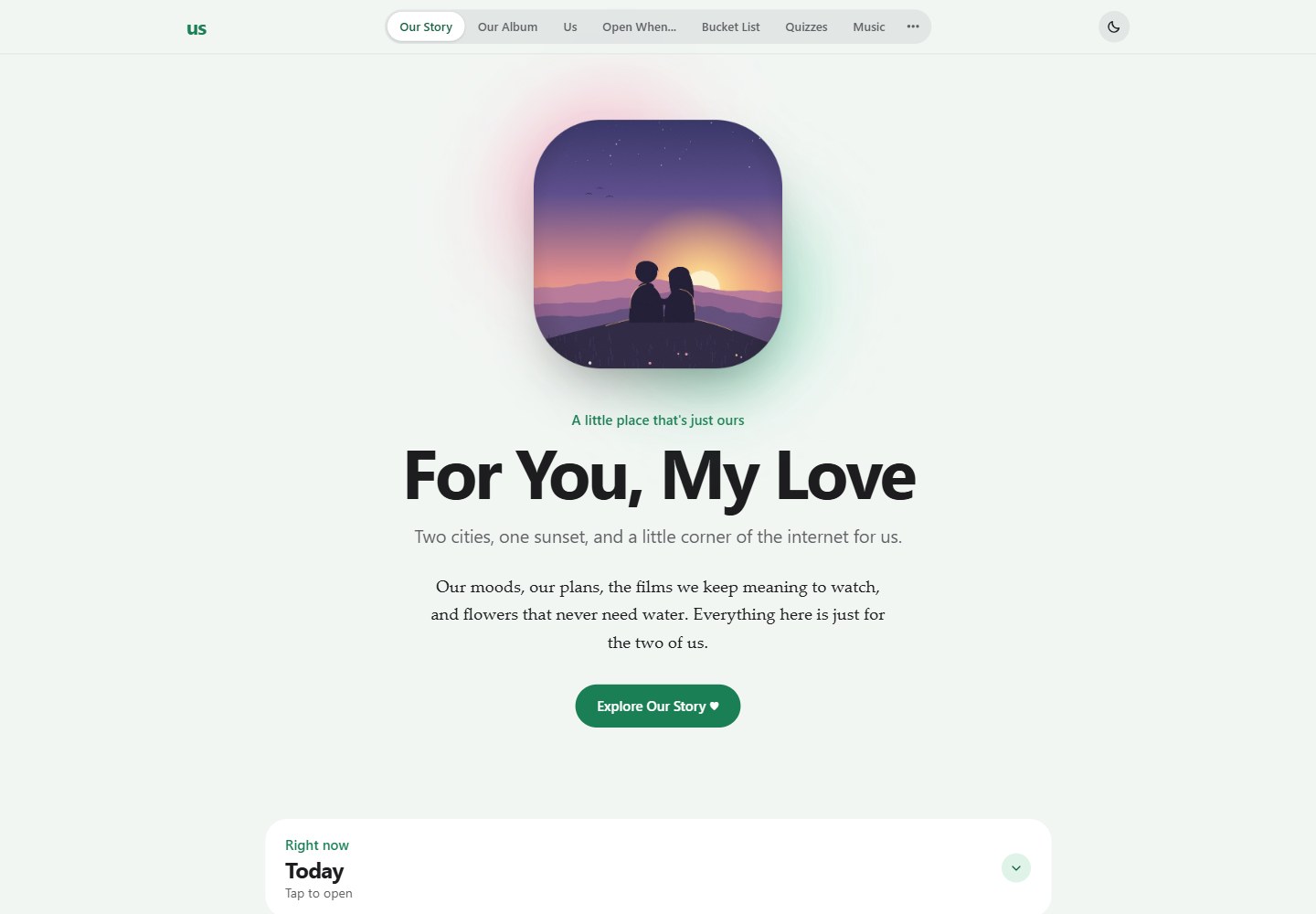
纯 HTML、CSS 和 JavaScript 单页应用,README 明确说明无构建步骤,个性化配置集中在 js/data/config.js 的 CONFIG 对象
HTML启动器
couples-website — HTML 启动器模板
作者 JohanJoestar333
面向两人的单页网站模板,使用纯 HTML、CSS 和 JavaScript,无需构建步骤,可配置共享数据、相册、Photo Booth 视频通话、花束、游戏、日历等模块。
看看你的网站会是什么样
浏览真实页面截图,比较内容排版与手机效果。点击下方缩略图切换,放大查看整页细节。
全部页面与视图 2
截图用于了解视觉与布局,交互效果请以实际项目为准。
采集于 2026-10-21查看来源
值得关注的模板亮点
从已有项目资料中,快速了解它的特点。
Our Story 包含关系计时器、重逢倒计时、两地天气与月相、Things I Miss、成长记录和 Today 小组件
Our Album 支持静态照片分类与 Our Memories 上传,照片存 Cloudinary、元数据存 Firebase,并带灯箱查看
Bouquet 花束支持 5 种包装、13 种花和 3 种蝴蝶结,可拖拽、缩放、旋转和排序,一周后枯萎并自动删除,可导出 PNG
Photo Booth 提供双摄像头视频通话,拍摄后可进入条带编辑器,支持贴纸、文字、滤镜、背景和 PNG 导出
共享功能通过 Firebase Firestore 同步,另可选 Cloudinary、Metered TURN、TMDB 和 Cloudflare Worker 集成
模板详细介绍
这是一个供两个人共同使用的单页网站模板,代码由纯 HTML、CSS 和 JavaScript 构成,README 明确说明没有构建步骤。大部分个性化内容集中在 js/data/config.js 的 CONFIG 对象中,包括姓名、日期、照片和密钥等。页面按标签页组织,涵盖 Our Story、Our Album、Us、Open When…、Bucket List、Quizzes、Music、Bouquet、Photo Booth、Calendar、Day Cards 和 Our Games 等区域。
共享功能依赖 Firebase Firestore;相册上传使用 Cloudinary;Photo Booth 跨网络通话需要 Metered TURN;电影搜索可选接入 TMDB;新闻头条可选使用 Cloudflare Worker。README 说明这些服务都提供免费额度,未配置 Firebase 时网站仍可使用,但每台设备只保留自己的数据。网站没有密码界面,任何拿到链接的人都能打开;启用 Firebase 后,拿到链接的人也能读取和修改共享数据,因此 README 建议将链接保持私密,不要存放敏感信息。
本地运行需要静态文件服务器,不能直接通过 file:// 打开;可使用 python3 -m http.server 或 VS Code 的 Live Server。部署提供 Vercel 和 GitHub Pages 两种方式,均通过 scripts/build.sh 构建,并将可选密钥注入为占位符。README 未说明具体框架版本、性能指标或生产环境保障。
HTML启动器
适合你的项目吗?
适用场景
- 为情侣或两位好友搭建一个包含故事、相册、清单、日历和留言的共享网站
- 在本地或静态托管环境中体验无需构建步骤的多标签页个人网站模板
- 使用 Firebase 同步共享清单、日历事件、音乐播放列表和花束等数据
- 通过 Photo Booth 进行双人视频通话并制作带贴纸和滤镜的照片条带
- 将模板部署到 Vercel 或 GitHub Pages,并按 README 步骤配置可选服务密钥
适合人群
- 希望用纯前端静态文件搭建双人共享网站的开发者
- 愿意按 README 配置 Firebase、Cloudinary 等可选服务并自行处理访问控制的人
- 需要可安装 PWA、深色模式和离线核心功能的轻量网站模板的用户
- 想参考单页多标签结构、Photo Booth 条带编辑器或花束交互实现的开发者
上手与定制指南
结合仓库当前版本的说明,按下面的资料检查内容、配置与运行要求。
- 1
本地运行需要静态文件服务器,不能直接打开 file://;可在项目根目录执行 python3 -m http.server 8000,或使用 VS Code Live Server
- 2
在 js/data/config.js 的 CONFIG 中修改姓名、日期、照片和密钥;未配置服务密钥时,共享功能以本地模式运行
- 3
共享数据需按 docs/firebase-setup.md 配置 Firebase Firestore;相册上传需配置 Cloudinary;跨网络 Photo Booth 需配置 Metered TURN
- 4
部署到 Vercel 或 GitHub Pages 时,构建脚本 scripts/build.sh 会注入可选密钥占位符;GitHub Pages 需在 Settings → Pages 中将 Source 设为 GitHub Actions
- 5
网站没有登录或密码界面,任何拿到链接的人都能访问;启用 Firebase 后也能修改共享数据,README 建议将链接保持私密并参考 SECURITY.md 处理访问限制
授权与来源资料
使用条件与限制
免费使用 · 保留许可声明本次收录的是公开仓库中采用 MIT 许可的免费版本;免费范围为该版本代码,不代表外部服务或第三方素材免费。
使用时需要遵守
- 允许免费使用、修改、商用和分发该版本代码。
- 分发代码副本或实质性部分时,保留原作者版权声明和完整 MIT 许可声明。
- 代码按现状提供;担保与责任限制以原许可证及适用法律为准。
额外费用与待核对事项
- README 提及 Firebase 集成;启用相关动态功能前需自行配置,并核对 Firebase 的额度与收费。
- 演示图片、字体、图标及其他第三方素材需按各自许可核对,不能仅凭代码的 MIT 许可判断。
- 域名、托管、数据库、支付或 AI 等外部服务可能另外收费。
- 网站没有密码界面,任何拿到链接的人都能打开,不应存放敏感信息。
- 启用 Firebase 后,任何拿到链接的人都能读取和修改共享数据,需保持链接私密。
- 所有共享功能依赖 Firebase Firestore,需按文档自行配置。
- 相册照片上传依赖 Cloudinary,需自行配置。
- Photo Booth 跨网络通话需要 Metered TURN 服务。
- 电影搜索为可选功能,需接入 TMDB。
- 新闻头条为可选功能,需自建 Cloudflare Worker。
- 网站需要静态文件服务器,不能直接通过 file:// 打开。
- 使用 TMDB 电影搜索时须在页脚保留 TMDB 署名,且项目未获 TMDB 认可或认证。
- 自定义贴纸只能使用自己制作或有权使用的图片。
查看原文依据
Permission is hereby granted, free of charge
许可证原文
The site has no password screen: **anyone who has the link can open it.** Don't
README 原文
> ⚠️ The site has no login. If you turn on Firebase, anyone with your link can
README 原文
| Firebase (Firestore) | All shared features | [`docs/firebase-setup.md`](docs/firebase-setup.md) |
README 原文
| Cloudinary | Memory photo uploads | [`docs/cloudinary-setup.md`](docs/cloudinary-setup.md) |
README 原文
| Metered TURN | Photo Booth across different networks | [`docs/turn-setup.md`](docs/turn-setup.md) |
README 原文
| TMDB | Movie search (optional) | `CONFIG.tmdb` comment in `config.js` |
README 原文
| Cloudflare Worker | News headlines (optional) | [`news-backend/README.md`](news-backend/README.md) |
README 原文
The site needs a static file server (it does not work from `file://`):
README 原文
uses the TMDB API but is not endorsed or certified by TMDB. The credit is shown
README 原文
https://github.com/JohanJoestar333/couples-website/blob/main/LICENSEhttps://github.com/JohanJoestar333/couples-website/blob/main/README.mdThey appear under **Stickers → My stickers ⭐** on every device. Only use
README 原文
DeepSeek 根据仓库许可证和 README 整理 ·2026-10-20。结果仅覆盖已读取资料,依赖、图片、字体及后续条款变更以各自原文为准。
项目核对记录与介绍依据
模板资料
- 来源平台
- GitHub
- 资料与维护参考分
- 资料较完整 · 83 / 100
- 技术栈
- HTML
- 网站类型
- 启动器
这个分数如何计算
本站按许可资料(最高30分)、演示链接(12分)、预览图(10分)、Star数(15分)、记录的维护时间(15分)、描述完整度(8分)、功能记录(5分)和分类资料(5分)计算。它不是代码、安全或性能测试,也不是 Google 评分;有链接不代表已实测可用。
这个项目需要核对什么
- 记录的仓库更新时间
- 2026-10-20
- 截图检查日期
- 2026-10-21
已收录演示链接。请用你的内容与屏幕尺寸检查;有演示不代表表单、认证或支付已经可用。
目录记录的主要技术栈是 HTML。请通过依赖清单和锁文件核对实际版本与托管要求。这些说明基于收录资料,不代表代码审计或部署实测。
查看具体选型方法 →介绍的制作与核对状态
介绍由 AI 辅助整理目录与仓库资料。仓库作者不等于这篇介绍的审核者。
审核声明: codex-user-requested-batch-review-20261021 · 2026-10-21
查看当时使用的来源资料
SHA-256: 9047cee0e2f0b14bf8ef947e8e946d893cf872436f7986b37373532d92e450ca
2026-10-20T22:45:18.745Z
来源文件 / 仓库# 💚 Couple Website Template A small website template for two people: a single-page app with shared live data, photo memories, a Photo Booth video call, a weekly bouquet, games, quizzes, music, a shared calendar and more. It is plain HTML, CSS and JavaScript — **no build step**. Almost everything you will personalize lives in one file: the `CONFIG` object in [`js/data/config.js`](js/data/config.js). The hero, closing photo and album come filled with original illustrated demo pictures (`assets/photos/demo/`) so you can see how a finished page looks. Swap them for your own photos in `config.js`. --- ## ✨ Features | Tab / area | What's inside | Data | |---|---|---| | **Our Story** | Hero, relationship counter, reunion countdown, weather for both cities (current + 7-day forecast, local time, moon phase), "Things I Miss", growth notes, little things, and the **Today** widget (moods, calendar, day card, bouquet, quote, news) | Local + Firebase | | **Our Album** | Static photo categories + live "Our Memories" uploads, lightbox | Photos → Cloudinary, metadata → Firebase | | **Us** | Favorites, fun facts, "Our Firsts" timeline | Local | | **Open When…** | Letters to open on different days / moods | Local | | **Bucket List** | Shared to-do list, plus **Movie Nights**: To Watch / Watched lists, TMDB search with posters, and a 5-star rating from each of you | Firebase (+ TMDB) | | **Quizzes** | Interactive quizzes about each other | Local | | **Music** | Shared playlists (YouTube / SoundCloud) with a persistent **mini-player** that keeps playing while you browse | Firebase | | **Bouquet** 💐 | Arrange a digital bouquet on a notebook page (see below) | Firebase | | **Photo Booth** | Live two-camera video call, take a photo strip together, then style it in the strip editor | WebRTC (+ TURN) | | **Calendar** | Shared events with daily / weekly / monthly / yearly repeats | Firebase | | **Day Cards** | Short notes (optionally voice) that expire after 24 h unless saved; can be read aloud | Firebase | | **Our Games** | Five card decks for couples | Local | ### 💐 Bouquet Send each other flowers. Pick one of **5 wraps**, add any of **13 flowers and 3 bows**, then drag, resize, rotate and reorder them on a notebook page (there is also "tuck behind wrap"), with an optional note. The bouquet: - stays fresh for **one week**, then wilts and deletes itself — or is replaced the moment a new one is made (only one is live at a time); - shows up in the **Today** widget on the home page, with a freshness badge; - can be saved as a **PNG**, with or without the notebook page; - syncs live through the `bouquets` Firestore collection. Art lives in `assets/stickers/` (`flower-*`, `bouquet-wrap-*`, `bow-*`) and is all original (see [License and credits](#-license-and-credits)). To add a flower, drop a transparent PNG there and add a line to `BOUQUET_FLOWERS` in `js/app.js`. ### Extra touches - **Installable app (PWA)**: add it to your home screen or dock; it opens full-screen and the core site works offline. - **"While you were away"** notifications for shared changes from the last 24 h, plus attention dots on tabs. - A **dark mode** toggle (remembered per device). - **Haptics**: subtle vibration feedback on phones (Android and iOS 17.4+), with an on/off switch in the footer. - Optional Cloudflare Worker for cleaner world-news headlines. --- ## 📁 Project structure ```text couple-website-template/ ├── index.html Page structure and tabs ├── manifest.json PWA name, icons, colors ├── service-worker.js PWA offline cache (must stay at the root) │ ├── css/ │ ├── style.css Base design + components │ ├── enhancements.css Scroll panes, depth and motion polish │ ├── photobooth-studio.css Photo Booth strip editor │ └── modern.css Apple-style redesign — colour tokens live here │ ├── js/ │ ├── data/ │ │ ├── config.js ⭐ CONFIG — names, dates, photos, keys (edit this) │ │ ├── quotes.js 365 bundled daily quotes │ │ ├── quizzes.js Quiz questions │ │ └── games.js Game decks │ ├── app.js All site behaviour (start with its table of contents) │ ├── enhancements.js Scroll panes and visual polish │ ├── photobooth-studio.js Strip editor (stickers, text, filters, backdrop, export) │ ├── haptics.js Vibration feedback │ └── pwa.js Service-worker registration + update banner │ ├── assets/ │ ├── photos/ Your photos (demo/ holds the illustrated demo pictures) │ ├── stickers/ Transparent PNGs: bouquet art, also used as Photo Booth stickers │ └── icons/ PWA and Apple touch icons │ ├── scripts/ │ └── build.sh Builds _site/ for Vercel and GitHub Pages │ ├── tools/ │ ├── draw-bouquet-art.py Draws the bouquet flowers and bows (optional) │ └── draw-demo-photos.py Draws the demo photos (optional) │ ├── docs/ Setup guides (see below) ├── news-backend/ Optional Cloudflare Worker for news ├── .github/workflows/ GitHub Pages deploy ├── vercel.json Vercel deploy settings ├── LICENSE MIT license (code and docs) ├── SECURITY.md Data handled and known trade-offs └── .gitignore Files Git should not track ``` Scripts are loaded in the order listed in `index.html`: data files first, then `app.js`, then the add-ons. See [`docs/architecture.md`](docs/architecture.md). --- ## 🚀 Quick start (local) Get the project with the green **Use this template** button on GitHub (or download the zip), then: The site needs a static file server (it does not work from `file://`): ```bash python3 -m http.server 8000 # from the project root # then open http://localhost:8000 ``` Or use the **Live Server** extension in VS Code. Locally the service keys are placeholders, so shared features run in local-only mode. Edit `js/data/config.js` and refresh to see your changes. --- ## 🔓 Access The site has no password screen: **anyone who has the link can open it.** Don't put sensitive information on it. If you need to restrict access, put the site behind your hosting provider's access control — see [`SECURITY.md`](SECURITY.md). --- ## ☁️ Live sync and other services | Service | Used for | Guide | |---|---|---| | Firebase (Firestore) | All shared features | [`docs/firebase-setup.md`](docs/firebase-setup.md) | | Cloudinary | Memory photo uploads | [`docs/cloudinary-setup.md`](docs/cloudinary-setup.md) | | Metered TURN | Photo Booth across different networks | [`docs/turn-setup.md`](docs/turn-setup.md) | | TMDB | Movie search (optional) | `CONFIG.tmdb` comment in `config.js` | | Cloudflare Worker | News headlines (optional) | [`news-backend/README.md`](news-backend/README.md) | All of them are free tiers. Without Firebase the site still works, but each device only keeps its own data. > ⚠️ The site has no login. If you turn on Firebase, anyone with your link can > read and change the shared data — keep the link private and don't store > anything sensitive in it. --- ## 🌐 Deployment Two free options. Both run the same build (`scripts/build.sh`), so pick whichever you like: - **[Vercel](#option-a-vercel)**: connect the repo once and every push goes live. A good fit if you already use GitHub Pages for something else. - **[GitHub Pages](#option-b-github-pages)**: nothing to sign up for; uses the workflow in `.github/workflows/deploy.yml`. ### Option A: Vercel 1. **Push the project to GitHub** (steps 1–2 of Option B below). 2. **Import it.** On [vercel.com/new](https://vercel.com/new), pick the repo and press **Deploy**. `vercel.json` already sets everything: no framework, build command `bash scripts/build.sh`, output folder `_site`. 3. **(Optional) add your keys** under **Project → Settings → Environment Variables**, using the same names as the GitHub secrets listed below. Then redeploy (Deployments → ⋯ → Redeploy). Leave them out to run in local-only mode. 4. **Turn off the Pages workflow** so it doesn't fail on every push: in the GitHub repo go to **Settings → Secrets and variables → Actions → Variables → New repository variable**, name `PAGES_DEPLOY`, value `off`. Every push to `main` now redeploys on Vercel, and pull requests get their own preview links. ### Option B: GitHub Pages **GitHub Actions** is GitHub's built-in automation. The file `.github/workflows/deploy.yml` tells it to build and publish your site every time you push to `main`, so you never upload files by hand. 1. **Create the repository.** On GitHub choose **New repository**, give it a name, and leave it empty (no README, no `.gitignore`, no license — this project already has them). 2. **Push the project.** In the project folder: ```bash git init git add . git commit -m "First commit" git branch -M main git remote add origin https://github.com/<username>/<repo>.git git push -u origin main ``` 3. **Turn on GitHub Pages.** In the repo go to **Settings → Pages**. Under **Build and deployment → Source** choose **GitHub Actions**. *This step is required — without it nothing is published.* 4. **(Optional) add your secrets.** Go to **Settings → Secrets and variables → Actions → New repository secret** and add the Firebase, Cloudinary, TMDB or TURN values you want. Skip this to try the site without live features. 5. **Run the workflow.** Open the **Actions** tab, pick **Deploy to GitHub Pages**, and press **Run workflow**. (The very first push also starts it, but that run fails if you had not done step 3 yet — just re-run it.) A green check means it worked. 6. **Open your site** at `https://<username>.github.io/<repo>/`. The link is also shown in **Settings → Pages**. From now on every push to `main` redeploys automatically. A change to a secret only takes effect on the next run, so press **Run workflow** after editing one. **If something goes wrong:** open the failed run in the **Actions** tab and click the red step to read the log. "Get Pages site failed" or "Not Found" means step 3 was skipped. A 404 right after a green run usually clears in a minute or two. ### What the build does `scripts/build.sh` runs on every deploy, on Vercel and on GitHub Pages. It: 1. copies only the site files (`index.html`, manifest, service worker, `css/`, `js/`, `assets/`) into a staging folder — docs and backend code are not published; 2. injects the `__PLACEHOLDER__` values from repository secrets (Vercel: environment variables). All of them are optional: a missing secret only switches that feature off, with a warning in the log; 3. stamps the service-worker cache with the commit id, so installed copies of the app always update — **you no longer bump `CACHE_VERSION` by hand**. Secret / environment variable names (all optional): `FIREBASE_API_KEY`, `FIREBASE_AUTH_DOMAIN`, `FIREBASE_PROJECT_ID`, `FIREBASE_STORAGE_BUCKET`, `FIREBASE_MESSAGING_SENDER_ID`, `FIREBASE_APP_ID`, `CLOUDINARY_CLOUD_NAME`, `CLOUDINARY_UPLOAD_PRESET`, `TMDB_ACCESS_TOKEN`, `METERED_TURN_DOMAIN`, `METERED_TURN_API_KEY` (optional). --- ## 🎞️ Photo Booth strip editor After the photos are taken, the strip opens in an editor (`js/photobooth-studio.js`): - **Tabs:** Frame · Stickers · Text · Dot art · Filters · Spot · Backdrop - **Toolbar:** Undo/Redo, Zoom, Eye line, Gutters, Cut strip, Reset - **Controls:** drag to move, corner to resize, top handle to rotate, arrow keys to nudge, `Delete` to remove, `Ctrl/Cmd + Z` to undo, pinch on touch - **Export:** PNG (1080×1920 with a backdrop) **Your own stickers:** save transparent PNGs in `assets/stickers/`, then list them in `CONFIG.photoBoothStickers`: ```js photoBoothStickers: ["assets/stickers/heart.png", "assets/stickers/bow.png"], ``` They appear under **Stickers → My stickers ⭐** on every device. Only use images you made or have the right to use. --- ## 🛠️ Common customizations | To change | Edit | |---|---| | Names, dates, cities | `NAMES` (top of `config.js`), `relationshipStart`, `reunionDate`, `partnerALocation`, `partnerBLocation` | | Hero text and photo | `CONFIG.hero`, `CONFIG.photos.hero` | | Album | `CONFIG.photos` + `CONFIG.album` + files in `assets/photos/` | | Open When letters | `CONFIG.openWhen` | | Starting bucket-list items | `CONFIG.bucketList` | | Playlists | `CONFIG.playlists` | | Colors, fonts | Section 1 of `css/modern.css` | For new tabs, new Firestore collections or a design overhaul, read the [tutorial](docs/tutorial.md). --- ## 📜 License and credits - **Code and docs:** [MIT License](LICENSE), © 2026 Thomas. If you fork this to make your own site, you can add your name to the copyright line. - **Bouquet art** in `assets/stickers/` is original and covered by the same MIT license: the five paper and lace wraps (`bouquet-wrap-*`) were made by the author, and the flowers and bows (`flower-*`, `bow-*`) are drawn in code by [`tools/draw-bouquet-art.py`](tools/draw-bouquet-art.py), so you can restyle or recolor them and re-render. - **Demo photos** in `assets/photos/demo/` are original illustrations drawn by [`tools/draw-demo-photos.py`](tools/draw-demo-photos.py), also MIT. - **Movie data and posters:** [TMDB](https://www.themoviedb.org). This product uses the TMDB API but is not endorsed or certified by TMDB. The credit is shown in the site footer — keep it if you use movie search. - **Weather and moon data:** [Open-Meteo](https://open-meteo.com), fetched live and not stored. - **World news (optional):** BBC News RSS, through your own Cloudflare Worker. --- ## 📖 Documentation map | File | Purpose | |---|---| | [`docs/tutorial.md`](docs/tutorial.md) | Beginner guide — start here | | [`docs/architecture.md`](docs/architecture.md) | How the code is organized | | [`docs/firebase-setup.md`](docs/firebase-setup.md) | Firebase / Firestore setup and rules | | [`docs/cloudinary-setup.md`](docs/cloudinary-setup.md) | Photo upload setup | | [`docs/turn-setup.md`](docs/turn-setup.md) | Photo Booth across networks | | [`news-backend/README.md`](news-backend/README.md) | News Cloudflare Worker | | [`SECURITY.md`](SECURITY.md) | Security model and trade-offs | --- Made with ♥ for someone special.
看看同类模板
对比同技术栈与用途的模板,找到更适合的视觉与内容结构。

startbootstrap-simple-sidebar
An off canvas sidebar navigation Bootstrap HTML template created by Start Bootstrap
HTML · 启动器

adminkit
AdminKit is a free & open-source HTML dashboard & admin template based on Bootstrap 5
HTML · 后台

Landing-Page
Tailwind CSS Starter Template - Landing Page
HTML · 企业官网

light-bootstrap-dashboard
Light Bootstrap Dashboard is an admin dashboard template designed to be beautiful and simple.
HTML · 后台

sing-app
💥Free and open-source admin dashboard template built with Bootstrap 4.5 💥
HTML · 后台

startbootstrap-modern-business
A multipurpose Bootstrap full website template created by Start Bootstrap
HTML · 启动器