Static site generation based on Astro, with no extra JavaScript output by default
AstroPortfolio
void — Astro Portfolio Template
By JorgeRosbel
Void is a minimalist multilingual portfolio template built on Astro and TailwindCSS, using @ariaskit/astro-i18n to provide English, Spanish, and Portuguese support, under the MIT license.
Explore the design
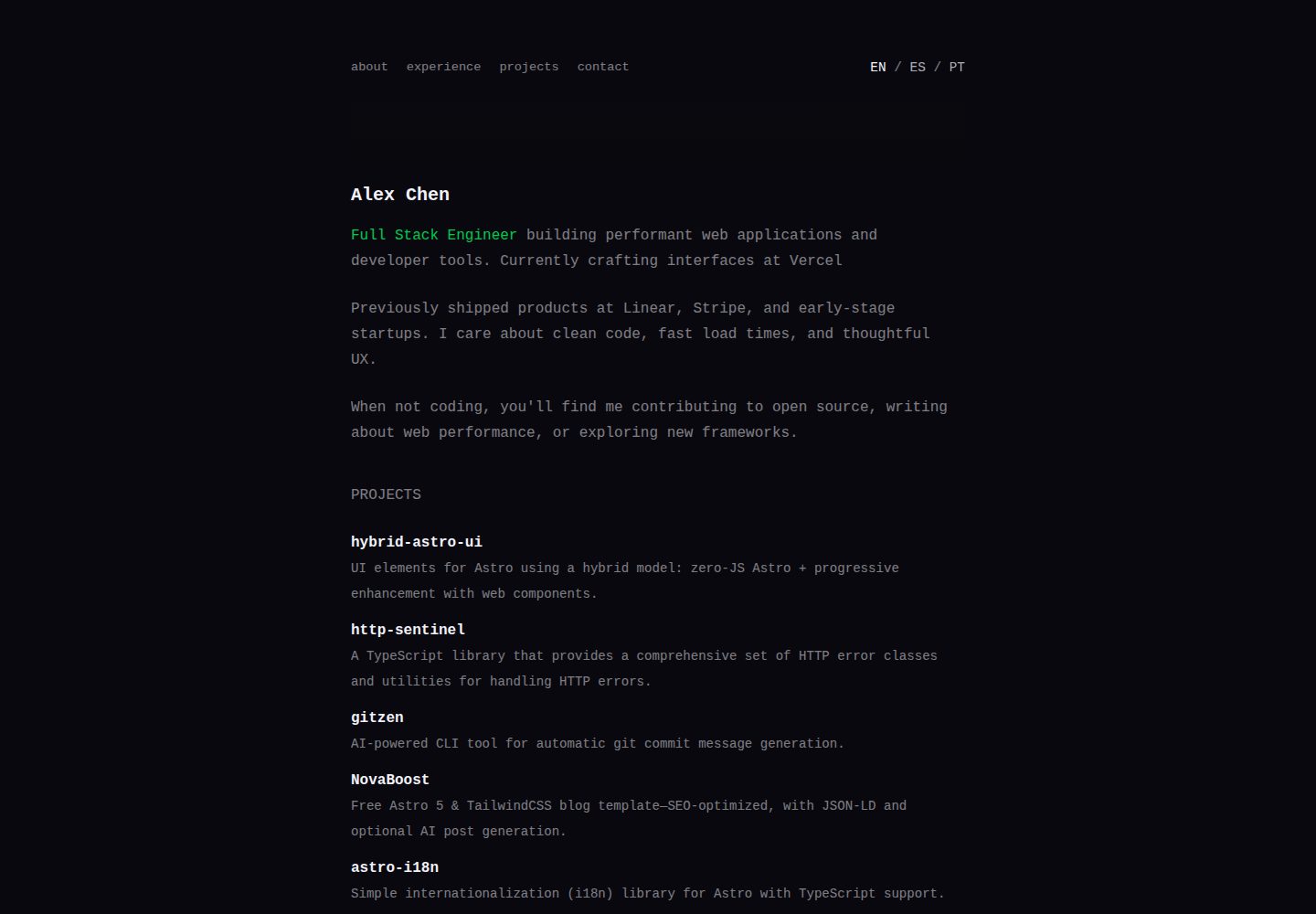
Compare the page layouts and mobile experience. Open any screenshot for a closer look.
Desktop homepage1 / 3
Desktop captureTop of page
Actual screenshot captured by the server browser.
All pages & views 3
Screenshots show visual appearance; interactive behavior may differ.
Recorded 2026-10-03View source
What stands out
A quick read of the recorded project description.
Built-in support for English, Spanish, and Portuguese via @ariaskit/astro-i18n
Translation strings centralized in JSON files under /i18n/ for easy maintenance
Uses TailwindCSS and Lucide icons, includes components such as Hero, Projects, and Experience
Pages organized with dynamic [lang] routes, root path redirects automatically
MIT licensed, allowing use, modification, commercial use, and distribution
Template Details
Void is a static site template for personal portfolios, maintained by JorgeRosbel, with the repository under the MIT license. The template uses Astro as its framework, TailwindCSS for styling, Lucide for icons, and @ariaskit/astro-i18n for internationalization.
In terms of content structure, the template includes built-in components such as Hero, Projects, and Experience. Pages are generated via dynamic [lang] routes, with the root path redirecting. Translation strings are centralized in en.json, es.json, and pt.json under the /i18n/ directory, covering keys for navigation, hero section, project descriptions, experience, and contact information.
For multilingual support, the default language is English, with Spanish and Portuguese also included. Adding a new language requires creating a corresponding JSON file, registering the new locale in getStaticPaths, and adjusting the i18n library configuration as needed. The build script pnpm build runs i18n validation.
Usage limitations: The template is a static site and does not include backend, database, or form-handling logic. Third-party assets such as demo images, fonts, and icons must have their licenses verified independently; the code's MIT license alone is not sufficient to judge them. Deployment platforms mentioned in the README are optional and do not indicate that the template has been specifically adapted for them.
AstroPortfolio
Is it right for your project?
Use Cases
- Building a personal portfolio website that needs multilingual display
- A developer homepage primarily in English but also for Spanish or Portuguese visitors
- A personal site that requires static hosting and does not rely on backend services
- As a sample project for learning Astro dynamic routing and i18n integration
Suitable For
- Developers with basic Astro and TailwindCSS knowledge who can adjust components and styles themselves
- Individuals who need portfolio pages in English, Spanish, or Portuguese
- Users who prefer static sites and plan to deploy to Vercel, Netlify, GitHub Pages, or Cloudflare Pages
Getting started & customization
Use these recorded setup notes alongside the repository instructions for your chosen version.
- 1
Requires Node.js 18 or higher; pnpm is recommended as the package manager
- 2
After cloning the repository, run pnpm install to install dependencies, and pnpm dev to start the local development server (default http://localhost:4321)
- 3
Modify the JSON files under /i18n/ to update text such as name, job title, projects, experience, and contact information
- 4
To add a new language, create the corresponding JSON in /i18n/ and register it in getStaticPaths in src/pages/[lang]/index.astro
- 5
pnpm build is used for production builds and includes i18n validation; pnpm preview allows previewing the build result
License & source material
Usage conditions & limitations
Free to use · keep license noticeThis entry covers the free version under the MIT license in the public repository; the free scope applies to that version's code and does not imply that external services or third-party assets are free.
Must comply with when using
- The code of this version may be used, modified, used commercially, and distributed free of charge.
- When distributing copies or substantial portions of the code, retain the original author's copyright notice and the full MIT license notice.
- The code is provided as is; warranties and limitations of liability are governed by the original license and applicable law.
Additional costs & items to verify
- Demo images, fonts, icons, and other third-party assets must be checked against their respective licenses; the code's MIT license alone is not sufficient to judge them.
- External services such as domains, hosting, databases, payments, or AI may incur additional charges.
View Original Text Basis
https://github.com/JorgeRosbel/void/blob/main/LICENSEhttps://github.com/JorgeRosbel/void/blob/main/README.mdPermission is hereby granted, free of charge
Original License Text
Compiled by DeepSeek based on repository license and README ·2026-10-03. Results only cover the materials read; dependencies, images, fonts, and subsequent term changes are subject to their respective original texts.
Project checks & description sources
Template Information
- Source platforms
- Astro Themes
- Documentation and maintenance reference score
- More documented · 87 / 100
- Technologies
- Astro
- Website type
- Portfolio
How this score is calculated
Our heuristic uses license records (up to 30), a demo link (12), a preview (10), stars (15), recorded maintenance (15), description completeness (8), feature records (5) and classification data (5). It is not a code, security or performance test, or a Google score. A link does not establish tested functionality.
What to verify for this project
- Repository update recorded
- 2026-02-10
- Screenshot last checked
- 2026-10-03
A demo link is listed. Check it with your own content and viewport sizes; its presence does not confirm that forms, authentication or payments work.
The catalog identifies Astro as the primary stack. Check the actual dependency manifest and lockfile for versions and hosting requirements. These notes use recorded metadata, not a code audit or a deployment test.
Use a selection guide →How this description was prepared
AI-assisted description based on catalog records and repository material. Repository authors are not automatically the reviewers of this description.
Review declaration: [email protected] · 2026-10-04
Inspect the recorded source material
SHA-256: 39d608117641c9780376570dce1549f2eee4f1f6be970568729c06e8d46b7a0e
2026-10-03T23:12:11.577Z
Source file / repository# Void - Minimalist Multilingual Portfolio Template A clean, minimalist portfolio template built with Astro and TailwindCSS, featuring full internationalization support using `@ariaskit/astro-i18n`.  ## ✨ Features - **🌍 Multilingual Support** - Built-in i18n with English, Spanish, and Portuguese - **⚡ Astro 5** - Fast, modern static site generation - **🎨 TailwindCSS 4** - Utility-first styling with dark mode - **📱 Responsive Design** - Mobile-first approach - **🔍 SEO Optimized** - Sitemap, meta tags - **🚀 Zero JS by Default** - Minimal JavaScript for optimal performance - **📝 TypeScript** - Full type safety throughout ## 🛠 Tech Stack - **Framework**: [Astro](https://astro.build/) - **Styling**: [TailwindCSS](https://tailwindcss.com/) - **Icons**: [Lucide](https://lucide.dev/) - **Internationalization**: [@ariaskit/astro-i18n](https://github.com/JorgeRosbel/astro-i18n) - **Package Manager**: pnpm ## 🚀 Quick Start ### Prerequisites - Node.js 18+ - pnpm (recommended) ### Installation ```bash # Clone the repository git clone https://github.com/JorgeRosbel/void.git cd void # Install dependencies pnpm install # Start development server pnpm dev ``` Your site will be available at `http://localhost:4321`. ### Build & Deploy ```bash # Build for production pnpm build # Preview production build pnpm preview ``` ## 🌐 Internationalization This template uses `@ariaskit/astro-i18n` for seamless multilingual support. The i18n system is configured for: - **English** (`en`) - Default locale - **Spanish** (`es`) - **Portuguese** (`pt`) ### Adding New Languages 1. Create a new JSON file in `/i18n/` (e.g., `fr.json`) 2. Copy the structure from `en.json` 3. Add the new locale to `src/pages/[lang]/index.astro` in the `getStaticPaths` function 4. Update the i18n library configuration if needed ### Translation Files All translations are stored in `/i18n/`: - `en.json` - English translations - `es.json` - Spanish translations - `pt.json` - Portuguese translations Each file contains the same structure with keys for: - Navigation items - Hero section content - Project descriptions - Experience details - Contact information ## 📁 Project Structure ``` void/ ├── public/ # Static assets ├── src/ │ ├── assets/ # Images and static files │ ├── components/ # Astro components │ │ ├── Hero.astro │ │ ├── Projects.astro │ │ ├── Experience.astro │ │ └── ... │ ├── layouts/ # Page layouts │ ├── pages/ # Route pages │ │ ├── index.astro # Root redirect │ │ └── [lang]/ # Localized pages │ └── styles/ # Global styles ├── i18n/ # Translation files ├── astro.config.mjs # Astro configuration └── package.json # Dependencies ``` ## 🎨 Customization ### Personal Information Edit the translation files in `/i18n/` to update: - Personal name and title - Project descriptions - Experience details - Contact information ### Styling The template uses TailwindCSS with a dark theme. Customize colors and styles in: - Global CSS classes in components - Tailwind configuration (if needed) ### Adding New Sections 1. Create new components in `/src/components/` 2. Add translation keys to all i18n files 3. Import and use components in `/src/pages/[lang]/index.astro` ## 🔧 Configuration ### Site Configuration Update `astro.config.mjs` to change: - Site URL (`site` property) - Add/remove integrations ### Package Scripts - `pnpm dev` - Start development server - `pnpm build` - Build for production (includes i18n validation) - `pnpm preview` - Preview production build ## 🌍 Deployment This template works great with: - **Vercel** - Zero-config deployment - **Netlify** - Simple static site hosting - **GitHub Pages** - Free static hosting - **Cloudflare Pages** - Global CDN ## 📝 License MIT License - feel free to use this template for your projects! ## 🤝 Contributing Contributions are welcome! Please feel free to submit a Pull Request. ## 📚 Learn More - [Astro Documentation](https://docs.astro.build/) - [TailwindCSS Documentation](https://tailwindcss.com/docs) - [@ariaskit/astro-i18n Documentation](https://github.com/JorgeRosbel/astro-i18n) --- **Built with ❤️ using Astro and TailwindCSS**
Explore similar templates
Compare previews and descriptions within the same stack and category.

astro-theme-cactus
Astro Cactus is an Astro-based blog and portfolio theme that uses Markdown/MDX content collections to manage posts, notes, and tags, with frontmatter type-checked by a schema.
Astro · Portfolio

astrofy
Astrofy is a free and open-source personal portfolio website template built with Astro and TailwindCSS, with built-in blog, CV timeline, project showcase, store, and RSS feed modules.
Astro · Portfolio

astro-nano
Astro Nano is a static, minimalist portfolio and blog template built with Astro, Tailwind, and TypeScript without frontend frameworks. It includes light/dark themes, animated UI, automatic sitemap and RSS feed generation, and Markdown/MDX support with component imports.
Astro · Portfolio

astro-erudite
astro-erudite is an opinionated, unstyled static blog template built with Astro and native CSS, with no UI or CSS framework and minimal dependencies.
Astro · Portfolio

astro-sphere
Astro Sphere is a static, minimalist portfolio and blog theme maintained by markhorn-dev, built mainly with Astro, Tailwind, and TypeScript, with a small amount of SolidJS for stateful components.
Astro · Portfolio

astro-micro
Astro Micro is a framework-free blog and portfolio theme for Astro, forked from Astro Nano. It adds Pagefind search and Giscus comments while retaining type safety, sitemap, RSS, Markdown and MDX support, and TailwindCSS with system, light, and dark themes.
Astro · Portfolio