Built on Next.js, TypeScript, and React
Next.jsReactAdmin dashboard
nextjs-template-admin — Next.js Admin dashboard Template
By JPCenz
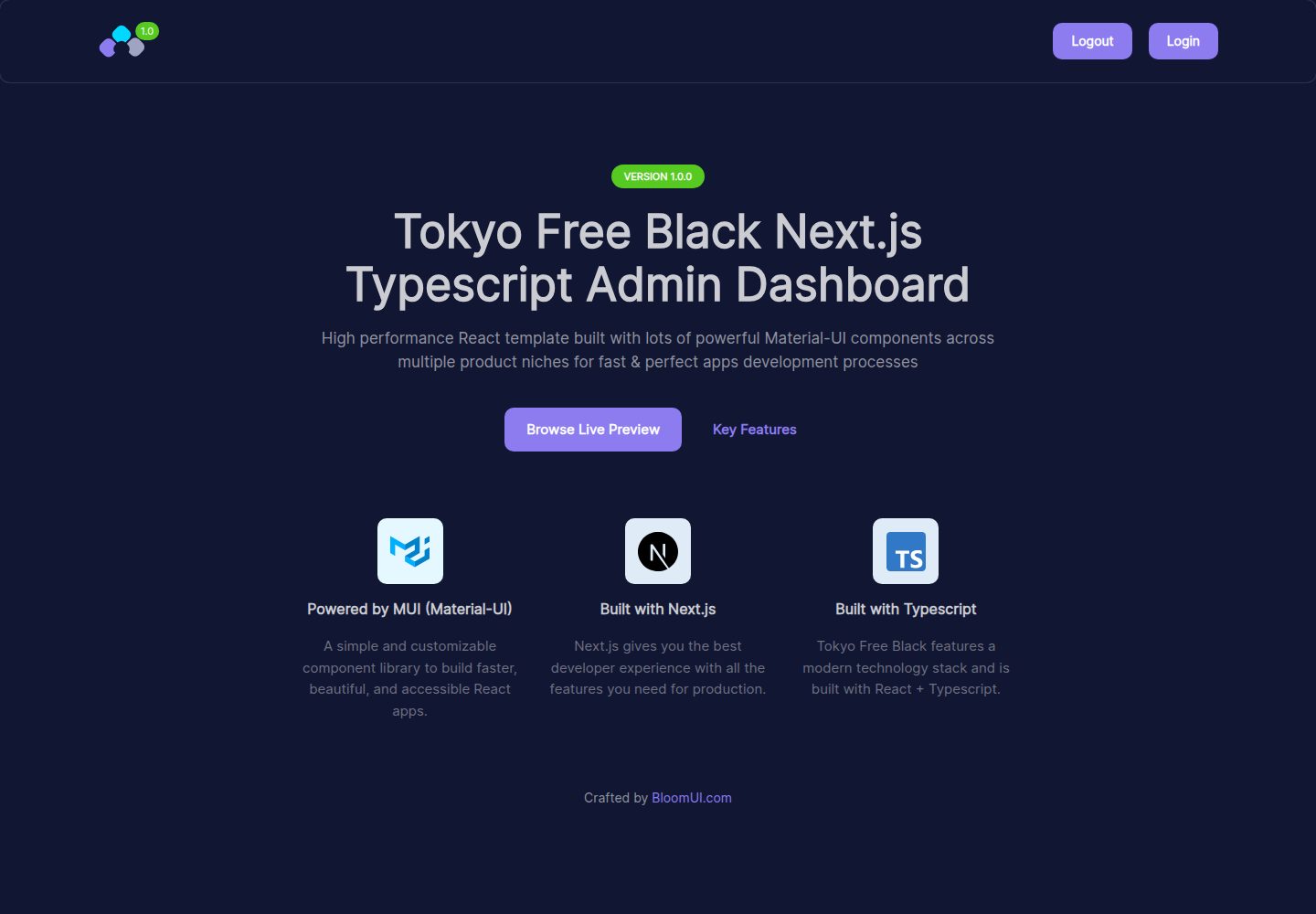
Tokyo Free Black is a free admin dashboard template built on Next.js, TypeScript, React, and Material-UI, featuring a dark color scheme, published by BloomUI, with a free JavaScript version and a paid PRO version.
Explore the design
Compare the page layouts and mobile experience. Open any screenshot for a closer look.
Desktop homepage1 / 2
Desktop captureTop of page
Actual screenshot captured by the server browser.
All pages & views 2
Screenshots show visual appearance; interactive behavior may differ.
Recorded 2026-10-13View source
What stands out
A quick read of the recorded project description.
Multiple components customized on top of Material-UI
Admin dashboard design with a dark color scheme
Offers a free JavaScript version
Also offers a paid PRO version with more components and features
README states dependencies will be continuously updated to the latest stable versions with email notifications
Template Details
This template is BloomUI's Tokyo Free Black Typescript Next.js Admin Dashboard, built on Next.js, TypeScript, and React, with multiple components customized on top of Material-UI. The README states that it uses a dark color scheme, includes multiple pages and flows, and says dependencies will be continuously updated to the latest stable versions, with users notified via the email address used at download time when updates occur.
The README does not list specific pages, components, or a feature inventory one by one; it only suggests using the online preview to see all features the template offers. It also does not provide a dependency list, so specific framework version numbers cannot be verified. The template offers a free JavaScript version, plus a paid PRO version with more features, which must be obtained from bloomui.com.
Quick start steps: ensure the latest stable versions of Node.js and NPM are installed, clone the repository, run npm install in the project directory to install dependencies, then run yarn dev to start the development server; the browser will open a live preview at http://localhost:3000. The clone command in the README points to the bloomui/tokyo-free-black-nextjs-admin-dashboard repository, which differs from this template's source repository address. Technical support is provided by sending an email to [email protected] to submit a ticket.
Next.jsAdmin panel
Is it right for your project?
Use Cases
- Building an admin interface that requires a dark theme
- Developing a Next.js and Material-UI admin project in TypeScript
- Using as a starting template for an admin panel for further development
- Switching to its free JavaScript version when JavaScript is preferred
Suitable For
- Developers using Next.js, TypeScript, and React
- Admin projects needing a Material-UI component foundation
- Teams wanting to start from a ready-made dark theme admin template
Getting started & customization
Use these recorded setup notes alongside the repository instructions for your chosen version.
- 1
Requires the latest stable versions of Node.js and NPM to be installed first
- 2
After cloning the repository, run npm install in the project directory to install dependencies
- 3
After installation, run yarn dev to start the development server
- 4
The development server opens a preview at http://localhost:3000 by default
- 5
The clone command in the README points to bloomui/tokyo-free-black-nextjs-admin-dashboard, which differs from this template's source repository address
License & source material
Usage conditions & limitations
Free to use · keep license noticeThis listing covers the free version under the MIT license in the public repository; the free scope is the code of this version and does not mean external services or third-party assets are free.
Must comply with when using
- Permits free use, modification, commercial use, and distribution of this version's code.
- When distributing copies or substantial portions of the code, retain the original author's copyright notice and the full MIT license notice.
- Code is provided as-is; warranties and liability limitations are governed by the original license and applicable law.
Additional costs & items to verify
- Project materials mention optional paid versions or features; this listing only covers the public free code and does not include paid upgrades.
- Demo images, fonts, icons, and other third-party assets must be checked against their respective licenses and cannot be judged solely by the code's MIT license.
- External services such as domains, hosting, databases, payments, or AI may incur separate charges.
- The template's paid PRO version includes more components, features, and options and must be downloaded from bloomui.com; the free version does not include these PRO-exclusive contents.
- Update notifications are sent to the email address the user originally used to download the template, so update reminders for using this template depend on providing an email.
- Technical support requires sending an email to [email protected] to submit a ticket.
View Original Text Basis
Permission is hereby granted, free of charge
Original License Text
<p>The premium version of this template comes with a lot more components, features and options making it a very powerful friend in your development endeavors. You can download a copy of it from <a href="https://bloomui.com">bloomui.com</a></p>
Original README
We keep all dependencies updated to their latest stable versions. Each time we release an updated version you will be notified via the email you used to initially download the template.
Original README
https://github.com/JPCenz/nextjs-template-admin/blob/main/LICENSEhttps://github.com/JPCenz/nextjs-template-admin/blob/main/README.mdYou can open a support ticket by sending an email here: <a href="mailto:[email protected]" title="Open Support Ticket">
Original README
Compiled by DeepSeek based on repository license and README ·2026-10-13. Results only cover the materials read; dependencies, images, fonts, and subsequent term changes are subject to their respective original texts.
Project checks & description sources
Template Information
- Source platforms
- GitHub
- Documentation and maintenance reference score
- Partly documented · 72 / 100
- Technologies
- Next.js · React
- Website type
- Admin dashboard
How this score is calculated
Our heuristic uses license records (up to 30), a demo link (12), a preview (10), stars (15), recorded maintenance (15), description completeness (8), feature records (5) and classification data (5). It is not a code, security or performance test, or a Google score. A link does not establish tested functionality.
What to verify for this project
- Repository update recorded
- 2026-06-17
- Screenshot last checked
- 2026-10-13
A demo link is listed. Check it with your own content and viewport sizes; its presence does not confirm that forms, authentication or payments work.
The catalog identifies Next.js as the primary stack. Check the actual dependency manifest and lockfile for versions and hosting requirements. These notes use recorded metadata, not a code audit or a deployment test.
Use a selection guide →How this description was prepared
AI-assisted description based on catalog records and repository material. Repository authors are not automatically the reviewers of this description.
Review declaration: codex-user-requested-batch-review-20261015 · 2026-10-15
Inspect the recorded source material
SHA-256: b2e3d8f0e74402625352b4424e681e1bd8e3c44cee07b5a1b7cacd69672444b6
2026-10-13T17:22:58.991Z
Source file / repository<p align="center">
<a href="https://bloomui.com" title="BloomUI.com">
<img src="https://bloomui.s3.us-east-2.amazonaws.com/tokyo-logo.png" alt="Tokyo Free Black Typescript Next.js Admin Dashboard">
</a>
</p>
<h1 align="center">
<b>Tokyo Free Black Typescript Next.js Admin Dashboard</b>
<br>
<a href="https://twitter.com/intent/tweet?url=https://bloomui.com&text=I like this Next.js admin dashboard">
<img src="https://img.shields.io/twitter/url/http/shields.io.svg?style=social" />
</a>
</h1>
<div align="center">


<a href="https://bloomui.com/product/tokyo-free-black-nextjs-typescript-material-ui-admin-dashboard/"><img src="https://bloomui.s3.us-east-2.amazonaws.com/tokyo-free-black-nextjs-typescript-material-ui-admin-dashboard.jpg" /></a>
</div>
<a href="https://bloomui.com/product/tokyo-free-black-nextjs-typescript-material-ui-admin-dashboard/"><h3>Free Material-UI Next.js Typescript Dashboard Template with Dark Color Scheme</h3></a>
<p>
Tokyo Free Black Next.js Typescript Dashboard is built using the latest industry standards and features a clean and premium design style, making use of colors and accents to improve the user experience for all included flows and pages.
</p>
<p>
It is powered by Next.js, Typescript and React and contains multiple components customized on top of Material-UI – which is one of the best UI components frameworks available.</p>
<p>
We keep all dependencies updated to their latest stable versions. Each time we release an updated version you will be notified via the email you used to initially download the template.
</p>
<p>
To discover all the features that this free React admin template has to offer, we suggest visiting the live preview we’ve set up.
</p>
<p>There is also a free Javascript version available, if that is what you prefer working with.</p>
---
<h3>Updrade to PRO</h3>
<p>The premium version of this template comes with a lot more components, features and options making it a very powerful friend in your development endeavors. You can download a copy of it from <a href="https://bloomui.com">bloomui.com</a></p>
---
<h2>
Quick Start
</h2>
<ol>
<li>Make sure you have the latest stable versions for Node.js and NPM installed</li>
<li>Clone repository: <code>git clone https://github.com/bloomui/tokyo-free-black-nextjs-admin-dashboard.git</code></li>
<li>Install dependencies: Run <code>npm install</code> inside the project folder</li>
<li>Start dev server: After the install finishes, run <code>yarn dev</code>. A browser window will open on http://localhost:3000 where you''ll see the live preview</li>
</ol>
---
<h2>
Technical Support
</h2>
<p>
You can open a support ticket by sending an email here: <a href="mailto:[email protected]" title="Open Support Ticket">
[email protected]
</a>
</p>
Explore similar templates
Compare previews and descriptions within the same stack and category.

next-shadcn-dashboard-starter
An MIT-licensed admin dashboard starter built with Next.js 16, shadcn/ui, Tailwind CSS v4, and TypeScript.
Next.js · Admin dashboard

Studio Admin · Radix UI
Studio Admin is an admin dashboard template built with Next.js 16, TypeScript, Tailwind CSS v4, and Shadcn UI.
Next.js · Admin dashboard

free-nextjs-admin-dashboard
A free, open-source admin dashboard template built on Next.js 16, React 19, TypeScript, and Tailwind CSS v4. It provides a collapsible sidebar, charts, tables, authentication forms, modals, dropdowns, and dark mode, with internationalization and RTL support since version 2.4.0.
Next.js · Admin dashboard

materio-mui-nextjs-admin-template-free
Materio Free is a Next.js admin dashboard template based on App Router and MUI, integrating Tailwind CSS and available in TypeScript and JavaScript versions.
Next.js · Admin dashboard
nextjs-postgres-nextauth-tailwindcss-template
A Vercel-maintained Next.js App Router admin dashboard starter with Auth.js GitHub OAuth, Postgres, Tailwind CSS, and Shadcn UI, plus a sample products table, seed endpoint, and CRUD interface.
Next.js · Admin dashboard

shadcn-dashboard-landing-template
An open-source admin dashboard and marketing landing page template built on shadcn/ui and Tailwind CSS, with both Vite + React and Next.js versions in one repository.
Next.js · Admin dashboard